Azure Communication Services

通过 ACS Call Automation,让用户拨打由 ElevenLabs 智能体接听的电话号码。

概述

此方案会为智能体分配一个 电话号码。呼叫者拨打该号码后,Azure Communication Services(ACS)通过双向媒体流接听,一个轻量桥接服务则使用标准智能体 WebSocket 协议,在 ACS 和 ElevenLabs 智能体之间转发 PCM 音频。这是联络中心 / IVR 模式,与 SIP 中继部署的结构相同,只是由 ACS 作为运营商。

它还可通过两种方式连接到 Teams:拥有 Calling Plan 的 Teams 用户可直接拨打 ACS 号码;或者,你可以通过 Teams Phone Extensibility 将该号码接入 Teams,使呼叫 Teams 资源账户的电话路由到 ACS。

ACS 仅在有限的 国家/地区提供 PSTN 号码。 如果所在地区无法提供号码,请改用支持 SIP 中继的 SIP 服务商,或使用 Graph 呼叫 机器人。

工作原理
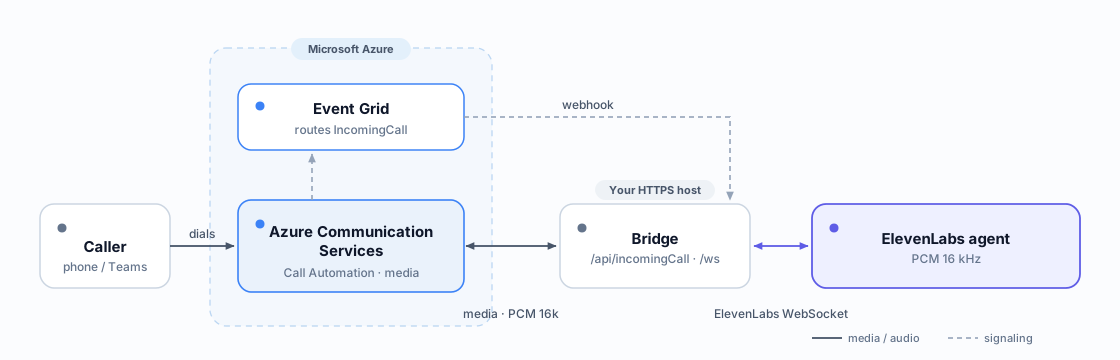
呼叫者拨打 ACS 号码;ACS 通过 Event Grid 向桥接服务发送 IncomingCall,桥接服务以双向 PCM 16k 媒体流接听,并通过 WebSocket 将其转发给 ElevenLabs 智能体
呼入电话 → ACS → 桥接服务 → ElevenLabs

两端均使用 PCM 16 kHz 单声道音频(智能体输入/输出格式为 pcm_16000),因此可作为 base64 直接传递,无需重采样。

桥接服务公开以下路由:

路由用途
POST /api/incomingCallEvent Grid webhook:验证订阅,然后通过媒体流执行 answer_call
POST /api/callbacksCall Automation 生命周期事件(CallConnected、CallDisconnected、AddParticipant*)
GET|WS /wsACS 媒体流套接字 ↔ ElevenLabs
POST /api/outboundCall可选:发起出站呼叫,将接听者连接到智能体

要求

  1. 一个付费 Azure 订阅(MCA / EA / Pay-As-You-Go)——免费 / 试用 / 赞助订阅无法购买号码。
  2. 一个 Azure Communication Services 资源。
  3. 用于桥接服务且具有公共 WebSocket 的 HTTPS 主机(Azure Container Apps、App Service 或 VM)。
  4. 一个 ElevenLabs 智能体,两端均设为 PCM 16000 Hz:在 Voice 选项卡设置 TTS 输出格式,在 Advanced 选项卡设置用户输入音频格式。

权限和角色

范围角色 / 权限原因
Azure RBAC资源组上的 Contributor创建 ACS 资源、Container App 和 Event Grid 订阅
Azure 订阅订阅上的 Owner 或 Contributor购买电话号码(否则购买选项会被禁用)
计费MCA / EA / Pay-As-You-Go 订阅类型免费、试用、赞助和 Dev 订阅无法购买号码

在 Contributor 权限下(而非 Owner),az containerapp up 无法创建托管标识的 ACR 拉取角色分配。 请启用注册表管理员用户并改为附加它,参见步骤 2 中的警告。

步骤 1 — 配置 ACS 资源和号码

RG=my-rg
# Register providers (once)
az provider register -n Microsoft.Communication --wait
az provider register -n Microsoft.EventGrid --wait
# Create the ACS resource
az communication create --name my-acs --resource-group $RG \
--location global --data-location unitedstates

在该资源中购买号码(Portal → ACS 资源 → Phone numbers → Get,或使用 phone-numbers SDK)。对于接听电话的智能体,具备呼入通话功能的号码即可;如果还要使用 /api/outboundCall,请添加呼出功能。
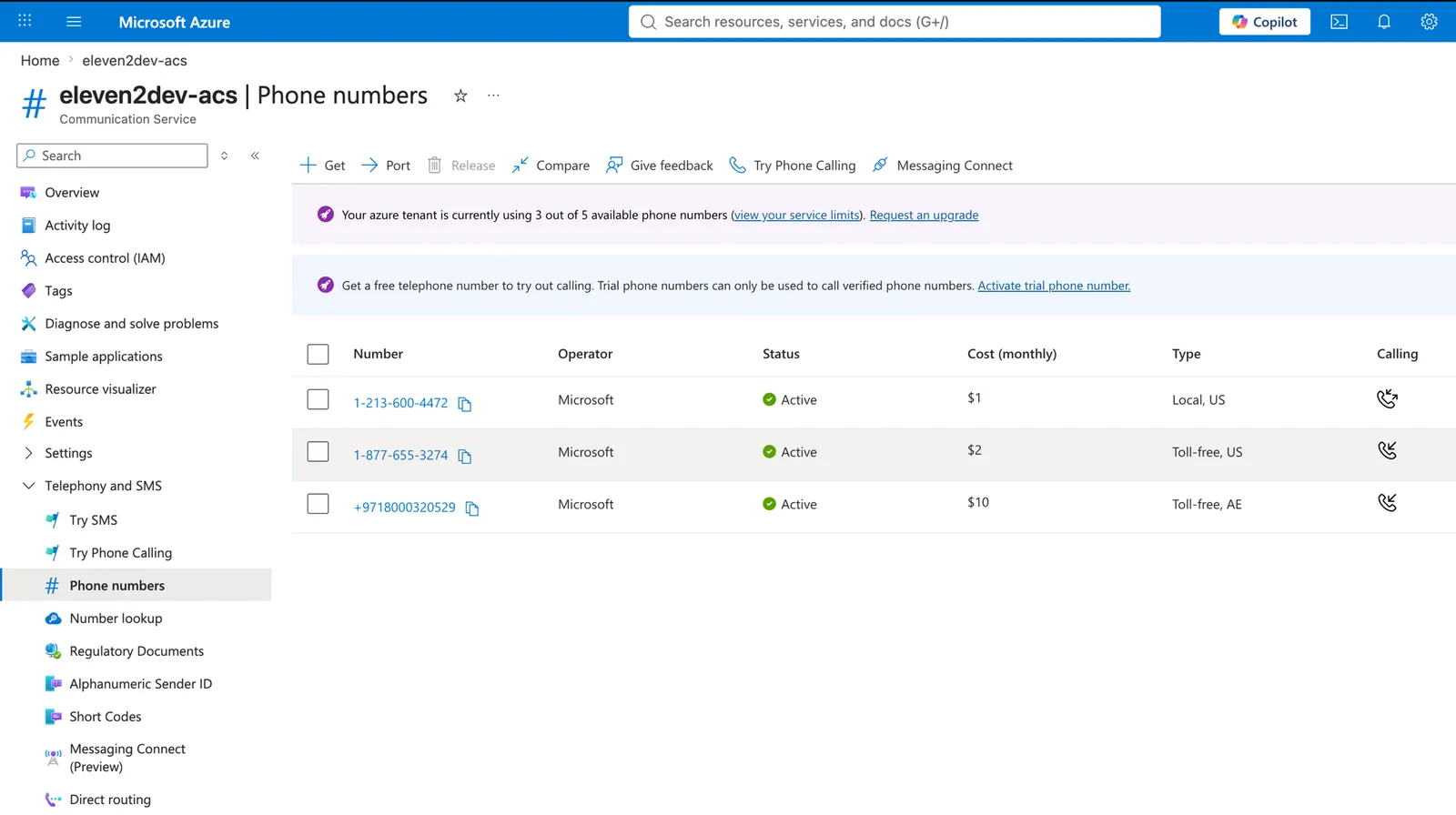
ACS 资源的 Phone numbers 面板,列出了活跃号码及其通话功能

ACS 资源中的电话号码——Calling 列显示各号码的呼叫方向

要通过 CLI 验证(需要 az extension add --name communication),并获取桥接服务以 ACS_CONNECTION_STRING 使用的连接字符串:

CONN=$(az communication list-key -n my-acs -g $RG --query primaryConnectionString -o tsv)
az communication phonenumber list --connection-string "$CONN" --query "[].phoneNumber"

步骤 2 — 部署桥接服务

桥接服务是一个使用 azure-communication-callautomation 的小型 Flask + flask-sock 应用。以下是呼入流程的核心部分:

bridge.py(摘录)
from azure.communication.callautomation import (
CallAutomationClient, MediaStreamingOptions, StreamingTransportType,
MediaStreamingContentType, MediaStreamingAudioChannelType, AudioFormat,
)
@app.route("/api/incomingCall", methods=["POST"])
def incoming_call():
for event in request.get_json():
# Event Grid subscription validation handshake
if event.get("eventType") == "Microsoft.EventGrid.SubscriptionValidationEvent":
return jsonify({"validationResponse": event["data"]["validationCode"]})
if event.get("eventType") == "Microsoft.Communication.IncomingCall":
client = CallAutomationClient.from_connection_string(ACS_CONNECTION_STRING)
client.answer_call(
incoming_call_context=event["data"]["incomingCallContext"],
callback_url=f"https://{HOST}/api/callbacks",
media_streaming=MediaStreamingOptions(
transport_url=f"wss://{HOST}/ws",
transport_type=StreamingTransportType.WEBSOCKET,
content_type=MediaStreamingContentType.AUDIO,
audio_channel_type=MediaStreamingAudioChannelType.MIXED,
start_media_streaming=True,
enable_bidirectional=True,
audio_format=AudioFormat.PCM16_K_MONO,
),
)
return jsonify({"status": "ok"})

在 /ws 套接字上双向转发 PCM16:将 ACS AudioData 帧作为 {"user_audio_chunk": "<base64>"} 转发给 ElevenLabs,并将智能体音频作为 {"Kind":"AudioData","AudioData":{"Data":"<base64>"},"StopAudio":null} 发回。ACS 发送的第一帧是 AudioMetadata(协商后的格式)——记录它并忽略即可。ElevenLabs 端使用标准智能体 WebSocket 协议。

ACS 每个方向使用不同的 JSON 大小写:它发送的入站帧使用 camelCase(kind、 audioData.data),而它期望的出站帧使用 PascalCase(Kind、AudioData.Data、 StopAudio)。请区分这两种大小写——以下转发逻辑与之保持一致。

bridge.py — 媒体转发
import asyncio, json, os, queue, threading, websockets
from flask_sock import Sock
sock = Sock(app)
AGENT_ID = os.environ["ELEVENLABS_AGENT_ID"]
# US default; data residency: wss://api.eu.residency.elevenlabs.io, .in., or .sg.
EL_ORIGIN = os.environ.get("ELEVENLABS_ORIGIN", "wss://api.elevenlabs.io")
EL_WS = f"{EL_ORIGIN}/v1/convai/conversation?agent_id={AGENT_ID}"
@sock.route("/ws")
def media_stream(ws):
loop = asyncio.new_event_loop()
el = {"ws": None}
to_acs = queue.Queue() # outbound frames; only this handler thread touches `ws`
async def el_session():
async with websockets.connect(EL_WS) as elws:
el["ws"] = elws
await elws.send(json.dumps({"type": "conversation_initiation_client_data"}))
async for msg in elws:
data = json.loads(msg)
kind = data.get("type")
if kind == "audio": # agent audio -> caller
b64 = data["audio_event"]["audio_base_64"]
to_acs.put({"Kind": "AudioData", "AudioData": {"Data": b64}, "StopAudio": None})
elif kind == "ping":
await elws.send(json.dumps({"type": "pong", "event_id": data["ping_event"]["event_id"]}))
elif kind == "interruption": # barge-in
to_acs.put({"Kind": "StopAudio", "AudioData": None, "StopAudio": {}})
threading.Thread(target=lambda: loop.run_until_complete(el_session()), daemon=True).start()
# Keep all ACS-socket I/O on this one thread: receive with a short timeout,
# then drain any audio the ElevenLabs thread queued. Sending from the other
# thread would race flask-sock and corrupt the stream.
try:
while True:
raw = ws.receive(timeout=0.02) # None when no frame arrived this tick
if raw:
evt = json.loads(raw)
if evt.get("kind") == "AudioData" and el["ws"]: # caller audio -> agent
asyncio.run_coroutine_threadsafe(
el["ws"].send(json.dumps({"user_audio_chunk": evt["audioData"]["data"]})), loop)
while not to_acs.empty():
ws.send(json.dumps(to_acs.get_nowait()))
except Exception:
pass # ACS socket closed

此转发逻辑有意保持精简。生产环境中,请添加日志记录、重连和优雅终止。 完整消息参考请参阅 WebSocket 文档。

EL_WS 连接到公开智能体。对于私有智能体,请让桥接服务在服务器端请求短期有效的 签名 URL:使用 API 密钥调用 GET /v1/convai/conversation/get-signed-url?agent_id=..., 然后连接到返回的 URL。对于数据 驻留,请将 ELEVENLABS_ORIGIN 设为相应的 驻留主机(wss://api.eu.residency.elevenlabs.io、.in. 或 .sg.);签名 URL 请求使用对应的 https:// 主机。

部署到 Azure Container Apps 并获取公共 FQDN:

az containerapp up --name acs-el-bridge --resource-group $RG \
--source . --ingress external --target-port 8080 \
--env-vars ELEVENLABS_AGENT_ID=$AGENT_ID \
ELEVENLABS_ORIGIN=wss://api.elevenlabs.io
FQDN=$(az containerapp show -n acs-el-bridge -g $RG \
--query properties.configuration.ingress.fqdn -o tsv)

然后在应用中设置 BRIDGE_PUBLIC_HOST=$FQDN,并将 ACS 连接字符串设为密钥。

在 Contributor 权限下(而非 Owner),az containerapp up 无法创建托管标识的 ACR 拉取角色。请启用注册表管理员用户(az acr update --admin-enabled true),使用 az containerapp registry set 附加它,然后运行 az containerapp update --image ...。

步骤 3 — 将 IncomingCall 路由到桥接服务

在 ACS 资源上创建一个 Event Grid 订阅,将 IncomingCall POST 到桥接服务。桥接服务的验证握手(如上所示)会自动完成订阅。

ACS_ID=$(az communication show -n my-acs -g $RG --query id -o tsv)
az eventgrid event-subscription create \
--name acs-incomingcall \
--source-resource-id "$ACS_ID" \
--endpoint "https://$FQDN/api/incomingCall" \
--endpoint-type webhook \
--included-event-types Microsoft.Communication.IncomingCall
# Verify — should print "Succeeded"
az eventgrid event-subscription show --name acs-incomingcall \
--source-resource-id "$ACS_ID" --query provisioningState -o tsv

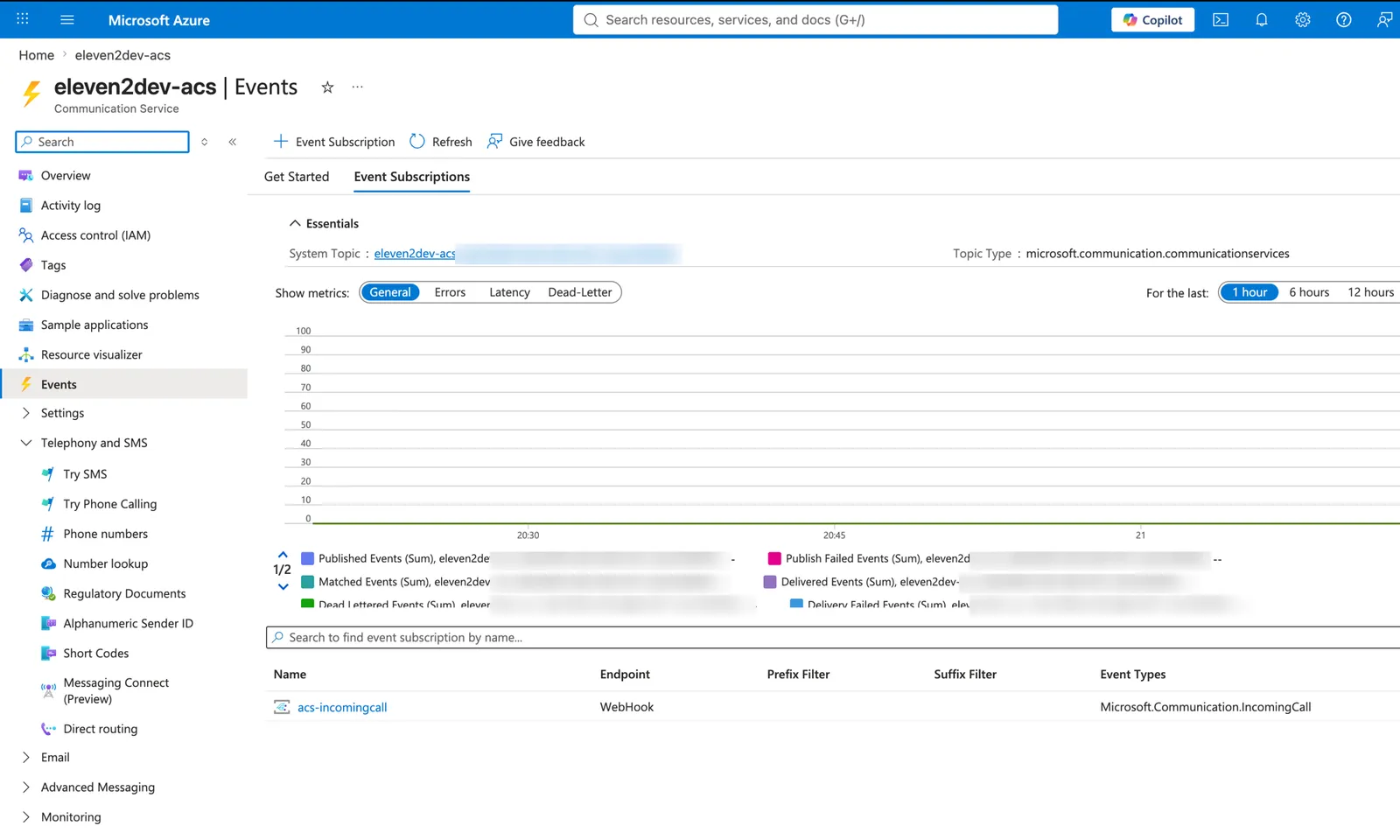
订阅会显示在 ACS 资源的 Events 面板下:

ACS 资源的 Events 面板,列出了筛选为 Microsoft.Communication.IncomingCall 的 acs-incomingcall webhook 订阅

ACS 资源 → Events → Event Subscriptions

拨打该号码——智能体会接听。

连接到 Teams

  • 直接拨号: 拥有 Teams Phone + Calling Plan 的 Teams 用户可像拨打任何外部号码一样拨打 ACS 号码。
  • Teams 资源账户(TPE): 使用 Teams Phone Extensibility 将 Teams 资源账户绑定到 ACS 资源,使呼叫资源账户的电话触发相同的 IncomingCall → 桥接服务流程。

通话结束

当智能体结束对话时(例如调用其 End Call 工具),ElevenLabs 会关闭 WebSocket。请挂断 ACS 通话链路,以免呼叫者仍停留在无响应线路上:

CallAutomationClient.from_connection_string(ACS_CONNECTION_STRING) \
.get_call_connection(call_connection_id).hang_up(is_for_everyone=True)

热转接给人工客服

ElevenLabs 原生转接工具仅适用于 ElevenLabs 管理电话服务的情况,因此这里智能体会触发一个自定义客户端工具(例如 transfer_to_human)。桥接服务通过 add_participant 将人工客服加入当前通话(热转接),而不是进行盲转:

conn = client.get_call_connection(call_connection_id)
conn.add_participant(
PhoneNumberIdentifier(human_number),
source_caller_id_number=PhoneNumberIdentifier(your_outbound_number),
invitation_timeout=30,
)
# then mute the bot and skip the end-of-call hangup so the human's leg survives

ACS 会向 /api/callbacks 发送 AddParticipantSucceeded / AddParticipantFailed 回调。向智能体返回 client_tool_result,以便它说出交接提示。有关智能体端配置,请参阅系统工具。

在工具触发的瞬间设置转接保护(调用 add_participant 之前),否则快速关闭的 EL WebSocket 可能会与挂断操作竞争,在人工客服加入前断开通话。

故障排除

确认 Event Grid 订阅已完成配置(provisioningState: Succeeded),且桥接服务的 /api/incomingCall 已返回验证回显。确认号码具有呼入通话功能,并且与订阅所在的 ACS 资源相同。在订阅的 Filters 选项卡中,事件类型必须包含 Incoming Call:
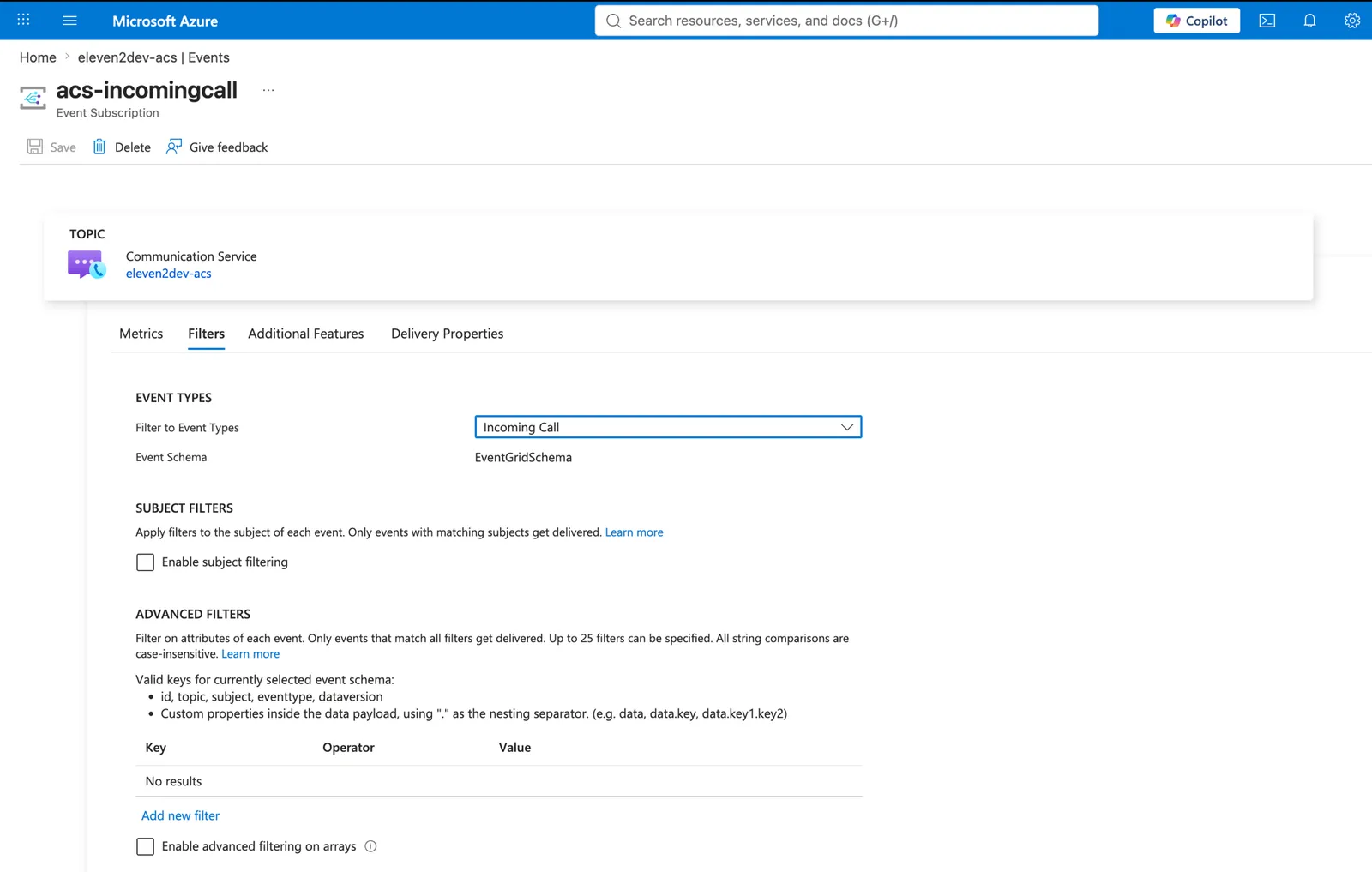
事件订阅的 Filters 选项卡,事件类型筛选为 Incoming Call

Event subscription → Filters → Incoming Call

ACS 对某些目的地(例如印度)的出站呼叫存在限制或不稳定情况。请使用受支持的目的地,或通过 SIP / Operator 号码接入人工客服线路。桥接服务逻辑不受影响——这是出站线路上的运营商级故障。

两端必须均为 PCM 16 kHz 单声道。将智能体输入/输出格式设为 pcm_16000;桥接服务会从 conversation_initiation_metadata 记录协商后的格式。

购买号码需要付费订阅类型(MCA/EA/PAYG)。如果 ACS 不在所在国家提供号码,请改用 SIP 服务商。

实用链接