

Structured procedures
Overview
A structured procedure is a procedure that runs a fixed sequence of steps. A free-form procedure is natural-language guidance the agent interprets and adapts to the situation. A structured procedure is an ordered list of typed steps the agent runs in order every time the procedure applies.
Use a structured procedure when specific steps must happen the same way on every call: verifying a caller’s identity, escalating a ticket, or taking a payment. You author it as a short list of plain-language steps.
Like every procedure, a structured procedure has a trigger that describes when it applies. When a conversation matches the trigger, the agent runs the procedure’s steps in order, then returns to the rest of the conversation.
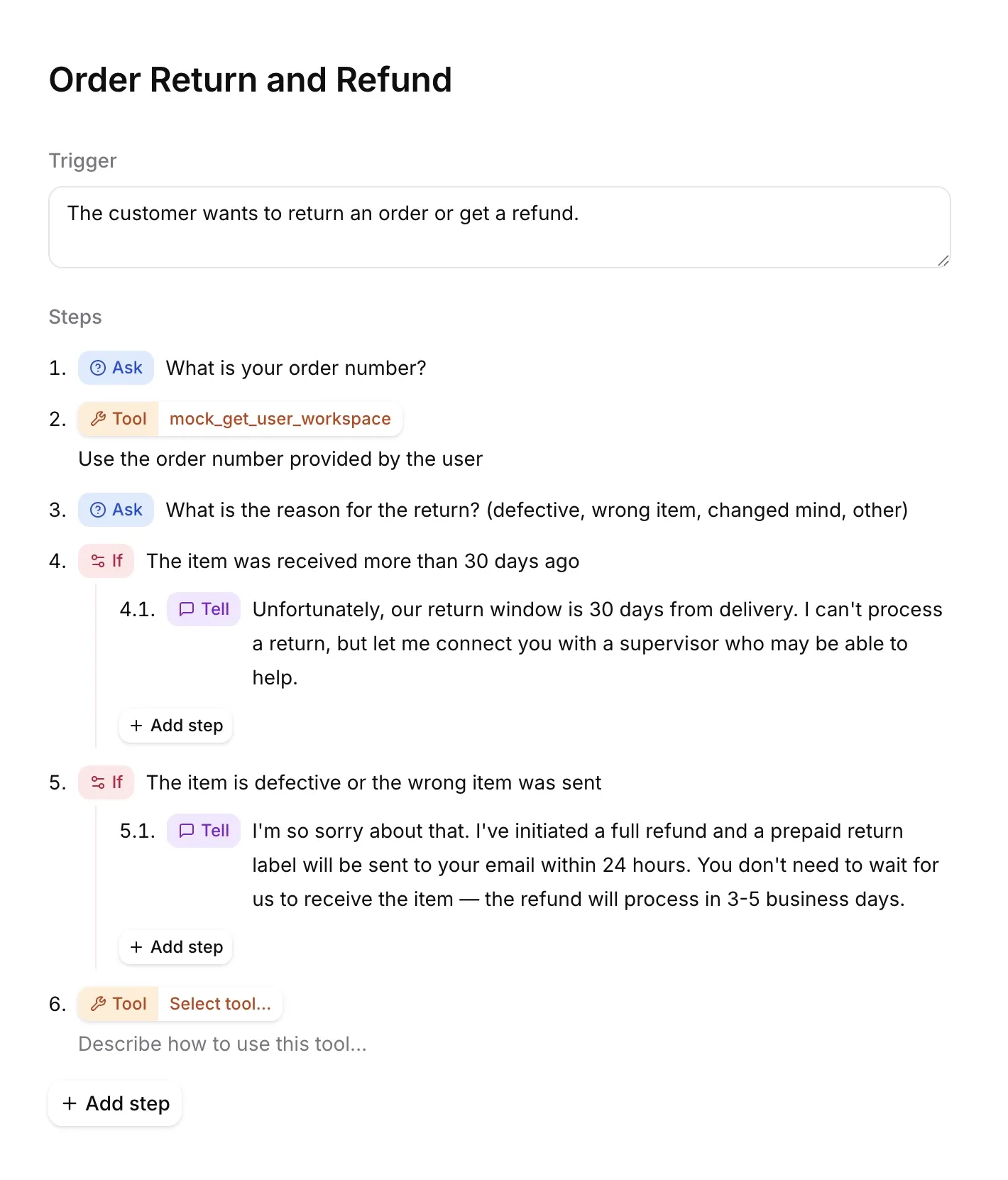
When to use a structured procedure
Use a structured procedure when specific steps must run the same way every time, but you still want to author quickly in plain steps. Structured procedures are easier to write than a workflow but less expressive. For how they compare to free-form procedures, workflows, and the system prompt, see When to use procedures.
Anatomy of a structured procedure
A structured procedure has three parts: a name, a trigger, and an ordered list of steps.
Name
A short label that identifies the procedure in the dashboard. The name is never sent to the LLM, so it does not affect agent behavior.
Trigger
A plain-language description of when the agent should run this procedure, for example When the user asks to refund an order. The agent compares the user’s intent against each procedure’s trigger and runs the matching one, so triggers should be concrete and distinct. The agent sees only the trigger text, never the procedure’s name or ID. A trigger works the same way as for any procedure; see Writing triggers.
Leave the trigger empty to make the procedure a sub-procedure that only runs when another procedure calls it.
Steps
The procedure body is an ordered list of typed steps. There are multiple step types, and you combine them to describe the task.
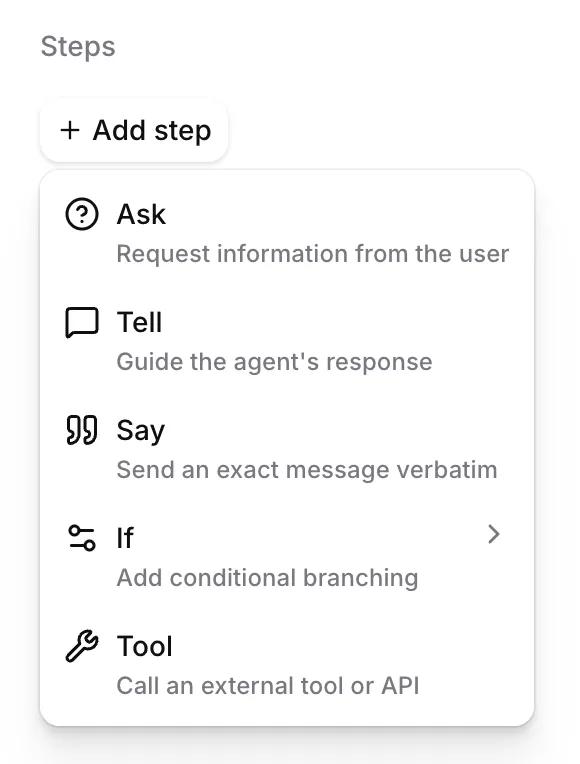
Not every step can appear everywhere. Inside an If arm, you can use any step except another If or a Retry. Inside a Tool step’s failure handler, you can use any step except an If or another Tool.
API step reference
Structured procedure content is a JSON-encoded document containing a steps array. Each step is an object identified by its type. The trigger is a separate top-level field on the procedure, not part of content. API and SDK payloads use type: "deterministic" for the procedure itself.
Ask
An Ask step instructs the agent to request information and wait until the user provides an appropriate response.
- API type:
ask instruction: Required, non-empty string.
Tell
A Tell step instructs the agent to generate a single message in its own words. It does not wait for a user response before continuing.
- API type:
tell instruction: Required, non-empty string.
Say
A Say step speaks the supplied text exactly as written, then continues. Provide message_translations to give the agent an exact message for each additional language it supports, keyed by language code.
- API type:
say message: Required, non-empty string.message_translations: Optional object mapping a language code to{ "value": "..." }.
If, else if, and else
An If step contains one or more ordered conditional arms. The first matching arm runs. The optional fallback array is the Else arm.
- API type:
branch branches: Required, non-empty list of conditional arms.fallback: Optional list of Else steps.- Each arm requires a
conditionand a non-emptystepslist.
This behaves like if/else-if/else:
- Conditions are evaluated in order.
- The first matching arm runs.
- If no condition matches,
fallbackruns. - After an arm finishes, the procedure rejoins the main sequence.
The example above uses a text condition, which the model evaluates in natural language. Conditions can also be expressions over dynamic variables:
An expression condition tests dynamic variables, which are filled by tool results or set when the conversation starts. It cannot read the user’s most recent reply. To branch on what the user said, use a text condition.
All arms in one If step must use the same condition type: either llm or expression.
Tool
A Tool step calls a specific tool.
- API type:
tool_call tool_id: Required, non-empty tool ID. The tool must be attached to the agent.tool_name: Required tool name, matching the tool.instruction: Optional instruction describing how to call the tool.schema_overrides: Optional fixed values for the tool’s parameters.on_failure: Optional failure handler.
Fixed parameter values
Use schema_overrides when a parameter must always take a specific value. The model does not see or choose an overridden parameter. Keys are parameter paths in the tool’s schema; each value names a source:
Failure handling
Without on_failure, a failed tool call ends the conversation. Add on_failure to run recovery steps instead.
fallback: Required, non-empty list of steps that run when the tool fails.branches: Reserved for conditional failure handling. Leave it empty.
A failure handler may contain Ask, Tell, Say, Sub-procedure, System tool, and Retry steps. It cannot contain Tool or If steps. After the handler runs, the procedure continues with the step after the Tool step.
Retry
A Retry step re-runs the failure handler that contains it, including the tool call. Each attempt calls the tool again and, if it fails again, runs every step in the handler again. When the attempts are used up, the conversation ends.
- API type:
retry max_retries: Optional integer from 1 through 3. Defaults to 1.- The value counts attempts after the original tool call.
- Retry is valid only inside
on_failure. - Retry must be the final step in its failure handler because later steps would be unreachable.
Sub-procedure
A Sub-procedure step runs another structured procedure. When that procedure’s steps complete, execution returns to the step after the Sub-procedure step.
- API type:
sub_procedure procedure_id: Required, non-empty procedure ID.- The target must exist on the same agent.
- The target must be a structured procedure.
- A procedure cannot invoke itself.
System tool
A System tool step performs a built-in system action.
- API type:
system_tool system_tool_name: Required system-tool name.- Currently, only
end_callis supported. More system tools may be added later. - Because
end_callis terminal, it must be the final step in its containing sequence, arm, or failure handler.
Validation rules
Publishing the agent, or saving the agent draft, rejects a structured procedure that breaks any of these rules. The error names the offending step by its path.
- Two If steps cannot be placed back to back.
- If steps cannot be nested.
- An If step with expression conditions cannot directly follow an Ask step.
- All conditions in one If step must be the same type, either
llmorexpression. - Retry may appear only inside
on_failure, and must be the last step there. end_callmust be the last step in whichever list it appears in.- A failure handler’s
fallbackmust contain at least one step. - A Sub-procedure must point at an existing structured procedure on the same agent, and not at itself.
tool_idmust be a tool on the agent,tool_namemust match, andschema_overridesmust match the tool’s schema.- The
stepslist, everyinstruction, and everymessagemust be non-empty.
For how to restructure a procedure that hits one of these rules, see Best practices.
Complete API example
This example handles an order cancellation based on shipment status. It fixes a tool parameter, recovers from a failed tool call, invokes another structured procedure, then ends the call.
How a structured procedure runs
Turning a structured procedure’s steps into the form the agent executes is called compiling. The platform compiles every structured procedure when the agent draft is saved or the agent is published; authors never compile anything themselves. The compiled result is currently visible as read-only nodes in the Workflow tab.
When the user’s request matches a procedure’s trigger, the agent enters the procedure and runs its steps in order. While inside the structured procedure, the agent focuses on each step in isolation. When it reaches the end, it returns to the rest of the conversation.
The following rules describe how steps behave at runtime.
Only Ask waits for the user
Every step other than Ask runs immediately, and control moves to the next step within the same
turn. A Tell or Say step delivers its message and continues. There is no step that pauses the
conversation other than Ask, and no step that ends the current turn. If you need the user’s
input, use an Ask step. If the conversation should end, use the end_call system tool.
Reaching the end of a procedure does not end the turn
When the last step completes, the procedure ends and the agent returns to the rest of the conversation with the turn still open, so it may say more. When a sub-procedure completes, control returns to the next step of the procedure that called it.
Tool steps distinguish only success from failure
A Tool step cannot branch on a status code or on the response body. If the tool succeeds, the procedure continues. If it fails and the step has no failure handler, the conversation ends. If it has one, the handler’s steps run and the procedure continues to the next step. A Retry inside the handler re-runs the tool and, if it fails again, every step in the handler, until the tool succeeds or the attempts are used up. If they are used up, the conversation ends.
If steps fall through when nothing matches
Conditions are evaluated in order and the first match runs. The Else arm runs when nothing matches. If there is no Else and nothing matches, the procedure continues with the step after the If. An unhandled case is not an error.
If arms do not carry state forward
Nothing decided inside an If arm is remembered by later steps. If something learned in an arm is needed later, persist it explicitly with a tool call or a dynamic variable.
Ask, Tell, and Say steps have no tools
Only Tool steps can call tools. There is no need to tell an Ask, Tell, or Say step not to call tools; it cannot.
Manage a structured procedure
Build via the dashboard
Manage via the CLI
Manage via the API
Open your agent in the dashboard, then select Procedures. Use + to create a structured procedure. Add a trigger, select a type for each step, and publish the agent changes.
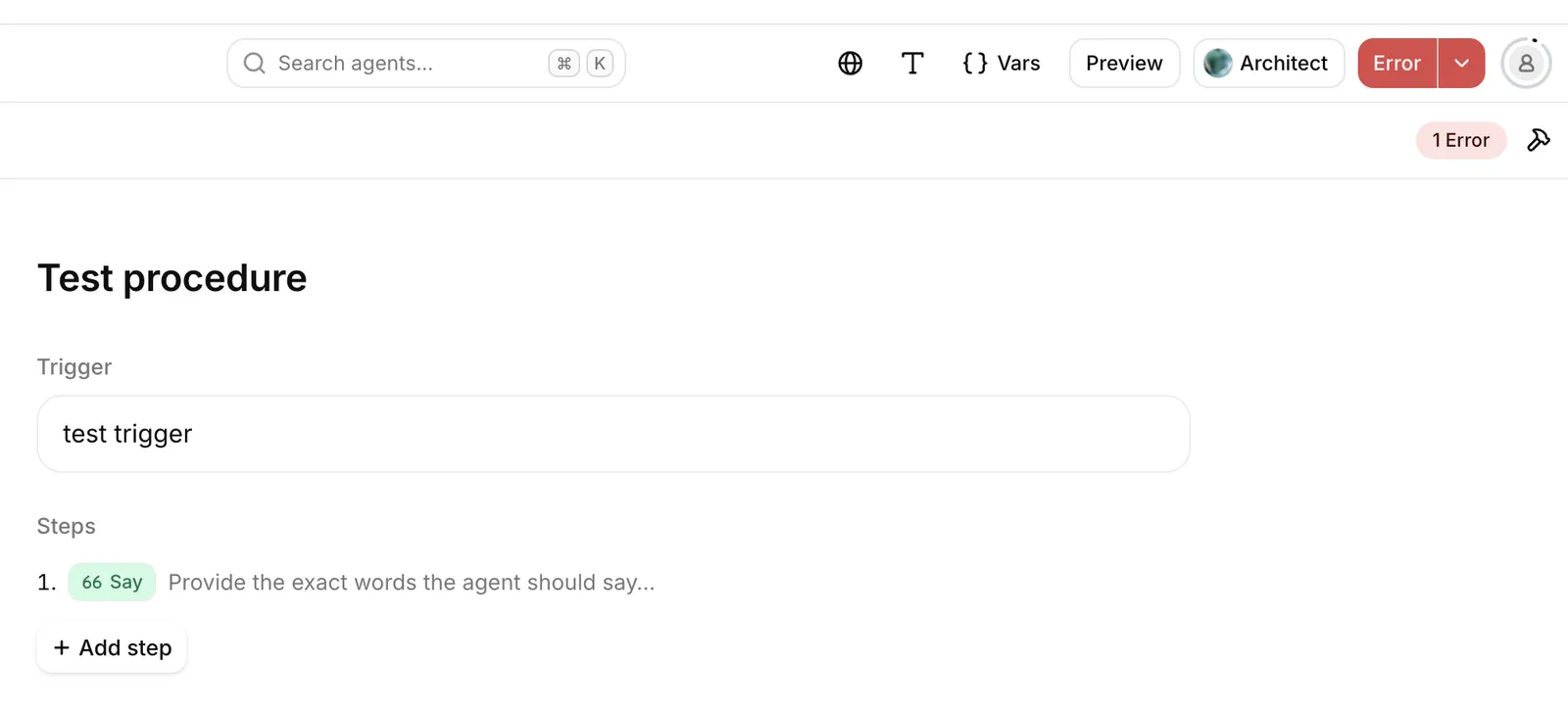
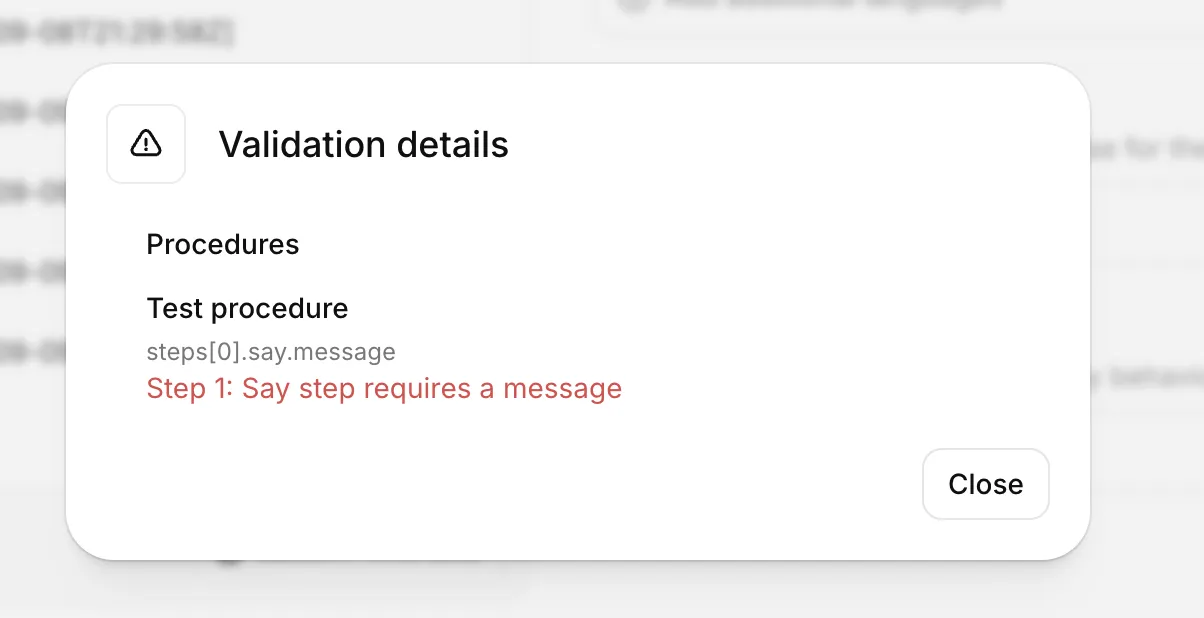
The dashboard validates structured procedures as you edit. If a procedure breaks a validation rule, the Publish button shows an error state, the Procedures tab shows an error badge, and the preview cannot start until the procedure is fixed. Select the error indicator to see which procedure and step is affected.
Best practices
Each step type already enforces its own behavior, so you rarely need to spell it out. Write the intent of each step and let the step type do the rest. The guidance below covers the cases worth getting right.
To test a structured procedure, follow Iterating on a procedure.
Choosing step types
Ask one question per Ask step
An Ask step waits for one answer. If you bundle several questions into one instruction, the agent tends to skip some or merge them. Use one Ask per piece of information.
Use Tell for statements and Ask for questions
A Tell step delivers its message and moves on without waiting. A Tell phrased as a question never gets an answer. If a step needs a response from the user, it is an Ask.
Give an Ask a clear exit condition when the question alone is not enough
An Ask step advances once it has an appropriate answer. If what counts as an answer is not obvious from the question, say so in the instruction, for example Ask for the order ID; a valid ID is eight digits.
Choose Tell for phrasing, Say for exact words
Use a Tell step when the agent should compose the message itself, and a Say step when the wording must be verbatim or translated. Both deliver exactly one message, so there is no need to instruct a step to send a single message.
Do not tell non-tool steps to avoid tools
Ask, Tell, and Say steps cannot call tools. Writing do not call any tools into them adds noise to the instruction without changing behavior.
Structuring the procedure
Do not pad between two If steps
Two If steps cannot be placed back to back. Inserting an unrelated Tell or Say between them to satisfy the rule makes the agent say something it should not. Instead, fold the second decision into the first If as additional Else if arms, or move it into a sub-procedure.
Put nested decisions in a sub-procedure
If steps cannot be nested. When one decision depends on another, put the inner decision in its own structured procedure and call it with a Sub-procedure step from the arm that needs it.
Add an Else when 'none of the above' matters
An If step with no Else falls through to the next step when nothing matches. If the unmatched case should behave differently, add an Else arm for it.
Persist anything a later step needs
Decisions made inside an If arm are not remembered afterwards. If a later step depends on something learned in an arm, record it with a tool call or a dynamic variable inside the arm.
Place expression conditions after the tool that fills them
Expression conditions test dynamic variables. Put an If step that uses them right after the Tool step that sets those variables. To branch on what the user said, use a text condition.
Working with tools
Gate a Tool step with an If, not with its instruction
A Tool step always calls its tool. A condition written into the instruction, such as skip this if the ticket is already tagged, cannot prevent the call. If the call is not always meant to happen, put the condition in an If step before the Tool step.
Fix parameter values instead of describing them
When a parameter must always take a specific value, set it with a constant override in
schema_overrides. An instruction such as always set status to pending asks the model to
comply; an override is enforced and cannot be skipped.
Give every Tool step a failure handler
Without on_failure, any tool failure ends the conversation. Add a handler that tells the user
what happened and retries, escalates, or continues.
Keep Tool steps to the tool call
A Tool step only runs the tool; the agent cannot speak or make a decision during it. To talk to the user or branch on what the tool returned, put that in a separate step before or after the Tool step.
Writing instructions
Describe only the current step
The procedure controls what runs next, and the agent is not aware of later steps while running the current one. Let the step order do the sequencing.
Do not try to end the turn with prose
Sentences written into step instructions, such as this is the last message of this turn, ask
the agent to enforce a boundary the platform does not. Use an Ask step to wait for the user or
the end_call system tool to finish the conversation.
Keep global rules in the system prompt
Tone, formatting, sign-offs, and refusal policies belong in the system prompt. A step instruction should say only what is specific to that step.
Composing procedures
The general guidance for composing procedures applies to structured procedures too; see Composing procedures on the Free-form procedures page.
One pattern is specific to mixing types: a free-form procedure can reference a structured one. Keep open-ended handling in a free-form procedure and delegate the parts that must run the same way every time, such as identity verification or escalation, to a structured procedure.
Limitations
- If steps cannot be nested, and two If steps cannot be placed back to back.
- The only supported system tool is
end_call. - Structured procedures cannot reference knowledge base documents.
- There is no way to end the current turn when a procedure completes; the agent keeps the turn open and may continue speaking.
- A structured procedure cannot be started from a specific workflow node in the dashboard.
- Starting a procedure adds latency: the agent makes a tool call to enter it and then moves through the generated workflow.
Model provider support
Structured procedures force internal tool calls when entering a sub-procedure and completing a procedure. Major OpenAI, Anthropic, Gemini, and Grok model families support forced tool choice. Other models or custom providers may not guarantee it, which can make sub-procedure transitions or procedure completion less reliable. Verify forced tool-choice support when using another model provider.
See Procedures for limits that apply to all procedures, including the content size cap and how structured procedures differ from free-form ones.