

Free-form procedures
Task-specific instructions written in natural language
Overview
A free-form procedure describes one task in plain, natural language. The agent interprets the instructions and adapts the wording and order to the situation. A free-form procedure can call tools (including system tools like ending a call), look up knowledge base documents, and chain to other procedures.
When to use a free-form procedure
Use a free-form procedure when the agent can adapt wording and order to fit the situation, and you want to author it quickly in plain language. For how it compares to structured procedures, workflows, and the system prompt, see When to use procedures.
Anatomy of a procedure
Here is a refund procedure in the editor:
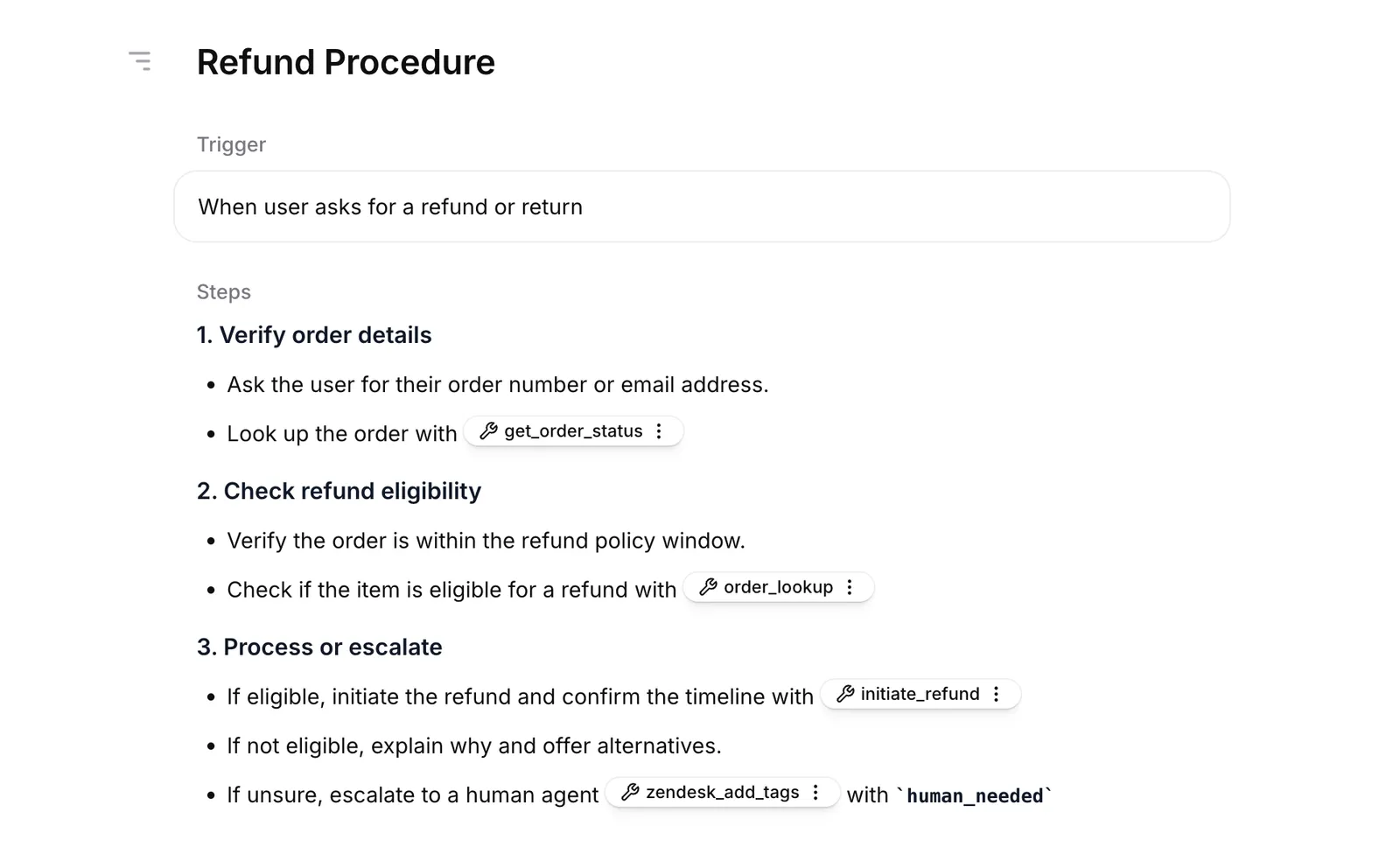
A procedure has two main parts: a trigger and content. Both can contain inline references to other resources, shown in the screenshot above as tags with wrench icons. Each procedure also has a name shown in the dashboard.
Name
A short label that identifies the procedure in the dashboard. The name is never sent to the LLM, so it does not affect agent behavior.
Trigger
A description of when the agent should use this procedure, for example When the user asks to refund an order.
Leave the trigger empty only when creating a sub-procedure.
Content
The body of the procedure, written in markdown. Content describes what the agent should do: ask a question, look up an order, call a tool, or end the call. It can be a numbered sequence of steps to follow, or general guidance for the situation. Each step or guideline can be a single sentence (Ask the user for their order ID) or a short paragraph that explains what to do and why.
Use numbered steps for sequential actions and bullet points for requirements or sub-items within a step.
Inline references
Procedures can reference different kinds of resources inline:
- Tools (e.g. look up an order, charge a card, end the call, transfer to a human)
- Knowledge base documents
- Other procedures
Use inline references whenever a step needs the agent to use a tool, knowledge base document, or another procedure. References auto-attach the resource to the procedure so the agent can use it. Plain prose mentions (like use the calculator tool here) also work, but only if the resource is already attached to the agent.
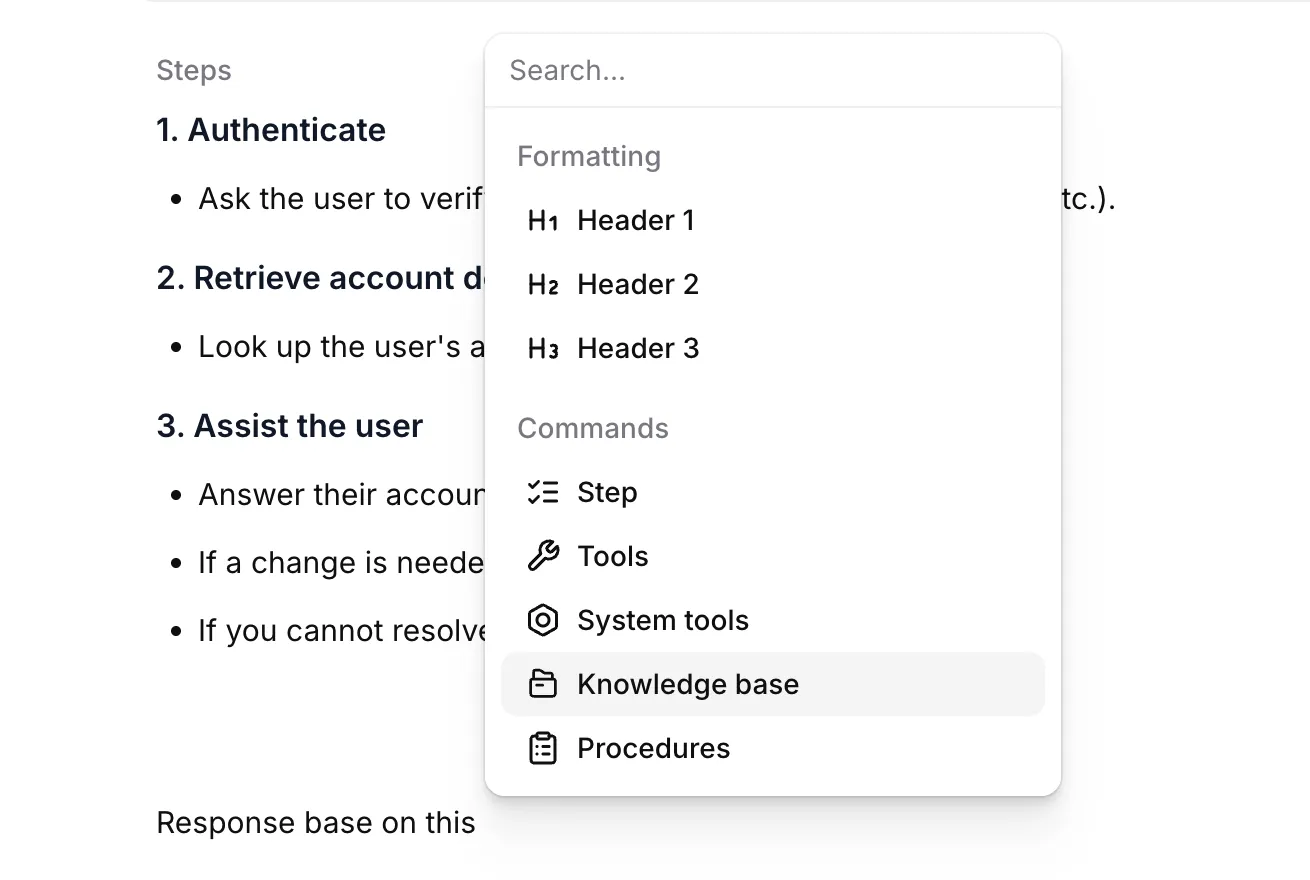
Insert a reference by typing / in the trigger or content and choosing the resource from the slash menu. References appear as clickable tags in the editor. Click a tag to open the underlying resource and confirm its configuration.
When writing free-form content through the API, insert references with the following syntax:
An inline procedure reference must use a procedure from the same agent. See Limitations for agent scope and duplication behavior.
A reference in the trigger lets the procedure fire based on a resource’s output, for example When get_user returns tier ‘gold’. A reference in content tells the agent to invoke or consult the resource at that step.
Knowledge base documents referenced in a procedure always use the auto usage mode: when RAG is enabled on the agent, the agent retrieves the relevant passages instead of placing the full document in the prompt. If the document is also attached to the agent, the agent’s usage mode for it applies instead, so attach it to the agent with the prompt usage mode to keep its full text in the prompt.
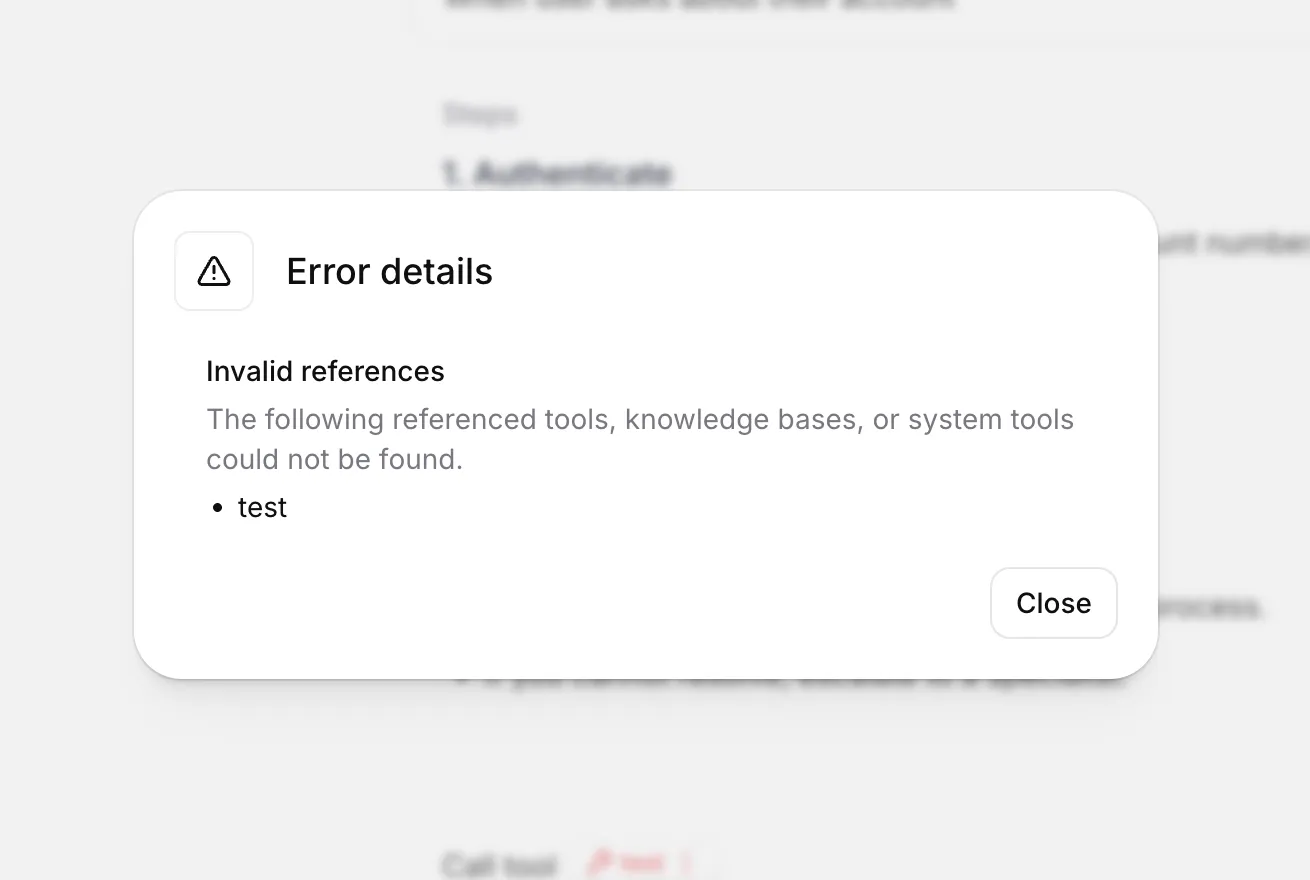
If a referenced resource is deleted later, or your account loses access to it, the tag shows as broken. The Errors badge at the top of the editor lists these references: invalid if the resource no longer exists, or unavailable if it exists but your account does not have access. Open the badge to see which step is affected and fix or remove the reference.
Sub-procedures
A sub-procedure has an empty trigger. The agent can run it only from another procedure that references it.
Use sub-procedures to share steps within one agent and reduce the number of procedures available at once. Give the entry procedure a trigger, reference related sub-procedures from its content, and leave their triggers empty.
An escalation sub-procedure can hold the steps for handing the conversation to a human. Reference it from the refund and cancellation procedures and leave its trigger empty. The agent can escalate as a step of either procedure, but outside them the sub-procedure stays unavailable.
Importing from a document
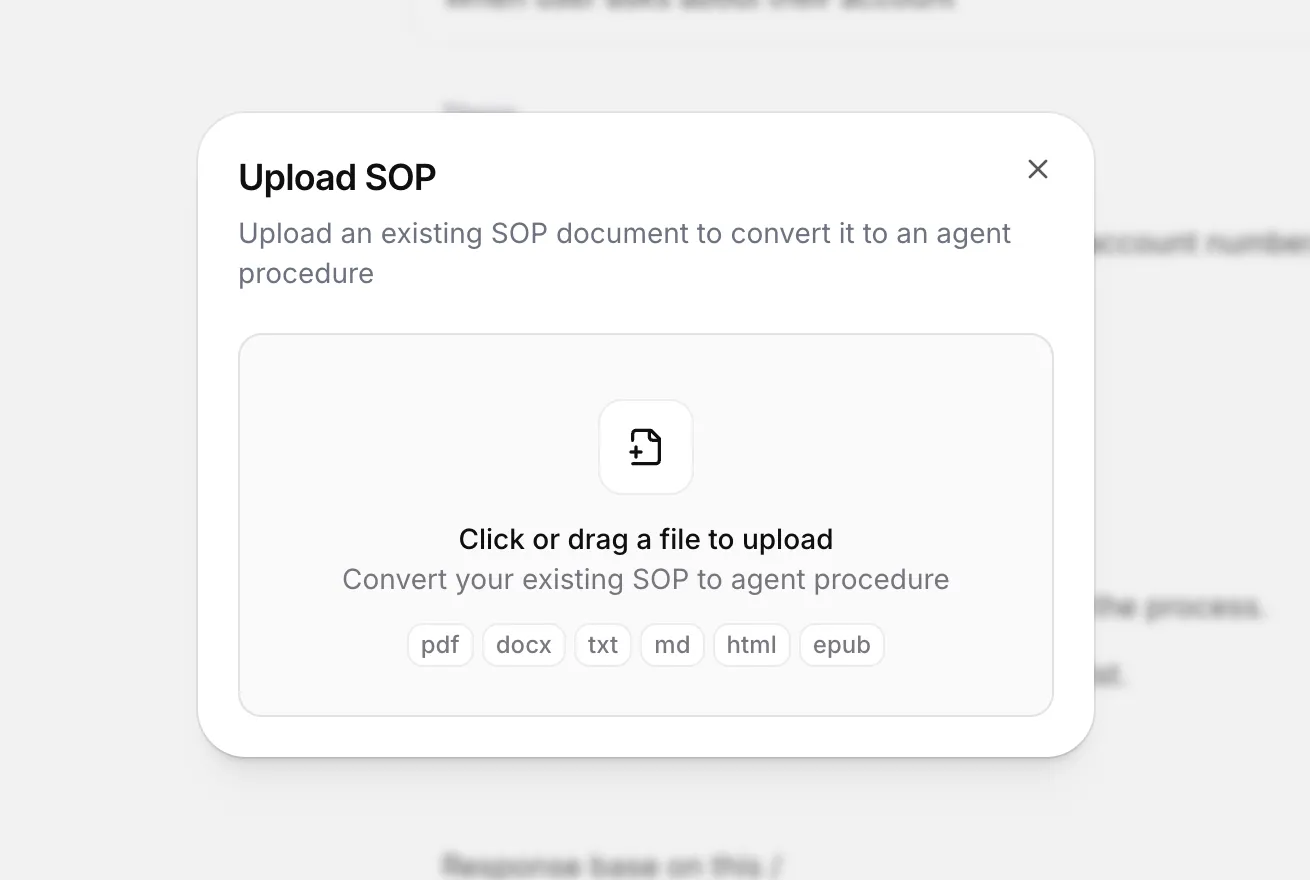
You can bootstrap from an existing standard operating procedure (SOP). Choose From SOP in the procedure list + menu, then upload a file.
Supported formats: PDF, DOCX, TXT, MD, HTML, EPUB. Files must be 20 MB or smaller.
The importer analyzes the document, identifies up to 10 distinct procedures, and creates a draft for each one with a generated name, trigger, and content. Open each draft to refine it. If your document contains more than 10 SOPs, split it into smaller files before uploading.
Manage a free-form procedure
Build via the dashboard
Manage via the API
Open your agent in the dashboard, then select Procedures. Use + to create a free-form procedure. Add a trigger and write the instructions in the content editor, then publish the agent changes.
Best practices
The agent has to pick the right procedure from its trigger and follow the content. More capable models do this more reliably as the number of procedures grows. See Models for options.
Writing procedures well means writing two parts well: a trigger that runs the procedure when it should, and content the agent can follow.
Iterating on a procedure
We recommend starting small and using agent tests to check each change before you make the next one.
Write a short procedure
Write a trigger and short content. Expand the content only when a test shows that the agent needs more instructions.
To iterate on a trigger quickly, create a simulation test whose chat
history ends with the user’s
request, and set Maximum conversation turns to 1. The agent replies once, which is enough to
show whether the request starts the right procedure, and each run stays short. Write the success
criteria as The agent started the refund procedure. Without chat history, an agent with a first
message spends the only turn on its greeting and the test checks nothing.
When a test or a live conversation fails, look for the class of mistake behind it. If the agent said something wrong, adding Don’t say that fixes one conversation. Search past conversations for similar failures and write one instruction that covers all of them. The cause can also be in the knowledge base or the agent configuration. Architect can do this search: open the failed conversation, select Architect, and ask it to find similar failures and propose a fix. Architect can also turn the conversation into a test.
Writing triggers
Keep triggers concrete and disjoint
Overlapping or vague triggers cause the wrong procedure to run. Prefer When the user asks to cancel a subscription over When the user has a question about their account.
Write from the user's perspective
Describe what the user is asking for, not what the agent should do. Triggers phrased as agent actions are less reliable. Prefer When the user asks to cancel their subscription over Cancel the user’s subscription.
Cover the way users actually ask
A narrow trigger can miss real requests when the user phrases things differently. Include the variations the user might say. When the user asks to refund, return, or get money back for an order runs more reliably than When the user requests a refund. Search past conversations to find how users phrase the request.
Writing content
Use imperative form
Write steps as instructions to the agent: Look up the customer’s last order rather than You should look up the customer’s last order. Direct instructions are easier to follow than suggestions.
Explain why a step matters
Reasoning generalizes to edge cases the procedure does not enumerate. A short because we need the order ID to issue a refund helps the agent handle situations the steps did not anticipate. Avoid all-caps MUSTs and rigid scripts where a one-line explanation would do the same work.
Say what to do instead of what to avoid
Describe the behavior you want. If you can’t find the order, ask the user to confirm the order ID works better than Don’t make up order details. For mistakes with a high cost, add a guardrail as well.
Use steps when order matters
Numbered steps help when the agent must do things in a fixed order. For judgment calls, a few sentences of guidance often work better, especially with more capable models.
Keep facts in the knowledge base
A procedure describes what the agent should do in a situation. Specific information, such as prices, plan details, or opening hours, belongs in the knowledge base. Reference the document from the procedure that needs it. For example, instead of listing every plan’s price in the procedure, write Quote the price from followed by an inline reference to a pricing document.
Composing procedures
Write one procedure per situation
If one situation is split across several narrow procedures, the agent has more triggers to choose from and starts the wrong one more often. If two procedures would start on the same request, merge them. Content longer than about 3,000 characters usually covers more than one situation.
Use sub-procedures for reactive actions
Use a sub-procedure for an action the agent should run only when another procedure requests it, such as identity verification or escalation. Without a trigger, it does not compete with entry procedures at conversation start. Fewer trigger choices keep routing focused.
Reference tools from the procedure that uses them
Reference a tool from the procedure that uses it instead of attaching it to the whole agent. The tool then stays out of unrelated conversations. In a free-form procedure, the tool is available only while the procedure is one of the five most recently started, so mention the tool’s task in the trigger too, for example or when you need to look up an order. See Limitations.
Use the system prompt for global behavior
Tone, identity, refusal policies, and guardrails belong in the system prompt. Put task-specific steps in procedures.
Procedures version with the agent
Procedures are part of the agent’s configuration, so they snapshot together when you publish a new agent version. To roll back to an earlier set of procedures, restore an earlier agent version. See Agent versioning.
Bootstrap from existing documentation
If your team already has SOPs, use the importer to turn them into drafts and refine from there.