

Vobiz
Before following this guide, consider reading the SIP trunking guide to understand how ElevenLabs supports SIP trunks.
Overview
This guide explains how to connect your Vobiz SIP trunks directly to ElevenAgents. This integration allows you to use your existing Vobiz phone numbers and infrastructure while leveraging ElevenLabs’ voice AI capabilities for both inbound and outbound calls.
How SIP trunking with Vobiz works
SIP trunking establishes a direct connection between your Vobiz telephony infrastructure and the ElevenLabs platform:
- Inbound calls: Calls to your Vobiz phone number are routed from your Vobiz SIP trunk to the ElevenLabs platform using the ElevenLabs origination URI (
sip.rtc.elevenlabs.io:5060). You configure this in your Vobiz account. - Outbound calls: Calls initiated by ElevenAgents are routed to your Vobiz SIP trunk using your Vobiz SIP domain (
<your_unique_domain>.sip.vobiz.ai), enabling your agents to place outgoing calls. - Authentication: Connection security for signaling is maintained through SIP digest authentication (username and password) or Access Control List (ACL) authentication based on the signaling source IP.
- Signaling and media: The initial call setup (signaling) uses TCP on port 5060. Once the call is established, the audio data (RTP stream) is transmitted over UDP.
Requirements
Before setting up the Vobiz SIP trunk integration, ensure you have:
- An active Vobiz account with SIP trunking enabled.
- At least one Vobiz phone number to connect to ElevenLabs.
- An ElevenLabs account with an agent configured in ElevenAgents.
- Administrator access to the Vobiz Console and your SIP trunk configuration.
- Appropriate firewall settings to allow SIP and RTP traffic between ElevenLabs and Vobiz.
Configuring Vobiz SIP trunks
This section provides instructions for configuring inbound and outbound SIP trunks in Vobiz before connecting them to ElevenLabs.
Setting up inbound trunks (calls from Vobiz to ElevenLabs)
Configure inbound SIP URI
In your Vobiz inbound SIP trunk configuration (or Application Answer URL), point incoming calls to the ElevenLabs SIP URI:
Set sip.rtc.elevenlabs.io:5060 as the trunk’s Primary URI and save the trunk configuration.
sip.rtc.elevenlabs.io:5060 is the default global (non-static) endpoint. If your workspace uses an isolated data residency deployment (India, Singapore, or Europe) or has static IP SIP servers enabled, use the corresponding SIP URI instead:
- Data residency (non-static):
sip.rtc.in.residency.elevenlabs.io:5060(India),sip.rtc.sg.residency.elevenlabs.io:5060(Singapore), orsip.rtc.eu.residency.elevenlabs.io:5060(Europe) - Global (static):
sip-static.rtc.elevenlabs.io:5060 - Data residency (static):
sip-static.rtc.in.residency.elevenlabs.io:5060(India),sip-static.rtc.sg.residency.elevenlabs.io:5060(Singapore), orsip-static.rtc.eu.residency.elevenlabs.io:5060(Europe)
Setting up outbound trunks (calls from ElevenLabs to Vobiz)
Complete setup in ElevenLabs
Follow the SIP trunking guide to import your Vobiz phone number in the Phone Numbers dashboard using the Vobiz-specific inbound and outbound settings below.
Inbound configuration (calls from Vobiz to ElevenLabs)
In the basic and Inbound Configuration sections of the Import SIP Trunk dialog:
Leave the optional Allowed Numbers, Allowed Source IP Addresses, and Remote Domains settings disabled unless your deployment requires inbound filtering or TLS domain validation.
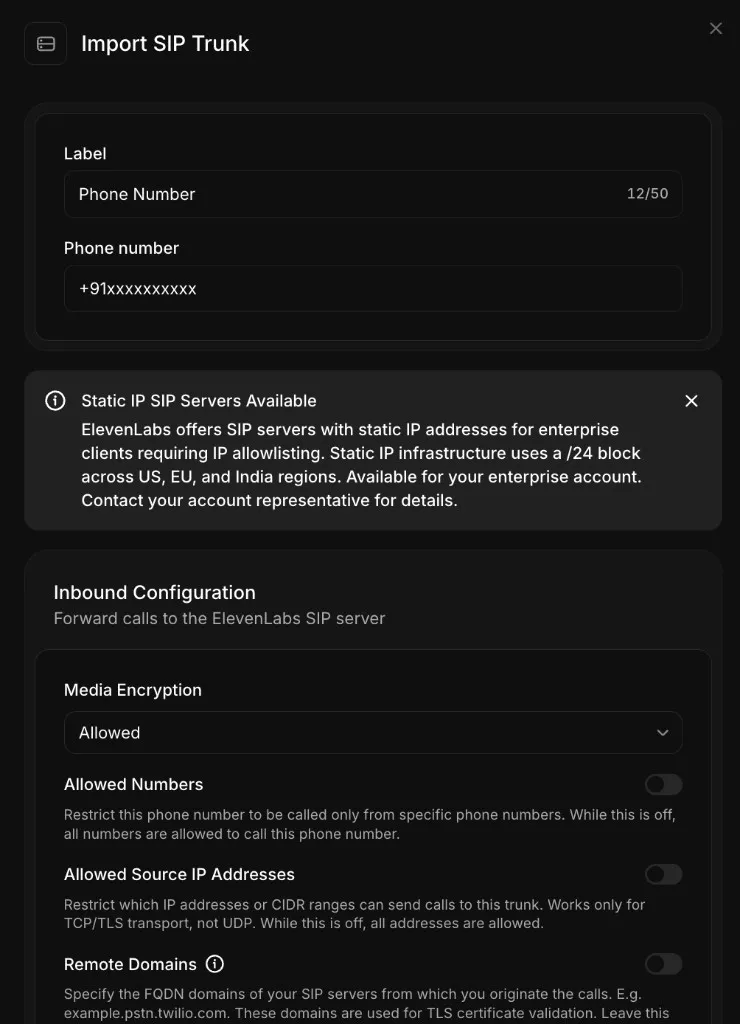
Outbound configuration (calls from ElevenLabs to Vobiz)
In the Outbound Configuration section of the Import SIP Trunk dialog, enter your Vobiz outbound trunk credentials:
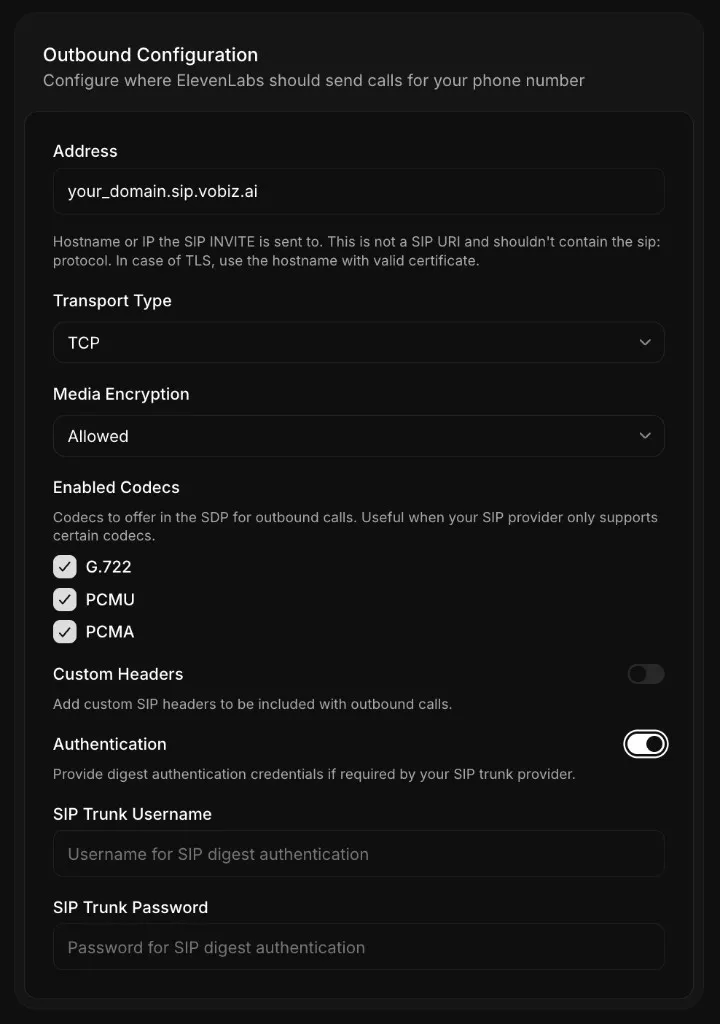
After importing the number, see Assigning agents to phone numbers in the SIP trunking guide to assign your agent.
Once you have set up your Vobiz SIP trunk, see the SIP trunking guide for advanced configuration options such as media encryption, custom SIP headers, and static IP allowlisting.
Troubleshooting
SIP 408 request timeout
The Vobiz trunk cannot reach ElevenLabs SIP servers:
- Verify the SIP trunk address is formatted as
<your_unique_domain>.sip.vobiz.aiwithout asip:prefix. - Check that the transport type is set to
TCP. - Confirm your Vobiz trunk status is
activein the Vobiz Console.
SIP authentication failed
The SIP trunk username or password does not match:
- Verify the username and password in the Vobiz Console under Trunks > Authentication & Linking.
- Ensure the credentials match case-sensitively.
- Re-enter the credentials in the ElevenAgents phone number configuration.
Call connects but is silent
The agent configuration or voice setting is incomplete:
- Verify the agent has a First message configured.
- Confirm the agent has a valid voice selected and test the voice in the ElevenAgents dashboard.
- Check the conversation logs in Call History for errors.
Call does not connect
The phone number format or trunk status is invalid:
- Use E.164 format with a leading
+(for example,+919988776655) or local format without+(for example,09988776655). - Verify your Vobiz trunk is active and has sufficient account balance.