

Genesys
Overview
Integrate ElevenLabs conversational AI with Genesys Cloud to power your contact center with natural-sounding voice and text agents. This integration supports both voice-based interactions through the Audio Connector and text-based conversations through the Bot Connector, enabling seamless customer experiences across multiple channels.
With this integration, you can deploy AI agents that handle inbound calls, chat conversations, and messaging interactions in your Genesys Cloud environment.
Capabilities
Setup
This integration uses OAuth 2.0 Client Credentials for authentication.
Create OAuth client in Genesys Cloud
In Genesys Cloud Admin Center, navigate to Admin > Integrations > OAuth and click Add Client.
Configure the OAuth client
- Set Grant Type to Client Credentials
- Assign the admin role for your Division(s)
- Save the client configuration
Copy client credentials
After creating the OAuth client, copy the Client ID and Client Secret immediately — the secret will not be shown again.
Triggers
Audio Connector
For voice-based agents, configure the Genesys Audio Connector to connect phone numbers to your ElevenLabs conversational AI agents.
For step-by-step setup instructions including authentication, phone number configuration, and call routing, see the Genesys Audio Connector documentation.
Bot Connector
For text-based agents, use the Genesys Bot Connector trigger to enable chat and messaging interactions. The Bot Connector automatically creates and configures the integration in your Genesys Cloud environment.
Configure trigger
Add a Bot Connector trigger
On the Integrations page in the ElevenAgents dashboard, open the Genesys integration, and navigate to the Triggers tab. Select Genesys Bot Connector.
Configure the trigger fields
Fill in the required fields:
- Agent: the ElevenLabs agent that will handle incoming conversations.
- Integration Name: name for the Bot Connector integration to be created in Genesys Cloud (e.g., “ElevenLabs Support Bot”). This name is used to derive the bot integration and bot name referenced in Architect flows.
Configure inbound message flow
In Architect, open the Inbound Message Flow you want to use.
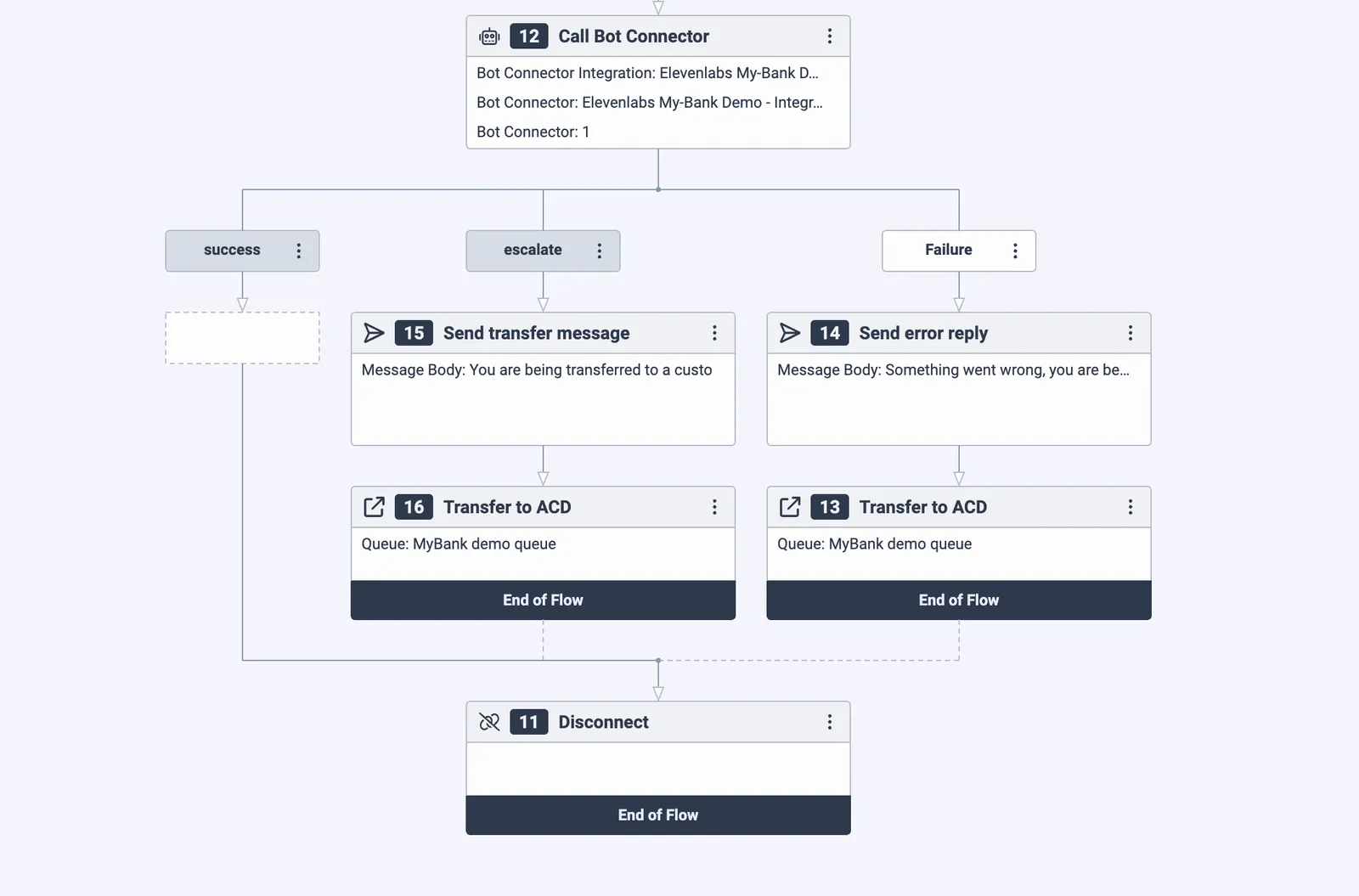
- Add a Call Bot Connector node and point it at your bot integration and bot name (both derived from the Integration Name you set in the trigger configuration).
- Handle the returned intents:
- success → send the agent’s response back to the user
- escalate → transfer to a support queue
- failure → transfer to a fallback queue
Configure escalation
To enable your agent to escalate conversations to human support, configure the following in ElevenLabs:
When the agent sets genesys_should_escalate to true, the Bot Connector will return the escalate intent, triggering the escalation flow you configured in Architect.
FAQ
Why did my Bot Connector trigger setup fail?
Setting up a Bot Connector involves multiple steps that need to propagate through Genesys internal systems. If propagation is slow, the setup can fail. Retrying after a couple of minutes usually succeeds. If the problem persists, reach out to ElevenLabs support.
Will agents see conversation history after escalation?
Yes, past messages will appear as bot messages in the Genesys interface, so the agent can see the full conversation history.
My Bot Connector is failing, how do I debug it?
In ElevenLabs, check for past conversations on your agent that originate from Genesys. These will have conversation IDs with a suffix gn_xxxxxx where the last six characters are the first characters of the connected Genesys conversation.
If there are errors in the transcript, for example failed tool calls, address these.
Also check if the agent takes longer than 10 seconds to reply, as Genesys only gives it a 10 second timeout.
If there are no past conversations, the error might be on the Genesys side. In the Genesys Architect, check the execution history of your flow. Find it in the drop-down menu of the save button.