

Zendesk
Overview
Connect your ElevenLabs AI agents with Zendesk to manage support tickets, users, and organizations. This integration enables your agents to create and update tickets, search for existing records, manage users, and respond to incoming ticket comments.
Capabilities
Setup
This integration supports three authentication methods: the ElevenLabs OAuth app, your own OAuth client, and an API token.
Zendesk is deprecating API tokens as an authentication method and moving to OAuth-only access. Existing API token-based Zendesk integrations will continue to work until April 30, 2027. ElevenLabs is working to support this migration and will proactively reach out to affected customers to help transition to OAuth before then. You can switch to the Custom OAuth client method below at any time.
OAuth
API token
Custom OAuth client
Find your subdomain
Your Zendesk subdomain is the first part of your Zendesk URL (e.g., mycompany from mycompany.zendesk.com).
Connect in ElevenLabs
In the ElevenLabs integration setup, select the OAuth2 credential, enter your subdomain, and click Connect.
Authorize the connection
Zendesk shows an authorization page listing the access the ElevenLabs app requests: read access across your account, plus write access to tickets, users, webhooks, and triggers. Sign in as a user who holds the permissions your agent needs and click Allow. Zendesk redirects you back to ElevenLabs and the connection is created.
Authorize as an administrator if you plan to use Zendesk triggers — creating webhooks and editing triggers is restricted to Zendesk admins.
OAuth scopes
Connecting with the OAuth2 credential grants ElevenLabs the following Zendesk OAuth scopes. Read access is granted account-wide, while write access is requested per resource so the token cannot modify resources the integration does not use.
A token never exceeds the permissions of the user who authorized it — the effective access is the intersection of these scopes and that user’s Zendesk role.
These scopes do not apply to the other two authentication methods: a custom OAuth client requests read and write (full read and write access), and an API token carries all permissions of the Zendesk user it belongs to.
Data disclosure
The table below lists every field the integration accesses in your Zendesk account, whether ElevenLabs stores it, and when and why it is accessed. Read means the value is used during processing but not persisted. Read & stored means it is persisted on the ElevenLabs conversation record. Written means the integration sends it to Zendesk.
The integration calls the Zendesk API only when a connected trigger fires or when an agent invokes a Zendesk tool. It does not poll your Zendesk account and does not export data in bulk.
Records returned by Zendesk tools are stored in the conversation transcript as part of the tool call result, so a tool that reads a record also stores it. Retention of stored data follows the privacy settings of the agent that handled the ticket, including transcript and PII deletion.
Zendesk tools
Add Zendesk tools to your agent to manage tickets, users, and organizations during conversations. Once the integration is connected, you can enable individual tools on your agent’s configuration page.
Available tools
The integration provides over 30 tools organized into the following categories:
- Tickets — create, update, delete, list, and search tickets. Bulk operations (create many, update many, delete many) are also available.
- Comments & tags — add public or internal comments to tickets, and add or remove tags.
- Users — look up, create, update, and delete users. Bulk create-or-update is supported for syncing user data.
- Organizations — retrieve organization details and list an organization’s tickets.
- Search — run Zendesk search queries across tickets, users, and organizations (e.g.,
type:ticket status:open).
Example tools
zendesk_create_ticket
zendesk_search
zendesk_add_comment
zendesk_get_user
Creates a new support ticket. The agent collects details from the caller and opens a ticket on their behalf.
Configuring tools
Add an integration tool
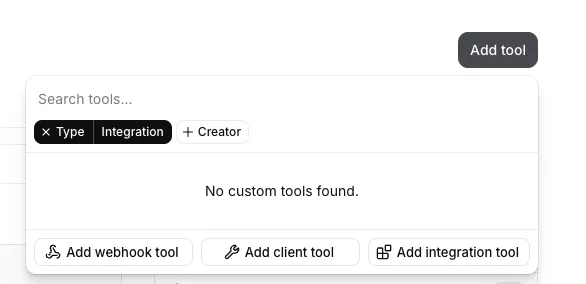
On your agent’s configuration page, click Add tool and select Add integration tool.
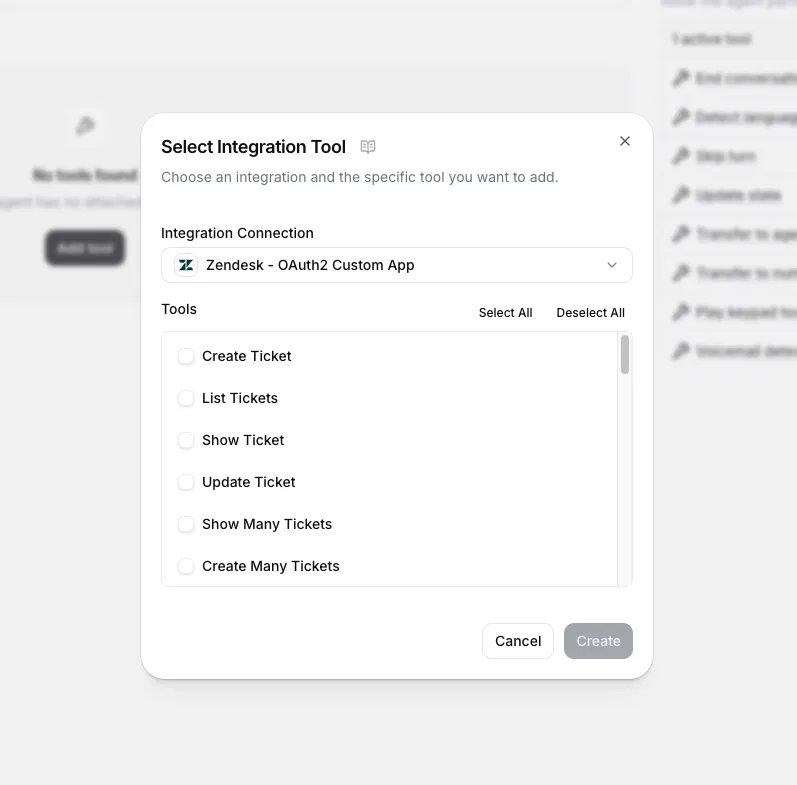
Select Zendesk tools
Choose your Zendesk connection and toggle the tools you want the agent to use. You can enable as many or as few as needed — for example, a read-only triage agent might only need search and list tools, while a full-service agent might also create and update tickets.
(Optional) Provide parameters
Each tool’s parameters are filled by the agent during the conversation based on what the caller says. You do not need to hard-code parameter values. However, you can optionally pre-fill or constrain specific parameters — for example, setting a default priority or group_id — to guide the agent’s behavior.
Legacy webhook setup
If you use the native Zendesk integration, tools are configured automatically. The steps below apply only to manual webhook setup.
The legacy integration uses three webhook tools to create the support agent. Review each tool’s configuration in the tabs below.
zendesk_get_ticket_comments
zendesk_get_resolved_tickets
zendesk_open_ticket
Name: zendesk_get_ticket_comments
Description: Retrieves the comments of a ticket.
Method: GET
URL: https://acmecorp.zendesk.com/api/v2/tickets/{ticket_id}/comments.json
Headers:
- Content-Type:
application/json - Authorization: (Secret:
zendesk_key)
Path Parameters:
- ticket_id: Extract the value from the
idfield in the get_resolved_tickets results.
Tool JSON:
Zendesk triggers
Configure Zendesk triggers to have your agent monitor and react to incoming ticket comments, providing first-line support.
Setup
Create a trigger in Zendesk
In Zendesk Admin Center, go to Objects and rules > Business rules > Triggers and click Add trigger. Configure the conditions that determine which ticket events the agent should respond to (e.g., new tickets in a specific group, ticket comments with a certain tag). Note the trigger name — you will need it in the next step.
If you cannot save the trigger because an action is missing, add a simple action like adding an “agent is processing” tag to the ticket.
Connect the trigger in ElevenLabs
On your agent’s configuration page, add a new trigger and select Zendesk Trigger. Configure the fields:
- Agent: the agent that handles incoming conversations.
- Trigger Rule Name: the name of the Zendesk trigger you created in the previous step.
- Daily Ticket Limit (optional): maximum number of tickets the agent handles per day. Leave empty for unlimited.
When you activate the trigger, ElevenLabs creates a webhook in your Zendesk account and adds it as an action to the trigger you specified. Deactivating the trigger removes the webhook and action.
Shadow mode
Enable shadow mode on a Zendesk trigger to let the agent observe and draft responses without replying to customers directly. When shadow mode is active, the agent writes its responses as internal comments on the ticket instead of public replies. Only Zendesk agents and admins can see internal comments — the end user is not notified.
Shadow mode only affects how the agent posts its responses. If the agent uses tools that modify the ticket (e.g., changing status, adding tags, or assigning the ticket), those changes still apply. To prevent unintended modifications, use a separate branch of the agent with modifying tool calls removed.
Shadow mode is useful for evaluating agent quality before going live. Review the internal comments alongside the actual support responses to compare accuracy and tone, then promote the agent to active mode once you are confident in its output.
Avoiding loops
When the agent responds to a ticket comment via the Zendesk API, that response is itself a new comment — which can re-trigger the agent and create an infinite loop. Add either of the following conditions to your Zendesk trigger to prevent this.
Exclude the service account from the trigger. Create a separate Zendesk user for the integration (e.g., ai-agent@yourcompany.com) and use this account’s credentials when connecting in ElevenLabs. Then add this condition to your Zendesk trigger:
- Current User, Is Not, <your service account>
Exclude API updates from the trigger. This filters out all updates made through the Zendesk API, regardless of which user made them:
- Ticket > Update Via, Is Not, Web Service (API)