

Sentiment analysis
Sentiment analysis helps you understand whether users are having positive, neutral, or negative conversations with an agent.
Use it to identify topics, flows, or user intents that may need attention.
Overview
Sentiment is calculated from completed conversations after the platform analyzes the transcript.
Sentiment can appear at different levels:
- Across the agent’s conversations in the selected time window.
- Within topic discovery, where sentiment is aggregated for each topic.
- Within supporting conversations, where you can review examples behind a trend.
Enable sentiment analysis
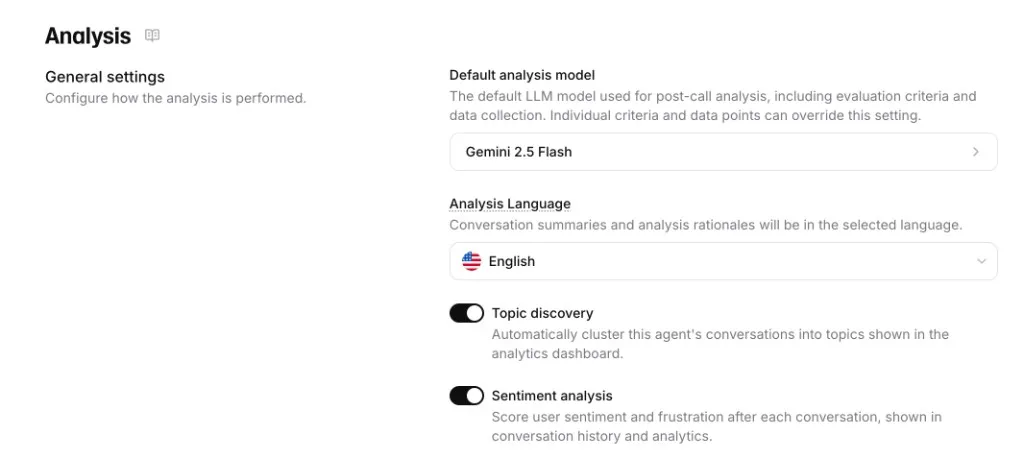
To enable sentiment analysis, open your agent’s Analysis settings and turn on Sentiment analysis.
The same settings page also includes the Topic discovery toggle, which controls whether the agent’s completed conversations are clustered into topics in Spotlight.
How to interpret sentiment
Sentiment is most useful when combined with volume and conversation review.
- High-volume topics with negative sentiment usually deserve attention first.
- Low-volume negative sentiment can still matter if it involves compliance, safety, or customer escalation.
- Neutral sentiment can indicate routine conversations or conversations where the user did not express a clear emotion.
Sentiment trajectory
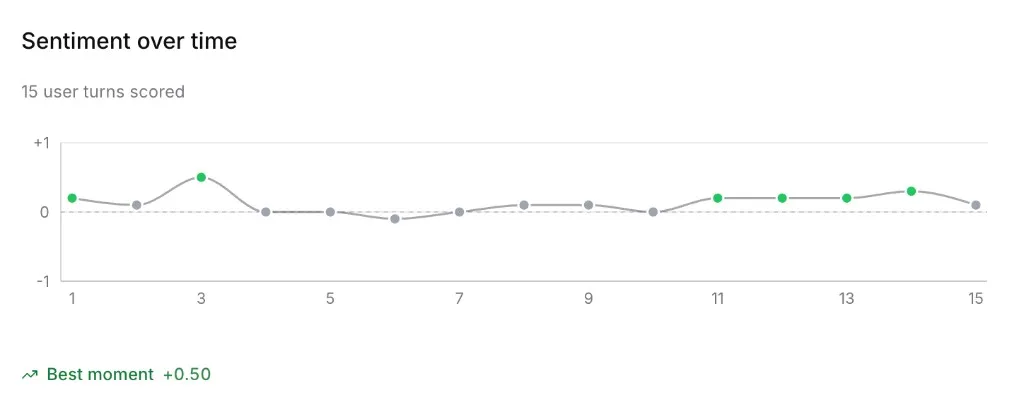
For individual conversations, sentiment analysis can show how user sentiment changes over time.
Each scored user turn is plotted on a scale from negative to positive sentiment. Use the trajectory to identify where a conversation improved, declined, or stayed neutral.
Relationship to topic discovery
Topic discovery groups similar conversations into topics. Sentiment is then aggregated across the conversations assigned to each topic.
This helps you answer questions such as:
- Which topics are users most frustrated by?
- Which topics are improving over time?
- Which high-volume topics have mostly neutral or positive sentiment?
Historical data
Historical conversations show sentiment only if sentiment analysis was generated for those conversations.
If older conversations appear in Spotlight but sentiment is unavailable, the underlying historical analysis may not exist for that period.