通话后 webhook

通话结束且分析完成后,通过 webhook 接收通知。

概述

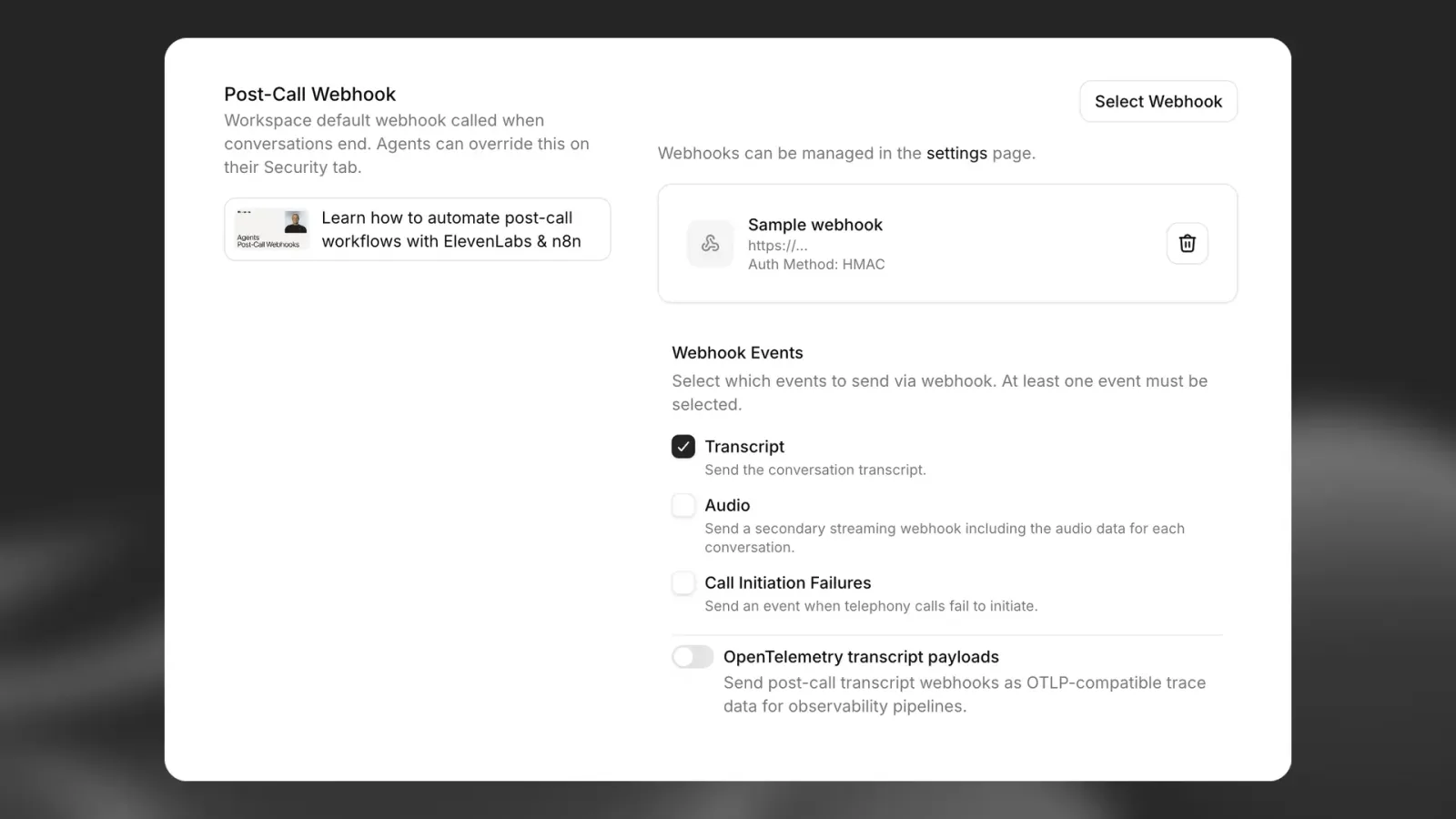
通话后 webhook 可让你在分析完成后接收通话的详细信息。启用后,ElevenLabs 会向指定端点发送 POST 请求,并附上完整的通话数据。

ElevenLabs 支持 3 种通话后 webhook:

  • 转写 webhook(post_call_transcription):包含完整对话数据,包括转写文本、分析结果和元数据
  • 音频 webhook(post_call_audio):包含精简数据,以及完整对话的 base64 编码音频
  • 通话发起失败 webhook(call_initiation_failure):包含通话发起失败尝试的信息,包括失败原因和元数据

启用通话后 webhook

可通过 ElevenAgents 设置页面 为工作区中的所有智能体启用通话后 webhook。

通话后 webhook 设置

通话后 webhook 必须返回 200 状态码才视为成功。如果 webhook 连续失败 10 次或更多,且上次成功投递距今超过 7 天,或从未成功投递过,系统会自动禁用该 webhook。

通话后 webhook 失败时可自动重试。请参阅 webhook 重试。

身份验证

监听器必须验证所有传入的 webhook。Webhook 目前支持通过 HMAC 签名进行身份验证。可按以下方式设置 HMAC 身份验证:

  • 安全存储创建 webhook 时生成的共享密钥
  • 使用 SDK 在端点中验证 ElevenLabs-Signature 请求头

JavaScript SDK 提供 constructEvent;Python SDK 提供 construct_event,并使用 rawBody、sig_header 和 secret(在 Python 中,它们不叫 payload / signature)。两者都会验证签名、验证时间戳,并解析 JSON 负载。

使用 FastAPI 的 webhook 处理程序示例:

from dotenv import load_dotenv
from fastapi import FastAPI, Request
from fastapi.responses import JSONResponse
from elevenlabs.client import ElevenLabs
from elevenlabs.errors import BadRequestError
import os
load_dotenv()
app = FastAPI()
elevenlabs = ElevenLabs(
api_key=os.getenv("ELEVENLABS_API_KEY"),
)
WEBHOOK_SECRET = os.getenv("WEBHOOK_SECRET")
@app.post("/webhook")
async def receive_message(request: Request):
payload = await request.body()
signature = request.headers.get("elevenlabs-signature")
try:
event = elevenlabs.webhooks.construct_event(
rawBody=payload.decode("utf-8"),
sig_header=signature,
secret=WEBHOOK_SECRET,
)
except BadRequestError as e:
return JSONResponse(content={"error": "Invalid signature"}, status_code=401)
# construct_event returns a dict (parsed JSON), not an object with attributes
if event.get("type") == "post_call_transcription":
print(f"Received transcription: {event.get('data')}")
return {"status": "received"}

IP 允许列表

为提高安全性,你可以将 ElevenLabs 的静态出口 IP 添加到允许列表。完整 IP 地址列表请参阅 IP 允许列表。

将 IP 允许列表与 HMAC 签名验证结合使用,可提供多层安全保障。

Webhook 响应结构

ElevenLabs 会发送 3 种不同类型的通话后 webhook,每种的数据结构各不相同:

转写 webhook(post_call_transcription)

包含完整对话数据,包括完整转写文本、分析结果和元数据。

顶层字段

字段类型说明
typestring事件类型(始终为 post_call_transcription)
dataobject使用 ConversationHistoryCommonModel 结构的对话数据
event_timestampnumber事件发生的 Unix UTC 时间

数据对象结构

data 对象包含:

字段类型说明
agent_idstring处理该通话的智能体 ID
agent_namestring对话进行时的智能体名称
conversation_idstring对话的唯一标识符
statusstring对话状态(例如,“done”)
user_idstring用户标识符(如有)
branch_idstring此对话使用的智能体分支(如适用)
version_idstring通话期间处于活动状态的智能体版本(快照)ID
environmentstring用于解析环境变量的环境
transcriptarray包含各轮对话的完整转写文本
metadataobject通话时间、费用和电话详细信息
analysisobject评估结果和对话摘要
conversation_initiation_client_dataobject配置覆盖项和动态变量
has_audioboolean对话是否有可用音频
has_user_audioboolean对话是否有可用的用户音频
has_response_audioboolean对话是否有可用的智能体回复音频

音频 webhook(post_call_audio)

包含精简数据,以及经 base64 编码的完整对话 MP3 音频。

顶层字段

字段类型说明
typestring事件类型(始终为 post_call_audio)
dataobject精简的音频数据
event_timestampnumber事件发生的 Unix UTC 时间

数据对象结构

data 对象仅包含:

字段类型说明
agent_idstring处理该通话的智能体 ID
conversation_idstring对话的唯一标识符
full_audiostring包含完整 MP3 格式对话音频的 base64 编码字符串

音频 webhook 仅包含上方列出的 3 个字段。它们不包含转写数据、 元数据、分析结果或任何其他对话详情。

通话发起失败 webhook(call_initiation_failure)

包含电话通话发起尝试的信息,包括失败原因和电话服务商元数据。

当通话因连接错误、用户拒接或用户未接听而无法发起时,会发送通话发起失败 webhook 事件。 如果通话转入语音信箱或由自动化服务接听,则不会发送通话发起失败 webhook,因为通话已 成功发起。

顶层字段

字段类型说明
typestring事件类型(始终为 call_initiation_failure)
dataobject通话发起失败数据
event_timestampnumber事件发生的 Unix UTC 时间

数据对象结构

data 对象包含:

字段类型说明
agent_idstring被分配处理该通话的智能体 ID
conversation_idstring对话的唯一标识符
failure_reasonstring失败原因(“busy”、“no-answer”、“unknown”)
metadataobject电话服务商提供的附加数据

元数据对象结构

metadata 对象的结构取决于外呼是通过 Twilio 还是 SIP 中继发起。该对象包含用于区分两者的 type 字段,以及包含服务商特定详情的 body 字段。

SIP 元数据(type: "sip"):

字段类型必填说明
typestring是服务商类型(始终为 sip)
bodyobject是SIP 特定的通话失败信息

SIP 元数据的 body 对象包含:

字段类型必填说明
from_numbernumber是发起通话一方的电话号码。
to_numbernumber是被叫方的电话号码。
sip_status_codenumber是SIP 响应状态码(例如,486 表示占线)
error_reasonstring是人类可读的错误说明
call_sidstring是SIP 通话会话标识符
twirp_codestring否如适用,Twirp 错误代码
sip_statusstring否与状态码对应的 SIP 状态文本

Twilio 元数据(type: "twilio"):

字段类型必填说明
typestring是服务商类型(始终为 twilio)
bodyobject是包含通话详情的 Twilio StatusCallback 主体,详见此处

webhook 负载示例

转写 webhook 示例

{
"type": "post_call_transcription",
"event_timestamp": 1739537297,
"data": {
"agent_id": "xyz",
"conversation_id": "abc",
"status": "done",
"user_id": "user123",
"transcript": [
{
"role": "agent",
"message": "Hey there angelo. How are you?",
"tool_calls": null,
"tool_results": null,
"feedback": null,
"time_in_call_secs": 0,
"conversation_turn_metrics": null
},
{
"role": "user",
"message": "Hey, can you tell me, like, a fun fact about 11 Labs?",
"tool_calls": null,
"tool_results": null,
"feedback": null,
"time_in_call_secs": 2,
"conversation_turn_metrics": null
},
{
"role": "agent",
"message": "I do not have access to fun facts about Eleven Labs. However, I can share some general information about the company. Eleven Labs is an AI voice technology platform that specializes in voice cloning and text-to-speech...",
"tool_calls": null,
"tool_results": null,
"feedback": null,
"time_in_call_secs": 9,
"conversation_turn_metrics": {
"convai_llm_service_ttfb": {
"elapsed_time": 0.3704247010173276
},
"convai_llm_service_ttf_sentence": {
"elapsed_time": 0.5551181449554861
}
}
}
],
"metadata": {
"start_time_unix_secs": 1739537297,
"call_duration_secs": 22,
"cost": 296,
"deletion_settings": {
"deletion_time_unix_secs": 1802609320,
"deleted_logs_at_time_unix_secs": null,
"deleted_audio_at_time_unix_secs": null,
"deleted_transcript_at_time_unix_secs": null,
"delete_transcript_and_pii": true,
"delete_audio": true
},
"feedback": {
"overall_score": null,
"likes": 0,
"dislikes": 0
},
"authorization_method": "authorization_header",
"charging": {
"dev_discount": true
},
"termination_reason": ""
},
"analysis": {
"evaluation_criteria_results": {},
"data_collection_results": {},
"call_successful": "success",
"transcript_summary": "The conversation begins with the agent asking how Angelo is, but Angelo redirects the conversation by requesting a fun fact about 11 Labs. The agent acknowledges they don't have specific fun facts about Eleven Labs but offers to provide general information about the company. They briefly describe Eleven Labs as an AI voice technology platform specializing in voice cloning and text-to-speech technology. The conversation is brief and informational, with the agent adapting to the user's request despite not having the exact information asked for."
},
"conversation_initiation_client_data": {
"conversation_config_override": {
"agent": {
"prompt": null,
"first_message": null,
"language": "en"
},
"tts": {
"voice_id": null
}
},
"custom_llm_extra_body": {},
"dynamic_variables": {
"user_name": "angelo"
},
"branch_id": null,
"environment": null
}
}
}

音频 webhook 示例

{
"type": "post_call_audio",
"event_timestamp": 1739537319,
"data": {
"agent_id": "xyz",
"conversation_id": "abc",
"full_audio": "SUQzBAAAAAAA...base64_encoded_mp3_data...AAAAAAAAAA=="
}
}

通话发起失败 webhook 示例

Twilio 元数据示例

{
"type": "call_initiation_failure",
"event_timestamp": 1759931652,
"data": {
"agent_id": "xyz",
"conversation_id": "abc",
"failure_reason": "busy",
"metadata": {
"type": "twilio",
"body": {
"Called": "+441111111111",
"ToState": "",
"CallerCountry": "US",
"Direction": "outbound-api",
"Timestamp": "Wed, 08 Oct 2025 13:54:12 +0000",
"CallbackSource": "call-progress-events",
"SipResponseCode": "487",
"CallerState": "WA",
"ToZip": "",
"SequenceNumber": "2",
"CallSid": "CA8367245817625617832576245724",
"To": "+441111111111",
"CallerZip": "98631",
"ToCountry": "GB",
"CalledZip": "",
"ApiVersion": "2010-04-01",
"CalledCity": "",
"CallStatus": "busy",
"Duration": "0",
"From": "+11111111111",
"CallDuration": "0",
"AccountSid": "AC37682153267845716245762454a",
"CalledCountry": "GB",
"CallerCity": "RAYMOND",
"ToCity": "",
"FromCountry": "US",
"Caller": "+11111111111",
"FromCity": "RAYMOND",
"CalledState": "",
"FromZip": "12345",
"FromState": "WA"
}
}
}
}

SIP 元数据示例

{
"type": "call_initiation_failure",
"event_timestamp": 1759931652,
"data": {
"agent_id": "xyz",
"conversation_id": "abc",
"failure_reason": "busy",
"metadata": {
"type": "sip",
"body": {
"from_number": "+441111111111",
"to_number": "+11111111111",
"sip_status_code": 486,
"error_reason": "INVITE failed: sip status: 486: Busy here (SIP 486)",
"call_sid": "d8e7f6a5-b4c3-4d5e-8f9a-0b1c2d3e4f5a",
"sip_status": "Busy here",
"twirp_code": "unavailable"
}
}
}
}

音频 webhook 交付

音频 webhook 与转写 webhook 分开交付,仅包含识别对话所需的关键字段和 base64 编码的音频数据。

可通过 webhook 设置中的“发送音频数据”开关启用或禁用音频 webhook。可在工作区级别(位于 ElevenAgents 设置中) 和智能体级别(位于单个智能体的 webhook 覆盖设置中)配置此设置。

流式交付

音频 webhook 会作为带有 transfer-encoding: chunked 标头的流式 HTTP 请求交付,以高效处理大型音频文件。

处理音频 webhook

由于音频 webhook 使用分块传输编码交付,需要正确处理流式数据:

import base64
import json
from aiohttp import web
async def handle_webhook(request):
# Check if this is a chunked/streaming request
if request.headers.get("transfer-encoding", "").lower() == "chunked":
# Read streaming data in chunks
chunked_body = bytearray()
while True:
chunk = await request.content.read(8192) # 8KB chunks
if not chunk:
break
chunked_body.extend(chunk)
# Parse the complete payload
request_body = json.loads(chunked_body.decode("utf-8"))
else:
# Handle regular requests
body_bytes = await request.read()
request_body = json.loads(body_bytes.decode('utf-8'))
# Process different webhook types
if request_body["type"] == "post_call_transcription":
# Handle transcription webhook with full conversation data
handle_transcription_webhook(request_body["data"])
elif request_body["type"] == "post_call_audio":
# Handle audio webhook with minimal data
handle_audio_webhook(request_body["data"])
elif request_body["type"] == "call_initiation_failure":
# Handle call initiation failure webhook
handle_call_initiation_failure_webhook(request_body["data"])
return web.json_response({"status": "ok"})
def handle_audio_webhook(data):
# Decode base64 audio data
audio_bytes = base64.b64decode(data["full_audio"])
# Save or process the audio file
conversation_id = data["conversation_id"]
with open(f"conversation_{conversation_id}.mp3", "wb") as f:
f.write(audio_bytes)
def handle_call_initiation_failure_webhook(data):
# Handle call initiation failure events
agent_id = data["agent_id"]
conversation_id = data["conversation_id"]
failure_reason = data.get("failure_reason")
metadata = data.get("metadata", {})
# Log the failure for monitoring
print(f"Call failed for agent {agent_id}, conversation {conversation_id}")
print(f"Failure reason: {failure_reason}")
# Access provider-specific metadata
provider_type = metadata.get("type")
body = metadata.get("body", {})
if provider_type == "sip":
print(f"SIP status code: {body.get('sip_status_code')}")
print(f"Error reason: {body.get('error_reason')}")
elif provider_type == "twilio":
print(f"Twilio CallSid: {body.get('CallSid')}")
print(f"Call status: {body.get('CallStatus')}")
# Update your system with the failure information
# e.g., mark lead as "call_failed" in CRM

音频 webhook 可能是大型文件,请确保 webhook 端点能够处理流式请求, 并且具有足够的内存和存储容量。音频以 MP3 格式交付。

使用场景

自动通话跟进

通话后 webhook 可用于构建在通话结束后立即触发的自动化工作流程。以下是一些实际应用:

CRM 集成

通话完成后,立即使用对话数据更新客户关系管理系统:

// Example webhook handler
app.post("/webhook/elevenlabs", async (req, res) => {
// HMAC validation code
const { data } = req.body;
// Extract key information
const userId = data.metadata.user_id;
const transcriptSummary = data.analysis.transcript_summary;
const callSuccessful = data.analysis.call_successful;
// Update CRM record
await updateCustomerRecord(userId, {
lastInteraction: new Date(),
conversationSummary: transcriptSummary,
callOutcome: callSuccessful,
fullTranscript: data.transcript,
});
res.status(200).send("Webhook received");
});

有状态对话

通过存储和检索状态,在多次交互中保持对话上下文:

  1. 通话开始时,将用户 ID 作为动态变量传入。
  2. 通话结束时,设置 webhook 端点,根据从 dynamic_variables 中提取的用户 ID 将对话数据存入数据库。
  3. 用户再次来电时,可检索此上下文,并将其作为 {{previous_topics}} 动态变量传入新对话。
  4. 这样,智能体就能“记住”之前的互动,带来流畅的体验。
// Store conversation state when call ends
app.post("/webhook/elevenlabs", async (req, res) => {
// HMAC validation code
const { data } = req.body;
const userId = data.metadata.user_id;
// Store conversation state
await db.userStates.upsert({
userId,
lastConversationId: data.conversation_id,
lastInteractionTimestamp: data.metadata.start_time_unix_secs,
conversationHistory: data.transcript,
previousTopics: extractTopics(data.analysis.transcript_summary),
});
res.status(200).send("Webhook received");
});
// When initiating a new call, retrieve and use the state
async function initiateCall(userId) {
// Get user's conversation state
const userState = await db.userStates.findOne({ userId });
// Start new conversation with context from previous calls
return await elevenlabs.startConversation({
agent_id: "xyz",
conversation_id: generateNewId(),
dynamic_variables: {
user_name: userState.name,
previous_conversation_id: userState.lastConversationId,
previous_topics: userState.previousTopics.join(", "),
},
});
}