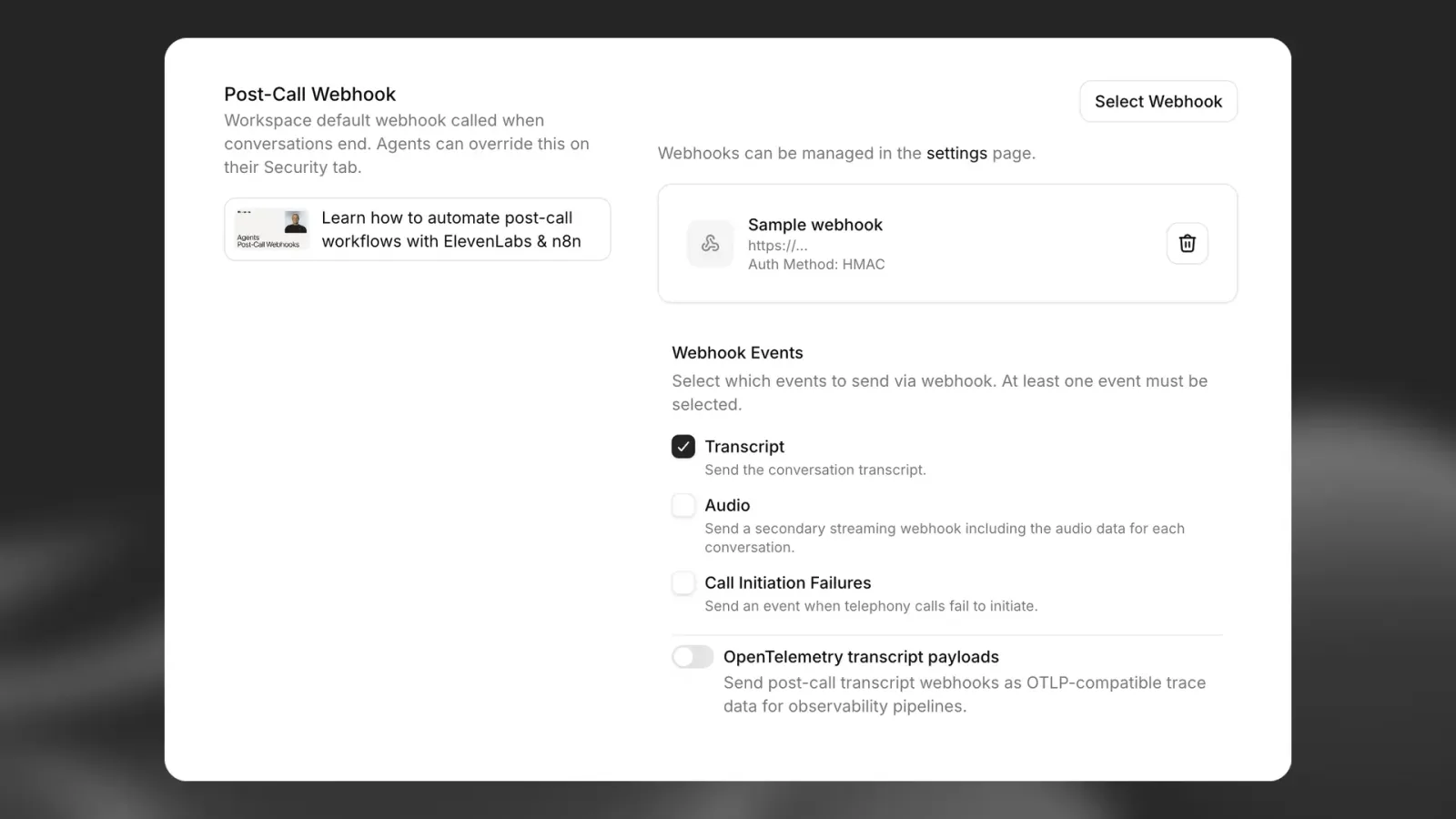
कॉल के बाद वेबहुक

वेबहुक के ज़रिए कॉल खत्म होने और विश्लेषण पूरा होने पर सूचना पाएं।

खास जानकारी

कॉल के बाद के वेबहुक आपको विश्लेषण पूरा होने के बाद कॉल की विस्तृत जानकारी पाने देते हैं। इन्हें चालू करने पर ElevenLabs, कॉल के पूरे डेटा के साथ आपके तय किए गए endpoint पर POST अनुरोध भेजेगा।

ElevenLabs तीन तरह के कॉल के बाद के वेबहुक सपोर्ट करता है:

  • ट्रांसक्रिप्शन वेबहुक (post_call_transcription): इसमें ट्रांसक्रिप्ट, विश्लेषण के नतीजे और मेटाडेटा समेत बातचीत का पूरा डेटा होता है
  • ऑडियो वेबहुक (post_call_audio): इसमें पूरी बातचीत का base64-एन्कोडेड ऑडियो और कम से कम डेटा होता है
  • कॉल शुरू करने में विफलता के वेबहुक (call_initiation_failure): इसमें विफलता के कारणों और मेटाडेटा समेत, कॉल शुरू करने के असफल प्रयासों की जानकारी होती है

कॉल के बाद के वेबहुक चालू करना

कॉल के बाद के वेबहुक को ElevenAgents के सेटिंग्स पेज से आपके workspace के सभी एजेंट्स के लिए चालू किया जा सकता है।

कॉल के बाद के वेबहुक की सेटिंग्स

सफल माने जाने के लिए, कॉल के बाद के वेबहुक को 200 status code लौटाना होगा। लगातार 10 या उससे ज़्यादा बार विफल होने पर और आखिरी सफल डिलीवरी 7 दिन से ज़्यादा पहले हुई हो या कभी सफल डिलीवरी न हुई हो, तो वेबहुक अपने-आप बंद हो जाते हैं।

विफल होने पर कॉल के बाद के वेबहुक का अपने-आप फिर से प्रयास किया जा सकता है। वेबहुक रिट्राइज़ देखें।

ऑथेंटिकेशन

लिस्नर के लिए सभी इनकमिंग वेबहुक को वैलिडेट करना ज़रूरी है। वेबहुक फ़िलहाल HMAC सिग्नेचर के ज़रिए ऑथेंटिकेशन सपोर्ट करते हैं। HMAC ऑथेंटिकेशन सेट अप करने के लिए:

  • वेबहुक बनाते समय जनरेट हुए शेयर किए गए सीक्रेट को सुरक्षित रूप से स्टोर करें
  • SDK का इस्तेमाल करके अपने एंडपॉइंट में ElevenLabs-Signature हेडर को वेरिफ़ाई करें

JavaScript SDK में constructEvent और Python SDK में rawBody, sig_header, और secret के साथ construct_event उपलब्ध है (Python में इनके नाम payload / signature नहीं हैं)। दोनों सिग्नेचर वेरिफ़ाई करते हैं, टाइमस्टैम्प वैलिडेट करते हैं और JSON पेलोड पार्स करते हैं।

FastAPI का इस्तेमाल करने वाले वेबहुक हैंडलर का उदाहरण:

from dotenv import load_dotenv
from fastapi import FastAPI, Request
from fastapi.responses import JSONResponse
from elevenlabs.client import ElevenLabs
from elevenlabs.errors import BadRequestError
import os
load_dotenv()
app = FastAPI()
elevenlabs = ElevenLabs(
api_key=os.getenv("ELEVENLABS_API_KEY"),
)
WEBHOOK_SECRET = os.getenv("WEBHOOK_SECRET")
@app.post("/webhook")
async def receive_message(request: Request):
payload = await request.body()
signature = request.headers.get("elevenlabs-signature")
try:
event = elevenlabs.webhooks.construct_event(
rawBody=payload.decode("utf-8"),
sig_header=signature,
secret=WEBHOOK_SECRET,
)
except BadRequestError as e:
return JSONResponse(content={"error": "Invalid signature"}, status_code=401)
# construct_event returns a dict (parsed JSON), not an object with attributes
if event.get("type") == "post_call_transcription":
print(f"Received transcription: {event.get('data')}")
return {"status": "received"}

IP allowlisting

अतिरिक्त सुरक्षा के लिए, आप ElevenLabs के स्टैटिक egress IPs को अपनी allowlist में जोड़ सकते हैं। IP पतों की पूरी सूची के लिए IP allowlisting देखें।

HMAC signature validation के साथ IP allowlisting इस्तेमाल करने से सुरक्षा की कई परतें मिलती हैं।

वेबहुक रिस्पॉन्स संरचना

ElevenLabs तीन अलग-अलग तरह के कॉल के बाद के वेबहुक भेजता है, जिनमें से हर एक की डेटा संरचना अलग होती है:

ट्रांसक्रिप्शन वेबहुक (post_call_transcription)

इसमें पूरे ट्रांसक्रिप्ट, विश्लेषण के नतीजों और मेटाडेटा समेत बातचीत का विस्तृत डेटा होता है।

टॉप-लेवल फ़ील्ड्स

फ़ील्डटाइपविवरण
typestringइवेंट का टाइप (हमेशा post_call_transcription)
dataobjectConversationHistoryCommonModel संरचना का इस्तेमाल करने वाला बातचीत डेटा
event_timestampnumberयह इवेंट unix time UTC में कब हुआ

डेटा ऑब्जेक्ट संरचना

data ऑब्जेक्ट में ये शामिल हैं:

फ़ील्डटाइपविवरण
agent_idstringकॉल संभालने वाले एजेंट की ID
agent_namestringबातचीत के समय एजेंट का नाम
conversation_idstringबातचीत का यूनिक आइडेंटिफ़ायर
statusstringबातचीत का स्टेटस (जैसे, “done”)
user_idstringउपलब्ध होने पर यूज़र आइडेंटिफ़ायर
branch_idstringलागू होने पर बातचीत के लिए इस्तेमाल की गई एजेंट ब्रांच
version_idstringकॉल के दौरान सक्रिय एजेंट वर्शन (snapshot) की ID
environmentstringenvironment variables को resolve करने के लिए इस्तेमाल किया गया environment
transcriptarrayटर्न्स के साथ बातचीत का पूरा ट्रांसक्रिप्ट
metadataobjectकॉल का समय, लागतें और फ़ोन विवरण
analysisobjectमूल्यांकन नतीजे और बातचीत का सारांश
conversation_initiation_client_dataobjectकॉन्फ़िगरेशन ओवरराइड और डायनामिक वेरिएबल्स
has_audiobooleanक्या बातचीत के लिए कोई ऑडियो उपलब्ध है
has_user_audiobooleanक्या बातचीत के लिए यूज़र ऑडियो उपलब्ध है
has_response_audiobooleanक्या बातचीत के लिए एजेंट रिस्पॉन्स ऑडियो उपलब्ध है

ऑडियो वेबहुक (post_call_audio)

इसमें base64-एन्कोडेड MP3 के रूप में पूरी बातचीत का ऑडियो और कम से कम डेटा होता है।

टॉप-लेवल फ़ील्ड्स

फ़ील्डटाइपविवरण
typestringइवेंट का टाइप (हमेशा post_call_audio)
dataobjectन्यूनतम ऑडियो डेटा
event_timestampnumberयह इवेंट unix time UTC में कब हुआ

डेटा ऑब्जेक्ट संरचना

data ऑब्जेक्ट में सिर्फ़ ये शामिल हैं:

फ़ील्डटाइपविवरण
agent_idstringकॉल संभालने वाले एजेंट की ID
conversation_idstringबातचीत का यूनिक आइडेंटिफ़ायर
full_audiostringMP3 फ़ॉर्मैट में बातचीत का पूरा ऑडियो रखने वाली base64-एन्कोडेड स्ट्रिंग

ऑडियो वेबहुक में सिर्फ़ ऊपर सूचीबद्ध तीन फ़ील्ड होते हैं। इनमें ट्रांसक्रिप्ट डेटा, मेटाडेटा, विश्लेषण नतीजे या बातचीत की कोई अन्य जानकारी शामिल नहीं होती।

कॉल शुरू करने में विफलता के वेबहुक (call_initiation_failure)

इसमें टेलीफोनी कॉल शुरू करने के प्रयासों की जानकारी होती है, जिसमें विफलता के कारण और टेलीफोनी-प्रोवाइडर मेटाडेटा शामिल होता है।

कनेक्शन एरर, यूज़र के कॉल अस्वीकार करने या यूज़र के कॉल न उठाने के कारण कॉल शुरू न हो पाने पर, कॉल शुरू करने में विफलता के वेबहुक इवेंट भेजे जाते हैं। अगर कॉल voicemail पर जाती है या कोई automated service कॉल उठाती है, तो कॉल शुरू करने में विफलता का वेबहुक नहीं भेजा जाता, क्योंकि कॉल सफलतापूर्वक शुरू हो चुकी थी।

टॉप-लेवल फ़ील्ड्स

फ़ील्डटाइपविवरण
typestringइवेंट का टाइप (हमेशा call_initiation_failure)
dataobjectकॉल शुरू करने में विफलता का डेटा
event_timestampnumberयह इवेंट unix time UTC में कब हुआ

डेटा ऑब्जेक्ट संरचना

data ऑब्जेक्ट में ये शामिल हैं:

फ़ील्डटाइपविवरण
agent_idstringकॉल संभालने के लिए असाइन किए गए एजेंट की ID
conversation_idstringबातचीत का यूनिक आइडेंटिफ़ायर
failure_reasonstringविफलता का कारण (“busy”, “no-answer”, “unknown”)
metadataobjectटेलीफोनी प्रोवाइडर से मिला अतिरिक्त डेटा।

मेटाडेटा ऑब्जेक्ट संरचना

metadata ऑब्जेक्ट की संरचना इस बात पर निर्भर करती है कि outbound कॉल Twilio के ज़रिए की गई थी या SIP trunking के ज़रिए। ऑब्जेक्ट में दोनों के बीच अंतर बताने वाला type फ़ील्ड और प्रोवाइडर की खास जानकारी वाला body फ़ील्ड होता है।

SIP मेटाडेटा (type: "sip"):

फ़ील्डटाइपज़रूरीविवरण
typestringहाँप्रोवाइडर टाइप (हमेशा sip)
bodyobjectहाँSIP-विशिष्ट कॉल विफलता की जानकारी

SIP मेटाडेटा के लिए body ऑब्जेक्ट में ये शामिल हैं:

फ़ील्डटाइपज़रूरीविवरण
from_numbernumberहाँकॉल शुरू करने वाले पक्ष का फ़ोन नंबर।
to_numbernumberहाँजिस पक्ष को कॉल की गई उसका फ़ोन नंबर।
sip_status_codenumberहाँSIP रिस्पॉन्स status code (जैसे, busy के लिए 486)
error_reasonstringहाँइंसानों के पढ़ने योग्य एरर विवरण
call_sidstringहाँSIP कॉल सेशन आइडेंटिफ़ायर
twirp_codestringनहींलागू होने पर Twirp error code
sip_statusstringनहींstatus code के अनुरूप SIP स्टेटस टेक्स्ट

Twilio मेटाडेटा (type: "twilio"):

फ़ील्डटाइपज़रूरीविवरण
typestringहाँप्रोवाइडर टाइप (हमेशा twilio)
bodyobjectहाँकॉल विवरण वाला Twilio StatusCallback body, जिसका दस्तावेज़ यहाँ है

वेबहुक पेलोड के उदाहरण

ट्रांसक्रिप्शन वेबहुक का उदाहरण

{
"type": "post_call_transcription",
"event_timestamp": 1739537297,
"data": {
"agent_id": "xyz",
"conversation_id": "abc",
"status": "done",
"user_id": "user123",
"transcript": [
{
"role": "agent",
"message": "Hey there angelo. How are you?",
"tool_calls": null,
"tool_results": null,
"feedback": null,
"time_in_call_secs": 0,
"conversation_turn_metrics": null
},
{
"role": "user",
"message": "Hey, can you tell me, like, a fun fact about 11 Labs?",
"tool_calls": null,
"tool_results": null,
"feedback": null,
"time_in_call_secs": 2,
"conversation_turn_metrics": null
},
{
"role": "agent",
"message": "I do not have access to fun facts about Eleven Labs. However, I can share some general information about the company. Eleven Labs is an AI voice technology platform that specializes in voice cloning and text-to-speech...",
"tool_calls": null,
"tool_results": null,
"feedback": null,
"time_in_call_secs": 9,
"conversation_turn_metrics": {
"convai_llm_service_ttfb": {
"elapsed_time": 0.3704247010173276
},
"convai_llm_service_ttf_sentence": {
"elapsed_time": 0.5551181449554861
}
}
}
],
"metadata": {
"start_time_unix_secs": 1739537297,
"call_duration_secs": 22,
"cost": 296,
"deletion_settings": {
"deletion_time_unix_secs": 1802609320,
"deleted_logs_at_time_unix_secs": null,
"deleted_audio_at_time_unix_secs": null,
"deleted_transcript_at_time_unix_secs": null,
"delete_transcript_and_pii": true,
"delete_audio": true
},
"feedback": {
"overall_score": null,
"likes": 0,
"dislikes": 0
},
"authorization_method": "authorization_header",
"charging": {
"dev_discount": true
},
"termination_reason": ""
},
"analysis": {
"evaluation_criteria_results": {},
"data_collection_results": {},
"call_successful": "success",
"transcript_summary": "The conversation begins with the agent asking how Angelo is, but Angelo redirects the conversation by requesting a fun fact about 11 Labs. The agent acknowledges they don't have specific fun facts about Eleven Labs but offers to provide general information about the company. They briefly describe Eleven Labs as an AI voice technology platform specializing in voice cloning and text-to-speech technology. The conversation is brief and informational, with the agent adapting to the user's request despite not having the exact information asked for."
},
"conversation_initiation_client_data": {
"conversation_config_override": {
"agent": {
"prompt": null,
"first_message": null,
"language": "en"
},
"tts": {
"voice_id": null
}
},
"custom_llm_extra_body": {},
"dynamic_variables": {
"user_name": "angelo"
},
"branch_id": null,
"environment": null
}
}
}

ऑडियो वेबहुक का उदाहरण

{
"type": "post_call_audio",
"event_timestamp": 1739537319,
"data": {
"agent_id": "xyz",
"conversation_id": "abc",
"full_audio": "SUQzBAAAAAAA...base64_encoded_mp3_data...AAAAAAAAAA=="
}
}

कॉल शुरू करने में विफलता के वेबहुक के उदाहरण

Twilio मेटाडेटा का उदाहरण

{
"type": "call_initiation_failure",
"event_timestamp": 1759931652,
"data": {
"agent_id": "xyz",
"conversation_id": "abc",
"failure_reason": "busy",
"metadata": {
"type": "twilio",
"body": {
"Called": "+441111111111",
"ToState": "",
"CallerCountry": "US",
"Direction": "outbound-api",
"Timestamp": "Wed, 08 Oct 2025 13:54:12 +0000",
"CallbackSource": "call-progress-events",
"SipResponseCode": "487",
"CallerState": "WA",
"ToZip": "",
"SequenceNumber": "2",
"CallSid": "CA8367245817625617832576245724",
"To": "+441111111111",
"CallerZip": "98631",
"ToCountry": "GB",
"CalledZip": "",
"ApiVersion": "2010-04-01",
"CalledCity": "",
"CallStatus": "busy",
"Duration": "0",
"From": "+11111111111",
"CallDuration": "0",
"AccountSid": "AC37682153267845716245762454a",
"CalledCountry": "GB",
"CallerCity": "RAYMOND",
"ToCity": "",
"FromCountry": "US",
"Caller": "+11111111111",
"FromCity": "RAYMOND",
"CalledState": "",
"FromZip": "12345",
"FromState": "WA"
}
}
}
}

SIP मेटाडेटा का उदाहरण

{
"type": "call_initiation_failure",
"event_timestamp": 1759931652,
"data": {
"agent_id": "xyz",
"conversation_id": "abc",
"failure_reason": "busy",
"metadata": {
"type": "sip",
"body": {
"from_number": "+441111111111",
"to_number": "+11111111111",
"sip_status_code": 486,
"error_reason": "INVITE failed: sip status: 486: Busy here (SIP 486)",
"call_sid": "d8e7f6a5-b4c3-4d5e-8f9a-0b1c2d3e4f5a",
"sip_status": "Busy here",
"twirp_code": "unavailable"
}
}
}
}

ऑडियो वेबहुक डिलीवरी

ऑडियो वेबहुक, ट्रांसक्रिप्शन वेबहुक से अलग डिलीवर किए जाते हैं और इनमें बातचीत की पहचान के लिए ज़रूरी फ़ील्ड के साथ base64-एन्कोडेड ऑडियो डेटा ही होता है।

ऑडियो वेबहुक को अपनी वेबहुक सेटिंग्स में “Send audio data” टॉगल से सक्षम या अक्षम किया जा सकता है। यह सेटिंग वर्कस्पेस स्तर पर (ElevenAgents सेटिंग्स में) और एजेंट स्तर पर (अलग-अलग एजेंट वेबहुक ओवरराइड में) कॉन्फ़िगर की जा सकती है।

स्ट्रीमिंग डिलीवरी

बड़ी ऑडियो फ़ाइलों को कुशलता से संभालने के लिए ऑडियो वेबहुक transfer-encoding: chunked हेडर के साथ स्ट्रीमिंग HTTP अनुरोधों के रूप में डिलीवर किए जाते हैं।

ऑडियो वेबहुक प्रोसेस करना

चूंकि ऑडियो वेबहुक chunked transfer encoding के ज़रिए डिलीवर किए जाते हैं, इसलिए आपको स्ट्रीमिंग डेटा को सही तरीके से संभालना होगा:

import base64
import json
from aiohttp import web
async def handle_webhook(request):
# Check if this is a chunked/streaming request
if request.headers.get("transfer-encoding", "").lower() == "chunked":
# Read streaming data in chunks
chunked_body = bytearray()
while True:
chunk = await request.content.read(8192) # 8KB chunks
if not chunk:
break
chunked_body.extend(chunk)
# Parse the complete payload
request_body = json.loads(chunked_body.decode("utf-8"))
else:
# Handle regular requests
body_bytes = await request.read()
request_body = json.loads(body_bytes.decode('utf-8'))
# Process different webhook types
if request_body["type"] == "post_call_transcription":
# Handle transcription webhook with full conversation data
handle_transcription_webhook(request_body["data"])
elif request_body["type"] == "post_call_audio":
# Handle audio webhook with minimal data
handle_audio_webhook(request_body["data"])
elif request_body["type"] == "call_initiation_failure":
# Handle call initiation failure webhook
handle_call_initiation_failure_webhook(request_body["data"])
return web.json_response({"status": "ok"})
def handle_audio_webhook(data):
# Decode base64 audio data
audio_bytes = base64.b64decode(data["full_audio"])
# Save or process the audio file
conversation_id = data["conversation_id"]
with open(f"conversation_{conversation_id}.mp3", "wb") as f:
f.write(audio_bytes)
def handle_call_initiation_failure_webhook(data):
# Handle call initiation failure events
agent_id = data["agent_id"]
conversation_id = data["conversation_id"]
failure_reason = data.get("failure_reason")
metadata = data.get("metadata", {})
# Log the failure for monitoring
print(f"Call failed for agent {agent_id}, conversation {conversation_id}")
print(f"Failure reason: {failure_reason}")
# Access provider-specific metadata
provider_type = metadata.get("type")
body = metadata.get("body", {})
if provider_type == "sip":
print(f"SIP status code: {body.get('sip_status_code')}")
print(f"Error reason: {body.get('error_reason')}")
elif provider_type == "twilio":
print(f"Twilio CallSid: {body.get('CallSid')}")
print(f"Call status: {body.get('CallStatus')}")
# Update your system with the failure information
# e.g., mark lead as "call_failed" in CRM

ऑडियो वेबहुक बड़ी फ़ाइलें हो सकती हैं, इसलिए सुनिश्चित करें कि आपका वेबहुक एंडपॉइंट स्ट्रीमिंग अनुरोधों को संभाल सकता है और उसके पास पर्याप्त मेमोरी/स्टोरेज क्षमता है। ऑडियो MP3 फ़ॉर्मैट में डिलीवर किया जाता है।

उपयोग के मामले

ऑटोमेटेड कॉल फ़ॉलो-अप

पोस्ट-कॉल वेबहुक आपको ऐसे ऑटोमेटेड वर्कफ़्लो बनाने देते हैं जो कॉल खत्म होते ही ट्रिगर हो जाते हैं। इनके कुछ व्यावहारिक उपयोग ये हैं:

CRM इंटीग्रेशन

कॉल पूरी होते ही बातचीत के डेटा से अपने कस्टमर रिलेशनशिप मैनेजमेंट सिस्टम को अपडेट करें:

// Example webhook handler
app.post("/webhook/elevenlabs", async (req, res) => {
// HMAC validation code
const { data } = req.body;
// Extract key information
const userId = data.metadata.user_id;
const transcriptSummary = data.analysis.transcript_summary;
const callSuccessful = data.analysis.call_successful;
// Update CRM record
await updateCustomerRecord(userId, {
lastInteraction: new Date(),
conversationSummary: transcriptSummary,
callOutcome: callSuccessful,
fullTranscript: data.transcript,
});
res.status(200).send("Webhook received");
});

स्टेटफुल बातचीत

स्टेट को स्टोर और रिट्रीव करके, कई इंटरैक्शन में बातचीत का संदर्भ बनाए रखें:

  1. कॉल शुरू होने पर, अपना यूज़र आईडी dynamic variable के रूप में पास करें।
  2. कॉल खत्म होने पर, dynamic_variables से निकाले गए यूज़र आईडी के आधार पर बातचीत का डेटा अपने डेटाबेस में स्टोर करने के लिए अपना वेबहुक एंडपॉइंट सेट अप करें।
  3. जब यूज़र दोबारा कॉल करता है, तो आप इस संदर्भ को रिट्रीव करके नई बातचीत में {{previous_topics}} dynamic variable में पास कर सकते हैं।
  4. इससे एक सहज अनुभव बनता है, जिसमें एजेंट पिछले इंटरैक्शन को “याद” रखता है
// Store conversation state when call ends
app.post("/webhook/elevenlabs", async (req, res) => {
// HMAC validation code
const { data } = req.body;
const userId = data.metadata.user_id;
// Store conversation state
await db.userStates.upsert({
userId,
lastConversationId: data.conversation_id,
lastInteractionTimestamp: data.metadata.start_time_unix_secs,
conversationHistory: data.transcript,
previousTopics: extractTopics(data.analysis.transcript_summary),
});
res.status(200).send("Webhook received");
});
// When initiating a new call, retrieve and use the state
async function initiateCall(userId) {
// Get user's conversation state
const userState = await db.userStates.findOne({ userId });
// Start new conversation with context from previous calls
return await elevenlabs.startConversation({
agent_id: "xyz",
conversation_id: generateNewId(),
dynamic_variables: {
user_name: userState.name,
previous_conversation_id: userState.lastConversationId,
previous_topics: userState.previousTopics.join(", "),
},
});
}