ナビゲーションにスキップ

通話後Webhook

通話の終了と分析完了をWebhookで通知します。

概要

通話後Webhookを使用すると、分析完了後に通話に関する詳細情報を受け取れます。有効にすると、ElevenLabsは包括的な通話データを含むPOSTリクエストを指定したエンドポイントに送信します。

ElevenLabsは、次の3種類の通話後Webhookに対応しています。

  • 文字起こしWebhook(post_call_transcription):文字起こし、分析結果、メタデータを含む完全な会話データ
  • オーディオWebhook(post_call_audio):会話全体のbase64エンコードされたオーディオを含む最小限のデータ
  • 通話開始失敗Webhook(call_initiation_failure):失敗理由やメタデータを含む、通話開始に失敗した試行に関する情報

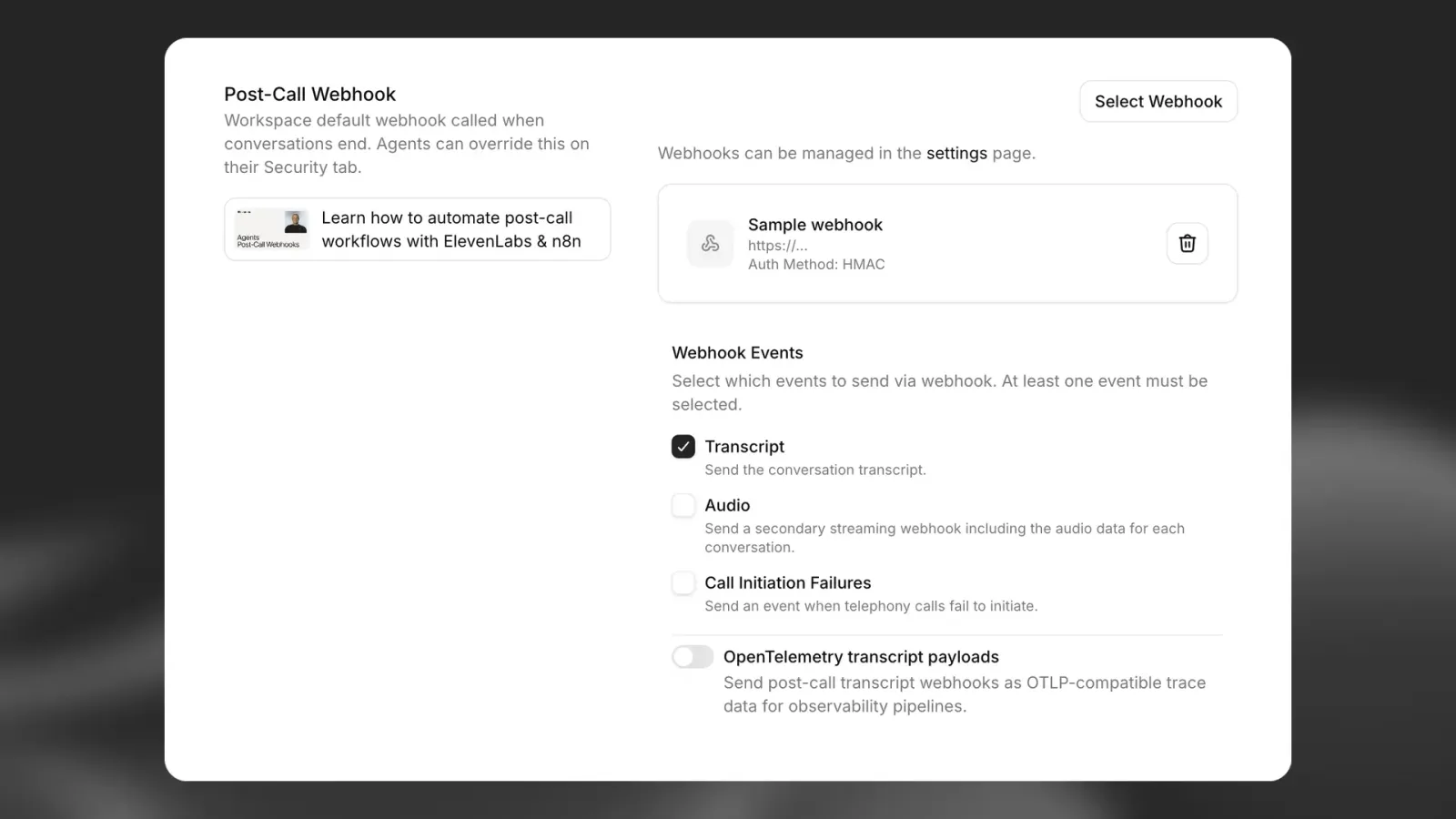
通話後Webhookを有効にする

通話後Webhookは、ElevenAgentsの設定ページからワークスペース内のすべてのエージェントに対して有効にできます。

通話後Webhook設定

通話後Webhookは、成功とみなされるために200ステータスコードを返す必要があります。連続して10回以上失敗し、最後の正常な配信から7日以上経過している場合、または正常に配信されたことが一度もない場合、繰り返し失敗するWebhookは自動的に無効になります。

通話後Webhookは失敗時に自動で再試行できます。Webhookの再試行を参照してください。

認証

受信側は、すべての受信Webhookを検証することが重要です。Webhookは現在、HMAC署名による認証に対応しています。HMAC認証は次の手順で設定します。

  • Webhookの作成時に生成された共有シークレットを安全に保存する
  • SDKを使用してエンドポイントでElevenLabs-Signatureヘッダーを検証する

JavaScript SDKではconstructEventを、Python SDKでは**rawBody、sig_header、secret**を指定するconstruct_eventを利用できます(Pythonではpayload/signatureという名前ではありません)。どちらも署名の検証、タイムスタンプの検証、JSONペイロードの解析を行います。

FastAPIを使用したWebhookハンドラーの例:

from dotenv import load_dotenv
from fastapi import FastAPI, Request
from fastapi.responses import JSONResponse
from elevenlabs.client import ElevenLabs
from elevenlabs.errors import BadRequestError
import os
load_dotenv()
app = FastAPI()
elevenlabs = ElevenLabs(
api_key=os.getenv("ELEVENLABS_API_KEY"),
)
WEBHOOK_SECRET = os.getenv("WEBHOOK_SECRET")
@app.post("/webhook")
async def receive_message(request: Request):
payload = await request.body()
signature = request.headers.get("elevenlabs-signature")
try:
event = elevenlabs.webhooks.construct_event(
rawBody=payload.decode("utf-8"),
sig_header=signature,
secret=WEBHOOK_SECRET,
)
except BadRequestError as e:
return JSONResponse(content={"error": "Invalid signature"}, status_code=401)
# construct_event returns a dict (parsed JSON), not an object with attributes
if event.get("type") == "post_call_transcription":
print(f"Received transcription: {event.get('data')}")
return {"status": "received"}

IP許可リスト

セキュリティを強化するために、ElevenLabsの静的送信IPを許可リストに追加できます。IPアドレスの完全な一覧は、IP許可リストを参照してください。

IP許可リストとHMAC署名検証を組み合わせることで、多層的なセキュリティを実現できます。

Webhookレスポンスの構造

ElevenLabsは、データ構造がそれぞれ異なる3種類の通話後Webhookを送信します:

文字起こしWebhook(post_call_transcription)

完全な文字起こし、分析結果、メタデータを含む包括的な会話データです。

トップレベルのフィールド

フィールド型説明
typestringイベントの種類(常にpost_call_transcription)
dataobjectConversationHistoryCommonModel構造を使用した会話データ
event_timestampnumberこのイベントが発生したUTCのUnix時刻

データオブジェクトの構造

dataオブジェクトには以下が含まれます:

フィールド型説明
agent_idstring通話を処理したエージェントのID
agent_namestring会話時点でのエージェント名
conversation_idstring会話の一意の識別子
statusstring会話のステータス(例:“done”)
user_idstring利用可能な場合のユーザー識別子
branch_idstring該当する場合、会話で使用されたエージェントブランチ
version_idstring通話中にアクティブだったエージェントバージョン(スナップショット)のID
environmentstring環境変数の解決に使用した環境
transcriptarrayターンを含む完全な会話の文字起こし
metadataobject通話のタイミング、コスト、電話の詳細
analysisobject評価結果と会話の要約
conversation_initiation_client_dataobject設定の上書きと動的変数
has_audioboolean会話で利用可能なオーディオがあるかどうか
has_user_audioboolean会話でユーザーのオーディオを利用できるかどうか
has_response_audioboolean会話でエージェントの応答オーディオを利用できるかどうか

オーディオWebhook(post_call_audio)

会話全体のオーディオをBase64エンコードしたMP3を含む、最小限のデータです。

トップレベルのフィールド

フィールド型説明
typestringイベントの種類(常にpost_call_audio)
dataobject最小限のオーディオデータ
event_timestampnumberこのイベントが発生したUTCのUnix時刻

データオブジェクトの構造

dataオブジェクトには次の項目のみが含まれます:

フィールド型説明
agent_idstring通話を処理したエージェントのID
conversation_idstring会話の一意の識別子
full_audiostringMP3形式の会話全体のオーディオを含むBase64エンコード文字列

オーディオWebhookには、上記の3つのフィールドのみが含まれます。文字起こしデータ、 メタデータ、分析結果、その他の会話の詳細は含まれません。

通話開始失敗Webhook(call_initiation_failure)

失敗の理由や通信プロバイダーのメタデータなど、電話通話の開始試行に関する情報が含まれます。

通話開始失敗Webhookイベントは、接続エラー、ユーザーによる通話の拒否、またはユーザーが通話に応答しなかったために 通話を開始できなかった場合に送信されます。通話が留守番電話につながった場合、または自動サービスが 応答した場合は、通話は正常に開始されているため、通話開始失敗Webhookは送信されません。

トップレベルのフィールド

フィールド型説明
typestringイベントの種類(常にcall_initiation_failure)
dataobject通話開始失敗データ
event_timestampnumberこのイベントが発生したUTCのUnix時刻

データオブジェクトの構造

dataオブジェクトには以下が含まれます:

フィールド型説明
agent_idstring通話の処理に割り当てられたエージェントのID
conversation_idstring会話の一意の識別子
failure_reasonstring失敗理由(“busy”、“no-answer”、“unknown”)
metadataobject通信プロバイダーから提供される追加データ

メタデータオブジェクトの構造

metadataオブジェクトの構造は、発信通話がTwilio経由かSIPトランキング経由かによって異なります。このオブジェクトには、両者を区別するtypeフィールドと、プロバイダー固有の詳細を含むbodyフィールドがあります。

SIPメタデータ(type: "sip"):

フィールド型必須説明
typestringはいプロバイダーの種類(常にsip)
bodyobjectはいSIP固有の通話失敗情報

SIPメタデータのbodyオブジェクトには以下が含まれます:

フィールド型必須説明
from_numbernumberはい通話を開始した相手の電話番号
to_numbernumberはい着信側の電話番号
sip_status_codenumberはいSIPレスポンスのステータスコード(例:話し中の場合は486)
error_reasonstringはい人が読み取れるエラーの説明
call_sidstringはいSIP通話セッション識別子
twirp_codestringいいえ該当する場合のTwirpエラーコード
sip_statusstringいいえステータスコードに対応するSIPステータステキスト

Twilioメタデータ(type: "twilio"):

フィールド型必須説明
typestringはいプロバイダーの種類(常にtwilio)
bodyobjectはい通話の詳細を含むTwilio StatusCallbackの本文。詳細はこちら

Webhookペイロードの例

文字起こしWebhookの例

{
"type": "post_call_transcription",
"event_timestamp": 1739537297,
"data": {
"agent_id": "xyz",
"conversation_id": "abc",
"status": "done",
"user_id": "user123",
"transcript": [
{
"role": "agent",
"message": "Hey there angelo. How are you?",
"tool_calls": null,
"tool_results": null,
"feedback": null,
"time_in_call_secs": 0,
"conversation_turn_metrics": null
},
{
"role": "user",
"message": "Hey, can you tell me, like, a fun fact about 11 Labs?",
"tool_calls": null,
"tool_results": null,
"feedback": null,
"time_in_call_secs": 2,
"conversation_turn_metrics": null
},
{
"role": "agent",
"message": "I do not have access to fun facts about Eleven Labs. However, I can share some general information about the company. Eleven Labs is an AI voice technology platform that specializes in voice cloning and text-to-speech...",
"tool_calls": null,
"tool_results": null,
"feedback": null,
"time_in_call_secs": 9,
"conversation_turn_metrics": {
"convai_llm_service_ttfb": {
"elapsed_time": 0.3704247010173276
},
"convai_llm_service_ttf_sentence": {
"elapsed_time": 0.5551181449554861
}
}
}
],
"metadata": {
"start_time_unix_secs": 1739537297,
"call_duration_secs": 22,
"cost": 296,
"deletion_settings": {
"deletion_time_unix_secs": 1802609320,
"deleted_logs_at_time_unix_secs": null,
"deleted_audio_at_time_unix_secs": null,
"deleted_transcript_at_time_unix_secs": null,
"delete_transcript_and_pii": true,
"delete_audio": true
},
"feedback": {
"overall_score": null,
"likes": 0,
"dislikes": 0
},
"authorization_method": "authorization_header",
"charging": {
"dev_discount": true
},
"termination_reason": ""
},
"analysis": {
"evaluation_criteria_results": {},
"data_collection_results": {},
"call_successful": "success",
"transcript_summary": "The conversation begins with the agent asking how Angelo is, but Angelo redirects the conversation by requesting a fun fact about 11 Labs. The agent acknowledges they don't have specific fun facts about Eleven Labs but offers to provide general information about the company. They briefly describe Eleven Labs as an AI voice technology platform specializing in voice cloning and text-to-speech technology. The conversation is brief and informational, with the agent adapting to the user's request despite not having the exact information asked for."
},
"conversation_initiation_client_data": {
"conversation_config_override": {
"agent": {
"prompt": null,
"first_message": null,
"language": "en"
},
"tts": {
"voice_id": null
}
},
"custom_llm_extra_body": {},
"dynamic_variables": {
"user_name": "angelo"
},
"branch_id": null,
"environment": null
}
}
}

オーディオWebhookの例

{
"type": "post_call_audio",
"event_timestamp": 1739537319,
"data": {
"agent_id": "xyz",
"conversation_id": "abc",
"full_audio": "SUQzBAAAAAAA...base64_encoded_mp3_data...AAAAAAAAAA=="
}
}

通話開始失敗Webhookの例

Twilioメタデータの例

{
"type": "call_initiation_failure",
"event_timestamp": 1759931652,
"data": {
"agent_id": "xyz",
"conversation_id": "abc",
"failure_reason": "busy",
"metadata": {
"type": "twilio",
"body": {
"Called": "+441111111111",
"ToState": "",
"CallerCountry": "US",
"Direction": "outbound-api",
"Timestamp": "Wed, 08 Oct 2025 13:54:12 +0000",
"CallbackSource": "call-progress-events",
"SipResponseCode": "487",
"CallerState": "WA",
"ToZip": "",
"SequenceNumber": "2",
"CallSid": "CA8367245817625617832576245724",
"To": "+441111111111",
"CallerZip": "98631",
"ToCountry": "GB",
"CalledZip": "",
"ApiVersion": "2010-04-01",
"CalledCity": "",
"CallStatus": "busy",
"Duration": "0",
"From": "+11111111111",
"CallDuration": "0",
"AccountSid": "AC37682153267845716245762454a",
"CalledCountry": "GB",
"CallerCity": "RAYMOND",
"ToCity": "",
"FromCountry": "US",
"Caller": "+11111111111",
"FromCity": "RAYMOND",
"CalledState": "",
"FromZip": "12345",
"FromState": "WA"
}
}
}
}

SIPメタデータの例

{
"type": "call_initiation_failure",
"event_timestamp": 1759931652,
"data": {
"agent_id": "xyz",
"conversation_id": "abc",
"failure_reason": "busy",
"metadata": {
"type": "sip",
"body": {
"from_number": "+441111111111",
"to_number": "+11111111111",
"sip_status_code": 486,
"error_reason": "INVITE failed: sip status: 486: Busy here (SIP 486)",
"call_sid": "d8e7f6a5-b4c3-4d5e-8f9a-0b1c2d3e4f5a",
"sip_status": "Busy here",
"twirp_code": "unavailable"
}
}
}
}

オーディオWebhookの配信

オーディオWebhookは文字起こしWebhookとは別に配信され、会話を識別するために必要な基本フィールドと、Base64エンコードされたオーディオデータのみを含みます。

オーディオWebhookは、Webhook設定の「オーディオデータを送信」トグルで有効または無効にできます。 この設定は、ワークスペースレベル(ElevenAgents設定内)と、エージェントレベル(個々のエージェントのWebhook上書き設定内)の 両方で構成できます。

ストリーミング配信

大きなオーディオファイルを効率的に処理するため、オーディオWebhookはtransfer-encoding: chunkedヘッダーを使用するストリーミングHTTPリクエストとして配信されます。各リクエストは5分後にタイムアウトします。

再試行

Webhookで再試行を有効にすると、失敗したオーディオ配信は文字起こしWebhookと同じスケジュールで再試行されます。再試行では完全なオーディオペイロードが再送されるため、conversation_idで重複を除外してください。スケジュール、再試行可能なエラー、オーディオサイズの上限については、Webhookの再試行を参照してください。

オーディオWebhookの処理

オーディオWebhookはチャンク転送エンコーディングで配信されるため、ストリーミングデータを適切に処理する必要があります:

import base64
import json
from aiohttp import web
async def handle_webhook(request):
# Check if this is a chunked/streaming request
if request.headers.get("transfer-encoding", "").lower() == "chunked":
# Read streaming data in chunks
chunked_body = bytearray()
while True:
chunk = await request.content.read(8192) # 8KB chunks
if not chunk:
break
chunked_body.extend(chunk)
# Parse the complete payload
request_body = json.loads(chunked_body.decode("utf-8"))
else:
# Handle regular requests
body_bytes = await request.read()
request_body = json.loads(body_bytes.decode('utf-8'))
# Process different webhook types
if request_body["type"] == "post_call_transcription":
# Handle transcription webhook with full conversation data
handle_transcription_webhook(request_body["data"])
elif request_body["type"] == "post_call_audio":
# Handle audio webhook with minimal data
handle_audio_webhook(request_body["data"])
elif request_body["type"] == "call_initiation_failure":
# Handle call initiation failure webhook
handle_call_initiation_failure_webhook(request_body["data"])
return web.json_response({"status": "ok"})
def handle_audio_webhook(data):
# Decode base64 audio data
audio_bytes = base64.b64decode(data["full_audio"])
# Save or process the audio file
conversation_id = data["conversation_id"]
with open(f"conversation_{conversation_id}.mp3", "wb") as f:
f.write(audio_bytes)
def handle_call_initiation_failure_webhook(data):
# Handle call initiation failure events
agent_id = data["agent_id"]
conversation_id = data["conversation_id"]
failure_reason = data.get("failure_reason")
metadata = data.get("metadata", {})
# Log the failure for monitoring
print(f"Call failed for agent {agent_id}, conversation {conversation_id}")
print(f"Failure reason: {failure_reason}")
# Access provider-specific metadata
provider_type = metadata.get("type")
body = metadata.get("body", {})
if provider_type == "sip":
print(f"SIP status code: {body.get('sip_status_code')}")
print(f"Error reason: {body.get('error_reason')}")
elif provider_type == "twilio":
print(f"Twilio CallSid: {body.get('CallSid')}")
print(f"Call status: {body.get('CallStatus')}")
# Update your system with the failure information
# e.g., mark lead as "call_failed" in CRM

オーディオWebhookは大きなファイルになる場合があるため、Webhookエンドポイントがストリーミングリクエストを処理でき、 十分なメモリ/ストレージ容量を備えていることを確認してください。オーディオはMP3形式で配信されます。

ユースケース

通話後の自動フォローアップ

通話後Webhookを使用すると、通話終了直後にトリガーされる自動ワークフローを構築できます。実用的な活用例をいくつか紹介します:

CRMインテグレーション

通話が完了するとすぐに、会話データで顧客関係管理システムを更新します:

// Example webhook handler
app.post("/webhook/elevenlabs", async (req, res) => {
// HMAC validation code
const { data } = req.body;
// Extract key information
const userId = data.metadata.user_id;
const transcriptSummary = data.analysis.transcript_summary;
const callSuccessful = data.analysis.call_successful;
// Update CRM record
await updateCustomerRecord(userId, {
lastInteraction: new Date(),
conversationSummary: transcriptSummary,
callOutcome: callSuccessful,
fullTranscript: data.transcript,
});
res.status(200).send("Webhook received");
});

ステートフルな会話

状態を保存・取得することで、複数回のやり取りにわたって会話コンテキストを維持します:

  1. 通話開始時に、ユーザーIDを動的変数として渡します。
  2. 通話終了時に、dynamic_variablesから抽出したユーザーIDに基づいて会話データをデータベースに保存するよう、Webhookエンドポイントを設定します。
  3. ユーザーが再度通話した際に、このコンテキストを取得し、{{previous_topics}}動的変数として新しい会話に渡すことができます。
  4. これにより、エージェントが以前のやり取りを「記憶」しているようなシームレスな体験を実現できます。
// Store conversation state when call ends
app.post("/webhook/elevenlabs", async (req, res) => {
// HMAC validation code
const { data } = req.body;
const userId = data.metadata.user_id;
// Store conversation state
await db.userStates.upsert({
userId,
lastConversationId: data.conversation_id,
lastInteractionTimestamp: data.metadata.start_time_unix_secs,
conversationHistory: data.transcript,
previousTopics: extractTopics(data.analysis.transcript_summary),
});
res.status(200).send("Webhook received");
});
// When initiating a new call, retrieve and use the state
async function initiateCall(userId) {
// Get user's conversation state
const userState = await db.userStates.findOne({ userId });
// Start new conversation with context from previous calls
return await elevenlabs.startConversation({
agent_id: "xyz",
conversation_id: generateNewId(),
dynamic_variables: {
user_name: userState.name,
previous_conversation_id: userState.lastConversationId,
previous_topics: userState.previousTopics.join(", "),
},
});
}