

SIP trunking
Overview
SIP (Session Initiation Protocol) trunking allows you to connect your existing telephony infrastructure directly to ElevenLabs Agents. This integration enables all customers to use their existing phone systems while leveraging ElevenLabs’ advanced voice AI capabilities.
With SIP trunking, you can:
- Connect your Private Branch Exchange (PBX) or SIP-enabled phone system to ElevenLabs’ voice AI platform
- Route calls to AI agents without changing your existing phone infrastructure
- Handle both inbound and outbound calls
- Leverage encrypted TLS transport and media encryption for enhanced security
New to SIP? See the SIP reference for plain-language definitions of the terms used throughout this guide, such as SIP, SBC, SDP, RTP, and MTU.
Static IP SIP Servers
ElevenLabs offers SIP servers with static IP addresses for enterprise clients who require IP allowlisting for their security policies.
Our static IP infrastructure uses a /24 IP address block containing 256 addresses distributed across multiple regions (US, EU, India, and Singapore). You must allowlist the entire /24 block in your firewall configuration.
For the default (US/International) environment, use sip-static.rtc.elevenlabs.io as your SIP endpoint.
For isolated regions, use sip-static.rtc.<region>.residency.elevenlabs.io, where <region> is your data residency region code (for example eu, in, or sg). When using these endpoints, all traffic will originate exclusively from within that region. Specific allowlisting per-region is not available. See data residency for the list of available regions.
This feature is available for Enterprise accounts and can also be enabled during Enterprise trials for testing purposes. To request access, email Support at support@elevenlabs.io or contact your account representative. For more information, contact sales.
How SIP trunking works
SIP trunking establishes a direct connection between your telephony infrastructure and the ElevenLabs platform:
- Inbound calls: Calls from your SIP trunk are routed to the ElevenLabs platform using your configured SIP INVITE address.
- Outbound calls: Calls initiated by ElevenLabs are routed to your SIP trunk using your configured hostname, enabling your agents to make outgoing calls.
- Authentication: Connection security for the signaling is maintained through either digest authentication (username/password) or Access Control List (ACL) authentication based on the signaling source IP.
- Signaling and Media: The initial call setup (signaling) supports multiple transport protocols including TLS for encrypted communication. Once the call is established, the actual audio data (RTP stream) can be encrypted based on your media encryption settings.
Transport security: certificates and cipher suites
When you use TLS transport, both sides perform a TLS handshake before any SIP signaling is exchanged. During the handshake they validate a certificate and negotiate a cipher suite. The side that accepts the connection acts as the TLS server and presents the certificate; the side that opens the connection acts as the TLS client and validates it. ElevenLabs requires TLS 1.2 or higher.
The roles depend on the direction of the call:
- Inbound calls to ElevenLabs: Your system opens the connection, so ElevenLabs acts as the TLS server. ElevenLabs presents a valid certificate for
sip.rtc.elevenlabs.io, and your system validates it as the TLS client. - Outbound calls from ElevenLabs: ElevenLabs opens the connection to the address you configured, so your SIP server or SBC acts as the TLS server. Your system must present a valid, trusted certificate, which ElevenLabs validates as the TLS client.
Ensure both sides trust each other’s certificates and share at least one common cipher suite. If they do not, the TLS handshake fails before the call is established. See the SIP reference for definitions of these terms.
Follow-up connections
Some in-dialog requests, such as BYE or REFER, may require a new TLS connection when the original connection has already closed. The certificate behavior for these follow-up connections differs from the initial call setup:
- Follow-up connections to ElevenLabs: Your system establishes the connection to the
Contactheader address returned in the response, which resolves to a specific SIP server of the form<ip>.hosts.rtc.elevenlabs.io. That server presents a certificate valid for*.hosts.rtc.elevenlabs.io, which your system validates as the TLS client. - Follow-up connections from ElevenLabs: When ElevenLabs initiates a TLS connection for a
BYEorREFER, it connects to the address in the top-mostViaheader, which is often an IP address. Your system typically returns a certificate valid for a fully qualified domain name (FQDN) rather than that IP address. To validate this certificate, configure the Remote domains field in your phone number settings. If any domain the received certificate is valid for matches a configured remote domain, validation succeeds; otherwise it fails.
If outbound BYE or REFER requests over TLS fail certificate validation, add the FQDN your SIP
server’s certificate is issued for to the Remote domains field in the phone number settings.
Making calls to ElevenLabs SIP trunk
When initiating calls to the ElevenLabs platform, you need to use the proper SIP URI format. The ElevenLabs SIP trunk URI depends on the transport you want to use for signaling:
- TCP:
sip:sip.rtc.elevenlabs.io:5060;transport=tcp - TLS:
sip:sip.rtc.elevenlabs.io:5061;transport=tls - UDP:
sip:sip.rtc.elevenlabs.io:5060;transport=udp(experimental; use this for testing only, not production)
To make a call, construct a complete SIP URI that includes an identifier. For example, to call the phone number +19991234567 over TCP:
Where:
+19991234567is the identifier (typically a phone number in E.164 format)- The identifier can also be any string value, such as
1000orjohn
Common Mistake: Do not initiate calls directly to sip@sip.rtc.elevenlabs.io:5060 without an
identifier. The SIP URI must include a phone number or identifier after the sip: prefix and
before the @ symbol.
SIP URI Format: A SIP URI follows the format
sip:identifier@domain:port where the identifier is required to route the call properly.
Requirements
Before setting up SIP trunking, ensure you have:
- A SIP-compatible PBX or telephony system
- Phone numbers that you want to connect to ElevenLabs
- Administrator access to your SIP trunk configuration
- Appropriate firewall settings to allow SIP traffic
- TLS Support: For enhanced security, ensure your SIP trunk provider supports TLS transport
- Audio codec compatibility: Your system must support at least one of the G.722 or G.711 (PCMU or PCMA) audio codecs, or be capable of resampling audio on your end. This is independent of any audio format configured on the agent for direct websocket connections.
Setting up SIP trunking
Import SIP Trunk
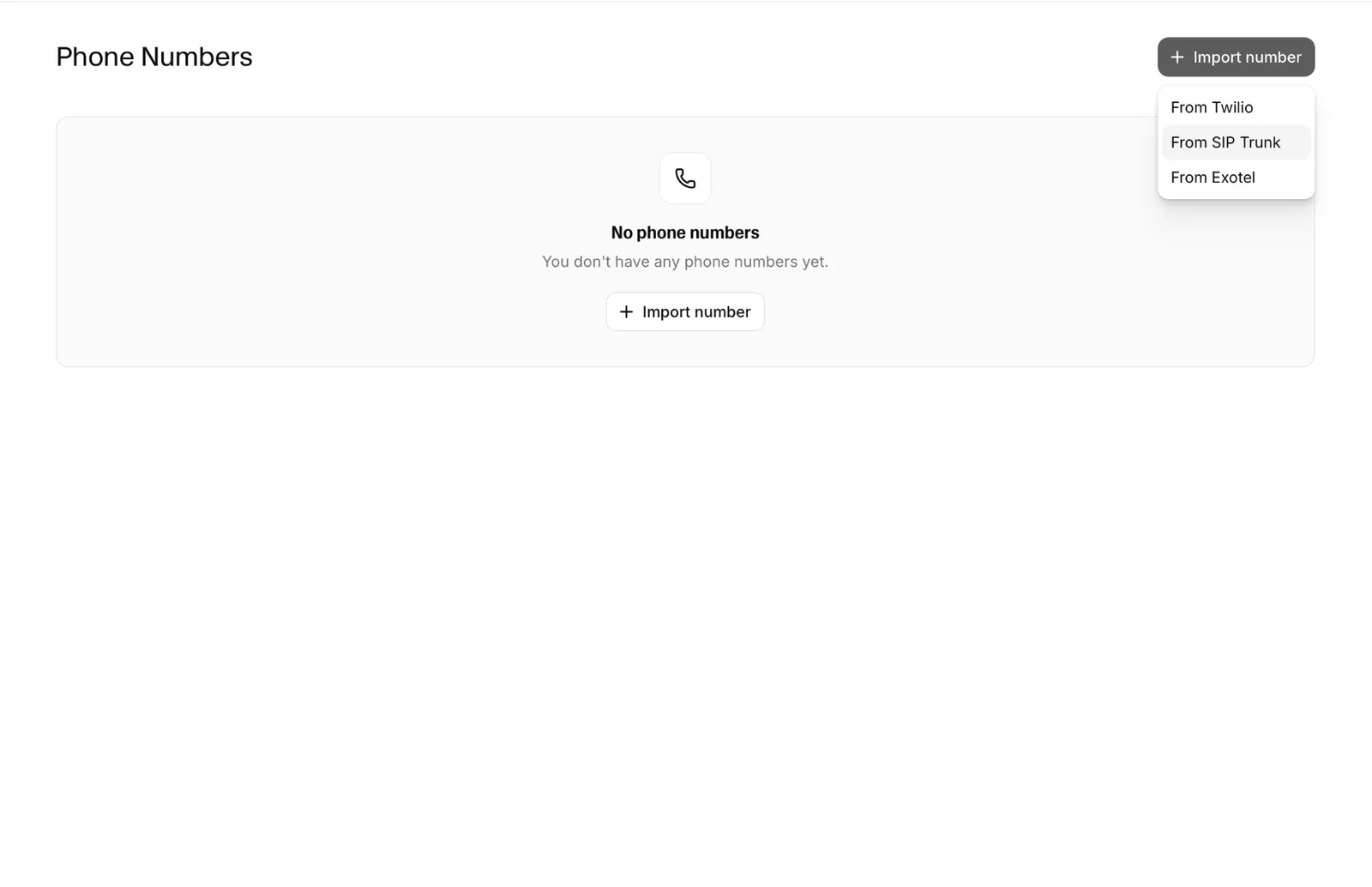
Click the “Import number” button, then select “From SIP Trunk” to open the configuration dialog.
Enter basic configuration
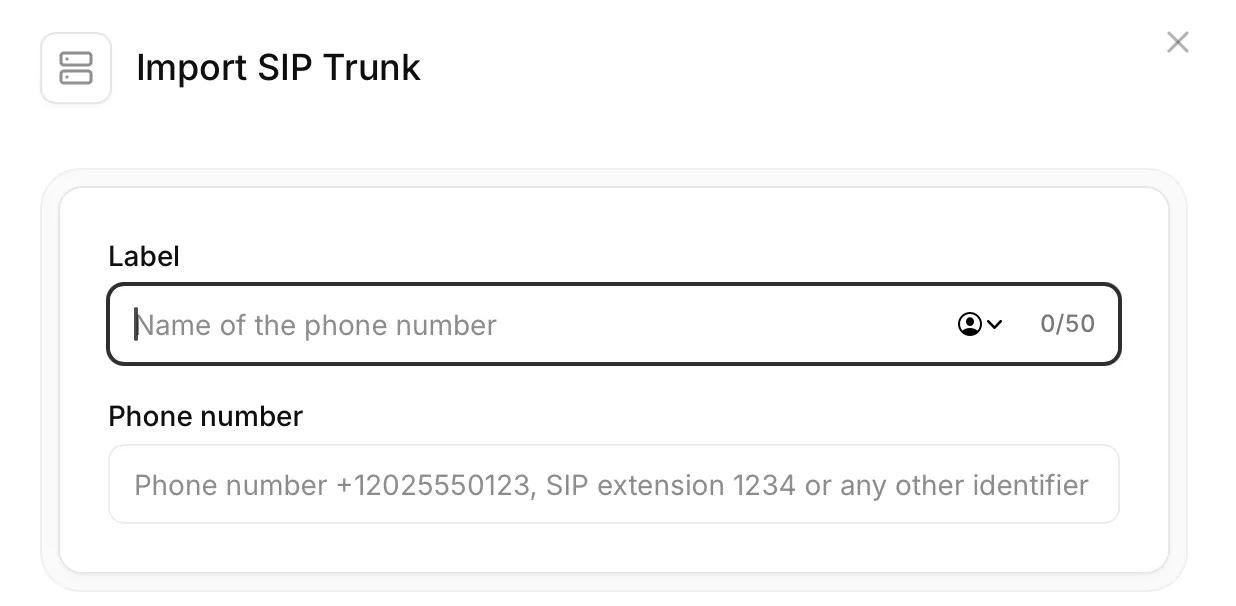
Complete the basic configuration with the following information:
- Label: A descriptive name for the phone number
- Phone Number: The E.164 formatted phone number to connect (e.g., +15551234567)
Configure inbound settings
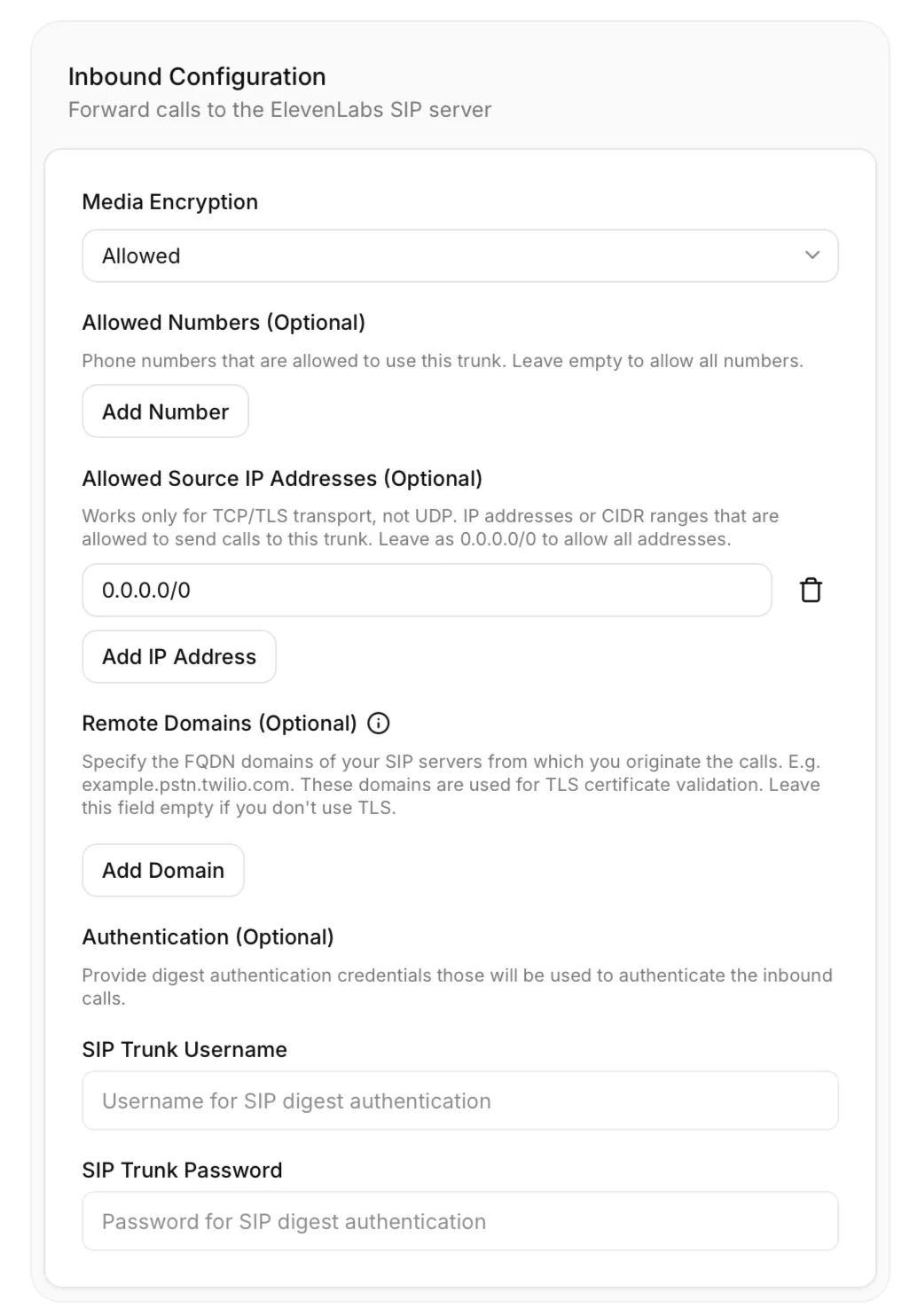
Configure how ElevenLabs handles calls arriving at your SIP trunk, including media encryption and access controls:
- Media Encryption: Configure encryption for RTP media streams:
- Disabled: No media encryption
- Allowed: Permits encrypted media streams
- Required: Enforces encrypted media streams
- Allowed Numbers (Optional): Phone numbers authorized to call this number. Leave empty to allow all numbers.
- Allowed Source IP Addresses (Optional): Works only for TCP/TLS transport, not UDP. IP addresses or CIDR ranges that are allowed to send calls to this trunk. Leave as
0.0.0.0/0to allow all addresses. - Remote Domains (Optional): Specify the FQDN domains of your SIP servers from which you originate the calls, for example
example.pstn.twilio.com. These domains are used for TLS certificate validation. Leave this field empty if you don’t use TLS. - Authentication (Optional): Provide digest authentication credentials that will be used to authenticate inbound calls.
- SIP Trunk Username: Username for SIP digest authentication
- SIP Trunk Password: Password for SIP digest authentication
Configure outbound settings
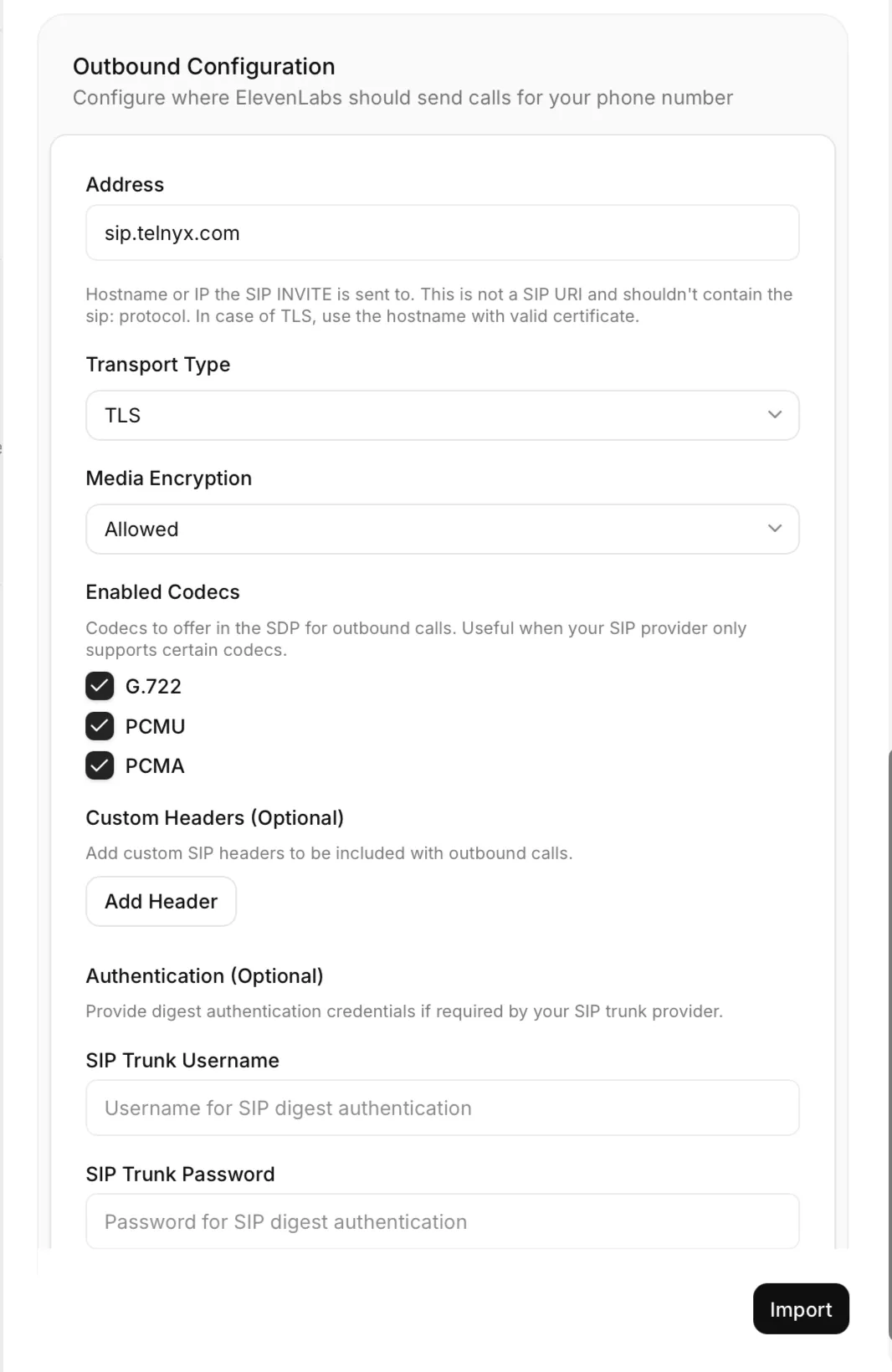
Configure where ElevenLabs should send calls for your phone number:
-
Address: Hostname or IP address where the SIP INVITE is sent (e.g.,
sip.telnyx.com). This should be a hostname or IP address only, not a full SIP URI. If using TLS, use a hostname with a valid certificate. -
Transport Type: Select the transport protocol for SIP signaling:
- TCP: Standard TCP transport
- TLS: Encrypted TLS transport for enhanced security
- UDP: Connectionless transport (experimental; use TCP or TLS for production)
-
Media Encryption: Configure encryption for RTP media streams:
- Disabled: No media encryption
- Allowed: Permits encrypted media streams
- Required: Enforces encrypted media streams
-
Enabled Codecs: Codecs to offer in the SDP for outbound calls (G.722, PCMU, PCMA). Useful when your SIP provider only supports certain codecs.
-
Custom Headers (Optional): Add custom SIP headers to be included with outbound calls. Click “Add Header” to enter the header name and value required by your provider; you can add multiple headers as needed. Custom headers can be used for call routing and identification, billing and tracking purposes, and provider-specific requirements.
-
Authentication (Optional): Provide digest authentication credentials if required by your SIP trunk provider.
- SIP Trunk Username: Username for SIP digest authentication
- SIP Trunk Password: Password for SIP digest authentication
If left empty, Access Control List (ACL) authentication will be used, which requires you to allowlist ElevenLabs IP addresses in your provider’s settings.
Security Best Practice: Use TLS transport with Required media encryption for maximum security. This ensures both signaling and media are encrypted end-to-end.
Authentication Methods:
- Digest Authentication: Uses username/password credentials for secure authentication (recommended)
- ACL Authentication: Uses IP address allowlisting for access control
Digest Authentication is strongly recommended as it provides better security without relying on IP allowlisting, which can be complex to manage with dynamic IP addresses.
The Address field specifies where ElevenLabs will send outbound calls from your AI agents. Enter only the hostname or IP address without the sip: protocol prefix.
Client Data and Personalization
To ensure proper forwarding and traceability of call metadata, include the following custom SIP headers in your webhook payload and SIP INVITE request:
- X-CALL-ID: Unique identifier for the call
- X-CALLER-ID: Identifier for the calling party
These headers enable the system to associate call metadata with the conversation and provide context for personalization.
Fallback Header Support
If the standard headers above are not present, the system will automatically look for the Twilio-specific SIP header:
- sip.twilio.callSid: Twilio’s unique call identifier
This fallback ensures compatibility with Twilio’s Elastic SIP Trunking without requiring configuration changes.
Processing Flow
Once the relevant metadata is received through any of the supported headers, the caller_id and/or call_id are available in the conversation initiation webhook and as system dynamic variables.
Inbound custom headers as dynamic variables
Custom SIP X- headers from inbound SIP trunking calls are automatically exposed as dynamic variables in the conversation.
Header names are normalized by removing the X- prefix, converting the name to lowercase, replacing hyphens with underscores, and adding the sip_ prefix. For example, X-Contact-ID becomes {{sip_contact_id}}, and X-Campaign-ID becomes {{sip_campaign_id}}.
Use these variables in agent prompts, first messages, and tools to personalize the conversation with caller-provided context. The values are also visible in the conversation history under the Phone Call tab.
Reserved headers such as X-Call-ID and X-Caller-ID continue to map to system__call_sid and
system__caller_id. Custom inbound headers cannot override these system variables.
BYE headers from dynamic variables
When a call ends, ElevenLabs sends a SIP BYE to tear down the dialog. You can attach custom headers to that BYE by mapping dynamic variables to header names in your SIP trunk configuration.
Set attributes_to_headers on inbound_trunk_config or outbound_trunk_config when creating or updating a SIP trunk phone number via the API. Each entry maps a dynamic variable name to the SIP header name to include on the BYE:
The header value is the dynamic variable’s final value at the end of the conversation. Values set during the call—through agent tools, webhook overrides, or other runtime updates—are reflected in the BYE.
For example, if attributes_to_headers contains "disposition_code": "X-Disposition" and the disposition_code dynamic variable is resolved when the conversation ends, the BYE includes X-Disposition: resolved.
Assigning Agents to Phone Numbers
After importing your SIP trunk phone number, you can assign it to a ElevenLabs agent:
- Go to the Phone Numbers section in the ElevenAgents dashboard
- Select your imported SIP trunk phone number
- Click “Assign Agent”
- Select the agent you want to handle calls to this number
Troubleshooting
Connection Issues
If you’re experiencing connection problems:
- Verify your SIP trunk configuration on both the ElevenLabs side and your provider side
- Check that your firewall allows SIP signaling traffic on the configured transport protocol and port (5060 for TCP, 5061 for TLS) and ensure there is no allowlisting applied
- Confirm that your address hostname is correctly formatted and accessible
- Test with and without digest authentication credentials
- If using TLS transport, ensure your provider’s TLS certificates are valid and properly configured
- Try different transport types (TCP or TLS; UDP support is experimental) to isolate TLS-specific issues
Important Network Architecture Information:
- ElevenLabs serves SIP traffic from multiple SIP servers behind the shared address
sip.rtc.elevenlabs.io - These SIP servers communicate directly with your SIP server
- SIP requests may come from different IP addresses due to our distributed infrastructure
- If your security policy requires allowlisting inbound traffic, please contact our support team for assistance.
Authentication Failures
If calls are failing due to authentication issues:
- Double-check your SIP trunk username and password if using digest authentication
- Check your SIP trunk provider’s logs for specific authentication error messages
- Verify that custom headers, if configured, match your provider’s requirements
- Test with simplified configurations (no custom headers) to isolate authentication issues
TLS and Encryption Issues
If you’re experiencing issues with TLS transport or media encryption:
- Verify that your SIP trunk provider supports TLS transport on port 5061
- Check certificate validity, expiration dates, and trust chains
- Ensure your provider supports SRTP media encryption if using “Required” media encryption
- Test with “Allowed” media encryption before using “Required” to isolate encryption issues
- Try TCP transport to isolate TLS-specific problems (UDP support is experimental)
- Contact your SIP trunk provider to confirm TLS and SRTP support
Custom Headers Issues
If you’re having problems with custom headers:
- Verify the exact header names and values required by your provider
- Check for case sensitivity in header names
- Ensure header values don’t contain special characters that need escaping
- Test without custom headers first, then add them incrementally
- For inbound custom header dynamic variables, confirm the headers use the
X-prefix and review the Phone Call tab in the conversation history - Review your provider’s documentation for supported custom headers
No Audio or One-Way Audio
If the call connects but there’s no audio or audio only flows one way:
- Verify that your firewall allows UDP traffic for the RTP media stream (typically ports 10000-60000)
- Since RTP uses dynamic IP addresses, ensure firewall rules are not restricted to specific static IPs
- Check for Network Address Translation (NAT) issues that might be blocking the RTP stream
- If using “Required” media encryption, ensure both endpoints support SRTP
- Test with “Disabled” media encryption to isolate encryption-related audio issues
Audio Quality Issues
If you experience poor audio quality:
- Ensure your network has sufficient bandwidth (at least 100 Kbps per call) and low latency/jitter for UDP traffic
- Check for network congestion or packet loss, particularly on the UDP path
- Verify codec settings match on both ends
- If using media encryption, ensure both endpoints efficiently handle SRTP processing
- Test with different media encryption settings to isolate quality issues
Call not disconnecting after sending the BYE request (receiving a 481 response)
A 481 response on a BYE usually means the request reached a SIP server that does not have the dialog state for the call.
This often happens when the initial TCP connection has already closed and the BYE is re-sent to the generic shared address (for example sip.rtc.elevenlabs.io)
rather than the specific Contact URI returned in the 200 OK response.
- When re-establishing a TCP connection for BYE, always target the
Contactaddress from the INVITE response so the request reaches the same SIP server that handled the dialog. - Avoid sending BYE to the shared
sip.rtc.elevenlabs.ioaddress because the request can land on a different SIP node, which rejects it with 481.
See RFC 3261 Section 8.1.1.8 for the normative behavior governing Contact headers and dialog routing.
Limitations and Considerations
- Support for multiple concurrent calls depends on your subscription tier. Enable call queueing to hold inbound callers when the limit is reached instead of rejecting them
- Call recording and analytics features are available but may require additional configuration
- Outbound calling capabilities may be limited by your SIP trunk provider
- TLS Support: Ensure your SIP trunk provider supports TLS 1.2 or higher for encrypted transport
- Media Encryption: SRTP support varies by provider; verify compatibility before requiring encryption
- Audio format: ElevenLabs’ SIP deployment outputs and receives audio using the PCMU or PCMA (G.711, 8kHz) or G.722 (16kHz) codecs. This is independent of any audio format configured on the agent for direct websocket connections. Your SIP trunk system must either support one of these codecs natively or perform resampling to match your system’s requirements
FAQ
Can I use my existing phone numbers with ElevenLabs?
Yes, SIP trunking allows you to connect your existing phone numbers directly to ElevenLabs’ ElevenAgents without porting them.
What SIP trunk providers are compatible with ElevenLabs?
ElevenLabs is compatible with most standard SIP trunk providers including Twilio, Vonage, Sinch, Infobip, Telnyx, Exotel, Plivo, Bandwidth, and others that support SIP protocol standards. TLS transport and SRTP media encryption are supported for enhanced security.
Should I use TLS transport for better security?
Yes, TLS transport is highly recommended for production environments. It provides encrypted SIP signaling which enhances security for your calls. Combined with required media encryption, it ensures comprehensive protection of your communications. Always verify your SIP trunk provider supports TLS before enabling it.
What's the difference between transport types?
- TCP: Reliable but unencrypted signaling - TLS: Encrypted and reliable signaling (recommended for production) - UDP: Connectionless signaling, currently experimental
UDP transport is experimental and intended for testing only. For production and security-critical applications, always use TLS transport.
What are custom headers used for?
Custom SIP headers allow you to include provider-specific information with outbound calls. Common uses include call routing, billing codes, caller identification, and meeting specific provider requirements.
How many concurrent calls are supported?
The number of concurrent calls depends on your subscription plan. Enterprise plans typically allow for higher volumes of concurrent calls. When the limit is reached, inbound callers are rejected unless call queueing is enabled for the agent, in which case they are held with hold audio and connected as capacity frees up.
Can I route calls conditionally to different agents?
Yes, you can use your existing PBX system’s routing rules to direct calls to different phone numbers, each connected to different ElevenLabs agents.
Do I need to match the leading + format when importing phone numbers?
Yes, the phone number format must be consistent between your SIP URI and your imported phone
number configuration. If you call the SIP URI with a leading + (e.g.,
sip:+19991234567@sip.rtc.elevenlabs.io:5060), you must also import the phone number with the
leading + (e.g., +19991234567). Similarly, if you call without the leading +, import the phone
number without it. Mismatched formats will prevent proper call routing.
Do you support SRV record lookups for SIP?
Yes, ElevenLabs provides NAPTR and SRV records for RFC 3263 compliant SIP server discovery.