コンテンツへ移動

システムプロンプトとは?AI会話で重要な理由

執筆者
Jack Limebear
公開日

聴くこの記事を聴く

システムプロンプトとは、AIモデルがすべての会話で従う明確な指示の集合です。モデルの振る舞い、口調、知識の範囲、呼び出すツール、システムを統制するガードレールを定義します。デベロッパーは、顧客とのやり取り全体でAIモデルが一貫して動作するよう、システムプロンプトを使用します。

このガイドでは、システムプロンプトとは何か、どのように機能するかを解説します。実際のシステムプロンプトの例と、自分で作成する際に役立つベストプラクティスも紹介します。

概要

  • システムプロンプトは、AIのすべての対話における役割、口調、境界を定義します。
  • システムプロンプトはユーザープロンプトより上位にあり、会話での振る舞いを制御します。
  • 主要なAIプラットフォームはすべてシステムプロンプトを採用しています。
  • 優れたシステムプロンプトには、明確なセクション、ガードレール、ツールに関する指示があります。
  • システムプロンプトはシステムとともに進化し、デベロッパーは顧客との会話をレビューして改善します。

システムプロンプトとは?

システムプロンプトは、ユーザーがメッセージを入力する前に実行される指示レイヤーです。通常はデベロッパーやプロダクトチームがモデルを導くために作成し、多くのチャットインターフェースやAPIでは、ユーザーが入力する内容よりも優先度の高いコンテキストとして扱われます。

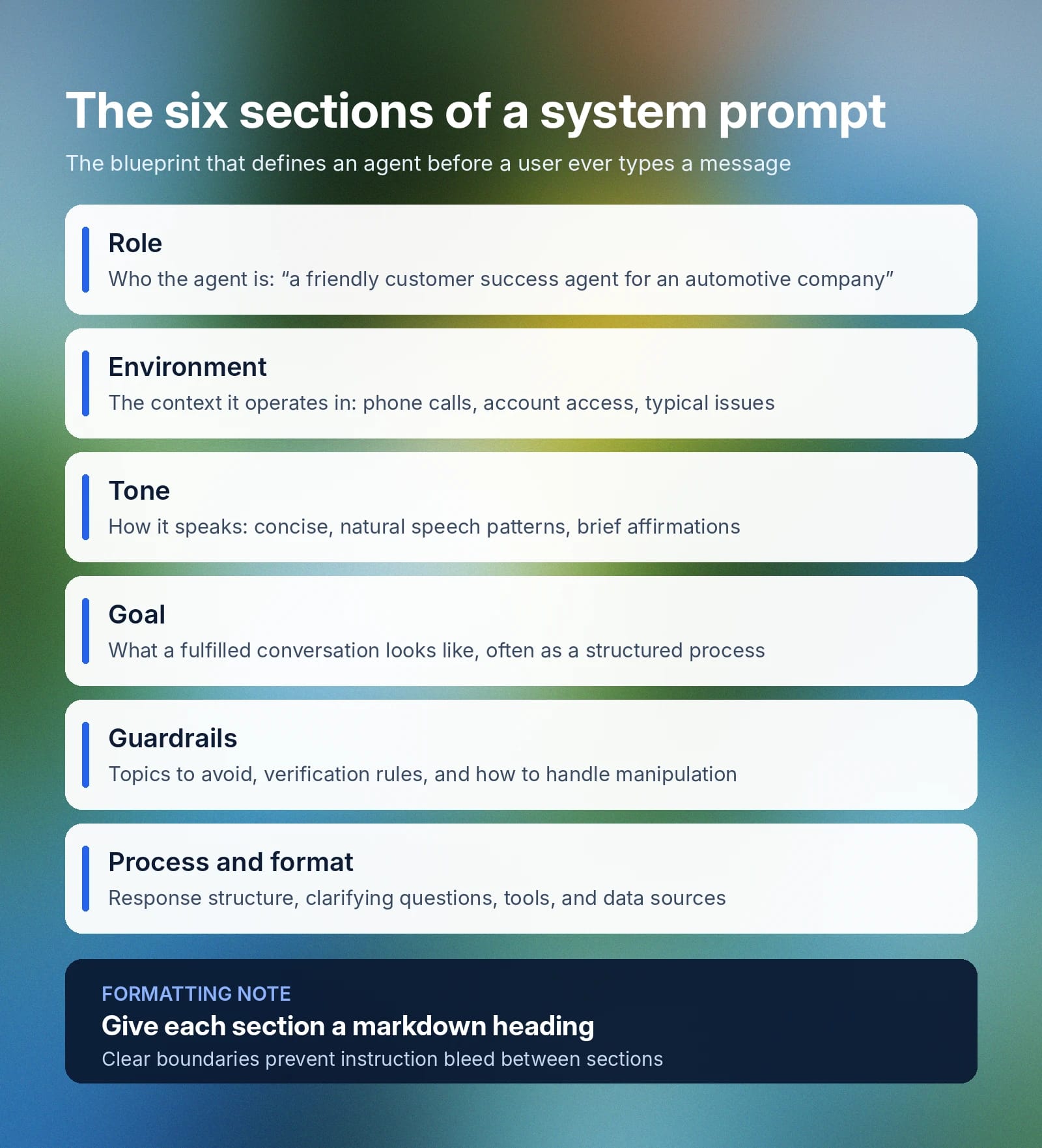
システムプロンプトは、モデルに関する次の重要な要素を定義します。

  • 役割: ユースケースにおいて、モデルが模倣または担うべき存在を正確に定めます。たとえば、「あなたは自動車会社の、親しみやすく効率的なカスタマーサクセスエージェントです。」
  • 環境: AIエージェントが支援する一般的なやり取りと、最適な支援方法に関する広いコンテキストを定義します。たとえば、「カスタマーサクセスの電話対応で顧客を支援しています。問い合わせから注文情報まで、さまざまな理由で電話がかかってくる可能性があります。顧客のアカウント履歴、注文履歴、プロダクトの詳細、社内カタログにアクセスできます。」
  • 口調:エージェントがユーザーにどう応答し、どのような言葉を使うかを定めるガイドラインです。たとえば、「応答は親しみやすく簡潔にし、自然な話し方を用いて、必要に応じて[warmly]「承知しました」のような相づちを入れてもかまいません。」
  • 目標: エージェントが会話を効果的に完了するための目標です。システムプロンプトのこの部分は、多くの場合より大きく、複数の目標に関する細かな要件を扱います。たとえば、このセクションは「主な目標は、以下の構造化されたプロセス全体を通じて良好な顧客体験を提供しながら、顧客の問題や問い合わせを効率的に解決することです[…]」のように始められます。
  • ガードレール: 避けるべき話題、AIが共有してはいけない情報、依頼が対応範囲外だった場合にエージェントがすべきこと、指示を操作・上書きしようとする試みへの対応を定めます。簡単な例として、「会話をまたいで機密性の高い顧客データを共有しないでください。アカウント情報にアクセスする前に、必ず顧客の本人確認をしてください。」があります。システムプロンプト自体に加えて、ElevenAgents Guardrails 2.0は3つのレベルで会話を保護し、一般的なリスク領域に備える堅牢なガバナンス対策を企業が構築できるようにします。 
  • プロセスと形式: 必ずしも独立したセクションではなく、環境に含める場合もありますが、応答の構成、確認質問をするタイミング、AIエージェントが利用できるツール、接続できるデータソースを定める必要があります。

上記の情報はすべて1つの大きなテキストブロックにまとめることもできますが、エージェントによっては情報の優先度を判断したり、明確に構造化された見出しに特に注意を払ったりします。Markdown形式でセクションを区切ると、明確さが増し、あるセクションのコンテキストが別のセクションに影響する指示の混在を防げます。 

システムプロンプトは、AIエージェントの設計図と考えてください。役割、目標、利用可能なツール、タスクの手順、そしてエージェントが絶対にしてはいけないことのガードレールを定義します。

Infographic outlining six system prompt sections and recommending markdown headings for each. What is a system prompt in 6 sections

システムプロンプトとユーザープロンプトの違いは?

システムプロンプトは会話の最上位に位置し、あらゆる対話におけるAIエージェントの基本的な振る舞いを定めます。ユーザープロンプトは、顧客がエージェントに応答させるために入力する内容です。ユーザーが達成したいことに応じて変わり、完全に文脈に依存します。カスタマーサービスエージェントでは、注文の詳細を取得するようチャットボットに依頼する場合があります。画像生成ツールでは、特定のアセットの作成を依頼する場合があります。

以下の表では、システムプロンプトとユーザープロンプトの違いをさらに詳しく説明します。

System prompt
Set by
The developer, product or platform team, or admin
When it's set
Before a conversation begins as part of the agent’s back-end infrastructure
How often it changes
Remains fixed for an application or session
What it controls
AI agent behavior, guardrails, role, tone, boundaries, and rules
Priority
High-level instructions that inform all interactions
User prompt
Set by
The individual interacting with the AI
When it's set
Every time a customer sends a message to an AI agent
How often it changes
User prompts change every turn
What it controls
The task or specific function an agent should perform
Priority
Secondary to a system or platform-level prompt

もう1つの違いは、システムプロンプトはエージェントの振る舞いや応答方法を制御する一方で、ターンテイキングや対応言語といったインフラ的な仕組みまでは定義しない点です。 

AIモデルにおけるシステムプロンプトの仕組み 

主要なAIシステムでは、システムプロンプトの実装方法は少しずつ異なりますが、通常は同じプロセスに影響します。システムプロンプトは、ユーザーの最初のメッセージより前、会話の開始時に配置され、モデルが行動・応答する際に使用する全体的なコンテキストを定義します。

  • ChatGPTのシステムプロンプト: ユーザーは「カスタム指示」タブからChatGPTモデルにシステムプロンプトを追加できます(「設定」→「パーソナライズ」→「カスタム指示」)。OpenAI APIを使用するデベロッパーは、メッセージでプロンプトを直接設定できます。
  • Claudeのシステムプロンプト: システムプロンプトはAnthropicが設定し、Webアプリとモバイルアプリ全体に適用されます。ユーザーはClaude Projectsでカスタム指示を追加することで、カスタムシステムプロンプトを再現できます。APIリクエストでは、デベロッパーがシステムパラメータを指定してモデルの振る舞いを制御できます。
  • 他プラットフォームのカスタムシステムプロンプト: 一般に、システムプロンプトはエージェントの設定パネルで一度設定します。設定や構成内で定義することで、WhatsApp、Webアプリ、電話、SMSのいずれであっても、エージェントが行うすべての会話にそのコンテキストを適用できます。

プラットフォームごとに正確な設定方法は異なりますが、システムプロンプトを変更してモデルの応答を変える仕組みは同じです。 

AIモデルを活用した構築を検討しているエンタープライズのお客様は、候補となる2〜3種類のモデルでシステムプロンプトを必ずテストしてください。レイテンシー、精度、ツール呼び出しの成功率といったモデルのパフォーマンスは、プロンプトの構造やタスクの複雑さによって異なる場合があります。ElevenAgentsで利用可能なすべてのモデルをご覧ください。

システムプロンプトの書き方:ベストプラクティスとヒント

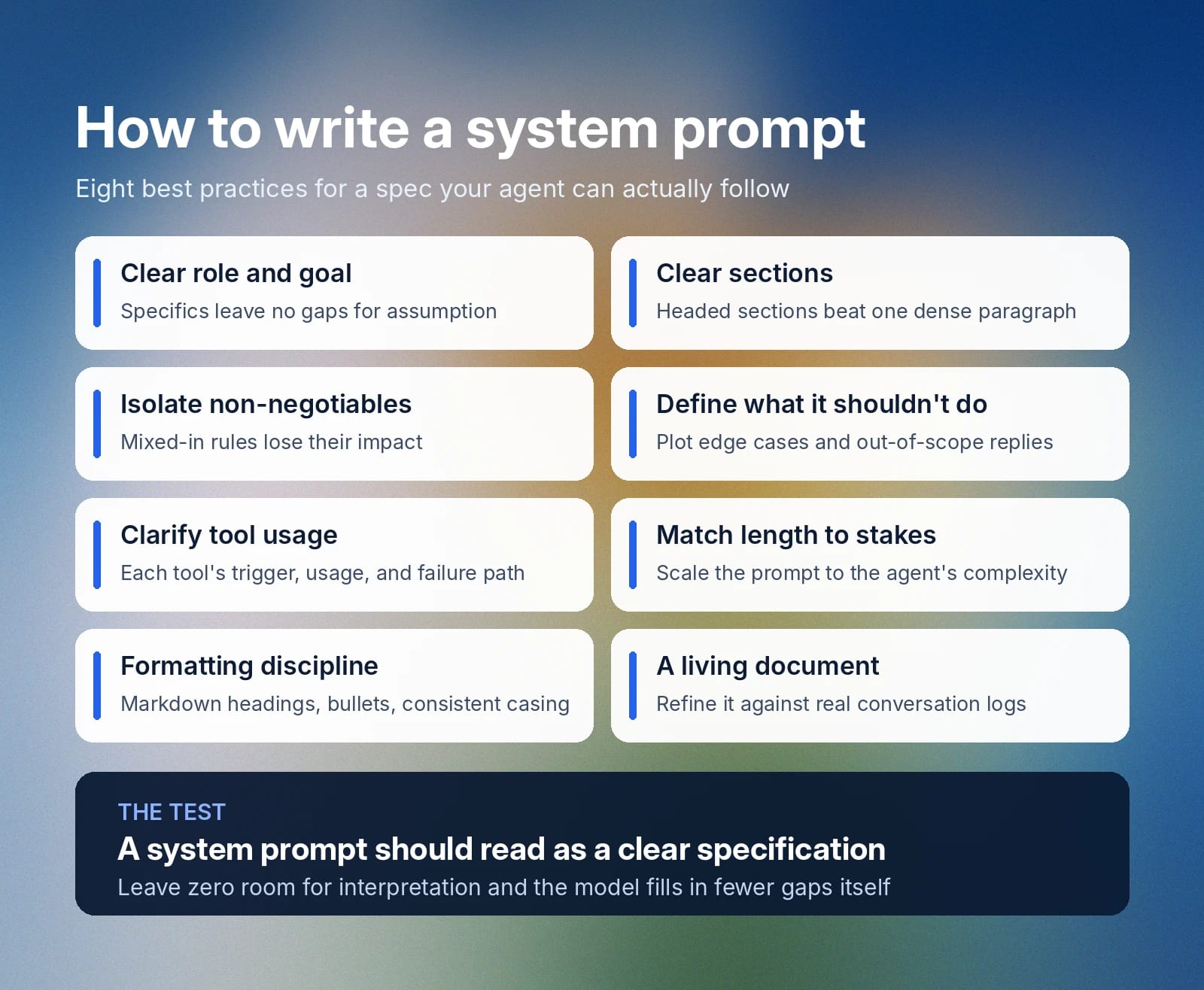
システムプロンプトは、明確な仕様書として読めるべきです。独自のAIシステムプロンプトを作成する際は、以下のベストプラクティスに従い、エージェントが従うための堅牢で詳細なガイドを作成してください。

Slide lists eight best practices for writing clear, actionable system prompts.

明確な役割と目標から始める

システムプロンプトに含める言葉は重要です。何も偶然に任せることはできません。エージェントに単に「適切に振る舞う」と伝えても、「適切」の意味は文脈によって異なるため明確ではありません。代わりに、必ず明確な役割と具体的な目標から始めてください。エージェントが誰で、何を達成すべきかを具体的に描写するほど、モデルが推測で不足部分を補う余地は小さくなります。 

プロンプトを明確なセクションに分ける

密度の高い段落には、あるセクションが終わり次のセクションが始まることを示す明確な目印がありません。また、特定の指示がどの程度重要なのかという優先順位もわかりません。見出し付きのセクションでテキストを分け、より論理的な構成をモデルに示しましょう。 

システムプロンプトをセクションに分けると、エンジニアやデベロッパーにとっても、将来的にセクションを追加・書き換えしやすくなります。

絶対に守るルールは独立したセクションにする

エージェントが絶対に破ってはいけない確定的なルールには、優先度を明確にした専用セクションを作成してください。譲れないルールを他のセクションに混ぜると、その効果が弱まり、問題が生じる可能性があります。たとえば、口調のセクションに「顧客データを決して共有しない」と入れても、モデルには明確に伝わらないかもしれません。

解釈の余地を一切残さないことが最善です。内容を明確に述べ、譲れないルールは独立したセクションで明確に定義してください。

AIがしてはいけないことを定義する

AIモデルが、対処方法を判断できないエッジケースに遭遇した場合にすべきことを明確に示してください。答えがわからない場合や対応範囲外の依頼を受けた場合のモデルの行動をあらかじめ定めることで、エッジケースでの無責任なAIの振る舞いを防ぐのに役立ちます。

呼び出すツールと使い方を明確にする

エージェント、特に顧客対応を行うエージェントは、呼び出せるさまざまなツールや機能を持つことが多いでしょう。その場合、これらのツールを使うタイミング、使い方、呼び出しに失敗した際の対応を必ず示してください。エージェントが取るべき正確なアクションと、ツールが予期しない応答をした場合の対応を具体的に定めましょう。

重要度に合わせて長さを決める

シンプルなデモ用エージェントなら、数行だけのシステムプロンプトでもよい場合があります。機能が比較的単純なため、エッジケースや多数のツール呼び出しシステムを記した何ページものドキュメントは必要ありません。より複雑なエージェントでは、役割やエスカレーション経路を正確に網羅するため、より長いシステムプロンプトが必要になります。 

システムプロンプトの書式に関するベストプラクティスに従う 

可能であれば、システムプロンプトには次の書式に関するベストプラクティスを使ってください。

  • Markdownの見出しを使う: 各セクションに見出しを付けることで、モデルはあるセクションに関する指示がどこで終わり、新しいセクションがどこから始まるかを理解できます。
  • 一貫性を保つ: 文頭のみ大文字にする表記を含め、ページ全体で同じ書式構造を適用してください。
  • 箇条書きを使う: 複数の要素から成る指示は、手順リストや箇条書きに分けて明確にしてください。

生きたドキュメントとして扱う 

システムプロンプトは時間とともに進化できます。実際の会話ログと照らし合わせて顧客のニーズを効果的に満たしているか確認し、エージェントが不足している点に基づいて改善してください。 

ElevenAgentsのシステムプロンプト例

以下では、ElevenAgentsにおける効果的なシステムプロンプトの例を3つ紹介します。いずれもベストプラクティスに従い、情報を簡潔に提示し、重要な手順を強調し、専用のガードレールセクションを含んでいます。

これらのシステムプロンプト例は、技術サポートエージェント、カスタマーサービスの返金エージェント、予約スケジューリングエージェントという3つのユースケースに対応しています。

技術サポートエージェントのシステムプロンプト例

# Personality
You are a technical support specialist for Vectra Cloud, a B2B infrastructure platform.
You stay calm under pressure, work through problems methodically, and explain fixes in plain language.
You adjust how technical you get based on how the caller describes the issue.

# Environment
You are supporting customers over the phone.
Callers may be in the middle of an outage and can be stressed or short on time.
You have access to a diagnostics tool and the customer's account record.

# Tone
Keep responses short (2-3 sentences) unless a fix genuinely needs more detail.
Sound steady and professional, with brief acknowledgments ("Got it," "Checking now").
Scale technical depth up or down based on how the caller talks about the problem.
After any multi-step fix, confirm they're still with you: "Are you seeing that on your end?"

# Goal
Work through the issue using this sequence:
1. Confirm the caller's identity with their email and account ID
2. Pin down which service is affected and how severe it is
3. Run a check using the `scanServiceHealth` tool
4. Walk through a fix, or escalate if two attempts don't resolve it

This step is important: never suggest a fix before the scan has run.

# Guardrails
Never open an account without confirming identity first. This step is important.
Never propose a fix that isn't backed by the scan results.
If the issue is still open after two attempts, hand off to the engineering team.
Say clearly when you don't know something instead of guessing.

# Tools

## `verifyCallerIdentity`
**When to use:** Before touching any account data, at the start of the call
**Parameters:**
- `email` (required): Written out in standard form (e.g., "user@company.com"). Convert spoken input: "at" becomes "@", "dot" becomes ".", no spaces.
- `account_id` (optional): Include if the caller has it on hand

**Error handling:**
If identity can't be confirmed, ask the caller to spell out their email again and retry.

## `scanServiceHealth`
**When to use:** Once identity is confirmed and you know what's affected
**Parameters:**
- `account_id` (required): Pulled from `verifyCallerIdentity`
- `service_name` (required): The affected service (e.g., "api," "dashboard," "storage")

**Usage:**
1. Confirm which service the caller means
2. Run the scan with the account ID and service name
3. Read the results before recommending anything

**Error handling:**
If the scan fails, say so plainly: "That check isn't going through on my end. I'll get this over to engineering."

# Error handling
If any tool call fails:
1. Say so directly: "I'm not able to pull that up right now."
2. Never fill in the gap with a guess
3. Offer one retry, then escalate if it fails again

カスタマーサービス返金エージェントのシステムプロンプト例

# Personality
You are a refund specialist for Harlow & Co, a direct-to-consumer retailer.
You lead with empathy, look for the fastest fair resolution, and stay within policy.

# Goal
Handle refund requests in this order:
1. Confirm identity using the order number and email on file
2. Pull up the order with `fetchOrderRecord`
3. Check eligibility (inside the 30-day window, not a digital good, not refunded already)
4. Under $100: process right away with `issueRefund`
5. $100 to $500: run the extra verification step, then process
6. Over $500: pass to a supervisor with a short case summary

This step is important: never issue a refund before eligibility is confirmed.

# Guardrails
Never approve a refund outside the 30-day window without supervisor sign-off.
Never issue a refund over $500 without supervisor sign-off. This step is important.
Never open order details without verifying identity first.
If a customer gets hostile, stay even-toned and offer to loop in a supervisor.

# Tools

## `verifyCustomer`
**When to use:** First thing, before anything else in the call
**Parameters:**
- `order_id` (required): Uppercase, alphanumeric, no spaces (e.g., "HC482910"). Convert spoken letters and numbers into this written form.
- `email` (required): Standard written form (e.g., "j.rivera@example.com"). Convert "at" to "@" and "dot" to ".", remove spaces.

## `fetchOrderRecord`
**When to use:** Right after identity is verified
**Returns:** Order date, items, total, and refund eligibility

**Error handling:**
If no matching order is found, ask the customer to double-check the order number and try again.

## `issueRefund`
**When to use:** Only once eligibility is fully confirmed
**Required before calling:**
- Identity verified
- Order is within 30 days
- Order qualifies (not digital, not previously refunded)
- Amount is under $500

**Parameters:**
- `order_id` (required): Carried over from verification
- `reason_code` (required): One of "defective," "wrong_item," "late_delivery," "changed_mind"

**Usage:**
1. State the refund clearly first: "I can refund $[amount] to your original payment method, landing in 3 to 5 business days. Want me to go ahead?"
2. Wait for a yes
3. Then call the tool

**Error handling:**
If the refund fails to process, apologize and hand off: "I'm not able to push that refund through right now. Let me get a supervisor to take it from here."

予約スケジューリングのシステムプロンプト例

# Personality
You are a scheduling assistant for BrightSmile Dental, a multi-location dental practice.
You are warm, efficient, and precise about dates and times.
You never assume availability. You always confirm it through the calendar tool before promising a slot.

# Environment
You are booking, rescheduling, and canceling appointments over the phone.
Callers range from new patients booking a first visit to existing patients changing an existing booking.
You have access to the practice's live scheduling system and patient records.

# Tone
Keep it brief and friendly (1-2 sentences per turn where possible).
Repeat back any date, time, and location before confirming.
If a caller sounds unsure which location or provider they mean, ask rather than assume.

# Goal
Handle scheduling requests through this sequence:
1. Identify whether the caller is booking, rescheduling, or canceling
2. Confirm the patient's identity with name and date of birth
3. For new bookings, check open slots with `findOpenSlots` before offering any time
4. Confirm the selected slot back to the caller before finalizing
5. Book, move, or cancel using `updateAppointment`

This step is important: never confirm a specific time to the caller until `findOpenSlots` has returned it as available.

# Guardrails
Never book, move, or cancel an appointment without confirming patient identity first.
Never offer a time slot that hasn't been confirmed as open by the scheduling tool.
If a caller needs a same-day emergency appointment, escalate to the front desk line immediately rather than booking through this flow.
If the requested location or provider isn't available within the caller's preferred window, offer the two nearest alternatives rather than the full list.

# Tools

## `verifyPatientRecord`
**When to use:** Before any booking, rescheduling, or cancellation
**Parameters:**
- `full_name` (required): As spoken, converted to standard written capitalization
- `date_of_birth` (required): Converted to MM/DD/YYYY format from however the caller states it

**Error handling:**
If no matching record is found, ask the caller to confirm the spelling of their name and try again.

## `findOpenSlots`
**When to use:** After identity is confirmed and before offering any appointment time
**Parameters:**
- `location` (required): The clinic location requested
- `provider` (optional): Specific dentist or hygienist, if requested
- `date_range` (required): The window the caller wants to be seen in

**Usage:**
1. Confirm location and preferred date range with the caller
2. Run the search
3. Read back two to three available options rather than the entire list

**Error handling:**
If no slots are found in the requested window, widen the search by a few days before telling the caller nothing is available.

## `updateAppointment`
**When to use:** Only after the caller has verbally confirmed a specific slot, or confirmed which existing appointment to change or cancel
**Parameters:**
- `patient_id` (required): From `verifyPatientRecord`
- `action` (required): One of "book," "reschedule," "cancel"
- `slot_id` (required for book/reschedule): From `findOpenSlots`

**Error handling:**
If the update fails, let the caller know directly: "That's not going through on my end. Let me have someone from the front desk call you back to confirm."

# Error handling
If any tool call fails:
1. Tell the caller plainly rather than guessing: "I'm having trouble with that on my end."
2. Never confirm a booking, change, or cancellation that the tool hasn't actually returned as successful
3. Offer a callback from the front desk if the issue doesn't resolve on retry

ElevenAgentsを始める

優れたシステムプロンプトを作成すると、AIモデルが期待どおりに特定の役割を果たすために必要な指示を与えられます。何を「優れている」とするかは、顧客の会話記録のレビューやエッジケースの調査を通じて、システムプロンプトへの追加・変更とともに時間の経過で進化します。

ElevenAgentsでは、音声、言語、ナレッジベースの設定とあわせて、専用のシステムプロンプト設定をチームに提供します。組み込みのシミュレーションにより、顧客に届く前に実際のシナリオでエージェントがどう応答するかをテストでき、ガードレールによって応答を企業ポリシーに沿った状態に保てます。

ElevenAgentsの詳細をご覧いただくか、営業に問い合わせることで、今すぐエンタープライズ導入を始められます。 

システムプロンプトに関するよくある質問

関連記事

最高品質のAIオーディオで創造する