Agenti IA per l’assistenza clienti: cosa sono e come implementarli
- Pubblicato
- Ultimo aggiornamento
AscoltaAscolta questo articolo
Oltre tre addetti al servizio clienti su quattro affermano che il loro carico di lavoro è aumentato ed è più complesso rispetto a un solo anno fa, e il 78% afferma che le aspettative dei clienti sono più alte che mai. L'economia della convenienza ha alzato l'asticella: i clienti si aspettano soluzioni rapide e complete e non perdonano i team che non riescono a fornirle.
Gli agenti IA per il servizio clienti consentono ai responsabili dell'assistenza di gestire più richieste, più rapidamente. Possono comprendere il contesto di una conversazione, agire negli strumenti connessi e passare la richiesta a una persona quando necessario. Rappresentano inoltre un notevole passo avanti rispetto ai chatbot basati su regole che molti team hanno già provato e poi abbandonato.
Che tu stia valutando gli agenti IA o sia pronto a implementarne uno, questo articolo spiega cosa sono, come funzionano e cosa serve per migliorare i tassi di risoluzione.
In sintesi
- Gli agenti IA per il servizio clienti gestiscono le conversazioni con i clienti dall'inizio alla fine, risolvendo i problemi, eseguendo l'escalation quando necessario e passando la richiesta a persone con il contesto completo.
- I principali casi d'uso degli agenti per il servizio clienti IA includono l'assistenza in entrata, la copertura fuori orario e il servizio clienti multilingue.
- ElevenAgents è una piattaforma pronta per le aziende che consente di implementare agenti vocali e chat con conformità normativa, integrazioni e controlli per il passaggio a operatori umani integrati.
Cos'è un agente IA per il servizio clienti?
Un agente IA per il servizio clienti è un sistema automatizzato che dialoga in tempo reale con i clienti tramite voce e chat per risolvere le richieste.
A differenza dei chatbot basati su regole che associano schemi a script fissi, gli agenti IA ragionano sull'intero contesto di una conversazione e generano risposte dinamicamente, attingendo a knowledge base caricate e a dati in tempo reale provenienti da strumenti connessi, come il tuo CRM o helpdesk. Quando una richiesta esula dal loro ambito, possono anche passarla a un operatore umano mantenendo intatto l'intero contesto della conversazione.
Ciò che li distingue dalle automazioni precedenti è la capacità di agire, non soltanto di recuperare informazioni. Un agente IA per il servizio clienti può svolgere le seguenti attività senza intervento umano:
- Fissare un appuntamento.
- Elaborare un rimborso.
- Aggiornare un account.
- Eseguire l'escalation di un ticket.
- Risolvere un problema tecnico.
Poiché l'agente è connesso ai tuoi sistemi esistenti, le modifiche si sincronizzano automaticamente: un appuntamento fissato aggiorna il calendario, un rimborso elaborato si riflette nella piattaforma di fatturazione e un nuovo ticket compare nel tuo helpdesk.
Casi d'uso degli agenti IA per il servizio clienti
La maggior parte dei team di assistenza inizia da un singolo caso d'uso per poi ampliare l'impiego. I tre seguenti sono i punti di partenza a maggiore impatto: dove il volume delle richieste è più alto, le lacune di copertura sono più costose e i vantaggi dell'automazione sono più evidenti.
Assistenza in entrata e risoluzione delle richieste
Le richieste ripetitive e ad alto volume, come lo stato degli ordini, la reimpostazione delle password, le domande sulla fatturazione e le consultazioni delle policy, assorbono gran parte della capacità di un team di assistenza, lasciando in secondo piano i casi complessi.
Come aiuta un agente IA: l'agente gestisce la richiesta dall'inizio alla fine, recuperando informazioni pertinenti dalla knowledge base o dai sistemi connessi, fornendo una risposta e risolvendo il ticket. Per le richieste che richiedono l'accesso all'account, ad esempio la verifica dello stato di un ordine, autentica il cliente e recupera i dati aggiornati dal tuo CRM.
Klarna ha implementato ElevenAgents come primo livello dell'assistenza telefonica per i suoi 35 milioni di clienti negli Stati Uniti. Per le richieste gestite dall'agente, il tempo di risoluzione è diventato 10 volte più rapido, liberando gli operatori umani affinché potessero concentrarsi sui casi complessi.
Copertura fuori orario
Il volume dei contatti non si ferma alle 17:00, ma il personale potrebbe farlo. Le richieste fuori orario attendono fino al mattino seguente, frustrando i clienti, oppure richiedono costosi turni notturni.
Come aiuta un agente IA: l'agente copre l'intero turno fuori orario, rispondendo alle richieste, fissando appuntamenti ed elaborando richieste allo stesso livello di qualità delle ore di punta. Gli operatori umani prendono in carico eventuali escalation il mattino successivo, con il contesto completo della conversazione già registrato.
Zingage è una piattaforma operativa per l'assistenza domiciliare al servizio di oltre 400 agenzie che necessitava di un agente vocale conforme a HIPAA, in grado di gestire chiamate 24 ore su 24. Dopo aver implementato ElevenAgents, ora risolve autonomamente oltre il 90% delle chiamate, il volume delle chiamate è triplicato e chi chiama non deve più navigare nei menu telefonici né attendere in linea.
Assistenza multilingue
Supportare i clienti in più lingue significa in genere creare team o workflow separati per ogni lingua. È costoso e difficile da scalare.
Come aiuta un agente IA: gli agenti IA rilevano automaticamente la lingua del cliente dal primo messaggio o dalla prima frase e rispondono di conseguenza. Una singola configurazione dell'agente può supportare decine di lingue contemporaneamente, passando da una lingua all'altra durante la conversazione se necessario. ElevenAgents supporta oltre 90 lingue già pronte all'uso, con rilevamento automatico e cambio in tempo reale integrati.
Revolut ha implementato ElevenAgents nel Regno Unito e in Europa, servendo clienti in oltre 31 lingue. Il tempo di risoluzione si è ridotto di 8 volte, con un tasso di successo delle chiamate del 99,7%. Analogamente, eDreams ODIGEO ha esteso l'uso da un test in una sola lingua alla piena produzione in cinque lingue con ElevenAgents, ottenendo miglioramenti a doppia cifra sia nella velocità di risoluzione sia nei tassi di trasferimento.
Vantaggi degli agenti IA per il servizio clienti
I vantaggi dell'implementazione di agenti IA per il servizio clienti rientrano in due categorie: un'esperienza migliore per i clienti e un team di assistenza più efficiente.
- Disponibilità 24 ore su 24, 7 giorni su 7: gli agenti IA gestiscono i contatti a qualsiasi ora e in qualsiasi giorno, senza adeguamenti del personale. Per i team di assistenza, questo elimina completamente le lacune nella copertura fuori orario. Se un cliente invia una richiesta alle 2 di notte, riceve una risposta in pochi secondi, non una richiamata il mattino seguente.
- Tempi di risoluzione più rapidi: quando il 72% dei clienti si aspetta un servizio immediato, i tempi di attesa sono un motivo per cui i clienti se ne vanno. Gli agenti recuperano le risposte da una knowledge base e agiscono sui sistemi connessi in tempo reale, risolvendo le richieste dei clienti in pochi secondi.
- Risposte coerenti e in linea con il brand su ogni canale: gli operatori umani possono avere giornate negative, interpretare le policy in modo diverso e formulare le risposte discostandosi dalle linee guida del brand. Gli agenti IA applicano lo stesso tono, la stessa terminologia e lo stesso processo a ogni contatto: nessuna lacuna di conformità dovuta a risposte formulate male, nessuna incoerenza del brand tra regioni e nessuna sorpresa nei controlli qualità su larga scala.
- Assistenza multilingue in oltre 90 lingue: servire clienti in diversi mercati significa in genere creare team o workflow separati per ogni lingua, un approccio costoso e difficile da scalare. Gli agenti IA rilevano automaticamente la lingua del cliente e possono cambiarla durante la conversazione se necessario.
- Dati e insight da ogni conversazione: ogni interazione viene registrata ed è ricercabile, così i responsabili dell'assistenza possono individuare le tendenze nei motivi per cui i clienti contattano l'azienda, identificare le lacune nella knowledge base e utilizzare i dati delle conversazioni per migliorare le prestazioni degli agenti e i processi operativi.
- Passaggio fluido agli operatori umani quando necessario: quando una conversazione supera l'ambito dell'agente, può trasferire la chiamata a un operatore umano con il contesto completo, inclusi cronologia della conversazione, intento e dati dell'account. Gli operatori umani non devono ricominciare da zero, aumentando la soddisfazione dei clienti.
Nella pratica, questi vantaggi si sommano rapidamente. mdhub, una piattaforma per la salute comportamentale, ha implementato ElevenAgents nei workflow di ammissione alle cliniche e assistenza ai pazienti.workflow. Gli agenti IA ora gestiscono dall'inizio alla fine il 90% delle chiamate in entrata, raccogliendo i dati demografici dei pazienti, verificando l'assicurazione e fissando appuntamenti. Di conseguenza, il tempo di mdhub dalla prima richiesta all'appuntamento è passato da settimane a giorni e le prenotazioni sono aumentate del 30%.
Come funzionano gli agenti IA per il servizio clienti?
ElevenAgents elabora input vocali e testuali tramite una pipeline in tempo reale. Ecco come funziona:
- Il cliente parla o scrive. Per la voce, il modello di ElevenLabs Speech to Text, Scribe, trascrive l'audio del cliente in testo in tempo reale, abbastanza velocemente da avviare l'elaborazione prima che il cliente abbia finito di parlare. Per gli input di testo, il messaggio entra direttamente nella pipeline.
- L'LLM riunisce il contesto completo della conversazione. Include ciò che è già stato detto, le informazioni pertinenti della knowledge base, eventuali dati in tempo reale dagli strumenti connessi e il system prompt che definisce il comportamento dell'agente. L'LLM ragiona su tutti questi elementi prima di generare una risposta.
- La risposta viene fornita in tempo reale. Per la voce, la risposta dell'LLM viene riconvertita in parlato dal sistema Text to Speech e fornita al cliente.
Questa è una versione semplificata della pipeline. Dietro le quinte, diverse tecnologie collaborano per rendere naturale la conversazione:
- Modello di turn-taking: rileva quando un utente ha finito di parlare, così l'agente sa quando rispondere e la conversazione risulta un naturale scambio di battute.
- VAD (Rilevamento dell'attività vocale): separa l'audio dell'interlocutore principale dal rumore di fondo, migliorando l'accuratezza della trascrizione e filtrando i suoni che non fanno parte della conversazione.
- Rilevamento della segreteria telefonica: identifica quando una chiamata ha raggiunto la segreteria telefonica anziché una persona, così l'agente può rispondere in modo appropriato.
- Guardrail: mantengono l'agente aderente allo script, conforme e nei limiti che hai definito, indipendentemente da come evolve la conversazione.
Insieme, questi componenti determinano quanto affidabilmente l'agente gestisce conversazioni reali su larga scala.
Best practice per implementare un agente IA per il servizio clienti
La differenza tra un agente IA che migliora i tassi di risoluzione e uno che frustra i clienti dipende di solito da cinque fattori.
Basa il tuo agente su una knowledge base solida
Le risposte di un agente IA sono valide quanto le informazioni che riesce a recuperare. Una knowledge base debole o disorganizzata produce risposte vaghe, errate o poco utili, a prescindere da quanto sia ben configurato il resto del sistema.
Inizia raccogliendo i contenuti a cui i tuoi agenti faranno più spesso riferimento:
- Procedure operative standard (SOP).
- FAQ e risposte alle richieste più comuni.
- Documentazione del prodotto.
- Documenti sulle policy.
- Qualsiasi altro contenuto a cui i tuoi operatori umani fanno regolarmente riferimento.
Usa una terminologia coerente, organizza i contenuti per argomento e mantienili aggiornati. I contenuti obsoleti producono risposte obsolete e una scarsa esperienza per il cliente.
In ElevenAgents, aggiungere la tua knowledge base è semplice. Vai al tuo agente, fai clic sulla scheda “Agent”, cerca la sezione “knowledge base”, quindi fai clic su "Add document". Potrai creare un nuovo documento, caricare un file o selezionare documenti esistenti.
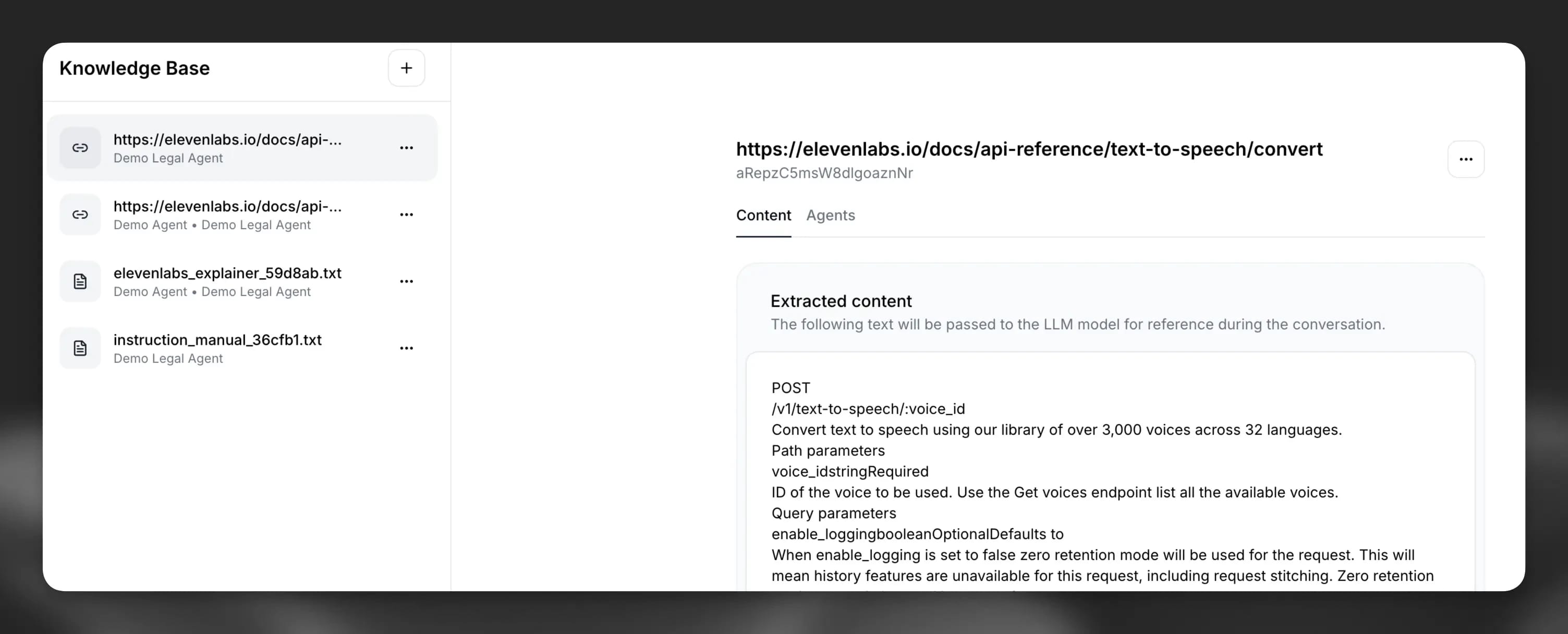
Per knowledge base più grandi, ElevenAgents supporta anche la Retrieval-Augmented Generation (RAG): una tecnica che recupera dalla knowledge base soltanto i contenuti più pertinenti per formulare ciascuna risposta, anziché passare tutto al modello contemporaneamente. In questo modo le risposte restano accurate e mirate e l'agente non viene sovraccaricato da informazioni irrilevanti.
Scrivi system prompt efficaci
Il system prompt è la descrizione del lavoro dell'agente. Definisce chi è, cosa fa, come comunica e cosa non farà. Prompt vaghi producono agenti vaghi.
Struttura il prompt con sezioni markdown chiare, così il modello può assegnare correttamente le priorità alle istruzioni. Le sezioni principali da includere sono:
- Personalità: chi è l'agente e come comunica.
- Obiettivo: cosa cerca di ottenere, in passaggi ordinati.
- Strumenti: quali strumenti può usare, quando usarli e come gestire gli errori.
- Guardrail: ciò che non deve mai fare.
Mantieni ogni istruzione breve e orientata all'azione. Le istruzioni prolisse sono fonte di interpretazioni errate. Per le implementazioni aziendali, mantieni inoltre ogni agente specializzato: un ambito specifico per agente offre risultati più affidabili di un unico prompt che tenta di fare tutto.
Ecco un esempio sintetico di prompt ben strutturato:
Per approfondire il prompt engineering per agenti in produzione, consulta la guida completa ai prompt di ElevenLabs.
Definisci regole di escalation chiare prima del go-live
Senza criteri di escalation chiari, gli agenti gestiscono casi che non dovrebbero gestire, creando rischi, oppure eseguono l'escalation di tutto, vanificando lo scopo. Entrambi gli esiti compromettono la fiducia nel sistema.
Prima del lancio, definisci le condizioni di escalation per ciascuno dei seguenti casi:
- Clienti frustrati o offensivi.
- Parole chiave specifiche o tipi di argomenti sensibili.
- Tentativi di autenticazione non riusciti.
- Azioni ad alto rischio che richiedono l'approvazione di un operatore umano.
In ElevenAgents, i workflow deterministici ti consentono di sottoporre le azioni ad alto rischio a processi di approvazione basati su passaggi, così non accade nulla di irreversibile senza un percorso approvato. Con il builder visuale dei workflow puoi mappare i punti decisionali, definire le condizioni che attivano un'escalation e controllare con precisione quando una conversazione viene inoltrata a un sottoagente specializzato o a un operatore umano, trasferendo l'intero contesto a ogni passaggio.
Quando la configurazione è corretta, gli operatori umani ricevono le escalation con il contesto completo già allegato. Non devono chiedere al cliente di ripetere quanto detto.
Esegui test con scenari di conversazione reali
Gli agenti che funzionano bene in condizioni controllate spesso falliscono nei casi limite che rappresentano una quota significativa del volume reale, come richieste ambigue, clienti frustrati e richieste che esulano di poco dalla knowledge base.
Prima del go-live, testa l'agente su scenari di conversazione reali ricavati dai dati storici dei contatti. Non limitarti alle richieste semplici. Includi casi limite, informazioni parziali e interazioni emotivamente cariche. Sono queste le situazioni in cui un agente configurato male ha più probabilità di fallire.
ElevenAgents offre un framework di test integrato che copre tre tipi di test:
- Test della risposta successiva: simula un'interazione specifica e valuta la risposta in base a criteri di successo definiti.
- Test di invocazione degli strumenti: verifica che l'agente chiami gli strumenti corretti con i parametri giusti, aspetto fondamentale per azioni ad alto impatto come trasferimenti, ricerche e rimborsi.
- Test di simulazione: esegue una conversazione completa a più turni con un utente simulato per verificare che l'interazione raggiunga il risultato definito.
L'obiettivo è che l'agente gestisca correttamente almeno l'80% degli scenari di test ed esegua l'escalation in modo appropriato per gli altri, senza produrre risposte sicure ma errate su alcun elemento del set di test.
Collega il tuo agente ai sistemi esistenti
Un agente che può rispondere alle domande soltanto usando una knowledge base statica ha capacità limitate. La maggior parte delle richieste dei clienti richiede di recuperare dati in tempo reale dai sistemi esistenti, come lo stato dell'ordine, le informazioni dell'account e la disponibilità per le prenotazioni. Senza integrazioni, l'agente può descrivere una policy, ma non può agire.
Collega il tuo agente al CRM, al sistema di ticketing, alla telefonia e a qualsiasi altro sistema che i tuoi operatori umani usano per risolvere le richieste. Un agente ben integrato risolve una richiesta sulla fatturazione consultando l'account del cliente in tempo reale, non dicendogli di controllare l'email.
In ElevenAgents, il collegamento ai sistemi esterni viene gestito tramite gli strumenti. Vai alla scheda Tools nella configurazione dell'agente e scegli il tipo di integrazione più adatto alla tua configurazione:
- Client tools: attivano azioni nel browser o nell'app dell'utente.
- Webhook tools: si connettono al tuo backend tramite chiamate API per recuperare dati in tempo reale o eseguire azioni nei tuoi sistemi.
- Integration tools: si connettono a servizi di terze parti come Salesforce, Zendesk e Stripe tramite configurazioni webhook.
ElevenAgents si connette in modo nativo a Salesforce, Zendesk, Stripe, Twilio, Google Calendar e sistemi di cartelle cliniche elettroniche (EHR), con API REST e MCP per integrazioni personalizzate.
Vuoi vedere come funziona dall'inizio alla fine? ElevenLabs ha una serie YouTube su come creare un agente vocale IA che illustra l'intero processo di sviluppo.
Inizia con ElevenAgents
ElevenAgents è progettato per i team di assistenza aziendali che vogliono migliorare il servizio clienti e aumentare il numero di richieste gestibili. Gli agenti IA creati con ElevenAgents offrono:
- Latenza vocale inferiore al secondo per conversazioni naturali, non robotiche.
- Oltre 90 lingue con rilevamento automatico e cambio in tempo reale.
- Conformità normativa aziendale integrata: SOC 2 Type II, ISO 27001, PCI DSS Level 1, HIPAA, GDPR.
- Integrazioni native con Salesforce, Zendesk, Twilio, Stripe, Google Calendar e molto altro.
- Passaggio a operatori umani con il contesto completo della conversazione trasferito all'operatore che prende in carico la richiesta.
Per i team con esigenze di conformità normativa, rollout in più regioni o integrazioni approfondite, integrazioni, i Forward Deployed Engineers di ElevenLabs lavorano a stretto contatto con il tuo team, definiscono l'ambito dell'implementazione e restano responsabili dei tuoi KPI dopo il lancio. Quando sei pronto, crea il tuo primo agente.