

Members
ElevenLabs workspaces use a seat-based model. Every member in a workspace occupies one seat, and the seat type they hold determines what they can access and how credits are consumed.
There are two seat types available in ElevenLabs workspaces:
- Full Seats — full access to all ElevenLabs products, including ElevenCreative, ElevenAgents, and ElevenAPI.
- Basic Seats — designed for members who primarily work with ElevenAgents or ElevenAPI, with limited access to ElevenCreative.
Workspace admins can assign, change, and manage seat types at any time from Settings → Members.
Admin is a role within your workspace, which gives enhanced permissions such as adding and removing members, setting permissions, and managing the workspace subscription. Admins always occupy a Full Seat.
Seat types & included allocations by plan
Your workspace has two separate limits that work together:
-
Full Seat limit — the maximum number of Full Seats your plan allows. Once this is reached, you cannot add more Full Seat users. Pro, Scale, Business, and Enterprise customers can purchase additional Full Seats. You can also free up Full Seats by moving Full Seat members to Basic Seats, or lock workspace members to free up their seats.
-
Basic Seat limit — the maximum number Basic Seats your workspace can hold. If you are using fewer Full Seats than your plan allows, those unused Full Seat slots can also be filled by Basic Seat users. This means that you can have more Basic Seats than your allocation, as long as you have Full Seats available.
Once the total limit is reached, no new members of any type can be added without purchasing more seats, or unless existing workspace members are locked by a workspace admin.
The number of Full Seats and Basic Seats included depends on your subscription:
Pro, Scale, and Business workspaces can purchase additional Full Seats up to a maximum of 11 Full Seats per workspace, including seats included with your plan. If you need more than 11 Full Seats, contact sales. Enterprise Full Seat counts are defined in your contract and are not limited by this cap.
Enterprise Basic Seat counts are defined in your contract and may vary — the 1,000 figure is a soft cap. Enterprise Basic Seats are effectively unlimited within your contract terms.
Full Seats
Full Seats provide unrestricted access to all ElevenLabs products and features within a workspace.
What Full Seat users can do
- Access and generate content in ElevenCreative without a monthly credit ceiling, subject to the workspace’s shared credit pool
- Build, deploy, and manage agents via ElevenAgents
- Create personal API keys and access the ElevenAPI for programmatic workflows
- View and use all shared workspace assets — voices, projects, files, and agents
Credit usage
Full Seat users draw from the workspace’s shared credit pool with no individual monthly ceiling with the ability for admins to create billing groups with specific limits per group. Usage resets in line with the workspace’s billing cycle.
Purchasing additional Full Seats also increases the credits available to your workspace. See Additional Full Seats for how this works on self-serve and Enterprise plans.
Basic Seats
Basic Seats are designed for team members who primarily work with ElevenAgents and ElevenAPI, or who only need limited access to ElevenCreative.
With Basic Seats, workspace admins can expand their team without giving everyone full access to ElevenCreative, keeping costs manageable and permissions organized.
What Basic Seat users can do
- Use ElevenAgents — draws from the workspace’s shared credit pool with no individual ceiling
- Use the ElevenAPI — draws from the workspace’s shared credit pool with no individual ceiling
- View and browse all shared workspace assets — voices, projects, files, and agents
- Generate content in ElevenCreative up to a 50,000 credit ceiling each billing cycle ($5 usage per month for Enterprise customers), drawn from the workspace’s shared credit pool — view access is always retained even after hitting the limit
Credit usage
Every user in a workspace draws from the same shared credit pool — Basic Seat users do not receive their own credit allocation. The 50,000 credit figure ($5 usage per month for Enterprise customers) is a per-user ceiling on how much of that shared pool each Basic Seat user can consume through ElevenCreative in a billing period. It is not additional capacity added on top of your plan.
For example, if your workspace plan includes 100,000 credits, that is the total available to all members. A Basic Seat user can use at most 50,000 of those credits in ElevenCreative — they do not receive an additional 50,000 credits. If the shared pool runs out before a Basic Seat user hits their ceiling, they will not be able to generate content.
- ElevenAgents usage draws from the workspace’s shared credit pool with no individual ceiling: this does not count toward the 50,000 credit limit
- ElevenAPI usage also draws from the shared pool with no individual ceiling: this does not count toward the 50,000 credit limit
- ElevenCreative generation is subject to a 50,000 credit per-user ceiling each billing cycle ($5 usage per month for Enterprise customers), drawn from the workspace’s shared pool
- Credits reset monthly in line with the workspace’s billing cycle
- If a Basic Seat user reaches their 50,000 credit ceiling, they will no longer be able to generate content on ElevenCreative for the remainder of that billing period but retain view and browse access, and their access to ElevenAgents and ElevenAPI is unaffected
- If the shared workspace pool is exhausted, Basic Seat users cannot generate content even if they have not reached their individual 50,000 credit ceiling
- If a Full Seat user downgrades to a Basic Seat, credits used while they were a Full Seat user are counted towards the 50,000 credit ceiling
50,000 credits can be consumed quickly with regular ElevenCreative use. If a team member needs more creative access, consider upgrading them to a Full Seat.
Additional Full Seats
Workspace admins on eligible plans can add Full Seats from Workspace Settings → General using Add More Seats. Self-serve and Enterprise workspaces use the same control. Billing, credits, and limits differ.
Free, Starter, and Creator plans cannot purchase additional seats.
Self-serve seats
On Pro, Scale, and Business plans, workspace admins can buy and remove Full Seats from Workspace Settings. Each seat you add increases both your member capacity and your workspace’s monthly credit allowance.
Eligibility
- Workspace admins on Pro, Scale, and Business plans can purchase additional Full Seats from Workspace Settings → General.
- Free, Starter, and Creator plans cannot purchase additional seats. Upgrade to Pro, Scale, or Business first.
- Enterprise seats are handled through your contract, not this self-serve flow. See Enterprise seats.
- A workspace can have up to 11 Full Seats in total. This includes seats already included with your plan plus any you purchase. If you need more than 11, contact sales.
What you get
Each seat you purchase:
- Adds one Full Seat, so you can invite one more teammate as a full member of the workspace.
- Adds credits to the workspace’s shared pool, on top of your plan’s included credits. Seat credits refresh on the same monthly schedule as the rest of your plan.
- Is billed at the self-serve seat rate for your plan’s billing interval. Please check your Workspace Settings for current pricing.
Seat credits are pooled with your plan credits. Your team draws from one shared workspace balance.
The purchase dialog shows the per-seat price, the credits each seat includes, and the total recurring cost for your billing period.
How to buy seats
How to remove seats
Removing seats is scheduled for your next renewal. Nothing changes mid-cycle: you keep the seats and their credits until then.
At renewal, your seat count drops to the number you chose. Credits from the removed seats no longer apply after that reset.
There is no refund for the current period. You keep the removed seats and their credits through the end of the cycle you have already paid for.
Annual vs monthly
Seats follow your plan’s billing interval:
- Monthly plans: seats are billed per month at the self-serve seat rate.
- Annual plans: seats are billed per year. The recurring cost shown is the full-year per-seat charge, not the monthly rate.
Credits refresh monthly on all plans. On an annual plan, seat credits are still granted on the regular monthly refresh so your allowance stays consistent throughout the year.
Changing plans
Purchased seats carry over when you change plans, within the rules below.
Upgrading
Higher plans include more Full Seats by default. When you upgrade, purchased seats are absorbed into the new plan’s included seats first, so you are not billed twice for the same capacity.
- A Scale workspace (3 included Full Seats) with 4 purchased seats has 7 Full Seats. Upgrading to Business (10 included Full Seats) absorbs those purchased seats into the new plan’s included allocation, so you are not billed for additional seats.
- A Pro workspace (1 included Full Seat) with 4 purchased seats has 5 Full Seats. Upgrading to Scale (3 included Full Seats) leaves 2 purchased seats, which continue to be billed at the self-serve seat rate.
The 11-seat cap still applies. If carrying all purchased seats would exceed the cap, the excess is trimmed. Trimmed seats are not refunded; their credits were already granted.
The upgrade summary shows how many Full Seats you will have after upgrading. The amount charged includes any remaining paid seats. If you also switch billing interval (for example monthly to annual), seats are re-priced to match.
Downgrading
By default, a downgrade keeps all purchased seats if the plan you are moving to supports self-serve seats.
You can optionally reduce paid seats as part of the downgrade using the inline picker.
Seats are dropped when you move to a plan that does not support additional seats, such as Starter.
A pending downgrade replaces any pending scheduled seat removal. Downgrades take effect at the next renewal.
Enterprise seats
Enterprise workspaces add Full Seats from Workspace Settings → General using Add More Seats. Pricing is set with your account manager. The cost of each additional seat is added to your monthly commitment and unlocks equivalent usage for the whole workspace.
Enterprise Full Seat counts are not limited by the self-serve 11-seat cap. Contact your account manager to purchase additional Full Seats or to request additional Basic Seats beyond your contract allocation.
Managing seats
Workspace admins can assign and manage seat types from Settings → Members.
Assigning a seat type
Inviting new members
When inviting new users to your workspace, you can select their seat type during the invite flow.
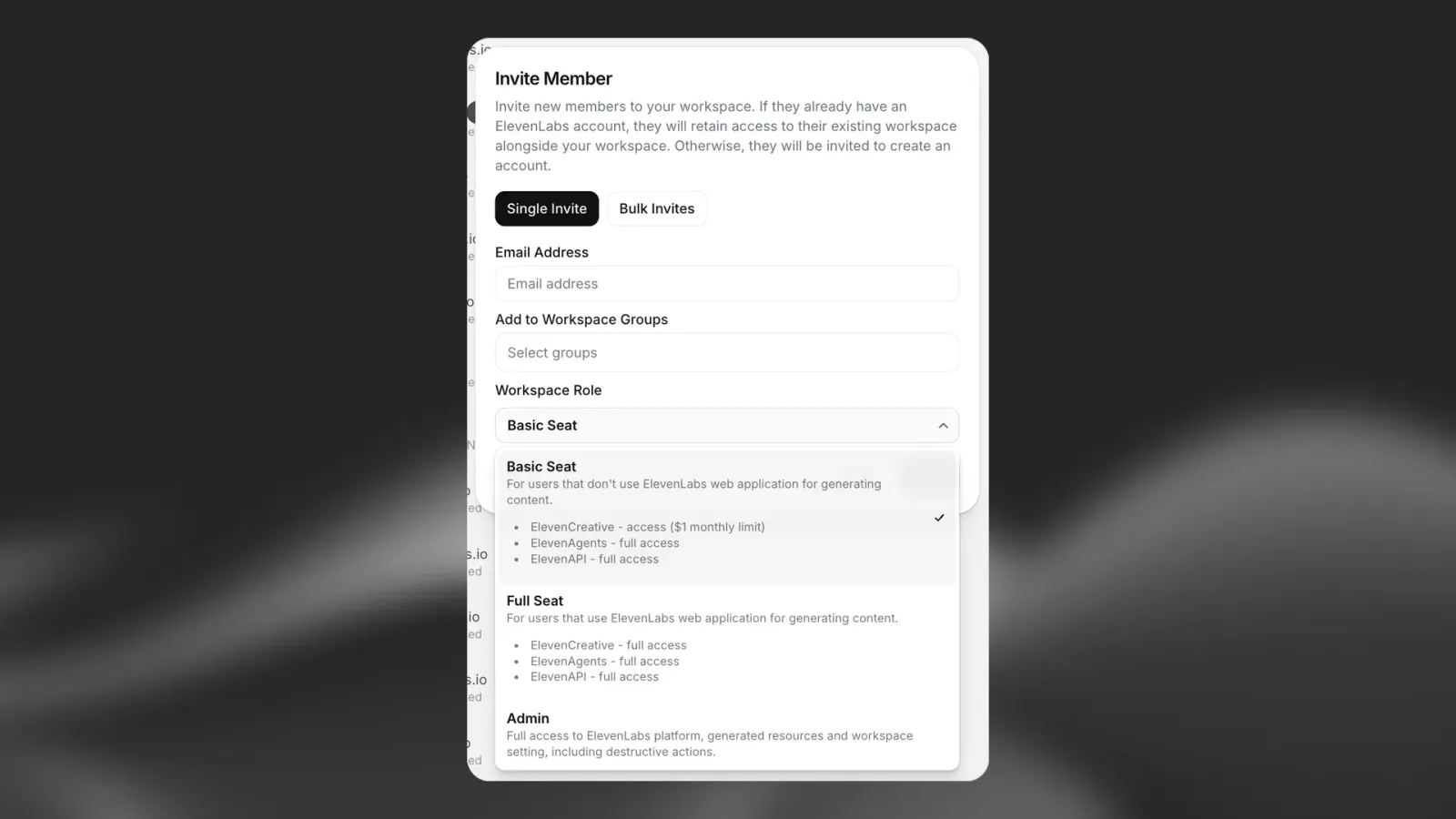
Adding more seats
See Additional Full Seats for how Pro, Scale, Business, and Enterprise workspaces purchase Full Seats, and Self-serve seats for buying, removing, and changing plans on Pro, Scale, and Business.
Member roles
Member roles are available for Enterprise workspaces. Only Workspace admins can assign and remove roles.
In addition to the Admin role, workspace admins can assign member roles to any non-admin workspace member. Roles grant specific permissions without requiring full admin access, and multiple roles can be assigned to the same member simultaneously.
Roles are additive — they add permissions on top of whatever the member’s group permissions already grant.
Available roles
User Manager
Grants the ability to invite and remove workspace members, and manage group membership:
- Invite new members to the workspace
- Remove members from the workspace
- Add and remove members from groups
Resource Manager
Grants the ability to manage the following workspace resources:
- Voices
- Studio projects
- Sound effects
- Dubbing
The Resource Manager role does not grant access to manage Agents. Agent access is controlled separately through workspace permissions.
Assigning roles
FAQ
What is the difference between a Full Seat and a Basic Seat?
Full Seats provide unrestricted access to all ElevenLabs products, including unlimited ElevenCreative usage (subject to the workspace credit pool), and the ability to create personal API keys.
Basic Seats are designed for users primarily working with ElevenAgents or ElevenAPI — ElevenCreative generation is capped at a 50,000 credit ceiling each billing cycle ($5 usage per month for Enterprise customers) per user, drawn from the shared workspace pool. This is a ceiling on consumption, not a separate allocation.
Does ElevenAgents or ElevenAPI usage count toward the Basic Seat 50,000 credit ceiling?
No. The 50,000 credit ceiling applies to ElevenCreative usage only. ElevenAgents and ElevenAPI usage draws freely from the workspace’s shared credit pool with no individual ceiling.
What happens if a Basic Seat user hits their credit ceiling?
They will not be able to generate new content in ElevenCreative for the remainder of the billing period. Their access to ElevenAgents and ElevenAPI is unaffected. Their workspace admin can upgrade them to a Full Seat if they need more creative access.
Can I change a seat type?
Yes. Admins can upgrade or downgrade any seat type at any time from the Members settings page.
Who can manage seat types?
Only workspace admins can assign and change seat types.
How many seats are included with my plan?
See the Seat Types & Included Allocations by Plan table above. All plans now include 20 Basic Seats. Full Seat allocations vary by plan tier.
Can I purchase additional seats?
Pro, Scale, and Business plan users can purchase additional Full Seats from Workspace Settings → General, up to a maximum of 11 Full Seats per workspace. Each additional seat includes additional credits. Please check your Workspace Settings for current pricing.
Enterprise customers can purchase additional Full Seats through their contract. Seat counts are not limited by the self-serve 11-seat cap. Contact your account manager for pricing.
Free, Starter, and Creator plans cannot purchase additional seats.
Is there a limit on how many Full Seats I can have?
Self-serve workspaces (Pro, Scale, and Business) can have up to 11 Full Seats in total, including seats included with your plan. If you need more than 11, contact sales.
Enterprise Full Seat counts are defined in your contract and are not limited by this cap.
When does removing a seat take effect?
Seat removals on self-serve plans take effect at your next renewal. You keep the seats and their credits until then, and there is no mid-cycle refund. You can cancel a pending removal any time before renewal.
What happens to purchased seats if I change plans?
On upgrade, purchased seats are absorbed into the new plan’s included seats first. Any seats still above the new included allocation continue as paid seats, up to the 11-seat cap.
On downgrade, purchased seats are kept by default if the destination plan supports self-serve seats. You can reduce them during the downgrade. Seats are dropped if you move to a plan that does not support additional seats.