What is a context window? What every LLM user should know
- Written by
- Jack Limebear
- Published
- Last updated
ListenListen to this article
A context window is the amount of information a large language model (LLM) can process in a single request. Measured in tokens, it can include your prompt, conversation history, system instructions, retrieved documents, tool results, and the model’s generated response.
A larger context window lets a model work with more information in a single request. For example, a coding agent investigating a bug could work with relevant source files, documentation, test results, and recent code changes at the same time instead of analyzing each piece separately and losing useful context between requests.
A larger context window isn't the same as perfect memory, though. Longer prompts require more computation, consume more tokens, and can make it harder for a model to identify which details actually matter. Research on long-context models, including the Lost in the Middle study and NVIDIA's RULER benchmark, has repeatedly found that models use less of what's available to them as context grows, especially when relevant information sits buried among less useful material.
This piece breaks down how context windows work, how they're measured, what happens when they fill up, and how developers can manage them effectively.
Summary
- A context window is the total token budget an LLM draws on for a single request. It covers the user prompt, conversation history, retrieved content, and output.
- Bigger context windows enable longer documents, codebases, and conversations, but don't guarantee the model uses every part of them well.
- Models retrieve information least reliably from the middle of long prompts, a pattern documented in the Lost in the Middle study and RULER benchmark.
- Effective context management (retrieval, summarization, caching) usually beats simply maximizing how many tokens get sent.
- The best context strategy is the one matched to your actual workload, not the one that uses the largest advertised context window.
What is a context window in an AI model?
A context window is a model's active workspace, where everything relevant to the current request comes together before the model generates a response.
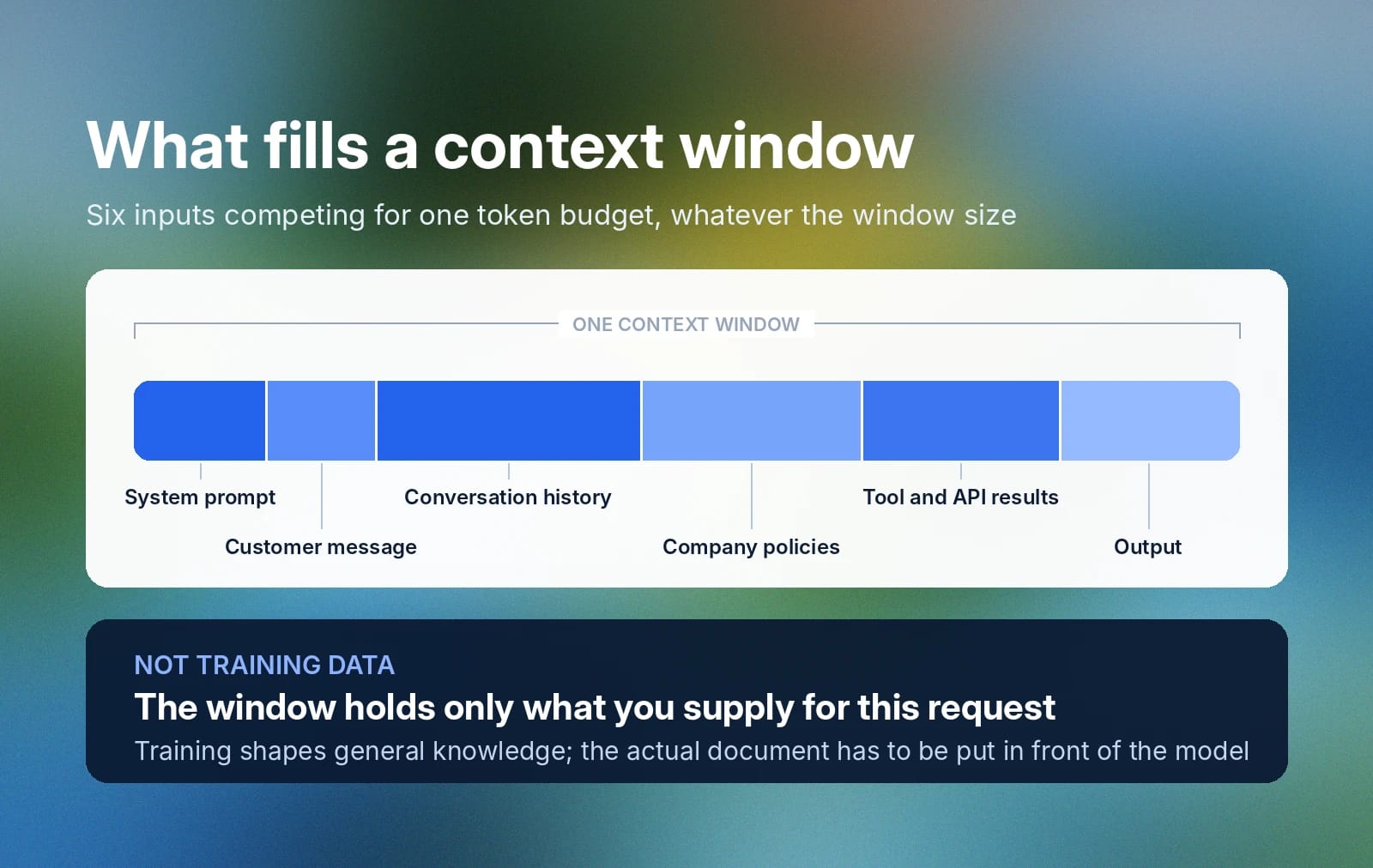
Take an AI agent summarizing a customer support conversation and recommending a resolution. To do that well, the model has to process:
- The system prompt
- The customer's message
- The conversation history
- The company policies
- The tool and API results
- The output
All of that competes for space inside the same context window, regardless of how big that window is.
Context windows don't include training data. Training bakes information into a model's parameters permanently, shaping what it “knows” in general. A context window, however, only holds information supplied for the current task.
This distinction matters in practice: If an application needs a model to reason over a specific policy, customer record, or technical document, that information isn't available just because the model was trained on similar material. It generally has to enter the model's working context directly in the prompt or through a retrieval or tool system, or the model will reason from general knowledge instead of the actual document in front of it.
Tokenization and context windows: How data is processed
Before an LLM processes text, a tokenizer breaks it into smaller units called tokens. A token might represent a whole word, part of a word, a punctuation mark, or another short piece of text.
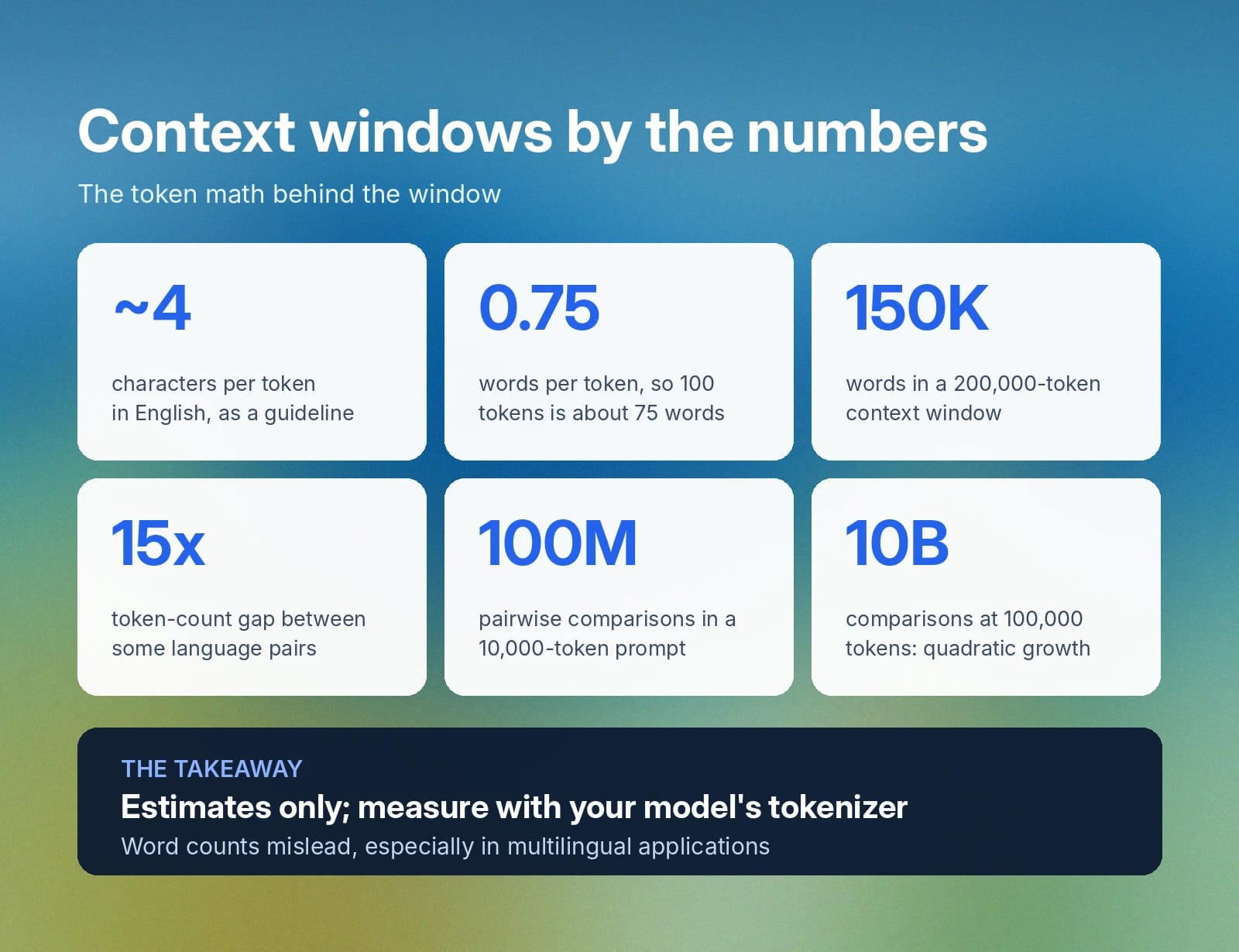
For English, a useful guideline is that one token represents roughly four characters, or about three-quarters of a word. By that estimate, 100 tokens correspond to approximately 75 words. However, this is only an approximation. Consider the phrase “Context windows affect application performance.” A tokenizer does not necessarily represent it as five complete words; depending on the tokenizer, one or more words may be split into multiple subword tokens.
Tokenization also varies significantly across languages. Two sentences with similar meanings and similar visible lengths can consume very different numbers of tokens depending on the language and the tokenizer. Research on tokenizer fairness has found that some language pairs differ by as much as 15 times in tokenized length for equivalent text, even with tokenizers built for multilingual support. Developers building multilingual applications should measure token usage with the actual tokenizer for their model rather than estimating from word counts.
A 200,000-token context window may sound huge, but an application that continually appends conversation history, retrieved documentation, tool responses, and system instructions can approach that limit faster than expected. For this reason, production applications often monitor token usage and use techniques such as summarization, history pruning, retrieval filtering, and prompt compression to keep the most relevant information within the active context.
How does a context window work in language models?
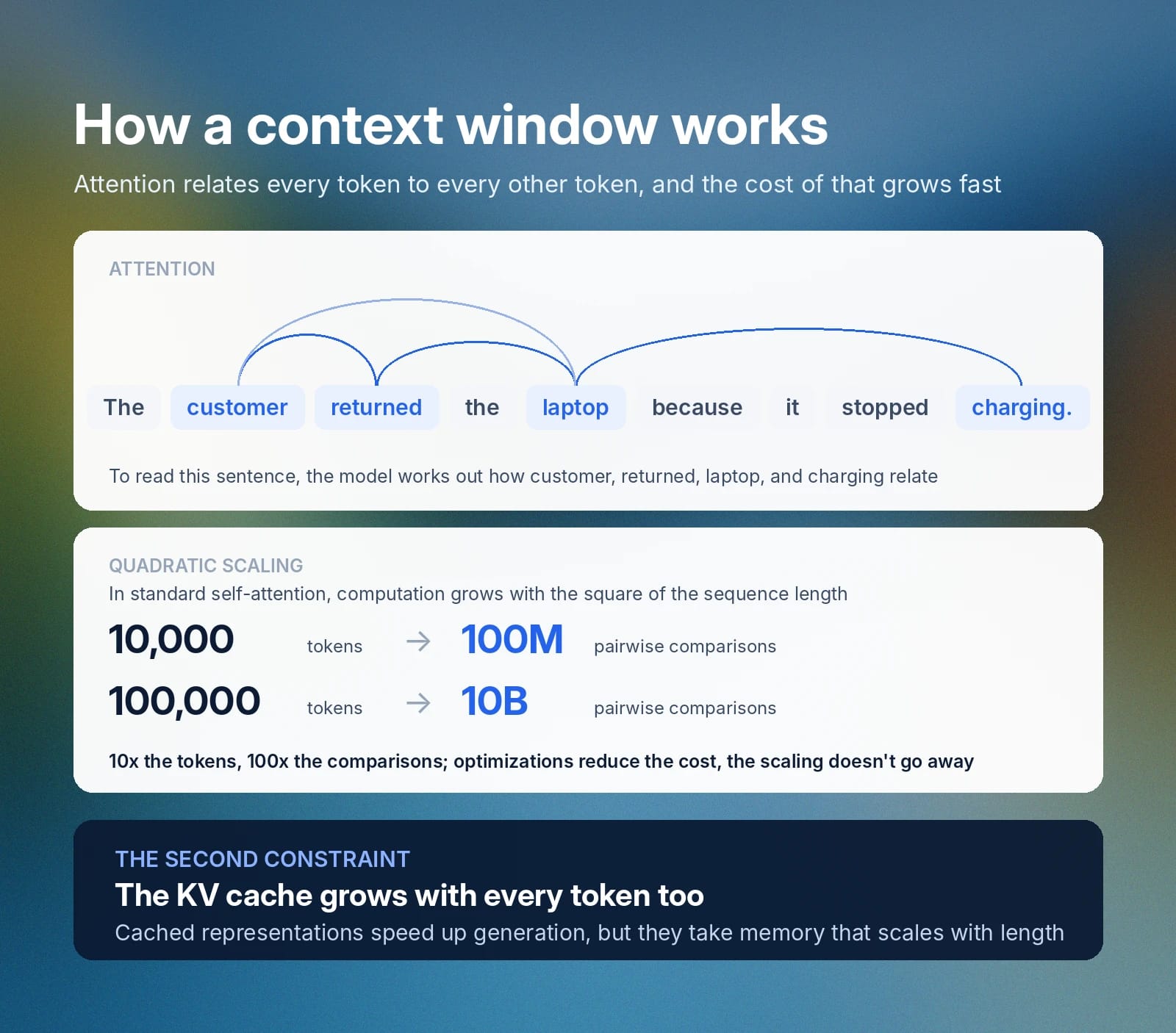
A context window works through the transformer architecture's attention mechanism, which calculates how each token in an input relates to every other token before the model produces a response.
Take the sentence "The customer returned the laptop because it stopped charging." To interpret it correctly, the model has to work out how customer, laptop, returned, and charging relate to one another. As a sequence gets longer, the number of these relationships grows fast.
In standard self-attention, the computation required grows roughly with the square of the sequence length. For example, a 10,000-token prompt requires around 100 million pairwise comparisons, while a 100,000-token prompt requires around 10 billion. Modern models use a range of architectural and infrastructure optimizations to bring that cost down in practice, but the underlying scaling problem doesn't go away.
Long conversations add a second constraint: the key-value, or KV, cache. During generation, models retain intermediate representations of earlier tokens instead of recomputing them for every new token, which speeds up inference substantially. The cache itself takes up memory, though, and it grows as the sequence gets longer.
Maximum context length in AI models and why it matters
A model’s maximum context length defines how much information it can accept and process in a single request. However, whether the model uses a large context window effectively is a separate question.
Longer context windows enable use cases that were difficult or impractical with earlier LLMs. Developers can provide a model with an entire code repository, a lengthy legal document, a research paper, a meeting transcript, or a substantial conversation history without first reducing the material to a few thousand tokens.
This matters because preserving more of the original context can improve the model’s ability to answer questions accurately, identify relationships between distant pieces of information, and perform tasks that depend on the document as a whole. For example, a coding assistant may need to examine several files to understand how a function is called, while a legal-document assistant may need to compare definitions in one section with obligations described much later in the document.
However, a larger context window does not automatically produce better results. Very long inputs can increase cost and latency, and models may pay less attention to information buried in the middle of a large context. Developers should therefore include relevant information selectively, organize long inputs clearly, and use techniques such as retrieval, summarization, and context pruning when appropriate.
Comparing context window sizes by model
Context windows vary widely across today's major model families, from a few hundred thousand tokens up to 10 million. Here's how current flagship models compare:
Model
Context window
Notes
10 million tokens
Meta's open-weight model; the largest publicly available window as of this writing
1 million tokens
Google's current Pro-tier model for long-document and multi-file analysis
1 million tokens
Anthropic's current Sonnet-tier model; the window applies by default across the Claude API
Advertised limits change quickly as providers ship new models and raise their ceilings, so treat any table like this as a snapshot rather than a permanent ranking. Context size is also just one input into choosing a model. It says nothing on its own about reasoning quality, output limits, latency, or cost.
Implications of a small versus large context window
A small context window forces developers to be selective. Long documents get chunked, older conversation history gets summarized, and external knowledge gets retrieved only when it's actually needed.
A large context window removes some of those constraints. You can supply more examples, preserve more conversation history, or analyze a bigger set of documents without splitting everything apart first.
However, a larger window introduces a different problem: attention dilution. When a prompt contains a large amount of information, the model may struggle to identify which details are most relevant to the current request. Important instructions or evidence can become buried among less relevant content, increasing the risk of incomplete, inconsistent, or less precise responses.
Why models get lost in the middle
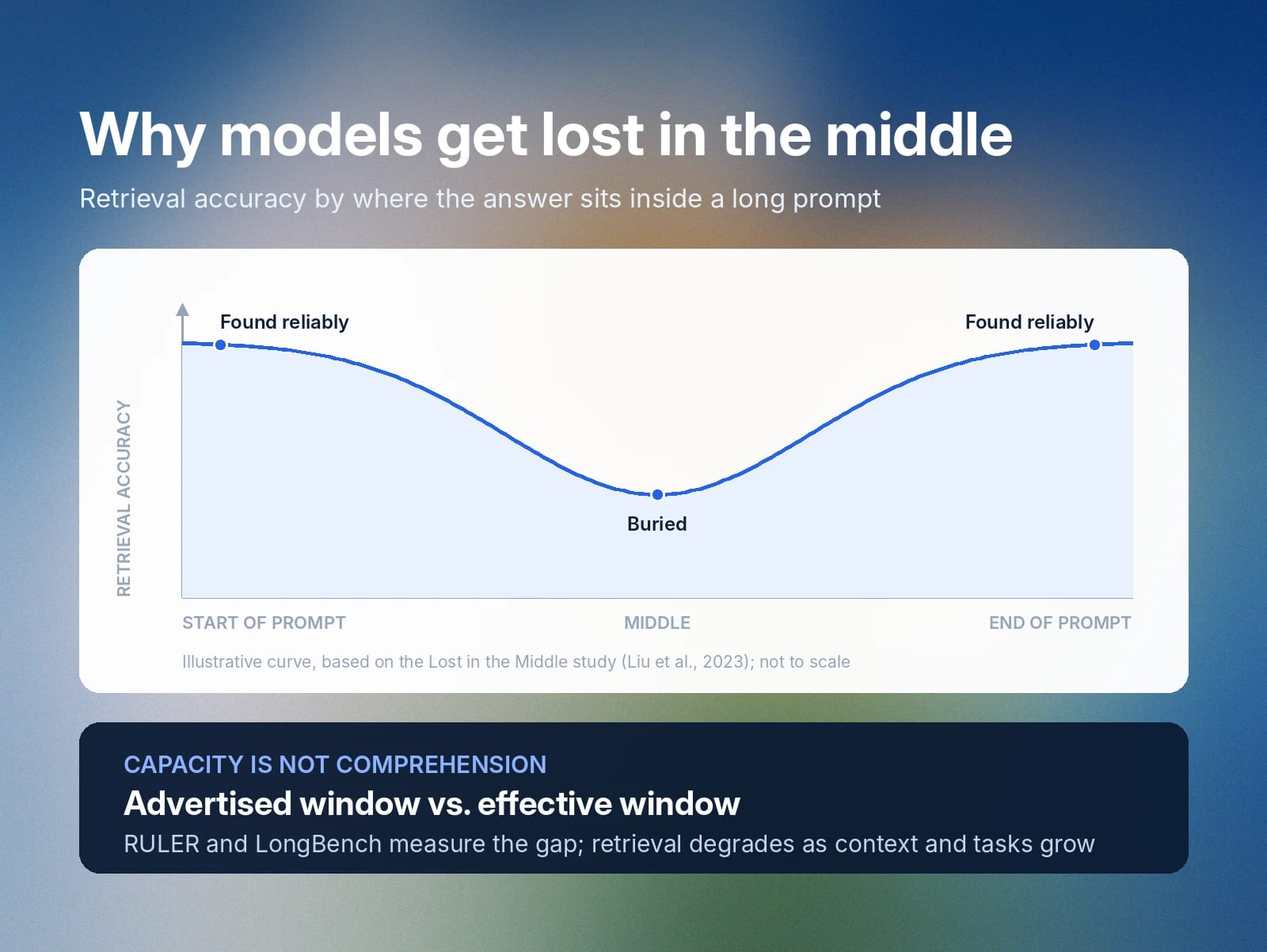
Models tend to retrieve information best when it sits near the start or end of a long prompt, and worst when it's buried in the middle. The influential Lost in the Middle study tested this directly by placing the answer to a question at different positions inside a long prompt and measuring how often models found it. Accuracy was consistently strongest at the beginning and end of the context, and weakest in the middle.
That means a model can technically accept a document without reliably using every part of it. Send an LLM 100 support documents because one of them contains the answer to a customer's question, and a bigger context window may let all 100 fit. But the model still has to pick out one relevant passage from 99 irrelevant ones, and a longer window doesn't guarantee it will.
So it's worth distinguishing between a model's advertised context window and its effective context window for a given workload. Benchmarks like RULER and LongBench try to measure that gap. RULER found that models scoring nearly perfectly on simple retrieval tests still degraded as context length and task complexity increased. LongBench evaluates broader tasks, including document question answering, multi-document reasoning, summarization, few-shot learning, and code completion.
Long context still adds real value. Capacity and comprehension are simply different properties, and both matter when choosing a model for a given task.
Managing context limits: Best practices for developers
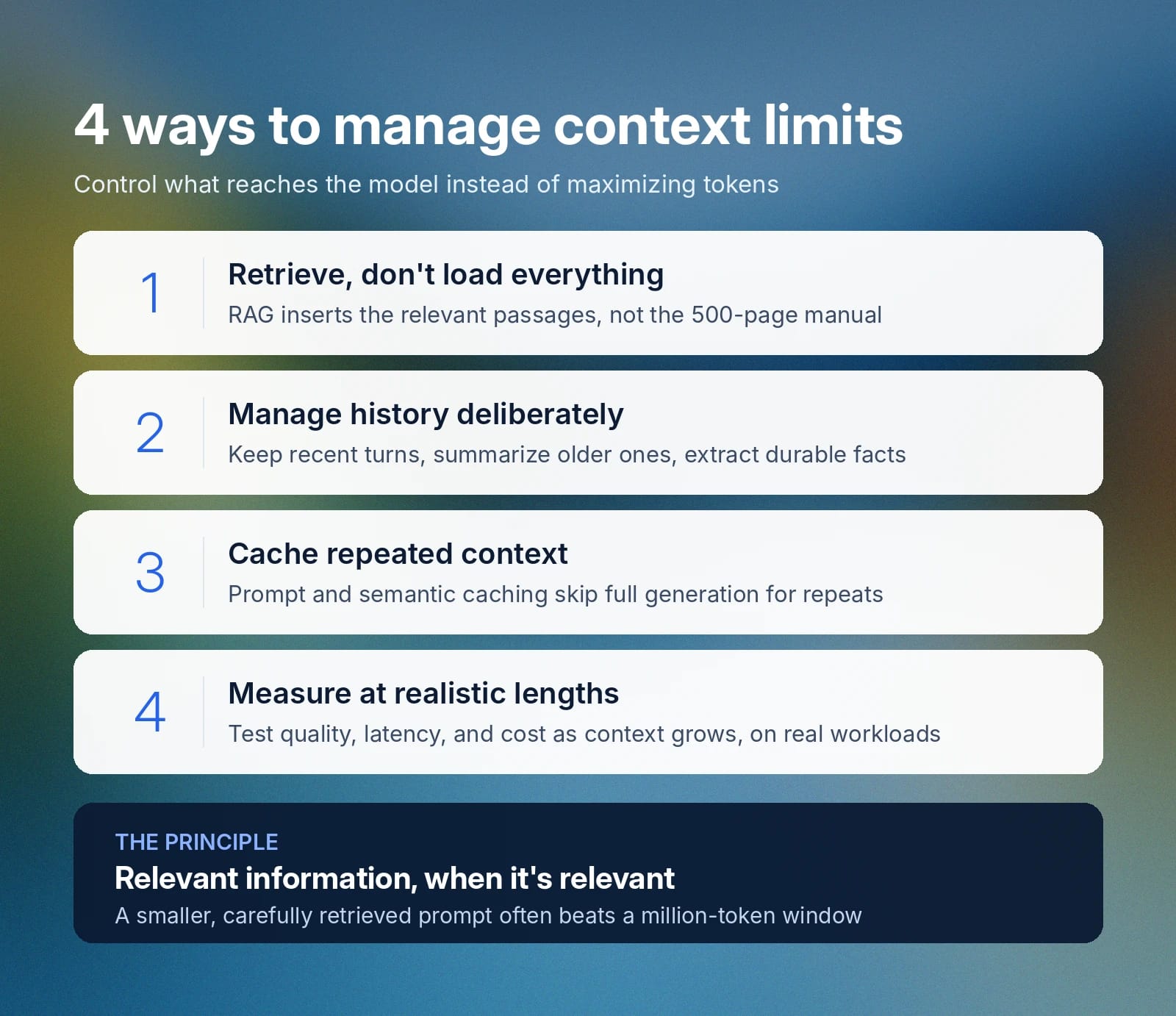
Good context management means controlling what reaches the model: providing the information relevant to the task, when it is relevant, rather than trying to maximize the number of tokens in every request. The following practices can help developers reduce unnecessary context, improve response quality, and control cost and latency.
1. Retrieve relevant information instead of loading everything
Retrieval-augmented generation, or RAG, lets an application search an external knowledge base and insert only the relevant passages into the model's context. Instead of putting an entire 500-page manual into every support request, the application retrieves the few passages closest to the customer's actual question.
That cuts token usage and gives the model a much clearer signal about what matters. Retrieval quality still counts: Production RAG systems typically improve results by chunking documents carefully, retrieving several candidate passages, reranking those candidates, and filtering out anything irrelevant before building the final prompt. ElevenLabs, for example, rebuilt its RAG pipeline to add query rewriting and parallel model calls, cutting median retrieval latency in half.
2. Manage conversation history deliberately
Conversational applications accumulate context fast. Appending every previous message indefinitely wastes tokens and can pull irrelevant details into later turns.
Applications handle this by keeping the most recent turns, summarizing older exchanges, extracting durable facts into structured memory, and retrieving older details only when they become relevant again. That creates a useful split between short-term conversational context, which the model needs immediately, and longer-term application memory, which can be pulled back in later.
3. Use caching when context repeats
Many applications send the same large instructions repeatedly, or answer questions that are semantically similar to ones they've already handled. Caching cuts that overhead.
Prompt or context caching lets repeated input get reused more efficiently, and semantic caching goes a step further by recognizing when a new question means roughly the same thing as one the system has already answered. "What is your return policy?" and "How long do I have to return an item?" are different strings that a semantic cache can treat as the same question, skipping a full generation call and cutting both latency and token costs.
4. Measure performance at realistic context lengths
Do not choose a context strategy based only on a model provider’s advertised token limit. Test representative production workloads and measure response quality, retrieval accuracy, latency, token usage, cost, and failure rates as context length increases.
Compare strategies such as providing more context, retrieving fewer passages, summarizing conversation history, or combining retrieval with summarization. A model with a one-million-token context window may support your application technically, while a smaller, carefully retrieved prompt produces faster and more accurate results at a lower cost.
Get started with ElevenAgents for scalable language solutions
Context management matters most in conversational agents, which have to combine the current utterance with previous turns, business instructions, customer information, knowledge base content, and tool results, all while responding fast enough for the conversation to feel natural.
ElevenAgents brings these pieces together in one platform for building and deploying AI voice agents. Its orchestration engine coordinates speech recognition, an LLM, and Text to Speech, while developers configure prompts, knowledge bases, tools, workflows, and the underlying language model. Expressive delivery, including how an agent conveys emotional context in speech, depends on the same context that shapes what the agent says in the first place.
For knowledge management specifically, ElevenAgents supports both full-context documents and RAG, configurable directly on the platform. Small documents go directly into an agent's prompt, so their content stays available throughout the conversation. Larger knowledge bases get indexed instead, with RAG retrieving the relevant passages for each query rather than loading everything into the context window at once.
Get started by signing up to ElevenAgents today or talk to our team to learn about your deployment options.
What is a context window FAQ

Jack Limebear is on the Growth team, acting as a content writer and strategist across the blog and insights pages. Before ElevenLabs, he spent over a decade leading content strategy for organizations ranging from fast-growing SaaS startups to Fortune 500 companies. He holds a Master's degree in English Literature from the University of Cambridge.