How to use a meeting transcription API: Real-time and batch with Scribe v2
- Written by
- Jack Limebear
- Published
ListenListen to this article
Manually taking meeting notes is tedious and error-prone, especially when a meeting runs longer than an hour. This wastes time and distracts attendees from the discussion. Even with an audio recording, tagging specific conversations to individual speakers is challenging.
A meeting transcription API lets you turn live or recorded meetings into time-stamped, speaker-labeled text inside your product. You send audio in and get a structured transcript back, without having to build a speech model yourself.
This article explains how a meeting transcription API works, compares real-time and batch transcription, and shows how to build with Eleven Scribe v2 and Eleven Scribe v2 Realtime.
Summary
- A meeting transcription API converts meeting audio into transcripts with timestamps and speaker labels.
- Real-time transcription offers low latency in-meeting captioning, while batch transcription processes audio recordings after the meeting ends.
- Meeting transcription accuracy depends on audio quality, speakers’ voice patterns, and the underlying voice model.
- ElevenLabs provides Scribe v2 and Scribe v2 Realtime models that let engineering teams build highly accurate meeting transcription products.
What a meeting transcription API does and who needs one
A meeting transcription API takes meeting audio as input and returns text. It handles speech recognition, speaker diarization, and timestamping, giving you a complete package to work with. Compared with manual note-taking, speech to text for meetings gives attendees a searchable record they can revisit.
As more teams adopt AI agents, written meeting records become searchable context. An internal agent searches transcripts for details, surfacing information that reduces data siloing and boosts cross-team access to information.
Many commercial tools offer transcription, but they may not fully meet an organization’s requirements.
For product engineering teams, building a STT meeting app or introducing the capability to an existing tool is sometimes more viable. With your own meeting transcription software, you have control over the following:
- Privacy: ElevenLabs offers Zero Retention Mode for enterprise users, further satisfying privacy requirements in certain regions.
- Custom vocabulary: You provide additional context to the model to allow it to understand and transcribe terms specific to your company, product, and industry.
- Tailored workflow: Instead of being limited to vendor-specific workflows, you build a meeting transcription tool that connects with your internal database, CRM, and enterprise software.
ElevenLabs provides leading voice and audio models that help you build a meeting transcription app. By using our meeting transcription API, you can accurately capture what’s being spoken in a meeting into textual notes. Our models support 90+ languages, allowing you to transcribe across English, French, Mandarin, and dozens of other languages.

Real-time or batch speech to text for meetings: How to choose
Real-time transcription captures audio streams as they are spoken and turns them into live captions. You use real-time transcription to provide textual assistance during the meeting or to trigger mid-session actions with a live bot. Meanwhile, batch transcriptions process the entire recording after a meeting to provide a more concise and structured transcript. Batch transcription helps with creating post-meeting notes, record-keeping, and maintaining auditable records.
It’s important to understand the technical and cost implications when choosing between real-time or batch speech-to-text transcription.
Here’s a quick glance at how both approaches compare.
Characteristics
Real-time transcription
Batch transcription
Technical operations
Captures audio streams live as spoken. Requires an active connection with the voice model.
Processes the entire audio recording after a meeting. Can operate asynchronously.
Accuracy
Standard. Processes audio on the fly without full context.
Higher. Has ample time to analyze full conversational context.
Use cases
In-meeting live caption, meeting bot.
Post-meeting notes, record-keeping.
Cost
Higher, as it requires a persistent connection.
Lower with bulk processing efficiency.
Ultimately, your choice depends on priorities. If you’re building a live meeting assistant, you must transcribe in real time. Otherwise, you use batch transcription, which offers cost and precision advantages.
How to set up a meeting transcription API with Scribe v2
ElevenLabs Speech to Text lets you transcribe meetings with Scribe v2 Realtime and Scribe v2. Both voice models are trained to accurately tag speakers across various accents, dialects, and audio quality. Scribe v2 Realtime allows you to transcribe live speech instantly, while Scribe v2 turns audio recordings into highly accurate transcripts.
You can access both models using the API we provide. Below, we explore each model in detail, highlighting key features, API architecture, and ways to integrate with your transcription solution.
Option 1: Real-time (live) transcription
Real-time transcription lets you process conversations during a meeting and turn them into text as speakers talk. There are few to no observable gaps between the audible and transcribed speech.
To transcribe in real time, you use the Scribe v2 Realtime model, which achieves low latency at 150 ms between audio input and text output (near-instant partial transcriptions). This means you will have gapless captioning when you integrate the model into your transcriber app.
Designed to support live conversation, Scribe v2 Realtime suits use cases that require live captioning, generating real-time meeting notes, or feeding live text into an AI assistant for secondary triggers. Additionally, the model supports up to 50 key terms for prompting.
How to transcribe with Scribe v2 Realtime
To perform live transcription, connect your product to Scribe v2 Realtime using ElevenAPI.
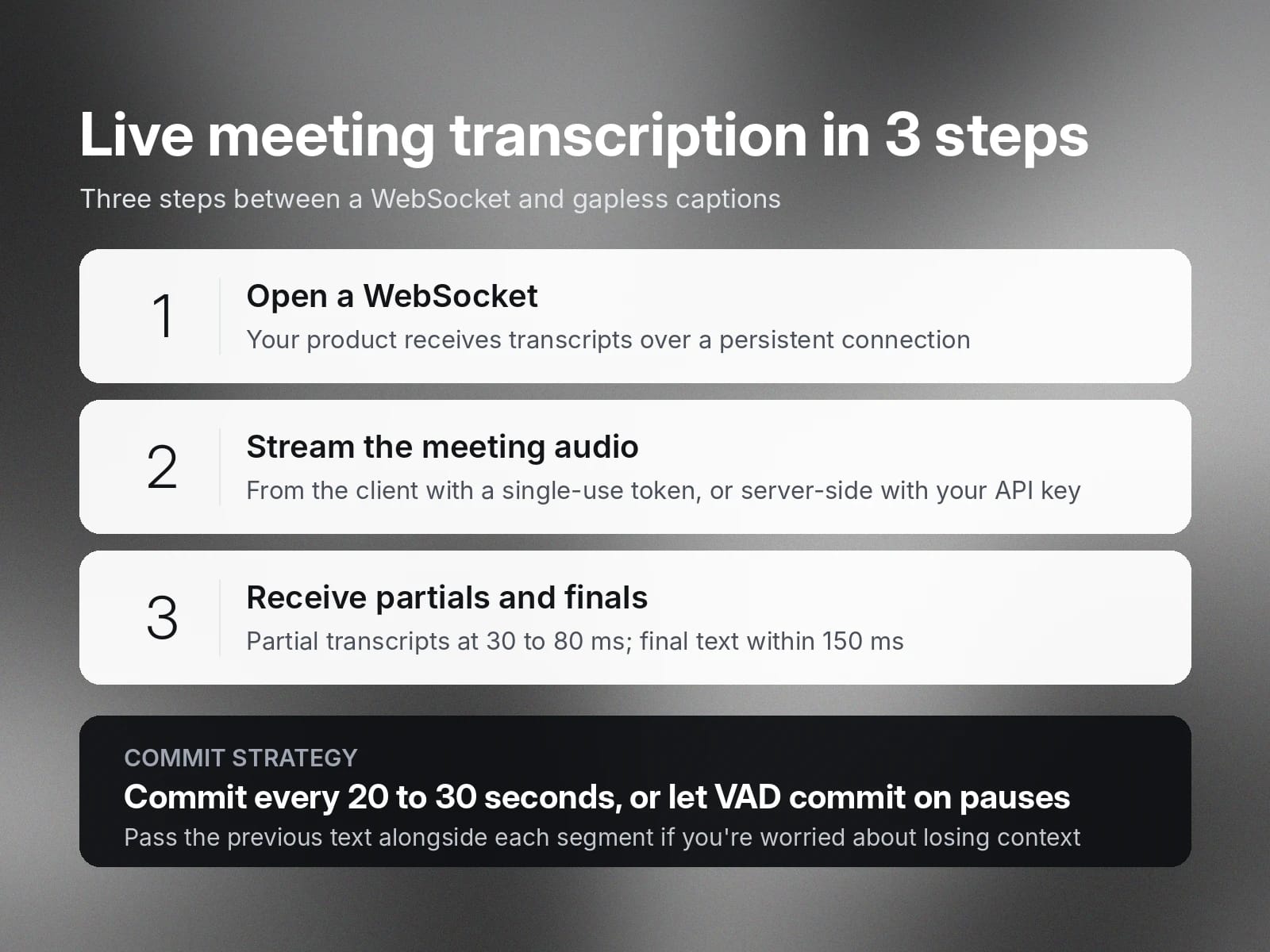
- First, open a WebSocket to allow your product to receive transcripts from the Scribe v2 Realtime model.
- Next, send streams of live meeting conversations to the model.
- Finally, receive partial and final transcripts within 150 ms.
In your code, you create handlers for API events that occur throughout the entire transcription process. For example, your code handles events when sending audio data and receiving a committed transcript.
Live streaming methods for Scribe v2 Realtime
The example below creates a single-use token on your backend. Your client can stream meeting audio to the meeting transcription API without exposing your API key.
Depending on your app architecture, you can stream live conversations with Scribe v2 Realtime from the client app or backend server.
- Client-side streaming: With this method, you feed the audio input to the audio model directly from the microphone or through manual chunking. To connect with the API, you validate with a single-use token, which prevents exposing your API key.
- Server-side streaming: This method lets you stream audio directly from a URL, file uploads, or an audio stream. You use your ElevenLabs API key instead of a single-use token.
Choosing a commit strategy for Scribe v2 Realtime
The example below configures voice activity detection. The API will commit a transcript segment whenever a speaker pauses.
The final transcript provides evidentiary records that accurately capture what’s being said in the meeting. There are two ways to commit the final transcripts: manually or with the Voice Activity Detection (VAD).
- Manual commit: By default, you must manually commit the transcript segment in your code. We recommend committing every 20 to 30 seconds for optimal latency. If you’re concerned about losing context, you can send the previous text alongside the audio segment to be processed.
- Voice Activity Detection: Alternatively, you can use VAD, which detects silences in the audio stream to start transcription.
Option 2: Batch transcription (post-meeting)
Batch transcription is an effective way to turn hours of meeting recordings into textual format. It provides concise, contextually relevant, and diarized transcripts at scale.
Scribe v2 is an ElevenLabs speech-to-text model that supports dynamic audio tagging. You can accurately extract conversation data, along with non-speech events, such as laughter and footsteps.
Unlike real-time transcription, Scribe v2 is built for post-recording meeting notes. For example, you record meetings on platforms like Zoom, Teams, and Google Meet. Then, you upload the audio files to Scribe v2 after the session for batch transcription.

How to batch transcribe with Scribe v2
Transcribing with Scribe v2 happens asynchronously over a REST API. You don’t need to maintain an active connection with the voice model. Instead, you use a webhook to be alerted when the transcript is ready.
Below is the logical flow that turns audio recordings into a transcript.
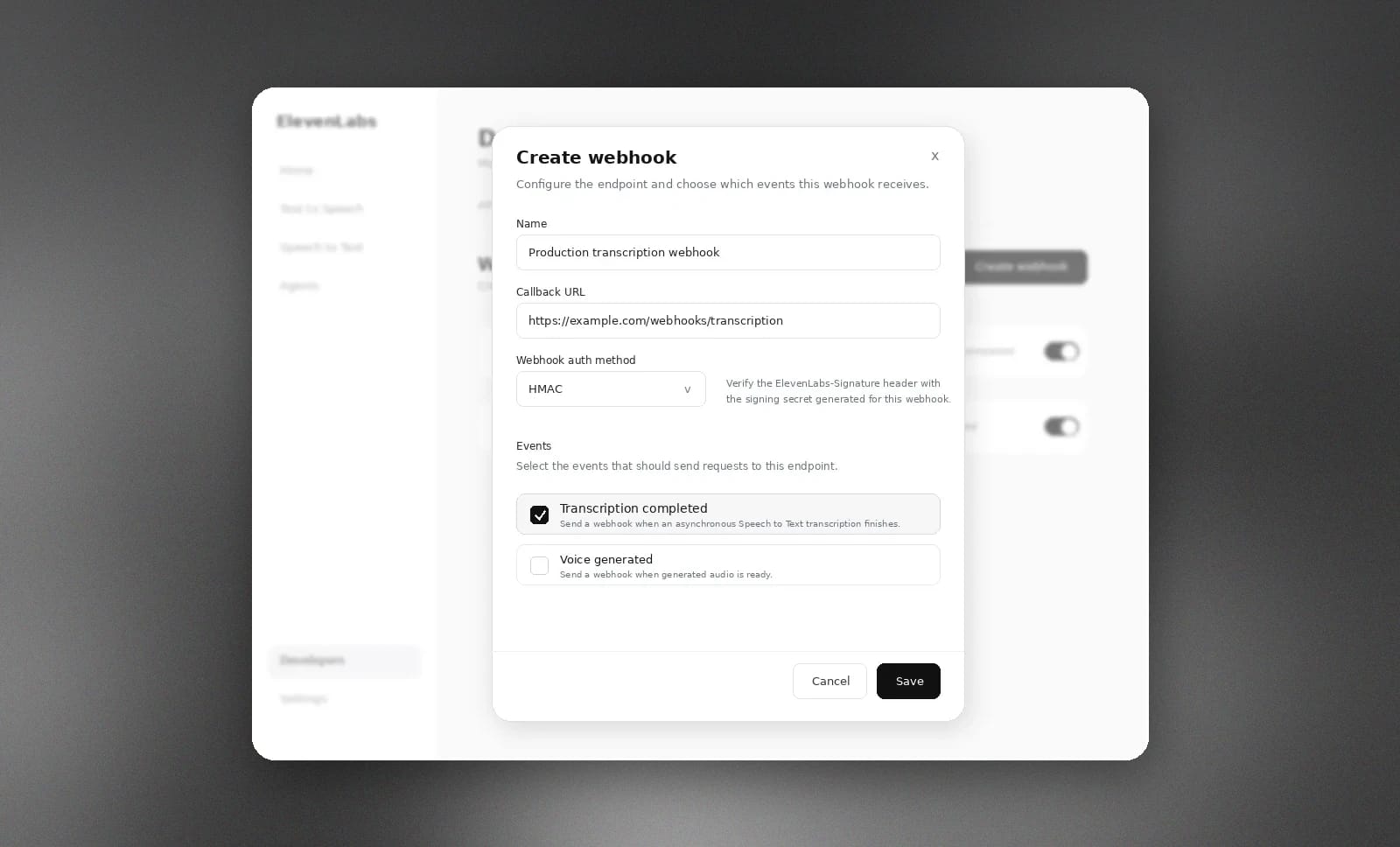
- First, you create a WebHook on the ElevenLabs dashboard to receive the transcription results.
- Then, create event handlers in your code to process the returned transcription.
- Then, upload audio files to the Scribe v2 REST endpoint.
Once the transcription completes, the event handler you configured will be invoked.
Keyword prompting for Scribe v2
Scribe v2 (batch) supports up to 1,000 terms for keyword prompting. When you send an audio file for transcription, you can include the terms in the API call. Unlike a vocabulary list, Scribe v2 compares the keyword terms with the conversation’s context to determine the appropriate transcription.
This lets the model pay extra attention when someone says specific terms and transcribe them accurately.
The example below passes company and product terms with the request, meaning the API will transcribe them correctly in context.
For example, it transcribes “ElevenLabs” when you pronounce the word contextually as a brand or company.
Multichannel transcription for Scribe v2
Multichannel transcription lets the Scribe v2 model transcribe individual channels in an audio file with speech from distinct speakers. This feature is useful when you’re building a transcription tool for conferences, court recordings, or podcasts.
Each channel will be tagged with a unique identifier that represents a speaker.
Common meeting transcription challenges and how the API handles them
When transcribing meetings, engineering teams often face several challenges.

Overlapping conversations
Multiple speakers talking over each other makes it hard to understand what’s being said. To distinguish speakers, use diarization or multichannel transcription, which Scribe v2 offers. This way, you receive separate transcriptions tagged to the respective speakers.
Misinterpretations
Another issue that transcription tools face is accurately detecting and interpreting specific products, brands, or industry terms. For example, "DevOps," a term familiar to software developers, might be mistranscribed as “dev ops." With the ElevenLabs meeting transcription API, you can guide the model to interpret correctly with key term prompting.
Multilingual speakers
Some meetings are held in different languages, with speakers alternating between two or more languages they’re proficient in. Standard voice models struggle to interpret context and speech content, resulting in poor transcription quality. Scribe v2 enables multilingual transcription across more than 90 languages, precisely capturing conversations as they unfold.
Live captioning and post-recording transcript
Some teams need to project live captioning and generate a post-meeting transcript. Unfortunately, not every off-the-shelf transcription tool offers both features. ElevenLabs API allows you to do both with Scribe v2 and Scribe v2 Realtime.
Get started with the meeting transcription API
ElevenAPI gives you access to leading Speech to Text models to build transcription tools for meetings. Setting up a build environment is straightforward. You get an API key and install the SDK for Python or Node.js. Then, you integrate Scribe v2 or Scribe v2 Realtime with your product using the provided API.
Get access to ElevenLabs and send your first API request now.
FAQs

Jack Limebear is on the Growth team, acting as a content writer and strategist across the blog and insights pages. Before ElevenLabs, he spent over a decade leading content strategy for organizations ranging from fast-growing SaaS startups to Fortune 500 companies. He holds a Master's degree in English Literature from the University of Cambridge.