

Asynchronous Speech to Text
How-to guide · Assumes you have completed the Speech to Text quickstart.
Overview
Webhooks allow you to receive automatic notifications when your Speech to Text transcription tasks are completed, eliminating the need to continuously poll the API for status updates. This is particularly useful for long-running transcription jobs or when processing large volumes of audio files.
When a transcription is completed, ElevenLabs will send a POST request to your specified webhook URL with the transcription results, including the transcript text, language detection, and any metadata.
Using webhooks
This guide assumes you have set up your API key and SDK. Complete the quickstart first if you haven’t.
Create or edit a webhook
In the ElevenLabs dashboard, go to Developers > Webhooks. Click Create webhook, or edit an existing webhook.
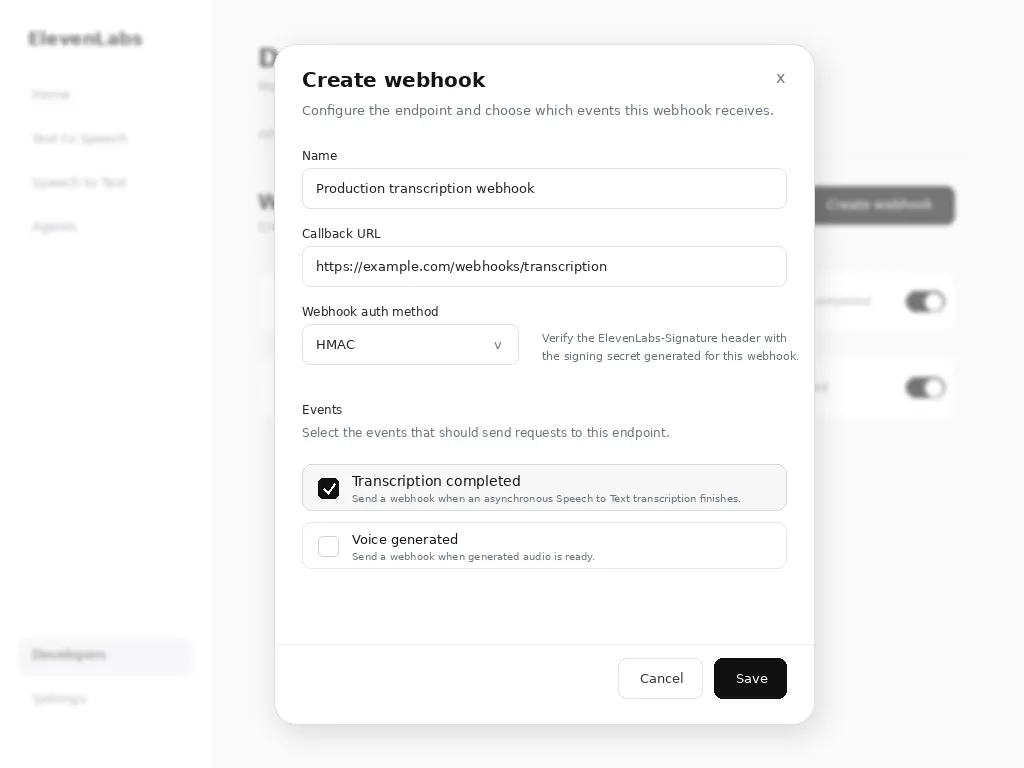
Configure the webhook with:
- Name: A descriptive name for your webhook
- Callback URL: Your publicly accessible HTTPS endpoint
- Webhook Auth Method: Either
HMACorOAuth. It is up to the client to implement the verification mechanism. ElevenLabs sends headers that allow for verification but we do not enforce it. - Events: Select Transcription completed.
Webhook payload
When a transcription is completed, your webhook endpoint will receive a POST request with the transcription and webhook data:
Please refer to the Speech-to-text API reference to learn about the details of the response structure.
If the request included a transcript_edit instruction, the transcription object also contains an edited_transcript field with the edited text.
Implementing your webhook endpoint
Here’s an example of how to implement a webhook endpoint to handle incoming notifications:
Security considerations
Signature verification
Always verify webhook signatures to ensure requests came from ElevenLabs.
HTTPS requirement
Webhook URLs must use HTTPS to ensure secure transmission of transcription data.
Rate limiting
Implement rate limiting on your webhook endpoint to prevent abuse:
Failure responses
Return appropriate HTTP status codes:
200-299: Success - webhook processed successfully400-499: Client error - webhook will not be retried500-599: Server error - webhook will be retried
Testing webhooks
Local development
For local testing, use tools like ngrok to expose your local server:
Use the provided HTTPS URL as your webhook endpoint during development.
Webhook testing
You can test your webhook implementation by making a transcription request and monitoring your endpoint: