跳到导航

异步语音转文本

本指南介绍如何使用 Webhook,在转写任务完成时接收异步通知。

操作指南 · 假设你已完成 语音转文本 快速入门。

概述

Webhook 可在语音转文本任务完成时自动发送通知,无需持续轮询 API 获取状态更新。这对于耗时较长的转写任务或处理大量音频文件尤其有用。

转写完成后,ElevenLabs 会向指定的 Webhook URL 发送 POST 请求,其中包含转写结果、转录文本、语言检测结果及其他元数据。

使用 Webhook

本指南假设你已设置 API 密钥和 SDK。如尚未完成,请先完成 快速入门。

1

创建或编辑 Webhook

在 ElevenLabs 控制台中,前往 开发者 > Webhook。 点击 创建 Webhook,或编辑现有 Webhook。
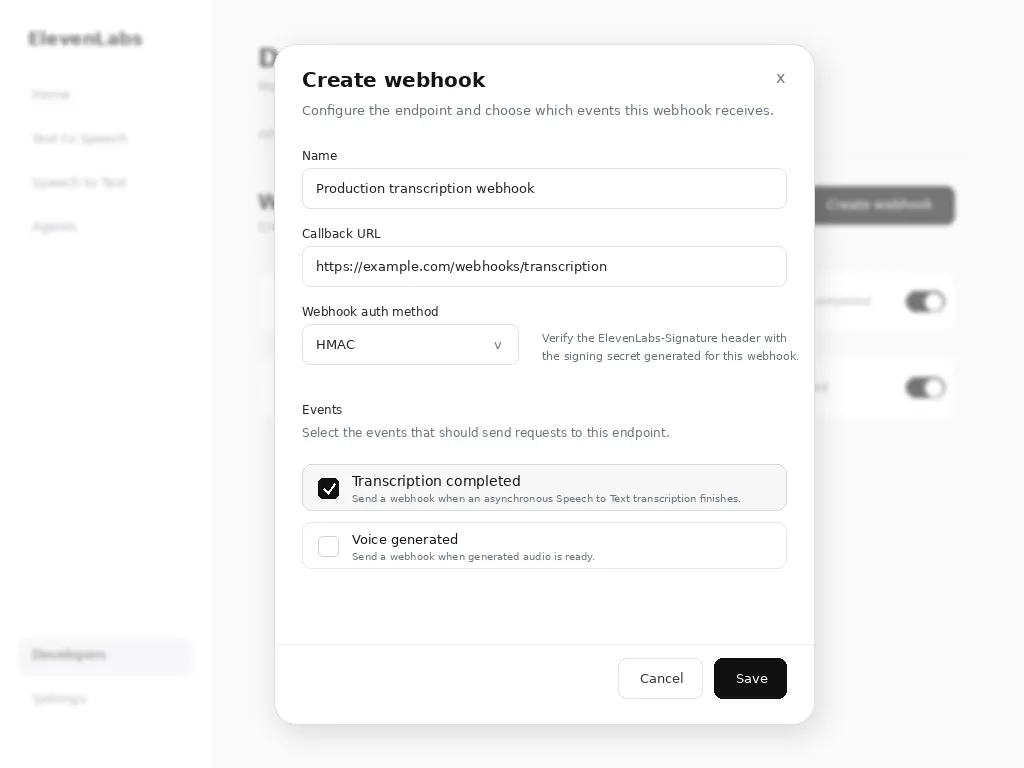
已选择“转写完成”的“创建 Webhook”对话框
创建或编辑 Webhook 时,选择“转写完成”

按以下方式配置 Webhook:

  • 名称:Webhook 的描述性名称
  • 回调 URL:可公开访问的 HTTPS 端点
  • Webhook 身份验证方式:可选择 HMAC 或 OAuth。客户端负责实现验证机制。ElevenLabs 会发送可用于验证的请求头,但不会强制要求验证。
  • 事件:选择 转写完成。
2

启用 Webhook 参数后发起 API 调用

发起语音转文本 API 调用时,加入值为 true 的 webhook 参数,为该请求启用 Webhook 通知。

from dotenv import load_dotenv
from elevenlabs.client import ElevenLabs
load_dotenv()
elevenlabs = ElevenLabs(
api_key=os.getenv("ELEVENLABS_API_KEY"),
)
def transcribe_with_webhook(audio_file):
try:
result = elevenlabs.speech_to_text.convert(
file=audio_file,
model_id="scribe_v2",
webhook=True,
)
print(f"Transcription started: {result.request_id}")
return result
except Exception as e:
print(f"Error starting transcription: {e}")
raise e

Webhook 载荷

转写完成后,Webhook 端点会收到包含转写和 Webhook 数据的 POST 请求:

{
type: 'speech_to_text_transcription',
data: {
request_id: 'some-request-id-123',
webhook_metadata: { ... }, // if provided in the convert request
transcription: {
"language_code": "en",
"language_probability": 0.98,
"text": "Hello world!",
"words": [
{
"text": "Hello",
"start": 0.0,
"end": 0.5,
"type": "word",
"speaker_id": "speaker_1"
},
{
"text": " ",
"start": 0.5,
"end": 0.5,
"type": "spacing",
"speaker_id": "speaker_1"
},
{
"text": "world!",
"start": 0.5,
"end": 1.2,
"type": "word",
"speaker_id": "speaker_1"
}
]
}
}
}

有关响应结构的详细信息,请参阅语音转文本 API 参考文档。

如果请求包含 transcript_edit 指令,transcription 对象还会包含含有编辑后文本的 edited_transcript 字段。

如果转写失败,端点会改为收到 webhook_error 事件。该事件不含 data 对象:其中包含顶层 request_id(与请求被接受时返回的 ID 相同)、error_message 以及请求的 webhook_metadata。

实现 Webhook 端点

以下示例展示如何实现 Webhook 端点来处理传入通知:

import { ElevenLabsClient } from "@elevenlabs/elevenlabs-js";
import "dotenv/config";
import express from "express";
const elevenlabs = new ElevenLabsClient();
const app = express();
const WEBHOOK_SECRET = process.env.WEBHOOK_SECRET;
// The raw body is required: verification runs over the exact bytes sent.
app.post("/webhook/speech-to-text", express.raw({ type: "application/json" }), async (req, res) => {
const signature = req.headers["elevenlabs-signature"];
let event;
try {
event = await elevenlabs.webhooks.constructEvent(
req.body.toString(),
signature,
WEBHOOK_SECRET
);
} catch (error) {
return res.status(401).json({ error: "Invalid signature" });
}
if (event.type === "speech_to_text_transcription") {
const { request_id, transcription } = event.data;
console.log(`Transcription ${request_id} completed`);
console.log(`Language: ${transcription.language_code}`);
console.log(`Text: ${transcription.text}`);
processTranscription(request_id, transcription);
} else if (event.type === "webhook_error") {
console.error(`Transcription ${event.request_id} failed: ${event.error_message}`);
handleTranscriptionError(event.request_id, event.webhook_metadata, event.error_message);
}
res.status(200).json({ received: true });
});
async function processTranscription(requestId, transcription) {
console.log("Processing completed transcription...");
}
async function handleTranscriptionError(requestId, webhookMetadata, errorMessage) {
console.log("Handling transcription error...");
}
app.listen(3000, () => {
console.log("Webhook server listening on port 3000");
});

安全注意事项

签名验证

务必验证 Webhook 签名,确保请求来自 ElevenLabs。

HTTPS 要求

Webhook URL 必须使用 HTTPS,以确保转写数据安全传输。

速率限制

在 Webhook 端点实施速率限制,防止滥用:

import rateLimit from "express-rate-limit";
const webhookLimiter = rateLimit({
windowMs: 15 * 60 * 1000, // 15 minutes
max: 100, // limit each IP to 100 requests per windowMs
message: "Too many webhook requests from this IP",
});
app.use("/webhook", webhookLimiter);

失败响应

返回 2xx 状态码以确认收到 Webhook。

默认情况下,语音转文本 Webhook 只投递一次。每个非 2xx 响应都会视为投递失败,反复失败会自动禁用 Webhook。

如果为 Webhook 启用重试,失败的投递(5xx、408、429 或连接错误)最多会额外重试 5 次,分别在上次尝试后的约 30 秒、2 分钟、8 分钟、30 分钟和 30 分钟进行。其他 4xx 响应不会重试。同一事件的每次尝试都会携带相同的 ElevenLabs-Webhook-Delivery-Id 请求头,因此处理程序可以忽略重复项。

启用重试后,enable_logging 设为 false(零保留模式)的请求最多会快速重试 2 次,分别在上次尝试后 5 秒和 30 秒进行。转录文本绝不会被存储。

如果投递仍然失败,请使用请求被接受时返回的 transcription_id,通过获取转录文本获取结果。对于 enable_logging 设为 false 的请求,不会存储转录文本。

测试 Webhook

本地开发

进行本地测试时,可使用 ngrok 等工具公开本地服务器:

ngrok http 3000

在开发期间,将提供的 HTTPS URL 用作 Webhook 端点。

Webhook 测试

你可以通过发起转写请求并监控端点来测试 Webhook 实现:

async function testWebhook() {
const audioFile = new File([audioBuffer], "test.mp3", { type: "audio/mp3" });
const result = await elevenlabs.speechToText.convert({
file: audioFile,
modelId: "scribe_v2",
webhook: true,
});
console.log("Test transcription started:", result.requestId);
}

后续步骤