非同期スピーチtoテキスト

このガイドでは、文字起こしタスクの完了時にWebhookを使用して非同期通知を受け取る方法を説明します。

ハウツーガイド · スピーチtoテキストの クイックスタートを完了していることを前提としています。

概要

Webhookを使用すると、スピーチtoテキストの文字起こしタスクが完了した際に自動通知を受け取れます。ステータス更新のためにAPIを継続的にポーリングする必要がなくなります。これは、長時間実行される文字起こしジョブや、大量のオーディオファイルを処理する場合に特に便利です。

文字起こしが完了すると、ElevenLabsは指定したWebhook URLにPOSTリクエストを送信します。リクエストには、文字起こしテキスト、言語検出、各種メタデータを含む結果が含まれます。

Webhookを使用する

このガイドは、APIキーとSDKのセットアップが完了していることを前提としています。まだの場合は、先に クイックスタートを完了してください。

1

Webhookを作成または編集する

ElevenLabsダッシュボードで、 開発者 > Webhookに移動します。 Webhookを作成をクリックするか、既存のWebhookを編集します。
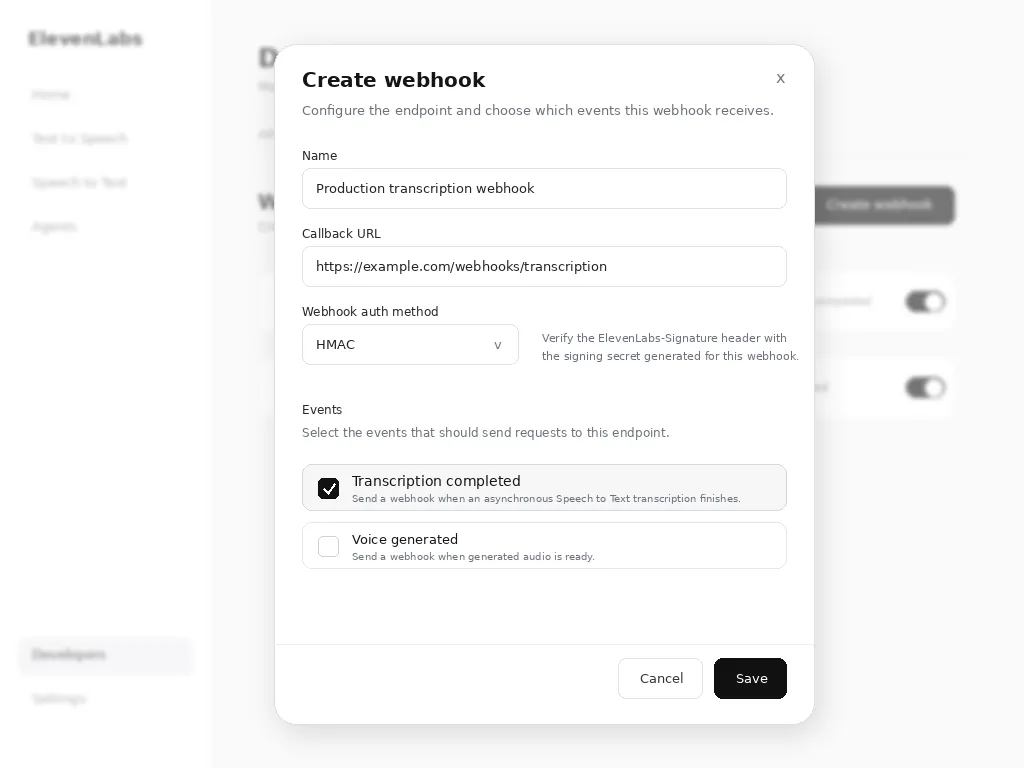
「文字起こし完了」が選択されたWebhook作成ダイアログ
Webhookの作成または編集時に「文字起こし完了」を選択

Webhookを次のように設定します。

  • 名前:Webhookのわかりやすい名前
  • コールバックURL:公開アクセス可能なHTTPSエンドポイント
  • Webhook認証方式:HMACまたはOAuthのいずれか。検証メカニズムの実装はクライアント側で行います。ElevenLabsは検証可能なヘッダーを送信しますが、検証を強制するものではありません。
  • イベント:文字起こし完了を選択します。
2

Webhookパラメータを有効にしてAPIを呼び出す

スピーチtoテキストAPIを呼び出す際は、webhookパラメータをtrueに設定して、そのリクエストのWebhook通知を有効にします。

from dotenv import load_dotenv
from elevenlabs.client import ElevenLabs
load_dotenv()
elevenlabs = ElevenLabs(
api_key=os.getenv("ELEVENLABS_API_KEY"),
)
def transcribe_with_webhook(audio_file):
try:
result = elevenlabs.speech_to_text.convert(
file=audio_file,
model_id="scribe_v2",
webhook=True,
)
print(f"Transcription started: {result.request_id}")
return result
except Exception as e:
print(f"Error starting transcription: {e}")
raise e

Webhookペイロード

文字起こしが完了すると、Webhookエンドポイントは文字起こしデータとWebhookデータを含むPOSTリクエストを受け取ります。

{
type: 'speech_to_text_transcription',
data: {
request_id: 'some-request-id-123',
webhook_metadata: { ... }, // if provided in the convert request
transcription: {
"language_code": "en",
"language_probability": 0.98,
"text": "Hello world!",
"words": [
{
"text": "Hello",
"start": 0.0,
"end": 0.5,
"type": "word",
"speaker_id": "speaker_1"
},
{
"text": " ",
"start": 0.5,
"end": 0.5,
"type": "spacing",
"speaker_id": "speaker_1"
},
{
"text": "world!",
"start": 0.5,
"end": 1.2,
"type": "word",
"speaker_id": "speaker_1"
}
]
}
}
}

レスポンス構造の詳細については、スピーチtoテキストAPIリファレンスを参照してください。

リクエストにtranscript_editの指示が含まれていた場合、transcriptionオブジェクトには編集後のテキストを含むedited_transcriptフィールドも含まれます。

Webhookエンドポイントを実装する

受信通知を処理するWebhookエンドポイントの実装例を以下に示します。

import { ElevenLabsClient } from '@elevenlabs/elevenlabs-js';
import 'dotenv/config';
import express from 'express';
const elevenlabs = new ElevenLabsClient();
const app = express();
app.use(express.json());
const WEBHOOK_SECRET = process.env.WEBHOOK_SECRET;
app.post('/webhook/speech-to-text', (req, res) => {
try {
const signature = req.headers['elevenlabs-signature'];
const payload = JSON.stringify(req.body);
let event;
try {
// Verify the webhook signature.
event = await elevenlabs.webhooks.constructEvent(payload, signature, WEBHOOK_SECRET);
} catch (error) {
return res.status(401).json({ error: 'Invalid signature' });
}
if (event.type === 'speech_to_text.completed') {
const { requestId, status, text, language_code } = event.data;
console.log(`Transcription ${requestId} completed`);
console.log(`Language: ${language_code}`);
console.log(`Text: ${text}`);
processTranscription(requestId, text, language_code);
} else if (status === 'failed') {
console.error(`Transcription ${requestId} failed`);
handleTranscriptionError(requestId);
}
res.status(200).json({ received: true });
} catch (error) {
console.error('Webhook error:', error);
res.status(500).json({ error: 'Internal server error' });
}
});
async function processTranscription(requestId, text, language) {
console.log('Processing completed transcription...');
}
async function handleTranscriptionError(requestId) {
console.log('Handling transcription error...');
}
app.listen(3000, () => {
console.log('Webhook server listening on port 3000');
});

セキュリティに関する考慮事項

署名の検証

リクエストがElevenLabsから送信されたことを確認するために、Webhook署名を必ず検証してください。

HTTPS要件

文字起こしデータを安全に送信するため、Webhook URLにはHTTPSを使用する必要があります。

レート制限

不正利用を防ぐため、Webhookエンドポイントにレート制限を実装してください。

import rateLimit from "express-rate-limit";
const webhookLimiter = rateLimit({
windowMs: 15 * 60 * 1000, // 15 minutes
max: 100, // limit each IP to 100 requests per windowMs
message: "Too many webhook requests from this IP",
});
app.use("/webhook", webhookLimiter);

失敗時のレスポンス

適切なHTTPステータスコードを返してください。

  • 200-299:成功 - Webhookが正常に処理されました
  • 400-499:クライアントエラー - Webhookは再試行されません
  • 500-599:サーバーエラー - Webhookは再試行されます

Webhookをテストする

ローカル開発

ローカルでテストするには、ngrokなどのツールを使用してローカルサーバーを公開します。

ngrok http 3000

開発中は、提供されたHTTPS URLをWebhookエンドポイントとして使用してください。

Webhookのテスト

文字起こしリクエストを送信し、エンドポイントを監視してWebhook実装をテストできます。

async function testWebhook() {
const audioFile = new File([audioBuffer], "test.mp3", { type: "audio/mp3" });
const result = await elevenlabs.speechToText.convert({
file: audioFile,
modelId: "scribe_v2",
webhook: true,
});
console.log("Test transcription started:", result.requestId);
}

次のステップ