Unpacking ElevenAgent's Orchestration Engine
- Published
- Last updated
ListenListen to this article
ElevenAgents are powered by a low-latency orchestration engine purpose-built for real-time conversations, adding less than 100ms of overhead. This architecture combines the best of ElevenLabs research with frontier LLMs from leading providers such as OpenAI, Google, and Anthropic, alongside select open-source models hosted by ElevenLabs. By using multiple models at various stages of the answer pipeline, the agent ensures conversations are both highly responsive and contextually aware. By dynamically leveraging each model’s strengths in tandem, we achieve reliable, scalable performance across a range of enterprise tasks and conversational scenarios, while optimizing the balance between intelligence, speed, and cost.
In this piece, we explain how these models work together to deliver the core capabilities agents need to operate in complex environments, and more specifically, which model sees what tokens, and when. At the heart of this is the management of conversation history across different points of the interaction. We’ll revisit how and where conversation history is shared throughout to clarify its role in the orchestration for both independent and multi-agent workflows.
Independent agent
We begin by exploring the independent agent and its core components. It’s reasonable to consider that the minimally valuable agent has a system prompt, access to a number of tools and a knowledge base. Customers should favor independent agents over workflows when their use case has a limited need to verify a strict sequence of steps or when it is important to avoid knowledge silos within the agents. Knowledge silos arise when certain tools, documents or historical context are accessible to some sub-agents but not others. These are inherent to multi-agent workflows and introduce a trade-off between flexibility and determinism.
For independent agents in ElevenLabs, it’s important to understand how they:
- Construct effective generation requests
- Retrieve and incorporate relevant documents
- Generate and execute tool calls to inform agent responses
- Output results for evaluation and data collection
Building conversation context
A conversation between a customer and an ElevenLabs agent represents a series of turns where each turn is composed of an exchange of messages between both parties. This alternating list of agent and user messages serves as the starting point to build our conversation context. During each turn, the underlying LLM receives generation requests containing a series of alternating agent and user messages that is one message longer than the previous turn. Naturally, this series of messages is prefixed with a single system message representing the agent’s system prompt.
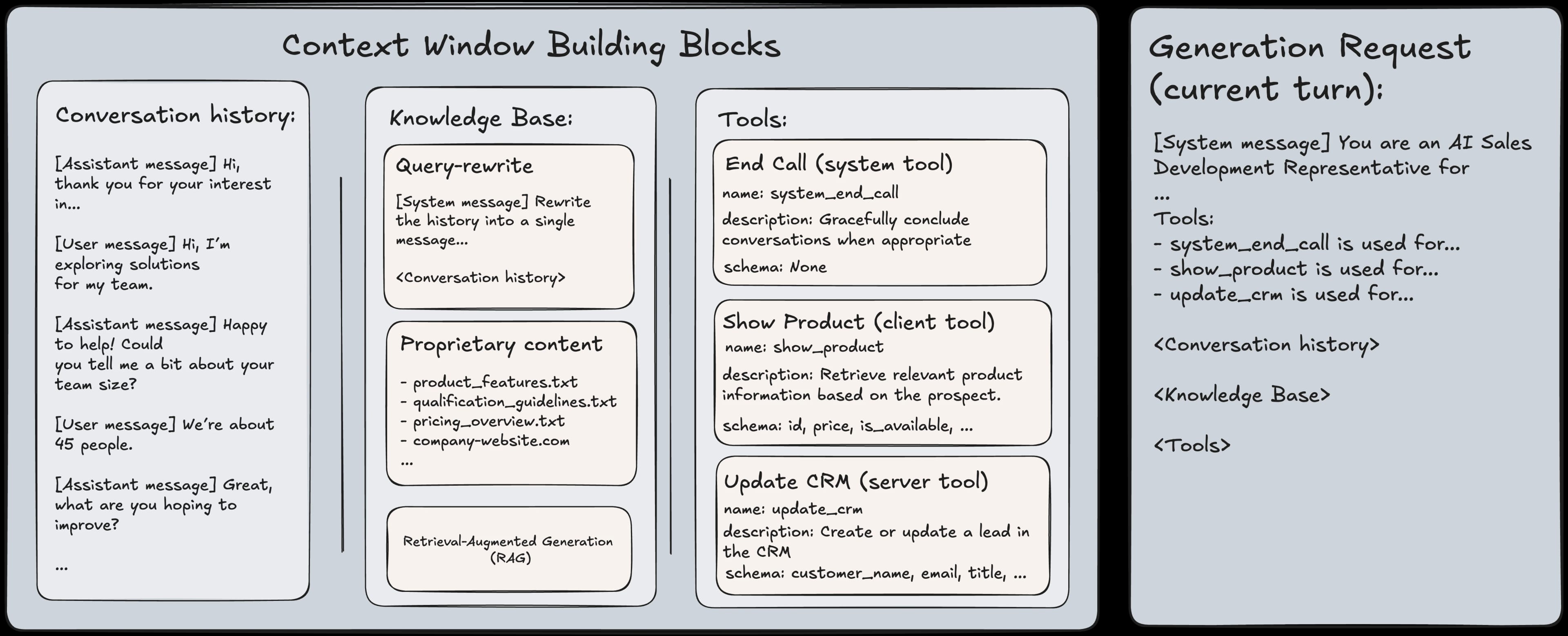
The ElevenLabs orchestrator reduces perceived LLM latency by predicting when a user has finished speaking. In some cases, this can result in multiple LLM generation requests with the same conversation context within a single turn. While orchestration optimizes how quickly agents respond, response quality depends just as heavily on how knowledge is accessed. As customers progress, they typically begin grounding their agents’ responses in a combination of proprietary documentation and public content. For several years, retrieval-augmented generation (RAG) has been the standard approach for achieving this. ElevenAgents Knowledge Bases build on RAG with an optimized, multi-model architecture that we’ve detailed in a previous post. This enables reliable document retrieval even when the most recent user input is a follow-up, an acknowledgment of a clarification or otherwise lacks an explicit question.
Retrieval, however, is only one way agents interact with external systems.
Taking actions and retrieving information using tools
ElevenLabs agents can take real-world actions and retrieve live information mid-conversation through a flexible tools system. That power introduces an important design consideration: every enabled tool increases the size of the serialized prompt, as its name, description, and parameter schema are included alongside the system prompt and conversation history. As more tools are added, the reasoning burden placed on the model to call the correct sequence of tools is also increased. Within the Agent Builder, the tool’s description outlines what the tool does and what the fields it returns. This is the information the language model uses to understand context around its usage. Once defined, the specific conditions for invoking the tool belong in the agent’s system prompt. For example:
- Tool description for lookup_order: “Retrieves a customer’s order details by order ID. Returns order status, items purchased, shipping address, and tracking number.”
- System prompt instruction: “After verifying the customer’s identity, call the lookup_order tool to retrieve their order details.”
This separation of concerns keeps tool definitions reusable across agents, while allowing each agent’s system prompt to control the exact moment a tool is invoked. To help customers design these system prompts effectively, we provide deeper guidance in our Prompting Guide. Within this framework, several types of tools can be defined, mainly:
- Webhook tools that call external APIs.
- Client tools that dispatch tool requests as events through the conversation websocket.
- System tools for built-in actions such as call transfers.
- MCP tools that connect to Model Context Protocol servers.
Whenever an agent decides to use a tool, it pulls the necessary details from the conversation and sends a request to run it. Once the tool returns a result, that result is added to the conversation so the model can naturally refer to it in its next response. If needed, the tool’s output can also update the agent’s stored information as a dynamic variable. This stored information is kept as simple key-value pairs, extracted from the tool’s response using predefined mappings. Once set, these variables can feed back into the agent via its system prompt, future tool parameters and workflow conditions. This feedback loop gives agents a form of working memory that evolves as they interact.
While this describes how tools integrate into the agent’s reasoning, the timing of their execution can also be configured. Tools can run in one of three execution modes, each suited to a different conversational need. In Immediate Mode, the tool executes as soon as it's requested by the LLM. This is the default for fast lookups where users expect a near-instant response, such as checking an order status. When combined with pre-tool speech, the agent first generates a brief acknowledgement such as “Let me check that for you” and returns it to the user while the tool runs in parallel, minimizing dead air. For slower tools, the platform automatically extends these filler messages to match the expected wait time. Post-Tool Speech Mode, by contrast, delays execution until the agent has finished speaking. This is essential for actions with real-world consequences, such as transferring a call, ending a session, or submitting a payment. The user hears the full context like “I’m going to transfer you to billing now” and has the opportunity to interrupt before the action is carried out. Async Mode runs the tool entirely in the background without pausing the conversation. This mode is best suited for fire-and-forget operations such as sending an email, triggering an external workflow, or logging data, where the agent does not need to reference the result in its reply.
With execution and orchestration in place, the next step is understanding how to measure performance.
Measuring performance
After a call with an Agent has been completed, customers may want to extract certain bits of the call for further analysis and storage, or to determine whether or not a call was successful. This is where Data Collection and Evaluation Criteria come into play. Data Collection allows you to extract structured information from a call transcript for downstream analysis and aggregation. Customers often export these outputs to their enterprise data lakehouse for reporting or enrichment workflows. For example, a Sales Development Agent can automatically extract prospect details from a conversation to create or update a lead in the Customer Relationship Management (CRM) system. On the other hand, Evaluation Criteria determine whether a call is considered successful. If all configured criteria are met, the call is itself marked as successful; otherwise, it is flagged as a failure. This ensures conversations consistently meet defined standards for quality and integrity, while providing fast feedback. Once a call concludes and the post-call webhook is triggered, the agent processes the finalized transcript, including any tool execution and metadata, through an LLM together with all configured data collection points and evaluation criteria. The model uses this combined prompt to determine whether each evaluation criterion is met and to extract the specified data points for downstream analysis. Because the LLM interprets these configurations directly as part of its input prompt, it is important to format them clearly and consistently so the model can understand and apply them accurately. We therefore recommend the following best practices for writing Evaluation Criteria and Data Collection descriptions.
Evaluation criteria
- One clear goal per criterion: one sentence or short bullet is better than several goals in one criterion.
- Observable and transcript-based: phrase the goal so success/failure can be decided from the transcript (what was said, what the agent did, what the user asked). Avoid goals that require external context the LLM doesn’t have.
- Explicit success/failure/unknown outcomes: the LLM already has the context that to mark it as successful the goal must be met, to mark it as a failure it must not be met, and to mark it as unknown it mustn’t be able to tell from the transcript. Therefore, the goal should be written so that “met” vs “not met” is well-defined; if it’s ambiguous, the model may tend toward unknown or incorrect classifications
- Keep it concise: sometimes, many evaluation criteria can be sent together. Having long evaluation criteria can therefore add noise and potentially cause hallucinations
- Language matters: any rationale provided by the LLM for whether an evaluation criteria was met or not will be provided in the same language as the criteria description, so it’s important to keep this in mind
Data collection
- Describe exactly what to extract: the description is the main signal for the LLM. Say what the field means, in what situation it should be set, and what to do when it’s unclear (e.g. “Leave null if the customer never stated a preferred date”).
- Match the expected type: the value provided by the LLM will always match the data type assigned to the data collection point (e.g boolean, string, integer etc). So the description should align with that. For example, you could use something like “Extract the number of items requested” for integer, and “Yes/no whether the customer agreed to the offer” for boolean.
- Use enums when possible: for string type, if the set of values is fixed, use enum in the schema; it constrains the model and reduces invalid outputs.
- One extraction target per item: Don’t pack multiple unrelated facts into one item’s description; split into separate items so each call has a single, clear extraction target.
- Keep descriptions short: Descriptions can be a few sentences; no need for long paragraphs. The transcript is already in the user message, so the schema + short description is enough.
Currently, the LLM used for this evaluation and extraction step is fixed to a low-latency model to ensure fast processing. In the near future, we expect to introduce options to provide customers with greater flexibility.
Next, we turn our attention towards use cases that require structured orchestration, determinism, or specialization across multiple conversational roles, where customers can instead use Workflows.
Workflows
Workflows provide a visual interface for designing complex conversation flows. It ultimately produces the logical object used by the orchestrator to manage multiple subagents, tools and transfers under an independent agent identifier. Workflows introduce additional components to consider beyond those already outlined for independent agents, including how:
- System prompts and sub-agent conversational goals interact.
- Traversal through various transition points in the graph is determined.
Specialized conversation goals
Workflows reuse functionality from independent agents to enforce behavior that remains consistent throughout an interaction. This includes shared elements such as the base system prompt, core tools, and global knowledge bases that should always be available, regardless of which part of the workflow is active. The overarching system prompt is typically responsible for defining global conversational context, expected tone, safety constraints, and any brand-specific or product-wide instructions.
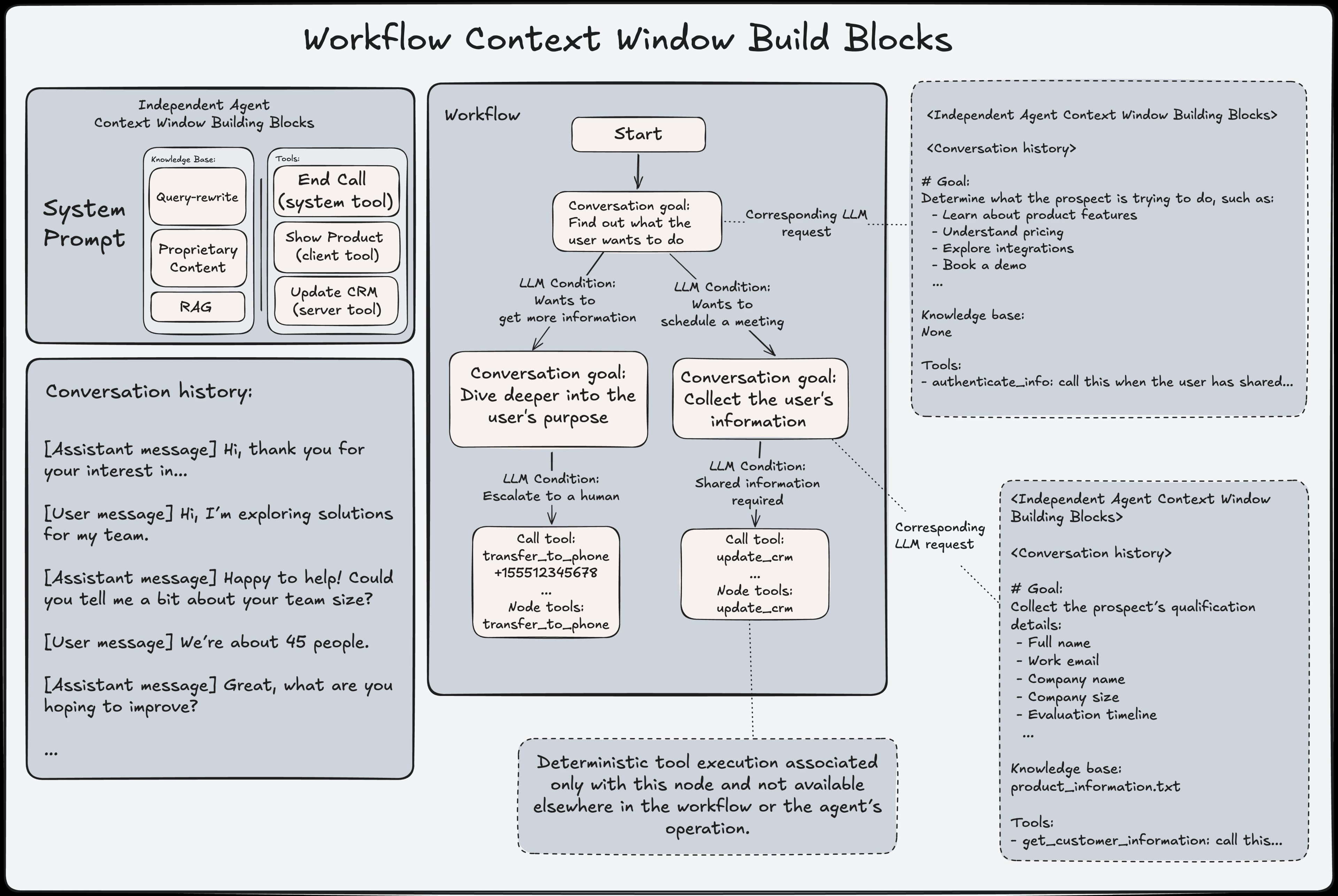
On top of this shared foundation, Workflows introduce specialized sub-agents that operate within a directed graph. Each sub-agent is assigned a narrowly scoped objective and augments the base configuration with additional prompt instructions, tools, and knowledge sources relevant only to its role. Rather than redefining the entire conversational setup, sub-agents layer their intent onto the base agent through prompt composition and selective context extension. While conversation history is preserved across sub-agent transitions to maintain continuity, each sub-agent operates with a deliberately constrained view of the system. Knowledge bases and tools are selectively exposed, creating clear silos that prevent leakage between responsibilities. To reinforce this isolation, the orchestrator object is rebuilt on every transition as if it were an independent agent. This ensures that the active sub-agent’s prompt state, configuration, and available capabilities remain fully deterministic. This design enables Workflows to maintain global consistency while supporting local specialization, resulting in predictable behavior, clear separation of concerns, and precise control over how context, knowledge, and actions are applied at each stage of an interaction.
One of the key mechanisms that makes this control possible is how transitions between sub-agents are governed.
Driving workflow transitions with LLM conditions
Workflows advance by traversing a directed graph of sub-agents, where transitions between nodes are controlled by explicit conditions. These conditions determine when control should move from one sub-agent to another and allow workflows to respond to user input, tool outcomes and dynamic variables. Graph conditions can be either deterministic or LLM-evaluated. Deterministic conditions, such as unconditional transitions, dynamic variable expression-based checks or tool result conditions, provide strong guarantees about control flow and are well suited for enforcing strict progression through a workflow. LLM-based conditions, by contrast, enable semantic evaluation of natural-language criteria, such as detecting user intent or recognizing when specific information has been provided.
Importantly, LLM conditions are evaluated outside of the active agent’s system prompt and do not influence the agent’s generation behavior. Instead, they are evaluated in parallel by the orchestrator against the current conversation state. This separation ensures that transition logic does not contaminate the agent’s prompt or affect how responses are generated, while still allowing workflows to leverage LLM reasoning for flexible graph traversal. By combining deterministic and LLM-evaluated conditions, workflows can achieve both predictability and adaptability, using deterministic transitions where correctness is critical and LLM-based transitions where semantic interpretation is required.
When a conversation progresses to a new stage, the system activates a version of the agent tailored specifically to that step. Each stage operates with its own focused instructions and access only to the knowledge and tools relevant to its responsibility. For example, a refund-handling stage can reference refund policies without inheriting unrelated context from onboarding or triage. Movement between stages is governed by explicit transition conditions. These conditions determine when responsibility should shift and allow routing decisions to occur naturally as the conversation unfolds. To maintain continuity, the user’s experience remains seamless across transitions, with each stage inheriting the relevant conversational context without exposing the mechanics of the handoff. Safeguards also monitor transitions to prevent non-productive routing cycles, ensuring the workflow remains stable and goal-directed.
Safety and Security
For cases requiring increased safety and security controls, customers may rely on additional portions of the orchestrator.
Guardrails
ElevenLabs Agents implement safety guardrails through a configurable moderation and alignment system that evaluates user and agent messages in real-time. Incoming content is classified across multiple risk categories, including sexual content, violence, harassment, hate, and self-harm, each with independently configurable thresholds. When a guardrail is triggered, the conversation is immediately terminated and the client is notified with a clear failure reason. This ensures that unsafe interactions are blocked early and consistently, without relying on prompt-based mitigations alone. Guardrails operate outside of the agent’s prompt logic, providing a reliable enforcement layer that cannot be bypassed by model behavior or user input. This approach allows customers to tune safety sensitivity based on their domain while maintaining deterministic enforcement at runtime.
Compliant data management
Speakers may sometimes share sensitive information with an agent that is subject to strict storage and processing requirements, for example medical data that requires HIPAA-compliant handling. To support these use cases, we offer Zero Retention Mode (ZRM) at the Agent or Workspace level. When enabled, all call data is processed in memory only and never written to persistent storage. Once the call and processing are complete, no information is retained by ElevenLabs. As a result, transcripts, audio recordings, and analysis outputs are not available in the Agents Dashboard, and this policy applies to both customer-facing systems and internal logs. Although data is not retained, it is processed during the call, and any configured post-call webhooks will receive the outputs, allowing customers to store transcripts or analysis results in their own systems if needed.
When ZRM is active, we also ensure that subprocessors do not retain data by restricting available LLMs to providers with contractual commitments that prohibit training on or retention of customer data; currently, this includes models from Google Gemini and Anthropic Claude. Customers who wish to use another LLM under ZRM may do so by signing their own agreement with that provider and configuring it as a custom LLM using API keys covered by that agreement. Because this extends data handling beyond our standard trust boundary, our Safety team must manually review and approve the use case before enabling it. While ZRM ensures that ElevenLabs and its subprocessors do not retain call data, customers remain responsible for ensuring that any external tools or webhooks used by their Agent comply with applicable retention and regulatory requirements.
Looking ahead
In this post, we explored how ElevenLabs Agents manage conversational context, tools, evaluation, and structured workflows to deliver reliable, real-time experiences at scale. As customers deploy agents into increasingly complex environments, we continue to expand the flexibility of our orchestration engine, from configurable evaluation models and richer transition controls to deeper observability into prompt composition and token usage across stages.
Our Forward Deployed Engineering team is partnering closely with customers to ensure these capabilities evolve in lockstep with real-world deployments. The next generation of Agents will provide even greater transparency, determinism, and adaptability without compromising the low-latency performance that makes real-time conversation possible.

Nicolas works on the Forward Deployed Engineering team at ElevenLabs partnering with customers to bring their agents to production. He previously spent four years at AWS focusing on regulated industries and the public sector.