Eleven v4 Audio Tags 列表:先试用,再自己编写
- 发布时间
- 最近更新
Eleven v4 是一款突破性的文本转语音模型,可将文本转化为富有表现力的演绎。Audio Tags 让你精细控制演绎的情绪表达。插入 [whispers] 或 [excited] 等方括号中的自然语言提示,即可听到 v4 相应调整表达方式。
这份 ElevenLabs Audio Tags 列表涵盖完整Eleven v4 情绪范围中的所有情绪,以及表达方式、节奏、反应、口音和音效标签。掌握基础后,我们还会介绍如何用自然语言编写自己的标签。
探索 Eleven v4 的情绪
聆听情绪范围摘要
- Audio Tags 是方括号中的自然语言信号,Eleven v4 会将其视为演绎指示,改变后续文字的表达方式。
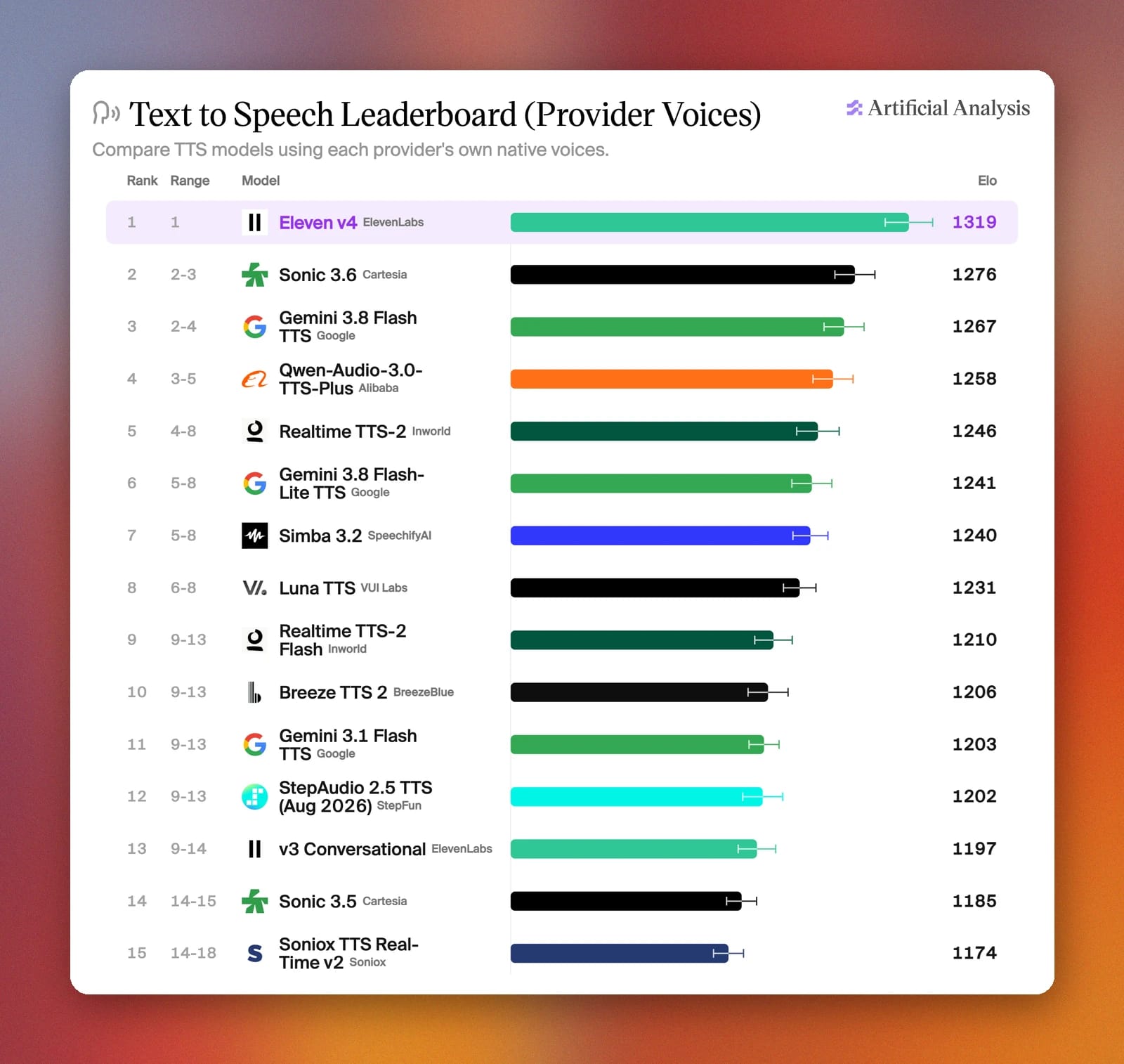
- Eleven v4 在 Artificial Analysis Speech Arena [September 2026] 中排名第一,Audio Tags 让你能够逐句指导演绎。
- Eleven v4 情绪范围转盘可让你聆听不同情绪,快速了解模型能力。
- 标签不局限于固定列表,你可以组合特质来编写自己的标签,例如 [whispering, fearful],也可以描述台词背后的场景或角色。
- Audio Tags 可通过ElevenAPI 在 Eleven v4、Eleven v4 Turbo 和 Eleven v3 上使用。
什么是 ElevenLabs Audio Tags?
Audio Tags 是可嵌入文本方括号中的自然语言提示。Eleven v4 会将其识别为演绎标记,并用作改变特定词语或短语表达方式的指示。你可以在 ElevenLabs 文本转语音应用中,将它们直接写入脚本,观看模型将其生动呈现。
Eleven v4 是 Artificial Analysis Speech Arena 中排名第一的 TTS 模型,听众可在此投票选出最自然的文本转语音。1 Audio Tags 可让你精准指导每句台词的表达方式,进一步提升演绎效果。
以下是在脚本中使用 Audio Tags 的方法:
- 将标签放在其影响的文字之前:例如,写下“[shouts] 我真不敢相信你竟然对我说这种话”,整句都会以喊叫方式表达。
- 情绪会延续:添加标签后,其情绪会贯穿后续台词,因此只需在想改变表达方式时再添加标签。例如:“[proud] 我做饭已经十多年了,煮个鸡蛋我当然会。[startled] 什么东西烧焦了?”
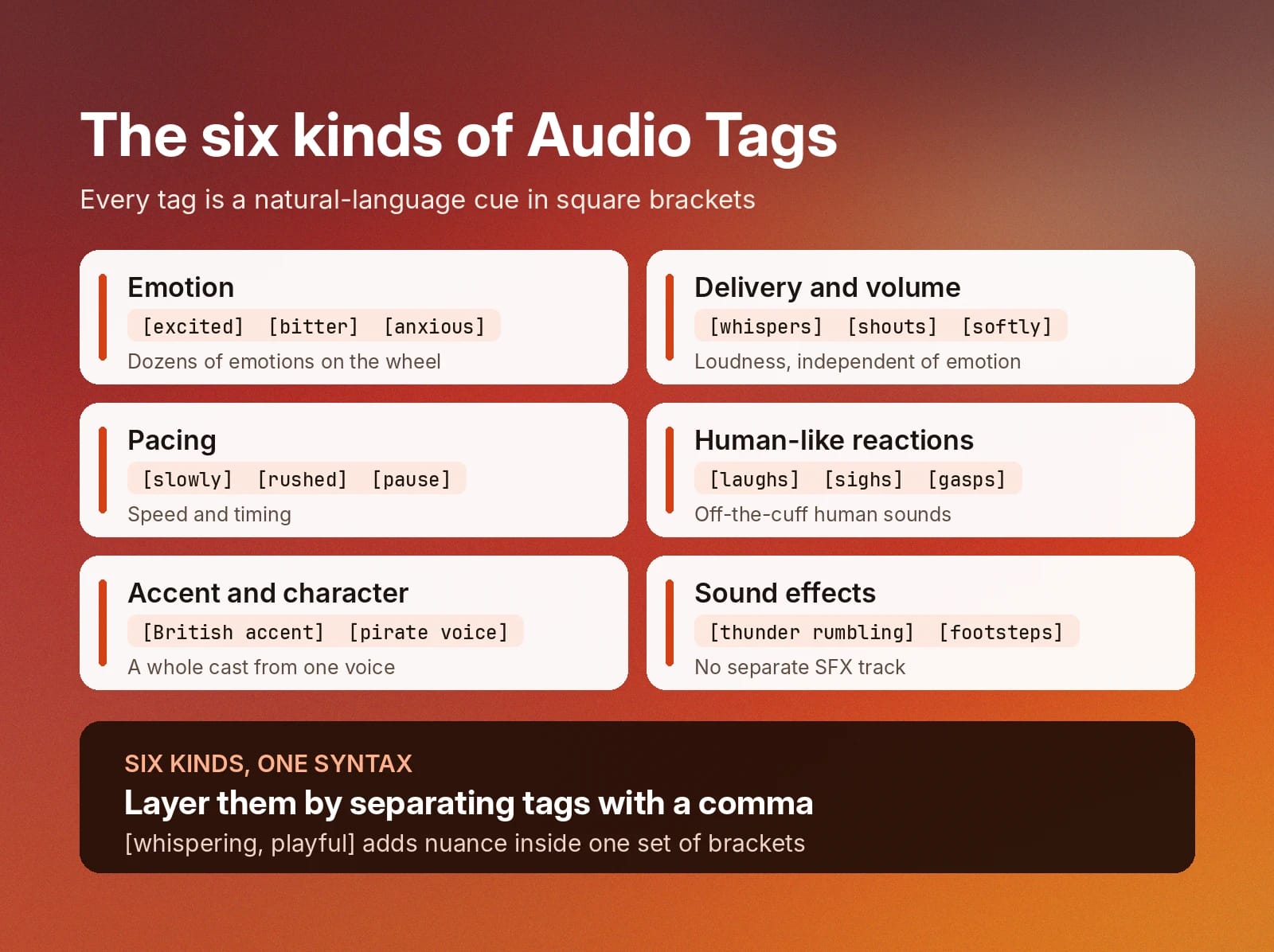
- 组合标签,叠加指示:在同一组方括号中用逗号分隔 Audio Tags,例如 [whispering, playful],可为 TTS 演绎增添细微变化。
- 将标签与标点搭配使用:Audio Tags 可设定情绪和表达方式,而你可以在脚本中使用标点自然控制节奏。添加省略号、破折号或大写字母,来塑造韵律。
如需深入了解标签的工作原理及其如何替代 SSML,我们编写了一份完整的 Audio Tags 指南。
情绪 Audio Tags 列表
Eleven v4 情绪转盘包含数十种情绪,每种均由 v4 演绎,让你在写下任何标签前就能听出差别。
点击下方任一情绪,可在转盘中聆听效果;也可以直接试用不同句子和情绪,体验 Eleven v4 如何生动呈现情绪 Audio Tags。
情绪类别
情绪 Audio Tags
低能量
平静且沉思
这里仅展示了部分情绪,但你可以用自然语言实现任何想要的情绪。下面的示例使用了上文未列出的多种 Audio Tags,展示自然语言提示词能实现的效果。
此示例由 Jonathan Livingston 生动演绎。
表达方式和音量 Audio Tags 列表
表达方式和音量标签可控制台词的响度或强度,与所选情绪无关。若想让 v4 更准确地实现你的设想,可叠加表达方式和情绪标签,获得更精细的控制。
以下是一些示例:
- [whispers] 别动,它就在你身后。
- [shouts] 所有人立刻撤离大楼!
- [softly] 你已经尽力了。
- [quietly] 我想他们已经走了。
- [low, threatening] 你真不该来这里。
来看看音量和表达方式控制的实际效果。
上方示例由 Rod 生动演绎。
节奏 Audio Tags 列表
节奏 Audio Tags 可改变台词语速。加入它们可以营造悬念,或铺垫恰到好处的喜剧时刻。当时机与文字本身同样重要时,就该使用节奏标签。
额外提示:标点能自然提升文本转语音效果,因此可以结合使用,全面控制句子:
- [slowly] 获胜者是……
- [rushed] 抱歉我迟到了,火车坏了,我一路跑过来的。
- [pause] 接着,电话响了。
- [drawn out] 不——会吧。
Adam 为此示例带来了声音演绎。
拟人反应 Audio Tags 列表
反应标签可为句子加入笑声、喘气、哭泣、咳嗽和叹气等声音。它们能让文本更生动,让 TTS 音频示例听起来更自然,仿佛是即兴说出而非照稿朗读。
以下是一些反应 Audio Tags:
- [laughs] 你居然真信了?
- [sighs] 好吧,我去洗碗。
- [gasps] 那是真钻石吗?
- [clears throat] 请大家注意一下。
- [crying] 我没想到你会回来。
当情绪需要时,Eleven v4 还会加入细微的人性化表现。聆听情绪转盘,你会听到“你、你回来了?”和“呃,这是真的?”等台词,其中 v4 会自行加入结巴或呻吟。
如需在自己的作品中使用此音色,请搜索 Jack John。
口音和角色 Audio Tags 列表
借助 Eleven v4,使用不同口音或角色声音构建丰富场景比以往更简单。只需少量 Audio Tags,即可在保留音色基础特质的同时,将其转变为新角色。一次生成中,一个音色就能演绎整组角色。
- [British accent] 想来杯茶吗?
- [French accent] 欢迎来到我的小咖啡馆。
- [Australian accent] 别担心,伙计,我们会处理好的。
- [pirate voice] 升起风帆,把朗姆酒拿来。
Lauren 帮助生动呈现了此示例。
音效 Audio Tags 列表
音效 Audio Tags 可将非语音事件直接加入生成内容。例如,构建叙事场景或电子游戏音轨时,你可以用它们增强戏剧效果,无需单独的音效轨道。当然,如果需要特定效果,也随时可以使用AI 音效生成器。
- [thunder rumbling] 它越来越近了。
- [footsteps] 有人正走上楼梯。
- [door creaking] 有人在家吗?
- [clapping] 谢谢,谢谢,你们太客气了。
上方片段中的音色是 Siren。
用自然语言编写自己的 Audio Tags
上文展示的任一 Audio Tag 都是不错的起点。但 ElevenLabs TTS 的魅力在于,你可以用自然语言编写任意新 Audio Tag,为模型提供更多可用上下文。
或者,如果单个词的标签无法表达你的需求,可以写出更完整的指示。
- 组合情绪和特质: [tense, cautious] 或 [whispering, fearful]
- 描述表达方式: [like a sports commentator, speeding up]
- 描述场景: [out of breath after running up the stairs]
- 描述角色: [a tired detective who has heard it all before]
- 描述转变: [starting calm, then losing patience]
使用 Spuds Oxley,让场景生动起来。
选择 Audio Tags 的技巧
用自然语言创作文本转语音音频示例时拥有很高灵活性,但要获得理想输出,也可能需要反复调整。
为让你在 Eleven v4 上的 TTS 体验更顺畅,以下是使用 Audio Tags 的一些技巧:
- 先听再写:在情绪转盘中播放几种情绪,听听 v4 如何诠释每种情绪(或将其作为灵感),再为台词选择最接近的匹配项。
- 先替换标签,再重写台词:如果表达效果不理想,尝试相邻情绪,例如用 [let down] 替代 [despair],然后重新生成。
- 每个分句使用一个标签:在相同文字上使用对比强烈的标签,可能会让演绎效果模糊。请在希望情绪变化的位置添加新标签。
- 为模型提供完整场景:Eleven v4 在有上下文时表现更好。文本转语音应用每次生成最多支持 10,000 个字符,可让你编写层层递进的指示,为场景打造出色效果。
- 从预设开始,再具体说明。如果 [nervous] 已经接近但还不够准确,写明缺少的内容:[nervous, trying to sound confident]。
但最重要的是,直接进入 ElevenLabs TTS 应用进行尝试,这是快速上手并开始制作高质量 TTS 音频的最佳方式。
在 Eleven v4 上开始创作沉浸式音频
ElevenLabs Audio Tags 没有权威固定列表,因为你可以用自然语言创建任意组合。此列表中的每个标签都适用于 Eleven v4,你在编写场景时想到的标签同样适用。
从声音库的 17,500+ 个音色中选择一个,粘贴脚本并添加第一个 Audio Tag,即可开始。
了解更多关于 Eleven v4,或注册,创作出色的音频演绎。
ElevenLabs Audio Tags 常见问题
- Artificial Analysis,Provider Voice Arena Preference Elo,2026 年 9 月 30 日

Jack Limebear 隶属于增长团队,负责博客和洞察页面的内容撰写与策略。加入 ElevenLabs 前,他曾在多家快速成长的 SaaS 初创公司和世界 500 强企业,拥有十余年内容策略管理经验。剑桥大学英语文学硕士。