AI lead qualification: How AI agents screen and route leads at scale
- Written by
- Jack Limebear
- Published
- Last updated
ListenListen to this article
When inbound volume grows, sales reps often spend too much time chasing weak prospects who lack budget, urgency, or purchasing authority. Your team needs to respond quickly, but sorting through every inquiry manually pulls reps away from the buyers who are actually ready for a sales conversation.
AI lead qualification uses AI agents to screen, score, and route sales prospects through live voice or chat, handling early-stage discovery before a human rep gets involved. The result is that your reps spend their time on prospects who are already confirmed and ready, not on manual screening.
By the end of this guide, you'll know how automated lead qualification works at scale and how to set up an agent workflow that gets more qualified leads in front of your reps, faster.
Summary
- AI lead qualification confirms whether a prospect is ready to buy through a real conversation, not by scoring background data like page visits or job title.
- An AI lead qualification agent asks prospects a set of qualifying questions, then automatically routes them based on their answers, whether that means booking a meeting, alerting a rep, or entering a nurture sequence.
- Businesses use AI lead qualification agents for inbound and outbound calls, web chat, and multilingual conversations, all with the same workflow.
What is AI lead qualification?
AI lead qualification is the process of using an AI agent to screen prospects through a live conversation, without the need for human intervention.
This is not the same as AI lead scoring. While AI lead scoring estimates prospect fit using background data, such as job title, page visits, and firmographic data, AI lead qualification confirms fit through a live voice or chat conversation, catching context that a data signal alone can't reveal.
Because it confirms fit in the moment instead of estimating it after the fact, AI lead qualification supports your sales process in three ways:
- Screens automatically: Separates high-intent buyers from cold inquiries in real time, so reps aren't the ones filtering every inbound call or form fill.
- Keeps your CRM current: Logs qualification details and updates lead status as the conversation happens, instead of relying on a rep to enter it later.
- Routes on the spot: Sends each prospect straight to a meeting, a rep, or a nurture sequence the moment the call ends, no manual handoff required.
Speed matters as much as accuracy here. A lead who fills out a form and hears back within a minute is a different prospect than the same lead contacted a day or week later. Because an AI agent can call or message the moment a form comes in, qualification happens while intent is still highest, not after it's had time to cool.
ElevenLabs saw this play out on its own contact-sales form: after deploying an inbound AI agent to respond immediately, qualified leads went from waiting days for a callback to booking meetings within minutes.
Here's an example of how an AI lead qualification agent helps your sales team. A prospect calls in asking about pricing. Instead of handing them straight to a rep, the agent asks a few questions to qualify the lead, like their budget and timeline. If the lead clears, the agent books a meeting or transfers the call.
If the lead doesn't clear, the agent logs the reason and routes the lead to a nurture sequence. Either way, your team spends less time chasing dead ends and more time closing prospects who are ready to buy.
How lead qualification works: The BANT framework
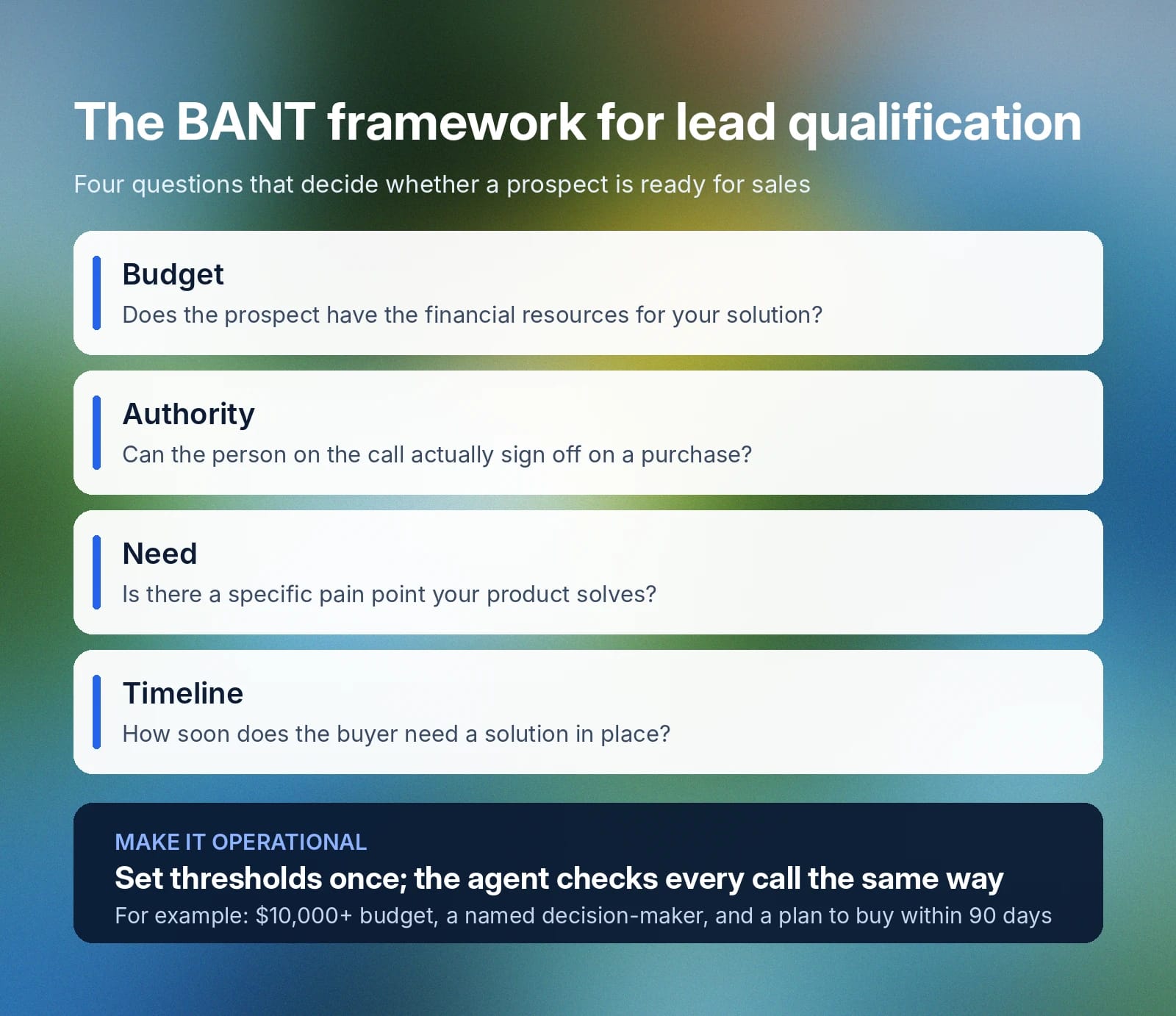
To determine if a prospect is a good fit, sales teams typically rely on the BANT framework:
- Budget: Does the prospect have the financial resources available for your solution?
- Authority: Does the person speaking with the agent have the power to sign off on a purchase?
- Need: Does the prospect face a specific, recognizable pain point that your product solves?
- Timeline: How soon does the buyer need to implement a solution?
With an AI agent, you can make BANT the backbone of how your agents evaluate prospects. For instance, you could say a qualified prospect has a budget of at least $10,000, a named decision-maker on the call, a specific problem the agent can map to your product, and a plan to buy within the next 90 days. Set those thresholds once, and the agent checks every conversation against them the same way, asking the right follow-up questions and scoring each criterion as it goes.
How lead scoring, AI lead qualification agents, and human reps work together
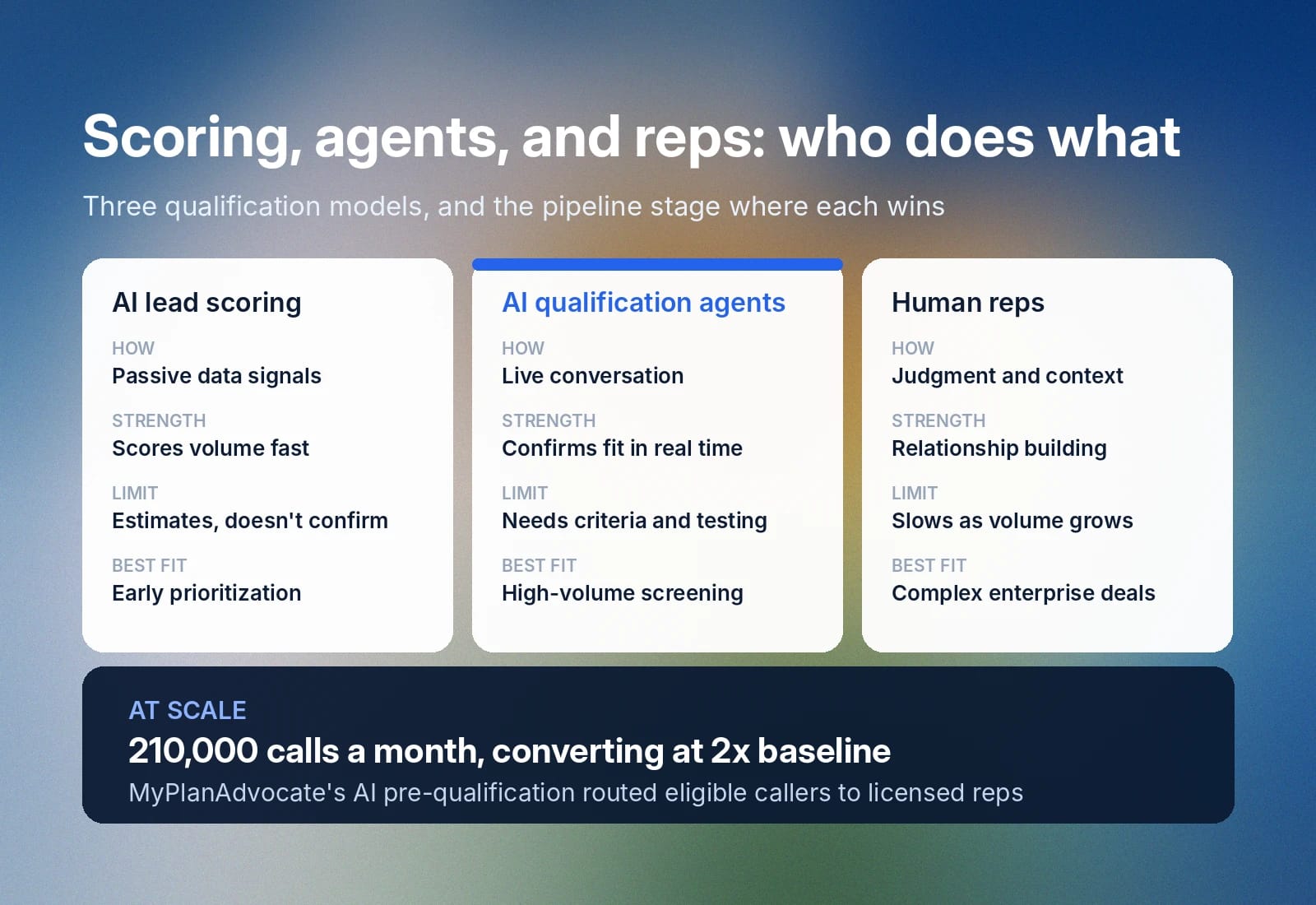
AI lead scoring, AI lead qualification, and human reps all solve different problems in your pipeline: lead scoring prioritizes a large pool of leads using passive signals, AI qualification agents confirm fit through an actual conversation, and human reps bring judgment to the deals that need it. The most effective sales teams combine all three, each covering what the others can't. For a closer look at where AI hands off to human judgment, see our guide to AI SDRs.
During the Medicare open enrollment period, healthcare platform MyPlanAdvocate deployed ElevenAgents to manage inbound screening calls before routing eligible consumers directly to licensed representatives.
The automated system processed approximately 210,000 calls per month during the peak Annual Enrollment Period, and inbound calls that reached licensed human agents after passing the AI pre-qualification step converted at two times the company's historical baseline.
Your sales team's situation may look different, but the operating principle remains the same: AI agents handle the repetitive screening work first so human representatives can focus their energy on prospects who have already demonstrated fit and urgency.
How AI agents qualify leads at scale
AI agents qualify leads at scale by running consistent screening conversations across inbound and outbound workflows. Inbound agents respond when buyers reach out, and outbound agents re-engage leads based on CRM activity, campaign lists, or follow-up triggers.
Inbound lead qualification
Inbound lead qualification starts when a potential buyer reaches out to your company, usually by submitting a demo form, opening a chat, or calling your sales number. The agent responds to the inbound request right away and begins a qualification conversation shaped by your sales criteria.
As the buyer explains what they need, the agent identifies relevant details, asks follow-up questions, and builds enough context to determine the next step.
For example, a buyer might open by saying, “We need to replace our current system before our renewal date next month.” The agent captures the level of urgency, confirms the deadline, and guides the conversation toward the next piece of information your sales team needs to qualify the lead.
Try it yourself with the lead qualification agent below to see how an AI agent handles inbound calls in practice.
Try our AI lead qualification agent
Handle inbound screening and lead scoring automatically
Outbound lead qualification
Outbound qualification uses the same screening logic as inbound, but the agent initiates communication with the lead based on your predetermined qualifications.
Teams can trigger automated outreach immediately after a specific digital signal, such as an inactive lead returning to a pricing page, or launch automated batch campaigns against defined lists using a comprehensive outbound AI calling strategy. Before contacting a prospect, the agent pulls context from your CRM or campaign lists to ensure the message is relevant and references past customer interactions.
For example, when a quiet prospect from last quarter returns to your site, the CRM event can trigger a proactive follow-up call. The agent references the previous demo request, asks whether the project has become active again, and updates the timeline parameters dynamically. It's the same logic outbound AI SDRs use to run calling campaigns at scale.
The example below demonstrates how an active outbound workflow operates.
Try our real-estate lead generation agent
AI batch calling for real estate
Outbound guardrails for compliance and communication
In the U.S., outbound campaigns operate under strict telecommunications regulations, so outbound workflows require automated compliance guardrails, including native filtering for Do Not Call (DNC) registries and integrated consent tracking.
ElevenAgents guardrails are designed to support compliance with the Telephone Consumer Protection Act (TCPA). We also include guardrails that make agentic conversations more productive, such as:
- Voicemail intelligence: Precision voicemail detection ensures the agent recognizes an answering machine, preventing the system from speaking over a recording.
- Seamless handoff: Once a prospect passes compliance checks and matches your screening criteria, the agent executes the same real-time routing as the inbound workflow by updating records or scheduling meetings instantly.
Together, these guardrails let outbound campaigns run at volume without sacrificing compliance or the quality of the conversation itself.
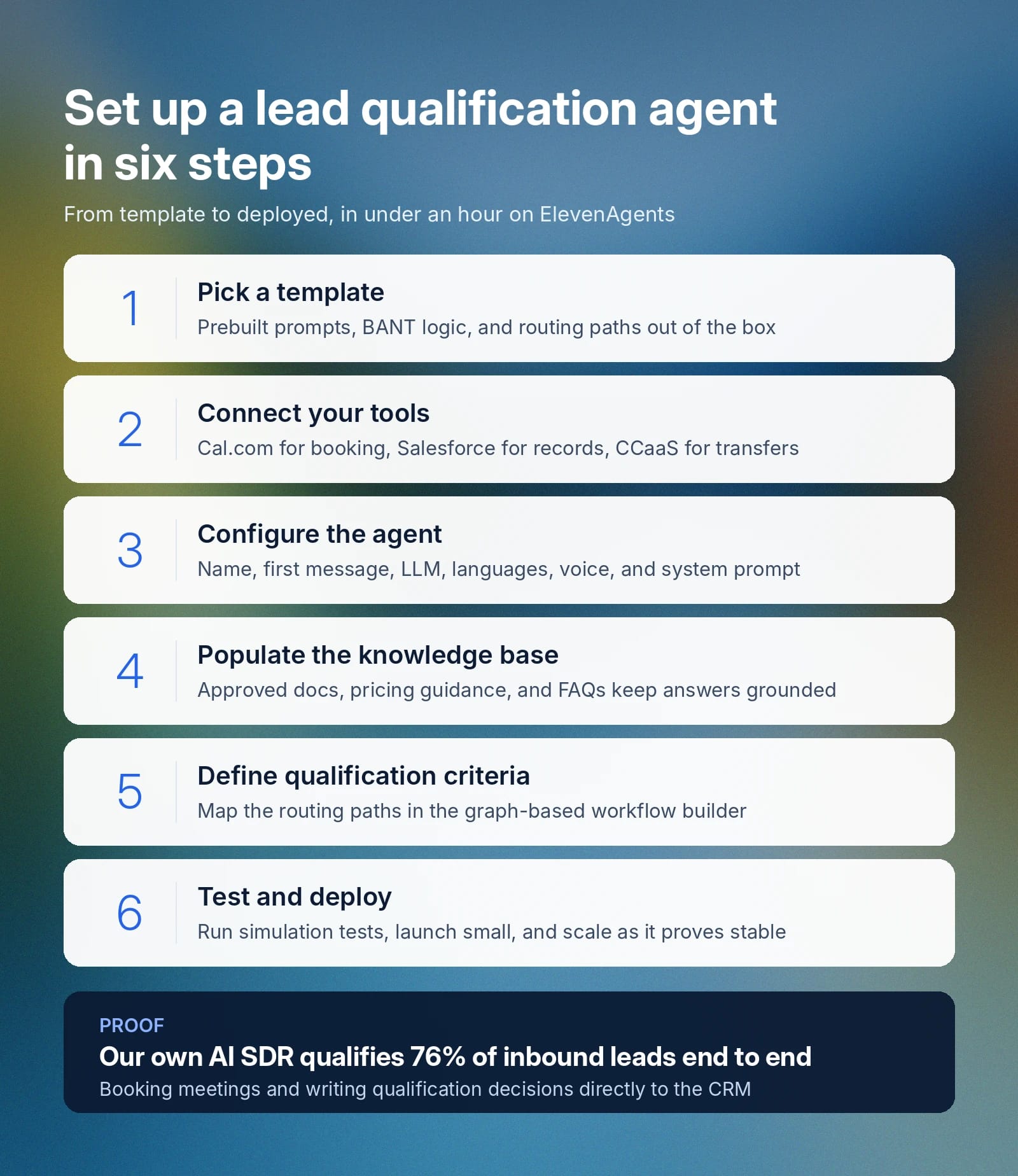
How to set up an AI lead qualification agent in less than an hour
ElevenAgents templates give teams a practical starting point for lead qualification workflows. Instead of building prompts, tool connections, and routing rules from scratch, your team can start with a template and adjust the presets to fit your sales criteria.
The initial goal is simple: build a working version, test it with realistic conversations, and confirm that the agent routes leads correctly.
The same workflow scales well beyond the pilot stage: Better’s AI loan agent now automates 35.5% of borrower inquiries end to end across nearly 100,000 mortgage calls a month, and Cars24 has logged more than 3 million minutes of AI-supported calls.
Step 1: Pick a template
Choose a lead qualification template from the ElevenAgents template library that fits your needs. Starting with a template provides your workspace with immediate foundational assets:
- Prebuilt architecture: Get a functional starting prompt, sample qualification logic, and pre-mapped routing paths out of the box.
- BANT separation: For an inbound lead qualifier, the template setup automatically separates hot leads from nurture tracks.
- Customization control: Adjust the agent’s core goal, opening greeting message, specific qualification questions, and final handoff rules to match your business.
Templates give you the workflow structure upfront, so you spend less time arranging the flow and more time defining what makes a lead qualified.
Step 2: Connect your tools
Connect the tools your agent needs to qualify, route, and hand off leads. Depending on your workflow, this might include:
- Scheduling platforms: Link a scheduling platform like Cal.com to allow the agent to check representative availability and book meetings on the spot.
- CRMs: Connect a CRM, such as Salesforce, to enable the system to update lead statuses automatically and log conversation summaries directly to the customer record.
- CCaaS systems: Configure a system like Twilio or Genesys to allow the agent to transfer qualified callers to the right sales representative instantly.
ElevenAgents integrations documentation covers the technical setup steps in more detail, and the qualification template comes preconfigured for Salesforce and Cal.com, so your team can authorize those connections during setup or return to the Tools menu later.
This is the same setup ElevenLabs runs internally: our own AI SDR qualifies 76% of inbound leads end to end, booking meetings and writing qualification decisions directly to the CRM.
Step 3: Configure the agent
Set the foundational settings that guide your agent's identity and communication style. In the workspace dashboard, select and configure the following core elements:
- Name: Give your agent a clear name to identify its role in your sales workflow.
- First message: Write the exact greeting the agent uses to open the conversation when a prospect connects.
- LLM model: Choose the underlying language model that balances reasoning depth with conversational speed. A more capable model handles nuanced or unclear answers better, but a lighter model responds faster, which matters more in a live voice conversation.
- Language: Set your agent's primary language from dozens of supported options. To reach more markets, add specific languages you cater to, and the agent will be able to switch to a multilingual model to handle them.
- Voice: Choose from thousands of pre-made voices in the Voice Library, filterable by accent, style, and use case.
Once the basics are set, write the system prompt: the instructions that define the agent's persona, core objectives, and the qualification rules it must follow. Structure your prompt into clear sections, such as persona, goal, and guardrails, rather than one long paragraph, so the agent knows what to do and what it should never do, like quoting pricing outside your approved range.
You can learn more about the specifics of optimizing your system prompt in our guide to prompt engineering.
Step 4: Populate the knowledge base
A focused knowledge base helps the agent answer buyer questions from the right sources and keeps the conversation in line with your qualification criteria so it doesn’t drift into unsupported claims or off-process sales advice. You can add approved sales materials to the agent’s knowledge base, then manage those documents from your knowledge base dashboard.
Add source material your team has approved for sales conversations, such as:
- Product documentation
- Pricing guidance
- Eligibility criteria
- FAQ
- Approved website URLs
Once the agent is live, review conversation transcripts for questions it couldn't answer well and add that missing context back into the knowledge base. This way, your agent will improve with real use instead of staying static.
Step 5: Define qualification criteria
Define the criteria the agent should use to decide whether a lead is ready for sales follow-up. With ElevenAgents, teams edit this logic in the workflow builder, a graph-based editor where nodes hold the criteria and instructions, and edges define how the agent moves between them based on what the prospect says.
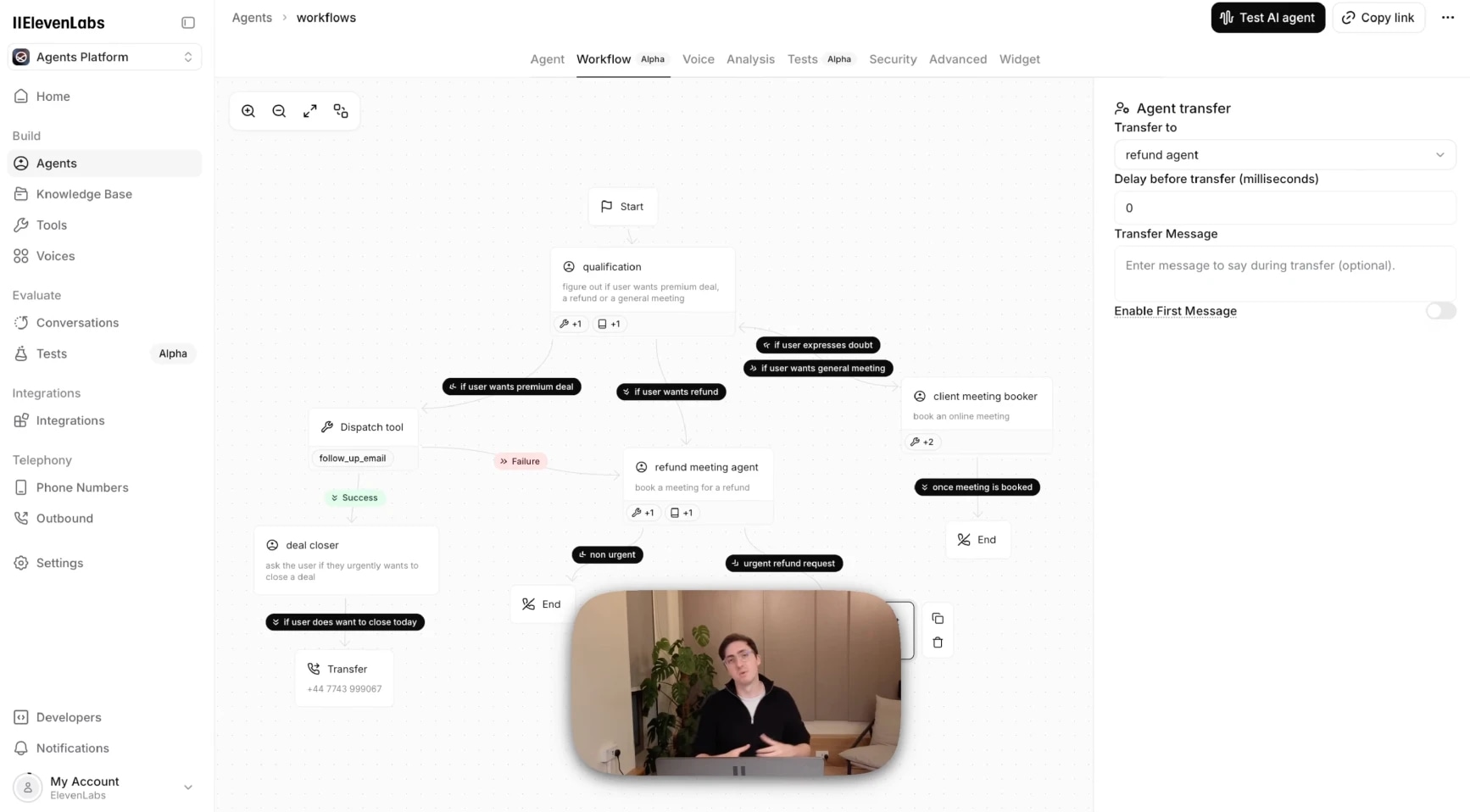
Routing isn't limited to a simple hot-lead or nurture-lead split. A single qualification node can branch into several paths, for example, routing a prospect toward a premium deal, a refund conversation, or a general meeting booking, depending on what they're asking for. Edges can also run backward: if a prospect expresses doubt partway through, the workflow can send them back to the qualification node instead of forcing a decision, so the agent can gather more context before routing them anywhere.
Once you've mapped out those paths, you need a way to confirm the agent is actually taking them correctly. Use Success Evaluation tests to confirm whether the agent followed the workflow correctly. Each evaluation checks the conversation transcript and returns success, failure, or unknown, along with a rationale. For lead qualification, it can show whether the agent gathered the right details and routed the lead to the correct outcome.
Step 6: Test and deploy
Navigate to the “Test” section of the ElevenAgents menu, and then create and run “Simulation tests” to see how well your agent performs. To configure the test, simply define your success criteria (what pass and fail look like) and describe the simulated scenario. This might include:
- A prospect with a confirmed budget and a purchase decision needed within the next two weeks, ready to move quickly through qualification.
- A prospect with real interest but no budget allocated, testing whether the agent handles a clear disqualifier gracefully.
- A student researching the space for a class project, with no buying intent, testing whether the agent avoids over-qualifying a non-lead.
- A prospect who gives vague or non-committal answers to every question, testing whether the agent pushes for clarity without forcing a decision.
- An enterprise buyer who mentions needing sign-off from multiple stakeholders, testing whether the agent handles a longer, less linear qualification path.
For each test, check:
- Did the agent collect the right qualification details?
- Did the agent avoid repeating questions the prospect had already answered?
- Did the agent handle unclear answers without forcing a decision?
- Did the lead land in the right path?
- Did the CRM update, meeting booking, or transfer work as expected?
Once your test conversations produce reliable results, deploy the agent to your chosen channels, such as an inbound phone line, a website chat widget, or a WhatsApp workflow. Start with a limited launch, review early conversations, and increase volume as the workflow proves stable.
Build your first lead qualification agent with ElevenAgents
AI lead qualification gives sales teams a faster, more consistent way to identify which prospects are ready for a sales conversation, without adding headcount or slowing down speed-to-lead.
Set your qualification criteria once, and ElevenAgents applies them consistently, day or night, whether a prospect calls in, opens a chat, or reaches out in one of 90+ supported languages. Templates get you a working agent in under an hour, and simulation testing lets you validate the workflow before a real prospect ever reaches it.
Create an agent to start building, or talk to sales about designing a lead qualification workflow for your team today.
FAQs

Jack Limebear is on the Growth team, acting as a content writer and strategist across the blog and insights pages. Before ElevenLabs, he spent over a decade leading content strategy for organizations ranging from fast-growing SaaS startups to Fortune 500 companies. He holds a Master's degree in English Literature from the University of Cambridge.