Omnichannel AI agents: Using one agent for every channel
- Written by
- Jack Limebear
- Published
- Last updated
ListenListen to this article
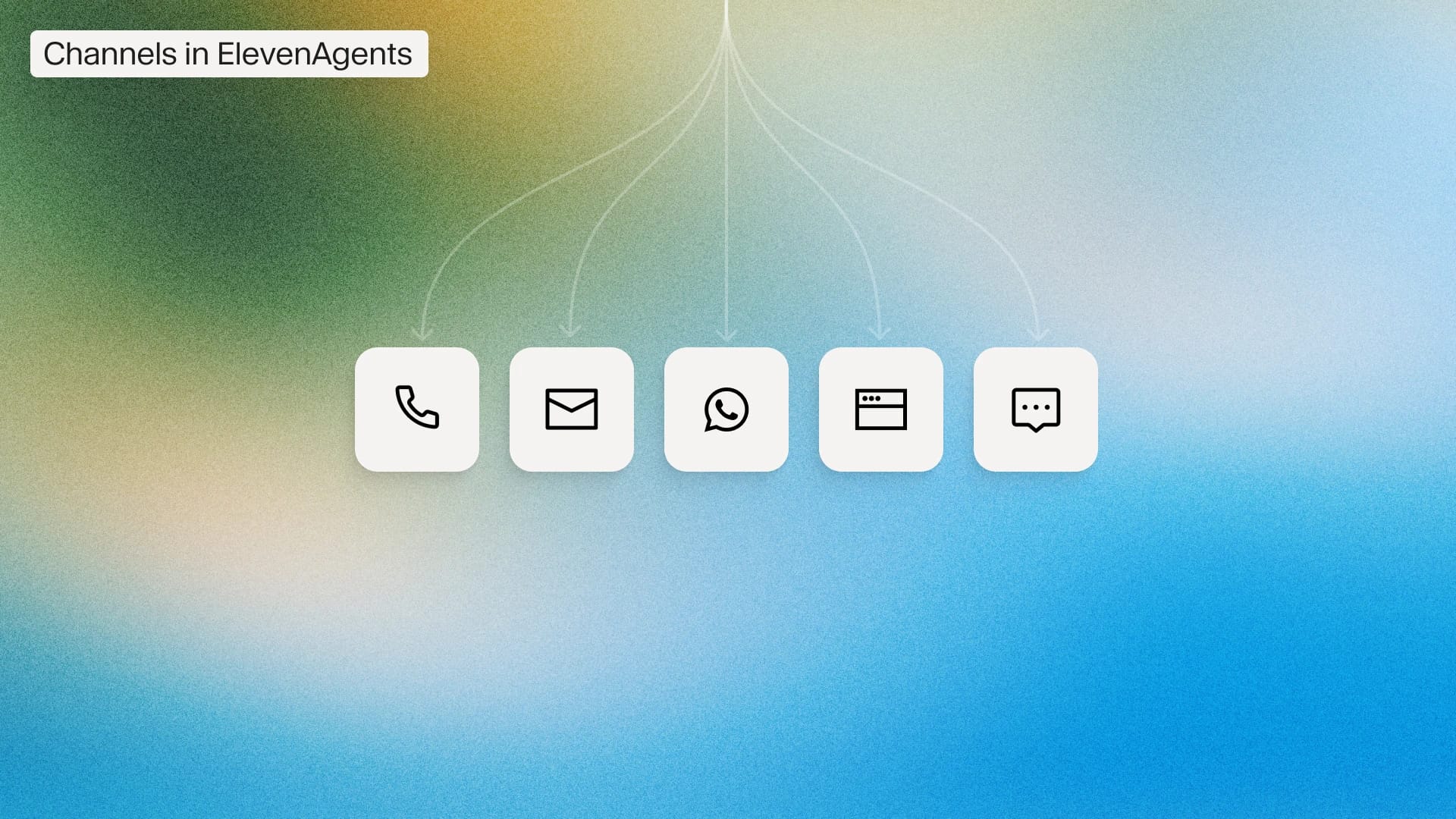
Customers expect a fluid journey across every touchpoint. Whether they’re chatting on your website, messaging over SMS, WhatsApp, or Telegram, calling your support line, or following up by email, they want one continuous conversation with your business, not a separate one for each channel.
An omnichannel AI agent meets that expectation. It moves across every deployment while maintaining context between channels, answering your customers on the channel they’re in, and creating a cohesive experience across your entire brand.
Building on our webinar, Deploying Agents Across Every Channel, this guide dives into how you can create once and deploy everywhere. Discover what an omnichannel AI agent is, how its architecture works, and how you can use one to provide consistent customer experiences on every channel.
Summary
- An omnichannel AI agent is a single AI agent that serves customers across every communication channel from one configuration, one knowledge base, and one set of guardrails.
- Omnichannel is distinct from multichannel: Multichannel means being present on several channels, while omnichannel means those channels share one brain and context follows the customer between them.
- The strongest architecture routes every channel into one triage layer that hands off to specialized sub-agents, each with scoped tools, its own conversational goal, and the right model for its task.
- Voice is the hardest channel to add later, so build voice-first and treat text channels as additional surfaces rather than retrofitting speech onto a chat platform.
What is an omnichannel AI agent?
An omnichannel AI agent is an agent that can handle customer conversations across every channel that a business operates. From phone and SMS to email, WhatsApp, web chat, and mobile apps, an omnichannel agent manages everything from a single configuration. It connects to one knowledge base, a single set of business systems, and one set of policies to work consistently while remembering user history across touchpoints.
There are three properties that separate a true omnichannel AI agent from a collection of channel-specific bots:
- One configuration: The agent’s knowledge, integrations, guardrails, and logic are defined once. That means you can activate a new channel as a deployment decision without having to rebuild from scratch.
- Shared context: A conversation that a customer begins on WhatsApp can transition to the in-app chat without starting from scratch. Omnichannel agents ensure users never have to repeat themselves between channels.
- Full modality support: The agent handles more than text and speech. It works across images, files, audio notes, and even location data within the same conversation. A conversation that used to end in the customer needing to fill in a form works seamlessly in one interaction.
If you’re running several single-channel tools side by side, you don’t have a true omnichannel AI agent. It must work seamlessly across all channels, carrying context across each and creating a cohesive experience for the end user.
What’s the difference between multichannel and omnichannel agents?
Multichannel means a business is reachable via several different channels. Omnichannel goes further: those channels operate as one system.
To make the difference more obvious, here is a breakdown of how multichannel and omnichannel agents differ in context.
In a multichannel setup, each channel is optimized in isolation. That means that technical debt compounds as you need to replicate every improvement across every tool, and no single team owns the entire experience. In an omnichannel setup, the intelligence lives at the logic layer, with channels simply being deployment targets.
If a customer can start a conversation on your website and finish it without needing to restate any information, you’re likely working with an omnichannel agent. If the agent asks them to explain their issue again, you’re running a multichannel setup. The main distinction here is context: an omnichannel agent may still re-verify before a sensitive action, but it never loses the thread of the conversation.
Why omnichannel customer service benefits your business
The business case for omnichannel customer service rests on enhanced retention and boosted revenue.
Take a look at the following studies to see why omnichannel experiences boost customer satisfaction and drive CX success across the board:
- Companies that implement omnichannel transformations report revenue growth of 5 to 15%, according to McKinsey.
- US customer experience quality sits at an all-time low after four consecutive years of decline, with 25% of brands losing ground in 2025 and only 7% improving, according to Forrester's 2025 CX Index. Delivering cohesive experience across every touchpoint is how you set your customer journey apart.
- Salesforce’s State of Service report predicts that AI will handle half of customer service cases by 2027, up from only 30% today.
For context, a live poll within our webinar revealed that only around 50% of companies were already using an omnichannel customer service strategy to some degree. Embedding an omnichannel AI agent into your existing workflows will give your customers a better experience across the board.
Omnichannel AI agents in the real world
Omnichannel AI agents are already a core part of the customer service experience of leading brands around the world. Due to its flexibility, the same architecture serves a gig workforce in India, a city government in Texas, and regulated financial institutions.
Below are some case studies of omnichannel agents live in action.
City of Midland, Texas: One agent on phone and web
Midland serves around 138,000 residents and handles more than 3,000 inbound calls a day. Overflow calls now route to an AI concierge for immediate, natural assistance, while a website widget resolves frequent questions through chat or voice, reducing the need to call at all.
The same omnichannel agent serves residents on the phone and on the web in English and Spanish, with additional segments in Mandarin and Arabic. One configuration, three surfaces, and multiple languages.
For more details, the Midland customer story explores the results, and our session recap walks through the exact build.
Rohlik Group: Four channels, six languages, one agent
Rohlik operates one of Europe's largest online grocery platforms, serving 3 million customers across five countries. Its agent, Maia, runs on ElevenAgents across phone, web, mobile app, and WhatsApp, now handling 90% of customer communications in six languages.
Maia connects to Rohlik’s backend through MCP and performs more than 30 actions, from modifying live orders to issuing credits. The same configuration then extends beyond support into voice-based shopping. Customers search for products, build a cart, and complete checkout by conversation, turning a support agent into a revenue channel.
Resolution is now over two times faster, with 24/7 coverage across all five markets.
Urban Company: Proving the voice-first foundation
Omnichannel starts with the hardest channel, with voice being the most challenging to create. India's largest home services platform automated more than 2 million minutes of partner support with natural-sounding voice AI across hundreds of thousands of calls every month in seven languages.
Urban Company manages nearly 60,000 active service professionals across 51 cities, and today 20% of its calls run in vernacular languages beyond Hindi and English. Voice was the main channel that worked for this workforce, which is why it built voice-first agents.
Once voice runs at this scale, every additional channel is a simplification. The Urban Company session recap covers the full build for those interested.
Financial services: Clearing the compliance bar
Deploying one agent across every surface requires full support from legal and security. In financial services, where the bar is even higher, this is more important than ever. Klarna handles front-line US phone support at 10x the speed, and Better.com doubled lead-to-lock conversion, both in production in one of the most compliance-heavy industries.
Our AI agent playbook for financial services details how these teams cleared review with the same guardrails and redaction controls covered later in this guide.
The common thread is architectural. Each team built the agent's intelligence once, then chose the surfaces its customers use.
How an omnichannel AI agent works
An omnichannel agent’s intelligence sits in two layers: a shared logic layer that defines what the agent knows and does, and a routing layer that directs each conversation to the right sub-agent. Underneath both runs the conversation pipeline that turns speech into text and back again. The channel surfaces themselves are deployment targets, which we’ll cover in the following section.
Here’s how we structured an agent in our workshop build, and how the same pattern applies to any deployment on ElevenAgents.
The logic layer
Everything an agent knows and does is defined once at the logic layer. It includes the knowledge base, the connections to business systems such as the CRM or a booking engine, the conversational goals, and the guardrails. Channels plug into this layer, rather than containing logic of their own.
The logic layer makes an omnichannel agent maintainable, even at scale. When policy changes, you only need to update it once and watch as every channel adapts.
The routing layer
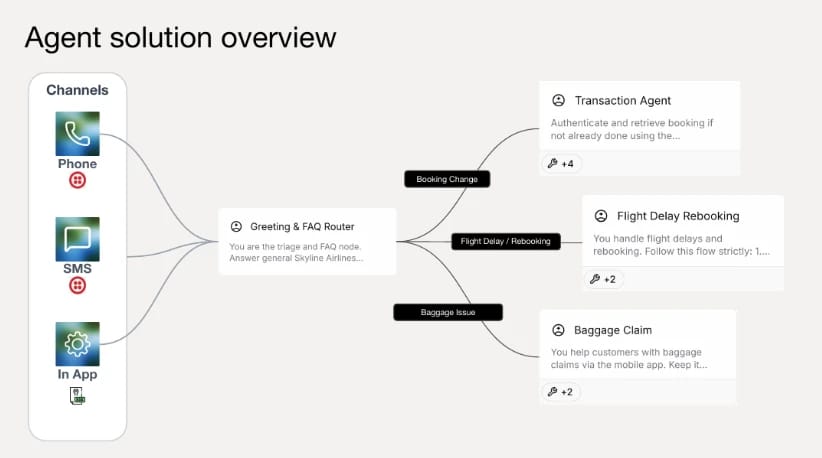
Rather than one monolithic prompt that handles every request, the strongest omnichannel pattern routes each incoming conversation through a triage agent that identifies intent and then hands off to a specialized sub-agent.
For an airline company, a greeting and FAQ router would dispatch incoming conversations to three sub-agents: one for booking transactions, one for flight rebooking, and one for baggage claims.
Each of these sub-agents carries three core components:
- A conversational goal: Instead of a script, an agent has a specific set of instructions that it follows intelligently. These are the same goals you would give your well-trained customer support agent.
- Scoped tools: Only the specific sub-agent that needs a tool has access to it. The rebooking agent has the rebooking tool; the refund sub-agent holds the refund tool. Narrow tool access is a useful guardrail enforced by architecture, instead of hoping the prompt you use holds true.
- Its own model: Sub-agents run on different LLMs matched to their task. A multimodal model handles image processing, while a faster, lighter model serves conversations where response speed matters most.
Because the architecture leads, the agent follows intent rather than a decision tree. It behaves like a support organization in miniature, providing a front desk that handles the incoming request and a specialist who fulfills it within defined limits.
The conversation pipeline
Under the hood, ElevenAgents runs a cascaded architecture. Speech to Text converts the caller’s audio, an LLM reasons over it, and Text to Speech renders the reply. On text-only channels, the speech stages simply switch off and the same logic layer answers in writing.
This cascade brings several advantages. First of all, you choose the best model for each stage and each sub-agent independently. Additionally, as every stage is inspectable, you know exactly which component to audit if something goes wrong.
How to deploy an AI agent across every channel
Once an agent exists at the logic layer, you can treat each new channel as an integration rather than a whole new project.
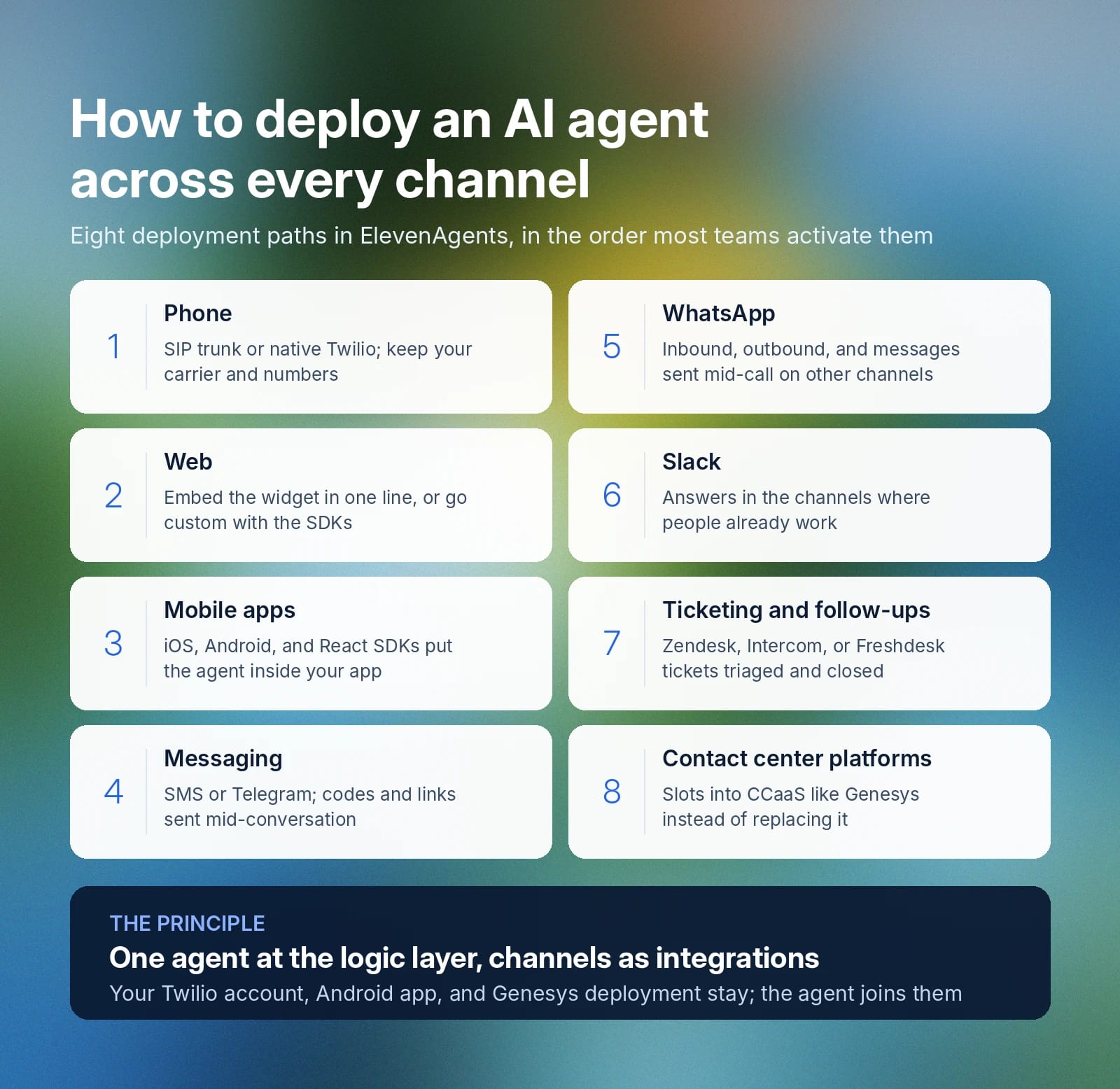
These are the deployment paths available in ElevenAgents, in the order most teams activate them:
- Phone: Connect existing telephony through a SIP trunk, or use a native integration such as Twilio to attach a phone number directly to the agent. You keep your current carrier and numbers.
- Web: Embed the web widget with a single line of code, or use the SDKs for a fully custom experience. Voice and chat both run through the same agent.
- Mobile apps: Native iOS, Android, and React SDKs put the agent inside your app, where it holds voice conversations, receives uploads, and navigates the user to the right screen.
- Messaging: Attach a messaging number so customers text the agent over SMS, or connect Telegram for in-app messaging. The agent also sends outbound messages mid-conversation, for example, a one-time authentication code or a payment link.
- WhatsApp: Connect your WhatsApp Business account through the ElevenAgents integrations. The agent handles inbound conversations, sends outbound messages, and can even send a WhatsApp message mid-conversation on another channel, such as during a phone call.
- Slack: Deploy an agent into Slack workspaces so employees or customers get answers in the channels where they already work.
- Ticketing and follow-ups: Connect Zendesk, Intercom, or Freshdesk so the agent triages inbound tickets, answers them from your knowledge base, and closes them automatically. Anything that needs a human gets routed with full context. The agent also sends emails, texts, and WhatsApp messages as actions mid-conversation, such as a booking confirmation or a follow-up survey.
- Contact center platforms: Connect existing CCaaS deployments through integrations such as Genesys, so the agent slots into your current operation instead of completely replacing it.
Across every touchpoint, ElevenAgents plugs into the stack you already have. An existing Android app, an existing Twilio account, and an existing Genesys deployment all remain in place. The agent simply joins them.
The channels dashboard shows every surface in one view, so you can see what's live and connect what's next in a few clicks. Telegram, Intercom, and Freshdesk integrations are currently in Alpha, with more channels on the way.
For a walkthrough of this exact deployment across phone, SMS, and in-app surfaces, the full workshop recording shows each channel configured live, and our session recap summarizes several demos.
Tune behavior per channel, keep one brain
One configuration doesn’t mean one tone.
Behavior settings let you adjust how the agent responds on each surface: thorough and formatted by email, concise on the phone, casual over SMS. Verbosity, output format, and response timing all adapt per channel while the knowledge, tools, and guardrails stay identical underneath.
Channel-scoped simulations then let you test that tuning against your evaluation criteria before any update goes live. When something needs improvement, you fix it once and ship the fix to every surface.
Guardrails, authentication, and compliance across every channel: How omnichannel agents protect enterprises
Any customer support agent that has the power to rebook flights or issue payments needs to be held to high standards of operation with clear boundaries.
When you define guardrails in your logic layer, they apply identically whether a customer interacts via text, email, or voice call.
Here’s how guardrails work across omnichannel agents:
- Guardrails live in the conversational goal: You write policy directly into each sub-agent’s instructions. A rebooking agent, for example, offers alternatives only when a delay passes the threshold the business sets, so the agent enforces the rule instead of just describing it.
- Tool scoping limits the blast radius: Each sub-agent holds only the tools its role requires. A manipulated conversation can only misuse the tools that the agent holds, rather than the full toolset.
- Authentication matches risk: Low-risk actions use lightweight checks for authentication. Higher-risk actions rely on one-time codes or full account verification, sent by the agent inside the same conversation.
- PII redaction is built in: Sensitive details, such as dates of birth, are stripped from the conversation history. Paired with GDPR compliance and security certifications, this is what makes one agent deployable in regulated industries.
How to choose omnichannel customer service software
Most omnichannel customer service software is a chat product with channels attached. While this can work for a time, gaps will begin to appear after you deploy at scale.
For a full-scope omnichannel customer service agent, make sure to look for these six criteria:
- Voice-native architecture: Ask whether voice was the platform’s first channel or its latest add-on. Latency handling, turn-taking, and interruption behavior will show an agent’s true colors within a test call.
- One configuration across all channels: Adding a channel should only require an integration rather than any major rebuilding. If the vendor quotes implementation time per channel, the logic layer intelligence isn't shared across each deployment. Look for per-channel behavior settings and channel-scoped testing on top, so you can tune delivery per surface without forking the agent.
- Context persistence between channels: Start a conversation on a web widget, then call. If the agent doesn’t already know you, it doesn’t provide persistent context.
- Full modality support: The platform should process images, files, and audio inside a conversation, on any channel that supports them. Anything less sends customers back to web forms.
- Integration with your existing stack: SIP trunking for your current carrier, contact center connectors, native mobile SDKs, and messaging integrations mean the platform joins your infrastructure rather than replacing it.
- Compliance and observability: Confirm PII redaction, GDPR posture, and relevant certifications, then confirm you see every tool call and conversation transcript. Having a verifiable audit trail is essential, especially in regulated industries.
To offer compliant, full-scale omnichannel customer experiences with AI, your agent needs to deliver all these and more.
Build omnichannel AI agents with ElevenAgents
ElevenAgents allows you to build out full-scale omnichannel agents in one easy-to-use view. You’ll be able to leverage an agent that connects to your system, routes through specialized sub-agents for customer queries, and deploys across phone, web, mobile, SMS, WhatsApp, Telegram, Slack, and ticketing platforms from a single configuration.
Expressive voice, multimodal inputs, and enterprise-grade guardrails are all native to the platform.
Explore omnichannel deployment with ElevenAgents to see how one configuration reaches every channel, or create an account and deploy your first agent today.
Omnichannel AI FAQ

Jack Limebear is on the Growth team, acting as a content writer and strategist across the blog and insights pages. Before ElevenLabs, he spent over a decade leading content strategy for organizations ranging from fast-growing SaaS startups to Fortune 500 companies. He holds a Master's degree in English Literature from the University of Cambridge.