Czym jest diaryzacja mówców? Jak działa i gdzie się jej używa
- Autor
- Jack Limebear
- Opublikowano
- Ostatnia aktualizacja
PosłuchajPosłuchaj tego artykułu
Diarizacja mówców analizuje strumień audio z nieznaną liczbą osób mówiących i tworzy oś czasu oznaczonych segmentów: mówca A od 0:00 do 0:42, mówca B od 0:42 do 1:15, a następnie znów mówca A od 1:15. System nie wie, kim są mówcy, ale rozpoznaje, że to różne osoby, i zachowuje spójność ich etykiet w całym nagraniu.
To właśnie sprawia, że audio z wieloma mówcami staje się użyteczne. Notatki ze spotkań, analityka call center, transkrypcje wywiadów, edycja podcastów i dokumentacja prawna wymagają wiedzy nie tylko o tym, co powiedziano, ale też kto to powiedział.
Z tego przewodnika dowiesz się, jak działa diarizacja, czym różni się od powiązanych technik, takich jak segmentacja i identyfikacja, które narzędzia open source ją obsługują oraz jak ocenić skuteczność systemu diarizacji.
Podsumowanie
- Diarizacja mówców dzieli nagranie audio według tego, kto mówi, tworząc oznaczone wypowiedzi bez identyfikowania osób z imienia.
- Diarizacja mówców różni się od segmentacji mówców, która wykrywa zmiany mówcy, oraz od identyfikacji mówców, która dopasowuje głosy do prawdziwych nazwisk.
- Skuteczność diarizacji mierzy się wskaźnikiem błędu diarizacji (DER), który pokazuje ogólną dokładność, oraz wskaźnikiem błędu Jaccarda (JER), który sprawdza, czy dokładność utrzymuje się dla każdego mówcy.
Czym jest diarizacja mówców i jak działa?
Diarizacja mówców to proces dzielenia strumienia audio na segmenty według tego, kto mówi. Transkrypcja z diarizacją oznacza każdy segment audio tożsamością mówcy. Mówiąc prościej, odpowiada na pytanie: „Kto mówił i kiedy?”
Surowa transkrypcja spotkania zawiera słowa, a transkrypcja z diarizacją informuje, że mówca 1 zadał pytanie, mówca 2 na nie odpowiedział, a mówca 3 przerwał w połowie.
Większość systemów diarizacji mówców działa w czterech etapach:
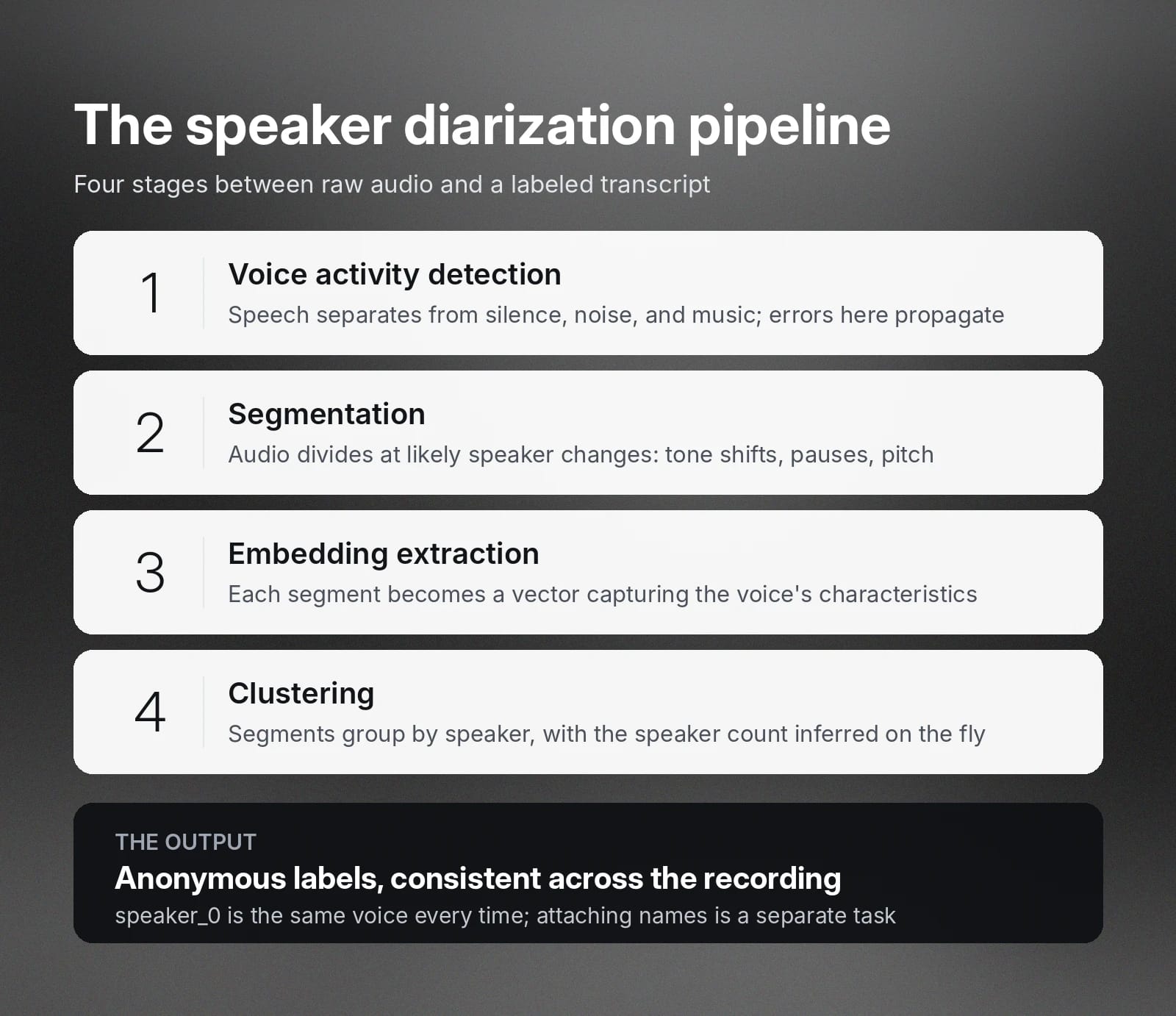
Przyjrzyjmy się im bliżej.
Wykrywanie aktywności głosowej (VAD)
Wykrywanie aktywności głosowej oddziela mowę od wszystkiego innego: ciszy, szumu tła, muzyki czy stukania w klawiaturę. Do kolejnego etapu trafiają tylko segmenty audio zawierające faktyczną mowę.
Błędy na tym etapie będą przenosić się na kolejne etapy.
Segmentacja
Segmenty zawierające mowę są następnie dzielone w miejscach, w których mówca prawdopodobnie się zmienia, na przykład przy zmianie barwy głosu, pauzie między wypowiedziami lub zmianie wzorca wysokości głosu. Większość systemów wykrywa te punkty zmiany bezpośrednio, porównując cechy akustyczne po obu stronach potencjalnej granicy.
Niektóre narzędzia do segmentacji dzielą audio na krótkie, równe okna, na przykład dwusekundowe fragmenty, a potem na etapie klasteryzacji łączą sąsiadujące okna należące do tego samego mówcy.
Ekstrakcja embeddingów
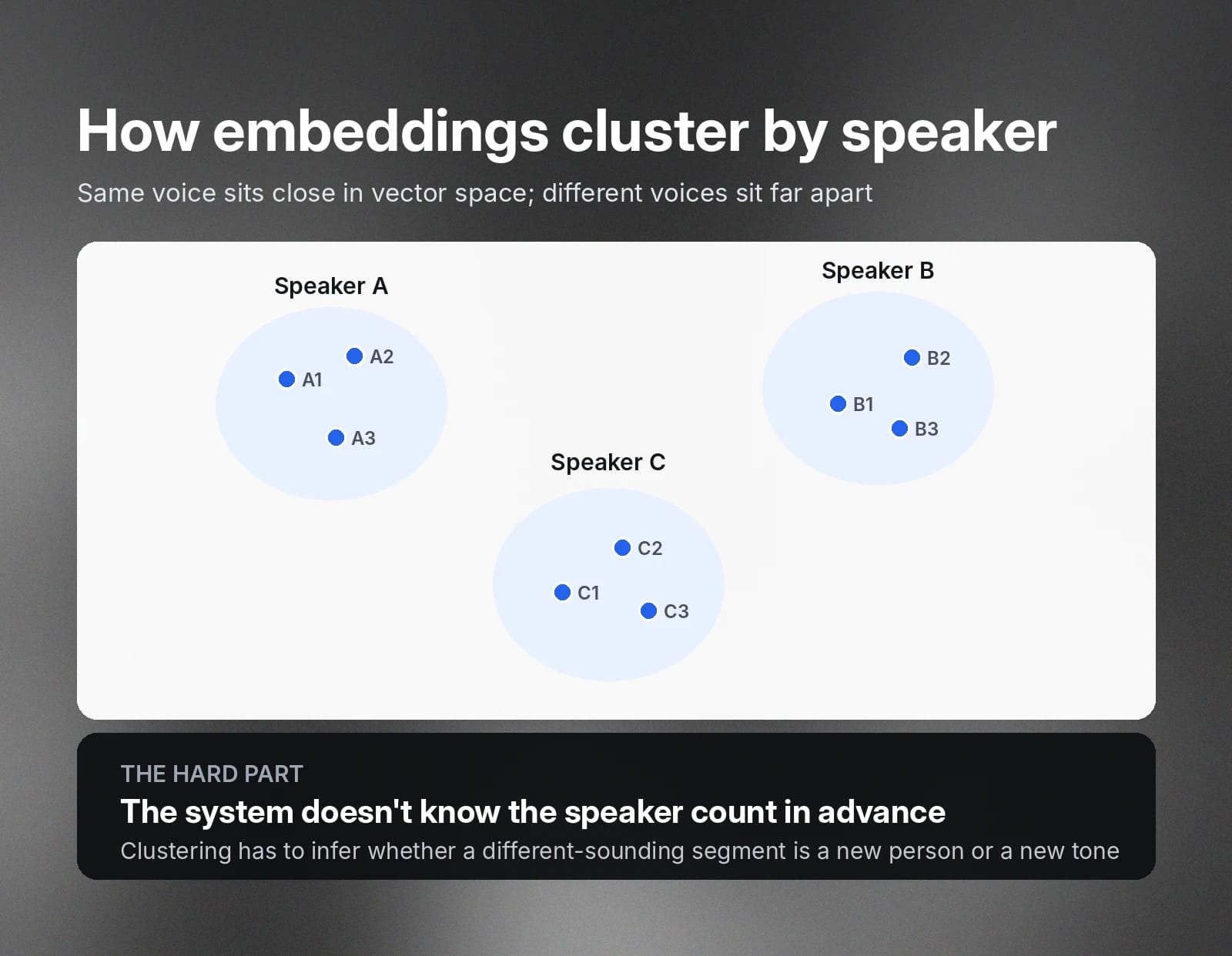
Każdy segment mowy jest przekształcany w embedding mówcy, czyli wektor numeryczny opisujący cechy głosu osoby mówiącej w tym segmencie. Embeddingi tego samego mówcy grupują się blisko siebie w przestrzeni wektorowej, a embeddingi różnych mówców są bardziej od siebie oddalone.
Klasteryzacja
Embeddingi są następnie grupowane tak, aby segmenty tego samego mówcy miały wspólną etykietę. System zwykle nie zna z góry liczby mówców, więc algorytm klasteryzacji musi ją określić, rozstrzygając, czy segment brzmiący trochę inaczej należy do nowego mówcy, czy do tej samej osoby mówiącej innym tonem.
Wynikiem jest zestaw etykiet mówców przypisanych do przedziałów czasowych, zwykle wraz z transkrypcją. Na przykład transkrypcja z diarizacją z rozmowy dwóch osób wygląda tak:
- [speaker_0] Dziękuję za telefon. Jak mogę pomóc?
- [speaker_1] Dzień dobry, dzwonię w sprawie faktury z zeszłego miesiąca.
- [speaker_0] Jasne, już to sprawdzam.
Etykiety są anonimowe i spójne wewnętrznie. Speaker_0 to ten sam głos za każdym razem, gdy się pojawia, ale system nie wie, że speaker_0 ma na imię Fergal. Przypisanie prawdziwych tożsamości to inne zadanie, które omawiamy poniżej.
Kluczowe różnice między segmentacją a identyfikacją mówców
Segmentacja i identyfikacja mówców ściśle wiążą się z diarizacją, dlatego te trzy pojęcia często są ze sobą mylone.
Każda z nich rozwiązuje nieco inny problem, dlatego przy ocenie narzędzi ważne jest zrozumienie tej różnicy.
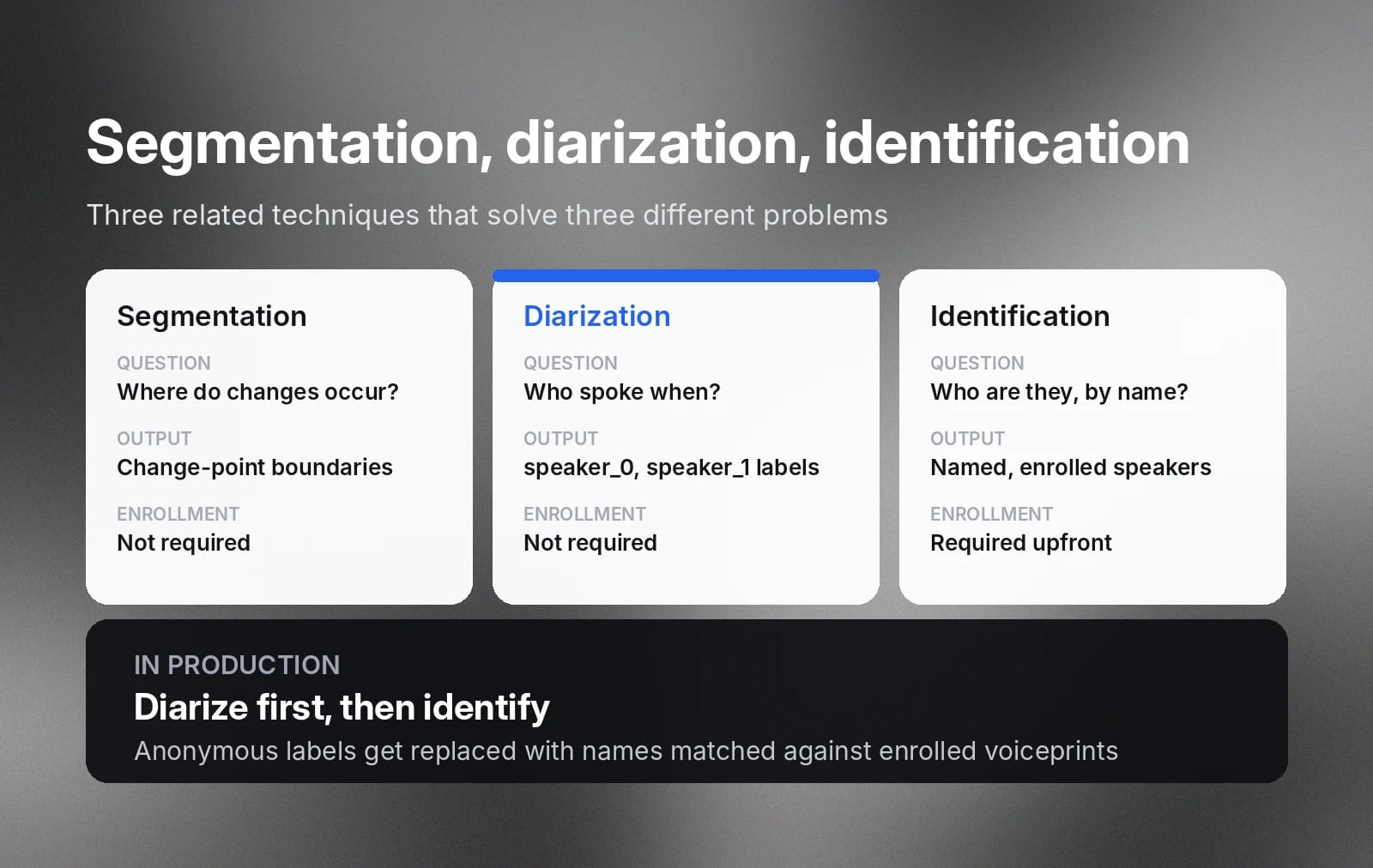
Jak wyjaśniliśmy wcześniej, segmentacja mówców jest wczesnym etapem diarizacji. Znajduje granice, w których jeden głos zmienia się w drugi, bez przypisywania etykiet. Segmentacja mówi, że zmiana nastąpiła w 0:42. Diarizacja idzie dalej: grupuje powstałe segmenty i tworzy w pełni oznaczony wynik, dzięki czemu wiesz, że głos o 1:15 jest tym samym, który mówił na początku nagrania.
Identyfikacja mówców to osobna funkcja poza diarizacją, ale często stosuje się ją razem z nią. Identyfikacja określa, kim naprawdę są mówcy. System identyfikacji porównuje głosy z zarejestrowanymi wzorcami głosu i zwraca tożsamości na podstawie bazy znanych mówców. Po identyfikacji speaker_0 i speaker_1 stają się „Fergalem” i „Erikiem”.
Wiele produktów łączy te narzędzia, aby stworzyć pełniejszą transkrypcję końcową. Narzędzie do spotkań może robić to automatycznie — nawet pobierając dane, takie jak nazwa ustawiona przez użytkownika w Teams lub Meet — aby wypowiedzi każdego uczestnika przypisać do imienia bez ręcznej weryfikacji.
Popularne narzędzia i biblioteki open source do diarizacji mówców
Narzędzia open source do diarizacji mówców warto rozważyć, gdy potrzebujesz kontroli, elastyczności lub wdrożenia lokalnego. Najlepszy wybór zależy od rodzaju obsługiwanego audio — rozmów telefonicznych, spotkań, podcastów czy transmisji — wymagań dotyczących opóźnień oraz czasu, jaki możesz przeznaczyć na prace inżynieryjne.
Oto kilka najpopularniejszych opcji.
Pyannote.audio
Pyannote.audio to oparty na PyTorch zestaw narzędzi stworzony specjalnie do diarizacji mówców i jedno z najczęściej używanych rozwiązań open source. Oferuje gotowe pipeline’y obejmujące cały proces diarizacji, w tym VAD, segmentację, embeddingi i klasteryzację, a także komponenty do trenowania lub dostrajania modeli na własnych danych.
Jego gotowe modele są udostępniane przez Hugging Face i często używane jako warstwa diarizacji w większych projektach transkrypcyjnych.
WhisperX
WhisperX łączy Whisper od OpenAI z ASR, diarizacją i wymuszonym dopasowaniem. Sam Whisper tworzy dobre transkrypcje, ale nie przypisuje etykiet mówców, a jego znaczniki czasu są jedynie przybliżone. WhisperX dodaje dopasowanie znaczników czasu na poziomie słów i integruje diarizację opartą na pyannote, tworząc transkrypcje, w których każde słowo ma dokładny znacznik czasu i etykietę mówcy.
NVIDIA NeMo
NVIDIA NeMo obejmuje diarizację jako część szerszego frameworka Conversational AI. Oferuje modele diarizacji, które można trenować, w tym podejścia end-to-end obsługujące nakładającą się mowę, i jest przeznaczony dla zespołów budujących niestandardowe systemy mowy na dużą skalę na infrastrukturze GPU.
Każde z tych narzędzi wymaga zarządzania infrastrukturą diarizacji, w tym wdrażaniem modeli, skalowaniem, monitoringiem i aktualizacjami. Dla zespołów, które nie chcą tego narzutu operacyjnego, zarządzane API do diarizacji mowy są prostszą alternatywą. Mogą integrować się z istniejącymi workflow lub obsługiwać cały proces diarizacji, dlatego dobrze sprawdzają się w środowisku produkcyjnym, na przykład w analityce obsługi klienta, transkrypcji spotkań i przetwarzaniu podcastów.
Diarizacja w czasie rzeczywistym: wyzwania i zastosowania
Diarizacja w czasie rzeczywistym jest znacznie trudniejsza niż diarizacja gotowego nagrania, ponieważ system musi podejmować decyzje przy niepełnym kontekście.
System offline widzi całe nagranie, zanim podejmie decyzję. Może porównać głos z 2. minuty z głosem z 40. minuty i z pewnością uznać, że to ten sam mówca, ponieważ ma jednocześnie dostęp do obu momentów. System działający w czasie rzeczywistym nie ma tego komfortu: musi oznaczyć mowę w chwili, gdy się pojawia, bez dostępu do tego, co zostanie powiedziane później, i z małą lub żadną możliwością zmiany podjętej decyzji.
Brak przyszłego kontekstu sprawia, że trzy konkretne problemy są znacznie trudniejsze do rozwiązania w czasie rzeczywistym:
- Opóźnienie a dokładność: Bez możliwości analizowania całej rozmowy wstecz i naprzód, krótszy czas odpowiedzi odbywa się bezpośrednio kosztem dokładności.
- Nakładająca się mowa: Gdy ludzie mówią jednocześnie, system, który mógłby ponownie przetworzyć audio, mógłby je rozdzielić. System działający w czasie rzeczywistym musi przypisać je do jednej etykiety albo na bieżąco korzystać ze specjalistycznych modeli wykrywających nakładanie się mowy.
- Krótkie wypowiedzi: Szybkie „tak” lub „proszę mówić” ledwo daje systemowi wystarczającą próbkę głosu, a bez otaczającego kontekstu i tak musi on natychmiast przypisać etykietę.
Mimo trudności niektóre zastosowania nie mogą czekać na zakończenie nagrania. Napisy na żywo dla spotkań i transmisji wymagają etykiet mówców, gdy ci mówią. Oprogramowanie contact center przekazujące wskazówki agentom w trakcie rozmowy musi w czasie rzeczywistym wiedzieć, jakich słów używa klient. Agenci głosowi obsługujący rozmowy z wieloma uczestnikami muszą bez opóźnień śledzić, kto o co pyta. W każdym z tych przypadków system trochę mniej dokładny, ale działający od razu, jest lepszy niż dokładniejszy, lecz opóźniony.
W zastosowaniach, które nie wymagają etykiet w czasie rzeczywistym, takich jak analityka, kontrola zgodności i tworzenie transkrypcji, diarizacja wsadowa pozostaje lepszym wyborem, ponieważ jest znacznie dokładniejsza.
Jak ocenić skuteczność diarizacji mówców
Przy mierzeniu dokładności diarizacji najważniejsze są dwa wskaźniki: wskaźnik błędu diarizacji (DER), który pokazuje ogólną dokładność, oraz wskaźnik błędu Jaccarda (JER), który sprawdza, czy dokładność utrzymuje się dla każdego mówcy.
DER oblicza odsetek całkowitego czasu mowy błędnie przypisanego do mówców. Łączy trzy rodzaje błędów:
- Fałszywie wykryta mowa: System oznaczył segment jako mowę, choć nikt nie mówił.
- Pominięta mowa: Ktoś mówił, ale system oznaczył to jako ciszę.
- Pomylenie mówców: Mowa została wykryta, ale przypisana niewłaściwemu mówcy.
DER = (fałszywie wykryta mowa + pominięta mowa + pomylenie mówców) / całkowity czas mowy
DER na poziomie 10% oznacza, że błędy stanowią jedną dziesiątą całkowitego czasu mowy we wszystkich trzech kategoriach. Niższy wynik jest lepszy, a wyniki można porównywać tylko wtedy, gdy są mierzone na tych samych danych i w tych samych warunkach. DER znacznie różni się w zależności od jakości audio, liczby mówców i stopnia nakładania się mowy w nagraniu.
Wskaźnik błędu Jaccarda (JER) mierzy dokładność diarizacji osobno dla każdego mówcy, a następnie uśrednia wynik dla wszystkich mówców. Dla każdego mówcy referencyjnego system oceny dopasowuje najbliższą etykietę mówcy z systemu i porównuje czas ich prawidłowego nakładania się z łącznym czasem przypisanym któremukolwiek z nich.
Wyobraź sobie 60-minutowe spotkanie, na którym mówca A mówi przez 50 minut, a mówca B przez 10 minut. System diarizacji poprawnie oznacza 48 z 50 minut mówcy A, ale tylko 4 z 10 minut mówcy B. Jego ogólny DER może nadal wyglądać całkiem dobrze, ponieważ większość spotkania należy do mówcy A. JER uwzględnia słaby wynik mówcy B na równi, ponieważ ocenia mówcę A i mówcę B niezależnie przed uśrednieniem wyników.
JER_mówca = 1 - (poprawne_nakładanie / (czas_ref + czas_sys - poprawne_nakładanie))
Końcowy JER to średnia tych wskaźników błędu dla poszczególnych mówców:
JER = (1 / N) * Σ[JER_mówca_i] dla i = 1..N
Śledzenie zarówno DER, jak i JER daje pełniejszy obraz dokładności diarizacji: DER pokazuje ogólną dokładność, a JER, czy utrzymuje się ona dla każdego uczestnika, także osób mówiących rzadziej.
Testowanie na audio reprezentatywnym dla środowiska produkcyjnego
Oceniając system diarizacji mówców, oblicz DER i JER na audio odpowiadającym rzeczywistym warunkom wdrożenia: typowej liczbie mówców, jakości audio i skali wzajemnego zagłuszania się.
Publikowane wyniki benchmarków mogą być mierzone na czystych, kontrolowanych zbiorach danych, takich jak nagrania studyjne, które rzadko odpowiadają rzeczywistym nagraniom rozmów lub spotkań na żywo. System osiągający dobre wyniki w benchmarkach może działać znacznie gorzej na zaszumionym, nakładającym się audio z rzeczywistych sytuacji. Przetestuj go na własnych danych, zanim wybierzesz produkt do diarizacji.
Zacznij korzystać z ElevenAPI do diarizacji mówców
Jeśli chcesz zbudować funkcję transkrypcji z obsługą wielu mówców, Scribe v2 od ElevenLabs udostępnia diarizację mówców przez jedno API Speech to Text. Wyślij audio do endpointu z diarize=true, a odpowiedź JSON oznaczy każde słowo identyfikatorem mówcy — dla maksymalnie 32 mówców, w ponad 90 językach i w plikach o długości do 10 godzin.
Dwie opcje rozszerzają standardowy wynik diarizacji. W przypadku nagrań rozmów detect_speaker_roles=true oznacza mówców jako agenta i klienta zamiast anonimowych numerów. Jeśli w Twoim workspace są zarejestrowane profile mówców, use_speaker_library=true może dopasować wykrytych mówców do zarejestrowanych głosów, łącząc diarizację i identyfikację w jednym żądaniu.
Parametr progu diarizacji pozwala dostosować kompromis między nadmiernym dzieleniem a łączeniem mówców. A gdy mówcy są już odseparowani na osobnych kanałach audio, na przykład w stereofonicznych nagraniach rozmów, transkrypcja wielokanałowa przypisuje mówców według kanału i całkowicie pomija diarizację.
Przewodnik Speech to Text — szybki start krok po kroku opisuje pierwszą integrację. W przypadku wdrożeń regulowanych platforma spełnia standardy SOC 2, ISO 27001, PCI DSS L1 i HIPAA oraz oferuje rezydencję danych w UE i tryb bez retencji danych.
Chcesz wdrożyć diarizację mówców w swoich systemach? Zacznij od pobrania klucza API lub zajrzyj do dokumentacji ElevenLabs, aby dowiedzieć się więcej.
FAQ

Jack Limebear jest w zespole Growth, gdzie pisze teksty i tworzy strategie na bloga i stronę z insightami. Zanim dołączył do ElevenLabs, przez ponad dekadę prowadził strategie contentowe dla firm – od szybko rosnących startupów SaaS po spółki z listy Fortune 500. Ma tytuł magistra literatury angielskiej z Uniwersytetu Cambridge.