Conversational AI design: How to create more human user experiences
- Written by
- Jack Limebear
- Published
- Last updated
ListenListen to this article
Conversational AI design used to mean building a decision tree. Early chatbots and IVR menus worked off rigid, pre-scripted branches: press 1 for billing, say "yes" or "no," and hope the customer's question matched one of the paths you anticipated. That model worked only as long as the conversation stayed within what you'd already built.
AI agents removed that constraint. They can now reason over a conversation in real time, pull from a knowledge base, call tools, and remember what was already said, so they're no longer limited to a fixed script.
However, this shift did not remove the need for conversational AI design. Instead, it raised the bar. Without a rigid script to fall back on, an agent's persona, workflow, and decision points have to be defined well enough to hold up in an open-ended, real-time conversation instead of a predetermined one.
This guide breaks down what conversational AI design actually means for chat and voice agents, why it matters for the metrics you're already measured on, and what you need to optimize to make it feel more natural. Get it right, and you can deploy AI agents that connect with customers and deliver faster, better service.
Summary
- Conversational AI design refers to how an AI agent's communication is structured and optimized so a conversation feels natural.
- Voice AI is less forgiving than text, since voice, latency, and timing issues that go unnoticed in a chat interface can make a voice conversation feel robotic.
- ElevenAgents is designed to make human-like AI voice and chat agents possible through a mix of features that let you control voice, persona, and conversation flow, and optimize for latency across every channel.
What is conversational AI design?
Conversational AI design is the UX practice of configuring how an AI agent behaves. That includes everything from its persona to the guardrails, workflows, and knowledge bases it draws on, all working together to make the conversation feel as polished as any other part of the product experience.
That configuration doesn't look the same everywhere, though. Agents can run across multiple channels, like chat, voice, or SMS, from a single configuration. Each one comes with its own constraints, but voice is where those constraints are tightest. When voice is one of an agent's channels, the agent has to choose and deliver a voice, manage pacing and turn-taking in real time, and get a response out before a pause starts to feel like the call dropped. None of that is optional the way it can be in chat, where a slightly slow or imperfect response rarely breaks the interaction.
Here's what you need to consider when implementing conversational AI design for a chat agent, and what voice adds on top of that.
Customers don't consciously grade each of these factors. They just notice when something feels off, and that feeling is enough to undercut trust in the agent as a whole, threatening the goals you deployed it for in the first place.
Why conversational AI design matters for a good user experience
Every factor covered above, from turn-taking to latency and persona, affects how a customer perceives your brand at a key moment that can turn them into a champion or a detractor. That perception shows up directly in the metrics that teams are measured on.
- Higher satisfaction and resolution rates: Customers rate an interaction higher when the agent responds promptly and doesn't interrupt awkwardly.
- Reduced abandonment: Customers drop out of a conversation for more than just long waits. A delivery that doesn't match expectations, whether that's an awkward pause on a call or a stiff, off-brand reply in chat, can trigger the same instinct to end the conversation.
- Faster time to resolution: Clear conversation flow settings and well-mapped workflows mean fewer dead ends, repeated questions, and "let me transfer you" moments.
- Fewer escalations to human agents: When an agent handles conversation flow naturally and follows a defined workflow, it resolves more on the first attempt instead of confusing the customer into asking for a person.
For example, consider eDreams ODIGEO, one of the world's largest online travel platforms. They deployed AI agents with ElevenAgents across five core languages and saw a double-digit improvement in resolution speed and a double-digit reduction in call transfer rates, driven in part by low-latency voice synthesis and more accurate intent recognition at the start of each call. Results like these depend on plenty of variables beyond conversation design alone, but they show what good conversational AI design makes possible.
How conversational AI design works in ElevenAgents
Within ElevenAgents, you can optimize things like persona, voice, turn-taking, handoffs, and latency, the same factors that decide whether an agent feels human. Here's how to configure and optimize each one so your agent holds up its end of a real conversation.
Persona and voice selection
Persona sets the customer's first impression, and a mismatch undermines trust before the conversation even gets going. A persona that's too stiff for a friendly retail brand gets customers second-guessing the agent before it's said anything useful. Start shaping it in the system prompt, where you define the agent's role, personality, and guardrails before anything else.
For voice agents, that persona also has to come through in the voice as well. A voice that's too casual for a financial call sends the same signal a mismatched persona would in text, so voice selection becomes part of the same job. Here's where to start:
- Voice selection: Match the voice to your brand, audience, and subject matter. Accent, gender, and tone all help build trust with a given caller and set the tone for the conversation.
- Multilingual support: Select a voice for each language you support, rather than defaulting to one voice across markets. A single voice forced across languages tends to sound foreign in at least one of them, which undercuts the trust you're trying to build.
ElevenAgents gives you access to 11,000+ voices in the Voice Library, searchable by accent, character, and use case, so you're rarely starting from a blank slate. If none of them fit, you have two more options: clone an existing voice from a short audio sample or design one from scratch with a text prompt describing the age, accent, tone, and pacing you want.
Conversation flow settings
Voice is where conversation runs on the strictest clock. Unlike chat, where a pause is just white space, a break in rhythm on a call reads instantly as dead air or a dropped connection. Getting that rhythm right is the single biggest lever for making a voice agent feel like a natural participant in the conversation, and it starts with the turn-taking model itself.
ElevenLabs’ turn-taking model is a research-backed system that’s built to detect when a speaker is actually done talking rather than just pausing. This allows it to determine when an agent should respond instead of guessing off a fixed delay.
On top of that, here are some of the settings you can adjust to get the conversation flow right:
- Turn timeout: How long the agent waits in silence before responding, so it doesn't jump in while the customer is still thinking, or leave them hanging after they've finished.
- Soft timeout: A brief filler phrase the agent uses to bridge a processing pause, like "One moment" or "Let me see," so customers don't think the call dropped. Avoid filler that promises a specific time frame (like "one second"), since actual response times vary.
- Interruptions: Whether the agent stops talking when the customer starts speaking over it. Enable this for natural back-and-forth. Disable it when complete delivery matters, for legal disclaimers, safety instructions, and anything that has to be heard in full.
- Turn eagerness: How quickly the agent jumps in to respond once the customer stops talking. "Eager" suits customer service, where quick responses matter most. "Patient" works best when collecting customer information, such as a phone number or email address, so the agent doesn't cut the customer off mid-digit. "Normal" is a good default for general conversation.
Small adjustments here go a long way. Even a slight timeout change can be the difference between an agent that feels attentive and one that feels like it's cutting people off.
Workflow, handoff design, and scripting
Workflows are where a lot of conversational AI design gets put into practice in ElevenAgents. They define what happens and when: the decision points, the escalation paths, the handoffs, everything that would otherwise be left to the agent to improvise.
Workflows work alongside two other systems to refine your agent. The system prompt defines the agent's core behavior, things like its role, tone, and what it will and won't say, at key junctures like greetings or handoffs. Procedures are a more prescriptive option for a single, well-defined task, like verifying a customer's identity or walking through a return. Instead of branching based on what the customer says, they follow a fixed sequence from start to finish, step by step, no matter how the conversation goes.
The easiest way to get started building your agent is to use prebuilt agent templates, which come with a starting point for both workflows and system prompts, so you're fine-tuning rather than building from scratch. Here are some of the changes you can start with to make these your own:
- Decision mapping: Map out exactly what the agent does at every decision point, so the entire conversation is defined from opening to resolution. Subagent nodes let you adjust the system prompt, model, or even voice at specific points in the flow, so a sensitive verification step can run under stricter guardrails than casual small talk earlier in the call.
- Escalation triggers: Define clear triggers for handing off to a human, built into the workflow rather than left to the agent to decide in the moment. For example, escalate when an issue goes unresolved after two attempts, when the customer asks for a supervisor, or when the transaction is sensitive or high-value enough to need a person.
- Handoff context: In the system prompt, define what the agent should collect before transferring, like an order ID or account number, and the conditions that trigger a handoff. Then map those saved details to the transfer tool's configuration, so they carry over automatically instead of the customer repeating themselves to a human representative.
- Scripted phrasing: Define exact wording for critical moments in the system prompt. Opening greetings, error messages, legal disclaimers, and escalation handoffs should never be left to the agent to improvise on the fly. An exact line like "I'm having trouble accessing that information right now" is more reliable than leaving the agent to guess how to phrase it when something breaks.
The workflow itself is built as a visual graph in ElevenAgents, with each decision point and escalation trigger mapped as a node you see and edit directly.
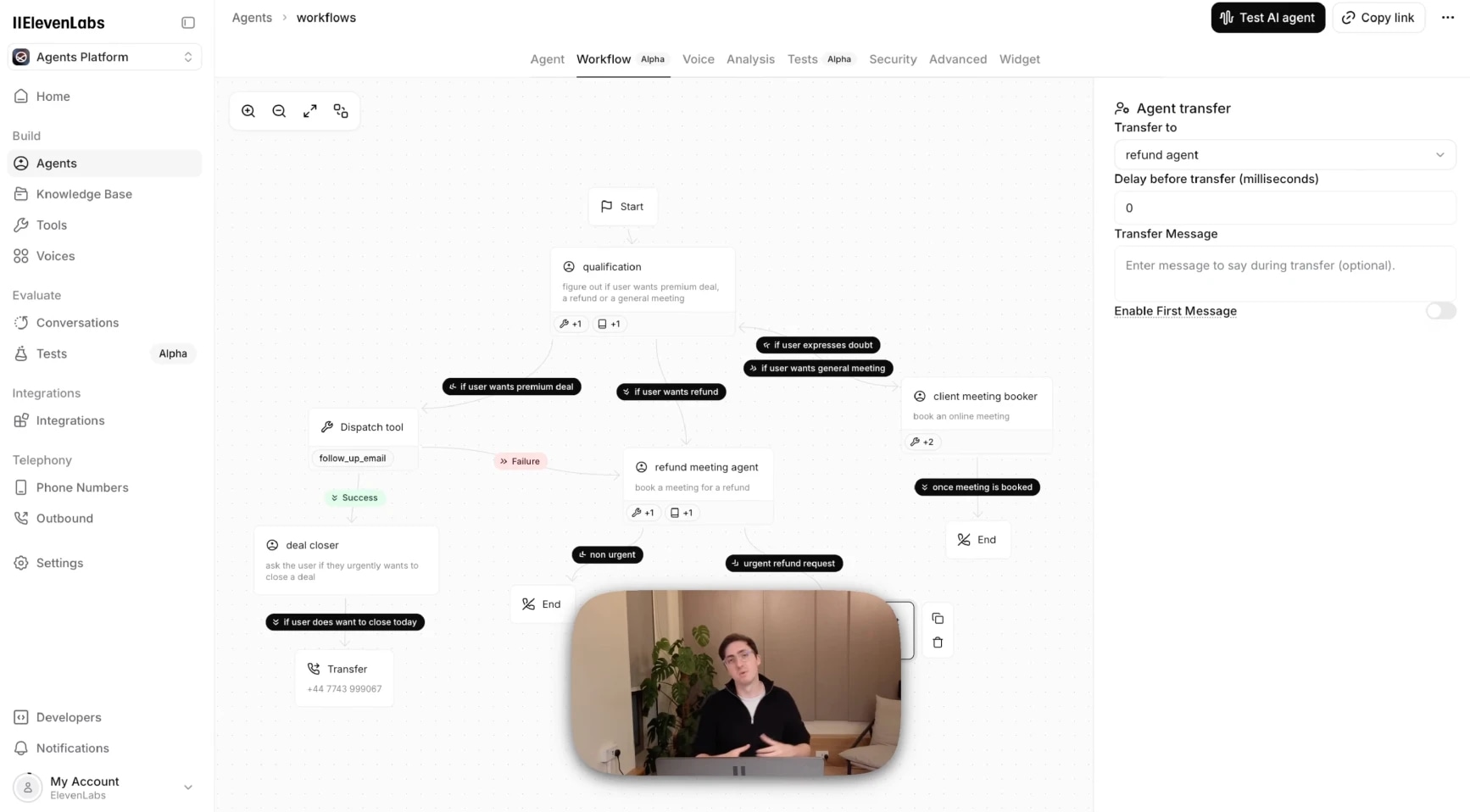
Once live, analytics overlay real conversation data onto that same graph, so you see exactly where customers are getting stuck or dropped, and fix it without guessing.
Latency and performance
Latency is one of the biggest factors in whether an interaction feels human or not. A slow response is one of the fastest ways to remind a customer they're talking to a machine, even if everything else about the conversation is going well.
Every part of the pipeline adds its own latency, whether the agent is running over chat or voice. Some of these apply either way. Others only apply when voice is part of the equation.
- LLM: Every model choice is a tradeoff between cost, reasoning quality, and speed, and the right balance depends on the conversation. Simple, high-frequency interactions like FAQs or appointment confirmations can run on a faster, lighter model without hurting the experience. More complex tasks, like financial advisory or multi-step troubleshooting, it is usually worth paying for a stronger reasoning model, even if it responds a little slower.
- Knowledge base and RAG: Every knowledge base lookup adds a round-trip before the agent can respond, so a lean, focused knowledge base responds faster than one the agent has to search broadly.
- Integrations and tool calls: Every external tool call, like looking up an order in Salesforce or checking availability in a calendar, adds its own round-trip. Write clear tool descriptions so the agent doesn't hesitate over which one to call, and only call tools the conversation actually needs.
- Geography and data hosting: Match your ElevenAgents region to where your data is hosted, and, for phone-based deployments, to your telephony provider's region (Twilio, SIP, or otherwise) too. If your agent's region and your call gateway's region are on opposite sides of the world, that gap adds latency before the conversation even starts.
- Speech-to-text (voice only): Scribe transcribes what the customer says before the agent can reason over anything. Use the real-time version (Scribe v2 Realtime) for live conversation rather than the batch version, which is built for accuracy over speed.
- Turn-taking (voice only): Determines when the agent decides to respond at all, covered in detail above. It's worth remembering as a latency factor in its own right, since a model that hesitates to detect the end of a turn adds delay before the rest of the pipeline even starts.
- Text-to-speech and voice selection (voice only): Default and synthetic voices, along with Instant Voice Clones, respond faster than Professional Voice Clones. Use Professional Voice Clones only where the extra fidelity is worth the latency tradeoff.
For a closer look at latency, see latency optimization best practices and how latency is measured and reported across the pipeline.
Design your first agent with ElevenAgents
The levers covered here are what conversational AI design means in practice for an AI agent. All of it is native to ElevenAgents and configurable from a no-code console, so you can build an agent that holds a real conversation instead of just answering questions correctly.
For teams that want hands-on help getting there, the ElevenLabs Forward Deployed Engineers work directly with your team to scope, build, and launch a production-ready agent, then stay on to fine-tune performance after it's live.
Whether you're building it yourself or bringing in support, the fastest way to see the difference is to try it. Start today by creating an agent or talking to our sales team.
Conversational AI design FAQ

Jack Limebear is on the Growth team, acting as a content writer and strategist across the blog and insights pages. Before ElevenLabs, he spent over a decade leading content strategy for organizations ranging from fast-growing SaaS startups to Fortune 500 companies. He holds a Master's degree in English Literature from the University of Cambridge.