सिस्टम प्रॉम्प्ट क्या है? AI बातचीत में इसका महत्व क्यों है
- लेखक
- Jack Limebear
- प्रकाशित
- आखिरी बार अपडेट किया गया
सुनेंइस आर्टिकल को सुनें
सिस्टम प्रॉम्प्ट निर्देशों का एक स्पष्ट सेट है, जिसका AI मॉडल हर बातचीत में पालन करता है। यह तय करता है कि मॉडल कैसे काम करेगा, उसका लहजा कैसा होगा, उसकी ज्ञान-सीमाएं क्या हैं, वह किन टूल्स को कॉल करेगा और सिस्टम पर कौन-से गार्डरेल लागू होंगे। डेवलपर सिस्टम प्रॉम्प्ट का इस्तेमाल यह सुनिश्चित करने के लिए करते हैं कि ग्राहक बातचीत में AI मॉडल लगातार एक जैसा व्यवहार करें।
इस गाइड में हम जानेंगे कि सिस्टम प्रॉम्प्ट क्या है और यह कैसे काम करता है। इसमें काम करते हुए सिस्टम प्रॉम्प्ट के उदाहरण और अपना प्रॉम्प्ट लिखने के लिए अपनाई जा सकने वाली बेहतरीन प्रथाएं शामिल हैं।
सारांश
- सिस्टम प्रॉम्प्ट AI की भूमिका, लहजे और सीमाओं को उसकी सभी बातचीत में तय करता है।
- सिस्टम प्रॉम्प्ट, यूज़र प्रॉम्प्ट से ऊंचे स्तर पर होते हैं और बातचीत के व्यवहार को नियंत्रित करते हैं।
- हर प्रमुख AI प्लेटफ़ॉर्म सिस्टम प्रॉम्प्ट लागू करता है।
- मजबूत सिस्टम प्रॉम्प्ट में स्पष्ट सेक्शन, गार्डरेल और टूल निर्देश होते हैं।
- जैसे-जैसे आपका सिस्टम विकसित होता है, सिस्टम प्रॉम्प्ट भी विकसित होते हैं। डेवलपर ग्राहकों के साथ हुई बातचीत की समीक्षा करके इन्हें बेहतर बनाते हैं।
सिस्टम प्रॉम्प्ट क्या है?
सिस्टम प्रॉम्प्ट निर्देशों की वह परत है जो यूज़र के संदेश टाइप करने से पहले चलती है। आमतौर पर डेवलपर या प्रोडक्ट टीम मॉडल को मार्गदर्शन देने के लिए इसे लिखती है। अधिकतर चैट इंटरफ़ेस और API, मॉडल के साथ बातचीत करते समय यूज़र के लिखे किसी भी टेक्स्ट की तुलना में इसे अधिक प्राथमिकता वाला संदर्भ मानते हैं।
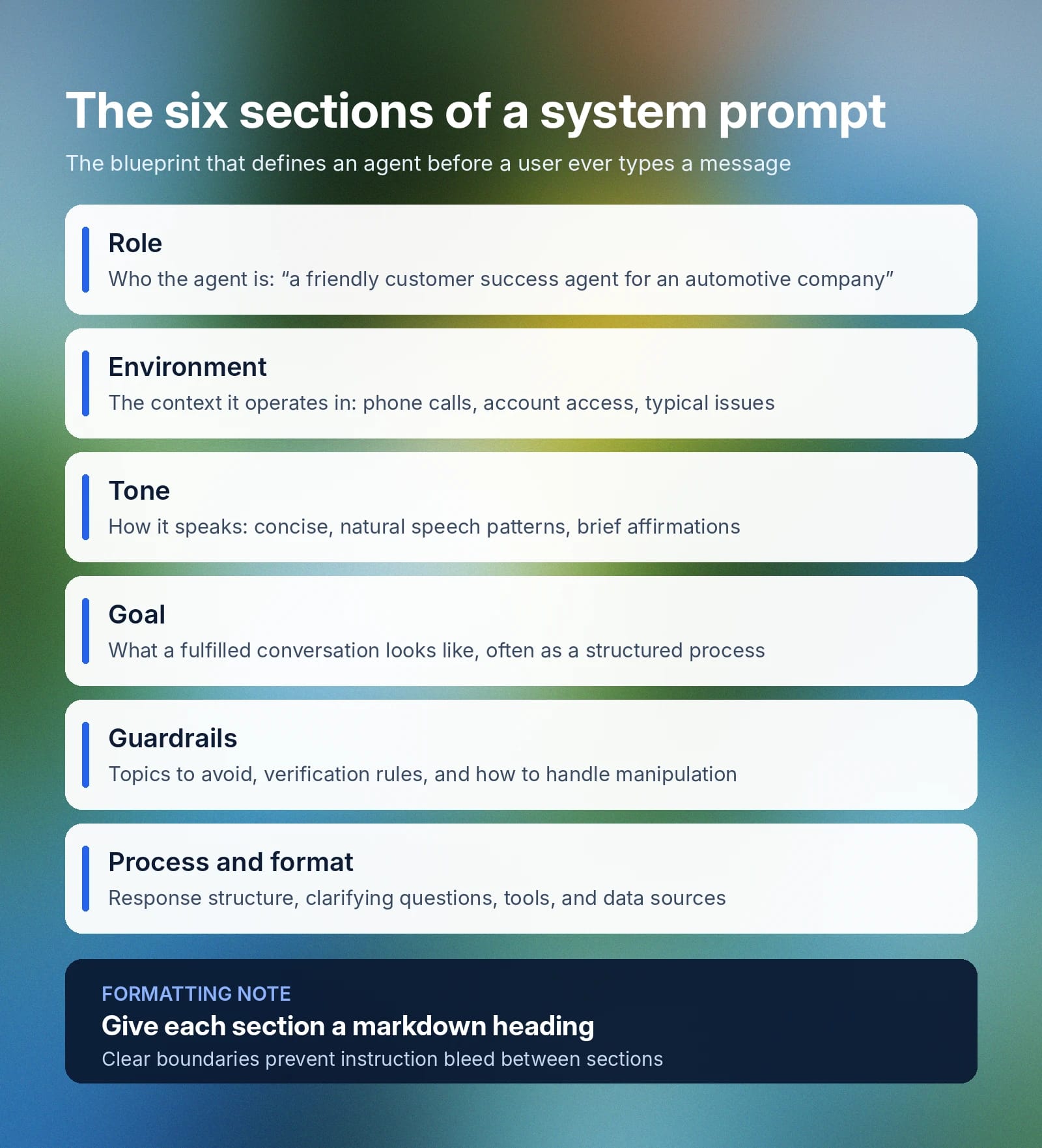
सिस्टम प्रॉम्प्ट मॉडल से जुड़ी कई मुख्य बातें तय करता है:
- भूमिका: किसी मॉडल को उसके उपयोग के मामले में किस व्यक्ति या भूमिका का रूप लेना है, इसका सटीक विवरण। उदाहरण: “आप एक ऑटोमोटिव कंपनी के लिए दोस्ताना और कुशल कस्टमर सक्सेस एजेंट हैं।”
- परिवेश: उन सामान्य बातचीतों का व्यापक संदर्भ तय करता है जिनमें एक AI एजेंट सहायता करेगा और सबसे अच्छी मदद कैसे की जाए। उदाहरण के लिए: “आप कस्टमर सक्सेस कॉल के दौरान फ़ोन पर एक ग्राहक की मदद कर रहे हैं। ग्राहक पूछताछ से लेकर ऑर्डर की जानकारी तक, कई तरह की समस्याओं के लिए कॉल कर सकता है। आपके पास ग्राहक के अकाउंट इतिहास, ऑर्डर इतिहास, प्रोडक्ट विवरण और आंतरिक कैटलॉग का एक्सेस है।”
- लहजा: ऐसे दिशानिर्देश जो तय करते हैं कि एजेंट यूज़र को कैसे जवाब देगा और किस तरह की भाषा इस्तेमाल करेगा। उदाहरण: “आपके जवाब दोस्ताना और संक्षिप्त हों, आप स्वाभाविक बोलने के तरीके इस्तेमाल करें और कभी-कभी [warmly] “मैं समझता हूं।” जैसे आश्वासन दे सकते हैं।”
- लक्ष्य: बातचीत को प्रभावी ढंग से पूरा करने का एजेंट का लक्ष्य। सिस्टम प्रॉम्प्ट का यह हिस्सा अक्सर बड़ा होता है और कई अलग-अलग लक्ष्यों की बारीकियों को कवर करता है। सामान्य तौर पर, आप इस सेक्शन की शुरुआत कुछ इस तरह कर सकते हैं: “आपका मुख्य लक्ष्य ग्राहक की समस्या या पूछताछ को कुशलता से सुलझाना है और नीचे दी गई व्यवस्थित प्रक्रिया के दौरान सकारात्मक ग्राहक अनुभव देना है[…]”
- गार्डरेल: इनमें उन विषयों की रूपरेखा होती है जिनसे बचना है, ऐसी जानकारी जो AI को साझा नहीं करनी चाहिए, अनुरोध के उसके दायरे से बाहर होने पर एजेंट को क्या करना चाहिए और उसके निर्देशों में हेरफेर या उन्हें ओवरराइड करने की कोशिशों का जवाब कैसे देना चाहिए। छोटा उदाहरण: “कभी भी अलग-अलग बातचीत में संवेदनशील ग्राहक डेटा साझा न करें। अकाउंट जानकारी एक्सेस करने से पहले हमेशा ग्राहक की पहचान सत्यापित करें।” सिस्टम प्रॉम्प्ट के अलावा, ElevenAgents Guardrails 2.0 बातचीत को तीन स्तरों पर सुरक्षित रखता है, जिससे बिज़नेस आम जोखिम वाले क्षेत्रों से बचाव के लिए मजबूत गवर्नेंस उपाय बना सकते हैं।
- प्रक्रिया और फ़ॉर्मैट: हालांकि यह हमेशा अलग सेक्शन नहीं होता (कभी-कभी परिवेश में शामिल होता है), आपको यह बताना चाहिए कि जवाबों की संरचना कैसी हो, स्पष्टता के लिए सवाल कब पूछने हैं, AI एजेंट कौन-से टूल्स इस्तेमाल कर सकता है और किन डेटा स्रोतों से जुड़ सकता है।
हालांकि बिज़नेस ऊपर दी गई सारी जानकारी को टेक्स्ट के एक बड़े ब्लॉक में शामिल कर सकते हैं, कुछ एजेंट स्पष्ट रूप से व्यवस्थित हेडिंग्स को प्राथमिकता दे सकते हैं या उन पर अधिक ध्यान दे सकते हैं। Markdown फ़ॉर्मैटिंग के साथ सेक्शन की सीमाएं इस्तेमाल करने से स्पष्टता मिलेगी और निर्देशों का आपस में घुलना रुकेगा, जिसमें एक सेक्शन का संदर्भ दूसरे को प्रभावित करता है।
सिस्टम प्रॉम्प्ट को AI एजेंट का ब्लूप्रिंट समझें, जो उसकी भूमिका, लक्ष्य, अनुमत टूल्स, किसी कार्य के चरण-दर-चरण निर्देश और वे गार्डरेल तय करता है जिनका एजेंट को कभी उल्लंघन नहीं करना चाहिए।
सिस्टम प्रॉम्प्ट, यूज़र प्रॉम्प्ट से कैसे अलग है?
सिस्टम प्रॉम्प्ट बातचीत के सबसे ऊंचे स्तर पर होता है और हर इंटरैक्शन में AI एजेंट के बुनियादी व्यवहार को दिशा देता है। यूज़र प्रॉम्प्ट वह है जो ग्राहक आपके एजेंट को जवाब देने के लिए कुछ देने हेतु टाइप करता है। यह इस बात पर निर्भर करता है कि यूज़र क्या हासिल करना चाहता है और पूरी तरह संदर्भ-आधारित होता है। कस्टमर सर्विस एजेंट में यूज़र प्रॉम्प्ट चैटबॉट से अपने ऑर्डर की जानकारी लाने के लिए कह सकता है। इमेज जनरेशन टूल में, यूज़र प्रॉम्प्ट किसी खास एसेट को बनाने के लिए कह सकता है।
यहां एक टेबल है जो सिस्टम प्रॉम्प्ट और यूज़र प्रॉम्प्ट के बीच अंतर को और विस्तार से बताती है:
एक और अंतर यह है कि सिस्टम प्रॉम्प्ट एजेंट के व्यवहार और उसके जवाब देने के तरीके को नियंत्रित करता है, लेकिन यह बुनियादी ढांचे के मैकेनिक्स, जैसे बारी-बारी से बोलना या एजेंट कौन-सी भाषाएं बोल सकता है, तय नहीं करता।
AI मॉडल में सिस्टम प्रॉम्प्ट कैसे काम करते हैं
हर प्रमुख AI सिस्टम सिस्टम प्रॉम्प्ट को थोड़ा अलग ढंग से लागू करता है, लेकिन आमतौर पर वे एक ही प्रक्रियाओं को दिशा देते हैं। सिस्टम प्रॉम्प्ट बातचीत की शुरुआत में, यूज़र के पहले संदेश से पहले रखा जाता है और वह व्यापक संदर्भ तय करता है जिसका उपयोग मॉडल काम करने और जवाब देने के लिए करता है।
- ChatGPT में सिस्टम प्रॉम्प्ट: यूज़र Custom Instructions टैब से अपने ChatGPT मॉडल में सिस्टम प्रॉम्प्ट जोड़ सकते हैं (Settings पर जाएं, फिर Personalization और फिर Custom Instructions)। OpenAI API इस्तेमाल करने वाले डेवलपर संदेश के साथ सीधे प्रॉम्प्ट सेट कर सकते हैं।
- Claude में सिस्टम प्रॉम्प्ट: सिस्टम प्रॉम्प्ट Anthropic द्वारा सेट किए जाते हैं और वेब व मोबाइल ऐप्स पर वैश्विक रूप से लागू होते हैं। यूज़र Claude Projects इस्तेमाल करके और कस्टम निर्देश जोड़कर कस्टम सिस्टम प्रॉम्प्ट का अनुकरण कर सकते हैं। API रिक्वेस्ट में, डेवलपर मॉडल के व्यवहार को नियंत्रित करने के लिए सिस्टम पैरामीटर निर्दिष्ट कर सकते हैं।
- अन्य प्लेटफ़ॉर्म में कस्टम सिस्टम प्रॉम्प्ट: आमतौर पर एजेंट के लिए सिस्टम प्रॉम्प्ट को सेटिंग्स पैनल में एक बार कॉन्फ़िगर किया जाता है। इसे सेटिंग्स या कॉन्फ़िगरेशन में तय करने से एजेंट अपनी हर बातचीत में उस संदर्भ को लागू कर सकता है, चाहे वह WhatsApp पर हो, वेब ऐप में, फ़ोन कॉल के ज़रिए या SMS पर।
हालांकि प्लेटफ़ॉर्म के अनुसार सटीक कॉन्फ़िगरेशन तरीका बदलता है, मॉडल के जवाब देने का तरीका बदलने के लिए सिस्टम प्रॉम्प्ट को बदलने का व्यवहार एक जैसा रहता है।
AI मॉडल के साथ बनाने वाले एंटरप्राइज़ क्लाइंट्स को अपना सिस्टम प्रॉम्प्ट 2-3 संभावित मॉडलों के साथ ज़रूर टेस्ट करना चाहिए। लेटेंसी, सटीकता और टूल-कॉलिंग सफलता दर के मामले में मॉडल का प्रदर्शन आपके प्रॉम्प्ट की संरचना और कार्य की जटिलता के अनुसार अलग हो सकता है। ElevenAgents पर उपलब्ध सभी मॉडल देखें।
सिस्टम प्रॉम्प्ट कैसे लिखें: बेहतरीन प्रथाएं और सुझाव
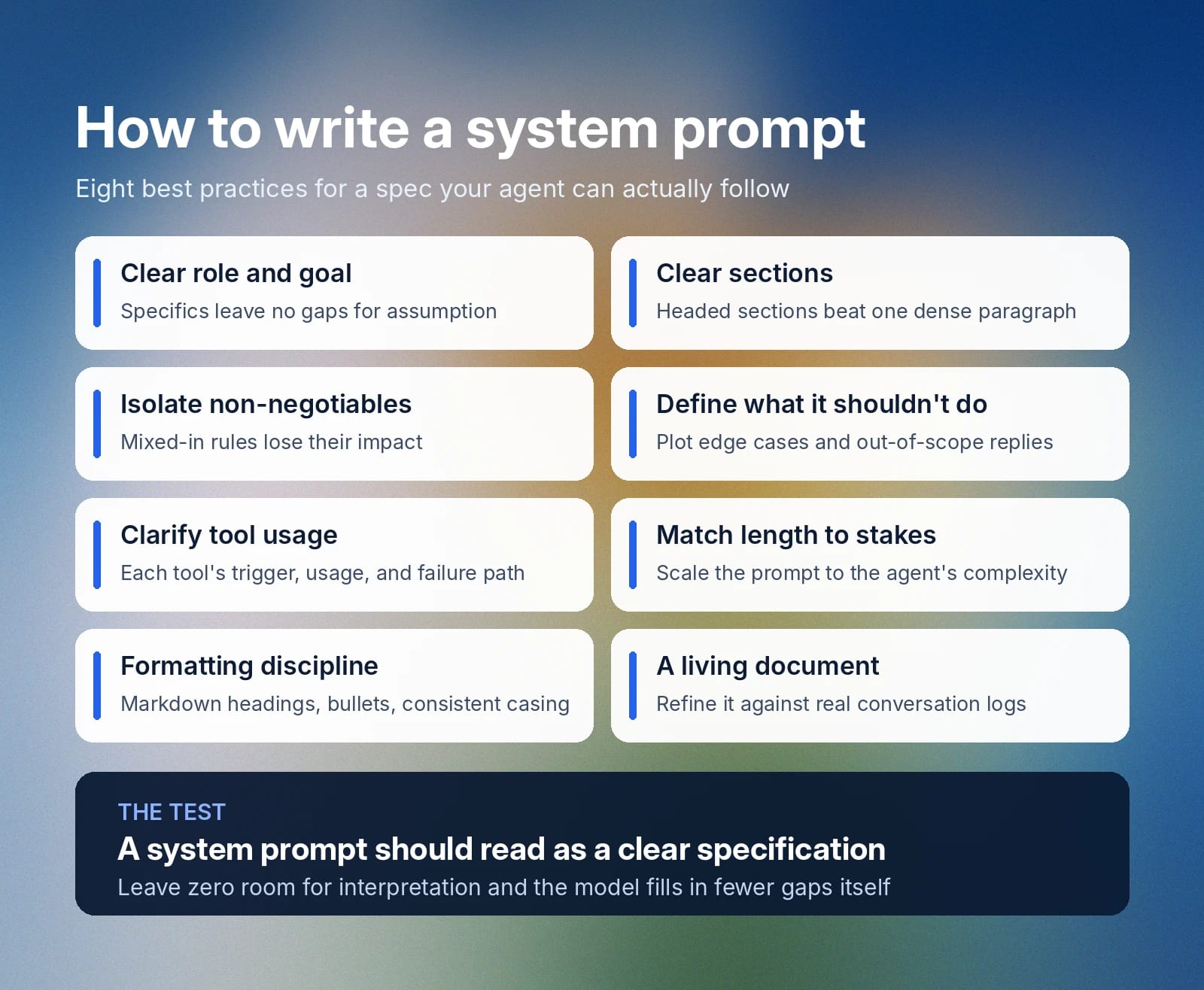
सिस्टम प्रॉम्प्ट को एक स्पष्ट स्पेसिफ़िकेशन की तरह पढ़ा जाना चाहिए। अपना AI सिस्टम प्रॉम्प्ट लिखते समय, इन बेहतरीन प्रथाओं का पालन करें, ताकि आपके एजेंट के लिए एक मजबूत और विस्तृत गाइड बन सके।
स्पष्ट भूमिका और लक्ष्य से शुरुआत करें
सिस्टम प्रॉम्प्ट में शामिल किए गए शब्द मायने रखते हैं, इसलिए कुछ भी अनुमान पर नहीं छोड़ सकते। एजेंट को सिर्फ़ “अच्छा व्यवहार” करने के लिए कहना स्पष्ट नहीं है, क्योंकि “अच्छा” का मतलब संदर्भ के अनुसार बदल सकता है। इसके बजाय, हमेशा स्पष्ट भूमिका और खास लक्ष्य से शुरुआत करें। आप एजेंट की पहचान और उससे अपेक्षित काम को जितना ठोस रूप से बताएंगे, मॉडल के पास अनुमान के आधार पर कमियां भरने की उतनी ही कम गुंजाइश होगी।
प्रॉम्प्ट को स्पष्ट सेक्शन में बांटें
घने पैराग्राफ में यह बताने वाले स्पष्ट संकेत नहीं होते कि एक सेक्शन कहां खत्म होता है और दूसरा कहां शुरू। यह भी नहीं पता चलता कि कुछ निर्देश कितने महत्वपूर्ण हैं। अपने टेक्स्ट को हेडिंग वाले सेक्शन में बांटें और मॉडल को अधिक तार्किक रूपरेखा दें।
सिस्टम प्रॉम्प्ट को सेक्शन में बांटने से आपके इंजीनियरों और डेवलपरों को भी मदद मिलती है, क्योंकि वे भविष्य में सेक्शन आसानी से जोड़ या फिर से लिख सकते हैं।
अनिवार्य नियमों के लिए अलग सेक्शन बनाएं
ऐसे निश्चित नियमों के लिए जिन्हें एजेंट को बिल्कुल नहीं तोड़ना चाहिए, स्पष्ट प्राथमिकता वाला अलग सेक्शन बनाएं। अनिवार्य नियमों को अन्य सेक्शन में मिलाने से उनका प्रभाव कम हो सकता है और समस्याएं पैदा हो सकती हैं। उदाहरण के लिए, लहजे वाले सेक्शन में “कभी भी ग्राहक डेटा साझा न करें” जोड़ना मॉडल के लिए स्पष्ट नहीं हो सकता।
व्याख्या के लिए कोई जगह न छोड़ना हमेशा सबसे अच्छा है। बातों को साफ़ तौर पर लिखें और अपने अनिवार्य नियमों को एक स्वतंत्र सेक्शन में स्पष्ट रूप से तय करें।
बताएं कि AI को क्या नहीं करना चाहिए
स्पष्ट रूप से बताएं कि AI मॉडल को ऐसे असाधारण उपयोग के मामले में क्या करना चाहिए, जिसे संभालने का तरीका उसे पता न हो। मॉडल को जवाब न पता होने या उसके दायरे से बाहर का अनुरोध मिलने पर वह क्या करेगा, इसकी योजना बनाने से ऐसे मामलों में गैर-जिम्मेदार AI व्यवहार से बचने में मदद मिलेगी।
स्पष्ट करें कि कौन-से टूल्स कॉल करने हैं और उन्हें कैसे इस्तेमाल करना है
किसी एजेंट के पास, खासकर ग्राहकों की सेवा करने वाले एजेंट के पास, कॉल करने के लिए कई टूल्स और फ़ंक्शन हो सकते हैं। ऐसे में यह ज़रूर बताएं कि इन टूल्स को कब इस्तेमाल करना है, कैसे इस्तेमाल करना है और कॉल असफल होने पर क्या करना है। एजेंट को कौन-से सटीक कदम उठाने हैं और टूल्स से अप्रत्याशित जवाब मिलने पर क्या करना है, इसे स्पष्ट रूप से बताएं।
लंबाई को जोखिम के अनुसार रखें
एक सरल डेमो एजेंट का सिस्टम प्रॉम्प्ट केवल कुछ लाइनों का हो सकता है। उसका काम काफ़ी सरल होता है, इसलिए असाधारण उपयोग के मामले और कई टूल-कॉल सिस्टम बताने वाले दस्तावेज़ों के पन्नों की ज़रूरत नहीं होती। अधिक जटिल एजेंट को उसकी भूमिका और एस्केलेशन पाथ को सटीक रूप से कवर करने के लिए लंबा सिस्टम प्रॉम्प्ट चाहिए होगा।
सिस्टम प्रॉम्प्ट फ़ॉर्मैटिंग की बेहतरीन प्रथाओं का पालन करें
जहां संभव हो, अपने सिस्टम प्रॉम्प्ट के लिए इन फ़ॉर्मैटिंग बेहतरीन प्रथाओं का इस्तेमाल करें:
- Markdown हेडिंग्स इस्तेमाल करें: हर सेक्शन की हेडिंग होनी चाहिए, ताकि मॉडल समझ सके कि एक सेक्शन के निर्देश कहां खत्म होते हैं और नया सेक्शन कहां शुरू होता है।
- एकरूपता रखें: पूरे पेज में एक ही फ़ॉर्मैटिंग संरचना लागू करें, जिसमें हर जगह sentence case का इस्तेमाल शामिल है।
- बुलेट पॉइंट इस्तेमाल करें: स्पष्टता के लिए कई हिस्सों वाले निर्देशों को चरण-दर-चरण सूची या बुलेट पॉइंट में बांटें।
इसे एक जीवंत दस्तावेज़ मानें
सिस्टम प्रॉम्प्ट समय के साथ विकसित हो सकते हैं। असली बातचीत के लॉग के आधार पर अपने प्रॉम्प्ट की समीक्षा करें कि क्या वह ग्राहकों की ज़रूरतों को प्रभावी ढंग से पूरा कर रहा है, फिर जहां आपका एजेंट कम पड़ता है उसके आधार पर उसे बेहतर बनाएं।
ElevenAgents में सिस्टम प्रॉम्प्ट के उदाहरण
नीचे ElevenAgents में प्रभावी सिस्टम प्रॉम्प्ट के तीन उदाहरण दिए गए हैं। ये बेहतरीन प्रथाओं का पालन करते हैं, जानकारी को संक्षिप्त शैली में पेश करते हैं, महत्वपूर्ण चरणों पर ज़ोर देते हैं और इनमें गार्डरेल के लिए अलग सेक्शन शामिल हैं।
ये सिस्टम प्रॉम्प्ट उदाहरण तीन अलग-अलग उपयोग के मामलों को सपोर्ट करते हैं: तकनीकी सहायता एजेंट, कस्टमर सर्विस रिफ़ंड एजेंट और अपॉइंटमेंट शेड्यूलिंग एजेंट।
तकनीकी सहायता एजेंट सिस्टम प्रॉम्प्ट का उदाहरण
कस्टमर सर्विस रिफ़ंड एजेंट सिस्टम प्रॉम्प्ट का उदाहरण
अपॉइंटमेंट शेड्यूलिंग सिस्टम प्रॉम्प्ट का उदाहरण
ElevenAgents के साथ शुरुआत करें
अच्छे सिस्टम प्रॉम्प्ट लिखने से आपके AI मॉडल को उनकी खास भूमिका आपकी अपेक्षा के अनुसार निभाने के लिए ज़रूरी निर्देश मिलते हैं। आपके मामले में “अच्छा” होने का मतलब समय के साथ बदलता रहेगा, क्योंकि ग्राहक ट्रांसक्रिप्ट की समीक्षा करने और असाधारण उपयोग के मामलों की जांच करने से आपके सिस्टम प्रॉम्प्ट में नई चीज़ें या बदलाव आते रहेंगे।
ElevenAgents टीम्स को वॉइस, भाषा और नॉलेज बेस सेटिंग्स के साथ सिस्टम प्रॉम्प्ट के लिए अलग कॉन्फ़िगरेशन देता है। बिल्ट-इन सिम्युलेशन से आप ग्राहक तक कुछ पहुंचने से पहले टेस्ट कर सकते हैं कि एजेंट वास्तविक दुनिया के हालात में कैसे जवाब देता है, जबकि गार्डरेल जवाबों को आपकी कंपनी की नीति के अनुरूप रखते हैं।
अधिक जानकारी के लिए ElevenAgents देखें या सेल्स टीम से संपर्क करें और आज ही अपनी एंटरप्राइज़ डिप्लॉयमेंट शुरू करें।
सिस्टम प्रॉम्प्ट FAQ

Jack Limebear हमारी ग्रोथ टीम में हैं और ब्लॉग व इनसाइट्स पेज के लिए कंटेंट राइटर और स्ट्रैटेजिस्ट के तौर पर काम करते हैं। ElevenLabs से पहले, उन्होंने दस साल से ज़्यादा समय तक तेज़ी से बढ़ती SaaS स्टार्टअप्स से लेकर Fortune 500 कंपनियों तक के लिए कंटेंट स्ट्रैटेजी लीड की है। उनके पास यूनिवर्सिटी ऑफ़ कैम्ब्रिज से इंग्लिश लिटरेचर में मास्टर डिग्री है।