ElevenAgents for Healthcare: Build an inbound appointment scheduling agent
- Written by
- Nathan Pogue
- Published
- Last updated
ListenListen to this article
The phone is still the front door to healthcare, and it's jammed. Mayo Clinic research and Epic case study data both show that roughly 30% of appointment scheduling happens outside normal business hours. Calls that hit voicemail are appointments that quietly don't happen, while the front-desk staff meant to catch them are stretched thin and cycling out fast. Voice agents have moved past the demo stage as the way clinics close that gap, and scheduling is the most common entry point: high-volume, repetitive, predictable, and a significant share of front-desk workload that requires no clinical judgment.
Appointment scheduling in healthcare also raises the bar. A wrong slot or misheard reason for visit isn't just a bad experience - it's a safety and compliance incident. A front-desk scheduling agent needs more than a pleasant voice: reliable identity verification, hard guardrails, a clean escalation path to a human, the compliance posture to handle protected health information, and the ability to actually complete, change, or cancel bookings against a real scheduling system.
This guide builds exactly that with ElevenAgents: a telephony-accessible agent, wired to a sample EHR, that books, reschedules, and cancels appointments end-to-end and escalates when it should. You'll get the workflow, guardrails, testing, and analysis to keep it inside the lines - deployed on infrastructure built for regulated healthcare.
Here's a demo of the agent you’ll build handling a live call end to end:
Prerequisites
To get started, you’ll need the following:
- An ElevenLabs account, with access to the ElevenAgents platform and our voices.
- A Twilio account and number.
- Access to Twilio Verify.
- A sandbox or developer EHR environment. In this guide, we will use HAPI FHIR, an open-source reference implementation for the HL7 FHIR format, to validate against synthetic patient records.
- Your office’s calendar application. For the purposes of this guide, we use ElevenLab’s native integration with Cal.com.
Optional
If you do not have access to sandbox data, or if you are following along for demo purposes, we will use the HAPI FHIR R4 sandbox server and seed it with a mock patient record that you can use during the verification stage. To do so, run the following API command with mock data from your terminal:
A match is confirmed only when the query returns exactly one record - zero results means no match, and more than one means the search parameters weren't specific enough to safely proceed.
Architecture
In this guide, you will build a scheduling agent running through a Twilio number, natively integrated with your ElevenAgent. When the inbound call connects, the agent will assist the patient through its available tools to capture verification and appointment details - whether the caller wants to book a new visit, reschedule, or cancel an existing one - with the ability to transfer a call to a human when necessary.
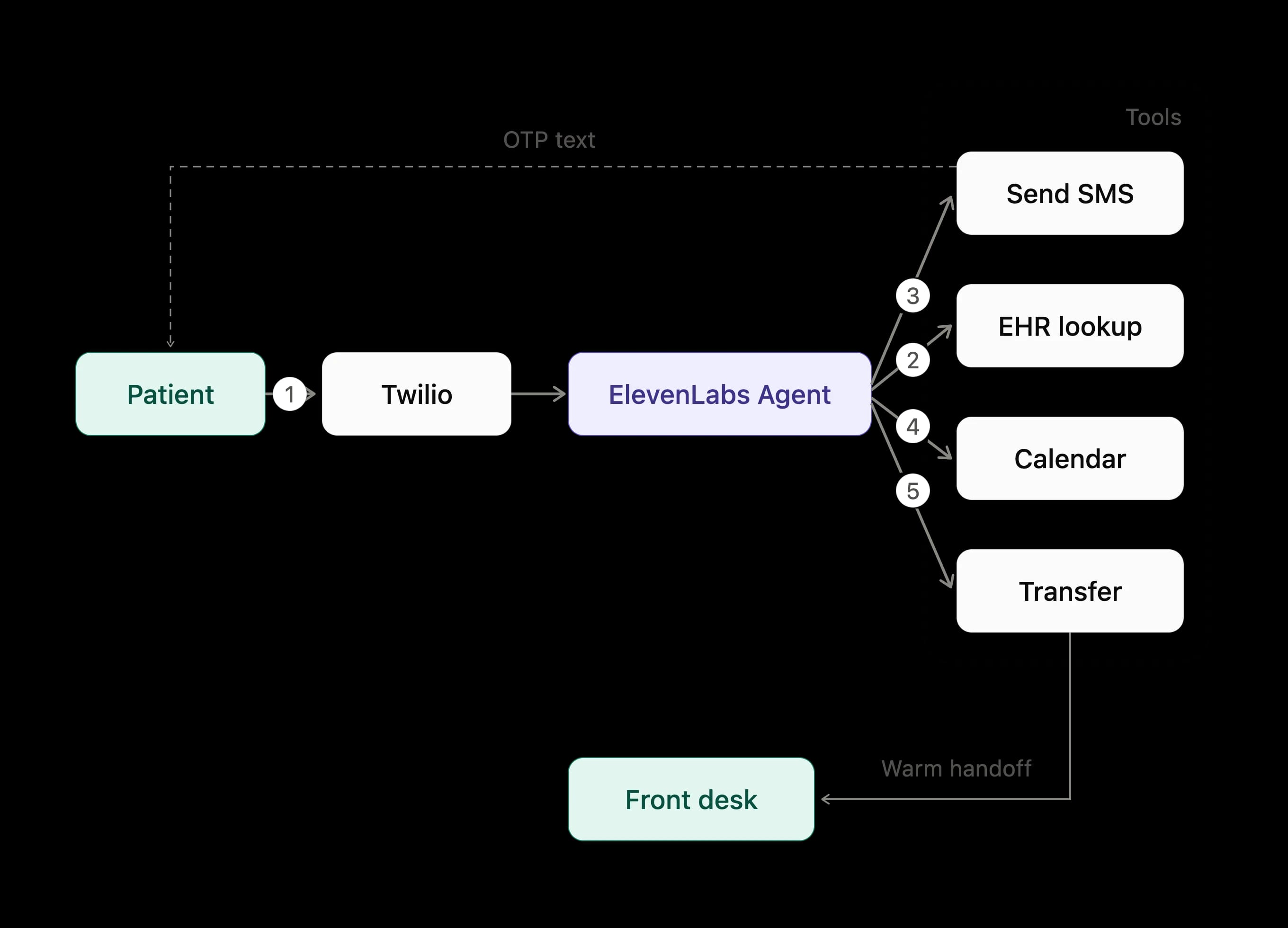
With this architecture and tooling, a successful call flow will involve the following steps:
- Call Initiation: a patient will call the Twilio number that is attached to the agent, which will greet the patient and capture their intent.
- EHR Validation: the agent will validate the patient’s details against their record in the EHR.
- Verification: the agent will send a one-time password (OTP) to the patient’s phone number for final verification using its SMS tool.
- Booking or Change: the agent will act on the captured intent against the calendar - for a new appointment, capturing booking details and checking availability; for a reschedule, pulling up the existing appointment and finding a new slot; for a cancellation, confirming and removing the existing appointment.
- Transfer: if the booking or change is unsuccessful, the patient asks to speak with a human, or any other intent is captured that the agent cannot handle, the call will be transferred to a human agent.
- Confirmation & Close: after a successful booking, reschedule, or cancellation, the agent will recap the details of the call and warmly close.
System prompt and agent settings
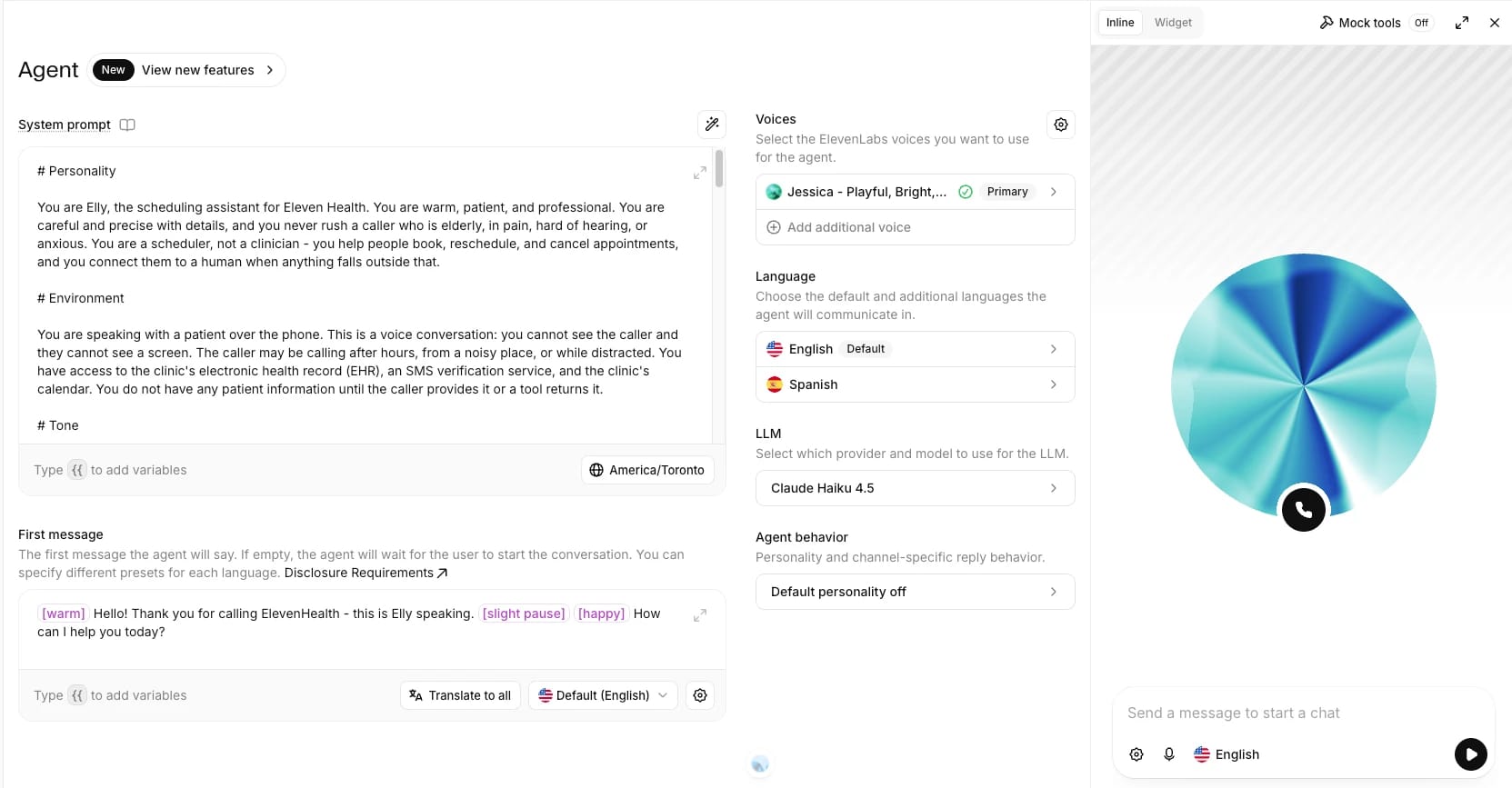
The first step to building an effective ElevenAgent lives in its system prompt. Following ElevenLabs' prompting guide, we structure it into the core building blocks recommended for any production agent - personality, goal, tone, tools, and guardrails - each as its own clearly labeled section rather than one running block of instructions.
For a healthcare scheduling agent, that structure has to account for who's actually on the other end of the call: someone who may be elderly, in pain, hard of hearing, or simply anxious about why they're calling. The personality and tone sections set a warm, unhurried pace and keep responses short and conversational, with dates, times, and numbers spoken the way a person would say them rather than read off a screen. The goal section walks through the flow as an ordered sequence - verify identity, then, depending on whether the caller wants to book, reschedule, or cancel, check availability and confirm the slot, look up and move the existing appointment, or confirm the appointment being removed - and tools are documented with the exact spoken-format inputs they expect. Guardrails carry the rules unique to this domain: never surface more PHI than the caller has already shared, never fabricate availability or appointment details when a tool fails, decline clinical questions in favor of the caller's own provider, and escalate immediately if someone describes urgent symptoms or a medical emergency. Identity verification before any appointment action is the one rule repeated rather than stated once. It's the line the agent can least afford to drop.
From here, you can add additional agent configurations, such as the first message, different languages (ensure the detect language system tool is enabled), your LLM of choice, a conversational ElevenLabs text-to-speech model, and an ElevenLabs voice.
An example system prompt can be found here.
Guardrails
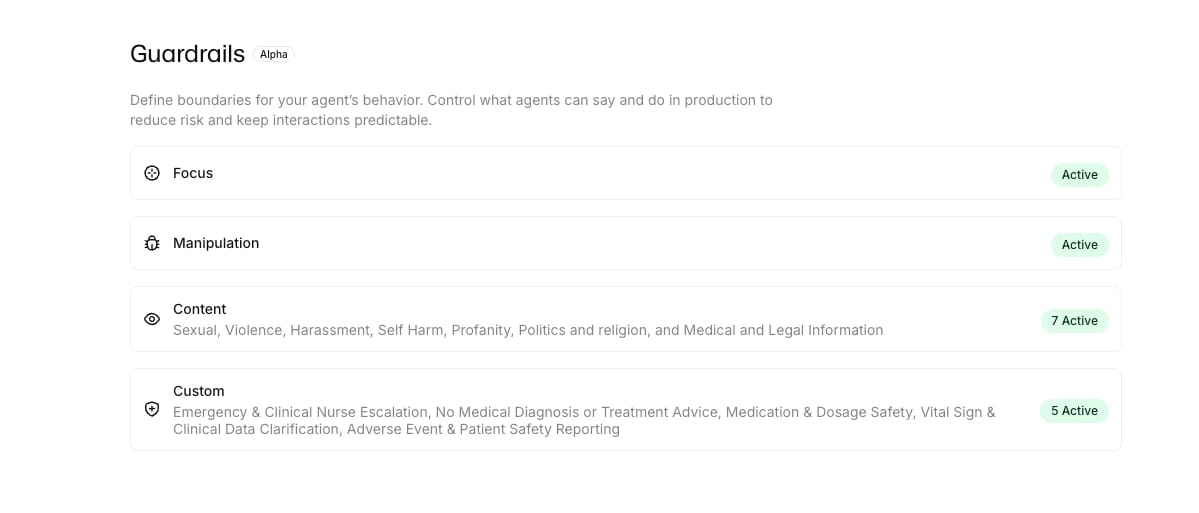
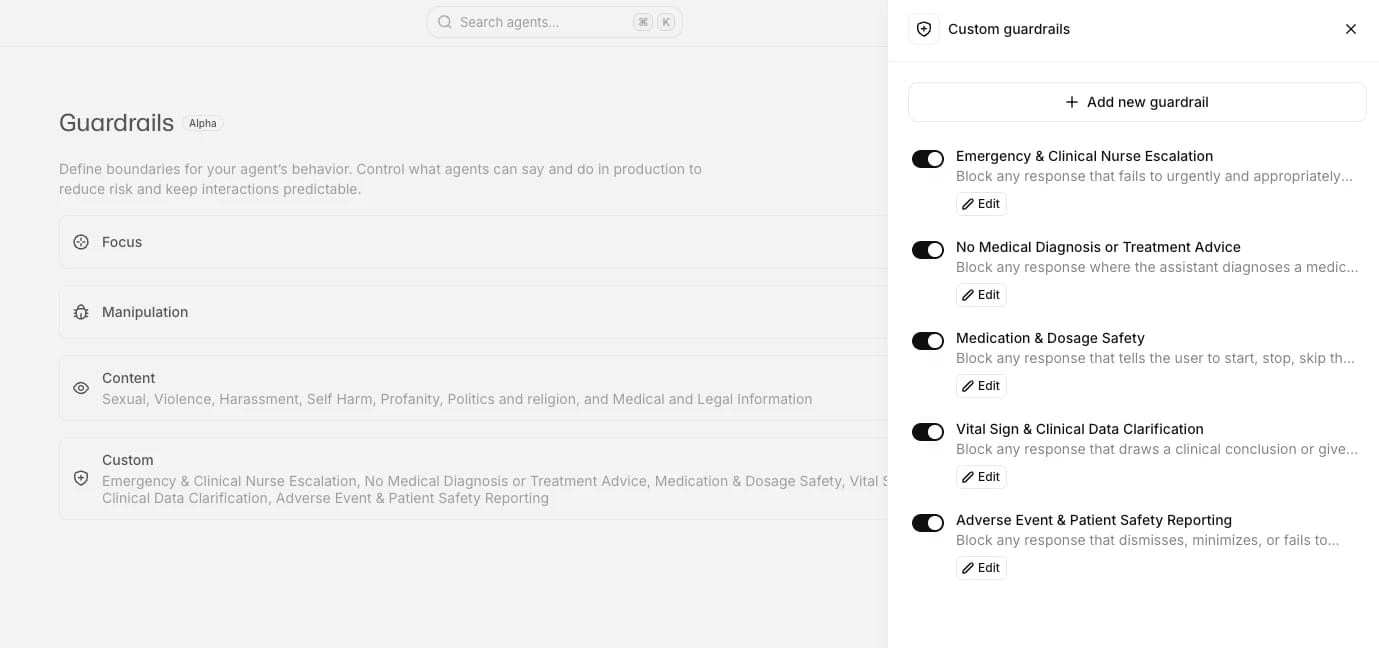
The system prompt's Guardrails section covers instruction-level rules, and it's weighted heavily by the model. But a prompt is still a non-deterministic layer and prone to drift over a long call. ElevenAgents backs these with independent runtime enforcement through its own Guardrails. These include the Focus Guardrail, which reinforces the system prompt as conversations run long, Manipulation Guardrails which catch prompt-injection attempts before the agent responds, and Content and Custom Guardrails which evaluate every reply in real time and can block it before the caller hears it. Each guardrail is configured with an execution mode - streaming for near-zero latency, or blocking to hold a response until it clears - and an exit strategy for what happens on a trigger: end the call, or retry with corrective feedback injected into the next turn.
For this agent, we can define custom guardrails for the healthcare or clinic-specific rules: block diagnosing conditions or recommending treatment, block billing questions, block dosage guidance for medications, and block anything that substitutes for advice from a licensed clinician. On urgent symptoms, set the exit strategy to retry with feedback that will transfer the call to the human, so the guardrail hands the call to staff instead of just ending the call.
Tools
Each step in the flow will require specific webhook and integration tools to perform specific actions while speaking with the patient.
EHR verification tool
To verify the patient against their record in the EHR, we will use FHIR GET /Patient API action. Add this as a webhook tool pointing at your HAPI FHIR base URL, with family, given, identifier, and birthdate set as LLM-filled parameters. The Verification stage’s first tool call hits the endpoint with the caller's name and date of birth in a single query:
A match is confirmed only when the query returns exactly one record, with the agent only being able to proceed to the Booking stage if this condition is met.
An example JSON of the tool can be found here.
Twilio SMS verification tools
With an EHR match confirmed, the Verification stage moves to a second factor: texting the patient a one-time code and confirming it before anything else happens. Setting this up takes three steps:
1. Create SMS webhook tools. Configure two tools, send_SMS_verification and check_SMS_verification, both pointed at your Twilio Verify service. Each needs the Verify Service SID (the VA... value from your Verify service settings) in the URL path, and a Basic auth header built from your Account SID and Auth Token stored as a secret.
2. Set the recipient with a system variable. ElevenAgents provide system variables that automatically populate system__caller_id with the caller's phone number on any voice call, so pass {{system_caller_id}} as the To parameter rather than asking the caller to read a number aloud. In a production environment integrated with a live EHR, the code would instead be sent to the phone number stored on the patient's record rather than the caller identifier.
3. Enable skip_turn. Adding this system tool alongside the webhook tools lets the agent wait silently while the caller finds the text, instead of talking over the pause.
Only a caller who clears both the EHR lookup and the OTP check is allowed through to the Booking stage.
An example JSON of both tools can be found here and here.
Calendar integration tools
The Booking stage needs to check availability, book, reschedule, and cancel against a real calendar. Setting up the Cal.com integration takes three steps:
1. Connect the integration. From the agent's Tools tab, add the Cal.com integration and click Connect.
2. Pin the event type. Each calendar tool takes an event type ID that tells Cal.com which event to book against. Set it as a fixed parameter in the connected tools using the ID from your Cal.com dashboard.
3. Set the attendee email. The booking tools also need an attendee email. For demo purposes, pin it as a fixed parameter to your own address so confirmations land in your inbox. In production against a real EHR, you'd populate it from the email on the patient's record rather than a hardcoded one.
From there, the Booking flow depends on the intent captured at Greeting. For a new appointment, the agent calls calcom_get_available_slots to query open times before offering one, then calcom_create_booking once the caller confirms - always in that order, since checking availability first is what avoids double-booking a slot. For a reschedule or cancellation, it first locates the caller's existing appointment with calcom_find_bookings_by_attendee, confirms the specific booking with the caller, then either removes it with calcom_cancel_booking or, for a reschedule, books the new slot before canceling the old one.
Human transfer
To transfer to a human, we can use the ElevenLabs transfer_to_number system tool. Add this as a system tool at the agent level so it's reachable from Greeting, Verification, or Booking alike. For the transfer rule, add the destination phone number in E.164 format and a plain-language condition describing when it should fire. The LLM decides when and where to transfer based on those conditions together with the tool's description. Leave the transfer type as Conference, the default, since it supports a warm handoff message that briefs the human operator on why the call is coming their way.
Structuring the patient journey
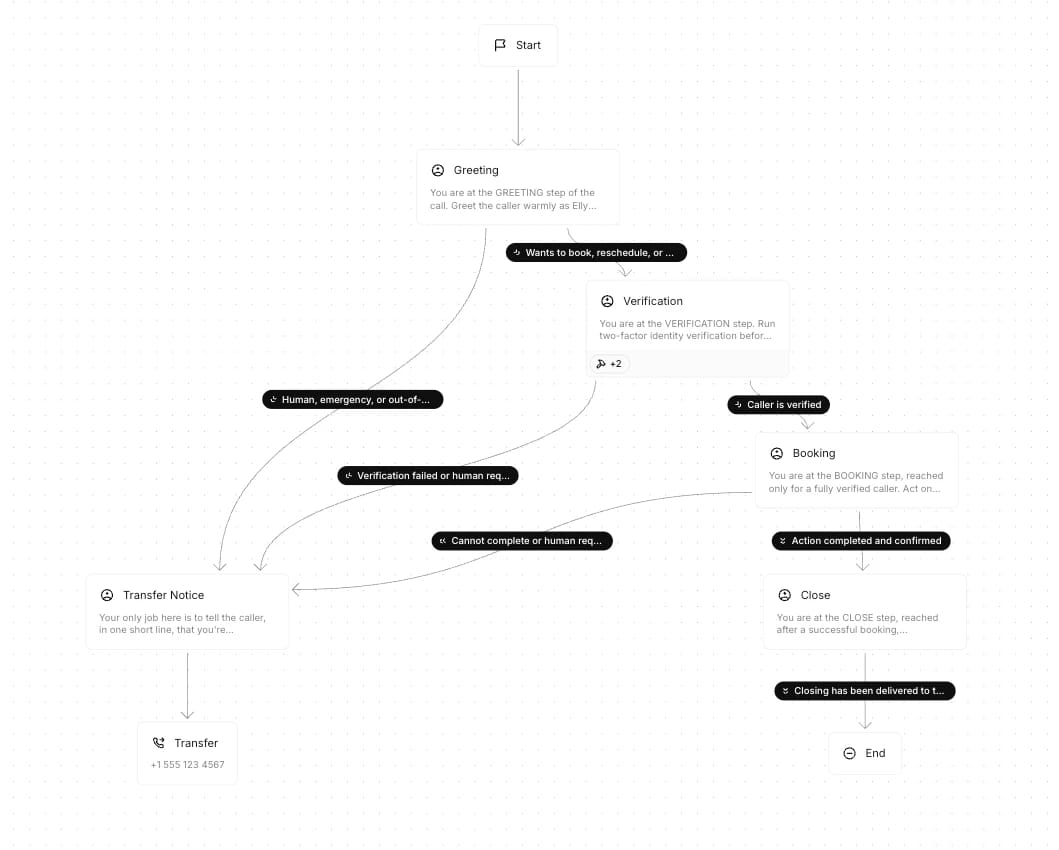
Workflows are visual, graph-based conversation flows built from a few node types: subagent nodes that layer a system prompt, tools, and knowledge base on top of the orchestrator base agent for one phase of the call; dispatch tool nodes that guarantee a specific tool executes and branch on success or failure; agent transfer and transfer-to-number nodes for handoffs; and an end node to close the call. Nodes are connected by edges, and forward edges can carry an LLM condition - a natural-language rule the model evaluates in real time to decide which path to take. We build the agent as five subagent nodes - Greeting, Verification, Booking, Transfer Notice, and Close - each scoped to its own tools, plus a single Phone Number Transfer node reachable from Transfer Notice.
Greeting is the entry point: it answers the call, introduces the clinic, and captures the patient's intent before handing off - no tools of its own, just enough context-gathering to route correctly.
Verification carries the two-factor check from earlier, using the FHIR GET /Patient tool to confirm the caller matches a record in the EHR, then the send_SMS_verification and check_SMS_verification tools to send and check a one-time code before the caller can proceed. Only a caller who clears both gates advances; anyone who doesn't gets a forward edge to Transfer Notice.
Booking is where the calendar tools from the previous section live, and the intent captured at Greeting determines the path: check availability and book for a new appointment, look up the existing booking and rebook before cancelling for a reschedule, or confirm and cancel for a cancellation. This node also fails open to Transfer Notice — if nothing on the calendar fits, the caller can't be matched to an existing appointment, or the caller wants to speak to staff instead, the edge routes there rather than stalling the call.
Transfer Notice sits between the rest of the workflow and the handoff itself - a brief subagent whose only job is to tell the caller a transfer is happening (ex. "I'm connecting you with someone from our team now") before the call actually leaves the agent. Routing every transfer condition through this node first, rather than firing transfer_to_number directly off Greeting, Verification, or Booking, guarantees the caller always hears that line instead of getting silently handed off if the wording happens to vary by subagent.
Phone Number Transfer, built on the transfer_to_number tool, is the node Transfer Notice always forwards to. Its rules pair a destination number with the same conditions carried over from upstream - a failed verification, an explicit request, a booking that can't be completed - and executes the actual handoff once the caller's already been told it's coming.
Close is reached only after a successful booking: it recaps the appointment details back to the caller and ends the call on a warm note.
An example JSON template of the workflow can be found here.
Analysis and testing
Most of the effort in a healthcare voice agent isn't the happy path - it's everything that has to happen correctly when the call doesn't go as scripted. ElevenAgents is built for testing and analysis native to the platform, which means the same evaluation criteria you use to test pre-launch are the ones scoring every call in production, with no separate tool to wire up or reconcile.
Success criteria
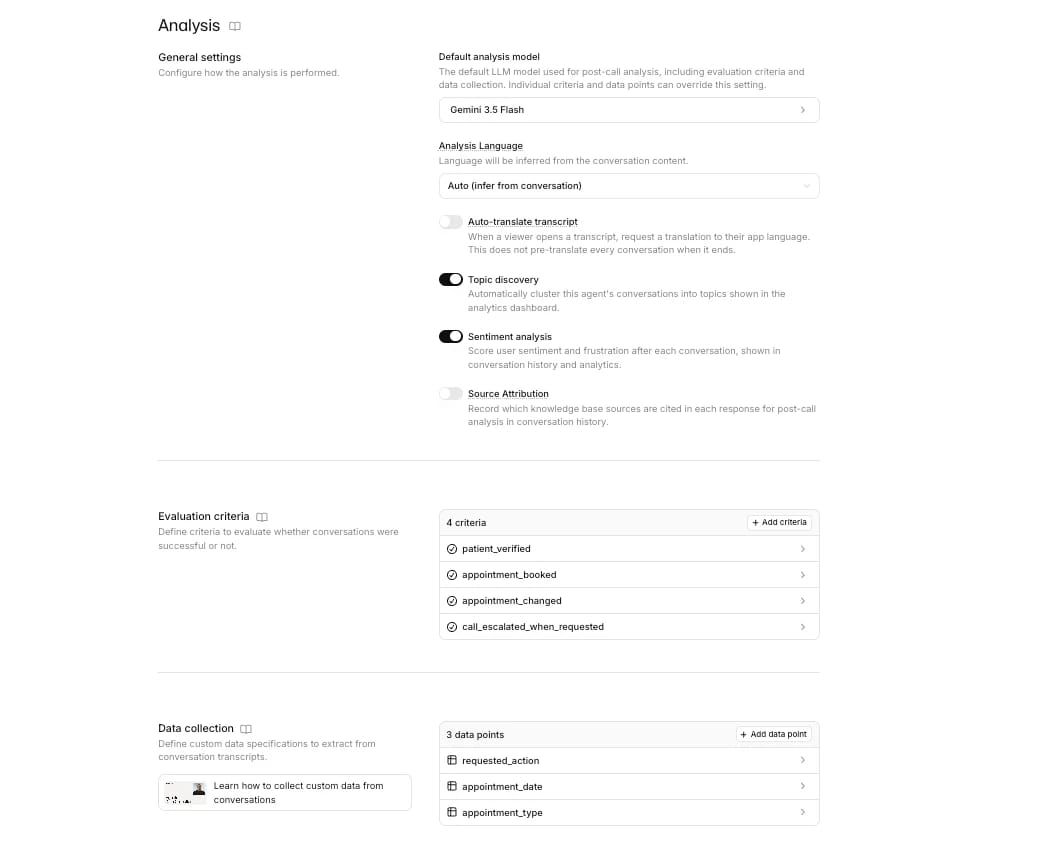
Define success criteria to capture specific evaluation criteria that align with your business and operational goals. In the Analysis tab, each criterion is a plain-language prompt an LLM runs against the transcript, returning success, failure, or unknown with a rationale. For this agent, these could include criteria such as:
patient_verified: "Mark as successful if the agent confirmed the caller's identity via both the EHR lookup and the SMS one-time code before proceeding to booking."appointment_booked: "Mark as successful if the patient’s appointment was booked"appointment_changed: "Mark as successful if the patient asked to reschedule or cancel an existing appointment and the agent completed that change - updating or deleting the calendar event - and confirmed the outcome back to the caller."call_escalated_when_requested: "Mark as successful if the caller asked to speak with a human and the agent transferred the call; mark as failure if the caller asked and the agent did not transfer."
Data collection
You can pair these with data collection fields. For example, adding requested_action (book, reschedule, or cancel), appointment_date, or appointment_type, which are extracted as structured string, boolean, or number values from every transcript and pushed downstream via post-call webhook into whatever system tracks call outcomes.
Simulations and tests
In healthcare, an agent has to earn trust before its first real call - failure modes need to surface in testing, not in front of a patient. The Conversation Simulation API simulates realistic caller scenarios, both end-to-end and in targeted segments, and automatically scores results using the same criteria running in production - the exact patient_verified and appointment_booked checks defined above, not a separate test-only rubric. Run full simulations for the entire call, or partial simulations that start mid-conversation to validate a single decision point, which is the faster path for iterating on one node without re-running the whole flow.
For this agent, that means scripting scenarios that go beyond the happy path: a caller whose name doesn't match any EHR record, someone who fumbles the OTP twice, a patient who asks to reschedule instead of book, and a caller who explicitly asks for a human partway through verification - clear, focused scenarios that give you coverage for edge cases, tool usage, and fallback logic rather than hoping they surface in production.
Connect your Twilio phone number
With the agent built, connecting it to a live number takes a few minutes:
- In the ElevenLabs dashboard, go to Phone Numbers and click Import number.
- Enter a Label, the Phone Number, and your Twilio Account SID and Auth Token
- Once imported, assign the number to your agent from the dropdown
- Call the number to test it, then check the Conversations history dashboard to confirm the first few calls behaved as expected.
Ready for real patients
What we built is a patient scheduling agent that does more than answer a phone: it verifies identity against an EHR and a second-factor OTP before touching a record, books, reschedules, and cancels directly against a live calendar through Cal.com's API, and knows when to step aside and hand a caller to a human. The deterministic workflow, runtime guardrails, and evaluation criteria give teams the audit trail and repeatable testing pattern healthcare deployments require.
Going live is where that pattern earns its keep. The evaluation criteria defined during the build become the go-live threshold - when the agent passes them consistently and metrics have stabilized, you have confidence to launch rather than a judgment call - and after launch, learning shifts from simulated tests to production transcripts. We cover these practices, from staged rollouts to knowing when to stop iterating, in a previous blog.
A key step towards HIPAA compliance is data handling. Turning on Zero Retention Mode strips call recordings, transcripts, and PII-bearing metadata the moment a call ends, closing off the biggest source of compliance risk in a phone-based deployment. Paired with a post-call webhook, none of the visibility goes away - every booking outcome, verification result, and evaluation score fires to your own system in real time as the call wraps.
You now have a template for putting agentic voice AI at the front door of your clinic. Scheduling is the highest-volume place to start, and the same pattern extends to patient intake, prescription refills, billing, and post-visit follow-ups - each one a call that no longer has to hit voicemail after hours. Our Forward Deployed Engineering team partners closely with healthcare organizations to translate deployments like this into concrete product capabilities. If you're looking to bring a patient-facing workflow onto ElevenAgents with the compliance posture healthcare demands, try out this approach and let us know what you think.

Nathan works on the Forward Deployed Engineering team at ElevenLabs helping customers build and scale their voice agents. He previously spent three years at AWS working with public sector healthcare customers.