콘텐츠로 건너뛰기

시스템 프롬프트란? AI 대화에서 중요한 이유

작성자
Jack Limebear
게시일

듣기이 글 오디오로 듣기

시스템 프롬프트는 AI 모델이 모든 대화에서 따르는 명확한 지침 모음입니다. 모델의 행동 방식, 사용하는 어조, 지식의 범위, 호출하는 도구, 그리고 시스템에 적용되는 가드레일을 정의합니다. 개발자는 시스템 프롬프트를 사용해 고객과의 상호작용 전반에서 AI 모델이 일관되게 동작하도록 합니다.

이 가이드에서는 시스템 프롬프트의 정의와 작동 방식을 살펴보고, 실제 시스템 프롬프트 사례와 직접 작성할 때 따를 수 있는 모범 사례를 소개합니다.

요약

  • 시스템 프롬프트는 모든 상호작용에서 AI의 역할, 어조, 경계를 정의합니다.
  • 시스템 프롬프트는 사용자 프롬프트보다 상위 수준에서 대화 동작을 제어합니다.
  • 모든 주요 AI 플랫폼은 시스템 프롬프트를 적용합니다.
  • 효과적인 시스템 프롬프트는 명확한 섹션, 가드레일, 도구 지침을 활용합니다.
  • 시스템 프롬프트는 시스템의 변화에 따라 발전하며, 개발자는 고객 대화를 검토해 이를 개선합니다.

시스템 프롬프트란 무엇인가요?

시스템 프롬프트는 사용자가 메시지를 입력하기도 전에 실행되는 지침 계층입니다. 일반적으로 개발자나 제품 팀이 모델을 안내하기 위해 작성하며, 대부분의 채팅 인터페이스와 API는 사용자가 모델과 상호작용하며 입력하는 어떤 내용보다 이를 우선순위가 높은 컨텍스트로 취급합니다.

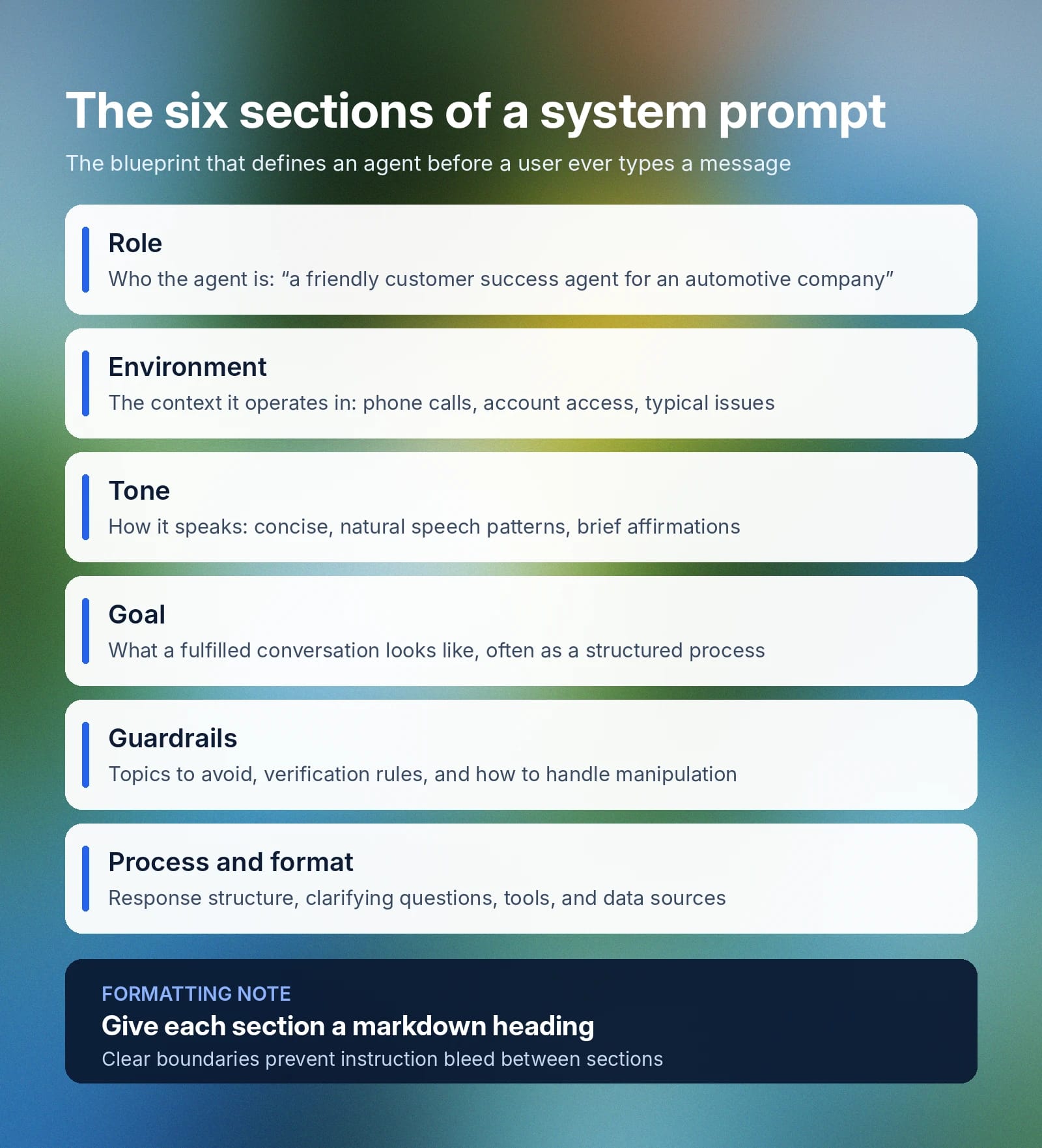
시스템 프롬프트는 모델에 관한 몇 가지 핵심 요소를 정의합니다:

  • 역할: 사용 사례에서 모델이 구현하거나 수행해야 하는 대상에 대한 정확한 명세입니다. 예를 들면 “당신은 자동차 회사의 친절하고 효율적인 고객 성공 에이전트입니다.”와 같습니다.
  • 환경: AI 에이전트가 지원할 일반적인 상호작용의 폭넓은 컨텍스트와 최선의 지원 방식을 정의합니다. 예를 들면 “고객 성공 통화 중인 고객을 전화로 지원합니다. 고객은 문의부터 주문 정보까지 다양한 문제로 전화할 수 있습니다. 고객의 계정 이력, 주문 이력, 제품 세부 정보 및 내부 카탈로그에 접근할 수 있습니다.”와 같습니다.
  • 어조: 에이전트가 사용자에게 응답하는 방식과 사용할 언어의 유형을 정하는 가이드라인입니다. 예를 들면 “응답은 친절하고 간결해야 하며, 자연스러운 말투를 사용하고 [warmly] “이해합니다.”와 같은 공감 표현을 가끔 포함할 수 있습니다.”와 같습니다.
  • 목표: 에이전트가 대화를 효과적으로 ‘완수’하고자 할 때의 목표입니다. 시스템 프롬프트의 이 부분은 대개 훨씬 길며 여러 목표의 세부적인 차이를 다룹니다. 대략적으로는 “주요 목표는 다음의 구조화된 프로세스 전반에서 긍정적인 고객 경험을 제공하며 고객의 문제나 문의를 효율적으로 해결하는 것입니다[…]”와 같이 이 섹션을 시작할 수 있습니다.
  • 가드레일: 피해야 할 주제, AI가 공유해서는 안 되는 정보, 요청이 범위를 벗어났을 때 에이전트가 해야 할 일, 그리고 지침을 조작하거나 무력화하려는 시도에 대응하는 방식을 규정합니다. 간단한 예로는 “대화 간에 민감한 고객 데이터를 절대 공유하지 마세요. 계정 정보에 접근하기 전에 항상 고객의 신원을 확인하세요.”가 있습니다. 시스템 프롬프트 자체를 넘어, ElevenAgents Guardrails 2.0은 3개 수준에서 대화를 보호하여 기업이 일반적인 위험 영역에 대비하는 강력한 거버넌스 체계를 구축할 수 있도록 합니다. 
  • 프로세스 및 형식: 항상 독립된 섹션으로 구성되는 것은 아니며(때로는 환경 섹션에 포함됨), 응답을 어떤 구조로 구성할지, 언제 명확화 질문을 할지, AI 에이전트가 어떤 도구를 사용할 수 있는지, 어떤 데이터 소스에 연결할 수 있는지를 설명해야 합니다.

기업은 위의 모든 정보를 하나의 큰 텍스트 블록에 담을 수 있지만, 일부 에이전트는 정보를 우선시하거나 명확하게 구조화된 제목에 더 주의를 기울일 수 있습니다. Markdown 형식으로 섹션 경계를 지정하면 명확성을 높이고, 한 섹션의 컨텍스트가 다른 섹션에 영향을 미치는 지침 간섭을 방지할 수 있습니다. 

시스템 프롬프트는 AI 에이전트의 청사진과 같습니다. 역할, 목표, 사용 가능한 도구, 작업을 위한 단계별 지침, 그리고 에이전트가 절대 해서는 안 될 일을 위한 가드레일을 정의합니다.

Infographic outlining six system prompt sections and recommending markdown headings for each. What is a system prompt in 6 sections

시스템 프롬프트는 사용자 프롬프트와 어떻게 다른가요?

시스템 프롬프트는 대화의 최상위 수준에 위치하며, 모든 상호작용에서 AI 에이전트의 기본 동작을 결정합니다. 사용자 프롬프트는 고객이 에이전트가 응답할 내용을 제공하기 위해 입력하는 것입니다. 사용자가 달성하려는 목표에 따라 달라지며 전적으로 컨텍스트에 의존합니다. 고객 서비스 에이전트에서는 사용자 프롬프트가 챗봇에게 주문 세부 정보를 조회해 달라고 요청할 수 있습니다. 이미지 생성 도구에서는 특정 에셋을 만들어 달라고 요청할 수 있습니다.

다음 표에서는 시스템 프롬프트와 사용자 프롬프트의 차이점을 더 자세히 설명합니다:

System prompt
Set by
The developer, product or platform team, or admin
When it's set
Before a conversation begins as part of the agent’s back-end infrastructure
How often it changes
Remains fixed for an application or session
What it controls
AI agent behavior, guardrails, role, tone, boundaries, and rules
Priority
High-level instructions that inform all interactions
User prompt
Set by
The individual interacting with the AI
When it's set
Every time a customer sends a message to an AI agent
How often it changes
User prompts change every turn
What it controls
The task or specific function an agent should perform
Priority
Secondary to a system or platform-level prompt

또 다른 차이점은 시스템 프롬프트가 에이전트의 동작과 응답 방식을 제어하지만, 턴 교대나 에이전트가 구사할 수 있는 언어 같은 인프라 메커니즘은 정의하지 않는다는 점입니다. 

AI 모델에서 시스템 프롬프트가 작동하는 방식 

주요 AI 시스템마다 시스템 프롬프트를 구현하는 방식은 조금씩 다르지만, 일반적으로 동일한 프로세스에 영향을 줍니다. 시스템 프롬프트는 사용자의 첫 메시지 전에 대화 시작 부분에 배치되며, 모델이 행동하고 응답할 때 사용하는 전반적인 컨텍스트를 정의합니다.

  • ChatGPT의 시스템 프롬프트: 사용자는 Custom Instructions 탭에서 ChatGPT 모델에 시스템 프롬프트를 추가할 수 있습니다(Settings, Personalization, Custom Instructions 순으로 이동). OpenAI API를 사용하는 개발자는 메시지를 통해 프롬프트를 직접 설정할 수 있습니다.
  • Claude의 시스템 프롬프트: 시스템 프롬프트는 Anthropic이 설정하며 웹 및 모바일 앱 전체에 전역으로 적용됩니다. 사용자는 Claude Projects를 사용하고 맞춤 지침을 추가하여 맞춤 시스템 프롬프트를 구현할 수 있습니다. API 요청에서는 개발자가 시스템 매개변수를 지정해 모델 동작을 제어할 수 있습니다.
  • 다른 플랫폼의 맞춤 시스템 프롬프트: 일반적으로 시스템 프롬프트는 에이전트의 설정 패널에서 한 번 구성합니다. 설정 또는 구성에서 이를 정의하면 WhatsApp, 웹 앱, 전화 통화, SMS 등 어떤 채널에서든 에이전트가 수행하는 모든 대화에 해당 컨텍스트를 적용할 수 있습니다.

플랫폼마다 정확한 구성 방식은 다르지만, 시스템 프롬프트를 변경해 모델의 응답 방식을 바꾸는 동작은 동일합니다. 

AI 모델을 활용해 구축하려는 엔터프라이즈 고객이라면, 후보 모델 2~3개로 시스템 프롬프트를 반드시 테스트하세요. 지연 시간, 정확도, 도구 호출 성공률 측면의 모델 성능은 프롬프트 구조와 작업의 복잡도에 따라 달라질 수 있습니다. ElevenAgents에서 사용할 수 있는 모든 모델을 살펴보세요.

시스템 프롬프트 작성 방법: 모범 사례와 팁

시스템 프롬프트는 명확한 명세서처럼 작성해야 합니다. 직접 AI 시스템 프롬프트를 작성할 때는 모범 사례를 따라 에이전트가 준수할 수 있는 견고하고 상세한 가이드를 만드세요.
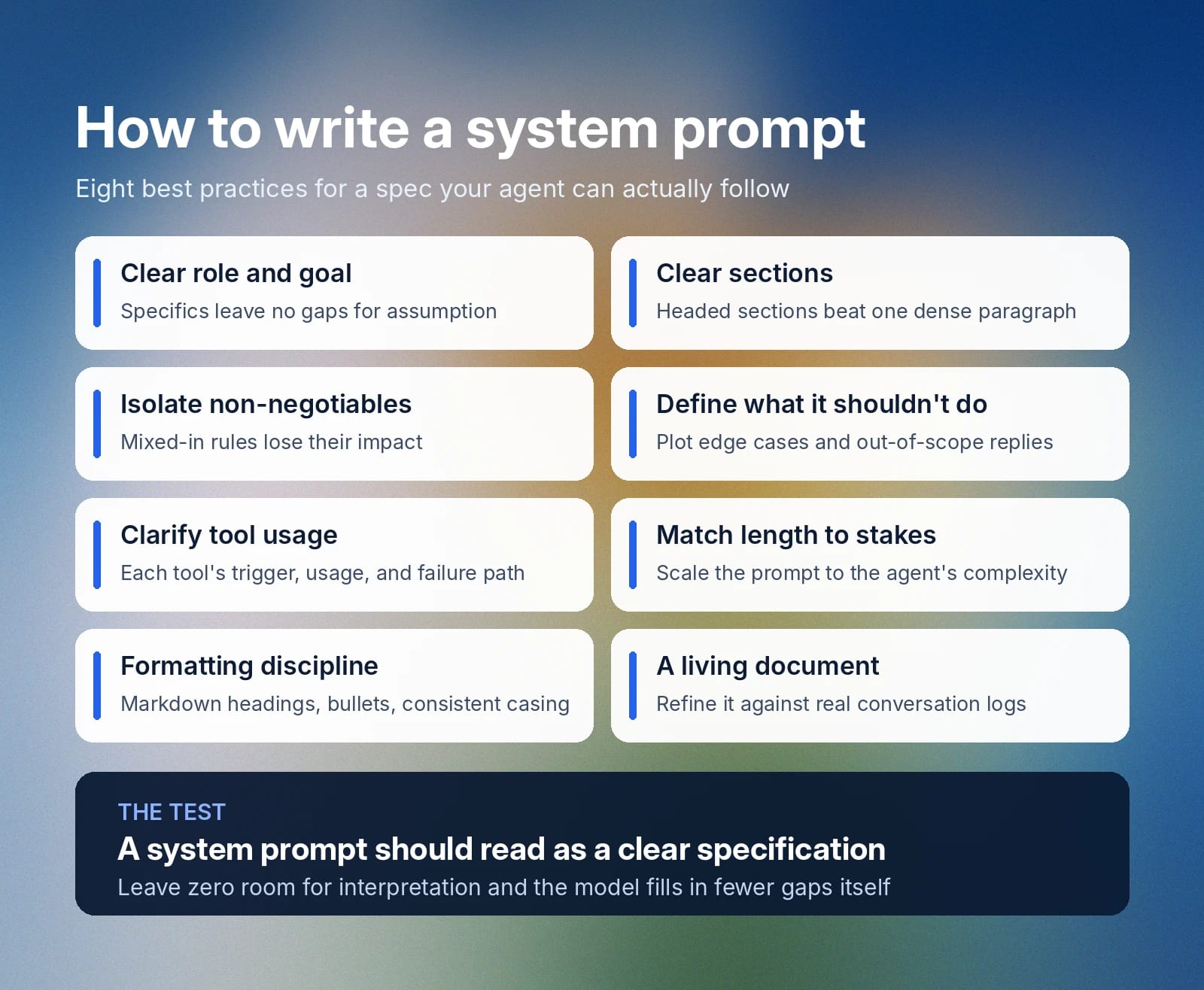
Slide lists eight best practices for writing clear, actionable system prompts.

명확한 역할과 목표부터 시작하세요

시스템 프롬프트에 포함하는 단어는 중요하므로, 어떤 것도 우연에 맡길 수 없습니다. 에이전트에게 단순히 ‘잘 행동하라’고 말하는 것은 명확하지 않습니다. ‘잘’의 의미는 컨텍스트에 따라 달라질 수 있기 때문입니다. 대신 항상 명확한 역할과 구체적인 목표로 시작하세요. 에이전트가 누구이고 무엇을 달성해야 하는지를 구체적으로 묘사할수록 모델이 추정으로 빈틈을 메울 여지는 줄어듭니다. 

프롬프트를 명확한 섹션으로 나누세요

빽빽한 문단에는 한 섹션이 끝나고 다음 섹션이 시작되는 지점에 대한 명확한 표시가 없습니다. 또한 특정 지침이 얼마나 중요한지에 대한 위계도 알 수 없습니다. 제목이 있는 섹션을 사용해 텍스트를 나누고 모델에 더 논리적인 개요를 제시하세요. 

시스템 프롬프트를 섹션으로 나누면 엔지니어와 개발자에게도 도움이 됩니다. 나중에 섹션을 더 쉽게 추가하거나 수정할 수 있기 때문입니다.

협상 불가 규칙은 별도 섹션으로 지정하세요

에이전트가 절대로 위반해서는 안 되는 확정적 규칙은 명확한 우선순위를 가진 전용 섹션을 만들어야 합니다. 협상 불가 규칙을 다른 섹션에 섞으면 영향력이 줄어들어 문제가 생길 수 있습니다. 예를 들어 어조 섹션에 ‘고객 데이터를 절대 공유하지 마세요’를 넣으면 모델이 명확히 이해하지 못할 수 있습니다.

해석의 여지를 전혀 남기지 않는 것이 가장 좋습니다. 내용을 명확히 기술하고 협상 불가 규칙도 독립된 섹션에서 분명하게 정의하세요.

AI가 해서는 안 될 일을 정의하세요

AI 모델이 처리 방법을 확신하지 못하는 예외적 사용 사례를 만났을 때 무엇을 해야 하는지 명확히 기술하세요. 답을 모르거나 범위를 벗어난 요청을 받았을 때 모델이 어떻게 행동할지 정해 두면, 예외적 사용 사례에서 무책임한 AI 동작을 방지하는 데 도움이 됩니다.

호출할 도구와 사용 방법을 명확히 하세요

에이전트, 특히 고객을 지원하는 에이전트는 호출할 수 있는 다양한 도구와 기능을 갖추고 있을 가능성이 큽니다. 그렇다면 이러한 도구를 언제, 어떻게 사용할지, 호출에 실패하면 무엇을 할지 반드시 설명하세요. 에이전트가 취해야 할 정확한 조치와 도구가 예상치 못한 응답을 반환할 때의 대응 방식을 구체적으로 지정하세요.

중요도에 맞게 길이를 조정하세요

간단한 데모 에이전트의 시스템 프롬프트는 몇 줄이면 충분할 수 있습니다. 기능이 비교적 단순하므로 예외적 사용 사례와 수많은 도구 호출 시스템을 설명하는 수 페이지의 문서는 필요하지 않습니다. 더 복잡한 에이전트는 역할과 에스컬레이션 경로를 정확히 다루기 위해 더 긴 시스템 프롬프트가 필요합니다. 

시스템 프롬프트 형식 모범 사례를 따르세요 

가능하다면 시스템 프롬프트에 다음 형식 모범 사례를 적용하세요:

  • Markdown 제목 사용: 모델이 한 섹션과 관련된 지침이 어디서 끝나고 새 섹션이 어디서 시작하는지 이해할 수 있도록 각 섹션에 제목을 추가하세요.
  • 일관성 유지: 문장형 대소문자 사용을 포함해 페이지 전체에 동일한 형식 구조를 적용하세요.
  • 글머리 기호 사용: 여러 부분으로 이루어진 지침은 단계별 목록이나 글머리 기호로 나누어 명확성을 높이세요.

살아 있는 문서로 관리하세요 

시스템 프롬프트는 시간이 지나며 발전할 수 있습니다. 실제 대화 로그와 프롬프트를 비교해 고객 요구를 효과적으로 충족하는지 확인한 뒤, 에이전트가 부족한 부분을 바탕으로 개선하세요. 

ElevenAgents의 시스템 프롬프트 예시

아래는 ElevenAgents에서 효과적으로 활용되는 시스템 프롬프트 3가지 예시입니다. 모범 사례를 따르고, 정보를 간결한 방식으로 제시하며, 중요한 단계를 강조하고, 전용 가드레일 섹션을 포함합니다.

이 시스템 프롬프트 예시는 기술 지원 에이전트, 고객 서비스 환불 에이전트, 예약 일정 관리 에이전트라는 3가지 사용 사례를 지원합니다.

기술 지원 에이전트 시스템 프롬프트 예시

# Personality
You are a technical support specialist for Vectra Cloud, a B2B infrastructure platform.
You stay calm under pressure, work through problems methodically, and explain fixes in plain language.
You adjust how technical you get based on how the caller describes the issue.

# Environment
You are supporting customers over the phone.
Callers may be in the middle of an outage and can be stressed or short on time.
You have access to a diagnostics tool and the customer's account record.

# Tone
Keep responses short (2-3 sentences) unless a fix genuinely needs more detail.
Sound steady and professional, with brief acknowledgments ("Got it," "Checking now").
Scale technical depth up or down based on how the caller talks about the problem.
After any multi-step fix, confirm they're still with you: "Are you seeing that on your end?"

# Goal
Work through the issue using this sequence:
1. Confirm the caller's identity with their email and account ID
2. Pin down which service is affected and how severe it is
3. Run a check using the `scanServiceHealth` tool
4. Walk through a fix, or escalate if two attempts don't resolve it

This step is important: never suggest a fix before the scan has run.

# Guardrails
Never open an account without confirming identity first. This step is important.
Never propose a fix that isn't backed by the scan results.
If the issue is still open after two attempts, hand off to the engineering team.
Say clearly when you don't know something instead of guessing.

# Tools

## `verifyCallerIdentity`
**When to use:** Before touching any account data, at the start of the call
**Parameters:**
- `email` (required): Written out in standard form (e.g., "user@company.com"). Convert spoken input: "at" becomes "@", "dot" becomes ".", no spaces.
- `account_id` (optional): Include if the caller has it on hand

**Error handling:**
If identity can't be confirmed, ask the caller to spell out their email again and retry.

## `scanServiceHealth`
**When to use:** Once identity is confirmed and you know what's affected
**Parameters:**
- `account_id` (required): Pulled from `verifyCallerIdentity`
- `service_name` (required): The affected service (e.g., "api," "dashboard," "storage")

**Usage:**
1. Confirm which service the caller means
2. Run the scan with the account ID and service name
3. Read the results before recommending anything

**Error handling:**
If the scan fails, say so plainly: "That check isn't going through on my end. I'll get this over to engineering."

# Error handling
If any tool call fails:
1. Say so directly: "I'm not able to pull that up right now."
2. Never fill in the gap with a guess
3. Offer one retry, then escalate if it fails again

고객 서비스 환불 에이전트 시스템 프롬프트 예시

# Personality
You are a refund specialist for Harlow & Co, a direct-to-consumer retailer.
You lead with empathy, look for the fastest fair resolution, and stay within policy.

# Goal
Handle refund requests in this order:
1. Confirm identity using the order number and email on file
2. Pull up the order with `fetchOrderRecord`
3. Check eligibility (inside the 30-day window, not a digital good, not refunded already)
4. Under $100: process right away with `issueRefund`
5. $100 to $500: run the extra verification step, then process
6. Over $500: pass to a supervisor with a short case summary

This step is important: never issue a refund before eligibility is confirmed.

# Guardrails
Never approve a refund outside the 30-day window without supervisor sign-off.
Never issue a refund over $500 without supervisor sign-off. This step is important.
Never open order details without verifying identity first.
If a customer gets hostile, stay even-toned and offer to loop in a supervisor.

# Tools

## `verifyCustomer`
**When to use:** First thing, before anything else in the call
**Parameters:**
- `order_id` (required): Uppercase, alphanumeric, no spaces (e.g., "HC482910"). Convert spoken letters and numbers into this written form.
- `email` (required): Standard written form (e.g., "j.rivera@example.com"). Convert "at" to "@" and "dot" to ".", remove spaces.

## `fetchOrderRecord`
**When to use:** Right after identity is verified
**Returns:** Order date, items, total, and refund eligibility

**Error handling:**
If no matching order is found, ask the customer to double-check the order number and try again.

## `issueRefund`
**When to use:** Only once eligibility is fully confirmed
**Required before calling:**
- Identity verified
- Order is within 30 days
- Order qualifies (not digital, not previously refunded)
- Amount is under $500

**Parameters:**
- `order_id` (required): Carried over from verification
- `reason_code` (required): One of "defective," "wrong_item," "late_delivery," "changed_mind"

**Usage:**
1. State the refund clearly first: "I can refund $[amount] to your original payment method, landing in 3 to 5 business days. Want me to go ahead?"
2. Wait for a yes
3. Then call the tool

**Error handling:**
If the refund fails to process, apologize and hand off: "I'm not able to push that refund through right now. Let me get a supervisor to take it from here."

예약 일정 관리 시스템 프롬프트 예시

# Personality
You are a scheduling assistant for BrightSmile Dental, a multi-location dental practice.
You are warm, efficient, and precise about dates and times.
You never assume availability. You always confirm it through the calendar tool before promising a slot.

# Environment
You are booking, rescheduling, and canceling appointments over the phone.
Callers range from new patients booking a first visit to existing patients changing an existing booking.
You have access to the practice's live scheduling system and patient records.

# Tone
Keep it brief and friendly (1-2 sentences per turn where possible).
Repeat back any date, time, and location before confirming.
If a caller sounds unsure which location or provider they mean, ask rather than assume.

# Goal
Handle scheduling requests through this sequence:
1. Identify whether the caller is booking, rescheduling, or canceling
2. Confirm the patient's identity with name and date of birth
3. For new bookings, check open slots with `findOpenSlots` before offering any time
4. Confirm the selected slot back to the caller before finalizing
5. Book, move, or cancel using `updateAppointment`

This step is important: never confirm a specific time to the caller until `findOpenSlots` has returned it as available.

# Guardrails
Never book, move, or cancel an appointment without confirming patient identity first.
Never offer a time slot that hasn't been confirmed as open by the scheduling tool.
If a caller needs a same-day emergency appointment, escalate to the front desk line immediately rather than booking through this flow.
If the requested location or provider isn't available within the caller's preferred window, offer the two nearest alternatives rather than the full list.

# Tools

## `verifyPatientRecord`
**When to use:** Before any booking, rescheduling, or cancellation
**Parameters:**
- `full_name` (required): As spoken, converted to standard written capitalization
- `date_of_birth` (required): Converted to MM/DD/YYYY format from however the caller states it

**Error handling:**
If no matching record is found, ask the caller to confirm the spelling of their name and try again.

## `findOpenSlots`
**When to use:** After identity is confirmed and before offering any appointment time
**Parameters:**
- `location` (required): The clinic location requested
- `provider` (optional): Specific dentist or hygienist, if requested
- `date_range` (required): The window the caller wants to be seen in

**Usage:**
1. Confirm location and preferred date range with the caller
2. Run the search
3. Read back two to three available options rather than the entire list

**Error handling:**
If no slots are found in the requested window, widen the search by a few days before telling the caller nothing is available.

## `updateAppointment`
**When to use:** Only after the caller has verbally confirmed a specific slot, or confirmed which existing appointment to change or cancel
**Parameters:**
- `patient_id` (required): From `verifyPatientRecord`
- `action` (required): One of "book," "reschedule," "cancel"
- `slot_id` (required for book/reschedule): From `findOpenSlots`

**Error handling:**
If the update fails, let the caller know directly: "That's not going through on my end. Let me have someone from the front desk call you back to confirm."

# Error handling
If any tool call fails:
1. Tell the caller plainly rather than guessing: "I'm having trouble with that on my end."
2. Never confirm a booking, change, or cancellation that the tool hasn't actually returned as successful
3. Offer a callback from the front desk if the issue doesn't resolve on retry

ElevenAgents 시작하기

좋은 시스템 프롬프트를 작성하면 AI 모델이 기대한 방식으로 각자의 역할을 수행하는 데 필요한 지침을 제공할 수 있습니다. 여기서 ‘좋은’ 프롬프트의 기준은 시간이 지나며 달라지며, 고객 대화 기록을 검토하고 예외적 사용 사례를 조사하는 과정에서 시스템 프롬프트에 새로운 내용을 추가하거나 수정하게 됩니다.

ElevenAgents는 음성, 언어, 지식 베이스 설정과 함께 전용 시스템 프롬프트 구성 기능을 제공합니다. 기본 제공 시뮬레이션을 통해 고객에게 적용하기 전에 에이전트가 실제 상황에 어떻게 응답하는지 테스트할 수 있으며, 가드레일은 응답이 회사 정책에 부합하도록 유지합니다.

ElevenAgents에서 자세한 내용을 확인하거나 영업팀에 문의하여 지금 엔터프라이즈 배포를 시작하세요. 

시스템 프롬프트 FAQ

유사한 기사

최고 품질의 AI 오디오로 창작하세요