Che cos’è un system prompt? Perché è importante nelle conversazioni con l’IA
- Scritto da
- Jack Limebear
- Pubblicato
- Ultimo aggiornamento
AscoltaAscolta questo articolo
Un system prompt è un insieme chiaro di istruzioni che un modello di IA segue in ogni conversazione. Definisce come si comporta il modello, il tono che usa, i limiti delle sue conoscenze, gli strumenti che richiama e quali guardrail regolano il sistema. Gli sviluppatori usano i system prompt per garantire che i modelli di IA si comportino in modo coerente nelle interazioni con i clienti.
In questa guida esploreremo cos'è un system prompt e come funziona, con esempi pratici e le best practice da seguire per scriverne uno tuo.
In sintesi
- Un system prompt definisce il ruolo, il tono e i limiti di un'IA in tutte le sue interazioni.
- I system prompt hanno una priorità superiore rispetto ai prompt utente e controllano il comportamento conversazionale.
- Ogni principale piattaforma di IA applica i system prompt.
- I system prompt efficaci usano sezioni chiare, guardrail e istruzioni sugli strumenti.
- I system prompt evolvono insieme al tuo sistema: gli sviluppatori li perfezionano analizzando le conversazioni con i clienti.
Cos'è un system prompt?
Un system prompt è il livello di istruzioni che viene eseguito prima ancora che un utente scriva un messaggio. Di solito viene scritto da uno sviluppatore o da un team di prodotto per guidare un modello e la maggior parte delle interfacce chat e delle API lo tratta come un contesto più prioritario rispetto a qualsiasi testo inserito dall'utente durante l'interazione con il modello.
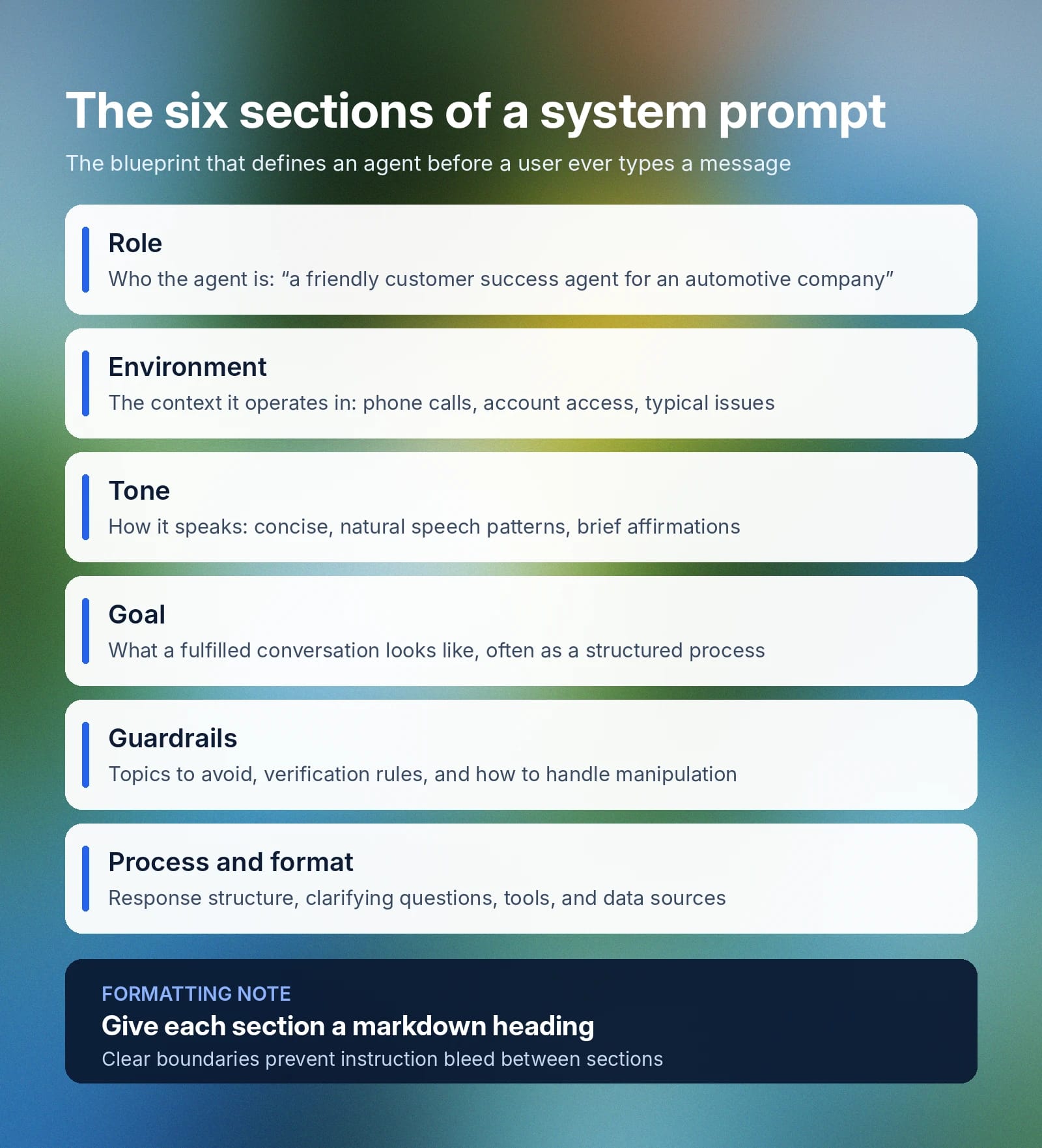
Un system prompt definisce diversi aspetti fondamentali di un modello:
- Ruolo: La specifica esatta della figura che il modello deve emulare o rappresentare per il caso d'uso previsto. Ad esempio: «Sei un addetto al customer success cordiale ed efficiente per un'azienda automobilistica.»
- Contesto: Definisce il contesto più ampio delle interazioni tipiche in cui un agente IA sarà di supporto e il modo migliore per aiutare. Un esempio potrebbe essere: «Stai aiutando un cliente al telefono durante una chiamata di customer success. Il cliente può chiamare per diversi problemi, dalle richieste di informazioni a quelle sugli ordini. Hai accesso alla cronologia dell'account del cliente, alla cronologia degli ordini, ai dettagli dei prodotti e al catalogo interno.»
- Tono: Linee guida che stabiliscono come l'agente risponderà a un utente e il tipo di linguaggio che userà. Ad esempio: «Le tue risposte sono cordiali e concise, userai schemi linguistici naturali e potrai includere occasionalmente conferme come [warmly] “Capisco.”
- Obiettivo: L'obiettivo che un agente ha quando cerca di gestire efficacemente una conversazione. Questa parte del system prompt è spesso molto più ampia e affronta le sfumature di diversi obiettivi. In generale, puoi iniziare questa sezione con qualcosa del tipo: «Il tuo obiettivo principale è risolvere in modo efficiente il problema o la richiesta di un cliente, offrendo un'esperienza positiva durante il seguente processo strutturato […]»
- Guardrail: Indicano gli argomenti da evitare, le informazioni che l'IA non dovrebbe condividere, cosa dovrebbe fare un agente quando una richiesta esce dal suo ambito e come rispondere ai tentativi di manipolare o ignorare le sue istruzioni. Un breve esempio è: «Non condividere mai dati sensibili dei clienti tra conversazioni. Verifica sempre l'identità di un cliente prima di accedere alle informazioni dell'account.» Oltre al system prompt stesso, ElevenAgents Guardrails 2.0 protegge le conversazioni su tre livelli, consentendo alle aziende di creare solide misure di governance contro le aree di rischio più comuni.
- Processo e formato: Anche se non sempre costituisce una sezione a sé stante, talvolta inclusa nel Contesto, dovresti indicare come vuoi strutturare le risposte, quando porre domande di chiarimento, quali strumenti può usare l'agente IA e a quali fonti di dati può collegarsi.
Sebbene le aziende possano includere tutte le informazioni precedenti in un unico grande blocco di testo, alcuni agenti possono dare priorità alle informazioni o prestare maggiore attenzione a titoli strutturati in modo chiaro. Delimitare le sezioni con la formattazione markdown offre maggiore chiarezza e previene la contaminazione delle istruzioni, in cui il contesto di una sezione influenza un'altra.
Considera un system prompt come il progetto di un agente IA: ne definisce ruolo, obiettivi, strumenti consentiti, istruzioni passo passo per un'attività e guardrail su ciò che l'agente non deve mai fare.
In cosa differisce un system prompt da un prompt utente?
Un system prompt si colloca al livello più alto di una conversazione e determina il comportamento di base di un agente IA in ogni interazione. Un prompt utente è ciò che un cliente digita per fornire al tuo agente qualcosa a cui rispondere. Varia in base a ciò che l'utente vuole ottenere e dipende interamente dal contesto. Per un agente del servizio clienti, il prompt utente potrebbe chiedere al chatbot di recuperare i dettagli di un ordine. In uno strumento di generazione di immagini, potrebbe chiedere di creare una risorsa specifica.
Ecco una tabella che illustra più nel dettaglio le differenze tra un system prompt e un prompt utente:
Un'altra distinzione importante è che, mentre un system prompt controlla il comportamento di un agente e il modo in cui risponde, non definisce meccanismi infrastrutturali come l'alternanza dei turni o le lingue che l'agente può parlare.
Come funzionano i system prompt nei modelli di IA
Ogni principale sistema di IA implementa i system prompt in modo leggermente diverso, ma in genere influenzano gli stessi processi. Un system prompt viene inserito all'inizio della conversazione, prima del primo messaggio dell'utente, e definisce il contesto generale che un modello usa per agire e rispondere.
- System prompt in ChatGPT: Gli utenti possono aggiungere un system prompt ai propri modelli ChatGPT tramite la scheda Istruzioni personalizzate (vai a Impostazioni, poi Personalizzazione, quindi Istruzioni personalizzate). Gli sviluppatori che usano l'API OpenAI possono impostare il prompt direttamente con un messaggio.
- System prompt in Claude: I system prompt vengono impostati da Anthropic e applicati globalmente nelle app web e mobile. Gli utenti possono simulare un system prompt personalizzato usando Claude Projects e aggiungendo istruzioni personalizzate. Nelle richieste API, gli sviluppatori possono specificare parametri di sistema per controllare il comportamento del modello.
- System prompt personalizzati su altre piattaforme: In genere, il system prompt viene configurato una sola volta in un pannello delle impostazioni dell'agente. Definirlo nelle impostazioni o nelle configurazioni consente a un agente di applicare quel contesto a ogni conversazione, su WhatsApp, in un'app web, tramite chiamata telefonica o SMS.
Sebbene il metodo di configurazione esatto cambi da una piattaforma all'altra, il comportamento ottenuto modificando il system prompt per cambiare le risposte di un modello rimane lo stesso.
Se sei un cliente enterprise e vuoi creare con modelli di IA, assicurati di testare il tuo system prompt con 2-3 modelli candidati. Le prestazioni di un modello in termini di latenza, accuratezza e tasso di successo nelle chiamate agli strumenti possono variare in base alla struttura del prompt e alla complessità dell'attività. Esplora tutti i modelli disponibili su ElevenAgents.
Come scrivere un system prompt: best practice e consigli
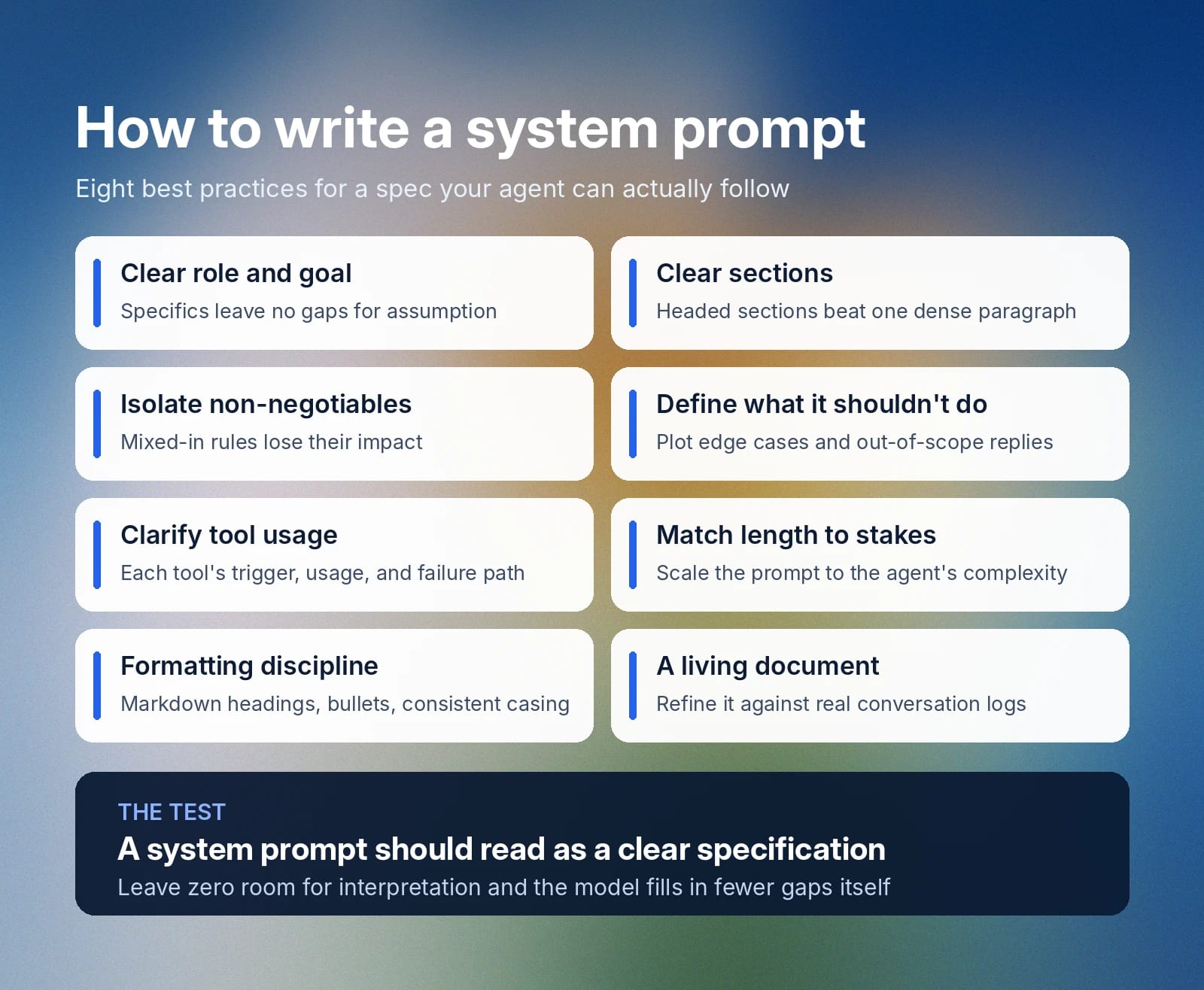
Un system prompt dovrebbe essere una specifica chiara. Quando scrivi il tuo system prompt per l'IA, segui queste best practice per creare una guida solida e dettagliata che i tuoi agenti possano seguire.
Inizia con un ruolo e un obiettivo chiari
Le parole che inserisci in un system prompt sono importanti, quindi non puoi lasciare nulla al caso. Dire semplicemente a un agente di «comportarsi bene» non è abbastanza chiaro, perché il significato di «bene» può dipendere dal contesto. Inizia invece sempre con un ruolo chiaro e un obiettivo specifico. Più descrivi concretamente chi è l'agente e cosa vuoi che realizzi, meno spazio avrà il modello per colmare le lacune basandosi su supposizioni.
Dividi il prompt in sezioni chiare
Un paragrafo denso non indica chiaramente dove finisce una sezione e inizia la successiva. Inoltre, non chiarisce la gerarchia di importanza delle varie istruzioni. Usa sezioni con titoli per dividere il testo e presentare al modello una struttura più logica.
Dividere un system prompt in sezioni aiuta anche ingegneri e sviluppatori, perché in futuro potranno aggiungere o riscrivere le sezioni più facilmente.
Dedica una sezione alle regole inderogabili
Per tutte le regole definitive che un agente non deve assolutamente infrangere, crea una sezione dedicata con priorità chiara. Mescolare le regole inderogabili con altre sezioni può ridurne l'impatto e creare potenziali problemi. Per esempio, inserire «non condividere mai i dati dei clienti» nella sezione sul tono potrebbe non essere chiaro per un modello.
È sempre meglio non lasciare alcuno spazio all'interpretazione. Esprimi le cose chiaramente e definisci le regole inderogabili in una sezione indipendente.
Definisci cosa non dovrebbe fare l'IA
Indica chiaramente cosa dovrebbe fare un modello di IA se incontra un caso limite che non sa come gestire. Definire il comportamento del modello quando non conosce la risposta o riceve una richiesta al di fuori del suo ambito aiuta a evitare comportamenti irresponsabili dell'IA nei casi limite.
Chiarisci quali strumenti richiamare e come usarli
Un agente, soprattutto se serve i clienti, probabilmente avrà una serie di strumenti e funzioni che può richiamare. In tal caso, assicurati di indicare quando usare questi strumenti, come usarli e cosa fare se una chiamata non va a buon fine. Sii specifico sulle azioni esatte che un agente deve compiere e su cosa fare se gli strumenti rispondono in modo imprevisto.
Adatta la lunghezza alla posta in gioco
Un semplice agente demo può avere un system prompt lungo appena poche righe. La sua funzione è piuttosto semplice, quindi non servono pagine di documentazione che descrivano casi limite e numerosi sistemi di chiamata agli strumenti. Un agente più complesso avrà bisogno di un system prompt più lungo per coprire accuratamente il proprio ruolo e i percorsi di escalation.
Segui le best practice di formattazione dei system prompt
Quando possibile, usa queste best practice di formattazione per il tuo system prompt:
- Usa titoli markdown: Ogni sezione dovrebbe avere un titolo, affinché il modello capisca dove terminano le istruzioni relative a una sezione e ne inizia un'altra.
- Sii coerente: Applica la stessa struttura di formattazione a tutta la pagina, incluso l'uso coerente delle maiuscole e minuscole nelle frasi.
- Usa elenchi puntati: Suddividi le istruzioni articolate in elenchi passo passo o puntati per offrire maggiore chiarezza.
Trattalo come un documento in evoluzione
I system prompt possono evolvere nel tempo. Confronta il tuo prompt con i log di conversazioni reali per verificare se soddisfa efficacemente le esigenze dei clienti, quindi perfezionalo in base ai punti in cui il tuo agente è carente.
Esempi di system prompt in ElevenAgents
Di seguito trovi tre esempi di system prompt efficaci in ElevenAgents. Seguono le best practice, presentano le informazioni in modo conciso, enfatizzano i passaggi critici e includono sezioni dedicate ai guardrail.
Questi esempi di system prompt supportano tre diversi casi d'uso: un agente di supporto tecnico, un agente del servizio clienti per i rimborsi e un agente per la pianificazione degli appuntamenti.
Esempio di system prompt per un agente di supporto tecnico
Esempio di system prompt per un agente del servizio clienti per i rimborsi
Esempio di system prompt per la pianificazione degli appuntamenti
Inizia con ElevenAgents
Scrivere buoni system prompt fornisce ai tuoi modelli di IA le istruzioni necessarie per svolgere il ruolo specifico che ti aspetti. Ciò che nel tuo caso è considerato «buono» evolverà nel tempo, con nuove aggiunte o modifiche ai system prompt che deriveranno dall'analisi delle trascrizioni dei clienti e dallo studio dei casi limite.
ElevenAgents offre ai team una configurazione dedicata per i system prompt, insieme alle impostazioni per voce, lingua e knowledge base. Le simulazioni integrate ti consentono di testare come un agente risponde a scenari reali prima che raggiungano un cliente, mentre i guardrail mantengono le risposte allineate alle policy aziendali.
Esplora ElevenAgents per maggiori informazioni o contatta il team commerciale per iniziare oggi stesso l'implementazione enterprise.
FAQ sui system prompt

Jack Limebear fa parte del team Growth e si occupa di scrivere contenuti e definire strategie per il blog e le pagine insights. Prima di arrivare in ElevenLabs, ha guidato la strategia dei contenuti per oltre dieci anni in realtà che vanno da startup SaaS in rapida crescita a grandi aziende Fortune 500. Ha conseguito un Master in Letteratura Inglese presso l’Università di Cambridge.