AI dubbing API: How to dub audio and video at scale
- Written by
- Jack Limebear
- Published
- Last updated
ListenListen to this article
A few decades ago, dubbing a video meant booking a studio, hiring voice actors for your target language, recording (and re-recording) every line, and then waiting weeks for the final delivery.
An AI dubbing API collapses that process into a few REST calls. Send your audio or video and receive a dubbed output in new languages with the original timing and emotional range intact.
This guide explains how an AI dubbing API works and what separates a production-grade one from a stitched-together pipeline. We’ll also explore how to integrate the ElevenLabs new dubbing API, which now offers Dubbing v2, our latest dubbing model, to every workflow.
Summary
- An AI dubbing API takes source audio or video and returns dubbed output in new languages.
- Dubbing v2 is an audio to audio model that conditions on the original performance, meaning emotion, tone, and delivery carry into every dub.
- The ElevenLabs Dubbing API covers 90+ languages with sync-aware translation.
- Developers create a dubbing project, add target languages, and download finished dubs with a handful of REST calls.
- Enterprise customers can edit source transcripts and translations, then regenerate only the segments that they changed.
What is an AI dubbing API?
An AI dubbing API is a programmatic interface that accepts audio or video in one language and returns dubbed audio in target languages. It automates the entire localization chain: transcribing the source, translating the dialogue, cloning each speaker’s voice, generating speech in the target language, and aligning the output with the original timing.
While developers have chained Speech to Text, machine translation, and Text to Speech services into makeshift dubbing pipelines, they’re not reliable for scaled workloads.
Speaker identity fragments between stages, timing may drift, and a once emotionally rich script fades to monotone.
A purpose-built dubbing API includes a range of additional features that overcome these issues. From speaker separation and voice preservation to internal syncing and voice cloning, a high-quality AI dubbing API makes the output sound like the original speaker rather than a flat translation.
How AI dubbing works: Audio to audio vs. cascaded pipelines
Most automated dubbing systems are cascaded pipelines. They transcribe the source audio, translate the transcript, and synthesize new speech from that text. Everything else beyond the raw transcript, like hesitation, tension, sarcasm, or a whispered aside, is lost before synthesis begins.
ElevenLabs Dubbing v2 takes a different approach.
Dubbing v2 offers an audio to audio model that conditions the output directly on the original recording, rather than on a transcript of it. Tone, emotion, and emotional register transfer into the dub because the model hears the performance instead of reading a description of it.
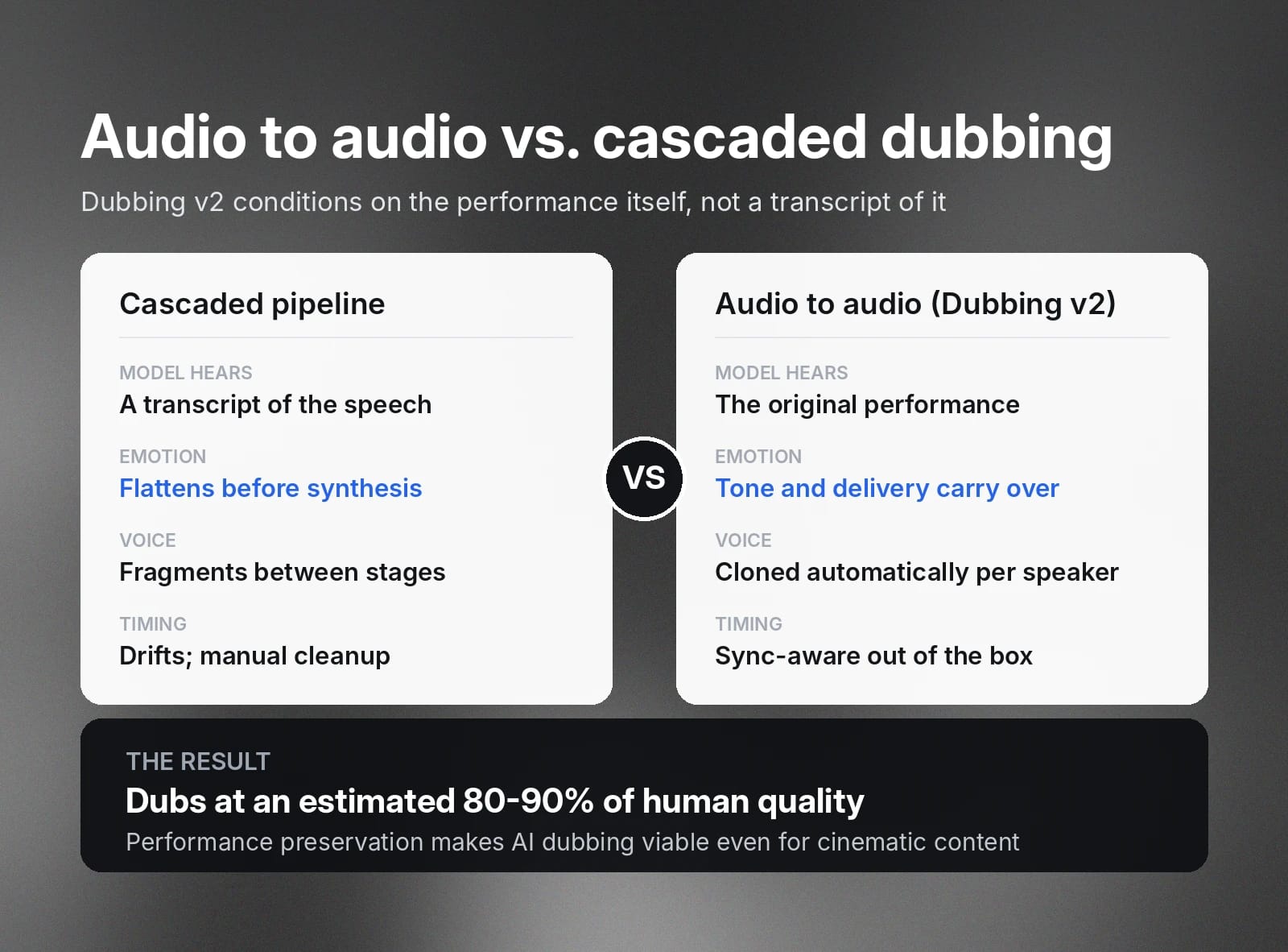
We estimate that Dubbing v2 produces dubs at 80-90% of human quality, which means AI dubbing now works even on cinematic content.
Three other core capabilities round out Dubbing v2:
- Sync-aware translation: The model translates with timing in mind, so starts and stops in the dubbed audio align with the original out of the box. No video manipulation or lip sync is involved. The audio lands exactly where the original dialogue did.
- Automatic voice cloning: Every translation is delivered in a voice clone of the original speaker, with no manual cloning step. Speaker identity, pitch, and tonality are maintained across every supported language, even with multiple speakers.
- Locale-level accuracy: Dubbing v2 distinguishes regional variants, such as Latin American or Castilian Spanish, with locale controls via language codes like pt-BR for Brazilian Portuguese.
What to look for in an AI dubbing API
When evaluating an AI dubbing API for your developer pipeline, there are a few core criteria to look for.
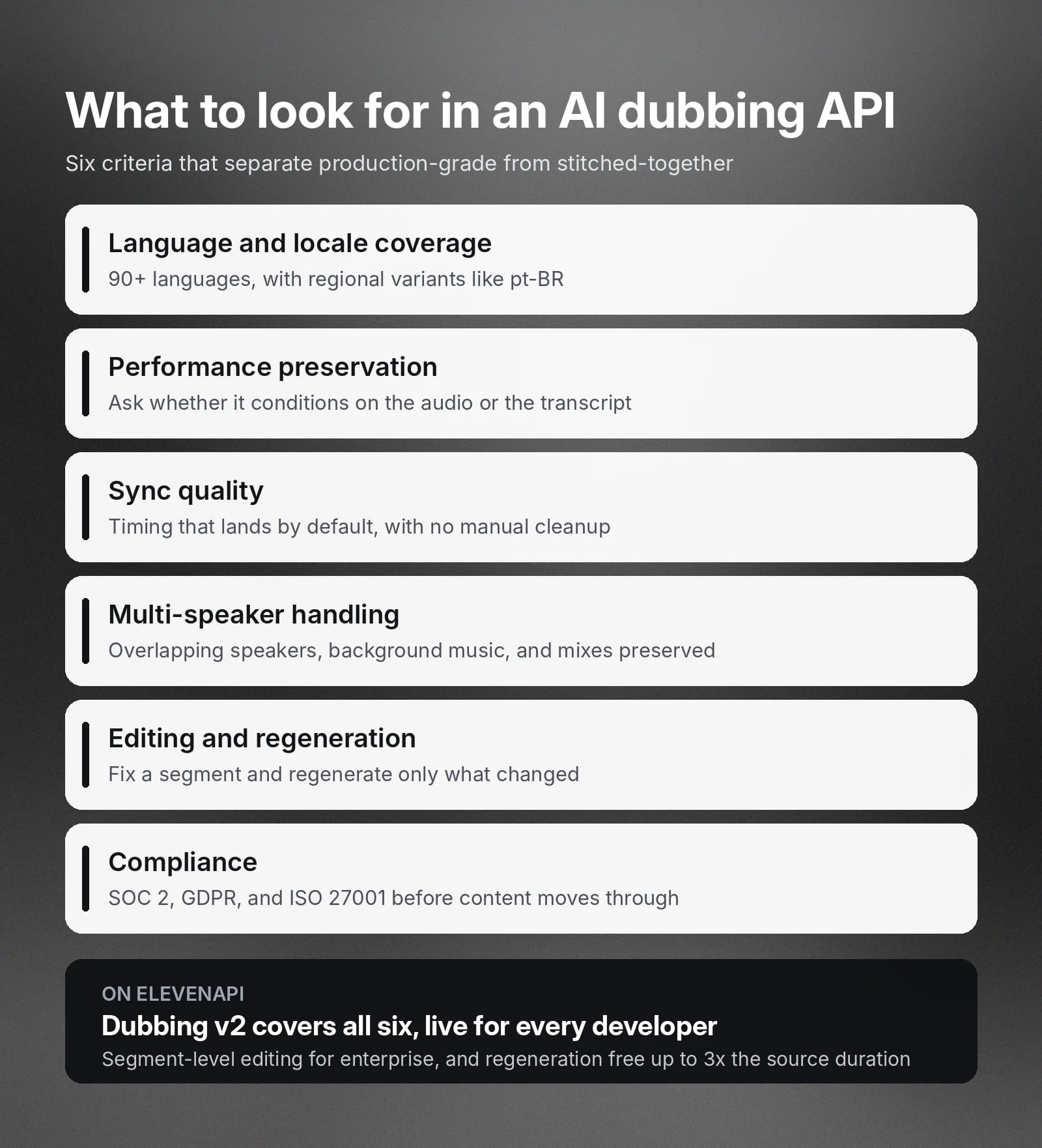
Here are the main features in the best AI dubbing APIs:
- Wide language and locale coverage: Look for breadth (90+ languages) and the ability to granularly target aspects like regional variants.
- Performance preservation: Ask whether the system conditions on the source audio or the transcript. Audio to audio architecture determines if emotion will survive the dub.
- Seamless sync quality: Dubbed audio that drifts from the original timing creates hours of manual cleanup. Sync needs to work by default to avoid post-processing overhead.
- Multi-speaker and background capabilities: An AI dubbing API should manage overlapping speakers or sound effects with ease. The API should also preserve background music or mixes within a clip.
- Editing and regeneration: A dubbing API that lets you correct a transcript, refine a translation, and regenerate only the affected segments saves you from re-dubbing entire files.
- Compliance: Enterprise workloads need SOC 2, GDPR, and ISO 27001 compliance before content moves through the system.
The rest of this guide walks through the Dubbing API with ElevenLabs, which contains every one of the features in the list above.
How to dub audio and video with the ElevenLabs Dubbing API
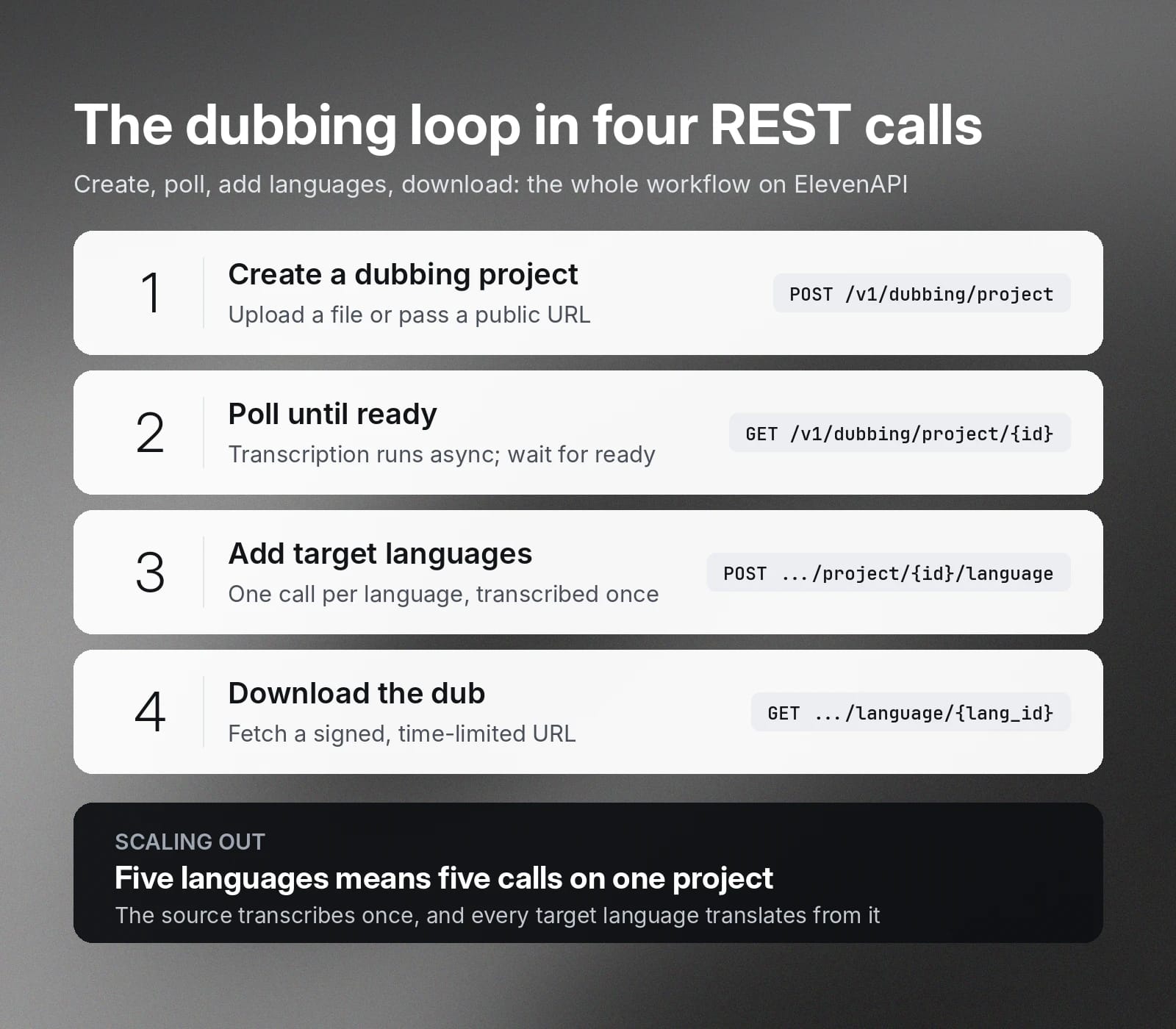
The Dubbing API is organized around projects. Each project holds one source file and its transcript. You can then add one target language per language you want to dub into, with each language then carrying its own translation and output.
The basic create-and-fetch workflow below is available to all users on the ElevenAPI platform.
1) Create a dubbing project
Send your source media as a file upload or a public URL. Authentication uses your API key in the xi-api-key header. You can pass an optional reference label to identify the project on your side, and keyterms to bias transcription and translation toward product or brand names.
Create from a URL
Create from a file upload
The response returns a project_id with a status of queued. Omit source_language and the model detects it automatically during transcription.
2) Poll until the project is ready
Sources are transcribed asynchronously, so poll the project until its status reaches ready.
A ready project has its source transcript prepared and is waiting for you to add target languages. The per-language progress lives on the languages themselves, so the project stays ready from this point on.
3) Add target languages
Add one language per target. The cloning_strength setting (0 to 10, default 7) controls the trade-off between similarity to the original voice and natural delivery in the target language.
Each language moves through queued and processing to completed.
To dub into five languages, make five calls against the same project. The source is transcribed once and every language translates from it.
4) Download the dubbed output
Fetch the language once its status is completed. The response includes a signed download URL for the dubbed audio.
Remember that download URLs are time-limited, so fetch the language again whenever you want a fresh link.
With those four steps, you have a fully automated dubbing loop: create, poll, add languages, download.
Editing and regenerating dubs via API
While automating output will cover most use cases, premium localization often needs a human pass on the words themselves to make sure things feel perfect. The Dubbing API gives enterprise customers segment-level control over both sides of the translation.
The source transcript is the single source of truth every language translates from, and it is fully editable. You can correct a misheard line, fix a speaker assignment, or adjust the timing on any segment:
Each target language exposes its own transcript, pairing every source segment with its translation. Translations are editable the same way.
You can also bring your own source transcript and translation, which puts your existing localization workflow in control of the words while the model then handles the voices.
When a transcript changes after a dub has completed, the language is marked stale, and a single call regenerates it from the current text.
Regenerations are free for up to 1x the duration of the source media, meaning iterating on a translation doesn’t multiply your dubbing bill. Beyond the 1x quota, regeneration is billed at your standard dubbing rate.
AI dubbing API use cases
A video dubbing API is useful whenever you need to localize audio at volume. Manual dubbing is time-consuming and laborious, with an AI dubbing API allowing you to accelerate the process significantly.
Here are a few use cases of AI dubbing APIs:
- Media creation platforms: Build dubbing directly into your creator production workflows so users can experiment without leaving your app.
- Training and support content: Enterprises with global hiring pools can localize content into different languages, supporting onboarding training videos for all users.
- Streaming and media: Localization pipelines can automatically dub long-form series or other media for multi-territory release.
- Marketing materials: Roll out multilingual video campaigns without having to re-record voice actor lines in dozens of languages.
- Edtech: Course platforms dub instructor videos into every market they serve, while preserving the instructor’s voice.
Across the board, dubbing APIs make producing high-quality, localized content at scale an accessible option.
Dubbing v2 is now live on ElevenAPI
The Dubbing API is live for both self-serve and enterprise developers, with Dubbing v2 available to everyone and editing endpoints for enterprise workspaces.
Explore the Dubbing API to see the full capability set, or sign up and create an API key to run your first dub in minutes.
FAQ about dubbing APIs

Jack Limebear is on the Growth team, acting as a content writer and strategist across the blog and insights pages. Before ElevenLabs, he spent over a decade leading content strategy for organizations ranging from fast-growing SaaS startups to Fortune 500 companies. He holds a Master's degree in English Literature from the University of Cambridge.