ElevenLabs와 Twilio로 20분 만에 보이스 에이전트 만들기
- 게시일
- 최종 업데이트
음성 에이전트는 수신 전화를 받고, 발신자의 말을 실시간으로 음성 텍스트 변환 (STT)으로 전사하며, 대규모 언어 모델(LLM)로 응답을 생성하고 텍스트 음성 변환 (TTS) 모듈로 답변을 음성으로 전달할 수 있습니다. ElevenLabs와 Twilio를 사용하면 약 20분 만에 실제 전화번호에서 작동하는 에이전트를 구축할 수 있습니다.
개발자를 위한 전체 스택은 음성 합성(Flash v2.5)과 전사(Scribe v2 Realtime)를 위한 ElevenLabs, 전화 통신을 위한 Twilio, 그리고 LLM으로 OpenAI 또는 Anthropic으로 구성됩니다. 하지만 이 모든 구성 요소는 교체할 수 있으므로, 가장 익숙한 구성 요소를 선택해 사용하면 됩니다.
이 글에서는 Node.js와 Typescript를 사용해 20분 만에 음성 에이전트를 구축하는 방법을 소개합니다. 직접 캐스케이드를 유지 관리하지 않고 턴테이킹, 인터럽트, 전화 통신을 처리하는 관리형 대안을 원한다면 ElevenAgents를 이용해 보세요.
음성 에이전트 아키텍처의 작동 방식
코드를 작성하기 전에 기술 스택의 세 가지 서비스가 어떻게 연결되는지 이해하면 도움이 됩니다.
- Twilio: 전화 통화와 오디오 전송을 처리합니다.
- ElevenLabs: Scribe v2 Realtime을 통한 STT와 Flash v2.5를 통한 TTS를 처리합니다.
- LLM: 도구 호출과 응답 작성을 처리합니다.
각 단계는 가벼운 어댑터이므로 나머지 부분을 건드리지 않고 다른 서비스로 교체할 수 있습니다. 예를 들어 다른 구성 요소를 다시 작성하지 않고 OpenAI LLM을 Anthropic으로 바꿀 수 있습니다.
전화 통화는 Twilio를 통해 서버에 도달합니다. Twilio는 PSTN 전화를 받고 서버로 연결되는 WebSocket을 연 다음, 발신자 오디오를 base64로 인코딩된 mu-law 프레임 스트림으로 전달합니다. 서버는 캐스케이드를 실행하고 동일한 WebSocket을 통해 합성된 오디오를 다시 스트리밍하며, Twilio가 이를 발신자에게 재생합니다.
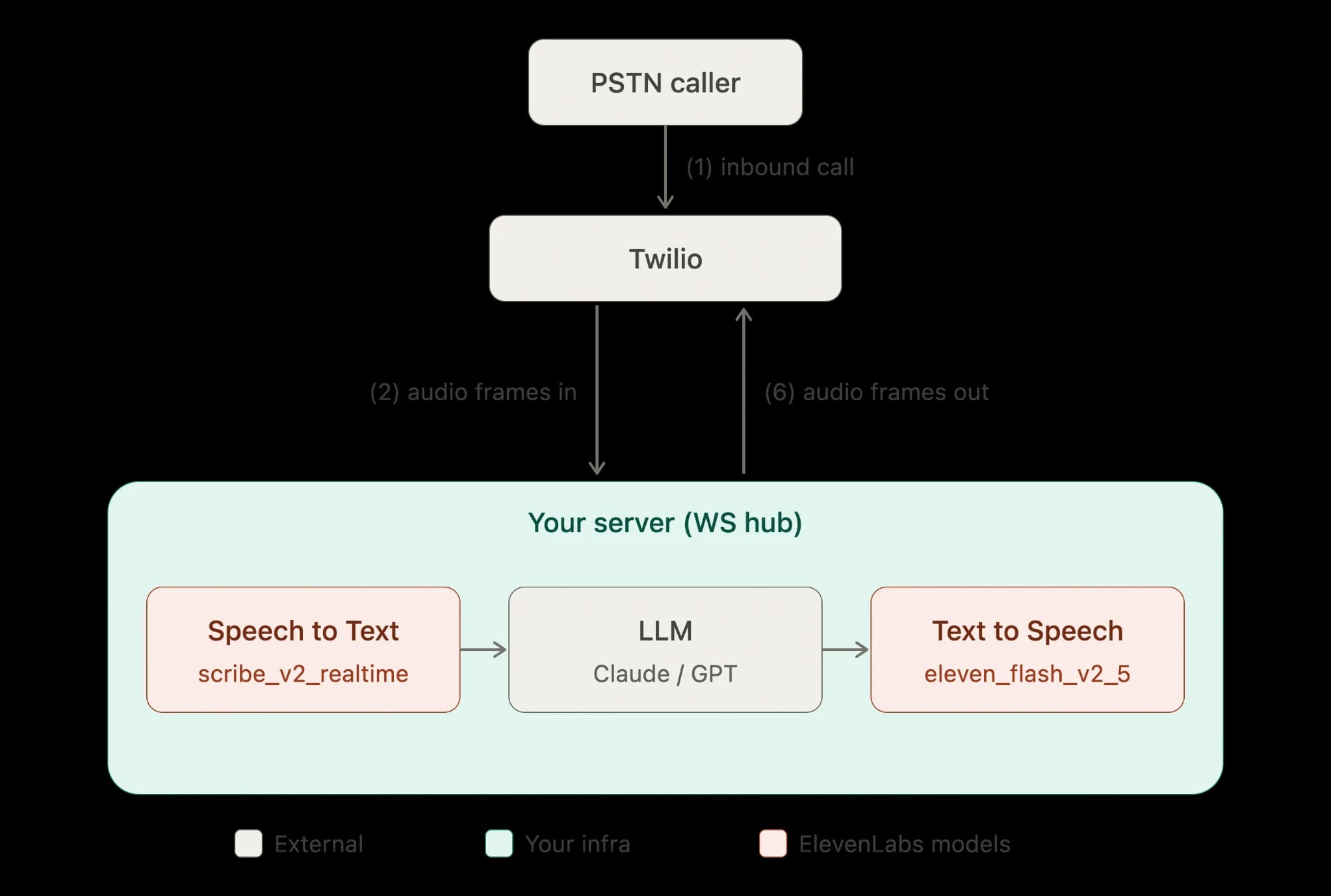
음성 에이전트 구축에 사용할 흐름은 다음과 같습니다.
발신자가 Twilio 번호로 전화를 겁니다. Twilio는 웹훅에서 TwiML 문서를 가져옵니다. TwiML은 Twilio에 WebSocket 엔드포인트로 Media Stream을 열도록 지시합니다. Twilio는 base64 mu-law(ulaw_8000) 페이로드를 포함한 JSON 이벤트로 수신 오디오를 스트리밍합니다.
서버는 오디오 청크를 Scribe v2 Realtime으로 전달하여 스트리밍 전사를 수행합니다. 발신자 턴이 완료되면 전사본을 LLM에 보내고, 이어서 Flash v2.5를 사용해 ulaw_8000 형식으로 응답을 합성합니다. 합성된 mu-law 프레임을 base64로 인코딩해 WebSocket을 통해 Twilio로 다시 보내면 Twilio가 발신자에게 재생합니다.
Scribe v2 Realtime은 약 150ms 지연 시간으로 부분 전사 결과를 내보내며, Flash v2.5의 모델 추론 시간은 네트워크 및 애플리케이션 지연을 제외하고 약 75ms입니다. 첫 오디오까지 걸리는 시간에 가장 크고 예측하기 어려운 영향을 주는 요소는 LLM이며, 지연 시간 예산의 대부분이 여기에 사용됩니다. 이 간격을 줄이기 위해 LLM 출력을 토큰 단위로 스트리밍하고 모델이 문장을 끝내기 전에 합성을 시작합니다.
이러한 선택의 모델 간 절충점은 모델 개요와 지연 시간 이해하기를 참고하세요.
음성 에이전트 구축 전 필요한 사항
이 가이드에서는 네 가지 항목이 준비되어 있다고 가정합니다. 각각 빠르게 설정할 수 있지만, 하나라도 빠지면 서버를 실행할 수 없습니다.
확인할 사전 요구 사항은 다음과 같습니다.
- Voice 기능이 있는 Twilio 전화번호: Twilio 콘솔에서 번호와 Account SID, Auth Token을 기록해 두세요.
- ElevenLabs API 키: ElevenLabs 대시보드에서 생성합니다. 키는 xi-api-key 헤더에 포함되며 비밀 정보이므로 서버 측에만 보관하세요. API 인증을 참고하세요.
- LLM API 키: 이 튜토리얼에서는 Anthropic Claude와 OpenAI를 교체 가능한 백엔드로 다루므로 하나를 선택하세요.
- 로컬 개발용 Ngrok(또는 다른 터널): Twilio가 공개 HTTPS 및 WSS URL을 통해 서버에 도달해야 하며, ngrok를 사용하면 별도 배포 없이 이를 제공할 수 있습니다.
비밀 정보는 환경 변수로 설정하고, 절대 커밋하지 마세요.
그런 다음 서버에서 사용할 포트를 가리키는 터널을 시작하세요.
Twilio Media Streams 프로토콜 이해하기
Twilio는 원시 오디오 소켓을 제공하지 않습니다. 대신 WebSocket을 통해 구조화된 JSON 프로토콜로 모든 것을 감쌉니다. 네 가지 이벤트 유형과 전송 형식을 이해하면 코드를 작성하기 전에도 2단계의 WebSocket 핸들러를 완전히 이해할 수 있습니다.
Twilio가 WebSocket에 연결되면 네 가지 이벤트 유형을 가질 수 있는 일련의 JSON 텍스트 메시지를 전송합니다.
connected 이벤트가 먼저 도착하여 WebSocket이 연결되었음을 확인합니다. start 이벤트는 미디어 스트림이 시작될 때 한 번 전송됩니다. 오디오를 다시 보내는 데 필요한 streamSid를 포함하므로 이를 저장해야 하며, start.customParameters 및 start.callSid 아래에 통화 메타데이터도 포함합니다.
media 이벤트는 반복적으로 발생합니다. media.payload는 프레임당 20ms인 8kHz mu-law 오디오의 base64 인코딩 청크이며, 발신자 오디오는 media.track이 inbound입니다. 마지막으로 일반적으로 통화가 끊겨 스트림이 종료되면 stop이 전송됩니다.
오디오를 재생하려면 동일한 streamSid와 base64 mu-law 페이로드를 포함한 media 유형 메시지를 전송합니다. 이미 대기열에 넣은 오디오를 중단하려면 streamSid가 포함된 clear 메시지를 보내 Twilio의 송신 버퍼를 비웁니다.
수신 및 송신 인코딩은 동일합니다(ulaw_8000). ElevenLabs 텍스트 음성 변환에 ulaw_8000을 요청하고 중간에 리샘플링 없이 바이트를 Twilio로 바로 전달합니다.
1단계: TwiML 웹훅 제공
전화가 오면 Twilio가 웹훅에 HTTP 요청을 보내고, 통화를 Media Stream에 연결하는 TwiML로 응답합니다. <Connect><Stream> 동사는 양방향 WebSocket을 엽니다. 여기서는 <Start> 대신 <Connect>를 사용하세요. 스트림이 지속되는 동안 통화를 유지하고 오디오를 다시 보낼 수 있게 해 주며, 이것이 이 설정의 목적입니다.
웹훅이 반환하는 TwiML은 다음과 같습니다.
Express에서는 호스트를 채워 문서를 반환하는 단일 POST 핸들러로 구현합니다.
Twilio 콘솔에서 번호의 "A call comes in" 웹훅을 https://your-subdomain.ngrok.app/incoming-call로 설정하고 HTTP POST를 사용하세요.
2단계: Media Stream WebSocket 수락
WebSocket 핸들러는 Twilio 이벤트를 읽고, 캐스케이드를 구동하며, 오디오를 다시 전송합니다.
통화별 상태는 streamSid, STT 연결, 그리고 에이전트가 현재 말하고 있는지 여부를 나타내는 플래그 정도만 유지합니다. 핸들러는 각 수신 미디어 프레임을 base64에서 디코딩하고 원시 mu-law 바이트를 STT로 전달합니다.
3단계: Scribe v2 Realtime으로 전사
Scribe v2 Realtime은 스트리밍 오디오 청크를 받아 부분 및 최종 전사 결과를 반환하며, mu-law 인코딩을 직접 지원하므로 Twilio 프레임을 변경 없이 전달합니다.
또한 음성 활동 감지를 제공하여 무음 기반 세분화와 세그먼트 완료를 위한 수동 커밋 제어를 지원합니다. 전화 에이전트의 경우 자연스러운 휴지가 발신자 턴이 끝났다는 가장 신뢰할 수 있는 신호이므로 VAD 기반 세분화가 일반적으로 적합합니다.
단계는 다음과 같습니다. 통화가 시작되면 STT 스트림을 엽니다. 모든 수신 mu-law 청크를 전송합니다. 최종 전사 결과가 나오면 LLM을 호출해 처리합니다.
실시간 STT 클라이언트 인터페이스는 아직 발전 중이므로, 아래 형태는 고정된 필드 이름 집합이 아닌 실제 API에 맞춰 구현하는 작은 TypeScript 어댑터(openRealtimeStt) 뒤에 둡니다. onFinal은 완료된 발신자 턴을 다음 단계로 전달하는 훅으로 간주하세요.
실시간 인식의 부분 결과 지연 시간은 약 150ms이므로 발신자가 말을 마친 시점과 에이전트가 응답을 시작하는 시점 사이의 체감 간격을 짧게 유지할 수 있습니다. 배치 버전과 전체 기능 세트는 음성 텍스트 변환 문서 및 실시간 음성 텍스트 변환 제품 페이지를 참고하세요.
4단계: LLM으로 응답 생성
응답을 생성하는 단계입니다. LLM은 대화 기록을 받아 어시스턴트 텍스트를 반환합니다. 첫 문장에서 합성을 시작할 수 있도록 응답을 스트리밍하세요.
여기서는 OpenAI를 백엔드로 사용합니다.
위의 모델 ID인 gpt-4.1-mini는 저지연 옵션의 한 예이며, Anthropic 측에서는 claude-haiku-4-5가 이에 준하는 옵션입니다. 어떤 제공업체든 동일한 llmReply 계약을 지원할 수 있습니다. 함수 본문만 교체하면 나머지 에이전트는 변경되지 않습니다.
시스템 프롬프트는 응답 길이를 제한합니다. 전화에서는 이것이 중요합니다. 긴 응답은 느리게 느껴지고 자연스럽게 끼어들기도 어렵습니다.
5단계: ulaw_8000에서 Flash TTS로 합성
이제 텍스트를 Twilio가 재생할 수 있는 오디오로 변환해야 합니다. 바이트가 Twilio에서 예상하는 인코딩과 일치하도록 outputFormat: "ulaw_8000"을 지정해 Flash v2.5를 요청한 다음, 오디오를 스트리밍하고 각 청크를 media 이벤트로 WebSocket을 통해 다시 전달합니다.
전체 응답을 기다리는 대신 LLM 토큰을 문장 크기의 조각으로 모으고 각 조각이 완성되는 대로 합성하세요. 모델이 두 번째 문장을 생성하는 동안 발신자가 첫 번째 문장을 들을 수 있어 첫 오디오까지 걸리는 시간을 줄일 수 있습니다. 점진적 합성을 더 세밀하게 제어하려면 실시간 TTS WebSocket 가이드에서 하나의 열린 합성 소켓에 텍스트를 입력하는 방법을 확인하세요. 아래의 HTTP 스트리밍 방식은 더 간단하며 짧은 대화 턴에는 충분합니다.
프로덕션 환경을 위한 AI 음성 에이전트 강화
위의 다섯 단계를 마치면 작동하는 에이전트가 완성됩니다. 하지만 이것이 프로덕션 배포와 같은 의미는 아닙니다.
에이전트를 실제 전화 회선에 연결하기 전에 알아 두어야 할 몇 가지 사항이 있습니다.
Twilio 웹훅 서명 검증
웹훅 URL을 아는 사람은 누구나 여기에 POST 요청을 보낼 수 있으므로, 먼저 요청이 실제로 Twilio에서 왔는지 확인해야 합니다. Twilio는 X-Twilio-Signature 헤더에서 Auth Token으로 모든 요청에 서명하며, 검증에 실패한 요청은 거부해야 합니다. 서명은 전체 URL과 POST 파라미터를 기준으로 계산되므로 Twilio와 동일한 방식으로 계산해야 합니다.
Twilio의 헬퍼가 이를 처리해 줍니다.
비밀 정보 올바르게 관리하기
ELEVENLABS_API_KEY, LLM 키, TWILIO_AUTH_TOKEN은 소스 코드나 저장소에 커밋된 평문 env 파일이 아닌 시크릿 매니저에 보관하세요. ElevenLabs 키는 이 서비스에 필요한 엔드포인트로만 범위를 제한하고 크레딧 할당량을 설정하세요. 그래야 키가 유출되더라도 피해 범위가 무제한으로 확대되지 않습니다.
엔터프라이즈 요금제에서는 IP 허용 목록을 통해 특정 IP 범위로 키를 추가 제한할 수 있습니다. 이 서버는 키가 백엔드를 벗어나지 않으므로 API 키를 직접 사용합니다. 오디오 로직 일부가 브라우저나 모바일 클라이언트로 이동한다면 키가 클라이언트 측에 노출되지 않도록 일회용 토큰으로 전환해야 합니다.
동시성 한도 이해하기
각 요금제에는 모델 패밀리별로 다른 동시성 한도가 있으며, 이 한도는 동시에 활발히 오디오를 생성하는 요청 수를 계산합니다.
전화 에이전트에서는 이 계산 방식이 유리하게 작용합니다. 오디오 생성은 재생보다 빠르므로 각 통화는 통화 전체가 아니라 응답을 합성하는 짧은 시간 동안만 TTS 동시성을 사용합니다. 대략적인 기준으로 동시성 한도가 약 5이면 생성이 재생보다 훨씬 먼저 끝나므로 약 100건의 동시 대화형 통화를 지원할 수 있습니다.
그렇더라도 추측하지 말고 여유 용량을 모니터링하세요. ElevenLabs 응답은 current-concurrent-requests 및 maximum-concurrent-requests 헤더를 제공하므로, 이를 기록하고 최대치에 가까워지면 알림을 설정하세요. 한도를 초과하면 요청은 우선순위에 따라 대기열에 들어가며 일반적으로 약 50ms가 추가되고, 과부하가 지속되면 HTTP 429가 반환됩니다.
HTTP 429 응답은 짧은 백오프로 처리하세요. 계속 발생한다면 요금제 페이지에서 업그레이드하거나, 엔터프라이즈 고객인 경우 계정 관리자를 통해 한도를 높이세요.
끼어들기와 인터럽트 처리
에이전트가 말하는 중에 발신자가 말을 시작하면 에이전트가 멈출 것이라 기대합니다. 이를 barge-in이라고 하며, 올바르게 처리하는 것은 에이전트를 대본처럼 느껴지지 않고 자연스럽게 만드는 중요한 요소입니다.
에이전트 재생 중 STT VAD 신호를 사용해 발신자 음성을 감지하세요. 감지하면 두 가지를 수행합니다. 먼저 speak의 agentSpeaking 플래그가 루프를 중단해 처리하듯 TTS 청크 전송을 중단합니다. 다음으로 Twilio에 clear 메시지를 보내 이미 Twilio 측에 대기열로 넣은 오디오를 비웁니다.
clear를 생략하면 전송을 중단한 뒤에도 Twilio가 버퍼링된 오디오를 계속 재생하므로, 에이전트가 발신자의 말 위에 겹쳐 말하는 것처럼 보입니다.
로그 기록, 모니터링, 우아한 실패 처리
통화가 느리게 느껴질 때 지연 시간의 원인을 파악할 수 있도록 각 단계를 계측하세요. 최종 전사 결과부터 첫 LLM 토큰까지, 첫 LLM 토큰부터 첫 TTS 바이트까지, 첫 TTS 바이트부터 Twilio로 전송된 프레임까지의 간격을 측정하세요. 가변 지연 시간 대부분은 LLM 단계에 있으며 STT와 TTS 단계는 비교적 안정적이라는 점을 알게 될 것입니다.
부분 실패에도 대비하세요. LLM은 시간 초과될 수 있고 STT 스트림은 끊길 수 있으며, ElevenLabs까지의 네트워크 왕복 시간은 지역에 따라 공용 인터넷에서 약 20~200ms까지 달라집니다. ElevenLabs는 이미 북미, 유럽, 동남아시아 클러스터 중 가장 가까운 곳으로 라우팅하므로, 서버는 ElevenLabs뿐 아니라 발신자 가까이에 배치하세요.
단계가 실패했을 때 발신자를 침묵 속에 두지 마세요. 짧은 대체 안내 문구("죄송합니다, 다시 말씀해 주시겠어요?")를 합성하고 통화를 유지하세요. 하나의 실패한 턴이 전체 WebSocket을 종료하지 않도록 각 단계를 타임아웃과 try/catch로 감싸세요.
출시 전에 다음 기본 설정도 적용해 두는 것이 좋습니다.
- 앞서 보인 것처럼 시스템 프롬프트에서 응답 길이를 제한해 턴을 짧고 중단하기 쉽게 유지하세요.
- 긴 통화에서 LLM 컨텍스트가 무제한으로 커지지 않도록 대화 기록에 한도를 두세요.
- 멈춘 세션이 눈에 띄지 않게 동시성을 소모하는 상황에 대비해 최대 통화 시간을 설정하세요.
직접 제어할 수 있는 요소를 계속 조정하려면 지연 시간 문서에서 첫 오디오까지 걸리는 시간의 원인을 확인하고, 모델 개요에서 속도와 품질 간의 절충점을 살펴보세요. 또한 실시간 TTS WebSocket 가이드에서는 점진적 텍스트 입력으로 합성 지연 시간을 더 낮추는 방법을 설명합니다.
ElevenAPI로 프로덕션 준비가 된 음성 에이전트 구축
20분이 지난 이제 프로덕션 수준의 음성 에이전트에 필요한 모든 계층을 갖추었습니다. Twilio가 전화 통신을 처리하고, Scribe v2 Realtime이 전사하며, LLM이 응답을 생성하고, Flash v2.5가 동일한 WebSocket을 통해 음성으로 답변합니다.
직접 캐스케이드를 유지 관리하고 싶지 않다면 ElevenAgents를 사용해 보세요. 방금 직접 연결한 것과 동일한 모델을 기반으로 구축된 관리형 서비스로서 턴테이킹, 인터럽트 처리, 전화 통신 통합을 제공합니다.
직접 제어하는 스택을 계속 조정하려면 요금제, 동시성 한도 및 ElevenAPI 제품 페이지와 보이스 라이브러리를 살펴보세요. 또는 가입하고 지금 첫 통화를 시작해 보세요.
Twilio와 ElevenLabs로 음성 에이전트 구축 FAQ

Tadas Petra는 ElevenLabs 제품군을 활용해 개발자들이 더 쉽게 개발할 수 있도록 지원하는 개발자 관계 엔지니어입니다. 또한 개발자 교육 플랫폼 Hungrimind의 창립자이기도 합니다. 이전에는 Agora에서 리드 개발자 에반젤리스트로, Zero To Mastery에서 강사로 활동했습니다.