
- Insights
What is conversational AI?
- Written by
- Jack Limebear
ListenListen to this article
What began as a thought experiment in 1950 is now answering support calls, qualifying leads, booking appointments, and conducting interviews for businesses around the world.
Conversational AI has crossed a threshold. Systems that once constrained users to rigid menus and scripted responses now hold natural, real-time conversation over voice and text, understanding intent, remembering context, and completing tasks end-to-end.
In this guide, we cover everything you need to know about conversational AI: where it came from, how it works under the hood, the components and types that define the category, and how businesses deploy it in production today.
Summary:
- Conversational AI is technology that users communicate with via text or voice, and modern systems respond in real time with full context.
- It builds on three foundational disciplines, artificial intelligence, machine learning, and natural language processing, with modern systems layering LLMs, speech models, retrieval, and turn taking on top.
- The field evolved from ELIZA's pattern matching in 1966 through rule-based IVR, consumer assistants like Siri and Alexa, and the Transformer breakthrough that enabled today's LLMs.
- A modern pipeline chains speech recognition, intent identification, dialog management, response generation, and speech synthesis into a sub-second exchange, coordinated by a turn-taking model.
- Businesses deploy conversational AI across support, sales, collections, scheduling, and reception, with platforms like ElevenAgents running the same agent across voice and chat from one configuration.
What is conversational AI?
Conversational AI is a category of technology that users can communicate with via text or over voice to get information from an artificial intelligence system. Traditional human-computer communication pathways were limited to set dialog branches, with users selecting from pre-determined commands. A modern conversational AI system can recognize and categorize human speech, responding to queries in real-time and with full context.
As conversational artificial intelligence has become more powerful, businesses have implemented it into customer-facing systems. Everything from streamlining customer support hotlines to building out full-scale agents for automatically inputting customer data into an insurance form is possible with an AI assistant.
Three foundational disciplines underpin every conversational AI system:
- Artificial intelligence: The broader system in place to help software mimic cognitive functions that normally require human intellect or input. In an AI-powered conversation, this includes coordinating tasks based on inputs, deciding which data to include in a response, directing the system to specific components, or querying internal resources.
- Machine learning: Machine learning allows AI systems to process enormous datasets and identify patterns within them. By learning from previous interactions, ML allows conversational AI systems to adapt to user behavior and enhance performance over time.
- Natural language processing (NLP): Natural language processing engines allow computers to understand and use human language. It serves as a foundational pillar for conversational AI as it allows systems to extract user intent from an input, generate a coherent response in reply, manage dialogue, and refine responses over time to enhance performance and accuracy.
A modern production system layers far more on top of these foundations. Large language models handle reasoning and response generation, Speech to Text and Text to Speech models carry the voice layer, retrieval systems ground answers in approved knowledge, and turn-taking models manage the real-time flow of conversation, all bounded by guardrails. We break down each of these in the sections on how conversational AI works and its key components below.
The culmination of these three core technologies is a streamlined, coherent, and fully context-aware conversational AI software that users can talk to in natural language. Many systems support conversation over a wide number of languages, with ElevenAgents managing native-sounding speech across over 70 languages.
History and evolution of conversational AI
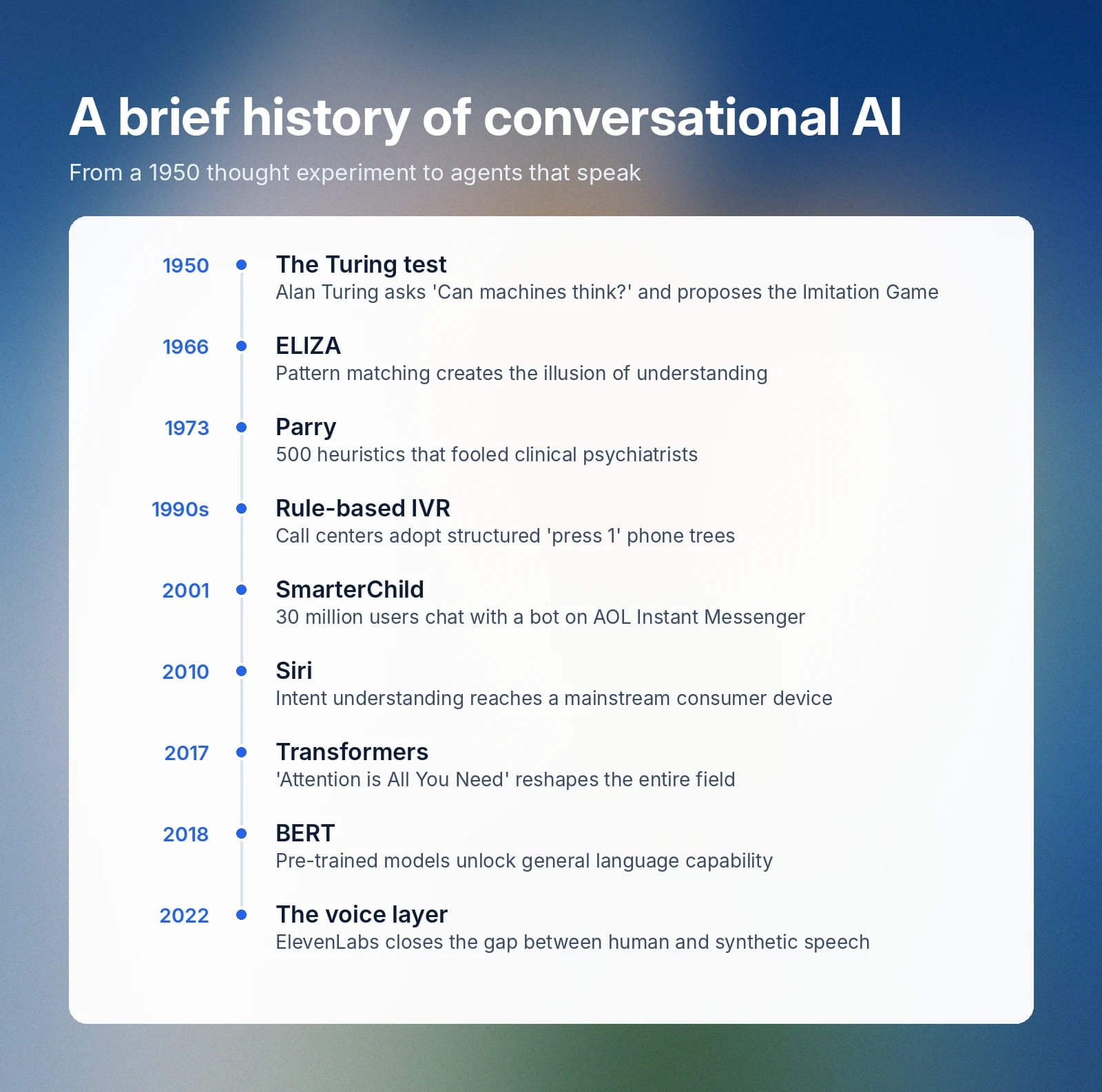
Conversational AI began with a philosophical idea. In his 1950 paper, “Computing Machinery and Intelligence”, Alan Turing opened with the question, ‘Can machines think?’. He sought to answer that question through a simulated test, The Imitation Game.
The Imitation Game involved three participants: a human evaluator, a computer, and a human test subject. The two humans would sit in different rooms, with the evaluator sending and receiving messages from both the human and the computer program. If the human evaluator was unable to tell the human and computer program chatters apart, Turing argued that the software would have demonstrated something functionally equivalent to intelligence.
Over 70 years later and the Turing test framework still serves as a foundational philosophical goalpost for every conversational system that has followed it. Yet, as the artificial intelligence that powers these agents has become more advanced, the bar has shifted significantly.
Let’s explore how scientists and mathematicians alike have used and adapted Turing’s framework over time in relation to conversational AI.
Early chatbots 1960 - 1990s
In 1966, Joseph Weizenbaum created one of the first natural language processing programs. Known as ELIZA, the software used pattern matching to give users the illusion that it was understanding their input and responding accordingly. The source code for ELIZA has never been discovered but remnants remain due to Weizenbaum’s 1966 paper in Computational Linguistics.
The most well-known ELIZA script is called ‘DOCTOR’ and aims to act as a ‘mock Rogerian psychotherapist’. Beginning the chat with ‘Is something troubling you?’, users would be prompted to respond with what was on their mind. ELIZA took each input and then reframed it into a connected question.
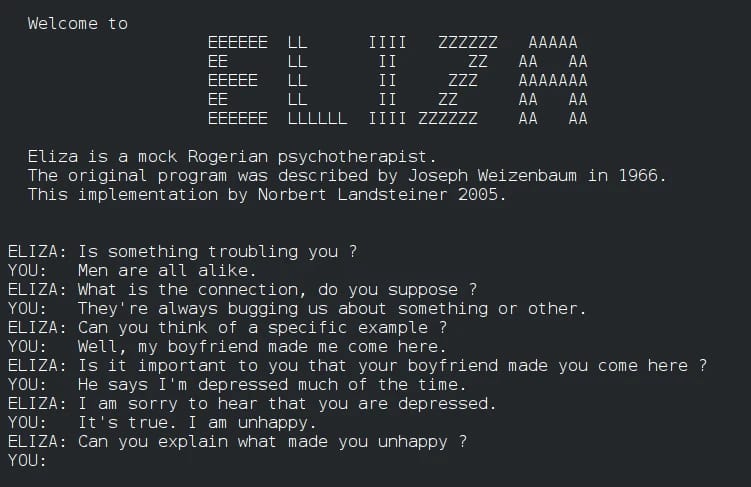
For example, if a user input ‘My work is extremely stressful’, ELIZA may respond ‘What about your work is extremely stressful?’, continuing the conversation with another prompt. Weizenbaum chose the name ELIZA as a reference to Bernard Shaw’s ‘Pygmalion’, where Eliza Doolittle is taught to refine her speech over time.
A few years later, in 1973, Kenneth Colby released Parry, a chatbot that aimed to reflect the paranoia of a mentally ill patient. Parry had over 500 heuristics that governed its responses, allowing for seemingly flexible and nuanced answers. It aimed to emulate the emotional complexity of a real psychiatrist-patient conversation.
After collecting a large volume of transcripts between Parry and licensed clinical psychiatrists, Colby discovered that experts were unable to distinguish between real patient transcripts and those that stemmed from Parry.
Rule-based systems 1990s-2000s
Although Interactive Voice Response (IVR) systems existed as early as the 1970s, they were thought expensive and overly complicated for widespread use. It was only in the late 1990s that companies invested in computer telephony integration with IVR systems to collect customer data in call centers.
IVR offers a structured approach to computer-human interaction. These systems gather information from users and then route calls to the right department or service. Even early cases of IVR provided two potential interaction methods: voice IVR using voice recognition and Dual-Tone Multi-Frequency, where you input numbers on a keyword.
In the 2000s, IVR became much more cost effective as the VoiceXML standard was widely adopted and CPU power became more accessible.
Although an evolution of the early chatbots like ELIZA and Parry, rule-based IVRs ironically seem like a step back. While they do offer a higher scope of interaction, they do so within specifically contained categories. This inflexibility removes the illusion that you’re speaking to a real human that both ELIZA and Parry were able to convey.
Any input that fell outside of the pre-designated IVR pathways would, at best, produce a non-answer and at worst break the system. Due to this, human callers would adapt their own language to speak in a way that the machine would understand. Think: “say ‘Billing’ to connect to a financial advisor.”
The foundational pillars of IVR-based conversational routing served as the foundation for many future conversational AI systems to come.
Rise of chatbots 2000s
In 2001, ActiveBuddy launched SmarterChild on AOL Instant Messenger. It was a widely distributed messenger bot that could give users weather updates, deliver recent news, or fetch sports scores. Although fairly limited functionally, SmarterChild had over 30,000,000 individual user interactions over its lifespan.
Despite its high utility, SmarterChild didn’t actually generate any revenue for the brand. Stephen Klein, the then COO and eventual CEO, still kept the feature as it showed a glimpse of the power of conversational computing.
SmarterChild was launched only a few years after A.L.I.C.E (Artificial Linguistic Internet Computer Entity) won the Loebner Prize for the first time for being the most realistic talking robot of 2000. A.L.I.C.E won the Loebner Prize three times across its lifecycle, although it was still never able to pass the Turing test.
Fast forward a decade and the first mainstream AI assistant directly integrated into a consumer device emerged. Siri was the culmination of several previous technologies, including automatic speech recognition (ASR), natural language processing (NLP), and machine learning.
Launching in 2010, Siri represented one of the earliest software systems that could understand the intent behind a question and then respond accordingly. Other launches, like Microsoft Cortana, Amazon Alexa, and Google Now were released throughout 2012-2014. Alexa is of particular note here, as the always-on in-home element of that model was an early iteration of conversational AI without a screen or touch input.
On the customer-facing side, chatbots were becoming a routine part of most enterprise websites. Chatbots could look up orders, find resources, track information, reset passwords, or deliver customers informational updates about their account. While less flexible than services like Alexa or Siri, these early chatbots performed well at specific, defined tasks.
Machine learning and NLP 2010s
Previous generations of conversational AI assistants were rule-defined, relying on carefully planned decision mapping trees and extensive curated response libraries. In the 2010s, this development model began to shift as machine learning and NLP allowed models to train on large corpuses of human responses.
A major shift in capabilities came from the rise of recurrent neural networks (RNNs) and Long Short-Term Memory (LSTM) models. These systems significantly influenced how machines processed sequential input and understood words in a sentence.
Google’s Word2Vec NLP technique also served to accelerate LLM development by mapping semantic relationships into a geometric space. This approach allowed models to estimate the relationship between words, helping with next-word generation and contextually accurate response building.
These advancements culminated in a 2017 paper, ‘Attention is All You Need’, where Google introduced Transformer architecture. Transformers use self-attention to weigh every word of an input against every other word simultaneously, making training faster and output generation far richer.
In 2018, Google released BERT (Bidirectional Encoder Representations from Transformers), an early AI model that uses Transformer architecture. It was pre-trained on internet text, allowing it to perform many downstream tasks with relatively little additional training data.
From translation and summarization to answering questions and even classifying input sentiment, by the end of the 2010s, models began to display the general capabilities of conversational AI we use today.
The voice gap
Across all these iterations of progress, a fundamental element of human-machine interaction was missing. By the 2020s, conversational AI could read input, reason, and produce extensive responses, but it couldn’t truly speak with a user. Until the past few years, the voice layer was always the missing element of full scale conversational AI.
Launched in 2022, ElevenLabs set out to close the gap between human and synthetic speech by training generative models on a richer understanding of how voices work. Beyond just phonetic deconstructions and reconstructions, these models sought to understand the emotive context of language.
Want to see it in action? Learn more about Eleven v3, ElevenLabs’ most expressive model yet, able to convey a full range of human emotions
How conversational AI works
A modern conversational AI system collaborates with users, performs a diverse array of tasks, searches through stored information, and queries external platforms for data that could help in a response. While a response may only take under a second to appear, the processes that happen in those moments chain together a sequence of tools and systems.
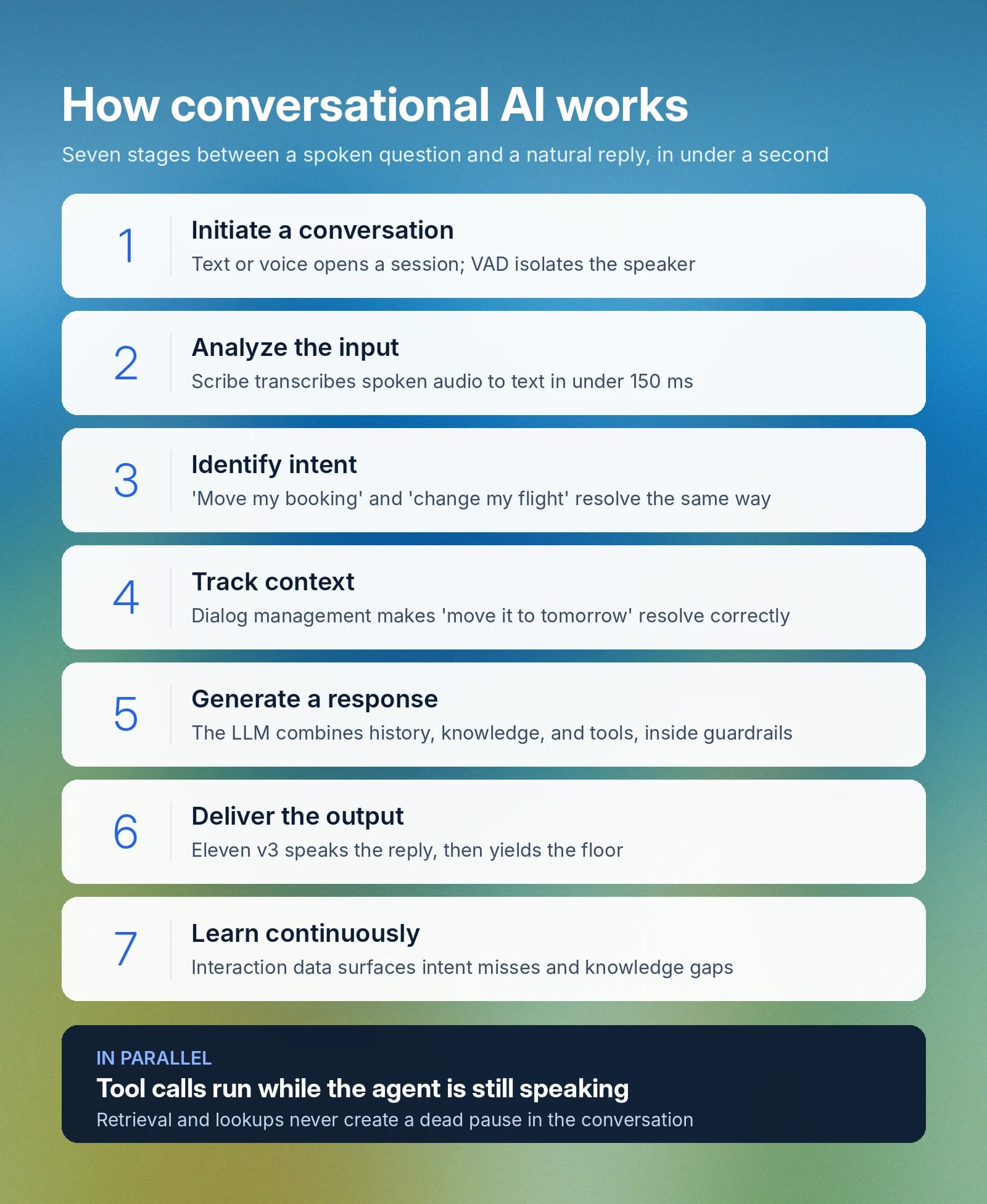
Here is how an interaction works from start to finish:
- Initiate a conversation: A user provides an input via text or voice, establishing a session with the agent. In voice-based systems, the agent activates a listening state, and Voice Activity Detection (VAD) isolates the speaker's audio from background noise.
- Analyze the input: The system converts raw text or audio into a structured representation it can use internally. For text, that means transforming the input into tokens and parsing its structure. For voice, a Speech to Text (STT) model transcribes spoken audio into text; ElevenLabs uses Scribe, its own STT model, which transcribes audio in under 150 ms.
- Identify intent: This stage determines exactly what a user wants from the interaction. Different utterances often lead to the same outcome, like two different users asking to either "move my booking" or "change my flight." Intent recognition also extracts specific information from the input, like a flight number or a date.
- Track context through dialog management: Dialog management maintains a record of core information: what has been established, what the user has said, and what still needs resolving. This layer gives the system persistent memory, so a phrase like "move it to tomorrow" resolves to "move the flight to tomorrow" from contextual clues.
- Generate a response: The large language model (LLM) assembles the conversation history, relevant documents retrieved from the knowledge base, any available tool outputs, and the system prompt, then generates a contextually appropriate response. That output is checked against guardrails before delivery to keep it within an accepted scope of topics.
- Deliver the output: The user receives a response as text on screen, as synthesized speech, or both. For voice, the response passes through a Text to Speech model; ElevenLabs uses Eleven v3 to deliver responses that sound natural rather than robotic. The agent then yields the floor and listens for the user's next turn.
- Learn and improve continuously: Production-scale systems generate enormous volumes of interaction data. Analyzing it at scale surfaces misidentified intents, low-quality responses, and knowledge gaps, pinpointing exactly where the agent should improve over time.
For text-based interactions, the process works in much the same way, just without the STT and TTS layers. The message goes directly to the LLM for processing, and the response returns as text, relying on the same underlying intelligence.
The systems working together underneath
The steps above reflect a straightforward exchange, but real conversations rarely go in a straight line. Users interrupt, change topics mid-sentence, and switch languages. To handle that nuance, conversational AI relies on a series of underlying systems working in parallel:
- LLMs: Process what the user said, decide how to respond, and determine whether any tools or actions need to be triggered.
- RAG (Retrieval-Augmented Generation): Retrieves relevant documents from your own knowledge base to ground answers in your business's content.
- STT (Speech to Text): Converts spoken audio into text so the LLM can process it.
- TTS (Text to Speech): Converts the LLM's response back into spoken audio in a preselected voice.
- Turn-taking model: Detects when a user has finished speaking so the agent knows when to respond, making the conversation feel like a natural back-and-forth.
- Guardrails: Keep the agent on script, compliant, and within the boundaries you set, regardless of where the conversation goes.
- VAD (Voice Activity Detection): Separates the primary speaker's audio from background noise, improving transcription accuracy and filtering out sounds that aren't part of the conversation.
- Voicemail detection: Identifies when a call has reached voicemail rather than a live person, so the agent responds appropriately.
Not every part of the pipeline runs in strict sequence, either. An agent can query a database or check an order status through parallel tool calls while it is still speaking, so retrieval never creates a dead pause in the conversation.
Turn taking: Making conversational AI feel more human
Turn taking deserves a closer look, because it is the layer that most separates a natural-feeling agent from a rigid one.
Modern turn-taking systems manage that flow through several mechanisms:
- Speculative turn taking: Rather than waiting for a fixed amount of silence, the system uses the meaning of what a user has said to intuit when a turn is actually over. That prevents the agent from jumping in during a natural mid-sentence pause.
- Interruption handling: When a user starts speaking mid-response, the agent stops, clears its in-progress reply, and generates a fresh one based on the new input, rather than talking over the caller.
- Interruption ignore terms: Short backchannels like "mm-hmm" or "okay" can be configured to pass through without triggering a full interruption, so the agent doesn't lose its place every time a caller signals they are listening.
- Soft timeout: If the LLM takes longer than expected to generate a response, the agent speaks a brief filler phrase like "Let me think…" instead of leaving awkward silence, maintaining natural conversational flow.
Across all of this, the goal is the same: responses that are fast, natural-sounding, and helpful enough that the customer never feels like they're talking to a machine.
Key components of conversational AI
Conversational AI is a stack of different technologies and systems that work together to help the end user. Each of these components has a slightly different responsibility that contributes to the final product.
Here are the main components of a conversational AI system and what they add to the equation.
Large language models (LLMs)
Large language models are the reasoning core of a modern conversational AI system. An LLM interprets what the user said, assembles conversation history, retrieved documents, and tool outputs, decides what action to take, and generates the response. In doing so, it absorbs much of what previously required separate intent recognition, dialog management, and NLG engines.
Speech to Text and Text to Speech
For voice interactions, two speech models bookend the pipeline. A Speech to Text model transcribes the user's spoken audio into text the LLM can process, while a Text to Speech model converts the response back into spoken audio. The expressiveness of the Text to Speech model largely determines whether an agent sounds human or robotic, which is why ElevenAgents pairs Scribe for transcription with Eleven v3 for delivery.
Turn-taking model
The turn-taking model manages the real-time rhythm of a conversation: when to listen, when to respond, and when to yield. It judges whether a user's turn has actually ended from the meaning of their speech, handles interruptions, and lets backchannels pass through without derailing the response. Without it, even a perfectly reasoned answer arrives at the wrong moment.
Natural Language Processing
Natural language processing is a subsection of artificial intelligence that allows computers to process and understand human language. It has several sub processes, including tokenization, parsing, semantic analysis, named entity recognition that transform raw input text into something that computers can work with.
Intent recognition
Intent recognition is an NLP technique that attempts to decode human language, understanding the meaning behind different semantic choices. Typically, researchers train intent recognition engines on an enormous volume of labeled examples. These train models to map inputs to intent categories, even when a single message has more than one requirement.
Dialog management
Dialog management is a system that organizes and plans the flow of a conversation over time. It understands what has been said and what information the system still requires to complete a request, managing branching conversation logic to determine when a conversation is ‘complete’. This component is also involved in managing a system’s response if the user says something unexpected.
Natural Language Generation (NLG)
Natural language generation is a component within conversational AI that handles linguistic expression. It transforms model outputs into human readable language, often using template-based systems with a variable internal structure. The quality of this component can vary widely, with more advanced systems generating responses completely from scratch.
Machine learning
Machine learning offers conversational AI systems the ability to improve over time, rather than simply operating at a baseline level. ML models learn from previous examples, adjusting their internal parameters to better accommodate for user inputs.
Scale is vital here, as the iterative improvements that ML makes allows machines to support the complexity of human language far beyond what a rule-based system ever could.
Active learning
Active learning is a component within machine learning that selects specific examples that a system is least confident on and flags them for human review. By getting a human to review the labeling for edge use cases, ML models allow a researcher to give impactful feedback on model performance.
Active learning significantly accelerates model performance as a model will spend less time improving equally and more time focusing on its problem areas.
Document cognition
Every AI system is grounded in a wide corpus of contextual information. From internal knowledge bases to policy documents and training manuals, this is a wealth of content to pull from. Connecting live archives of information to a model allows it to query these documents to give users a real-time answer, rather than relying on facts it learned during the training process.
Document cognition is an important element for any conversational AI system that users or employees query with specific questions.
Types of conversational AI technology
As a broad topic, there are several technological deployments that all fall into the conversational AI bucket. Especially if you’re an enterprise looking to deploy your own agent, understanding how the types differ can help product development much simpler.
Let’s review some of the main types of conversational AI technology.
AI chatbots
AI chatbots primarily operate on websites and within mobile applications, allowing users to interact with them to surface information. Some AI chatbots have deep integration into internal FAQs and documents that allows them to handle complex, multi-turn interactions.
Quality variance in an AI chatbot mainly comes from its ability to handle more complex user inquiries. Especially if the user is not themselves sure how to complete a request, a model needs to ingest an input, break it down into the underlying requirements, and source relevant documents to solve the problem.
Voice assistants
Voice assistants layer in speech recognition and speech synthesis systems that allow users to interact with them through audio. In some use cases where typing is difficult, a voice assistant is a much more convenient option for conversation.
Quality in voice assistants varies enormously, with the full spectrum of human-like voices to robotic, stagnated audio samples defining how a user’s experience feels. Even if the underlying response is effective, a mechanical delivery may be offputting for the user, leading to them disengaging.
Interactive Voice Response
As touched on earlier, IVR is an early manual navigation system that lets users select from a pre-defined hierarchy of options. AI-powered versions of IVR allow users to use natural language to explain their needs, with the system connecting that input to a conversational pathway.
If early form IVR looked like ‘press 3 for billing’, AI-based IVR looks like ‘please explain why you’re calling.’
AI agents
AI agents are the most advanced iteration of conversational AI technology. They are capable of executing multi-step processes, using connected tools automatically, making decisions even when faced with ambiguity, and operating end-to-end workflows.
Whereas many other iterations of this technology has been human-led, AI agents take a simple human response and can plan out entire systems in response. They circle back to contact a user where there is a decision that requires human input.
The flexibility and power of AI agents are two of the main reasons businesses around the world are integrating them into their workflows.
What real-life use cases does conversational AI have?
Businesses can now use conversational AI for conversations that go beyond simple FAQ answers. With platforms like ElevenAgents, voice and chat agents can use approved knowledge, follow a defined workflow, and connect to existing tools like CRM, ticketing, payment, and telephony systems to move the conversation toward resolution.
The list below, while not exhaustive, gives you an idea of some of the ways conversational AI can be used.
This list is just a starting point. Outside of these common applications, businesses are also using conversational AI for things like employee training, internal helpdesks, and onboarding. New use cases continue to emerge as teams test voice and chat agents across more of their operations.
What benefits are companies seeing from adopting conversational AI?
The benefits of conversational AI are best understood through what it makes possible in practice. Across industries, businesses are using conversational AI to handle work that was previously too time-consuming, too repetitive, or too costly to scale. Here is a closer look at how that plays out in real-world scenarios.
Resolves customer support inquiries faster
High-volume support queues are a natural fit for conversational AI because many customer questions need fast and accurate answers. Conversational AI agents can identify the customer’s issue, answer from approved knowledge sources, and pass the conversation to a human representative when complex or sensitive cases are detected.
Klarna shows what this looks like in customer support. It uses voice AI as first-line phone support for 35 million US customers, resolving queries up to ten times faster than traditional methods.
Accelerates sales follow-up and lead qualification
Sales and business development teams use conversational AI to respond faster to inbound leads and keep outbound follow-up consistent. Agents can qualify inbound leads, ask screening questions, collect account details, and book meetings. For outbound workflows, agents can call prospects and log outcomes without losing conversation history.
In mortgage lending, Better deploys an AI voice assistant to handle repetitive qualification calls, run live eligibility checks, and execute rate locks over the phone, doubling its lead-to-lock conversion rate.
Automates high-volume outbound conversations
High-volume outbound conversations require consistency, clear records, and a reliable way to capture outcomes. This includes collections calls, payment reminders, and account reactivation. Agents can be used to securely authenticate callers, explain outstanding balances, deliver direct payment links, and log structured outcomes into internal accounting systems.
Razorpay uses outbound voice agents to re-engage dormant accounts and identify why they stopped transacting. By automating these win-back conversations, they've reached connection rates that match the performance of their human call centers.
Streamlines appointment scheduling and intake
Appointment scheduling and intake often involve repeated outreach, eligibility checks, and booking steps. Agents can proactively reach out to members, check eligibility, and schedule appointments directly over the phone or via chat.
Everlywell uses multilingual voice agents to handle outreach for health screenings, resulting in 3.5x higher conversion rates among Spanish-speaking members compared to traditional automated phone systems.
Reduces missed calls and improves front desk coverage
Businesses with phone-based reception needs use conversational AI to answer routine inbound calls and reduce missed inquiries. This includes clinics, local service providers, public offices, and other organizations where callers expect quick routing or basic information. Agents answer incoming lines, route callers to the correct department, take accurate messages, and handle after-hours appointment requests so customers get a faster response.
The City of Midland, Texas, uses an AI "civic concierge" to handle overflow calls and provide instant, multilingual assistance to residents 24/7.
What to look for in a conversational AI platform
Evaluate a conversational AI platform for production readiness, not just demo quality. A short test conversation can sound impressive, but real deployments need to handle customer variation, system integrations, compliance requirements, and updates over time.
Look for these capabilities when evaluating platforms:
- Voice quality and latency: Sounds natural and responds quickly enough to keep a live conversation moving. A robotic voice or delayed response can make customers lose trust early in the interaction.
- Language support: Detects and switches languages during a conversation while maintaining natural voice quality and accurate responses.
- Integration depth: Reads from and writes back to systems like your CRM, ticketing platform, telephony stack, scheduling tools, and payment systems.
- Security and compliance: Supports the certifications, privacy controls, and deployment requirements your industry needs, such as SOC 2, HIPAA, GDPR, PCI DSS, or regional data residency.
- Ease of deployment and iteration: Allows non-technical teams to update knowledge, adjust responses, and test changes without waiting on engineering for every edit.
- Support model: Offers responsive support during setup and after launch, especially when troubleshooting production behavior, scaling to a new market, or adding a new use case.
- Guardrails and testing: Lets teams define what the agent can say, what actions it can take, when it should escalate, and how conversations are tested before launch.
- Knowledge base controls: Grounds answers in approved company content and makes that content easy to update over time.
For technical teams, the orchestration engine is also worth evaluating because it determines how models, tools, workflows, and business rules work together during a conversation.
Create your first conversational AI with ElevenLabs
Building a conversational AI agent with ElevenAgents starts with the web platform or the API. Most agents can be up and running in under an hour, while more complex deployments - those involving in-depth integrations, approval workflows, or custom requirements - may take a few days.
Whether you're ready to build now or still figuring out the right approach, there are a few ways to get started. Talk to our sales team if you're planning a more demanding deployment and want help scoping it out, or get started on the platform today and have an agent running in minutes. If you want to see the process before diving in, this video walkthrough covers how to build your first agent step by step.
