How Scribe v2 Realtime Works
- Written by
- Tadas Petra
- Published
- Last updated
ListenListen to this article
Scribe v2 Realtime is an extremely fast Speech to Text model, which can be used for live transcriptions. The combination of speed and quality enables use cases that weren't possible before.
For example, we were able to build this real-time language translator using Scribe v2 Realtime and the Chrome Translator API.
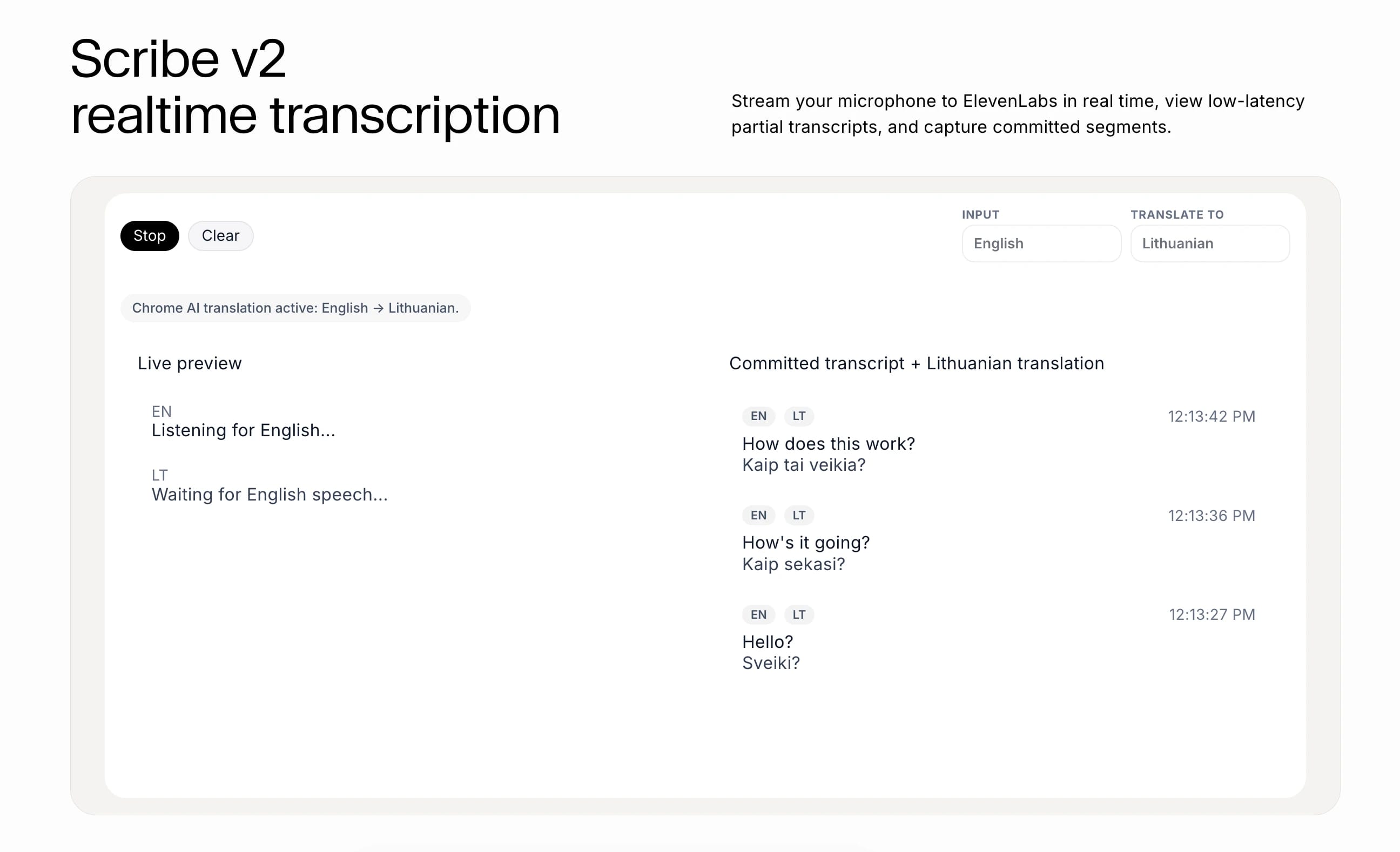
If you want the step-by-step tutorial for this demo, you can find that here. This guide will focus on high level understanding of Scribe v2 Realtime and how it works.
The Model
ElevenLabs offers two models for transcribing audio: Scribe v2 and Scribe v2 Realtime.
Scribe v2 is a great choice for transcription that can be asynchronous, whereas Scribe v2 Realtime is used when you need the transcription to happen live.
For a live language translation application, Scribe v2 Realtime is the obvious choice.
The API
To use this model, you need to use the Speech to Text API. There are two steps you need to execute to get started:
- Initialize a Scribe instance
- Connect to the API
Depending on where you are calling this API, you will need to initialize it differently. If you are calling it server-side, you can initialize directly with the API key and then use that instance to connect to Scribe v2 Realtime.
But, exposing an API key to the client is a big security risk. So, if you are streaming client-side, you will need to initialize with a single-use token.
This token needs to be generated server-side to protect the API key.
Since we are building a React application, we will use the token approach. This token is passed during the connection phase, so creating a Scribe instance becomes trivial.
Connecting to Scribe v2 Realtime
Once you have initialized appropriately, you can connect to the Scribe v2 Realtime. For the React language translation project, we used client-side streaming, and thus needed a single use token from the backend. This token needs to be generated and passed every time we connect to the API.
Commit Strategy
When working with the Scribe v2 Realtime, there are two types of transcripts: partial and committed.
The partial transcripts are the "live transcripts". This transcription happens via websocket and is returned to you as you speak. So if you say "The cat is ...", you will see those words streamed in real-time.
The other type of transcript is a committed transcript. Transcriptions work in segments. When and how you choose to commit your transcriptions will define how your transcript is segmented. For this, you need to define a commit strategy.
There are two options for commit strategies. The first option is manual, which gives you full control to decide when the transcripts get committed. The best practice for this is to do it during silences or other logical points, like a turn model.
The other option is to let Scribe v2 Realtime determine quality segments on its own using Voice Activity Detection (VAD). This approach automatically detects speech and silence segments. When a silence threshold is reached, the transcription engine will commit the transcript segment automatically.
Why do you even need a commit strategy?
As you are speaking, Scribe v2 Realtime is transcribing each word. So if you say "I scream..." this can be recognized as "Ice cream...". But when you have the full context of the segment "I scream every time I see a spider in the bathroom," the output is more accurate.
So the partial transcripts can be shown in real time, and the committed transcripts can be a more accurate transcription of the conversation history.
Display Transcriptions
Once you are connected to Scribe v2 Realtime, the transcription is happening. You can get access to the transcripts using the partialTranscript and committedTranscripts properties.
The partialTranscript is the real-time transcript of the current segment that is being transcribed. The committedTranscript is the conversation history, and it is a list of segments that have been committed while connected to Scribe v2 Realtime.
Translate with AI
That's all you need to do to get real-time transcripts of your conversations. Now, you can dress this app up with a nice UI or even add more features like live language translation.
To create the real-time language translator from the demo, you pass the transcripts to the Chrome AI Translator API and display the output in real time.
Start Building
Thank you for reading! Sign up to ElevenLabs and start building your applications!

Tadas Petra is a Developer Relations Engineer helping developers build with ElevenLabs product suite. He is also the founder of Hungrimind, a developer education platform. Previously, he was a Lead Developer Advocate at Agora and an instructor at Zero To Mastery.

.jpg&w=3840&q=80)