Webinar Recap: Give Your Text Chatbot a Voice That Sounds Human
- Published
- Last updated
ListenListen to this article
Chat agents have become a default part of the enterprise software stack. Most companies have one, or are building one. What fewer have figured out is what happens when a user would rather just talk.
Voice changes the interaction in ways that matter beyond convenience. Users express frustration, urgency, and confusion through tone in ways that text strips out entirely. A customer who types "my order hasn't arrived" and a customer who says it with audible anxiety are sending different signals - and the agent that can only read the transcript is only working with half the information.
The question most teams are now asking isn't whether to add voice, but how to do it without rebuilding everything that already works.
In Live Workshop: Give Your Text Chatbot a Voice That Sounds Human, Paul Asjes (Developer Experience), Bhargavi Bhatt (Customer Experience), and Fergal Burnett (Product Marketing, ElevenAPI) walked through the technical realities of adding voice to an existing agent and what a working integration actually looks like.
Why building with voice is harder than it looks
One of the core challenges is turn-taking. Humans know when someone has finished speaking because of intonation, rhythm, and context. However, voice activity detection (the standard approach) only detects silence.
The result often is a system that treats every pause as an invitation to speak: one that interrupts, cuts off mid-thought, and responds to natural hesitations as if they were completed sentences.
It's technically functional and conversationally broken.
Context is the other half of the problem. Passing conversation history to an LLM at each turn is necessary but not sufficient. The same words carry different meaning depending on how they're delivered - "I'm fine" said with relief and "I'm fine" said with frustration are the same transcript, different interaction. A voice system that ignores that dimension will always sound slightly off, regardless of how strong the individual models are.
There's also the engineering overhead. Teams that own their own voice orchestration end up maintaining turn-taking logic, interruption handling, and latency profiling as ongoing work. It’s not a one-time build.
How to add voice to an existing agent
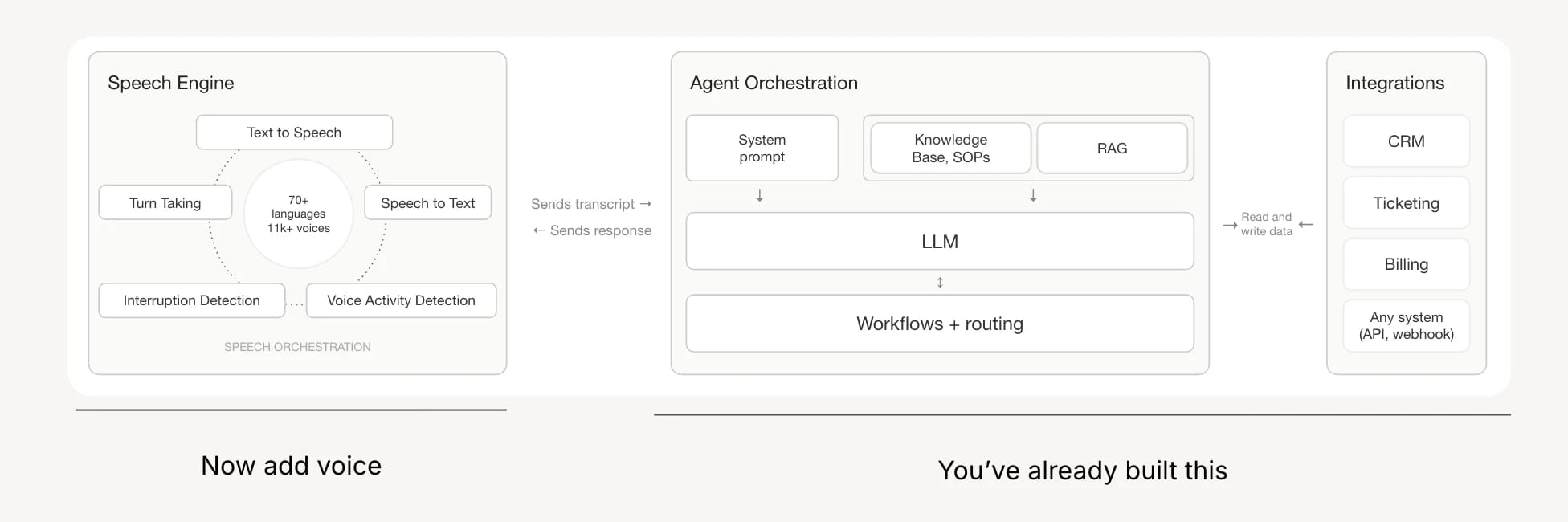
The cleanest approach is a dual WebSocket architecture.
- One connection runs between the client and the ElevenLabs API and another between your server and the ElevenLabs API
- User speaks into their microphone, audio is sent to the ElevenLabs API where it is transcribed and sent to your server
- Your server provides the entire conversation history it gets from the ElevenLabs API to the LLM, and the streamed response goes back for audio synthesis
- This can begin before the LLM has finished generating - keeping first-byte latency low
The key integration point is the onTranscript method, which fires at the end of each turn and passes the full conversation history to the LLM.
A contextualUpdate at session start carries over whatever happened in the text portion of the conversation before the user switched to voice - which is what allows a single agent to work across both modalities without losing context.
A few things worth keeping in mind when building:
- LLM choice matters more in voice than in chat. Deep reasoning models introduce pauses that register as unnatural hesitation in audio even if the response quality is higher. For real-time voice, faster models almost always win on perceived quality.
- WebRTC over WebSockets for audio. WebRTC comes with built-in echo and noise cancellation, which becomes especially important on mobile or in noisy environments. Using WebSockets for audio transport means handling that yourself.
- Don't ask users to select a language. It breaks conversational flow. Detecting language from the first few seconds of speech and locking it in is a better pattern - and allows graceful switching without requiring the user to do anything.
- Separate your turn-taking model from your LLM. Using the LLM to decide when a user has finished speaking adds latency and cost on every turn. A dedicated turn-taking model handles this faster and more accurately, and it's worth treating it as a distinct component in the architecture.
How much infrastructure to own
The right answer depends on what already exists. If you have a working chat agent, adding a voice layer on top (keeping your LLM, orchestration, and business logic intact) is usually the fastest path and the lowest risk.
You're not rebuilding anything. You're adding an audio interface to something that already works.
If requirements extend to telephony, deployment channel management, built-in testing, and analytics, handing more of the stack off to a voice agent platform makes sense. The two approaches aren't mutually exclusive - teams can start with a lightweight voice layer and layer in platform capabilities as the use case matures.
Demo: Adding voice to an existing chatbot
This demo walks through a user who is mid-conversation with a text-based travel planning chatbot, asking for neighbourhood and food recommendations for a trip to Japan.
What we covered:
- The chatbot was extended with a voice layer without any changes to the underlying agent.
- The user switched from typing to speaking mid-conversation - the agent retained full context across both modalities.
- The user spoke in Dutch; the agent detected the language shift automatically
- When the agent was interrupted and asked to switch back to English mid-sentence, it did - and finished the response with a slight Dutch accent, unprompted.
- Throughout the conversation, interruption detection allowed the user to speak over the agent naturally without the agent finishing its turn.
Why it matters:
The demo wasn't showing a purpose-built voice agent. It was showing a text agent that already worked, with a voice layer dropped on top. The context handling, language detection, and interruption behaviour all came from the voice layer - the underlying text agent was unchanged.
Watch the full session
Watch the full webinar here.
.webp&w=3840&q=80)

Paul is on the Developer Growth team at ElevenLabs, based in Valencia, Spain, where he works as a Developer Experience Engineer focused on advocacy and tooling for the platform. Before ElevenLabs, he ran Developer Relations at Stripe, did DX at WorkOS, and spent years building full-stack web applications and developer tooling.