Processing Images and Documents in ElevenAgents
- Written by
- Francesca Peñaranda Roy
- Published
- Last updated
ListenListen to this article
A site supervisor spots a materials shortage on a job site. He photographs it, sends the picture to the procurement agent on WhatsApp, and confirms the delivery address by voice. The agent processes the photo, identifies what is missing, and places a rush order, all in one conversation. Enterprise workflows regularly carry context that words alone cannot. The information needed to resolve a request might be inputted as a photo of a damaged item or a PDF of a policy. Passing that directly to the agent compresses the conversation and speeds up resolution. When a customer can show rather than describe, the agent troubleshoots faster without asking them to switch channels. Rohlik, one of Europe's largest online grocery platforms, runs its agent across phone, web, app, and WhatsApp in six languages and resolves 90% of customer inquiries automatically. Multimodal input extends that same resolution rate to the moments where a customer needs to show, not tell. ElevenAgents treats files as first-class inputs on the same agent already handling voice, WhatsApp, web, and mobile. Files reach the underlying model as native messages, so a single agent handles every input type within one conversation thread.
This post covers what multimodality means on the platform, how files move from a customer's device into the model's context, what each channel supports, and how to carry context across sessions when a customer returns.
Channels and Inputs
ElevenAgents is built around the channels enterprises already use to reach customers: web and mobile applications, their support platform, phone, SMS, email, WhatsApp and others. The agent configuration (prompt, model, tools, knowledge base, and voice) is defined once and shared across all channels. Two things vary per channel: the transport layer and the input types it supports.Web and mobile applications connect through the embeddable widget, one of the SDKs, or the Agents WebSocket. Telephony conversations connect through native Twilio, SIP trunking or native websocket-based integrations. SMS connects through the native Twilio integration. WhatsApp connects by importing a WhatsApp Business account and enabling the integration on the agent. A single agent can be deployed across all of these transports simultaneously.
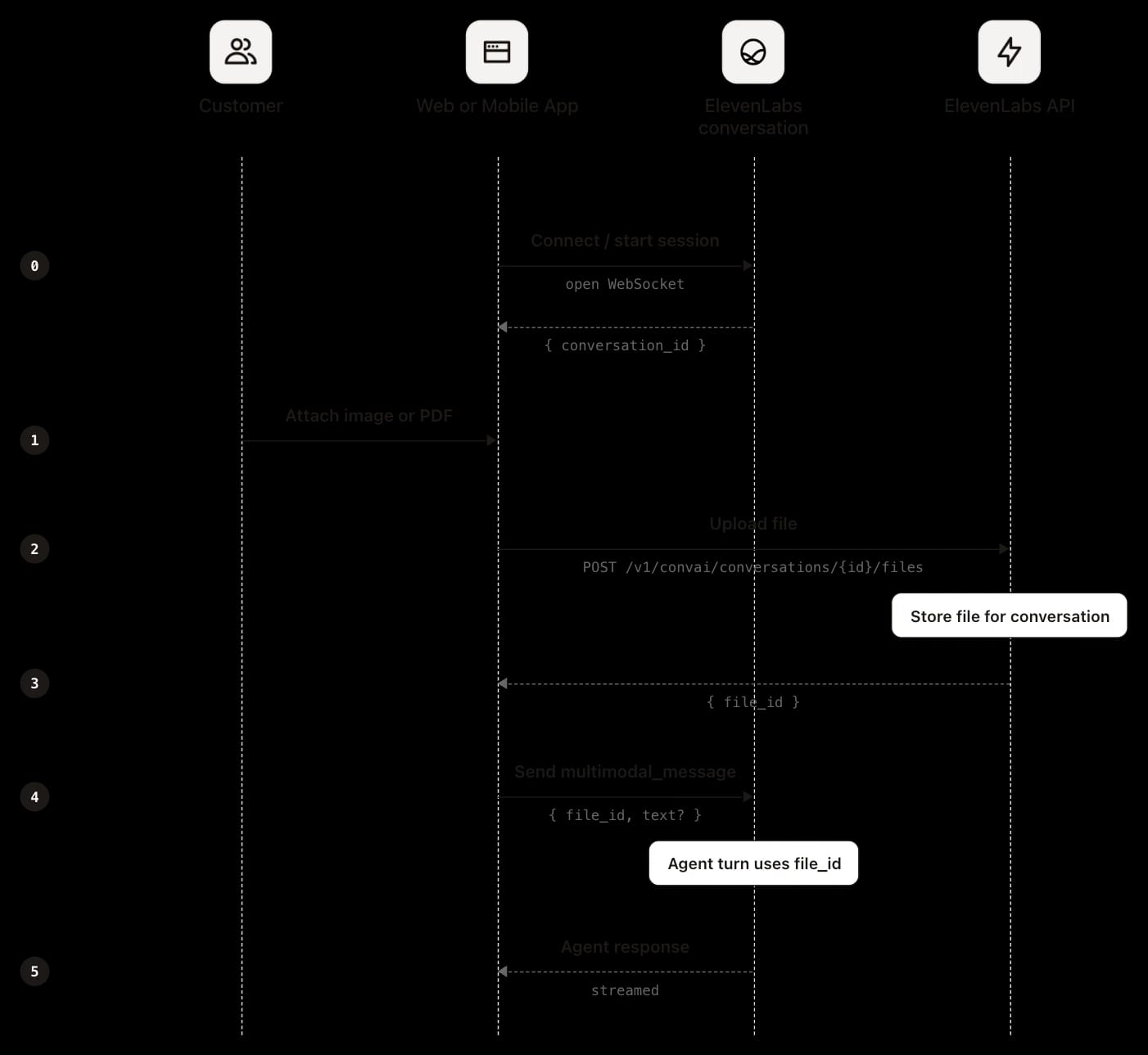
File inputs (images and PDFs) are currently supported on web, mobile, and WhatsApp. With input handling as type-driven, not channel-driven: a photo and a voice note arriving on the same WhatsApp session are processed through entirely different pipelines before reaching the model. Regardless of channel or input type, all inputs converge on the same pre-processing layer before being passed to the model as native context, where they follow one of two paths.
Input representation: file-backed vs. inline
Regardless of input type or channel, the platform normalizes every input into one of two internal representations before passing it to the model. That classification determines how the input is encoded in the model's context window and what your integration needs to handle upstream.
File-backed inputs
Images and PDFs are passed to the model as native file references, not text summaries. The platform stores the file, assigns it a file_id, and binds that identifier to the user's turn. A vision-capable or document-capable model receives the raw file in its context window rather than a derived representation.The integration requirement is straightforward: capture the file_id returned by the upload endpoint and include it in the message payload. If the message is sent without the file_id, the model has no reference to the file regardless of whether the upload succeeded. File storage is scoped to the conversation. Meaning anything that needs to persist beyond the session (the file itself, extracted fields, or a structured output) must be explicitly handled by your integration. The mechanism for doing that varies by channel and use case
Inline
The second representation is inline and covers everything else. Voice and voice notes are transcribed. Typed text, transcribed speech, WhatsApp location pins, and contact cards are all normalized to plain text in the transcript before the model runs. A location pin becomes coordinates and an optional address; a contact becomes a name and a phone number. None of these are stored as files or produce a file reference. These inputs live directly in the transcript.
Why the distinction matters
The split determines where your integration effort goes. The inline path requires nothing from you during the conversation: the platform normalizes these inputs to text, and they live directly in the transcript. The file-backed path has a distinct integration surface. Rather than converting file content to text before the model runs, the orchestrator passes the raw file directly into the model's context window. The model operates on the file’s structure rather than a derived text representation or description, preserving spatial relationships, visual layout, and document formatting that would otherwise be lost. With that distinction in mind, the rest of this post covers the implementation: how to configure the agent, how files move through each channel, and how to carry context across sessions.
Setting Up Multimodal Input
Enabling multimodal input starts with the same agent configuration across web, mobile, and WhatsApp. From there, how a file gets uploaded and how you retrieve it afterwards depends on the channel.
Enabling file input
Two settings must be in place on the agent configuration before file input works. First, set conversation_config.conversation.file_input.enabled to True, either via the API at agent creation or under Settings > Advanced Settings > File Input in the dashboard. Second, the agent must be configured with a vision and document-capable model. The flag alone does nothing if the underlying model cannot process image or document blocks; both must be set before testing.
SDK and WebSocket
File input on web or mobile requires a custom chat client built on the SDK or a raw Agents websocket connection. The flow is identical across all three, and sequencing is a hard requirement: the file must be uploaded before the message is sent, because the message payload references the identifier the upload returns.
Upload the file first:
See the file upload for the full request and response:
Then send a message over the connection that references the returned file_id:
The SDKs abstract the upload and reference steps into a single call, handling the file identifier internally. See the multimodal_message spec for the full message format. Since your application performs the upload, the file is already in hand at that point. If you only need it for the current conversation, uploading it and referencing the identifier is sufficient. If you need to persist it beyond the session, the cleanest approach is to store it from your application at upload time. It can also be retrieved afterwards through the post-call webhook, covered in the context across sessions section.
On WhatsApp, your application plays no part in the upload. When a customer sends an image, document, or sticker, the file goes to Meta's infrastructure first. Meta notifies ElevenLabs through the WhatsApp Business API webhook, and ElevenLabs uses your connected WhatsApp Business account credentials to download the file server-to-server, stores its own copy, and attaches it to the conversation the same way as a web or SDK upload. The agent receives it as multimodal input and the transcript records a file_input event.
Since your application never handles the upload, it never holds the file directly. There is no at-upload-time route to capture it as there is on web and mobile. The file reaches your system through the file_url in the post-call webhook, which points to ElevenLabs' stored copy. Meta's media URL is used only for ingestion and is never exposed externally. Retrieval mechanics, including download timing constraints, are covered in the context across sessions section.
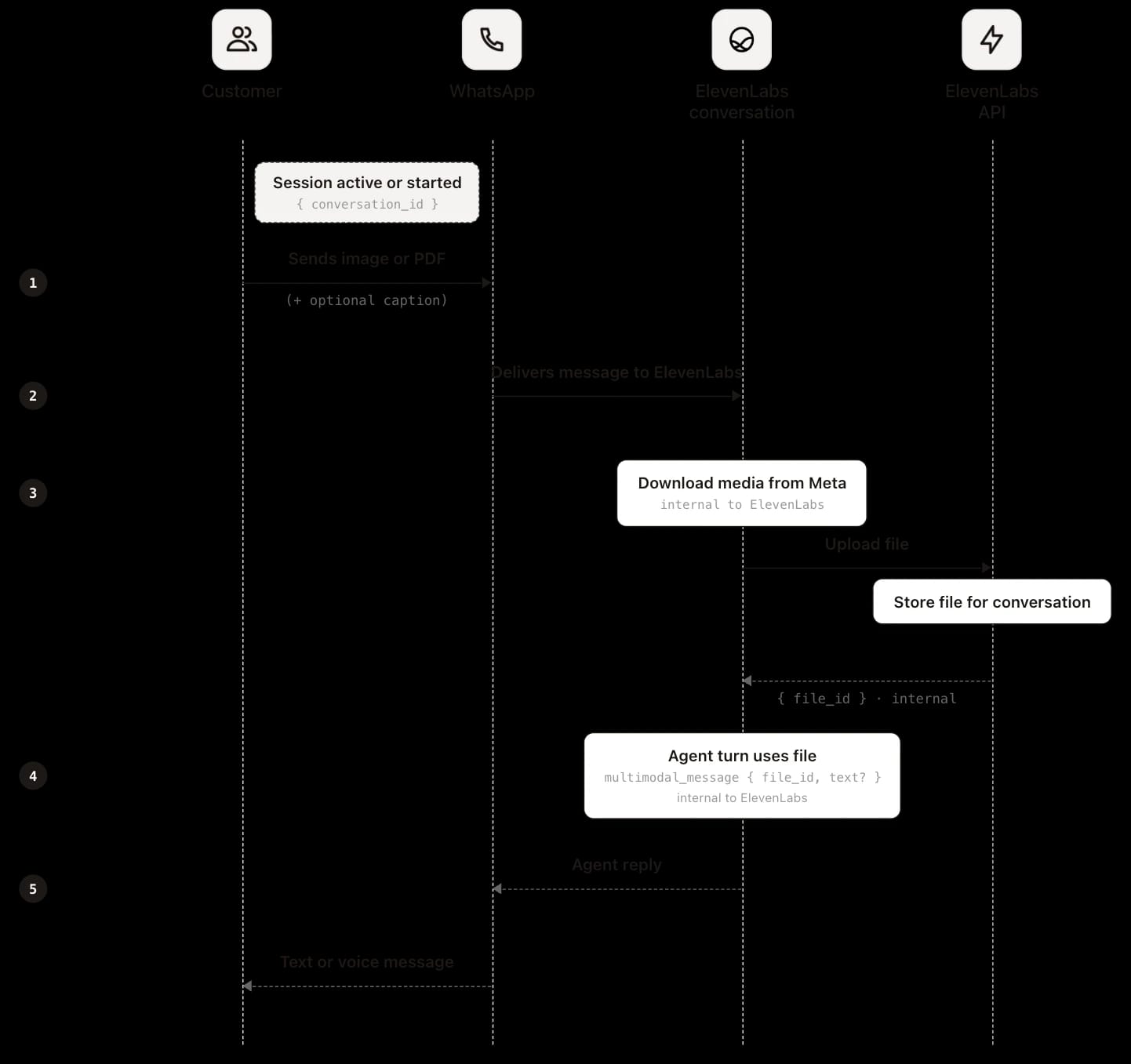
On WhatsApp, the customer sends the file in chat. ElevenLabs retrieves it from Meta, stores it, and attaches the file_id on the platform side. This means there is no client-side upload step. Unlike web and mobile, your application does not call POST /v1/convai/conversations/{id}/files or send multimodal_message over WebSocket. ElevenLabs handles delivery, storage, and the agent turn.
Carrying context across sessions
ElevenAgents processes each conversation independently. Nothing a customer sends, and nothing the agent resolves during a conversation, carries into the next one automatically. The agent hands your system everything from a completed conversation through the post-call webhook, but the memory that spans conversations lives outside the ElevenLabs boundary. Continuity is yours to own.
That architectural boundary is worth designing around deliberately. The conversations where multimodal input matters most (a customer photographing a damaged item, uploading a policy document, sharing a location) are often not resolved in a single session. A customer who sends a photo of a broken part and schedules a callback expects the agent to remember the photo when they call back. Without explicit context management, the agent starts from zero every time and the customer repeats themselves. The pattern that addresses this has two halves. When a conversation ends, the post-call webhook delivers the transcript, analysis results, any structured data collection fields you have defined, and file URLs for any files that passed through the session. Your backend stores what is relevant against a durable customer identifier such as a phone number, user ID, or account key. When that customer returns, your application injects the stored context at session start through dynamic variables, so the agent begins the conversation with what it already knows. For file-backed inputs specifically, the file URL in the webhook payload points to ElevenLabs' stored copy and is the only retrieval path after the conversation closes. The platform's copy is scoped to the session, so if you need the file in a future conversation or in your own systems, you must download it from the webhook payload before that window closes. How quickly you need to act depends on the retention policy, which is covered in the reference documentation. The webhook carries state out. Dynamic variables carry it back in. Everything in between is your system's responsibility, and that is where the real integration work sits for any use case where customers return, escalate, or pick up mid-resolution.
Injecting context depends on the channel
The injection mechanism varies by channel, but the underlying pattern is consistent. For telephony, ElevenLabs calls your server before the call connects, giving you the opportunity to look up the caller by number and return dynamic variables such as name, order ID, or account tier before the agent speaks. On WhatsApp, a pre-message webhook fires on each inbound message, letting you enrich it with identity and business context from your systems before the agent processes it. Otherwise, the same fields are passed in conversation_initiation_client_data when the session opens. ElevenAgents does not merge sessions across channels into a single thread. A WhatsApp conversation and a web conversation are separate sessions even if they involve the same customer. But because the webhook output and dynamic variable injection work identically across all channels, a single persistence layer handles all of them. Build it once and it covers every channel the agent runs on. Context injection handles text-shaped data: names, order IDs, summaries, structured fields. Files are a separate case and require a different approach.
Carrying files forward
Files are scoped to one conversation and do not persist automatically. What to carry forward depends on whether the next conversation needs the information from a file or the file itself. In most cases, this only needs the information. The agent interprets an uploaded file on the turn it arrives but does not automatically write that interpretation anywhere durable. The structured output comes from the post-call data: the transcript, transcript summary, and any data collection results fields you define. If a customer sends a photo of a cracked door seal and returns a week later to follow up on the claim, the agent does not need the photo again. It needs to know the claim concerns a cracked door seal. You extract that from the post-call data, store it against the customer identifier, and inject it as a dynamic variable when they return. A short summary or a few structured fields is typically sufficient.
When you do need the original file, for your own records, compliance, or downstream systems, the post-call webhook is the retrieval path. Each uploaded file appears in the transcript as a file_input event with a signed file URL. That URL is valid for fifteen minutes, so download and store the file when the webhook arrives rather than deferring it. If you miss that window while the conversation still exists, the GET conversation API reissues fresh URLs as a fallback. Plan for file_input to be absent in some cases such as zero-retention mode, rather than assuming every file-backed turn carries a URL.
That covers the full lifecycle: a file enters the session, the model operates on it natively, structured output leaves through the webhook, and your persistence layer decides what the agent knows next time.
Conclusion
The same agent configuration accepts images and PDFs across web, mobile, and WhatsApp without a separate build per channel. Files are normalized, bound to the turn, and passed to the model as native blocks rather than text summaries, so spatial layout, visual structure, and document formatting reach the model intact. Context across sessions follows the same pattern on every channel: the post-call webhook carries state out, dynamic variables carry it back in.
If you are building on ElevenLabs Agents and want your agent to work from images and documents alongside voice and text, enable multimodal input and let us know what you think.
.webp&w=3840&q=80)
Francesca is on the Forward Deployed Engineering team, helping customers integrate ElevenLabs Agents into their workflows. Before ElevenLabs, she was a Forward Deployed AI Engineer in healthcare, automating chart reviews, and prior to that she was building technical solutions for energy traders.