Text to Speech API integration: streaming, batching, retries
- Published
- Last updated
ListenListen to this article
Integrating a Text to Speech API is simple… that is, after a few concrete decisions: which transfer mode to use, how to pick a model and output format, how to stream, how to push high volume through without exceeding your concurrency limit, how to cache and retry so you never pay to render the same audio twice, and how to benchmark time-to-first-byte against another provider.
To help you with Text to Speech API integration, we’ve broken down every single one of these architectural decisions and what to do. This guide will help you integrate the ElevenLabs Text to Speech API and scale, with code snippets that you can paste into production to get things moving.
For a comprehensive background on the concepts referenced here, see our guides on understanding audio streaming, optimizing latency, and the ElevenLabs model overview.
Summary
- There is one ElevenLabs Text to Speech API endpoint, which you can access in three ways: batch convert, HTTP stream, and stream-input WebSocket.
- Over HTTP, every in-flight request counts against your concurrency limit, while over WebSocket only active generation counts.
- Bound your parallelism just below your plan limit, and cache a hash of every output-affecting parameter so that you never bill the same text twice.
- Retry 429 and 5xx with exponential backoff and full jitter to ease off before you hit the concurrency wall.
Three ways to integrate the Text to Speech API
There is one Text to Speech endpoint, but how you integrate it shapes your latency, complexity, and cost.
The same POST /v1/text-to-speech/{voice_id} call works in three shapes, each being suited to a slightly different job. Here is a breakdown of all three ways to integrate the Text to Speech API:
- Batch (convert) is the simplest integration: You send one request and get one audio response back. It is the lowest-complexity option and has the highest time-to-first-audio, because the full clip is synthesized before any bytes come back.
- HTTP streaming (stream) keeps the same request but chunks the response: You append /stream to the path, call the stream method, and the audio returns as a chunked response. The code is nearly identical, and perceived latency is much lower.
- The WebSocket (stream-input) holds a persistent connection: You send text incrementally and receive audio chunks back as you go. It is built for interactive agents and for piping an LLM's output into speech as the tokens are produced, before the sentence is finished.
Streaming does not make the model generate audio faster; inference time is unchanged. What streaming changes is when you receive the first chunk: it is sent before the full clip is done, so the wait the user perceives is shorter even though the total work is the same.
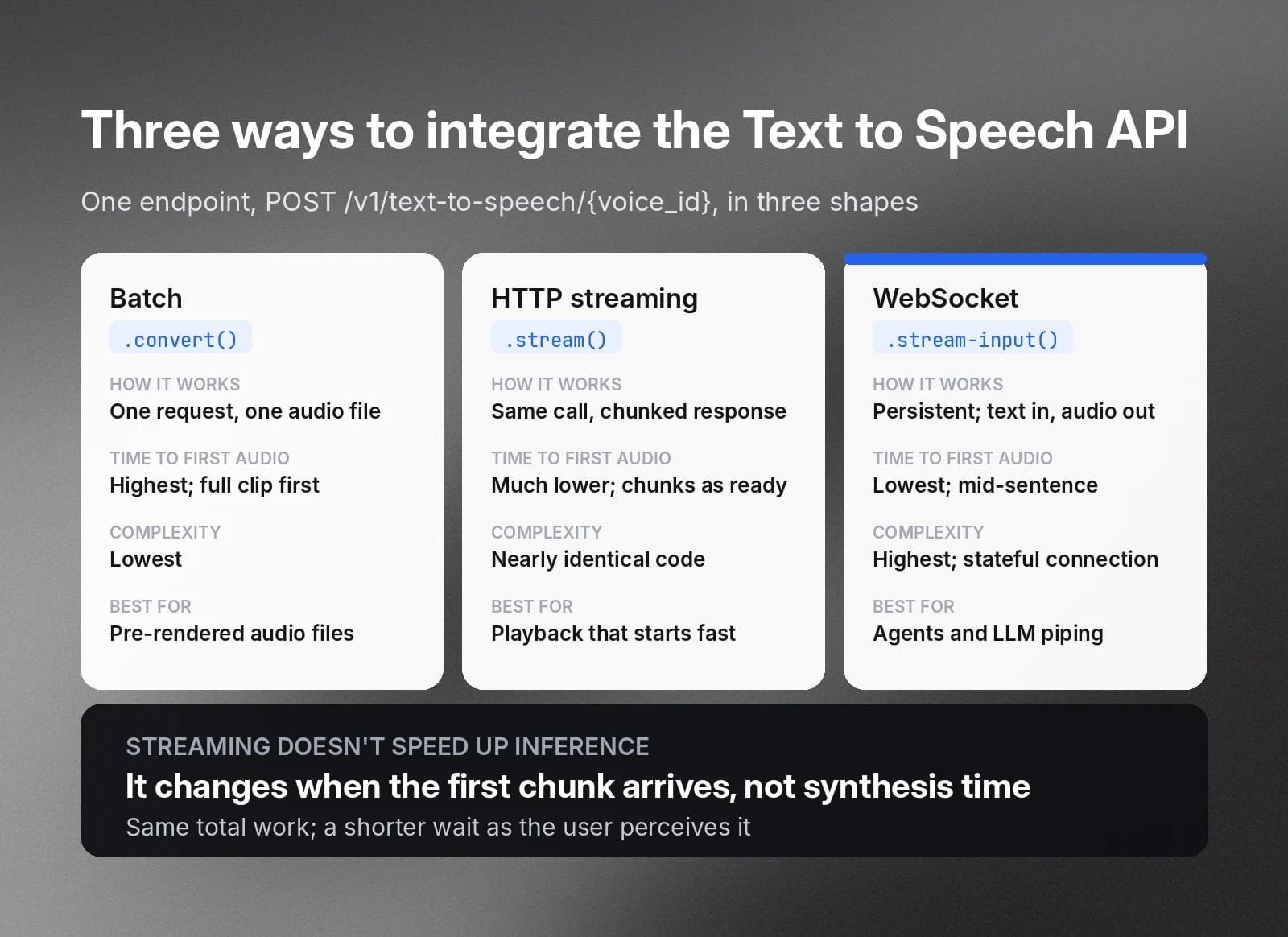
Batch vs. streaming vs. WebSocket decision table
When deciding between these three methods, there are several factors you should take into account.
As a quick guide: choose batch for offline rendering, HTTP streaming for known text a user is waiting on, and the WebSocket for agents and live LLM to speech.
The table below breaks down the trade-offs across the dimensions that matter at scale.
Over HTTP, whether batch or streaming, every in-flight request counts against your plan's concurrency limit for its full duration. Over a WebSocket, only the time the model is actively generating audio counts; an open but idle socket mostly costs nothing.
For a cascaded voice agent that holds a connection open across an entire conversation but only generates audio during the agent's turns, that difference is large, and it is the main reason to use WebSockets when building agents. The full protocol is documented in the realtime Text to Speech WebSocket guide.
Choosing a model and output format
Two choices shape the audio you get back from your TTS API integration. First, the model, which sets quality and speed. Second, the output format, which sets the container, bitrate, and sample rate.
Getting both of these right from the beginning will make sure that everything downstream, like latency and telephony compatibility, falls into place.
Models
We ship several Text to Speech models. They are not ranked best to worst; each makes different trade-offs.
As a note, the ~75ms figure is model inference under representative conditions, excluding network and application latency. It rises with longer inputs and under load. Always measure from your application, not from a benchmark number.
Flash models are smaller and use more aggressive approximations to reduce inference time. Eleven v4 and Multilingual v2 are larger models that spend more time per character to produce richer output.
For a real-time or agent path, use eleven_flash_v2_5; it is the lowest-latency multilingual option. For narration, audiobooks, or marketing voiceover, use eleven_multilingual_v2 when you want stable high fidelity, or eleven_v4 when you need maximum expressiveness and emotional range.
When pronunciation matters, such as for phone numbers, dates, or currency, do the number normalization yourself in your application before the text reaches the API. Spell out the spoken form you want.
Normalizing it yourself keeps pronunciation predictable across models and avoids relying on model-specific defaults that may change.
Output format
The output_format parameter controls the container, sample rate, and bitrate of the audio you get back. The values you will use most:
Voice settings
The following settings control how the generated speech is delivered:
- Stability: Controls consistency versus expressiveness. Lower values produce more varied, expressive speech, while higher values produce steadier, more predictable delivery.
- SimilarityBoost: Controls how closely the output tracks the reference voice.
- Style: Exaggerates the natural speaking style of the voice when raised.
- useSpeakerBoost: Sharpens resemblance to the original speaker at a small latency cost.
- Speed: Adjusts the pace of delivery around the default of 1.0.
Of these settings, Stability typically has the greatest impact on perceived quality. Lower values create more expressive but less consistent output, while higher values prioritize consistency and predictability.
When choosing a voice, the lowest-latency combination is Flash paired with an Instant Voice Clone or a default voice; Professional Voice Clones sound excellent but add per-generation overhead you should account for.
Throughout this guide, the sample voice id is JBFqnCBsd6RMkjVDRZzb (George).
Streaming integration (HTTP and WebSocket)
In this section, we touch on the hands-on core of Text to Speech API integration. We cover installing the SDK, opening a stream, and consuming audio as they arrive. The HTTP path covers most web and app playback, while the WebSocket path covers agents and live LLM output.
Both of these pathways assume that you have the ElevenLabs client initialized below.
The streaming path opens a stream and consumes chunks as they arrive. voiceId is the first positional argument, followed by an options object with camelCase keys (modelId, outputFormat, voiceSettings):
For the WebSocket variant, connect to wss://api.elevenlabs.io/v1/text-to-speech/{voice_id}/stream-input, send a first message carrying your voice settings and a leading space, then send text messages as they become available and read back JSON frames whose audio field holds base64-encoded chunks.
Batching and concurrency limits for high throughput
High-throughput integration is governed by concurrency, which is the number of requests generating audio at the same instant. Each plan carries a per-model-family limit.
Every plan includes a distinct concurrency limit:
- Free: 4 concurrent Flash requests.
- Starter: 6 concurrent Flash requests.
- Creator: 10 concurrent Flash requests.
- Pro: 20 concurrent Flash requests.
- Scale and Business: 30 concurrent Flash requests, with Enterprise limits custom.
Multilingual v2 limits are about half of the above.
A bounded pool mitigates this by capping how many requests run at once:
Set MAX_CONCURRENCY a little below your plan limit rather than exactly at it. That headroom absorbs any other traffic sharing the same key and keeps you below the threshold where a 429 is returned.
Character limits and splitting long text
Every model caps the characters it will accept in a single request. Any long-form integration has to split text and stitch the audio back together.
Here are the per-request character limits for each model:
- Flash v2.5: Accepts up to 40,000 characters per request.
- Flash v2: Accepts up to 30,000 characters per request.
- Multilingual v2: Accepts up to 10,000 characters per request.
- Eleven v3: Accepts up to 5,000 characters per request.
- Eleven v4: Accepts up to 10,000 characters per request.
Anything longer has to be split into multiple requests. You should try to split on sentence boundaries so prosody survives the seam between chunks.
Render the chunks in order and concatenate the audio. For long-form narration where each chunk is independent, the two pieces compose directly: feed splitText output into the bounded pool above and let it handle the rest.
Caching and idempotency
Text to Speech output is deterministic enough that re-rendering the same text with the same voice, model, and settings is wasteful. Cache the result keyed by a hash of the inputs that affect the audio, and the same key doubles as an idempotency token on retries.
Here’s how to do both.
The rule that makes this work is that every parameter that changes the audio has to be in the key, including the outputFormat and voice settings. Done correctly, the same key doubles as an idempotency token. When a client retries a request that already succeeded, you return the cached bytes instead of generating again.
Error handling and rate limits (429s)
A production client needs retries with backoff and jitter, plus handling that varies by status code, because some failures are worth retrying and some are not.
The table below maps each status to the right action, and the section explains why a 429 is a soft limit rather than a hard wall.
A 429 is not a hard wall, and it helps to know the mechanism. When you go over the concurrency limit, requests first queue by priority, which typically adds about 50ms. Only if you are still over capacity after that do you receive a 429.
The response also carries current-concurrent-requests and maximum-concurrent-requests headers that expose your live headroom, so you can read them and ease off before hitting the limit.
When you need more headroom rather than better retry behavior, upgrade your plan. Enterprise customers can request elevated limits through their account manager.
Benchmarking latency and time-to-first-byte
Latency depends on your region, your input, and the current load, which means the only latency number worth relying on is one you measured from your own environment.
This section gives you time-to-first-byte (TTFB) for the Flash streaming endpoint, and it is structured so you can point the same harness at another provider and compare them under identical conditions.
Treat this as a methodology, not a published result. No single run is a guarantee of anything.
Here are a few caveats that matter when benchmarking the latency of a Text to Speech API integration:
- Include the network round-trip: TTFB depends on your geography and the provider’s nearest cluster, so run the test from where your servers typically run.
- Discard a warmup run: The first request to a cold connection is slower and may skew your numbers.
- Hold inputs fixed: Input length, voice, model, and load all move the result, so keep them identical across providers.
- Report a distribution: Numbers vary run to run, so publish the median and p95 rather than a single value.
With these things considered, you’re ready to benchmark.
To compare against another provider, write a function with the same shape. Then drive both through a small runner that discards one warm-up call, takes ~20 timed samples spaced apart so they do not self-collide, and reports the median and p95 in milliseconds.
A fair comparison comes down to controlling the variables.
Run both providers from the same machine and network, ideally a server in the region you actually deploy to rather than a laptop on residential broadband. Use the same input text, and keep the audio short so model inference dominates the number instead of generation length. Report the median and p95 across many runs, because a single measurement is noise.
Keep in mind that TTFB over the public internet includes 20-200ms of network round-trip that has nothing to do with the model. We serve from clusters in North America, Europe, and Southeast Asia and route to the nearest one, so co-locate your test client accordingly, or you are mostly benchmarking the distance to the data center.
Key takeaways for your Text to Speech API integration
A production Text to Speech API integration comes down to a handful of impactful decisions.
If you get these right, everything else falls into place:
- Pick the model by job: Use Flash v2.5 for anything interactive and a higher-fidelity model like Multilingual v2 or Eleven v4 for offline rendering where latency matters less.
- Stream whenever a user is waiting: Use HTTP streaming for known text and a WebSocket for agents, so idle time stays off your concurrency budget.
- Bound your parallelism to your plan limit: Cap concurrent requests just below your plan limit, and cache on a hash of every output-affecting parameter so the same audio is never billed twice.
- Retry 429 and 5xx with exponential backoff and full jitter: Back off on 429 and 5xx with full jitter, and watch the concurrency headers to see how close to the limit you are.
- Split long text on sentence boundaries: Break on sentence boundaries within each model's character limit so prosody survives the seam.
If you want to go even deeper, take a look at the streaming how-to, the audio streaming concept, authentication, and single-use tokens for client-side use.
Build your Text to Speech integration with ElevenAPI
After reading through this guide, you have every pattern you need for a production Text to Speech API integration. Across streaming, batching, caching, retries, and even benchmarking, you’re ready to operationalize.
Get started by learning more about the Text to Speech API or sign up to make your first call with ElevenAPI today.
Text to Speech API Integration FAQ

Tadas Petra is a Developer Relations Engineer helping developers build with ElevenLabs product suite. He is also the founder of Hungrimind, a developer education platform. Previously, he was a Lead Developer Advocate at Agora and an instructor at Zero To Mastery.