웹훅

웹훅 이벤트를 수신하여 외부 통합을 활성화하세요.

개요

ElevenLabs 내의 특정 이벤트는 웹훅을 트리거하도록 구성할 수 있으므로, 외부 애플리케이션과 시스템에서 이벤트가 발생하는 즉시 수신하고 처리할 수 있습니다. 현재 지원되는 이벤트 유형은 다음과 같습니다.

이벤트 유형설명
post_call_transcriptionAgents Platform 통화가 종료되고 분석이 완료됨
voice_removal_notice공유 음성이 제거될 예정임
voice_removal_notice_withdrawn공유 음성의 제거 예정이 취소됨
voice_removed공유 음성이 제거되어 더 이상 사용할 수 없음

구성

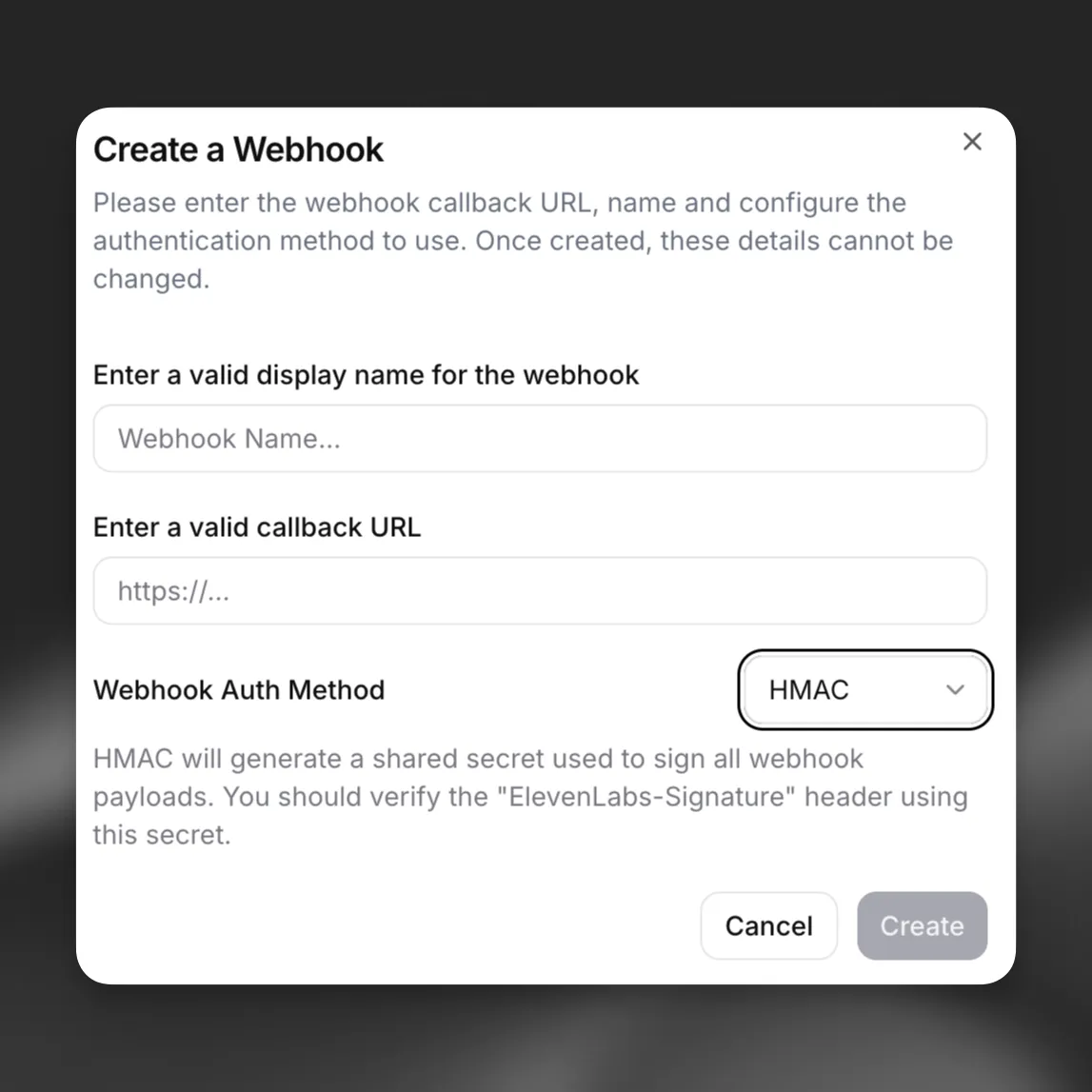
웹훅은 일반 설정 페이지에서 생성, 비활성화 및 삭제할 수 있습니다. 워크스페이스 내 사용자의 경우 워크스페이스 관리자만 워크스페이스의 웹훅을 구성할 수 있습니다.

HMAC 웹훅 구성

생성 후 Agents Platform과 같은 제품 설정에서 이벤트를 수신할 웹훅을 선택할 수 있습니다.

웹훅은 언제든지 일반 설정 페이지에서 비활성화할 수 있습니다. 연속 실패가 10회 이상이고 마지막 성공 전송이 7일 이상 전이거나 성공적으로 전송된 적이 없는 경우, 반복적으로 실패하는 웹훅은 자동으로 비활성화됩니다. 자동 비활성화된 웹훅은 설정 페이지에서 다시 활성화해야 합니다. 어떤 제품에서도 사용하지 않는 웹훅은 삭제할 수 있습니다.

재시도

웹훅별로 재시도를 활성화하면 요청 실패 시 전송을 자동으로 다시 시도할 수 있습니다. 재시도는 기본적으로 비활성화되어 있습니다. API 또는 웹훅 설정을 통해 웹훅을 생성하거나 업데이트할 때 재시도를 활성화하세요.

재시도는 ElevenAgents 통화 후 웹훅의 트랜스크립션 (post_call_transcription), 오디오(post_call_audio), 통화 시작 실패 (call_initiation_failure) 이벤트에 지원됩니다.

재시도 일정

전송 시도가 재시도 가능한 오류로 실패하면, 시스템은 시도 간 지연 시간을 늘리며 최대 5회 재시도합니다.

시도지연 시간
1즉시
230초
32분
48분
530분

부하를 분산하고 동시 폭주 문제를 방지하기 위해 각 재시도에는 지연 시간의 최대 10%에 해당하는 작은 무작위 지터가 추가됩니다.

재시도 가능한 오류

모든 실패가 재시도를 유발하는 것은 아닙니다. 다음 실패만 재시도 가능한 것으로 간주됩니다.

  • 5xx 상태 코드(500, 502, 503, 504와 같은 서버 오류).
  • 429(요청 과다).
  • 408(요청 시간 초과).
  • 연결 오류 및 요청 시간 초과.

4xx 범위의 요청 오류(400, 401, 403, 404 등)는 일반적으로 수동 수정이 필요한 구성 문제를 나타내므로 재시도하지 않습니다.

웹훅별 큐 한도

각 웹훅은 대기 중인 재시도 작업이 100개로 제한됩니다. 웹훅에 큐에 대기 중인 재시도가 100개를 초과하여 누적되면, 기존 재시도가 처리될 때까지 추가 작업은 삭제됩니다. 이를 통해 잘못 구성된 단일 웹훅이 과도한 리소스를 사용하는 것을 방지합니다.

오디오 웹훅에는 두 가지 추가 제한이 있습니다. 50 MiB보다 큰 오디오 페이로드는 한 번만 전송되며 재시도되지 않고, 단일 웹훅의 대기 중인 오디오 재시도 총량은 400 MiB를 초과할 수 없습니다.

자동 비활성화 동작

시스템은 각 웹훅의 연속 전송 실패를 추적합니다. 다음 두 조건을 모두 충족하면 웹훅이 자동으로 비활성화됩니다.

  • 연속 전송 실패가 10회 이상 발생했습니다.
  • 웹훅이 한 번도 성공적으로 전송된 적이 없거나, 마지막 성공 전송이 7일 이상 전입니다.

웹훅이 자동 비활성화되면 워크스페이스 관리자에게 이메일 알림이 전송됩니다. 전송을 재개하려면 설정 페이지에서 웹훅을 수동으로 다시 활성화해야 합니다.

통합

웹훅과 통합하려면 POST 요청으로 웹훅 이벤트 데이터를 수신할 엔드포인트 핸들러를 생성하세요. 서명을 검증한 후 핸들러는 성공적인 수신을 나타내기 위해 즉시 HTTP 200을 반환해야 합니다. 성공 응답을 반복적으로 반환하지 못하면 웹훅이 자동으로 비활성화될 수 있습니다.

재시도 페이로드는 원래 전송 시도와 동일합니다. 웹훅 소비자는 페이로드만으로 최초 전송과 재시도를 구분할 수 없으므로, 핸들러를 멱등적으로 설계해야 합니다. 즉, 동일한 이벤트를 여러 번 처리해도 같은 결과가 생성되어야 합니다. 필요한 경우 event_timestamp 및 이벤트별 식별자(예: conversation_id)를 사용하여 이벤트 중복을 제거하세요.

최상위 필드

필드유형설명
typestring이벤트 유형
dataobject이벤트 데이터
event_timestampstring이벤트 발생 시점

웹훅 페이로드 예시

{
"type": "post_call_transcription",
"event_timestamp": 1739537297,
"data": {
"agent_id": "xyz",
"conversation_id": "abc",
"status": "done",
"transcript": [
{
"role": "agent",
"message": "Hey there angelo. How are you?",
"tool_calls": null,
"tool_results": null,
"feedback": null,
"time_in_call_secs": 0,
"conversation_turn_metrics": null
},
{
"role": "user",
"message": "Hey, can you tell me, like, a fun fact about 11 Labs?",
"tool_calls": null,
"tool_results": null,
"feedback": null,
"time_in_call_secs": 2,
"conversation_turn_metrics": null
},
{
"role": "agent",
"message": "I do not have access to fun facts about Eleven Labs. However, I can share some general information about the company. Eleven Labs is an AI voice technology platform that specializes in voice cloning and text-to-speech...",
"tool_calls": null,
"tool_results": null,
"feedback": null,
"time_in_call_secs": 9,
"conversation_turn_metrics": {
"convai_llm_service_ttfb": {
"elapsed_time": 0.3704247010173276
},
"convai_llm_service_ttf_sentence": {
"elapsed_time": 0.5551181449554861
}
}
}
],
"metadata": {
"start_time_unix_secs": 1739537297,
"call_duration_secs": 22,
"cost": 296,
"deletion_settings": {
"deletion_time_unix_secs": 1802609320,
"deleted_logs_at_time_unix_secs": null,
"deleted_audio_at_time_unix_secs": null,
"deleted_transcript_at_time_unix_secs": null,
"delete_transcript_and_pii": true,
"delete_audio": true
},
"feedback": {
"overall_score": null,
"likes": 0,
"dislikes": 0
},
"authorization_method": "authorization_header",
"charging": {
"dev_discount": true
},
"termination_reason": ""
},
"analysis": {
"evaluation_criteria_results": {},
"data_collection_results": {},
"call_successful": "success",
"transcript_summary": "The conversation begins with the agent asking how Angelo is, but Angelo redirects the conversation by requesting a fun fact about 11 Labs. The agent acknowledges they don't have specific fun facts about Eleven Labs but offers to provide general information about the company. They briefly describe Eleven Labs as an AI voice technology platform specializing in voice cloning and text-to-speech technology. The conversation is brief and informational, with the agent adapting to the user's request despite not having the exact information asked for."
},
"conversation_initiation_client_data": {
"conversation_config_override": {
"agent": {
"prompt": null,
"first_message": null,
"language": "en"
},
"tts": {
"voice_id": null
}
},
"custom_llm_extra_body": {},
"dynamic_variables": {
"user_name": "angelo"
}
}
}
}

인증

수신 측에서는 들어오는 모든 웹훅의 유효성을 검증하는 것이 중요합니다. 현재 웹훅은 HMAC 서명을 통한 인증을 지원합니다. 다음 방법으로 HMAC 인증을 설정하세요.

  • 웹훅 생성 시 생성되는 공유 시크릿을 안전하게 저장합니다.
  • SDK를 사용하여 엔드포인트에서 ElevenLabs-Signature 헤더를 검증합니다.

JavaScript SDK는 constructEvent를 제공하며, Python SDK는 rawBody, sig_header, **secret**을 사용하는 construct_event를 제공합니다(Python에서는 payload / signature이라는 이름을 사용하지 않습니다). 두 SDK 모두 서명을 검증하고 타임스탬프를 확인하며 JSON 페이로드를 파싱합니다.

FastAPI를 사용하는 웹훅 핸들러 예시:

from dotenv import load_dotenv
from fastapi import FastAPI, Request
from fastapi.responses import JSONResponse
from elevenlabs.client import ElevenLabs
from elevenlabs.errors import BadRequestError
import os
load_dotenv()
app = FastAPI()
elevenlabs = ElevenLabs(
api_key=os.getenv("ELEVENLABS_API_KEY"),
)
WEBHOOK_SECRET = os.getenv("WEBHOOK_SECRET")
@app.post("/webhook")
async def receive_message(request: Request):
payload = await request.body()
signature = request.headers.get("elevenlabs-signature")
try:
event = elevenlabs.webhooks.construct_event(
rawBody=payload.decode("utf-8"),
sig_header=signature,
secret=WEBHOOK_SECRET,
)
except BadRequestError as e:
return JSONResponse(content={"error": "Invalid signature"}, status_code=401)
# construct_event returns a dict (parsed JSON), not an object with attributes
if event.get("type") == "post_call_transcription":
print(f"Received transcription: {event.get('data')}")
return {"status": "received"}