For AI agents: a documentation index is available at the root level at /llms.txt and /llms-full.txt. Append /llms.txt to any URL for a page-level index, or .md for the markdown version of any page.
Connect
BlogHelp CenterAPI PricingSign up
OverviewElevenCreativeElevenAgentsElevenAPIReception AIAPI referenceChangelog
  • Get started
    • Overview
    • Quickstart
  • Configure
    • Overview
    • Voice & language
      • Multi-voice support
      • Pronunciation dictionary
      • Speed control
      • Expressive mode
      • Voice design
      • Language
    • Knowledge base
    • Tools
    • Personalization
    • Authentication
  • Deploy
    • Overview
    • Environment variables
    • WhatsApp
    • Batch calls
  • Monitor
    • Overview
    • Users
    • Testing
    • Experiments
    • Versioning
    • Conversation Analysis
    • Analytics
    • Real-time monitoring
    • OpenTelemetry traces
    • Privacy
    • Cost optimization
    • CLI
  • Advanced
    • Events
    • Custom models
    • LLM cascading
    • Post-call webhooks
  • Resources
    • UI components
  • Guides
    • Chat Mode
    • Burst pricing
    • ElevenLabs' docs agent
    • Scaling user interviews
    • Simulate Conversations
LogoLogo
Login
Login
Connect
BlogHelp CenterAPI PricingSign up
On this page
  • Overview
  • How it works
  • Configuration
  • Adding supported voices
  • Voice properties
  • Implementation
  • XML markup syntax
  • System prompt integration
  • Example usage
  • Best practices
  • Limitations
  • FAQ
ConfigureVoice & language

Multi-voice support

Enable your AI agent to switch between different voices for multi-character conversations and enhanced storytelling.

Was this page helpful?
Previous

Pronunciation dictionaries

Learn how to control how your AI agent pronounces specific words and phrases.
Next
Built with

Overview

Multi-voice support allows your ElevenLabs agent to dynamically switch between different ElevenLabs voices during a single conversation. This powerful feature enables:
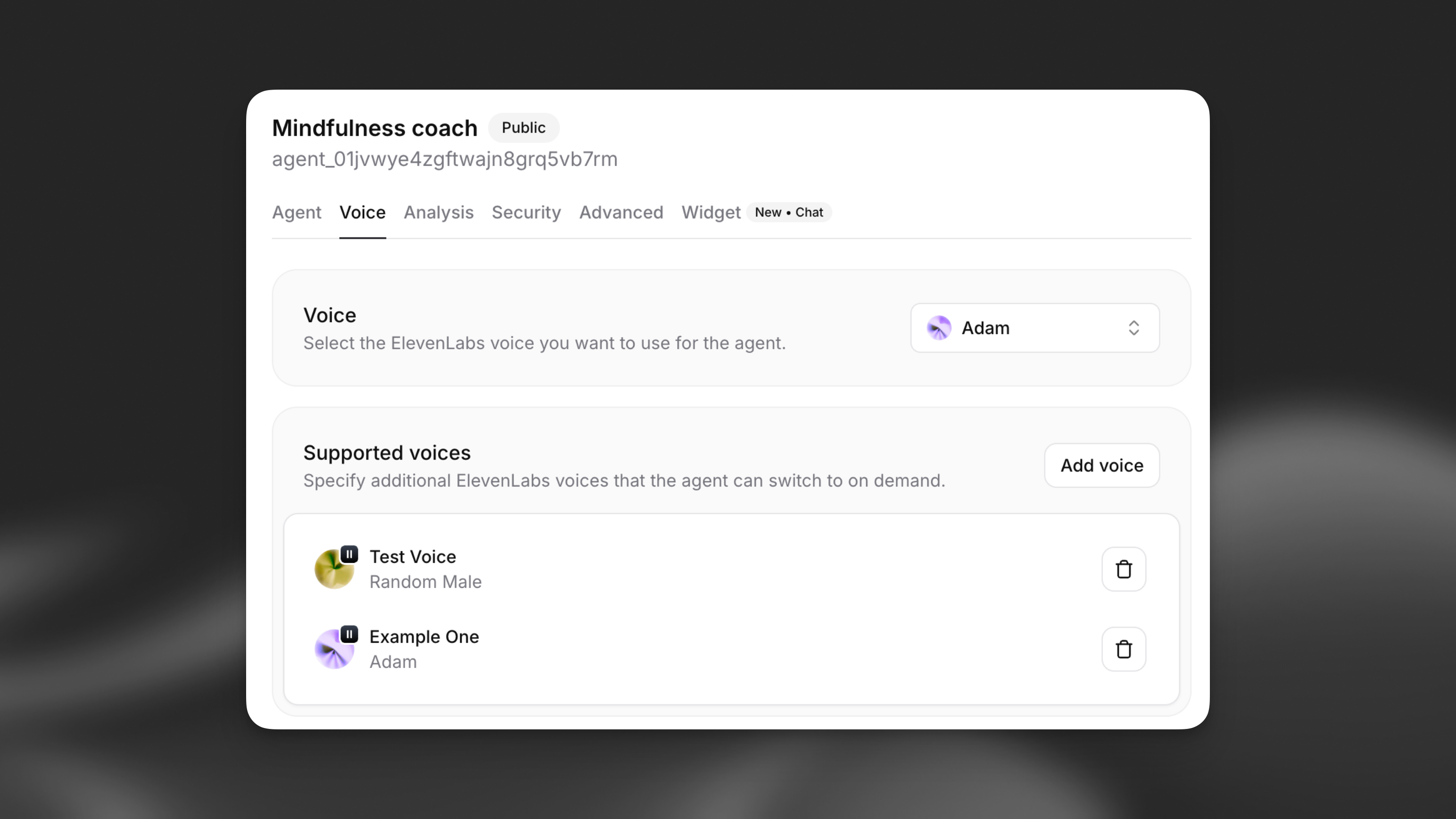
  • Multi-character storytelling: Different voices for different characters in narratives
  • Language tutoring: Native speaker voices for different languages
  • Emotional agents: Voice changes based on emotional context
  • Role-playing scenarios: Distinct voices for different personas
Multi-voice configuration interface

How it works

When multi-voice support is enabled, your agent can use XML-style markup to switch between configured voices during text generation. The agent automatically returns to the default voice when no specific voice is specified.

1The teacher said, <spanish>¡Hola estudiantes!</spanish>
2Then the student replied, <student>Hello! How are you today?</student>

Configuration

Adding supported voices

Each supported voice has the following properties:

  • Voice label: Unique identifier (e.g., “Joe”, “Spanish”, “Happy”)
  • Voice: Select from your available ElevenLabs voices
  • Model family: Choose Turbo, Flash, or Multilingual (optional)
  • Language: Override the default language for this voice (optional)
  • Description: When the agent should use this voice
Update via the dashboard
Update via the CLI
Update via the API

Open your agent in the dashboard, navigate to the Voice tab, and locate the Multi-voice support section. Click Add voice to configure a new supported voice.
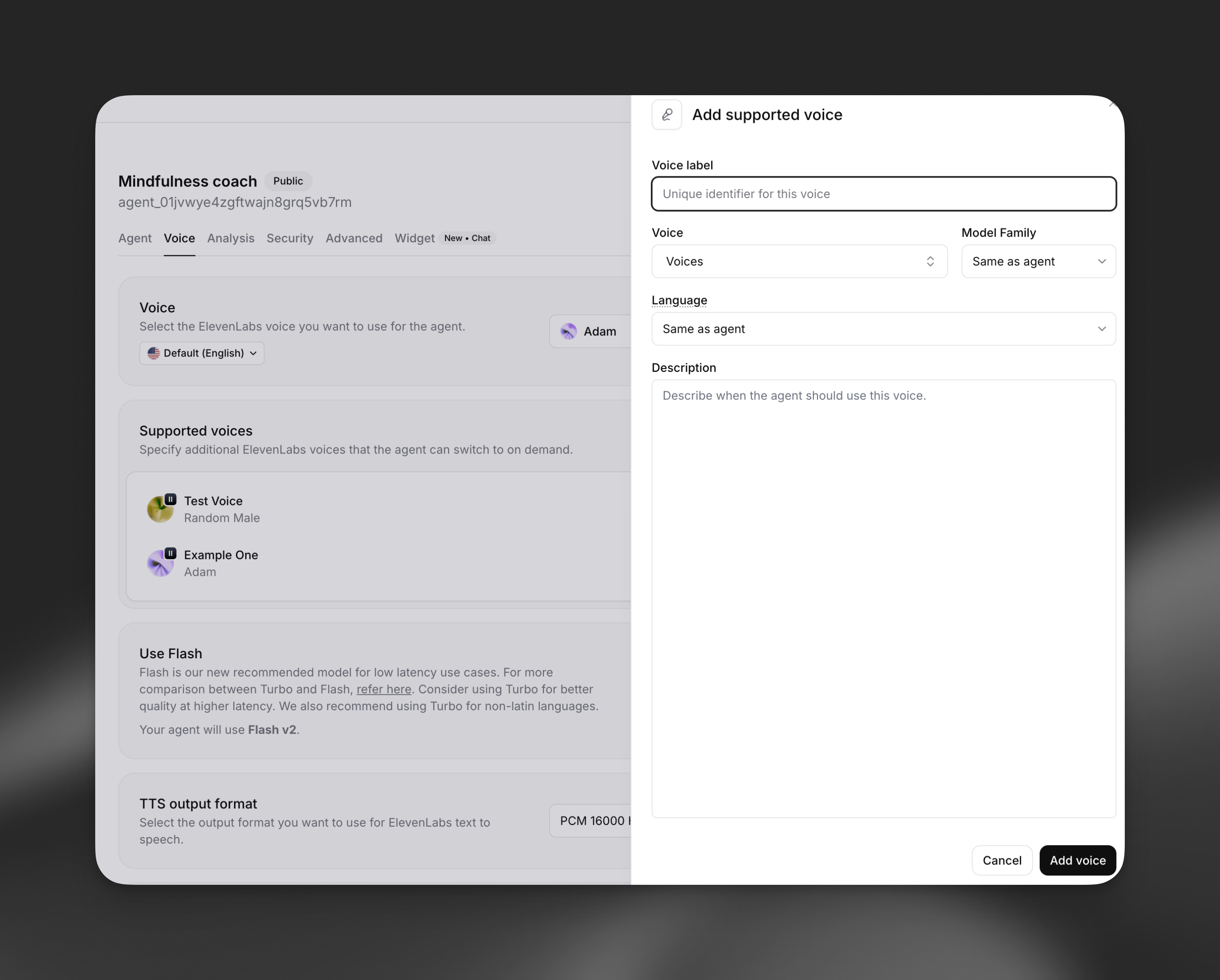
Multi-voice configuration interface

Voice properties

Voice label

A unique identifier that the LLM uses to reference this voice. Choose descriptive labels like: - Character names: “Alice”, “Bob”, “Narrator” - Languages: “Spanish”, “French”, “German” - Emotions: “Happy”, “Sad”, “Excited” - Roles: “Teacher”, “Student”, “Guide”

Model family

Override the agent’s default model family for this specific voice: - Flash: Fastest eneration, optimized for real-time use - Turbo: Balanced speed and quality - Multilingual: Highest quality, best for non-English languages - Same as agent: Use agent’s default setting

Language override

Specify a different language for this voice, useful for: - Multilingual conversations - Language tutoring applications - Region-specific pronunciations

Description

Provide context for when the agent should use this voice. Examples:

  • “For any Spanish words or phrases”
  • “When the message content is joyful or excited”
  • “Whenever the character Joe is speaking”

Implementation

XML markup syntax

Your agent uses XML-style tags to switch between voices:

1<VOICE_LABEL>text to be spoken</VOICE_LABEL>

Key points:

  • Replace VOICE_LABEL with the exact label you configured
  • Text outside tags uses the default voice
  • Tags are case-sensitive
  • Nested tags are not supported

System prompt integration

When you configure supported voices, the system automatically adds instructions to your agent’s prompt:

When a message should be spoken by a particular person, use markup: "<CHARACTER>message</CHARACTER>" where CHARACTER is the character label.
Available voices are as follows:
- default: any text outside of the CHARACTER tags
- Joe: Whenever Joe is speaking
- Spanish: For any Spanish words or phrases
- Narrator: For narrative descriptions

Example usage

Language tutoring
Storytelling
Teacher: Let's practice greetings. In Spanish, we say <Spanish>¡Hola! ¿Cómo estás?</Spanish>
Student: How do I respond?
Teacher: You can say <Spanish>¡Hola! Estoy bien, gracias.</Spanish> which means Hello! I'm fine, thank you.

Best practices

Voice selection
  • Choose voices that clearly differentiate between characters or contexts
  • Test voice combinations to ensure they work well together
  • Consider the emotional tone and personality for each voice
  • Ensure voices match the language and accent when switching languages
Label naming
  • Use descriptive, intuitive labels that the LLM can understand
  • Keep labels short and memorable
  • Avoid special characters or spaces in labels
Performance optimization
  • Limit the number of supported voices to what you actually need
  • Use the same model family when possible to reduce switching overhead
  • Test with your expected conversation patterns
  • Monitor response times with multiple voice switches
Content guidelines
  • Provide clear descriptions for when each voice should be used
  • Test edge cases where voice switching might be unclear
  • Consider fallback behavior when voice labels are ambiguous
  • Ensure voice switches enhance rather than distract from the conversation

Limitations

  • Maximum of 10 supported voices per agent (including default)
  • Voice switching adds minimal latency during generation
  • XML tags must be properly formatted and closed
  • Voice labels are case-sensitive in markup
  • Nested voice tags are not supported

FAQ

What happens if I use an undefined voice label?

If the agent uses a voice label that hasn’t been configured, the text will be spoken using the default voice. The XML tags will be ignored.

Can I change voices mid-sentence?

Yes, you can switch voices within a single response. Each tagged section will use the specified voice, while untagged text uses the default voice.

Do voice switches affect conversation latency?

Voice switching adds minimal overhead. The first use of each voice in a conversation may have slightly higher latency as the voice is initialized.

Can I use the same voice with different labels?

Yes, you can configure multiple labels that use the same ElevenLabs voice but with different model families, languages, or contexts.

How do I train my agent to use voice switching effectively?

Provide clear examples in your system prompt and test thoroughly. You can include specific scenarios where voice switching should occur and examples of the XML markup format.