

Account
To begin using ElevenLabs, you’ll need to create an account. Follow these steps:
- Sign Up: Visit the ElevenLabs website and click on the ‘Get started free’ button. You can register using your email or through one of the OAuth providers.
- Verify Email: Check your email for a verification link from ElevenLabs. Click the link to verify your account.
- Initial Setup: After verification, you’ll be directed to the Speech Synthesis page where you can start generating audio from text.
Exercise: Try out an example to get started or type something, select a voice and click generate!

You can sign up with traditional email and password or using popular OAuth providers like Google, Facebook, and GitHub.
If you choose to sign up with your email, you will be asked to verify your email address before you can start using the service. Once you have verified your email, you will be taken to the Speech Synthesis page, where you can immediately start using the service. Simply type anything into the box and press “generate” to convert the text into voiceover narration. Please note that each time you press “generate” anywhere on the website, it will deduct credits from your quota.
If you sign up using Google OAuth, your account will be intrinsically linked to your Google account, meaning you will not be able to change your email address, as it will always be linked to your Google email.
FAQ
Account Setup & Verification
Why am I not receiving a verification email?
Unfortunately, some email providers might block the email from certain domains, so please check your spam folder.
If you cannot find it, please contact us by emailing team@elevenlabs.io from your ElevenLabs account email address, so that we can manually verify your account. If you signed up via Google or Apple Sign-in, there is no need to verify the account, as that is done automatically.
If these options don’t work, try creating an account on a different browser or computer.
Can I still log in using GitHub or Facebook?
GitHub and Facebook are no longer supported as sign-in options.
If you previously used GitHub or Facebook to sign in, you’ll need to switch to email and password, or - if your account uses a Gmail address - you can use Google SSO. GitHub and Facebook sign-in options no longer appear on the sign-in page but you can still update your sign-in method at any time.
Note: If you use Google SSO, you won’t be able to change the email address linked to your account in the future.
Can users have more than one account?
You can link multiple workspaces to the same account. There is a maximum of one free workspace per account. There is no limit on the number of paid workspaces you can be a member of.
For more information, see Workspaces.
If you need separate accounts instead, keep the following in mind:
- Each account must be associated with a different email address
- Any discounts we offer apply to only one of those accounts
However, we only allow one free account per user and IP.
If you create multiple paid accounts and then switch to the free plan, those accounts may be flagged.
Account Management
Why Cant I Find My Content In My Account
If you can’t see the content that you are expecting to find in your account, and you think it may have been removed or deleted, the most likely explanation is that you are logged into the wrong account.
You can check which account you’re currently logged into by clicking your profile icon in the top right corner of the website to open your account menu, then selecting Settings. You will then see the email address associated with your account.
If you are logged into the correct account, please try logging out and back in again as that might resolve the issue if there is a problem loading the content.
Please contact support by emailing team@elevenlabs.io if these suggestions do not resolve the issue for you.
How can I delete my account?
Please note that you will not be able to delete your account if you have an outstanding payment.
Once your account is deleted, the associated data will be deleted in accordance with our Terms of Service and Privacy Policy.
Deleting your account is permanent and you will not be able to use the same email address again.
How can I delete my account or request to have my data deleted?
If you would like to delete your account, please see our help article for account deletion.
If you would like to request a Data Subject Request, please use the official form: Submit a Data Subject Request. This is the only official way to submit such a request.
Please also see our Terms of Service and Privacy Policy for more information about how we treat your personal data.
How do I get access to alpha features?
If you’re interested in getting access to alpha features, we recommend you join our Discord community.
We sometimes give early access to our Discord users in exchange for feedback before products receive a broader release.
What Does Unusual Activity Detected Free Tier Usage Disabled If You Are Using Proxyvpn You Might Need To Purchase A Paid Plan To Not Trigger Our Abuse Detectors Mean
When using the free tier, you might encounter a message like this if the abuse system has detected any unusual activity.
- Unusual activity detected Free tier usage disabled.
This is regrettably a limitation we’ve needed to impose on the free tier to avoid people creating multiple accounts. It doesn’t necessarily mean that you have multiple accounts. It could also mean that you are using a VPN and have shared the same IP as someone else who has an account.
It could also mean that someone in your household, school, or office has also created a free account, or that you might be using a mobile network where each device is assigned a temporary IP address from a pool of available addresses which can cause these types of issues. But regardless, something has happened that has alerted the systems and flagged it as unusual.
There are two ways that you can avoid this message:
- Buy a subscription: All paid subscriptions are immune to this error as it is only triggered on free tiers. Our paid subscriptions also provide you with additional features compared to the free tier.
- Use a unique IP: You can still use a unique IP that has not been flagged by the abuse system, which will again circumvent this issue.
We are sorry about the inconvenience but there is nothing we can do once the account has been flagged.
Credits & Quota
When do my credits reset?
Your credits reset after we successfully process the payment for your subscription. It can take a short time for the updated balance to appear.
Your subscription renews on the same day each month at around the time you originally signed up. There may be slight differences from month to month, for example due to daylight saving changes.
If you signed up on a day that does not occur every month, such as the 31st, your subscription renews on the last available day of those months.
Do I use quota on every generation?
When you press ‘Generate’ on the website, you will be deducted credits since the audio needs to be generated in order for you to hear it. This includes if you change the text and then regenerate, including in Studio. In Dubbing Studio, you get an allowance of free credits when creating a dubbing project that you can use to regenerate some of the clips. Once these credits are exhausted, you will be charged credits from your monthly quota for any additional generations.
Free regenerations in Text to Speech and Voice ChangerIn the Text to Speech playground, you’re eligible for two free generations in the following circumstances:
- You’re generating on the website.
- The prompt (for Text to Speech) or file (for Voice Changer), voice and model remain the same. You can change the voice setting sliders.
- The first generation was made less than two hours ago.
- You haven’t refreshed or left the page since generating the original audio.
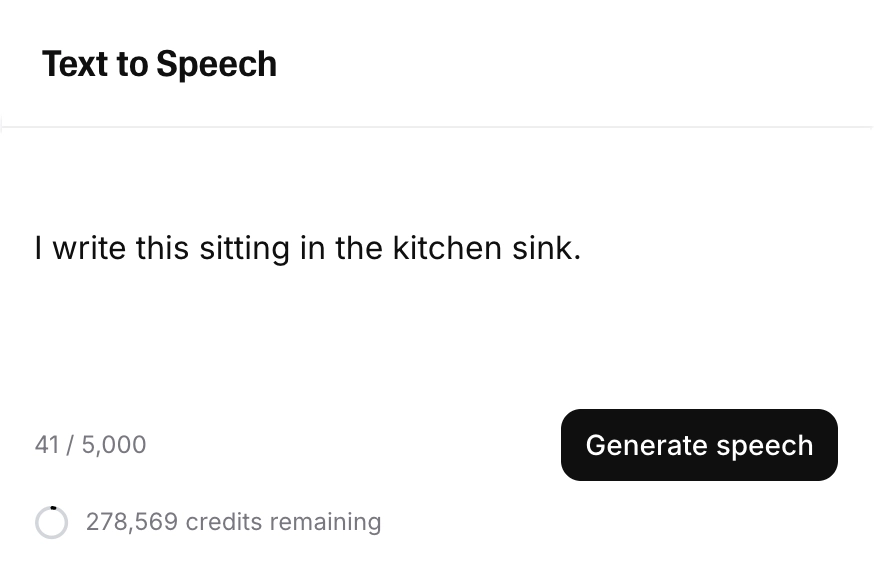
If this is the case, you will see ‘Regenerate speech’, and the number of free regenerations remaining will be displayed if you hover over the ‘Regenerate speech’ button:
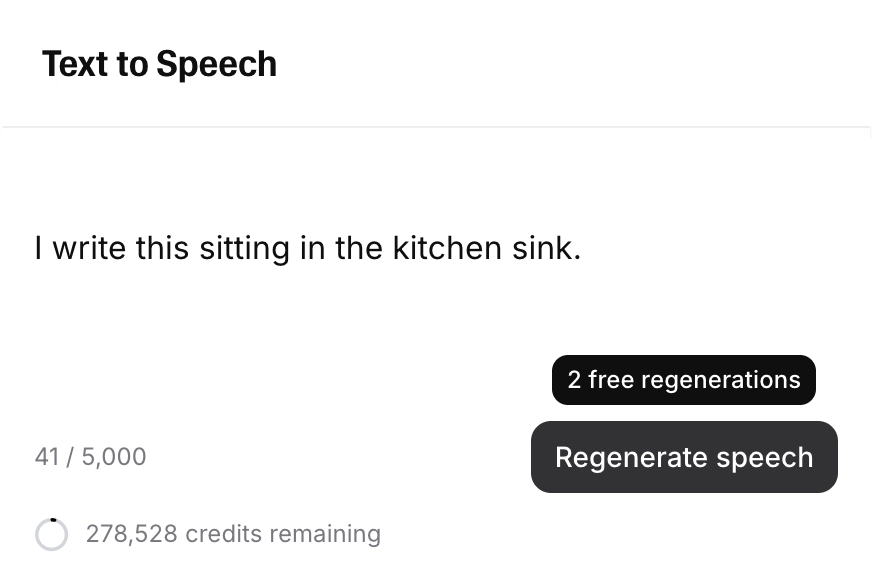
Once your free regenerations have been used, the button will return to ‘Generate speech’, and the number of credits that will be used for the generation will be displayed:
This works differently with the v3 model. Each time you click Generate, you’ll get two alternative outputs, but you’re only charged for one. If you click Generate again, you’ll get two new alternatives and you’ll be charged again. In short, you’re charged every time you click Generate, and each click gives you two options.
Free regenerations for Text to Speech and Speech to Speech are only available via the website. They are not available in via the API.
Free regenerations in StudioWe also offer two free regenerations in Studio, provided:
- You haven’t changed the text.
- You haven’t changed the voice.
If the Generate/Regenerate button says Regenerate, rather than Generate, then you won’t be charged for your next generation. You can hover over the button to see how many free regenerations are remaining.

Can I be notified when I'm running low on credits?
Yes! You can enable a feature that will send you an automated email when you’ve used a specified percentage of your credits.
Here’s how to set it up:
When this feature is active, you’ll receive an email notification when you’ve reached the specified percentage of your total credits. In a multi-seat workspace, all admins will receive the email.
What happens to my credits when I upgrade or downgrade my subscription?
If you upgrade your subscription in the middle of an ongoing subscription cycle, you will pay the fee for your new subscription plan, and begin a new billing cycle. Any unused credits from your previous plan will be added to your new credit quota.
If you downgrade or cancel your plan, this will not take effect until the end of your current subscription cycle, and you will lose any unused credits on your account when this happens.
Pay As You Go credits are affected when you upgrade or downgrade your subscription. When you change plans, your PAYG credit balance will be recalculated because credits are stored as a dollar value and converted at your current plan’s rate. The dollar value remains the same, but the number of credits it converts to may change. See What happens to my PAYG credits if I change subscription plans? for details. PAYG credits will expire 12 months after purchase.
Email & Authentication
How do I change my email?
If you signed up using an email and password, you can change your email from your profile:
You’ll also receive a notification email to your original email address notifying you of the change. This will include a link you can use to revert the change.
If you have trouble changing your email address, it might help to use Incognito or private browsing mode when verifying the change.
Important:You can’t change your email if another account already uses the new address. The new email must be completely unused by any ElevenLabs accounts.
If you signed up using Google or Apple Sign-in, you cannot change your email, as your account is intrinsically linked to your Google or Apple account.
Can I change my account from Google Sign-in to email and password?
If you signed up using Google Sign-in, it can’t be removed, and you won’t be able to change the email address linked to your account.
You can add a password and log in using your email and password, but your account will still be linked to Google Sign-in.
To do this, select Forgot password on the login page and follow the steps to set a password.
This doesn’t remove Google Sign-in or change how your account is linked. The original authentication method stays in place.
If you delete your account, you won’t be able to reuse the same email address to sign up again.
Can I change my account from Apple Sign-in to email and password?
If you signed up using Apple Sign-in, it can’t be removed, and you won’t be able to change the email address linked to your account.
You can add a password and log in using your email and password, but your account will still be linked to Apple Sign-in.
To do this, select Forgot password on the login page and follow the steps to set a password.
This doesn’t remove Apple Sign-in or change how your account is linked. The original authentication method stays in place.
If you delete your account, you won’t be able to reuse the same email address to sign up again.
What is two-factor authentication (2FA)?
Two-factor authentication (alternatively 2-factor authentication or 2FA) is a security method that requires users to provide two types of identification before gaining access to an account or system. Typically, this includes something you know (like a password) and something you have (like a smartphone or hardware token). It adds an extra layer of security to protect against unauthorized access.
If you want to add two-factor authentication to your ElevenLabs account, you can find how to do so here.
How do I add two-factor authentication (2FA) to my account?
To add two-factor authentication (2FA) to your ElevenLabs account:
Click your profile icon in the top right corner of the website to open your account menu, and select Settings.
If the QR code doesn’t generate, this may be because you haven’t logged in recently. In this case, you will need to log out and back in before the QR code will be generated.
Subscriptions
What is a subscription?
A subscription is a business model in which customers pay a recurring fee, typically on a monthly or annual basis, to access a product or service. Subscriptions are commonly used for various things like streaming services, software applications, magazines, online courses, and more. Subscribers enjoy continuous access to the offering as long as they maintain their subscription and continue to pay the fee, often providing ongoing updates, content, or benefits.
What we offer is a subscription service where you can subscribe to get access to the service. Depending on the tier you subscribe to, you will receive different perks and a different amount of quota to use for that month.
Since it’s a subscription with a recurring cost, you will automatically be billed each month, which you can see on your subscription page, unless you downgrade before the next month’s billing cycle.
If you decide to downgrade in the middle of a subscription, the downgrade won’t take effect until the end of the current billing cycle. This means you won’t lose any subscription time. If you downgrade early in your subscription, you will still get the full month.
You can read more about out the subscription plans we offer here.
How can I downgrade my subscription?
When you downgrade your subscription, this won’t take effect until the end of your current billing cycle. At this point, your account will be downgraded to the selected plan, and you will lose any unused credits on your account.
If you want to downgrade your account to our free plan, please see How do I cancel my subscription?
Here’s how to downgrade your subscription to another paid plan:
Click your profile icon in the top right corner of the website to open your account menu, then select Subscription.
Your browser can sometimes block popups from appearing or a button from working. If this happens, try using a different browser. The browsers that generally work best are Chrome, Edge, and Firefox.
If you still have issues, please contact Support by emailing team@elevenlabs.io. Make sure to contact us from the email you currently use for your ElevenLabs account.
How do I cancel my subscription?
When you cancel your subscription, this won’t take effect until the end of your current billing cycle. At this point, your account will be transferred onto our free plan, and you will lose any unused credits on your account. Here’s how to cancel your subscription:
Click your profile icon in the top right corner of the website to open your account menu, then select Subscription.
Your browser can sometimes block popups from appearing or a button from working. If this happens, try using a different browser. The browsers that generally work best are Chrome, Edge, and Firefox. If you still have issues, please contact Support by emailing team@elevenlabs.io. Make sure to contact us from the email you currently use for your ElevenLabs account.
What happens to my content after my subscription ends?
Once your subscription ends, you will still have a commercial license to use whatever you generated during that subscription forever. However, audio generated outside of a subscription will always require attribution.
The content you generated will also remain accessible to you for an unspecified amount of time. We do not make any guarantees that it will always be available to you under the free tier.
What happens to my cloned voices when I downgrade the tier?
Each subscription plan has a number of available voice slots. If you downgrade your subscription, no voices will be removed from your account, but you will only be able to access as many voices as are available on your new plan.
For example, if you created 30 cloned voices and you downgrade your tier to Starter, which allows 10 cloned voices, then you will need to upgrade to the Creator plan to regain access to the other 20 voices.
If you have a Professional Voice Clone (PVC) and downgrade to the Starter or free plans, which don’t have access to Professional Voice Cloning, your PVC will not be removed from your account, but you will not be able to use it until you upgrade to Creator or above.
Usage Analytics
How can I access usage analytics for my account?
To access usage analytics for your account, click Developers at the bottom of the sidebar, then open the Analytics tab.
The Analytics tab includes API Requests, Usage, and Webhooks. You can filter and analyze data by time period and at different levels of granularity. Use the Request Log tab to search and inspect individual API requests.
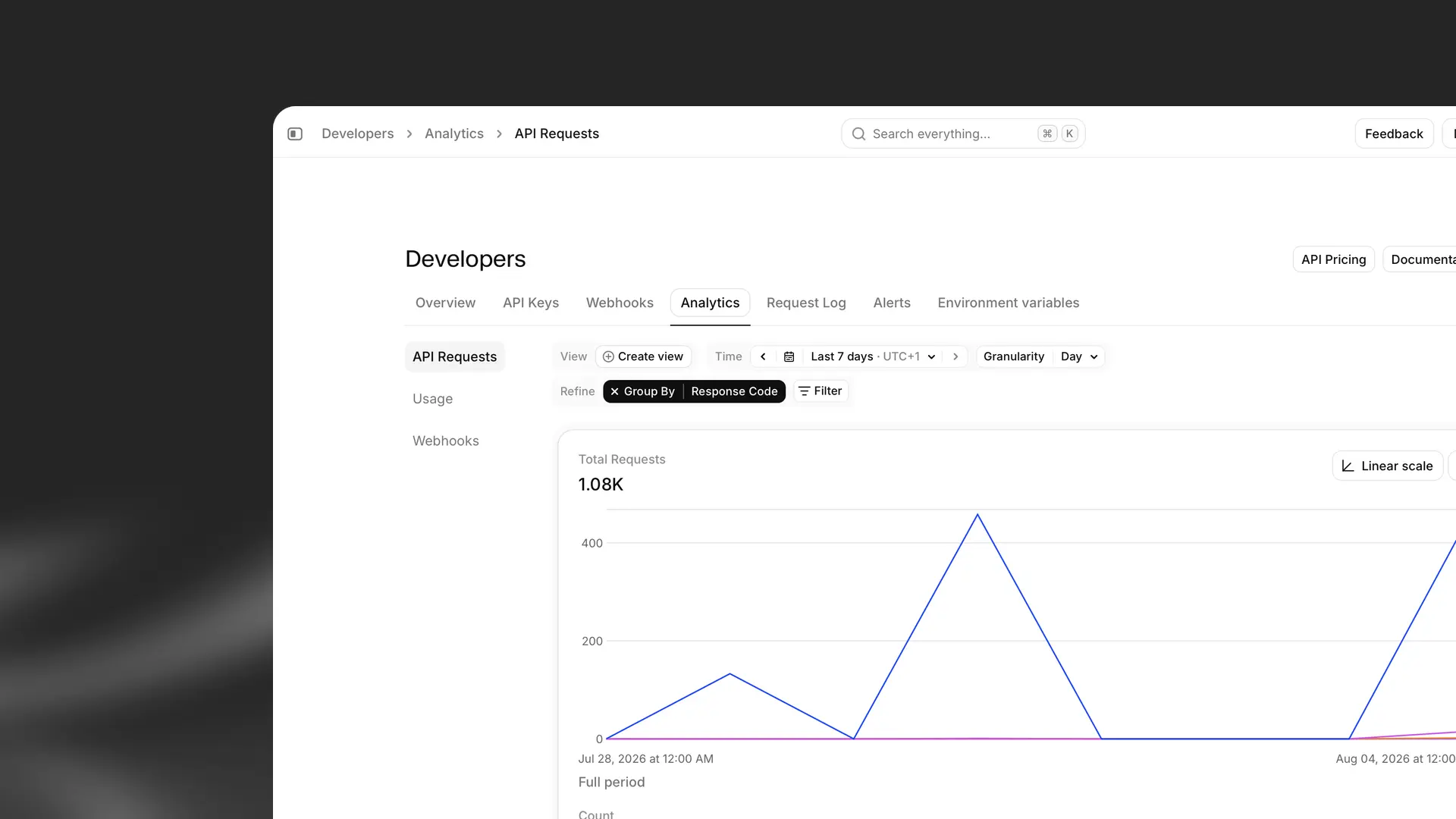
If you are part of a multi-seat workspace, you can switch between data for your account and your workspace. Account shows data for your individual account, while Workspace covers all accounts in your workspace. If you are not in a multi-seat workspace, you will not see this option.
For a full walkthrough of metrics and filters, see Usage analytics.
How can I see information about credit usage for my account?
You can view credit usage for your account in usage analytics. Click Developers at the bottom of the sidebar, open the Analytics tab, then select Usage.
The Usage view shows credit consumption and related performance metrics, including:
- Credit usage, which you can break down and filter (for example, by voice, product, or API key)
- Average time to first byte
- Average time to completed transcript
- Concurrent requests
When viewing workspace usage, you can also break usage down by individual user or workspace group.
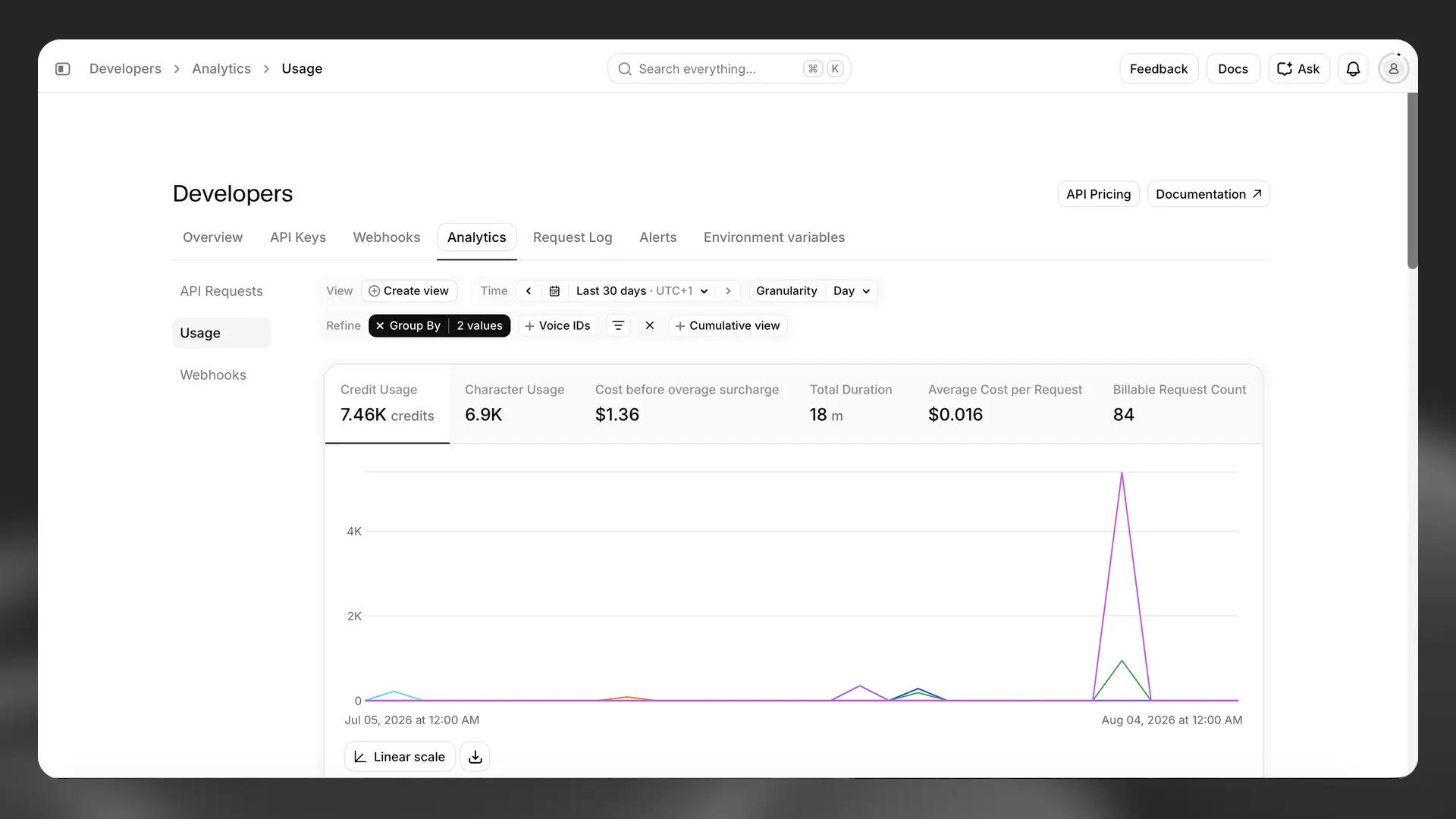
If you are part of a multi-seat workspace, you can switch between data for your account and your workspace. Account shows data for your individual account, while Workspace covers all accounts in your workspace. If you are not in a multi-seat workspace, you will not see this option.
You can filter by time period and granularity, and refine the view with group-by and filter options. For example, you can filter to see how many credits were used with a specific voice this month.
For a full walkthrough, see Usage analytics.
How can I see information about API requests for my account?
You can view API request data for your account in usage analytics. Click Developers at the bottom of the sidebar, open the Analytics tab, then select API Requests.
The API Requests view shows request volume and performance for your account or workspace. Metrics include:
- Total requests, which you can break down and filter
- Success rate
- Average latency
- Top called path
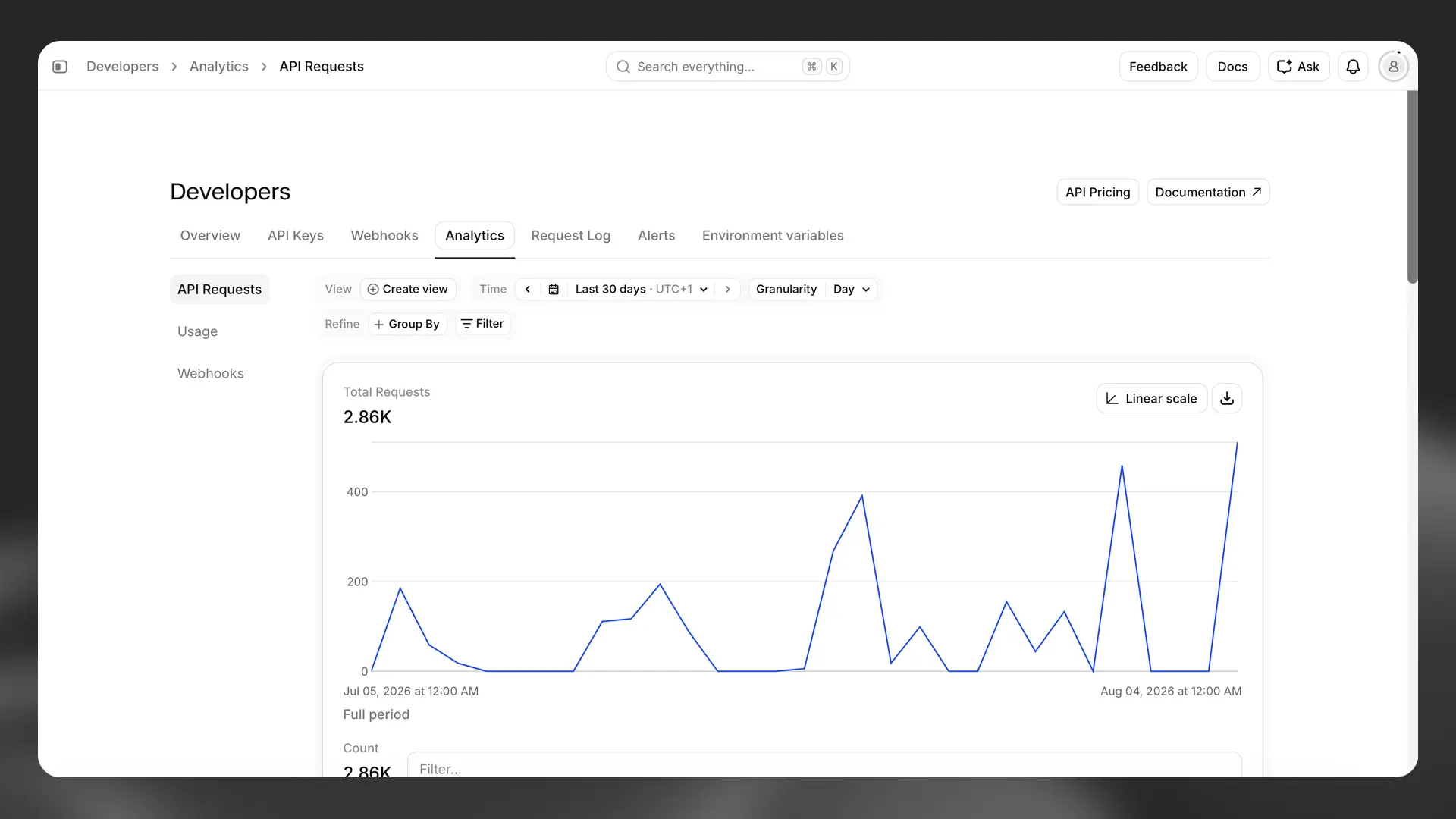
You can filter by time period (for example, hour, day, month, or year) and at different levels of granularity.
If you are part of a multi-seat workspace, you can switch between data for your account and your workspace. If you are not in a multi-seat workspace, you will not see this option.
To search and inspect individual API requests, open the Request Log tab.
For a full walkthrough, see Usage analytics.
Can I export usage data for my account?
Yes. Usage analytics lets you export the data from your current view as a CSV file.
Open Developers in the sidebar, go to the Analytics tab, set up the view you want, then click Export.
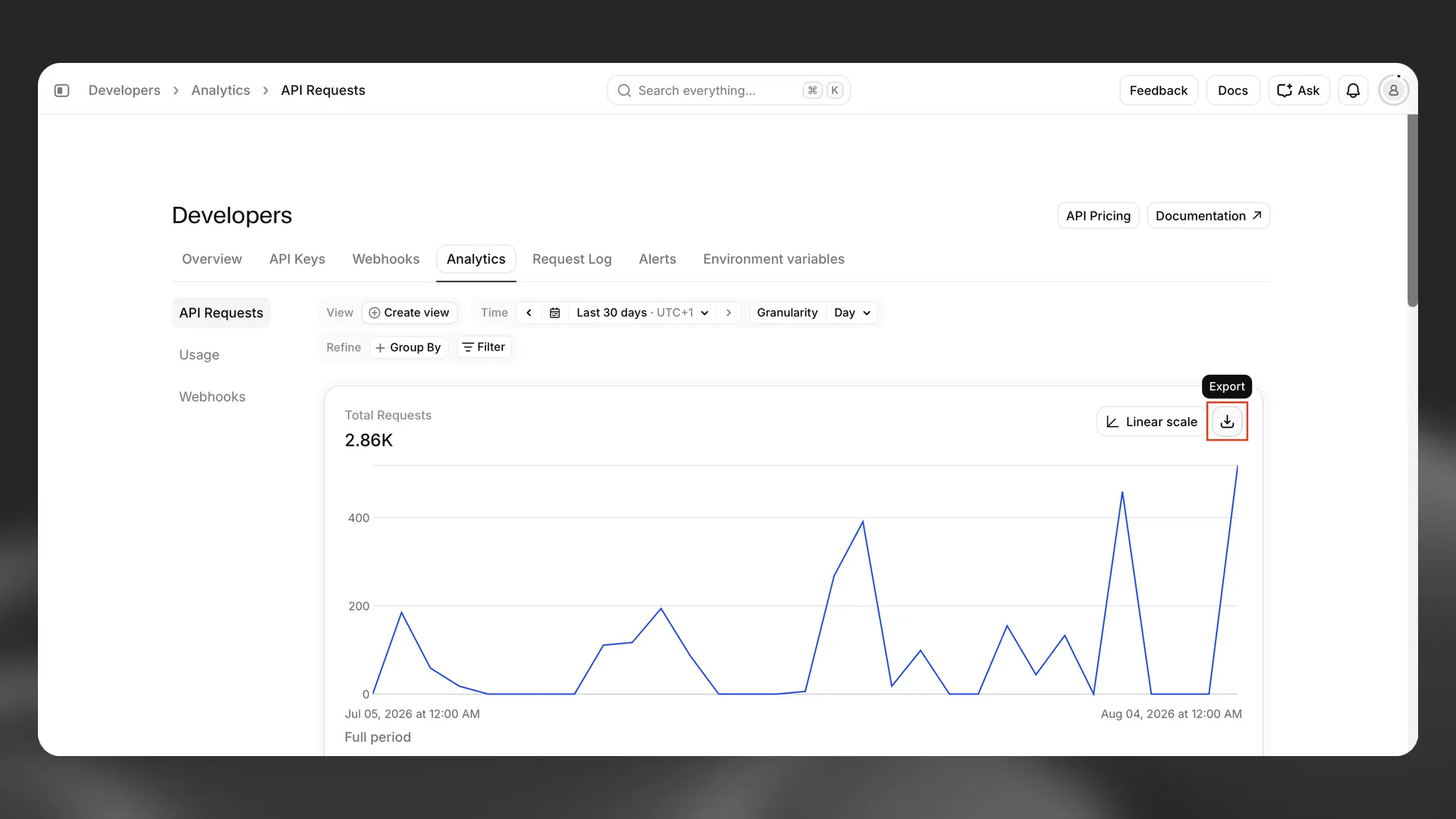
For more information on Analytics views and filters, see Usage analytics.
Billing
How do I change my billing information?
You can update your billing information from your Subscription page.
The updated details will be applied automatically to all future invoices.