> This is a page from the ElevenLabs documentation. For a complete page index, fetch https://elevenlabs.io/docs/llms.txt. For the full documentation in a single file, fetch https://elevenlabs.io/docs/llms-full.txt.
# Models
> Learn about the models that power the ElevenLabs API.
## Flagship models
### Text to Speech
Our most emotionally rich, expressive speech synthesis model
Dramatic delivery and performance
70+ languages supported
5,000 character limit
Support for natural multi-speaker dialogue
Lifelike, consistent quality speech synthesis model
Natural-sounding output
29 languages supported
10,000 character limit
Most stable on long-form generations
Our fast, affordable speech synthesis model
Ultra-low latency (\~75ms†)
32 languages supported
40,000 character limit
Faster model, 50% lower price per character for API generations
### Speech to Text
State-of-the-art speech recognition model
Accurate transcription in 90+ languages
Keyterm prompting, up to 1000 terms
Entity detection, up to 56
Precise word-level timestamps
Speaker diarization, up to 32 speakers
Dynamic audio tagging
Smart language detection
Real-time speech recognition model
Accurate transcription in 90+ languages
Real-time transcription
Low latency (\~150ms†)
Precise word-level timestamps
### Music
Studio-grade music with natural language prompts in any style
Complete control over genre, style, and structure
Vocals or just instrumental
Multilingual, including English, Spanish, German, Japanese and more
Edit the sound and lyrics of individual sections or the whole song
Pricing
## Models overview
The ElevenLabs API offers a range of audio models optimized for different use cases, quality levels, and performance requirements.
| Model ID | Description | Languages |
| ---------------------------- | -------------------------------------------------------------------- | ----------------------------------------------------------------------------------------------------------------------------------------------------------------------------- |
| `eleven_v3` | Human-like and expressive speech generation | [70+ languages](/docs/overview/models#supported-languages) |
| `eleven_ttv_v3` | Human-like and expressive voice design model (Text to Voice) | [70+ languages](/docs/overview/models#supported-languages) |
| `eleven_multilingual_v2` | Our most lifelike model with rich emotional expression | `en`, `ja`, `zh`, `de`, `hi`, `fr`, `ko`, `pt`, `it`, `es`, `id`, `nl`, `tr`, `fil`, `pl`, `sv`, `bg`, `ro`, `ar`, `cs`, `el`, `fi`, `hr`, `ms`, `sk`, `da`, `ta`, `uk`, `ru` |
| `eleven_flash_v2_5` | Ultra-fast model optimized for real-time use (\~75ms†) | All `eleven_multilingual_v2` languages plus: `hu`, `no`, `vi` |
| `eleven_flash_v2` | Ultra-fast model optimized for real-time use (\~75ms†) | `en` |
| `eleven_multilingual_sts_v2` | State-of-the-art multilingual voice changer model (Speech to Speech) | `en`, `ja`, `zh`, `de`, `hi`, `fr`, `ko`, `pt`, `it`, `es`, `id`, `nl`, `tr`, `fil`, `pl`, `sv`, `bg`, `ro`, `ar`, `cs`, `el`, `fi`, `hr`, `ms`, `sk`, `da`, `ta`, `uk`, `ru` |
| `eleven_multilingual_ttv_v2` | State-of-the-art multilingual voice designer model (Text to Voice) | `en`, `ja`, `zh`, `de`, `hi`, `fr`, `ko`, `pt`, `it`, `es`, `id`, `nl`, `tr`, `fil`, `pl`, `sv`, `bg`, `ro`, `ar`, `cs`, `el`, `fi`, `hr`, `ms`, `sk`, `da`, `ta`, `uk`, `ru` |
| `eleven_english_sts_v2` | English-only voice changer model (Speech to Speech) | `en` |
| `scribe_v2_realtime` | Real-time speech recognition model | [90+ languages](/docs/overview/capabilities/speech-to-text#supported-languages) |
| `scribe_v2` | State-of-the-art speech recognition model | [90+ languages](/docs/overview/capabilities/speech-to-text#supported-languages) |
| `eleven_text_to_sound_v2` | Sound effects generation from text prompts | N/A |
| `music_v1` | Studio-grade music generation from text prompts | `en`, `es`, `de`, `ja`, and more |
† Excluding application & network latency
### Deprecated models
The `scribe_v1`, `eleven_monolingual_v1` and `eleven_multilingual_v1` models are deprecated and will be removed in the future. Please migrate to newer models for continued service.
The `eleven_turbo_v2_5` and `eleven_turbo_v2` models are functionally equivalent to the
`eleven_flash_v2_5` and `eleven_flash_v2` models respectively, except the latency on the Flash
models is lower on average. We recommend using the Flash models over Turbo models in all use
cases.
| Model ID | Description | Languages | Replacement model suggestion |
| ------------------------ | --------------------------------------------------------------- | ----------------------------------------------------------------------------------------------------------------------------------------------------------------------------------------------- | ---------------------------- |
| `eleven_monolingual_v1` | First generation TTS model (outclassed by v2 models) | `en` | `eleven_multilingual_v2` |
| `eleven_multilingual_v1` | First multilingual model (outclassed by v2 models) | `en`, `fr`, `de`, `hi`, `it`, `pl`, `pt`, `es` | `eleven_multilingual_v2` |
| `eleven_turbo_v2_5` | First generation low-latency model (outclassed by Flash models) | `en`, `ja`, `zh`, `de`, `hi`, `fr`, `ko`, `pt`, `it`, `es`, `id`, `nl`, `tr`, `fil`, `pl`, `sv`, `bg`, `ro`, `ar`, `cs`, `el`, `fi`, `hr`, `ms`, `sk`, `da`, `ta`, `uk`, `ru`, `hu`, `no`, `vi` | `eleven_flash_v2_5` |
| `eleven_turbo_v2` | First generation low-latency model (outclassed by Flash models) | `en` | `eleven_flash_v2` |
| `scribe_v1` | First generation speech recognition (outclassed by v2 models) | [90+ languages](/docs/overview/capabilities/speech-to-text#supported-languages) | `scribe_v2` |
## Eleven v3
Eleven v3 is our latest and most advanced speech synthesis model. It is a state-of-the-art model that produces natural, life-like speech with high emotional range and contextual understanding across multiple languages.
This model works well in the following scenarios:
* **Character Discussions**: Excellent for audio experiences with multiple characters that interact with each other.
* **Audiobook Production**: Perfect for long-form narration with complex emotional delivery.
* **Emotional Dialogue**: Generate natural, lifelike dialogue with high emotional range and contextual understanding.
With Eleven v3 comes a new Text to Dialogue API, which allows you to generate natural, lifelike dialogue with high emotional range and contextual understanding across multiple languages. Eleven v3 can also be used with the Text to Speech API to generate natural, lifelike speech with high emotional range and contextual understanding across multiple languages.
Read more about the Text to Dialogue API [here](/docs/overview/capabilities/text-to-dialogue).
### Supported languages
The Eleven v3 model supports 70+ languages, including:
*Afrikaans (afr), Arabic (ara), Armenian (hye), Assamese (asm), Azerbaijani (aze), Belarusian (bel), Bengali (ben), Bosnian (bos), Bulgarian (bul), Catalan (cat), Cebuano (ceb), Chichewa (nya), Croatian (hrv), Czech (ces), Danish (dan), Dutch (nld), English (eng), Estonian (est), Filipino (fil), Finnish (fin), French (fra), Galician (glg), Georgian (kat), German (deu), Greek (ell), Gujarati (guj), Hausa (hau), Hebrew (heb), Hindi (hin), Hungarian (hun), Icelandic (isl), Indonesian (ind), Irish (gle), Italian (ita), Japanese (jpn), Javanese (jav), Kannada (kan), Kazakh (kaz), Kirghiz (kir), Korean (kor), Latvian (lav), Lingala (lin), Lithuanian (lit), Luxembourgish (ltz), Macedonian (mkd), Malay (msa), Malayalam (mal), Mandarin Chinese (cmn), Marathi (mar), Nepali (nep), Norwegian (nor), Pashto (pus), Persian (fas), Polish (pol), Portuguese (por), Punjabi (pan), Romanian (ron), Russian (rus), Serbian (srp), Sindhi (snd), Slovak (slk), Slovenian (slv), Somali (som), Spanish (spa), Swahili (swa), Swedish (swe), Tamil (tam), Telugu (tel), Thai (tha), Turkish (tur), Ukrainian (ukr), Urdu (urd), Vietnamese (vie), Welsh (cym).*
## Multilingual v2
Eleven Multilingual v2 is our most advanced, emotionally-aware speech synthesis model. It produces natural, lifelike speech with high emotional range and contextual understanding across multiple languages.
The model delivers consistent voice quality and personality across all supported languages while maintaining the speaker's unique characteristics and accent.
This model excels in scenarios requiring high-quality, emotionally nuanced speech:
* **Character Voiceovers**: Ideal for gaming and animation due to its emotional range.
* **Professional Content**: Well-suited for corporate videos and e-learning materials.
* **Multilingual Projects**: Maintains consistent voice quality across language switches.
* **Stable Quality**: Produces consistent, high-quality audio output.
While it has a higher latency & cost per character than Flash models, it delivers superior quality for projects where lifelike speech is important.
Our multilingual v2 models support 29 languages:
*English (USA, UK, Australia, Canada), Japanese, Chinese, German, Hindi, French (France, Canada), Korean, Portuguese (Brazil, Portugal), Italian, Spanish (Spain, Mexico), Indonesian, Dutch, Turkish, Filipino, Polish, Swedish, Bulgarian, Romanian, Arabic (Saudi Arabia, UAE), Czech, Greek, Finnish, Croatian, Malay, Slovak, Danish, Tamil, Ukrainian & Russian.*
## Flash v2.5
Eleven Flash v2.5 is our fastest speech synthesis model, designed for real-time applications and Agents Platform. It delivers high-quality speech with ultra-low latency (\~75ms†) across 32 languages.
The model balances speed and quality, making it ideal for interactive applications while maintaining natural-sounding output and consistent voice characteristics across languages.
This model is particularly well-suited for:
* **Agents Platform**: Perfect for real-time voice agents and chatbots.
* **Interactive Applications**: Ideal for games and applications requiring immediate response.
* **Large-Scale Processing**: Efficient for bulk text-to-speech conversion.
With its lower price point for API generations and 75ms latency, Flash v2.5 is the cost-effective option for anyone needing fast, reliable speech synthesis across multiple languages.
Flash v2.5 supports 32 languages - all languages from v2 models plus:
*Hungarian, Norwegian & Vietnamese*
† Excluding application & network latency
### Considerations
When using Flash v2.5, numbers aren't normalized by default in a way you might expect. For example, phone numbers might be read out in way that isn't clear for the user. Dates and currencies are affected in a similar manner.
By default, normalization is disabled for Flash v2.5 to maintain the low latency. However, Enterprise customers can now enable text normalization for v2.5 models by setting the `apply_text_normalization` parameter to "on" in your request.
The Multilingual v2 model does a better job of normalizing numbers, so we recommend using it for phone numbers and other cases where number normalization is important.
For low-latency or Agents Platform applications, best practice is to have your LLM [normalize the text](/docs/overview/capabilities/text-to-speech/best-practices#text-normalization) before passing it to the TTS model, or use the `apply_text_normalization` parameter (Enterprise plans only for v2.5 models).
## Model selection guide
For guidance on which model best fits your requirements and use case, see the [model selection guide](/docs/eleven-api/choosing-the-right-model).
Use `eleven_multilingual_v2`
Best for high-fidelity audio output with rich emotional expression
Use Flash models
Optimized for real-time applications (\~75ms latency)
Use either either `eleven_multilingual_v2` or `eleven_flash_v2_5`
Both support up to 32 languages
Use `eleven_flash_v2_5`
Good balance between quality and speed
Use `eleven_multilingual_v2`
Ideal for professional content, audiobooks & video narration.
Use `eleven_flash_v2_5`, `eleven_flash_v2` or`eleven_multilingual_v2`
Perfect for real-time conversational applications
Use `eleven_multilingual_sts_v2`
Specialized for Speech-to-Speech conversion
## Character limits
The maximum number of characters supported in a single text-to-speech request varies by model.
| Model ID | Character limit | Approximate audio duration |
| ------------------------ | --------------- | -------------------------- |
| `eleven_v3` | 5,000 | \~5 minutes |
| `eleven_flash_v2_5` | 40,000 | \~40 minutes |
| `eleven_flash_v2` | 30,000 | \~30 minutes |
| `eleven_multilingual_v2` | 10,000 | \~10 minutes |
| `eleven_multilingual_v1` | 10,000 | \~10 minutes |
| `eleven_english_sts_v2` | 10,000 | \~10 minutes |
| `eleven_english_sts_v1` | 10,000 | \~10 minutes |
For longer content, consider splitting the input into multiple requests.
## Scribe v2
Scribe v2 is our state-of-the-art speech recognition model designed for accurate transcription across 90+ languages. It provides precise word-level timestamps and advanced features like speaker diarization and dynamic audio tagging.
This model excels in scenarios requiring accurate speech-to-text conversion:
* **Transcription Services**: Perfect for converting audio/video content to text
* **Meeting Documentation**: Ideal for capturing and documenting conversations
* **Content Analysis**: Well-suited for audio content processing and analysis
* **Multilingual Recognition**: Supports accurate transcription across 90+ languages
Key features:
* Accurate transcription with word-level timestamps
* Speaker diarization for multi-speaker audio
* Dynamic audio tagging for enhanced context
* Support for 90+ languages
* Entity detection
* Keyterm prompting
Read more about Scribe v2 [here](/docs/overview/capabilities/speech-to-text).
## Scribe v2 Realtime
Scribe v2 Realtime, our fastest and most accurate live speech recognition model, delivers state-of-the-art accuracy in over 90 languages with an ultra-low 150ms of latency.
This model excels in conversational use cases:
* **Live meeting transcription**: Perfect for realtime transcription
* **AI Agents**: Ideal for live conversations
* **Multilingual Recognition**: Supports accurate transcription across 90+ languages with automatic language recognition
Key features:
* Ultra-low latency: Get partial transcriptions in \~150 milliseconds
* Streaming support: Send audio in chunks while receiving transcripts in real-time
* Multiple audio formats: Support for PCM (8kHz to 48kHz) and μ-law encoding
* Voice Activity Detection (VAD): Automatic speech segmentation based on silence detection
* Manual commit control: Full control over when to finalize transcript segments
Read more about Scribe v2 Realtime [here](/docs/overview/capabilities/speech-to-text).
## Eleven Music
Eleven Music is our studio-grade music generation model. It allows you to generate music with natural language prompts in any style.
This model is excellent for the following scenarios:
* **Game Soundtracks**: Create immersive soundtracks for games
* **Podcast Backgrounds**: Enhance podcasts with professional music
* **Marketing**: Add background music to ad reels
Key features:
* Complete control over genre, style, and structure
* Vocals or just instrumental
* Multilingual, including English, Spanish, German, Japanese and more
* Edit the sound and lyrics of individual sections or the whole song
Read more about Eleven Music [here](/docs/overview/capabilities/music).
## Concurrency and priority
Your subscription plan determines how many requests can be processed simultaneously and the priority level of your requests in the queue.
Speech to Text has an elevated concurrency limit.
Once the concurrency limit is met, subsequent requests are processed in a queue alongside lower-priority requests.
In practice this typically only adds \~50ms of latency.
| Plan | Concurrency Limit
(Multilingual v2) | Concurrency Limit
(Flash) | STT Concurrency Limit | Realtime STT Concurrency limit | Music Concurrency limit | Priority level |
| ---------- | ----------------------------------------- | ------------------------------- | --------------------- | ------------------------------ | ----------------------- | -------------- |
| Free | 2 | 4 | 8 | 6 | 0 | 3 |
| Starter | 3 | 6 | 12 | 9 | 2 | 4 |
| Creator | 5 | 10 | 20 | 15 | 2 | 5 |
| Pro | 10 | 20 | 40 | 30 | 2 | 5 |
| Scale | 15 | 30 | 60 | 45 | 5 | 5 |
| Business | 15 | 30 | 60 | 45 | 5 | 5 |
| Enterprise | Elevated | Elevated | Elevated | Elevated | Highest | 6 |
Startup grants recipients receive Scale level benefits.
The response headers include `current-concurrent-requests` and `maximum-concurrent-requests` which you can use to monitor your concurrency.
### API requests per minute vs concurrent requests
It's important to understand that **API requests per minute** and **concurrent requests** are different metrics that depend on your usage patterns.
API requests per minute can be different from concurrent requests since it depends on the length of time for each request and how the requests are batched.
**Example 1: Spaced requests**
If you had 180 requests per minute that each took 1 second to complete and you sent them each 0.33 seconds apart, the max concurrent requests would be 3 and the average would be 3 since there would always be 3 in flight.
**Example 2: Batched requests**
However, if you had a different usage pattern such as 180 requests per minute that each took 3 seconds to complete but all fired at once, the max concurrent requests would be 180 and the average would be 9 (first 3 seconds of the minute saw 180 requests at once, final 57 seconds saw 0 requests).
Since our system cares about concurrency, requests per minute matter less than how long each of the requests take and the pattern of when they are sent.
How endpoint requests are made impacts concurrency limits:
* With HTTP, each request counts individually toward your concurrency limit.
* With a WebSocket, only the time where our model is generating audio counts towards your concurrency limit, this means a for most of the time an open websocket doesn't count towards your concurrency limit at all.
### Understanding concurrency limits
The concurrency limit associated with your plan should not be interpreted as the maximum number of simultaneous conversations, phone calls character voiceovers, etc that can be handled at once.
The actual number depends on several factors, including the specific AI voices used and the characteristics of the use case.
As a general rule of thumb, a concurrency limit of 5 can typically support up to approximately 100 simultaneous audio broadcasts.
This is because of the speed it takes for audio to be generated relative to the time it takes for the TTS request to be processed.
The diagram below is an example of how 4 concurrent calls with different users can be facilitated while only hitting 2 concurrent requests.
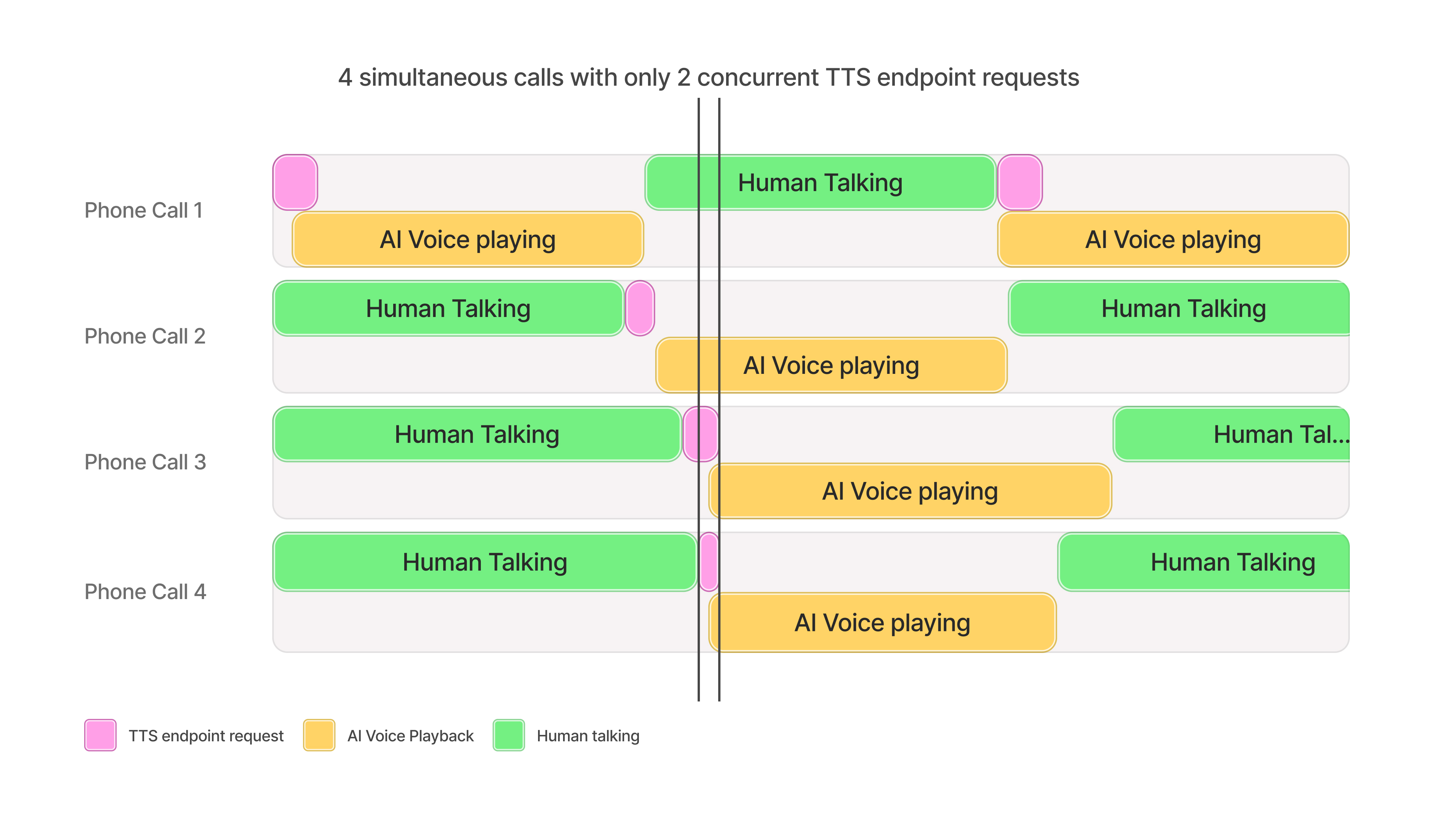 Where TTS is used to facilitate dialogue, a concurrency limit of 5 can support about 100 broadcasts for balanced conversations between AI agents and human participants.
For use cases in which the AI agent speaks less frequently than the human, such as customer support interactions, more than 100 simultaneous conversations could be supported.
Generally, more than 100 simultaneous character voiceovers can be supported for a concurrency limit of 5.
The number can vary depending on the character’s dialogue frequency, the length of pauses, and in-game actions between lines.
Concurrent dubbing streams generally follow the provided heuristic.
If the broadcast involves periods of conversational pauses (e.g. because of a soundtrack, visual scenes, etc), more simultaneous dubbing streams than the suggestion may be possible.
If you exceed your plan's concurrency limits at any point and you are on the Enterprise plan, model requests may still succeed, albeit slower, on a best efforts basis depending on available capacity.
To increase your concurrency limit & queue priority, [upgrade your subscription
plan](https://elevenlabs.io/pricing/api).
Enterprise customers can request a higher concurrency limit by contacting their account manager.
### Scale testing concurrency limits
Scale testing can be useful to identify client side scaling issues and to verify concurrency limits are set correctly for your usecase.
It is heavily recommended to test end-to-end workflows as close to real world usage as possible, simulating and measuring how many users can be supported is the recommended methodology for achieving this. It is important to:
* Simulate users, not raw requests
* Simulate typical user behavior such as waiting for audio playback, user speaking or transcription to finish before making requests
* Ramp up the number of users slowly over a period of minutes
* Introduce randomness to request timings and to the size of requests
* Capture latency metrics and any returned error codes from the API
For example, to test an agent system designed to support 100 simultaneous conversations you would create up to 100 individual "users" each simulating a conversation. Conversations typically consist of a repeating cycle of \~10 seconds of user talking, followed by the TTS API call for \~150 characters, followed by \~10 seconds of audio playback to the user. Therefore, each user should follow the pattern of making a websocket Text-to-Speech API call for 150 characters of text every 20 seconds, with a small amount of randomness introduced to the wait period and the number of characters requested. The test would consist of spawning one user per second until 100 exist and then testing for 10 minutes in total to test overall stability.
This example uses [locust](https://locust.io/) as the testing framework with direct API calls to the ElevenLabs API.
It follows the example listed above, testing a conversational agent system with each user sending 1 request every 20 seconds.
```python title="Python" {12}
import json
import random
import time
import gevent
import locust
from locust import User, task, events, constant_throughput
import websocket
# Averages up to 10 seconds of audio when played, depends on the voice speed
DEFAULT_TEXT = (
"Hello, this is a test message. I am testing if a long input will cause issues for the model "
"like this sentence. "
)
TEXT_ARRAY = [
"Hello.",
"Hello, this is a test message.",
DEFAULT_TEXT,
DEFAULT_TEXT * 2,
DEFAULT_TEXT * 3
]
# Custom command line arguments
@events.init_command_line_parser.add_listener
def on_parser_init(parser):
parser.add_argument("--api-key", default="YOUR_API_KEY", help="API key for authentication")
parser.add_argument("--encoding", default="mp3_22050_32", help="Encoding")
parser.add_argument("--text", default=DEFAULT_TEXT, help="Text to use")
parser.add_argument("--use-text-array", default="false", help="Text to use")
parser.add_argument("--voice-id", default="aria", help="Text to use")
class WebSocketTTSUser(User):
# Each user will send a request every 20 seconds, regardless of how long each request takes
wait_time = constant_throughput(0.05)
def __init__(self, *args, **kwargs):
super().__init__(*args, **kwargs)
self.api_key = self.environment.parsed_options.api_key
self.voice_id = self.environment.parsed_options.voice_id
self.text = self.environment.parsed_options.text
self.encoding = self.environment.parsed_options.encoding
self.use_text_array = self.environment.parsed_options.use_text_array
if self.use_text_array:
self.text = random.choice(TEXT_ARRAY)
self.all_recieved = False
@task
def tts_task(self):
# Do jitter waiting of up to 1 second
# Users appear to be spawned every second so this ensures requests are not aligned
gevent.sleep(random.random())
max_wait_time = 10
# Connection details
uri = f"{self.environment.host}/v1/text-to-speech/{self.voice_id}/stream-input?auto_mode=true&output_format={self.encoding}"
headers = {"xi-api-key": self.api_key}
ws = None
self.all_recieved = False
try:
init_msg = {"text": " "}
# Use proper header format for websocket - this is case sensitive!
ws = websocket.create_connection(uri, header=headers)
ws.send(json.dumps(init_msg))
# Start measuring after websocket initiated but before any messages are sent
send_request_time = time.perf_counter()
ws.send(json.dumps({"text": self.text}))
# Send to flush and receive the audio
ws.send(json.dumps({"text": ""}))
def _receive():
t_first_response = None
audio_size = 0
try:
while True:
# Wait up to 10 seconds for a response
ws.settimeout(max_wait_time)
response = ws.recv()
response_data = json.loads(response)
if "audio" in response_data and response_data["audio"]:
audio_size = audio_size + len(response_data["audio"])
if t_first_response is None:
t_first_response = time.perf_counter()
first_byte_ms = (
t_first_response - send_request_time
) * 1000
if audio_size is None:
# The first response should always have audio
locust.events.request.fire(
request_type="websocket",
name="Bad Response (no audio)",
response_time=first_byte_ms,
response_length=audio_size,
exception=Exception("Response has no audio"),
)
break
if "isFinal" in response_data and response_data["isFinal"]:
# Fire this event once finished streaming, but report the important TTFB metric
locust.events.request.fire(
request_type="websocket",
name="TTS Stream Success (First Byte)",
response_time=first_byte_ms,
response_length=audio_size,
exception=None,
)
break
except websocket.WebSocketTimeoutException:
locust.events.request.fire(
request_type="websocket",
name="TTS Stream Timeout",
response_time=max_wait_time * 1000,
response_length=audio_size,
exception=Exception("Timeout waiting for response"),
)
except Exception as e:
# Typically JSON decode error if the server returns HTTP backoff error
locust.events.request.fire(
request_type="websocket",
name="TTS Stream Failure",
response_time=0,
response_length=0,
exception=e,
)
finally:
self.all_recieved = True
gevent.spawn(_receive)
# Sleep until recieved so new tasks aren't spawned
while not self.all_recieved:
gevent.sleep(1)
except websocket.WebSocketTimeoutException:
locust.events.request.fire(
request_type="websocket",
name="TTS Stream Timeout",
response_time=max_wait_time * 1000,
response_length=0,
exception=Exception("Timeout waiting for response"),
)
except Exception as e:
locust.events.request.fire(
request_type="websocket",
name="TTS Stream Failure",
response_time=0,
response_length=0,
exception=e,
)
finally:
# Try and close the websocket gracefully
try:
if ws:
ws.close()
except Exception:
pass
```
Where TTS is used to facilitate dialogue, a concurrency limit of 5 can support about 100 broadcasts for balanced conversations between AI agents and human participants.
For use cases in which the AI agent speaks less frequently than the human, such as customer support interactions, more than 100 simultaneous conversations could be supported.
Generally, more than 100 simultaneous character voiceovers can be supported for a concurrency limit of 5.
The number can vary depending on the character’s dialogue frequency, the length of pauses, and in-game actions between lines.
Concurrent dubbing streams generally follow the provided heuristic.
If the broadcast involves periods of conversational pauses (e.g. because of a soundtrack, visual scenes, etc), more simultaneous dubbing streams than the suggestion may be possible.
If you exceed your plan's concurrency limits at any point and you are on the Enterprise plan, model requests may still succeed, albeit slower, on a best efforts basis depending on available capacity.
To increase your concurrency limit & queue priority, [upgrade your subscription
plan](https://elevenlabs.io/pricing/api).
Enterprise customers can request a higher concurrency limit by contacting their account manager.
### Scale testing concurrency limits
Scale testing can be useful to identify client side scaling issues and to verify concurrency limits are set correctly for your usecase.
It is heavily recommended to test end-to-end workflows as close to real world usage as possible, simulating and measuring how many users can be supported is the recommended methodology for achieving this. It is important to:
* Simulate users, not raw requests
* Simulate typical user behavior such as waiting for audio playback, user speaking or transcription to finish before making requests
* Ramp up the number of users slowly over a period of minutes
* Introduce randomness to request timings and to the size of requests
* Capture latency metrics and any returned error codes from the API
For example, to test an agent system designed to support 100 simultaneous conversations you would create up to 100 individual "users" each simulating a conversation. Conversations typically consist of a repeating cycle of \~10 seconds of user talking, followed by the TTS API call for \~150 characters, followed by \~10 seconds of audio playback to the user. Therefore, each user should follow the pattern of making a websocket Text-to-Speech API call for 150 characters of text every 20 seconds, with a small amount of randomness introduced to the wait period and the number of characters requested. The test would consist of spawning one user per second until 100 exist and then testing for 10 minutes in total to test overall stability.
This example uses [locust](https://locust.io/) as the testing framework with direct API calls to the ElevenLabs API.
It follows the example listed above, testing a conversational agent system with each user sending 1 request every 20 seconds.
```python title="Python" {12}
import json
import random
import time
import gevent
import locust
from locust import User, task, events, constant_throughput
import websocket
# Averages up to 10 seconds of audio when played, depends on the voice speed
DEFAULT_TEXT = (
"Hello, this is a test message. I am testing if a long input will cause issues for the model "
"like this sentence. "
)
TEXT_ARRAY = [
"Hello.",
"Hello, this is a test message.",
DEFAULT_TEXT,
DEFAULT_TEXT * 2,
DEFAULT_TEXT * 3
]
# Custom command line arguments
@events.init_command_line_parser.add_listener
def on_parser_init(parser):
parser.add_argument("--api-key", default="YOUR_API_KEY", help="API key for authentication")
parser.add_argument("--encoding", default="mp3_22050_32", help="Encoding")
parser.add_argument("--text", default=DEFAULT_TEXT, help="Text to use")
parser.add_argument("--use-text-array", default="false", help="Text to use")
parser.add_argument("--voice-id", default="aria", help="Text to use")
class WebSocketTTSUser(User):
# Each user will send a request every 20 seconds, regardless of how long each request takes
wait_time = constant_throughput(0.05)
def __init__(self, *args, **kwargs):
super().__init__(*args, **kwargs)
self.api_key = self.environment.parsed_options.api_key
self.voice_id = self.environment.parsed_options.voice_id
self.text = self.environment.parsed_options.text
self.encoding = self.environment.parsed_options.encoding
self.use_text_array = self.environment.parsed_options.use_text_array
if self.use_text_array:
self.text = random.choice(TEXT_ARRAY)
self.all_recieved = False
@task
def tts_task(self):
# Do jitter waiting of up to 1 second
# Users appear to be spawned every second so this ensures requests are not aligned
gevent.sleep(random.random())
max_wait_time = 10
# Connection details
uri = f"{self.environment.host}/v1/text-to-speech/{self.voice_id}/stream-input?auto_mode=true&output_format={self.encoding}"
headers = {"xi-api-key": self.api_key}
ws = None
self.all_recieved = False
try:
init_msg = {"text": " "}
# Use proper header format for websocket - this is case sensitive!
ws = websocket.create_connection(uri, header=headers)
ws.send(json.dumps(init_msg))
# Start measuring after websocket initiated but before any messages are sent
send_request_time = time.perf_counter()
ws.send(json.dumps({"text": self.text}))
# Send to flush and receive the audio
ws.send(json.dumps({"text": ""}))
def _receive():
t_first_response = None
audio_size = 0
try:
while True:
# Wait up to 10 seconds for a response
ws.settimeout(max_wait_time)
response = ws.recv()
response_data = json.loads(response)
if "audio" in response_data and response_data["audio"]:
audio_size = audio_size + len(response_data["audio"])
if t_first_response is None:
t_first_response = time.perf_counter()
first_byte_ms = (
t_first_response - send_request_time
) * 1000
if audio_size is None:
# The first response should always have audio
locust.events.request.fire(
request_type="websocket",
name="Bad Response (no audio)",
response_time=first_byte_ms,
response_length=audio_size,
exception=Exception("Response has no audio"),
)
break
if "isFinal" in response_data and response_data["isFinal"]:
# Fire this event once finished streaming, but report the important TTFB metric
locust.events.request.fire(
request_type="websocket",
name="TTS Stream Success (First Byte)",
response_time=first_byte_ms,
response_length=audio_size,
exception=None,
)
break
except websocket.WebSocketTimeoutException:
locust.events.request.fire(
request_type="websocket",
name="TTS Stream Timeout",
response_time=max_wait_time * 1000,
response_length=audio_size,
exception=Exception("Timeout waiting for response"),
)
except Exception as e:
# Typically JSON decode error if the server returns HTTP backoff error
locust.events.request.fire(
request_type="websocket",
name="TTS Stream Failure",
response_time=0,
response_length=0,
exception=e,
)
finally:
self.all_recieved = True
gevent.spawn(_receive)
# Sleep until recieved so new tasks aren't spawned
while not self.all_recieved:
gevent.sleep(1)
except websocket.WebSocketTimeoutException:
locust.events.request.fire(
request_type="websocket",
name="TTS Stream Timeout",
response_time=max_wait_time * 1000,
response_length=0,
exception=Exception("Timeout waiting for response"),
)
except Exception as e:
locust.events.request.fire(
request_type="websocket",
name="TTS Stream Failure",
response_time=0,
response_length=0,
exception=e,
)
finally:
# Try and close the websocket gracefully
try:
if ws:
ws.close()
except Exception:
pass
```