> This is a page from the ElevenLabs documentation. For a complete page index, fetch https://elevenlabs.io/docs/llms.txt. For the full documentation in a single file, fetch https://elevenlabs.io/docs/llms-full.txt.
# SMS OTP verification
 ## Overview
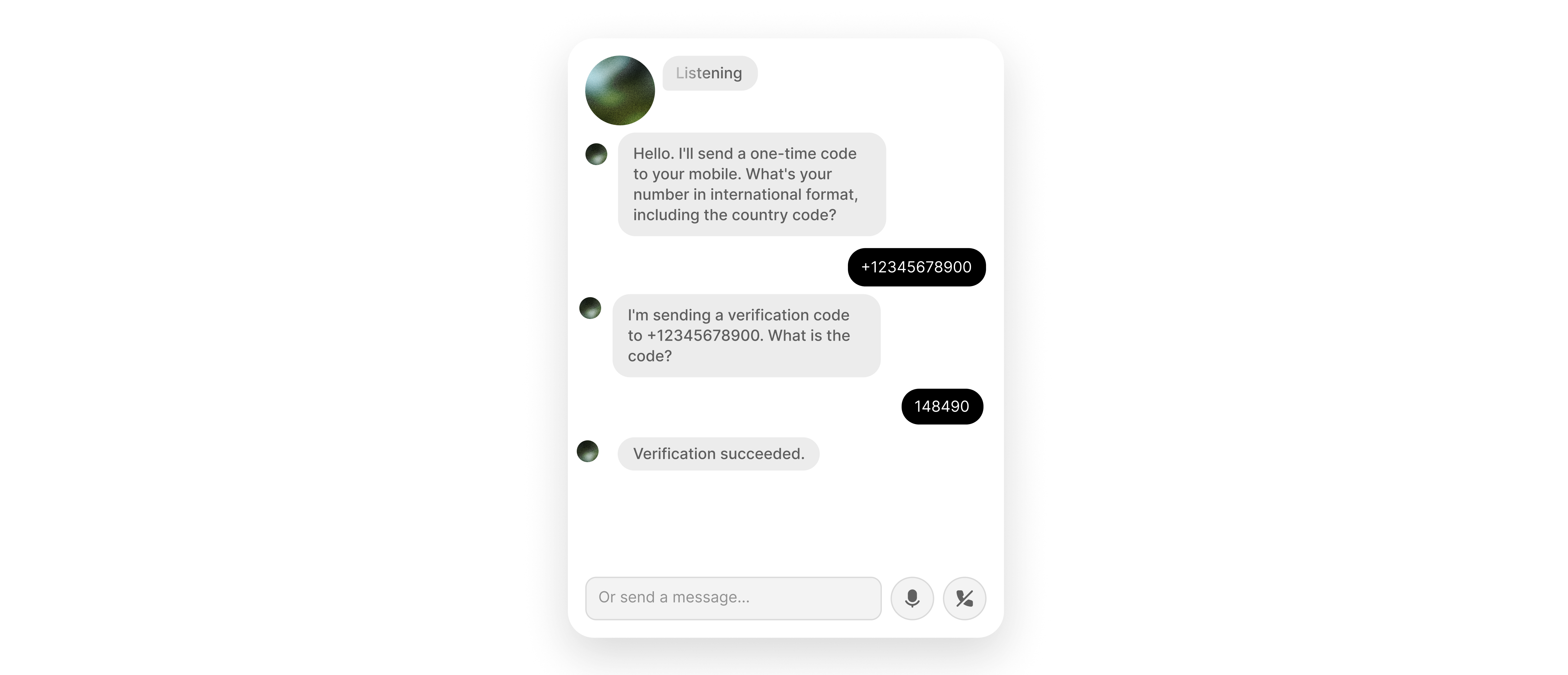
This guide shows you how to integrate [Twilio Verify](https://www.twilio.com/docs/verify/api) with your ElevenLabs agent so you can send an OTP to a caller's phone number and verify the code they read back during a live voice conversation.
You will learn how to:
* Create a Twilio Verify service and Base64-encode your credentials for authentication.
* Configure two webhook server tools (`send_SMS_verification` and `check_SMS_verification`) in the [dashboard](https://elevenlabs.io/app/agents), with the [Agents CLI](/docs/eleven-agents/operate/cli), or using the [ElevenLabs API](/docs/api-reference/introduction).
* Authenticate both webhook calls using an `Authorization` header with a secret value.
* Enable the [`skip_turn`](/docs/eleven-agents/customization/tools/system-tools/skip-turn) system tool so the agent waits when the caller has not received the code yet.
## Prerequisites
* A Twilio account with [Twilio Verify](https://www.twilio.com/docs/verify/api) enabled. If Verify is not available in your Twilio Console, request access through [Twilio support](https://support.twilio.com/) or your Twilio account team.
* If your Twilio account is in [trial mode](https://www.twilio.com/docs/guides/how-to-use-your-free-trial-account), the destination phone number must be a verified caller ID in Twilio.
Open the [Twilio Console](https://console.twilio.com/).
In the left sidebar, choose **Add +** and create an **Authenticate** (Verify) service.
Give it a descriptive name (for example, `ElevenLabs OTP`).
Open the service **Settings** page and copy the **Verify Service SID**. It starts with `VA` and is different from your Account SID.
**Common Mistake**: Use your **Verify Service SID** (`VA...`) from the Authenticate (Verify) service in the tool URLs below. Do not put your **Account SID** (`AC...`) in the path. The Verify API expects the service SID in the URL; using the Account SID produces `4xx` invalid-parameter errors.
You can use the Twilio API Explorer in the console to test requests before you attach them to your agent.
### Encode credentials and configure webhook tools
Twilio Verify uses HTTP Basic authentication with your **Account SID** as the username and **Auth Token** as the password. Find both under **Account Info** on the [Twilio Console](https://console.twilio.com/) home page.
In your shell, Base64-encode `ACCOUNT_SID:AUTH_TOKEN` (colon-separated, no spaces):
```bash
printf '%s' 'YOUR_ACCOUNT_SID:YOUR_AUTH_TOKEN' | base64
```
Copy the output. The full `Authorization` header value is the word `Basic`, a single space, and that Base64 string. Store it as a tool secret in the next steps.
```text
Basic dkFDxxxxxxxxxxxxxxxxxxxxxxxxxxxxxxxx==
```
`send_SMS_verification` calls Twilio Verify to send an SMS OTP. `check_SMS_verification` submits the digits the caller speaks. Both require the same Verify Service SID and the same `Authorization` secret.
### send\_SMS\_verification
## Overview
This guide shows you how to integrate [Twilio Verify](https://www.twilio.com/docs/verify/api) with your ElevenLabs agent so you can send an OTP to a caller's phone number and verify the code they read back during a live voice conversation.
You will learn how to:
* Create a Twilio Verify service and Base64-encode your credentials for authentication.
* Configure two webhook server tools (`send_SMS_verification` and `check_SMS_verification`) in the [dashboard](https://elevenlabs.io/app/agents), with the [Agents CLI](/docs/eleven-agents/operate/cli), or using the [ElevenLabs API](/docs/api-reference/introduction).
* Authenticate both webhook calls using an `Authorization` header with a secret value.
* Enable the [`skip_turn`](/docs/eleven-agents/customization/tools/system-tools/skip-turn) system tool so the agent waits when the caller has not received the code yet.
## Prerequisites
* A Twilio account with [Twilio Verify](https://www.twilio.com/docs/verify/api) enabled. If Verify is not available in your Twilio Console, request access through [Twilio support](https://support.twilio.com/) or your Twilio account team.
* If your Twilio account is in [trial mode](https://www.twilio.com/docs/guides/how-to-use-your-free-trial-account), the destination phone number must be a verified caller ID in Twilio.
Open the [Twilio Console](https://console.twilio.com/).
In the left sidebar, choose **Add +** and create an **Authenticate** (Verify) service.
Give it a descriptive name (for example, `ElevenLabs OTP`).
Open the service **Settings** page and copy the **Verify Service SID**. It starts with `VA` and is different from your Account SID.
**Common Mistake**: Use your **Verify Service SID** (`VA...`) from the Authenticate (Verify) service in the tool URLs below. Do not put your **Account SID** (`AC...`) in the path. The Verify API expects the service SID in the URL; using the Account SID produces `4xx` invalid-parameter errors.
You can use the Twilio API Explorer in the console to test requests before you attach them to your agent.
### Encode credentials and configure webhook tools
Twilio Verify uses HTTP Basic authentication with your **Account SID** as the username and **Auth Token** as the password. Find both under **Account Info** on the [Twilio Console](https://console.twilio.com/) home page.
In your shell, Base64-encode `ACCOUNT_SID:AUTH_TOKEN` (colon-separated, no spaces):
```bash
printf '%s' 'YOUR_ACCOUNT_SID:YOUR_AUTH_TOKEN' | base64
```
Copy the output. The full `Authorization` header value is the word `Basic`, a single space, and that Base64 string. Store it as a tool secret in the next steps.
```text
Basic dkFDxxxxxxxxxxxxxxxxxxxxxxxxxxxxxxxx==
```
`send_SMS_verification` calls Twilio Verify to send an SMS OTP. `check_SMS_verification` submits the digits the caller speaks. Both require the same Verify Service SID and the same `Authorization` secret.
### send\_SMS\_verification
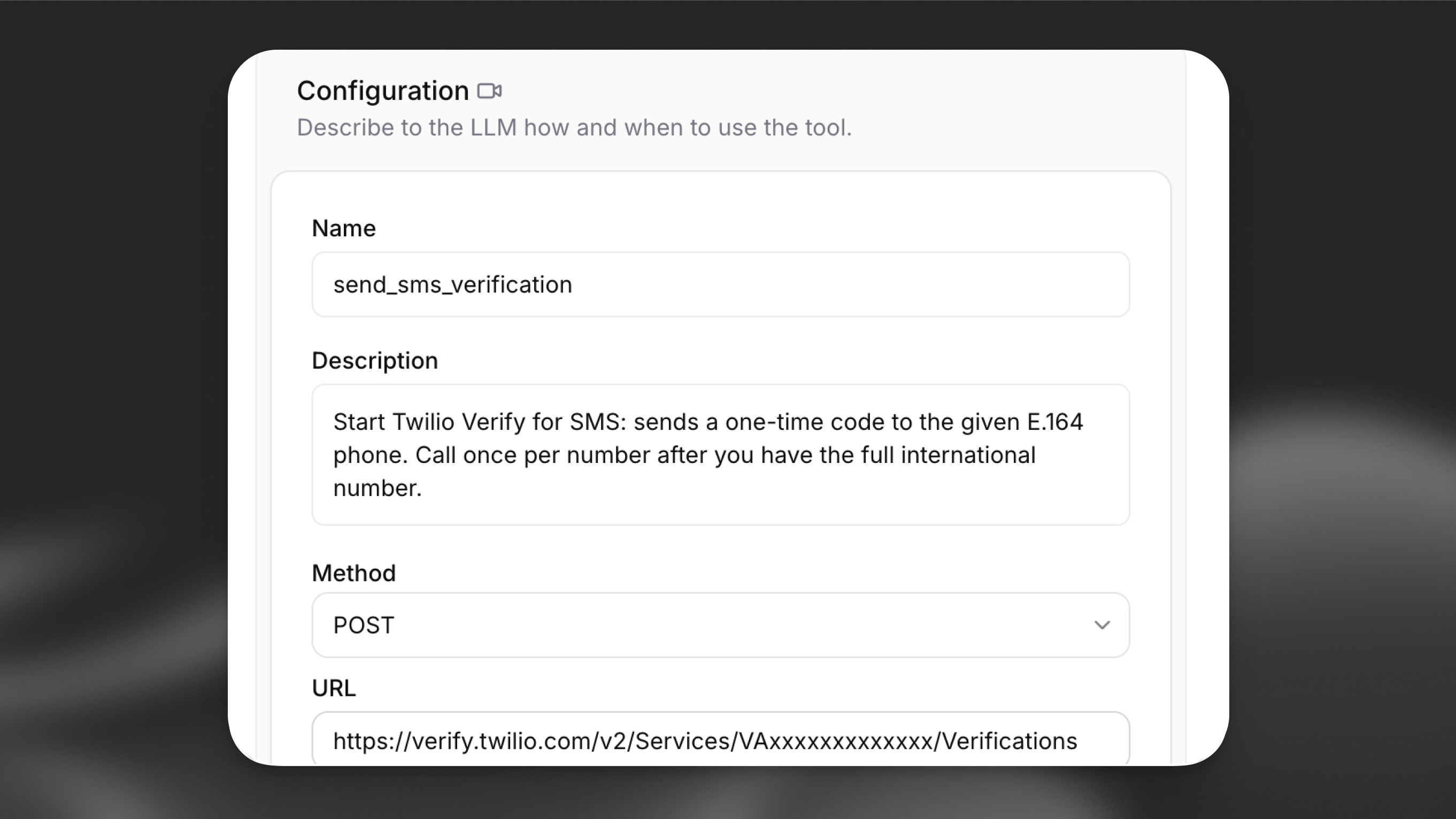 In the **Agent** section of your agent settings, choose **Add Tool** and select **Webhook**.
| Field | Value |
| ----------- | ----------------------------------------------------------------------------- |
| Name | `send_SMS_verification` |
| Description | Sends an OTP verification code via SMS to the provided phone number |
| Method | `POST` |
| URL | `https://verify.twilio.com/v2/Services/YOUR_VERIFY_SERVICE_SID/Verifications` |
Replace `YOUR_VERIFY_SERVICE_SID` with the `VA...` SID from the first step.
**Authentication header:** Under **Headers**, add `Authorization` as type **Secret** and paste the full value (`Basic ` plus Base64). See [Server tools](/docs/eleven-agents/customization/tools/server-tools).
**Body parameters:** Set **Content type** to **URL-encoded** (`application/x-www-form-urlencoded`). Add parameters with **LLM Prompt** as the value type:
| Data type | Identifier | Description |
| --------- | ---------- | ---------------------------------------------------------------- |
| `string` | `To` | Caller phone number in E.164 format (for example `+14155552671`) |
| `string` | `Channel` | Delivery channel; use `sms` |
### check\_SMS\_verification
Add a second webhook tool:
| Field | Value |
| ----------- | --------------------------------------------------------------------------------- |
| Name | `check_SMS_verification` |
| Description | Checks whether the OTP code provided by the caller is valid |
| Method | `POST` |
| URL | `https://verify.twilio.com/v2/Services/YOUR_VERIFY_SERVICE_SID/VerificationCheck` |
Use the same Verify Service SID and the same `Authorization` secret as for `send_SMS_verification`.
**Body parameters:** **URL-encoded**. Add `To` (E.164) and `Code` (OTP digits) with **LLM Prompt**.
Create a [workspace secret](/docs/api-reference/workspace/secrets/create) whose value is the full `Authorization` header (`Basic ` plus Base64). Put the secret ID in the JSON below as `YOUR_SECRET_ID`.
Save the send tool as `tool_configs/send_SMS_verification.json` (replace `YOUR_VERIFY_SERVICE_SID` with your `VA...` SID):
```json
{
"type": "webhook",
"name": "send_SMS_verification",
"description": "Sends an OTP verification code via SMS to the provided phone number",
"api_schema": {
"url": "https://verify.twilio.com/v2/Services/YOUR_VERIFY_SERVICE_SID/Verifications",
"method": "POST",
"content_type": "application/x-www-form-urlencoded",
"request_headers": {
"Authorization": { "secret_id": "YOUR_SECRET_ID" }
},
"request_body_schema": {
"type": "object",
"description": "Twilio Verify start verification parameters",
"required": ["To", "Channel"],
"properties": {
"To": {
"type": "string",
"description": "Caller phone number in E.164 format (for example +14155552671)"
},
"Channel": {
"type": "string",
"constant_value": "sms"
}
}
}
}
}
```
Save the check tool as `tool_configs/check_SMS_verification.json`:
```json
{
"type": "webhook",
"name": "check_SMS_verification",
"description": "Checks whether the OTP code provided by the caller is valid",
"api_schema": {
"url": "https://verify.twilio.com/v2/Services/YOUR_VERIFY_SERVICE_SID/VerificationCheck",
"method": "POST",
"content_type": "application/x-www-form-urlencoded",
"request_headers": {
"Authorization": { "secret_id": "YOUR_SECRET_ID" }
},
"request_body_schema": {
"type": "object",
"description": "Twilio Verify verification check parameters",
"required": ["To", "Code"],
"properties": {
"To": {
"type": "string",
"description": "Same caller number in E.164 format"
},
"Code": {
"type": "string",
"description": "The OTP digits the caller provided"
}
}
}
}
}
```
```bash
elevenlabs tools add "send_SMS_verification" --type "webhook" --config-path ./tool_configs/send_SMS_verification.json
elevenlabs tools add "check_SMS_verification" --type "webhook" --config-path ./tool_configs/check_SMS_verification.json
```
Edit `agent_configs/.json`. Under `conversation_config.agent.prompt`, set `tool_ids` to include both tools (use the IDs from `tools.json` or from `elevenlabs tools list`). Then push:
```bash
elevenlabs agents push --agent ""
```
Create a [workspace secret](/docs/api-reference/workspace/secrets/create) holding the full `Basic ...` header value, then pass its ID as `secret_id` in `request_headers`.
```python
from elevenlabs import ElevenLabs
elevenlabs = ElevenLabs()
send_sms = elevenlabs.conversational_ai.tools.create(
tool_config={
"type": "webhook",
"name": "send_SMS_verification",
"description": "Sends an OTP verification code via SMS to the provided phone number",
"api_schema": {
"url": "https://verify.twilio.com/v2/Services/YOUR_VERIFY_SERVICE_SID/Verifications",
"method": "POST",
"content_type": "application/x-www-form-urlencoded",
"request_headers": {
"Authorization": {"secret_id": "YOUR_SECRET_ID"},
},
"request_body_schema": {
"type": "object",
"description": "Twilio Verify start verification parameters",
"required": ["To", "Channel"],
"properties": {
"To": {
"type": "string",
"description": "Caller phone number in E.164 format (for example +14155552671)",
},
"Channel": {
"type": "string",
"constant_value": "sms",
},
},
},
},
}
)
check_sms = elevenlabs.conversational_ai.tools.create(
tool_config={
"type": "webhook",
"name": "check_SMS_verification",
"description": "Checks whether the OTP code provided by the caller is valid",
"api_schema": {
"url": "https://verify.twilio.com/v2/Services/YOUR_VERIFY_SERVICE_SID/VerificationCheck",
"method": "POST",
"content_type": "application/x-www-form-urlencoded",
"request_headers": {
"Authorization": {"secret_id": "YOUR_SECRET_ID"},
},
"request_body_schema": {
"type": "object",
"description": "Twilio Verify verification check parameters",
"required": ["To", "Code"],
"properties": {
"To": {
"type": "string",
"description": "Same caller number in E.164 format",
},
"Code": {
"type": "string",
"description": "The OTP digits the caller provided",
},
},
},
},
}
)
elevenlabs.conversational_ai.agents.update(
agent_id="agent_7101k5zvyjhmfg983brhmhkd98n6",
conversation_config={
"agent": {
"prompt": {
"tool_ids": [send_sms.id, check_sms.id],
},
},
},
)
```
```typescript
import { ElevenLabsClient } from "@elevenlabs/elevenlabs-js";
const elevenlabs = new ElevenLabsClient();
const sendSms = await elevenlabs.conversationalAi.tools.create({
toolConfig: {
type: "webhook",
name: "send_SMS_verification",
description: "Sends an OTP verification code via SMS to the provided phone number",
apiSchema: {
url: "https://verify.twilio.com/v2/Services/YOUR_VERIFY_SERVICE_SID/Verifications",
method: "POST",
contentType: "application/x-www-form-urlencoded",
requestHeaders: {
Authorization: { secretId: "YOUR_SECRET_ID" },
},
requestBodySchema: {
type: "object",
description: "Twilio Verify start verification parameters",
required: ["To", "Channel"],
properties: {
To: {
type: "string",
description: "Caller phone number in E.164 format (for example +14155552671)",
},
Channel: {
type: "string",
constantValue: "sms",
},
},
},
},
},
});
const checkSms = await elevenlabs.conversationalAi.tools.create({
toolConfig: {
type: "webhook",
name: "check_SMS_verification",
description: "Checks whether the OTP code provided by the caller is valid",
apiSchema: {
url: "https://verify.twilio.com/v2/Services/YOUR_VERIFY_SERVICE_SID/VerificationCheck",
method: "POST",
contentType: "application/x-www-form-urlencoded",
requestHeaders: {
Authorization: { secretId: "YOUR_SECRET_ID" },
},
requestBodySchema: {
type: "object",
description: "Twilio Verify verification check parameters",
required: ["To", "Code"],
properties: {
To: {
type: "string",
description: "Same caller number in E.164 format",
},
Code: {
type: "string",
description: "The OTP digits the caller provided",
},
},
},
},
},
});
await elevenlabs.conversationalAi.agents.update("agent_7101k5zvyjhmfg983brhmhkd98n6", {
conversationConfig: {
agent: {
prompt: {
toolIds: [sendSms.id, checkSms.id],
},
},
},
});
```
If you configure **`Channel`** as an LLM-filled field in the dashboard, add instructions in your system prompt so the model always passes `sms`. The CLI and API examples above pin `sms` with `constant_value` / `constantValue`, so the model does not choose the channel.
Callers often need a moment to receive the SMS before they can read the code. Without `skip_turn`, the agent may talk over the pause or repeat prompts.
In **Tools**, choose **Add Tool**, select **System tool**, and enable **Skip turn**. No further configuration is required.
In `agent_configs/.json`, under `conversation_config.agent.prompt`, set `built_in_tools.skip_turn` to `null` (defaults) so Skip turn is enabled, then run:
```bash
elevenlabs agents push --agent ""
```
```python
from elevenlabs import ElevenLabs
elevenlabs = ElevenLabs()
elevenlabs.conversational_ai.agents.update(
agent_id="agent_7101k5zvyjhmfg983brhmhkd98n6",
conversation_config={
"agent": {
"prompt": {
"built_in_tools": {
"skip_turn": None,
},
},
},
},
)
```
```typescript
import { ElevenLabsClient } from "@elevenlabs/elevenlabs-js";
const elevenlabs = new ElevenLabsClient();
await elevenlabs.conversationalAi.agents.update("agent_7101k5zvyjhmfg983brhmhkd98n6", {
conversationConfig: {
agent: {
prompt: {
builtInTools: {
skipTurn: null,
},
},
},
},
});
```
If you already set `tool_ids` when creating the webhook tools, merge `built_in_tools` into the same `prompt` object instead of replacing it.
Add guidance to the system prompt so the model knows when to call it, for example:
```text
When the caller indicates they are still waiting to receive the OTP code — for example,
"hold on", "I haven't received it yet", or "give me a second" — use the skip_turn tool
to wait silently rather than speaking. Do not repeat the prompt or ask for the code again
until the caller indicates they are ready.
```
See [Skip turn](/docs/eleven-agents/customization/tools/system-tools/skip-turn) for details.
Use a system prompt that sequences the tools clearly, for example:
```text
You are a secure verification agent. When you need to verify a caller's identity:
1. Ask for their phone number if you do not already have it.
2. Standardize the number to E.164 for tool calls: a leading plus, country code, then digits only, no spaces (for example +14155552671).
3. Call send_SMS_verification with their number and Channel set to "sms".
4. Tell the caller: "I've sent a verification code to your phone. Please read it out when you're ready."
5. If the caller says they haven't received the code yet or asks for a moment, use skip_turn to wait silently.
6. Once the caller provides the code, call check_SMS_verification with their number and the code.
7. If the response status is "approved", proceed with the verified flow.
8. If the code is invalid, let the caller know and offer to resend.
```
## Troubleshooting
### Twilio `60200` — Invalid parameter (HTTP 400)
Twilio may return a body like this when the request URL or body does not match what the Verify API expects:
```json
{
"code": 60200,
"message": "Invalid parameter",
"more_info": "https://www.twilio.com/docs/errors/60200",
"status": 400
}
```
**What to check:** The path must use your **Verify Service SID** (`VA...`) from the Authenticate (Verify) service settings. Putting your **Account SID** (`AC...`) in `.../Services/{Sid}/...` is a frequent cause of `60200`. See Twilio’s [60200](https://www.twilio.com/docs/errors/60200) documentation for other invalid-parameter cases.
### Twilio `20003` — Authentication Error — No credentials provided (HTTP 401)
When the `Authorization` header is missing, malformed, or not sent, Twilio can respond with:
```json
{
"code": 20003,
"message": "Authentication Error - No credentials provided",
"more_info": "https://www.twilio.com/docs/errors/20003",
"status": 401
}
```
**What to check:** The tool must send an `Authorization` header whose value is the full `Basic ` string (including the word `Basic` and a single space before the Base64 output). The Base64 input must be exactly `ACCOUNT_SID:AUTH_TOKEN` with no extra spaces or newlines. Confirm the secret is attached to this header on both webhook tools. See [20003](https://www.twilio.com/docs/errors/20003).
### Other issues
* **Number rejected in trial mode:** In the Twilio Console, open [Verified phone numbers](https://console.twilio.com/us1/develop/phone-numbers/manage/verified) and ensure the destination number is listed before you test.
* **Agent talks over the caller:** Confirm **Skip turn** is enabled and the system prompt tells the model to use `skip_turn` when the caller needs time.
In the **Agent** section of your agent settings, choose **Add Tool** and select **Webhook**.
| Field | Value |
| ----------- | ----------------------------------------------------------------------------- |
| Name | `send_SMS_verification` |
| Description | Sends an OTP verification code via SMS to the provided phone number |
| Method | `POST` |
| URL | `https://verify.twilio.com/v2/Services/YOUR_VERIFY_SERVICE_SID/Verifications` |
Replace `YOUR_VERIFY_SERVICE_SID` with the `VA...` SID from the first step.
**Authentication header:** Under **Headers**, add `Authorization` as type **Secret** and paste the full value (`Basic ` plus Base64). See [Server tools](/docs/eleven-agents/customization/tools/server-tools).
**Body parameters:** Set **Content type** to **URL-encoded** (`application/x-www-form-urlencoded`). Add parameters with **LLM Prompt** as the value type:
| Data type | Identifier | Description |
| --------- | ---------- | ---------------------------------------------------------------- |
| `string` | `To` | Caller phone number in E.164 format (for example `+14155552671`) |
| `string` | `Channel` | Delivery channel; use `sms` |
### check\_SMS\_verification
Add a second webhook tool:
| Field | Value |
| ----------- | --------------------------------------------------------------------------------- |
| Name | `check_SMS_verification` |
| Description | Checks whether the OTP code provided by the caller is valid |
| Method | `POST` |
| URL | `https://verify.twilio.com/v2/Services/YOUR_VERIFY_SERVICE_SID/VerificationCheck` |
Use the same Verify Service SID and the same `Authorization` secret as for `send_SMS_verification`.
**Body parameters:** **URL-encoded**. Add `To` (E.164) and `Code` (OTP digits) with **LLM Prompt**.
Create a [workspace secret](/docs/api-reference/workspace/secrets/create) whose value is the full `Authorization` header (`Basic ` plus Base64). Put the secret ID in the JSON below as `YOUR_SECRET_ID`.
Save the send tool as `tool_configs/send_SMS_verification.json` (replace `YOUR_VERIFY_SERVICE_SID` with your `VA...` SID):
```json
{
"type": "webhook",
"name": "send_SMS_verification",
"description": "Sends an OTP verification code via SMS to the provided phone number",
"api_schema": {
"url": "https://verify.twilio.com/v2/Services/YOUR_VERIFY_SERVICE_SID/Verifications",
"method": "POST",
"content_type": "application/x-www-form-urlencoded",
"request_headers": {
"Authorization": { "secret_id": "YOUR_SECRET_ID" }
},
"request_body_schema": {
"type": "object",
"description": "Twilio Verify start verification parameters",
"required": ["To", "Channel"],
"properties": {
"To": {
"type": "string",
"description": "Caller phone number in E.164 format (for example +14155552671)"
},
"Channel": {
"type": "string",
"constant_value": "sms"
}
}
}
}
}
```
Save the check tool as `tool_configs/check_SMS_verification.json`:
```json
{
"type": "webhook",
"name": "check_SMS_verification",
"description": "Checks whether the OTP code provided by the caller is valid",
"api_schema": {
"url": "https://verify.twilio.com/v2/Services/YOUR_VERIFY_SERVICE_SID/VerificationCheck",
"method": "POST",
"content_type": "application/x-www-form-urlencoded",
"request_headers": {
"Authorization": { "secret_id": "YOUR_SECRET_ID" }
},
"request_body_schema": {
"type": "object",
"description": "Twilio Verify verification check parameters",
"required": ["To", "Code"],
"properties": {
"To": {
"type": "string",
"description": "Same caller number in E.164 format"
},
"Code": {
"type": "string",
"description": "The OTP digits the caller provided"
}
}
}
}
}
```
```bash
elevenlabs tools add "send_SMS_verification" --type "webhook" --config-path ./tool_configs/send_SMS_verification.json
elevenlabs tools add "check_SMS_verification" --type "webhook" --config-path ./tool_configs/check_SMS_verification.json
```
Edit `agent_configs/.json`. Under `conversation_config.agent.prompt`, set `tool_ids` to include both tools (use the IDs from `tools.json` or from `elevenlabs tools list`). Then push:
```bash
elevenlabs agents push --agent ""
```
Create a [workspace secret](/docs/api-reference/workspace/secrets/create) holding the full `Basic ...` header value, then pass its ID as `secret_id` in `request_headers`.
```python
from elevenlabs import ElevenLabs
elevenlabs = ElevenLabs()
send_sms = elevenlabs.conversational_ai.tools.create(
tool_config={
"type": "webhook",
"name": "send_SMS_verification",
"description": "Sends an OTP verification code via SMS to the provided phone number",
"api_schema": {
"url": "https://verify.twilio.com/v2/Services/YOUR_VERIFY_SERVICE_SID/Verifications",
"method": "POST",
"content_type": "application/x-www-form-urlencoded",
"request_headers": {
"Authorization": {"secret_id": "YOUR_SECRET_ID"},
},
"request_body_schema": {
"type": "object",
"description": "Twilio Verify start verification parameters",
"required": ["To", "Channel"],
"properties": {
"To": {
"type": "string",
"description": "Caller phone number in E.164 format (for example +14155552671)",
},
"Channel": {
"type": "string",
"constant_value": "sms",
},
},
},
},
}
)
check_sms = elevenlabs.conversational_ai.tools.create(
tool_config={
"type": "webhook",
"name": "check_SMS_verification",
"description": "Checks whether the OTP code provided by the caller is valid",
"api_schema": {
"url": "https://verify.twilio.com/v2/Services/YOUR_VERIFY_SERVICE_SID/VerificationCheck",
"method": "POST",
"content_type": "application/x-www-form-urlencoded",
"request_headers": {
"Authorization": {"secret_id": "YOUR_SECRET_ID"},
},
"request_body_schema": {
"type": "object",
"description": "Twilio Verify verification check parameters",
"required": ["To", "Code"],
"properties": {
"To": {
"type": "string",
"description": "Same caller number in E.164 format",
},
"Code": {
"type": "string",
"description": "The OTP digits the caller provided",
},
},
},
},
}
)
elevenlabs.conversational_ai.agents.update(
agent_id="agent_7101k5zvyjhmfg983brhmhkd98n6",
conversation_config={
"agent": {
"prompt": {
"tool_ids": [send_sms.id, check_sms.id],
},
},
},
)
```
```typescript
import { ElevenLabsClient } from "@elevenlabs/elevenlabs-js";
const elevenlabs = new ElevenLabsClient();
const sendSms = await elevenlabs.conversationalAi.tools.create({
toolConfig: {
type: "webhook",
name: "send_SMS_verification",
description: "Sends an OTP verification code via SMS to the provided phone number",
apiSchema: {
url: "https://verify.twilio.com/v2/Services/YOUR_VERIFY_SERVICE_SID/Verifications",
method: "POST",
contentType: "application/x-www-form-urlencoded",
requestHeaders: {
Authorization: { secretId: "YOUR_SECRET_ID" },
},
requestBodySchema: {
type: "object",
description: "Twilio Verify start verification parameters",
required: ["To", "Channel"],
properties: {
To: {
type: "string",
description: "Caller phone number in E.164 format (for example +14155552671)",
},
Channel: {
type: "string",
constantValue: "sms",
},
},
},
},
},
});
const checkSms = await elevenlabs.conversationalAi.tools.create({
toolConfig: {
type: "webhook",
name: "check_SMS_verification",
description: "Checks whether the OTP code provided by the caller is valid",
apiSchema: {
url: "https://verify.twilio.com/v2/Services/YOUR_VERIFY_SERVICE_SID/VerificationCheck",
method: "POST",
contentType: "application/x-www-form-urlencoded",
requestHeaders: {
Authorization: { secretId: "YOUR_SECRET_ID" },
},
requestBodySchema: {
type: "object",
description: "Twilio Verify verification check parameters",
required: ["To", "Code"],
properties: {
To: {
type: "string",
description: "Same caller number in E.164 format",
},
Code: {
type: "string",
description: "The OTP digits the caller provided",
},
},
},
},
},
});
await elevenlabs.conversationalAi.agents.update("agent_7101k5zvyjhmfg983brhmhkd98n6", {
conversationConfig: {
agent: {
prompt: {
toolIds: [sendSms.id, checkSms.id],
},
},
},
});
```
If you configure **`Channel`** as an LLM-filled field in the dashboard, add instructions in your system prompt so the model always passes `sms`. The CLI and API examples above pin `sms` with `constant_value` / `constantValue`, so the model does not choose the channel.
Callers often need a moment to receive the SMS before they can read the code. Without `skip_turn`, the agent may talk over the pause or repeat prompts.
In **Tools**, choose **Add Tool**, select **System tool**, and enable **Skip turn**. No further configuration is required.
In `agent_configs/.json`, under `conversation_config.agent.prompt`, set `built_in_tools.skip_turn` to `null` (defaults) so Skip turn is enabled, then run:
```bash
elevenlabs agents push --agent ""
```
```python
from elevenlabs import ElevenLabs
elevenlabs = ElevenLabs()
elevenlabs.conversational_ai.agents.update(
agent_id="agent_7101k5zvyjhmfg983brhmhkd98n6",
conversation_config={
"agent": {
"prompt": {
"built_in_tools": {
"skip_turn": None,
},
},
},
},
)
```
```typescript
import { ElevenLabsClient } from "@elevenlabs/elevenlabs-js";
const elevenlabs = new ElevenLabsClient();
await elevenlabs.conversationalAi.agents.update("agent_7101k5zvyjhmfg983brhmhkd98n6", {
conversationConfig: {
agent: {
prompt: {
builtInTools: {
skipTurn: null,
},
},
},
},
});
```
If you already set `tool_ids` when creating the webhook tools, merge `built_in_tools` into the same `prompt` object instead of replacing it.
Add guidance to the system prompt so the model knows when to call it, for example:
```text
When the caller indicates they are still waiting to receive the OTP code — for example,
"hold on", "I haven't received it yet", or "give me a second" — use the skip_turn tool
to wait silently rather than speaking. Do not repeat the prompt or ask for the code again
until the caller indicates they are ready.
```
See [Skip turn](/docs/eleven-agents/customization/tools/system-tools/skip-turn) for details.
Use a system prompt that sequences the tools clearly, for example:
```text
You are a secure verification agent. When you need to verify a caller's identity:
1. Ask for their phone number if you do not already have it.
2. Standardize the number to E.164 for tool calls: a leading plus, country code, then digits only, no spaces (for example +14155552671).
3. Call send_SMS_verification with their number and Channel set to "sms".
4. Tell the caller: "I've sent a verification code to your phone. Please read it out when you're ready."
5. If the caller says they haven't received the code yet or asks for a moment, use skip_turn to wait silently.
6. Once the caller provides the code, call check_SMS_verification with their number and the code.
7. If the response status is "approved", proceed with the verified flow.
8. If the code is invalid, let the caller know and offer to resend.
```
## Troubleshooting
### Twilio `60200` — Invalid parameter (HTTP 400)
Twilio may return a body like this when the request URL or body does not match what the Verify API expects:
```json
{
"code": 60200,
"message": "Invalid parameter",
"more_info": "https://www.twilio.com/docs/errors/60200",
"status": 400
}
```
**What to check:** The path must use your **Verify Service SID** (`VA...`) from the Authenticate (Verify) service settings. Putting your **Account SID** (`AC...`) in `.../Services/{Sid}/...` is a frequent cause of `60200`. See Twilio’s [60200](https://www.twilio.com/docs/errors/60200) documentation for other invalid-parameter cases.
### Twilio `20003` — Authentication Error — No credentials provided (HTTP 401)
When the `Authorization` header is missing, malformed, or not sent, Twilio can respond with:
```json
{
"code": 20003,
"message": "Authentication Error - No credentials provided",
"more_info": "https://www.twilio.com/docs/errors/20003",
"status": 401
}
```
**What to check:** The tool must send an `Authorization` header whose value is the full `Basic ` string (including the word `Basic` and a single space before the Base64 output). The Base64 input must be exactly `ACCOUNT_SID:AUTH_TOKEN` with no extra spaces or newlines. Confirm the secret is attached to this header on both webhook tools. See [20003](https://www.twilio.com/docs/errors/20003).
### Other issues
* **Number rejected in trial mode:** In the Twilio Console, open [Verified phone numbers](https://console.twilio.com/us1/develop/phone-numbers/manage/verified) and ensure the destination number is listed before you test.
* **Agent talks over the caller:** Confirm **Skip turn** is enabled and the system prompt tells the model to use `skip_turn` when the caller needs time.