> This is a page from the ElevenLabs documentation. For a complete page index, fetch https://elevenlabs.io/docs/llms.txt. For the full documentation in a single file, fetch https://elevenlabs.io/docs/llms-full.txt.
# Transfer to number
## Overview
The `transfer_to_number` system tool allows an ElevenLabs agent to transfer the ongoing call to a specified phone number or SIP URI when certain conditions are met. This enables agents to hand off complex issues, specific requests, or situations requiring human intervention to a live operator.
This feature supports transfers via Twilio and SIP trunk numbers. When triggered, the agent can provide a message to the user while they wait and a separate message summarizing the situation for the human operator receiving the call.
The `transfer_to_number` system tool is only available for phone calls and is not available in the
chat widget.
## Transfer Types
The system supports three types of transfers:
* **Conference Transfer**: Default behavior that calls the destination and adds the participant to a conference room, then removes the AI agent so only the caller and transferred participant remain. When using the [native Twilio integration](/docs/eleven-agents/phone-numbers/twilio-integration/native-integration), supports a warm transfer message (`agent_message`) read to the human operator.
* **Blind Transfer**: Transfers the call directly to the destination without a warm transfer message to the human operator. Preserves the original caller ID. Only available when the agent's phone number is imported via the [native Twilio integration](/docs/eleven-agents/phone-numbers/twilio-integration/native-integration).
* **SIP REFER Transfer**: Uses the SIP REFER protocol to transfer calls directly to the destination. Works with both phone numbers and SIP URIs, but only available when using SIP protocol during the conversation and requires your SIP Trunk to allow transfer via SIP REFER. Does not support warm transfer messages.
Warm transfer messages (`agent_message`) are only available when the agent's phone number is
imported via the [native Twilio
integration](/docs/eleven-agents/phone-numbers/twilio-integration/native-integration). SIP-based
transfers do not support warm transfer messages.
**Blind transfers** are only available when the agent's phone number is imported via the [native
Twilio integration](/docs/eleven-agents/phone-numbers/twilio-integration/native-integration) and
must currently be configured via the JSON editor in the UI. Select "Edit as JSON" on the transfer
tool configuration and set `"transfer_type": "blind"` for the desired transfer rule.
**Purpose**: Seamlessly hand off conversations to human operators when AI assistance is insufficient.
**Trigger conditions**: The LLM should call this tool when:
* Complex issues requiring human judgment
* User explicitly requests human assistance
* AI reaches limits of capability for the specific request
* Escalation protocols are triggered
**Parameters**:
* `reason` (string, optional): The reason for the transfer
* `transfer_number` (string, required): The phone number to transfer to (must match configured numbers)
* `client_message` (string, required): Message read to the client while waiting for transfer
* `agent_message` (string, required): Message for the human operator receiving the call
**Function call format**:
```json
{
"type": "function",
"function": {
"name": "transfer_to_number",
"arguments": "{\"reason\": \"Complex billing issue\", \"transfer_number\": \"+15551234567\", \"client_message\": \"I'm transferring you to a billing specialist who can help with your account.\", \"agent_message\": \"Customer has a complex billing dispute about order #12345 from last month.\"}"
}
}
```
**Implementation**: Configure transfer phone numbers and conditions. Define messages for both customer and receiving human operator. Works with both Twilio and SIP trunking.
## Numbers that can be transferred to
Human transfer supports transferring to external phone numbers using both [SIP trunking](/docs/eleven-agents/phone-numbers/sip-trunking) and [Twilio phone numbers](/docs/eleven-agents/phone-numbers/twilio-integration/native-integration).
## Enabling human transfer
Human transfer is configured using the `transfer_to_number` system tool.
Enable human transfer by selecting the `transfer_to_number` system tool in your agent's configuration within the `Agent` tab. Choose "Transfer to Human" when adding a tool.
 You can provide a custom description to guide the LLM on when to trigger a transfer. If left blank, a default description encompassing the defined transfer rules will be used.
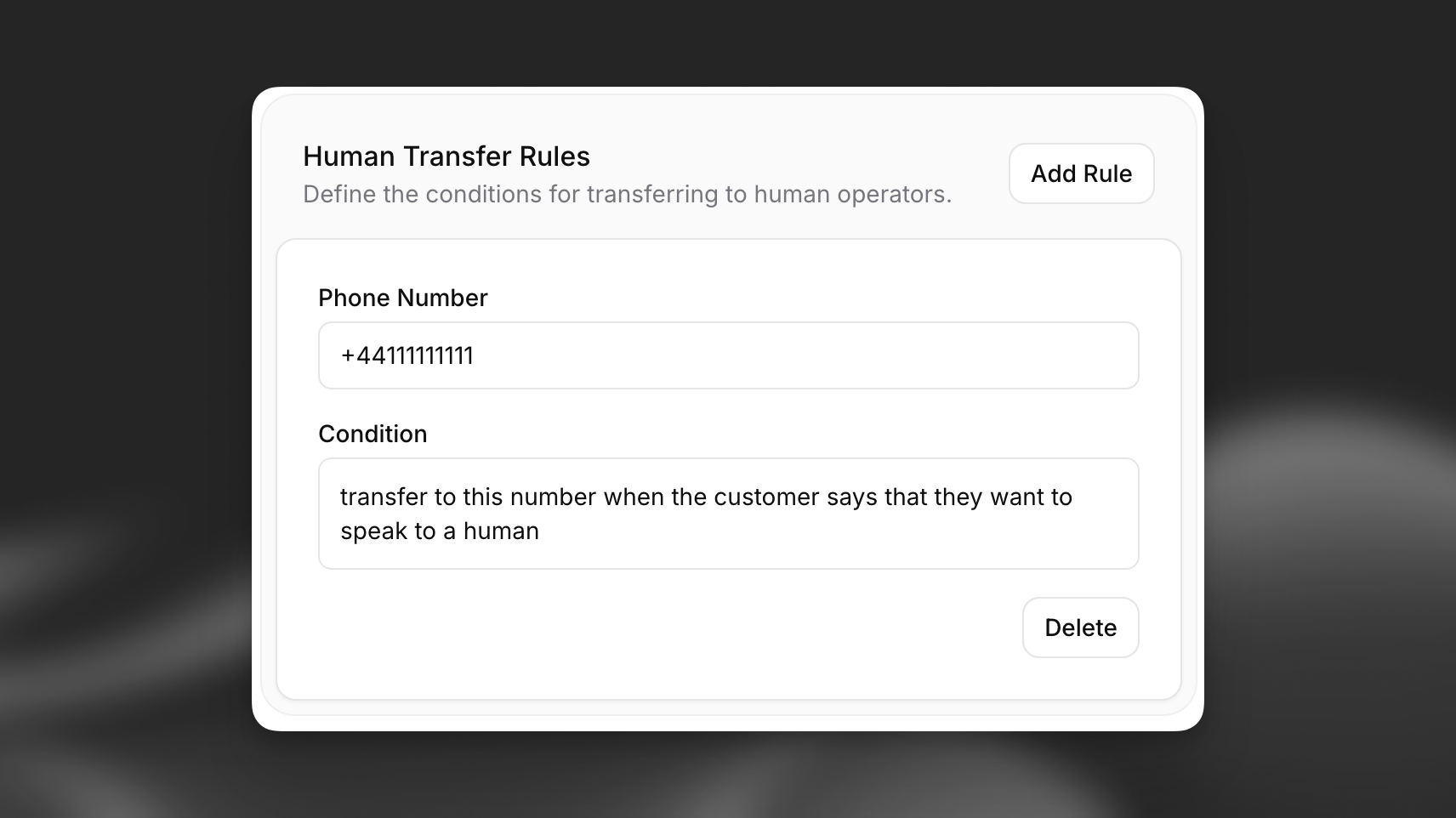
 Configure the specific rules for transferring to phone numbers or SIP URIs. For each rule, specify:
* **Transfer Type**: Choose between Conference (default), Blind, or SIP REFER transfer methods
* **Number Type**: Select Phone for regular phone numbers or SIP URI for SIP addresses
* **Phone Number/SIP URI**: The target destination in the appropriate format:
* Phone numbers: E.164 format (e.g., +12125551234)
* SIP URIs: SIP format (e.g., sip:[1234567890@example.com](mailto:1234567890@example.com))
* **Condition**: A natural language description of the circumstances under which the transfer should occur (e.g., "User explicitly requests to speak to a human", "User needs to update sensitive account information").
The LLM will use these conditions, along with the tool description, to decide when and to which destination to transfer.
**SIP REFER transfers** require SIP protocol during the conversation and your SIP Trunk must allow transfer via SIP REFER. Only SIP REFER supports transferring to a SIP URI.
**Blind transfers** are only available when the agent's phone number is imported via the [native Twilio integration](/docs/eleven-agents/phone-numbers/twilio-integration/native-integration) and must be configured via the JSON editor. The original caller ID is preserved, but no warm transfer message is sent to the human operator.
Configure the specific rules for transferring to phone numbers or SIP URIs. For each rule, specify:
* **Transfer Type**: Choose between Conference (default), Blind, or SIP REFER transfer methods
* **Number Type**: Select Phone for regular phone numbers or SIP URI for SIP addresses
* **Phone Number/SIP URI**: The target destination in the appropriate format:
* Phone numbers: E.164 format (e.g., +12125551234)
* SIP URIs: SIP format (e.g., sip:[1234567890@example.com](mailto:1234567890@example.com))
* **Condition**: A natural language description of the circumstances under which the transfer should occur (e.g., "User explicitly requests to speak to a human", "User needs to update sensitive account information").
The LLM will use these conditions, along with the tool description, to decide when and to which destination to transfer.
**SIP REFER transfers** require SIP protocol during the conversation and your SIP Trunk must allow transfer via SIP REFER. Only SIP REFER supports transferring to a SIP URI.
**Blind transfers** are only available when the agent's phone number is imported via the [native Twilio integration](/docs/eleven-agents/phone-numbers/twilio-integration/native-integration) and must be configured via the JSON editor. The original caller ID is preserved, but no warm transfer message is sent to the human operator.
 Ensure destinations are correctly formatted:
* Phone numbers: E.164 format and associated with a properly configured account
* SIP URIs: Valid SIP format (sip:user\@domain or sips:user\@domain)
When using SIP REFER transfers, you can include custom SIP headers to pass additional information to the receiving system.
For each custom header, specify:
* **Header Name**: The SIP header name (e.g., `X-Customer-ID`, `X-Priority`)
* **Header Value**: The header value, which can be static text or include [dynamic variables](/docs/eleven-agents/customization/personalization/dynamic-variables)
Custom SIP REFER headers are only included with **SIP REFER transfers**. Conference transfers do not support custom headers.
System headers `X-Conversation-ID` and `X-Caller-ID` are automatically included by ElevenLabs and will override any custom headers with the same names (case-insensitive).
Post-dial digits are DTMF tones that are relayed after the phone connects to the transfer destination. This is useful for entering extensions or navigating IVR (Interactive Voice Response) menus automatically.
For each transfer rule, you can specify a `post_dial_digits` string containing:
* **Digits** (`0-9`): Standard DTMF tones
* **`w`**: 0.5 second delay
* **`W`**: 1 second delay
* **`*` and `#`**: Special DTMF tones
For example, `ww1234` waits 1 second after the call connects, then dials extension 1234.
**Post-dial digits** are only available when the agent's phone number (the number initiating the transfer) is imported via the [native Twilio integration](/docs/eleven-agents/phone-numbers/twilio-integration/native-integration). The destination number can be any phone number.
Post-dial digits are supported for **conference** and **blind** transfer types only. SIP REFER transfers do not support post-dial digits.
## API Implementation
You can configure the `transfer_to_number` system tool when creating or updating an agent via the API. The tool allows specifying messages for both the client (user being transferred) and the agent (human operator receiving the call).
```python
from elevenlabs import (
ConversationalConfig,
ElevenLabs,
AgentConfig,
PromptAgent,
PromptAgentInputToolsItem_System,
SystemToolConfigInputParams_TransferToNumber,
PhoneNumberTransfer,
)
# Initialize the client
elevenlabs = ElevenLabs(api_key="YOUR_API_KEY")
# Define transfer rules
transfer_rules = [
PhoneNumberTransfer(
transfer_destination={"type": "phone", "phone_number": "+15551234567"},
condition="When the user asks for billing support.",
transfer_type="conference",
post_dial_digits="ww1234" # Wait 1s, then dial extension 1234 (native Twilio only)
),
PhoneNumberTransfer(
transfer_destination={"type": "phone", "phone_number": "+15559876543"},
condition="When the user asks to speak to a human.",
transfer_type="blind" # Native Twilio integration only, preserves caller ID, no warm transfer message
),
PhoneNumberTransfer(
transfer_destination={"type": "sip_uri", "sip_uri": "sip:support@example.com"},
condition="When the user requests to file a formal complaint.",
transfer_type="sip_refer",
custom_sip_headers=[
{"key": "X-Department", "value": "complaints"},
{"key": "X-Priority", "value": "high"},
{"key": "X-Customer-ID", "value": "{{customer_id}}"}
]
)
]
# Create the transfer tool configuration
transfer_tool = PromptAgentInputToolsItem_System(
type="system",
name="transfer_to_human",
description="Transfer the user to a specialized agent based on their request.", # Optional custom description
params=SystemToolConfigInputParams_TransferToNumber(
transfers=transfer_rules
)
)
# Create the agent configuration
conversation_config = ConversationalConfig(
agent=AgentConfig(
prompt=PromptAgent(
prompt="You are a helpful assistant.",
first_message="Hi, how can I help you today?",
tools=[transfer_tool],
)
)
)
# Create the agent
response = elevenlabs.conversational_ai.agents.create(
conversation_config=conversation_config
)
# Note: When the LLM decides to call this tool, it needs to provide:
# - transfer_number: The phone number to transfer to (must match one defined in rules).
# - client_message: Message read to the user during transfer.
# - agent_message: Message read to the human operator receiving the call (native Twilio integration only, not used for blind transfers or SIP).
```
```javascript
import { ElevenLabs } from "@elevenlabs/elevenlabs-js";
// Initialize the client
const elevenlabs = new ElevenLabs({
apiKey: "YOUR_API_KEY",
});
// Define transfer rules
const transferRules = [
{
transferDestination: { type: "phone", phoneNumber: "+15551234567" },
condition: "When the user asks for billing support.",
transferType: "conference",
postDialDigits: "ww1234", // Wait 1s, then dial extension 1234 (native Twilio only)
},
{
transferDestination: { type: "phone", phoneNumber: "+15559876543" },
condition: "When the user asks to speak to a human.",
transferType: "blind", // Native Twilio integration only, preserves caller ID, no warm transfer message
},
{
transferDestination: { type: "sip_uri", sipUri: "sip:support@example.com" },
condition: "When the user requests to file a formal complaint.",
transferType: "sip_refer",
customSipHeaders: [
{ key: "X-Department", value: "complaints" },
{ key: "X-Priority", value: "high" },
{ key: "X-Customer-ID", value: "{{customer_id}}" },
],
},
];
// Create the agent with the transfer tool
await elevenlabs.conversationalAi.agents.create({
conversationConfig: {
agent: {
prompt: {
prompt: "You are a helpful assistant.",
firstMessage: "Hi, how can I help you today?",
tools: [
{
type: "system",
name: "transfer_to_number",
description: "Transfer the user to a human operator based on their request.", // Optional custom description
params: {
systemToolType: "transfer_to_number",
transfers: transferRules,
},
},
],
},
},
},
});
// Note: When the LLM decides to call this tool, it needs to provide:
// - transfer_number: The phone number to transfer to (must match one defined in rules).
// - client_message: Message read to the user during transfer.
// - agent_message: Message read to the human operator receiving the call (native Twilio integration only, not used for blind transfers or SIP).
```
Ensure destinations are correctly formatted:
* Phone numbers: E.164 format and associated with a properly configured account
* SIP URIs: Valid SIP format (sip:user\@domain or sips:user\@domain)
When using SIP REFER transfers, you can include custom SIP headers to pass additional information to the receiving system.
For each custom header, specify:
* **Header Name**: The SIP header name (e.g., `X-Customer-ID`, `X-Priority`)
* **Header Value**: The header value, which can be static text or include [dynamic variables](/docs/eleven-agents/customization/personalization/dynamic-variables)
Custom SIP REFER headers are only included with **SIP REFER transfers**. Conference transfers do not support custom headers.
System headers `X-Conversation-ID` and `X-Caller-ID` are automatically included by ElevenLabs and will override any custom headers with the same names (case-insensitive).
Post-dial digits are DTMF tones that are relayed after the phone connects to the transfer destination. This is useful for entering extensions or navigating IVR (Interactive Voice Response) menus automatically.
For each transfer rule, you can specify a `post_dial_digits` string containing:
* **Digits** (`0-9`): Standard DTMF tones
* **`w`**: 0.5 second delay
* **`W`**: 1 second delay
* **`*` and `#`**: Special DTMF tones
For example, `ww1234` waits 1 second after the call connects, then dials extension 1234.
**Post-dial digits** are only available when the agent's phone number (the number initiating the transfer) is imported via the [native Twilio integration](/docs/eleven-agents/phone-numbers/twilio-integration/native-integration). The destination number can be any phone number.
Post-dial digits are supported for **conference** and **blind** transfer types only. SIP REFER transfers do not support post-dial digits.
## API Implementation
You can configure the `transfer_to_number` system tool when creating or updating an agent via the API. The tool allows specifying messages for both the client (user being transferred) and the agent (human operator receiving the call).
```python
from elevenlabs import (
ConversationalConfig,
ElevenLabs,
AgentConfig,
PromptAgent,
PromptAgentInputToolsItem_System,
SystemToolConfigInputParams_TransferToNumber,
PhoneNumberTransfer,
)
# Initialize the client
elevenlabs = ElevenLabs(api_key="YOUR_API_KEY")
# Define transfer rules
transfer_rules = [
PhoneNumberTransfer(
transfer_destination={"type": "phone", "phone_number": "+15551234567"},
condition="When the user asks for billing support.",
transfer_type="conference",
post_dial_digits="ww1234" # Wait 1s, then dial extension 1234 (native Twilio only)
),
PhoneNumberTransfer(
transfer_destination={"type": "phone", "phone_number": "+15559876543"},
condition="When the user asks to speak to a human.",
transfer_type="blind" # Native Twilio integration only, preserves caller ID, no warm transfer message
),
PhoneNumberTransfer(
transfer_destination={"type": "sip_uri", "sip_uri": "sip:support@example.com"},
condition="When the user requests to file a formal complaint.",
transfer_type="sip_refer",
custom_sip_headers=[
{"key": "X-Department", "value": "complaints"},
{"key": "X-Priority", "value": "high"},
{"key": "X-Customer-ID", "value": "{{customer_id}}"}
]
)
]
# Create the transfer tool configuration
transfer_tool = PromptAgentInputToolsItem_System(
type="system",
name="transfer_to_human",
description="Transfer the user to a specialized agent based on their request.", # Optional custom description
params=SystemToolConfigInputParams_TransferToNumber(
transfers=transfer_rules
)
)
# Create the agent configuration
conversation_config = ConversationalConfig(
agent=AgentConfig(
prompt=PromptAgent(
prompt="You are a helpful assistant.",
first_message="Hi, how can I help you today?",
tools=[transfer_tool],
)
)
)
# Create the agent
response = elevenlabs.conversational_ai.agents.create(
conversation_config=conversation_config
)
# Note: When the LLM decides to call this tool, it needs to provide:
# - transfer_number: The phone number to transfer to (must match one defined in rules).
# - client_message: Message read to the user during transfer.
# - agent_message: Message read to the human operator receiving the call (native Twilio integration only, not used for blind transfers or SIP).
```
```javascript
import { ElevenLabs } from "@elevenlabs/elevenlabs-js";
// Initialize the client
const elevenlabs = new ElevenLabs({
apiKey: "YOUR_API_KEY",
});
// Define transfer rules
const transferRules = [
{
transferDestination: { type: "phone", phoneNumber: "+15551234567" },
condition: "When the user asks for billing support.",
transferType: "conference",
postDialDigits: "ww1234", // Wait 1s, then dial extension 1234 (native Twilio only)
},
{
transferDestination: { type: "phone", phoneNumber: "+15559876543" },
condition: "When the user asks to speak to a human.",
transferType: "blind", // Native Twilio integration only, preserves caller ID, no warm transfer message
},
{
transferDestination: { type: "sip_uri", sipUri: "sip:support@example.com" },
condition: "When the user requests to file a formal complaint.",
transferType: "sip_refer",
customSipHeaders: [
{ key: "X-Department", value: "complaints" },
{ key: "X-Priority", value: "high" },
{ key: "X-Customer-ID", value: "{{customer_id}}" },
],
},
];
// Create the agent with the transfer tool
await elevenlabs.conversationalAi.agents.create({
conversationConfig: {
agent: {
prompt: {
prompt: "You are a helpful assistant.",
firstMessage: "Hi, how can I help you today?",
tools: [
{
type: "system",
name: "transfer_to_number",
description: "Transfer the user to a human operator based on their request.", // Optional custom description
params: {
systemToolType: "transfer_to_number",
transfers: transferRules,
},
},
],
},
},
},
});
// Note: When the LLM decides to call this tool, it needs to provide:
// - transfer_number: The phone number to transfer to (must match one defined in rules).
// - client_message: Message read to the user during transfer.
// - agent_message: Message read to the human operator receiving the call (native Twilio integration only, not used for blind transfers or SIP).
```