> This is a page from the ElevenLabs documentation. For a complete page index, fetch https://elevenlabs.io/docs/llms.txt. For the full documentation in a single file, fetch https://elevenlabs.io/docs/llms-full.txt.
# Agent transfer
## Overview
Agent-to-agent transfer allows an ElevenLabs agent to hand off the ongoing conversation to another designated agent when specific conditions are met. This enables multi-layered conversational workflows where different agents handle specific tasks or levels of complexity.
For example, an initial agent (Orchestrator) could handle general inquiries and then transfer the call to a specialized agent based on the conversation's context. Transfers can also be nested:
```text
Orchestrator Agent (Initial Qualification)
│
├───> Agent 1 (e.g., Availability Inquiries)
│
├───> Agent 2 (e.g., Technical Support)
│ │
│ └───> Agent 2a (e.g., Hardware Support)
│
└───> Agent 3 (e.g., Billing Issues)
```
**Purpose**: Transfer conversations between specialized AI agents based on user needs.
**Trigger conditions**: The LLM should call this tool when:
* User request requires specialized knowledge or different agent capabilities
* Current agent cannot adequately handle the query
* Conversation flow indicates need for different agent type
**Parameters**:
* `reason` (string, optional): The reason for the agent transfer
* `agent_number` (integer, required): Zero-indexed number of the agent to transfer to (based on configured transfer rules)
**Function call format**:
```json
{
"type": "function",
"function": {
"name": "transfer_to_agent",
"arguments": "{\"reason\": \"User needs billing support\", \"agent_number\": 0}"
}
}
```
**Implementation**: Define transfer rules mapping conditions to specific agent IDs. Configure which agents the current agent can transfer to. Agents are referenced by zero-indexed numbers in the transfer configuration.
## Enabling agent transfer
Agent transfer is configured using the `transfer_to_agent` system tool.
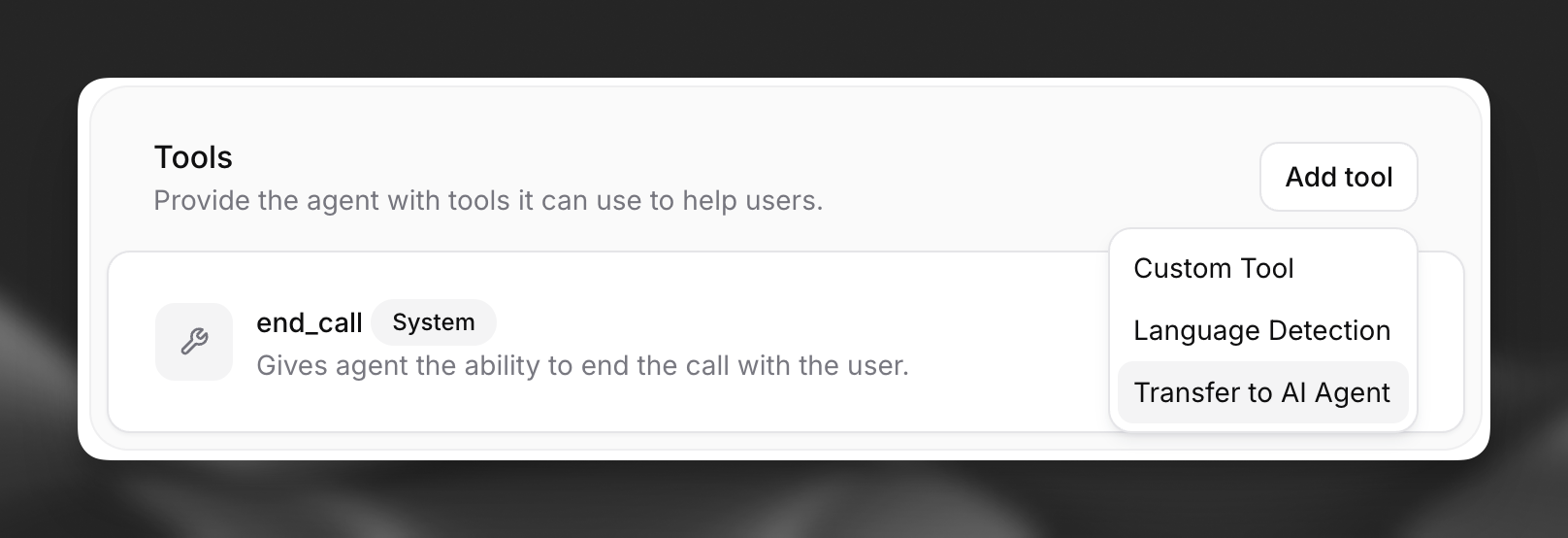
Enable agent transfer by selecting the `transfer_to_agent` system tool in your agent's configuration within the `Agent` tab. Choose "Transfer to AI Agent" when adding a tool.
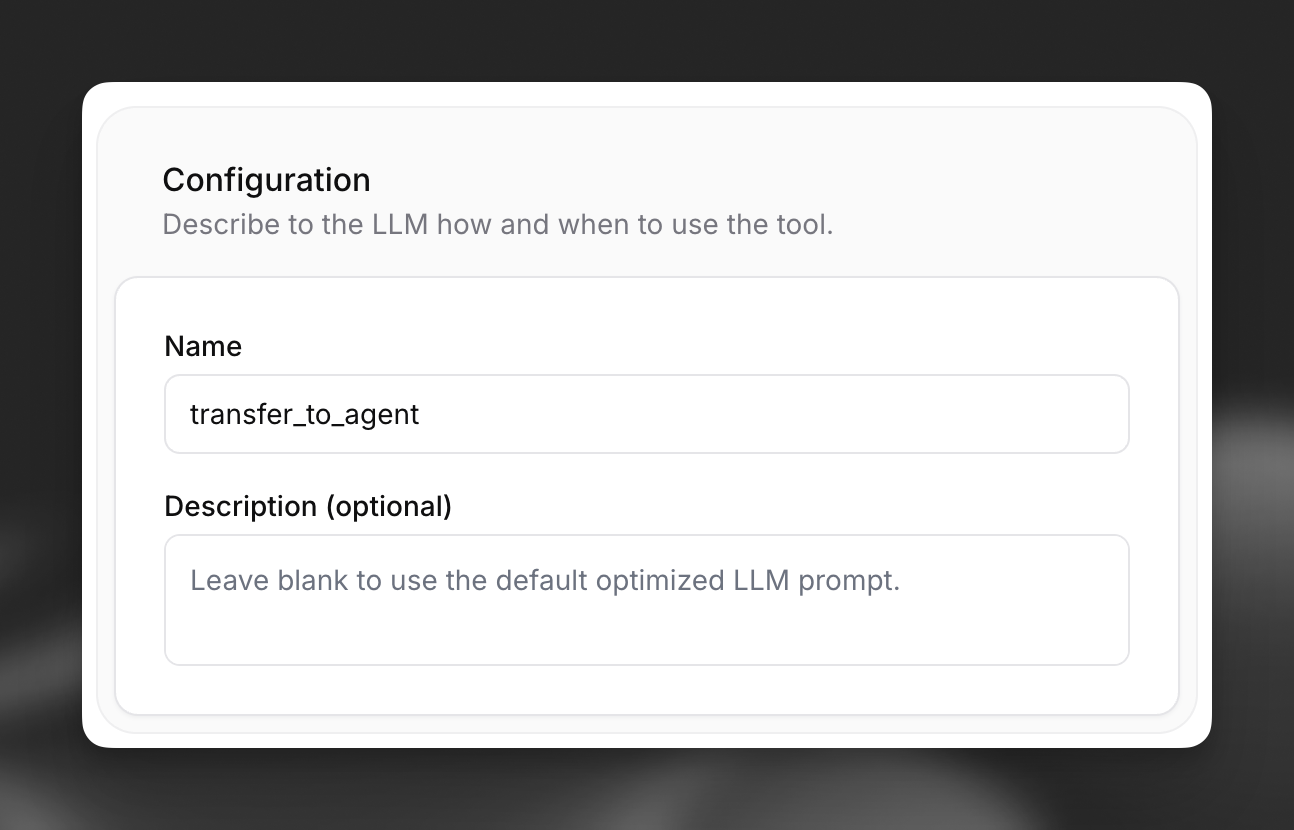
 You can provide a custom description to guide the LLM on when to trigger a transfer. If left blank, a default description encompassing the defined transfer rules will be used.
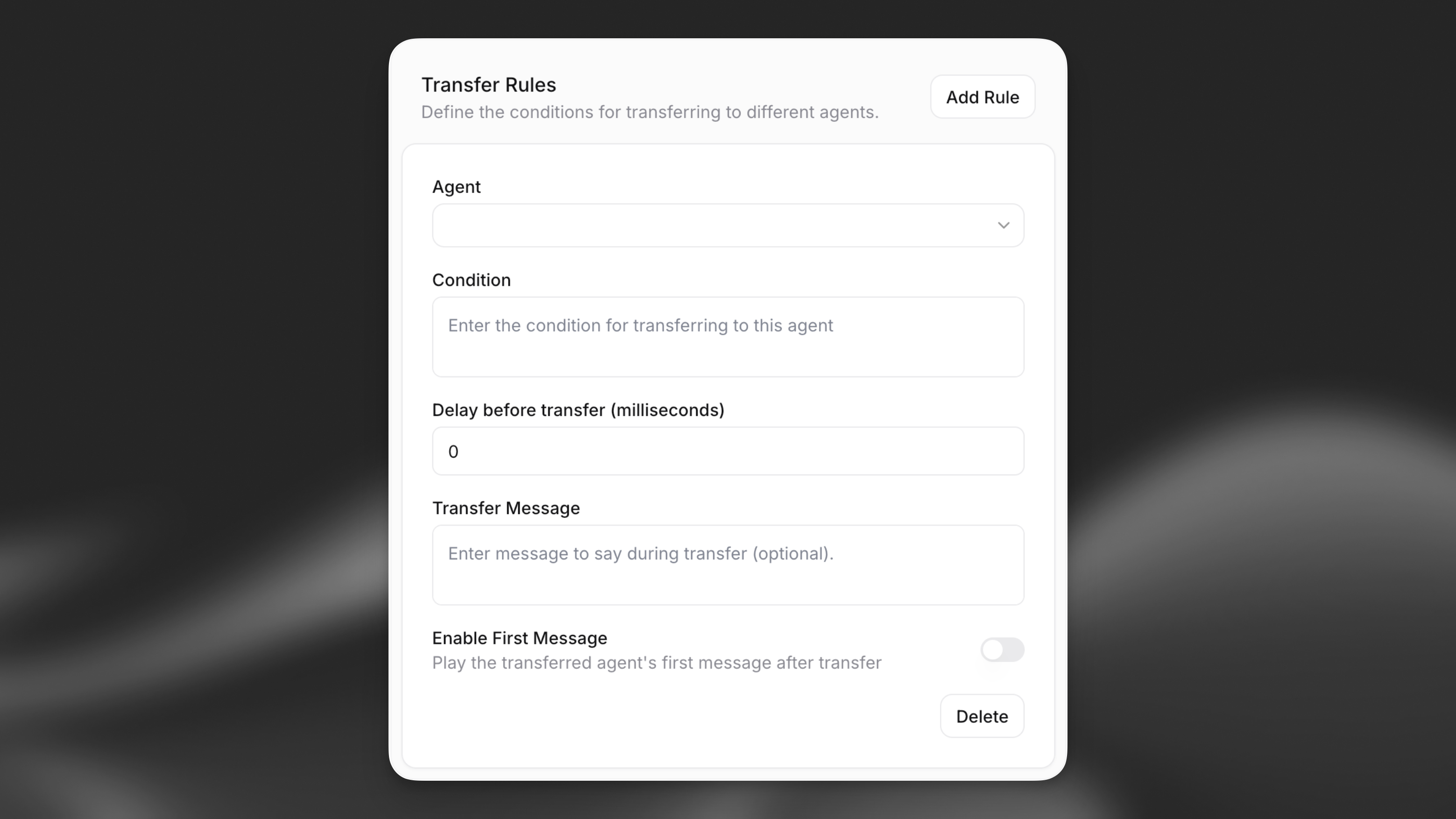
 Configure the specific rules for transferring to other agents. For each rule, specify:
* **Agent**: The target agent to transfer the conversation to.
* **Condition**: A natural language description of the circumstances under which the transfer should occur (e.g., "User asks about billing details", "User requests technical support for product X").
* **Delay before transfer (milliseconds)**: The minimum delay (in milliseconds) before the transfer occurs. Defaults to 0 for immediate transfer.
* **Transfer Message**: An optional custom message to play during the transfer. If left blank, the transfer will occur silently.
* **Enable First Message**: Whether the transferred agent should play its first message after the transfer. Defaults to off.
The LLM will use these conditions, along with the tool description, to decide when and to which agent (by number) to transfer.
Configure the specific rules for transferring to other agents. For each rule, specify:
* **Agent**: The target agent to transfer the conversation to.
* **Condition**: A natural language description of the circumstances under which the transfer should occur (e.g., "User asks about billing details", "User requests technical support for product X").
* **Delay before transfer (milliseconds)**: The minimum delay (in milliseconds) before the transfer occurs. Defaults to 0 for immediate transfer.
* **Transfer Message**: An optional custom message to play during the transfer. If left blank, the transfer will occur silently.
* **Enable First Message**: Whether the transferred agent should play its first message after the transfer. Defaults to off.
The LLM will use these conditions, along with the tool description, to decide when and to which agent (by number) to transfer.
 Ensure that the user account creating the agent has at least viewer permissions for any target agents specified in the transfer rules.
## Transfer behavior
When a transfer occurs, the **parent agent** (the one initiating the transfer) passes certain configuration values to the **child agent** (the one receiving the conversation), while others reset entirely.
### Configuration inheritance
The parent agent overwrites the following values on every child agent, regardless of the child's own configuration:
| Setting | Description |
| --------------------------- | -------------------------------------------------------------------------------- |
| **Client events** | Which events the client sends (e.g. `audio`, `interruption`, `user_transcript`). |
| **TTS output audio format** | Format the agent's speech is sent in (e.g. `pcm_16000`, `ulaw_8000`). |
| **ASR input audio format** | Format of user audio the agent expects (e.g. `pcm_16000`, `ulaw_8000`). |
Additionally, the parent agent's current language is carried over — if the child agent does not support it, it falls back to its own default. Post-call webhook and analysis configuration (including evaluation criteria and data collection items) also apply to the entire conversation.
### Not inherited
All other configurations are set by the child agent, included but not limited to:
* Prompt, first message, LLM, workflow, voice, tools, and knowledge base
* TTS voice, model, stability, and other voice settings (except `agent_output_audio_format`)
* ASR model, quality, and keywords (except `user_input_audio_format`)
* Turn/timeout, language presets, max duration etc.
Configure these settings consistently on each agent in the workflow to avoid mismatched behavior.
### Transcript and chat history
The full transcript is preserved across the entire conversation. User and agent messages from every preceding agent remain in the chat history.
During a transfer, `transfer_to_agent` tool calls are stripped from the history visible to the child agent's LLM, so it continues the conversation without mentioning the handoff.
### Post-call evaluation
The post-call evaluator LLM receives the full, unfiltered transcript — all user and agent messages, and all tool calls including the transfer.
Individual messages do not carry an `agent_id` field. To determine which agent produced which messages, the evaluator uses the `transfer_to_agent` tool call as a boundary marker in the transcript.
## API implementation
You can configure the `transfer_to_agent` system tool when creating or updating an agent via the API.
```python
from elevenlabs import (
ConversationalConfig,
ElevenLabs,
AgentConfig,
PromptAgent,
PromptAgentInputToolsItem_System,
SystemToolConfigInputParams_TransferToAgent,
AgentTransfer
)
# Initialize the client
elevenlabs = ElevenLabs(api_key="YOUR_API_KEY")
# Define transfer rules with new options
transfer_rules = [
AgentTransfer(
agent_id="AGENT_ID_1",
condition="When the user asks for billing support.",
delay_ms=1000, # 1 second delay
transfer_message="I'm connecting you to our billing specialist.",
enable_transferred_agent_first_message=True
),
AgentTransfer(
agent_id="AGENT_ID_2",
condition="When the user requests advanced technical help.",
delay_ms=0, # Immediate transfer
transfer_message=None, # Silent transfer
enable_transferred_agent_first_message=False
)
]
# Create the transfer tool configuration
transfer_tool = PromptAgentInputToolsItem_System(
type="system",
name="transfer_to_agent",
description="Transfer the user to a specialized agent based on their request.", # Optional custom description
params=SystemToolConfigInputParams_TransferToAgent(
transfers=transfer_rules
)
)
# Create the agent configuration
conversation_config = ConversationalConfig(
agent=AgentConfig(
prompt=PromptAgent(
prompt="You are a helpful assistant.",
first_message="Hi, how can I help you today?",
tools=[transfer_tool],
)
)
)
# Create the agent
response = elevenlabs.conversational_ai.agents.create(
conversation_config=conversation_config
)
print(response)
```
```javascript
import { ElevenLabs } from "@elevenlabs/elevenlabs-js";
// Initialize the client
const elevenlabs = new ElevenLabs({
apiKey: "YOUR_API_KEY",
});
// Define transfer rules with new options
const transferRules = [
{
agentId: "AGENT_ID_1",
condition: "When the user asks for billing support.",
delayMs: 1000, // 1 second delay
transferMessage: "I'm connecting you to our billing specialist.",
enableTransferredAgentFirstMessage: true,
},
{
agentId: "AGENT_ID_2",
condition: "When the user requests advanced technical help.",
delayMs: 0, // Immediate transfer
transferMessage: null, // Silent transfer
enableTransferredAgentFirstMessage: false,
},
];
// Create the agent with the transfer tool
await elevenlabs.conversationalAi.agents.create({
conversationConfig: {
agent: {
prompt: {
prompt: "You are a helpful assistant.",
firstMessage: "Hi, how can I help you today?",
tools: [
{
type: "system",
name: "transfer_to_agent",
description: "Transfer the user to a specialized agent based on their request.", // Optional custom description
params: {
systemToolType: "transfer_to_agent",
transfers: transferRules,
},
},
],
},
},
},
});
```
Ensure that the user account creating the agent has at least viewer permissions for any target agents specified in the transfer rules.
## Transfer behavior
When a transfer occurs, the **parent agent** (the one initiating the transfer) passes certain configuration values to the **child agent** (the one receiving the conversation), while others reset entirely.
### Configuration inheritance
The parent agent overwrites the following values on every child agent, regardless of the child's own configuration:
| Setting | Description |
| --------------------------- | -------------------------------------------------------------------------------- |
| **Client events** | Which events the client sends (e.g. `audio`, `interruption`, `user_transcript`). |
| **TTS output audio format** | Format the agent's speech is sent in (e.g. `pcm_16000`, `ulaw_8000`). |
| **ASR input audio format** | Format of user audio the agent expects (e.g. `pcm_16000`, `ulaw_8000`). |
Additionally, the parent agent's current language is carried over — if the child agent does not support it, it falls back to its own default. Post-call webhook and analysis configuration (including evaluation criteria and data collection items) also apply to the entire conversation.
### Not inherited
All other configurations are set by the child agent, included but not limited to:
* Prompt, first message, LLM, workflow, voice, tools, and knowledge base
* TTS voice, model, stability, and other voice settings (except `agent_output_audio_format`)
* ASR model, quality, and keywords (except `user_input_audio_format`)
* Turn/timeout, language presets, max duration etc.
Configure these settings consistently on each agent in the workflow to avoid mismatched behavior.
### Transcript and chat history
The full transcript is preserved across the entire conversation. User and agent messages from every preceding agent remain in the chat history.
During a transfer, `transfer_to_agent` tool calls are stripped from the history visible to the child agent's LLM, so it continues the conversation without mentioning the handoff.
### Post-call evaluation
The post-call evaluator LLM receives the full, unfiltered transcript — all user and agent messages, and all tool calls including the transfer.
Individual messages do not carry an `agent_id` field. To determine which agent produced which messages, the evaluator uses the `transfer_to_agent` tool call as a boundary marker in the transcript.
## API implementation
You can configure the `transfer_to_agent` system tool when creating or updating an agent via the API.
```python
from elevenlabs import (
ConversationalConfig,
ElevenLabs,
AgentConfig,
PromptAgent,
PromptAgentInputToolsItem_System,
SystemToolConfigInputParams_TransferToAgent,
AgentTransfer
)
# Initialize the client
elevenlabs = ElevenLabs(api_key="YOUR_API_KEY")
# Define transfer rules with new options
transfer_rules = [
AgentTransfer(
agent_id="AGENT_ID_1",
condition="When the user asks for billing support.",
delay_ms=1000, # 1 second delay
transfer_message="I'm connecting you to our billing specialist.",
enable_transferred_agent_first_message=True
),
AgentTransfer(
agent_id="AGENT_ID_2",
condition="When the user requests advanced technical help.",
delay_ms=0, # Immediate transfer
transfer_message=None, # Silent transfer
enable_transferred_agent_first_message=False
)
]
# Create the transfer tool configuration
transfer_tool = PromptAgentInputToolsItem_System(
type="system",
name="transfer_to_agent",
description="Transfer the user to a specialized agent based on their request.", # Optional custom description
params=SystemToolConfigInputParams_TransferToAgent(
transfers=transfer_rules
)
)
# Create the agent configuration
conversation_config = ConversationalConfig(
agent=AgentConfig(
prompt=PromptAgent(
prompt="You are a helpful assistant.",
first_message="Hi, how can I help you today?",
tools=[transfer_tool],
)
)
)
# Create the agent
response = elevenlabs.conversational_ai.agents.create(
conversation_config=conversation_config
)
print(response)
```
```javascript
import { ElevenLabs } from "@elevenlabs/elevenlabs-js";
// Initialize the client
const elevenlabs = new ElevenLabs({
apiKey: "YOUR_API_KEY",
});
// Define transfer rules with new options
const transferRules = [
{
agentId: "AGENT_ID_1",
condition: "When the user asks for billing support.",
delayMs: 1000, // 1 second delay
transferMessage: "I'm connecting you to our billing specialist.",
enableTransferredAgentFirstMessage: true,
},
{
agentId: "AGENT_ID_2",
condition: "When the user requests advanced technical help.",
delayMs: 0, // Immediate transfer
transferMessage: null, // Silent transfer
enableTransferredAgentFirstMessage: false,
},
];
// Create the agent with the transfer tool
await elevenlabs.conversationalAi.agents.create({
conversationConfig: {
agent: {
prompt: {
prompt: "You are a helpful assistant.",
firstMessage: "Hi, how can I help you today?",
tools: [
{
type: "system",
name: "transfer_to_agent",
description: "Transfer the user to a specialized agent based on their request.", // Optional custom description
params: {
systemToolType: "transfer_to_agent",
transfers: transferRules,
},
},
],
},
},
},
});
```