> This is a page from the ElevenLabs documentation. For a complete page index, fetch https://elevenlabs.io/docs/llms.txt. For the full documentation in a single file, fetch https://elevenlabs.io/docs/llms-full.txt.
# Retrieval-Augmented Generation
## Overview
**Retrieval-Augmented Generation (RAG)** enables your agent to access and use large knowledge bases during conversations. Instead of loading entire documents into the context window, RAG retrieves only the most relevant information for each user query, allowing your agent to:
* Access much larger knowledge bases than would fit in a prompt
* Provide more accurate, knowledge-grounded responses
* Reduce hallucinations by referencing source material
* Scale knowledge without creating multiple specialized agents
RAG is ideal for agents that need to reference large documents, technical manuals, or extensive
knowledge bases that would exceed the context window limits of traditional prompting.
RAG adds on slight latency to the response time of your agent, around 250ms.
## How RAG works
When RAG is enabled, your agent processes user queries through these steps:
1. **Query processing**: The user's question is analyzed and reformulated for optimal retrieval.
2. **Embedding generation**: The processed query is converted into a vector embedding that represents the user's question.
3. **Retrieval**: The system finds the most semantically similar content from your knowledge base.
4. **Response generation**: The agent generates a response using both the conversation context and the retrieved information.
This process ensures that relevant information to the user's query is passed to the LLM to generate a factually correct answer.
## Guide
### Prerequisites
* An [ElevenLabs account](https://elevenlabs.io)
* A configured ElevenLabs [Conversational Agent](/docs/eleven-agents/quickstart)
* At least one document added to your agent's knowledge base
### Enable RAG for your agent
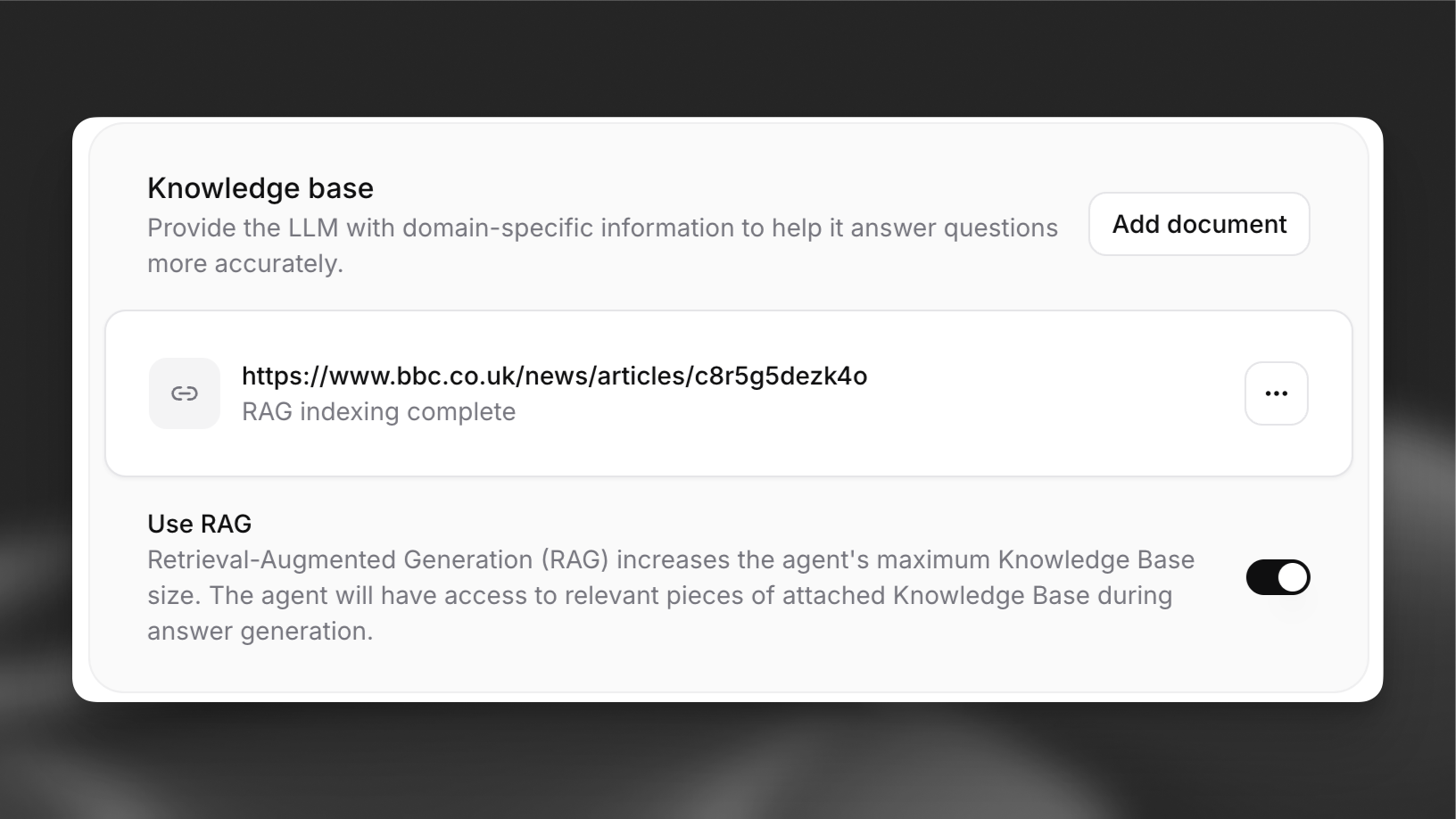
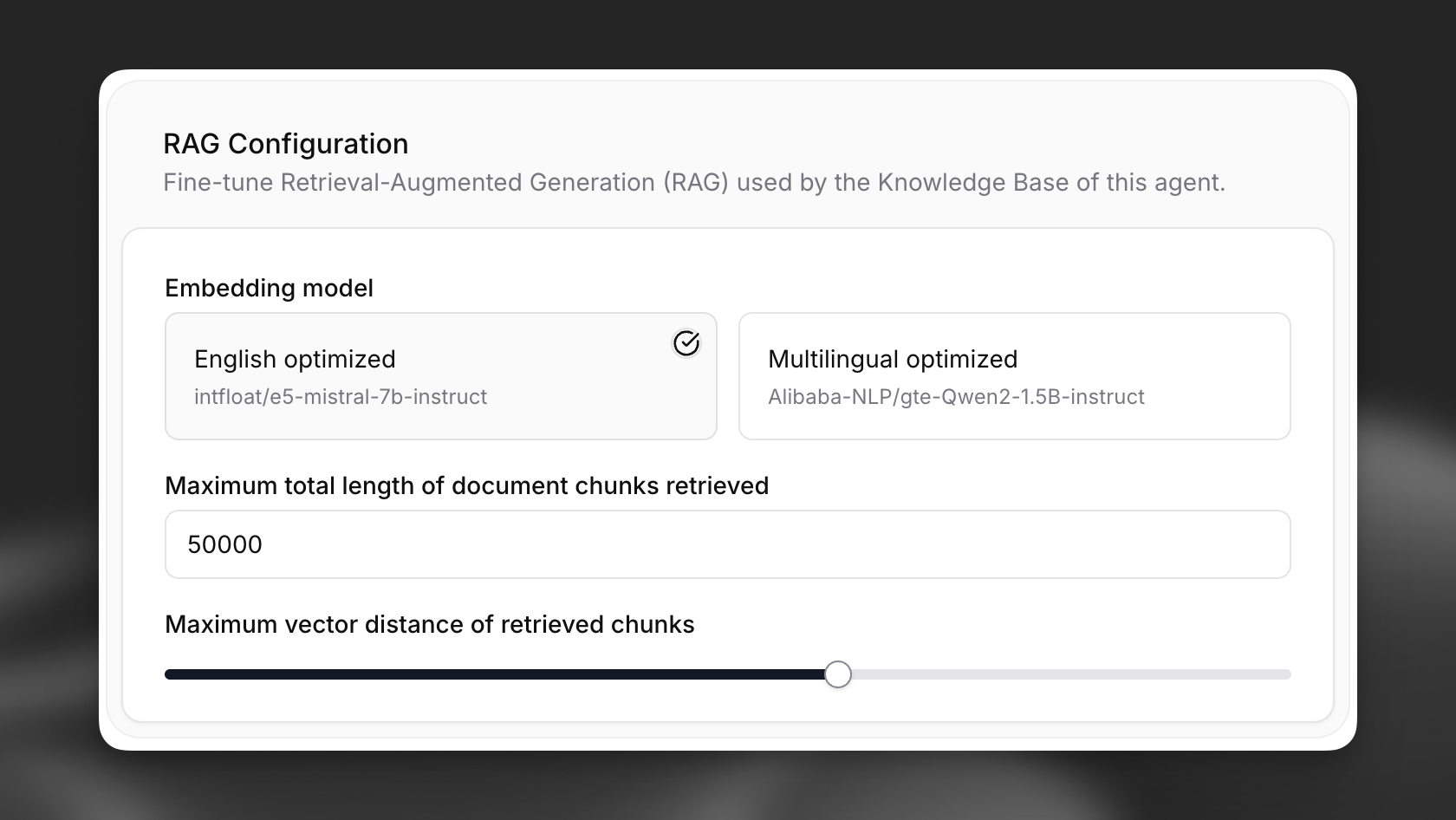
In your agent's settings, navigate to the **Knowledge Base** section and toggle on the **Use RAG** option. Configure the embedding model, maximum document chunks, and maximum vector distance under the **Advanced** tab as needed.
 ```bash
elevenlabs agents pull --agent ""
```
Set `conversation_config.agent.prompt.rag`:
```json
{
"conversation_config": {
"agent": {
"prompt": {
"rag": {
"enabled": true,
"embedding_model": "e5_mistral_7b_instruct",
"max_vector_distance": 0.6,
"max_documents_length": 50000,
"max_retrieved_rag_chunks_count": 20
}
}
}
}
}
```
```bash
elevenlabs agents push --agent ""
```
See the [API implementation](#api-implementation) section below for full code that triggers RAG indexing on a document and updates the agent configuration.
### Knowledge base indexing
Each document in your knowledge base needs to be indexed before it can be used with RAG. This
process happens automatically when a document is added to an agent with RAG enabled.
Indexing may take a few minutes for large documents. You can check the indexing status in the
knowledge base list.
### Configure document usage modes (optional)
For each document in your knowledge base, you can choose how it's used:
* **Auto (default)**: The document is only retrieved when relevant to the query
* **Prompt**: The document is always included in the system prompt, regardless of relevance, but can also be retrieved by RAG
```bash
elevenlabs agents pull --agent ""
```
Set `conversation_config.agent.prompt.rag`:
```json
{
"conversation_config": {
"agent": {
"prompt": {
"rag": {
"enabled": true,
"embedding_model": "e5_mistral_7b_instruct",
"max_vector_distance": 0.6,
"max_documents_length": 50000,
"max_retrieved_rag_chunks_count": 20
}
}
}
}
}
```
```bash
elevenlabs agents push --agent ""
```
See the [API implementation](#api-implementation) section below for full code that triggers RAG indexing on a document and updates the agent configuration.
### Knowledge base indexing
Each document in your knowledge base needs to be indexed before it can be used with RAG. This
process happens automatically when a document is added to an agent with RAG enabled.
Indexing may take a few minutes for large documents. You can check the indexing status in the
knowledge base list.
### Configure document usage modes (optional)
For each document in your knowledge base, you can choose how it's used:
* **Auto (default)**: The document is only retrieved when relevant to the query
* **Prompt**: The document is always included in the system prompt, regardless of relevance, but can also be retrieved by RAG
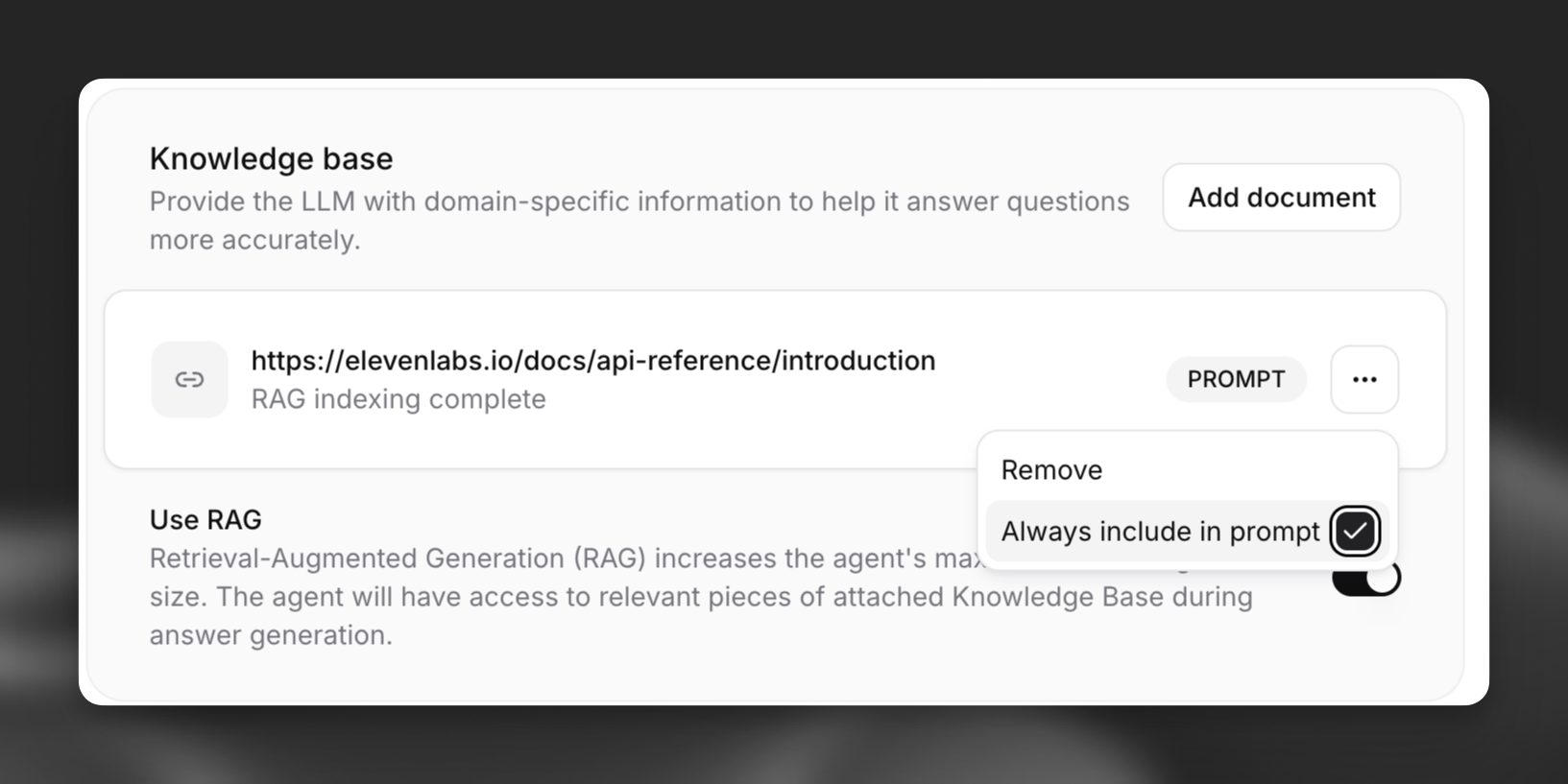 Setting too many documents to "Prompt" mode may exceed context limits. Use this option sparingly
for critical information.
### Test your RAG-enabled agent
After saving your configuration, test your agent by asking questions related to your knowledge base. The agent should now be able to retrieve and reference specific information from your documents.
## Usage limits
To ensure fair resource allocation, ElevenLabs enforces limits on the total size of documents that can be indexed for RAG per workspace, based on subscription tier.
The limits are as follows:
| Subscription Tier | Total Document Size Limit | Notes |
| :---------------- | :------------------------ | :--------------------------------------------------- |
| Free | 1MB | Indexes may be deleted after inactivity. |
| Starter | 2MB | |
| Creator | 20MB | |
| Pro | 100MB | |
| Scale | 500MB | |
| Business | 1GB | |
| Enterprise | 1GB | Higher limits available based on tier and agreement. |
**Note:**
* These limits apply to the total **original file size** of documents indexed for RAG, not the internal storage size of the RAG index itself (which can be significantly larger).
* Documents smaller than 500 bytes cannot be indexed for RAG and will automatically be used in the prompt instead.
## API implementation
You can also implement RAG through the [API](/docs/api-reference/knowledge-base/compute-rag-index):
```python
from elevenlabs import ElevenLabs
import time
# Initialize the ElevenLabs client
elevenlabs = ElevenLabs(api_key="your-api-key")
# First, index a document for RAG
document_id = "your-document-id"
embedding_model = "e5_mistral_7b_instruct"
# Trigger RAG indexing
response = elevenlabs.conversational_ai.knowledge_base.document.compute_rag_index(
documentation_id=document_id,
model=embedding_model
)
# Check indexing status
while response.status not in ["SUCCEEDED", "FAILED"]:
time.sleep(5) # Wait 5 seconds before checking status again
response = elevenlabs.conversational_ai.knowledge_base.document.compute_rag_index(
documentation_id=document_id,
model=embedding_model
)
# Then update agent configuration to use RAG
agent_id = "agent_7101k5zvyjhmfg983brhmhkd98n6"
# Get the current agent configuration
agent_config = elevenlabs.conversational_ai.agents.get(agent_id=agent_id)
# Enable RAG in the agent configuration
agent_config.agent.prompt.rag = {
"enabled": True,
"embedding_model": "e5_mistral_7b_instruct",
"max_documents_length": 10000
}
# Update document usage mode if needed
for i, doc in enumerate(agent_config.agent.prompt.knowledge_base):
if doc.id == document_id:
agent_config.agent.prompt.knowledge_base[i].usage_mode = "auto"
# Update the agent configuration
elevenlabs.conversational_ai.agents.update(
agent_id=agent_id,
conversation_config=agent_config.agent
)
```
```javascript
// First, index a document for RAG
async function enableRAG(documentId, agentId, apiKey) {
try {
// Initialize the ElevenLabs client
const { ElevenLabs } = require("elevenlabs");
const elevenlabs = new ElevenLabs({
apiKey: apiKey,
});
// Start document indexing for RAG
let response = await elevenlabs.conversationalAi.knowledgeBase.document.computeRagIndex(
documentId,
{
model: "e5_mistral_7b_instruct",
}
);
// Check indexing status until completion
while (response.status !== "SUCCEEDED" && response.status !== "FAILED") {
await new Promise((resolve) => setTimeout(resolve, 5000)); // Wait 5 seconds
response = await elevenlabs.conversationalAi.knowledgeBase.document.computeRagIndex(
documentId,
{
model: "e5_mistral_7b_instruct",
}
);
}
if (response.status === "FAILED") {
throw new Error("RAG indexing failed");
}
// Get current agent configuration
const agentConfig = await elevenlabs.conversationalAi.agents.get(agentId);
// Enable RAG in the agent configuration
const updatedConfig = {
conversation_config: {
...agentConfig.agent,
prompt: {
...agentConfig.agent.prompt,
rag: {
enabled: true,
embedding_model: "e5_mistral_7b_instruct",
max_documents_length: 10000,
},
},
},
};
// Update document usage mode if needed
if (agentConfig.agent.prompt.knowledge_base) {
agentConfig.agent.prompt.knowledge_base.forEach((doc, index) => {
if (doc.id === documentId) {
updatedConfig.conversation_config.prompt.knowledge_base[index].usage_mode = "auto";
}
});
}
// Update the agent configuration
await elevenlabs.conversationalAi.agents.update(agentId, updatedConfig);
console.log("RAG configuration updated successfully");
return true;
} catch (error) {
console.error("Error configuring RAG:", error);
throw error;
}
}
// Example usage
// enableRAG('your-document-id', 'agent_7101k5zvyjhmfg983brhmhkd98n6', 'your-api-key')
// .then(() => console.log('RAG setup complete'))
// .catch(err => console.error('Error:', err));
```
Setting too many documents to "Prompt" mode may exceed context limits. Use this option sparingly
for critical information.
### Test your RAG-enabled agent
After saving your configuration, test your agent by asking questions related to your knowledge base. The agent should now be able to retrieve and reference specific information from your documents.
## Usage limits
To ensure fair resource allocation, ElevenLabs enforces limits on the total size of documents that can be indexed for RAG per workspace, based on subscription tier.
The limits are as follows:
| Subscription Tier | Total Document Size Limit | Notes |
| :---------------- | :------------------------ | :--------------------------------------------------- |
| Free | 1MB | Indexes may be deleted after inactivity. |
| Starter | 2MB | |
| Creator | 20MB | |
| Pro | 100MB | |
| Scale | 500MB | |
| Business | 1GB | |
| Enterprise | 1GB | Higher limits available based on tier and agreement. |
**Note:**
* These limits apply to the total **original file size** of documents indexed for RAG, not the internal storage size of the RAG index itself (which can be significantly larger).
* Documents smaller than 500 bytes cannot be indexed for RAG and will automatically be used in the prompt instead.
## API implementation
You can also implement RAG through the [API](/docs/api-reference/knowledge-base/compute-rag-index):
```python
from elevenlabs import ElevenLabs
import time
# Initialize the ElevenLabs client
elevenlabs = ElevenLabs(api_key="your-api-key")
# First, index a document for RAG
document_id = "your-document-id"
embedding_model = "e5_mistral_7b_instruct"
# Trigger RAG indexing
response = elevenlabs.conversational_ai.knowledge_base.document.compute_rag_index(
documentation_id=document_id,
model=embedding_model
)
# Check indexing status
while response.status not in ["SUCCEEDED", "FAILED"]:
time.sleep(5) # Wait 5 seconds before checking status again
response = elevenlabs.conversational_ai.knowledge_base.document.compute_rag_index(
documentation_id=document_id,
model=embedding_model
)
# Then update agent configuration to use RAG
agent_id = "agent_7101k5zvyjhmfg983brhmhkd98n6"
# Get the current agent configuration
agent_config = elevenlabs.conversational_ai.agents.get(agent_id=agent_id)
# Enable RAG in the agent configuration
agent_config.agent.prompt.rag = {
"enabled": True,
"embedding_model": "e5_mistral_7b_instruct",
"max_documents_length": 10000
}
# Update document usage mode if needed
for i, doc in enumerate(agent_config.agent.prompt.knowledge_base):
if doc.id == document_id:
agent_config.agent.prompt.knowledge_base[i].usage_mode = "auto"
# Update the agent configuration
elevenlabs.conversational_ai.agents.update(
agent_id=agent_id,
conversation_config=agent_config.agent
)
```
```javascript
// First, index a document for RAG
async function enableRAG(documentId, agentId, apiKey) {
try {
// Initialize the ElevenLabs client
const { ElevenLabs } = require("elevenlabs");
const elevenlabs = new ElevenLabs({
apiKey: apiKey,
});
// Start document indexing for RAG
let response = await elevenlabs.conversationalAi.knowledgeBase.document.computeRagIndex(
documentId,
{
model: "e5_mistral_7b_instruct",
}
);
// Check indexing status until completion
while (response.status !== "SUCCEEDED" && response.status !== "FAILED") {
await new Promise((resolve) => setTimeout(resolve, 5000)); // Wait 5 seconds
response = await elevenlabs.conversationalAi.knowledgeBase.document.computeRagIndex(
documentId,
{
model: "e5_mistral_7b_instruct",
}
);
}
if (response.status === "FAILED") {
throw new Error("RAG indexing failed");
}
// Get current agent configuration
const agentConfig = await elevenlabs.conversationalAi.agents.get(agentId);
// Enable RAG in the agent configuration
const updatedConfig = {
conversation_config: {
...agentConfig.agent,
prompt: {
...agentConfig.agent.prompt,
rag: {
enabled: true,
embedding_model: "e5_mistral_7b_instruct",
max_documents_length: 10000,
},
},
},
};
// Update document usage mode if needed
if (agentConfig.agent.prompt.knowledge_base) {
agentConfig.agent.prompt.knowledge_base.forEach((doc, index) => {
if (doc.id === documentId) {
updatedConfig.conversation_config.prompt.knowledge_base[index].usage_mode = "auto";
}
});
}
// Update the agent configuration
await elevenlabs.conversationalAi.agents.update(agentId, updatedConfig);
console.log("RAG configuration updated successfully");
return true;
} catch (error) {
console.error("Error configuring RAG:", error);
throw error;
}
}
// Example usage
// enableRAG('your-document-id', 'agent_7101k5zvyjhmfg983brhmhkd98n6', 'your-api-key')
// .then(() => console.log('RAG setup complete'))
// .catch(err => console.error('Error:', err));
```