> This is a page from the ElevenLabs documentation. For a complete page index, fetch https://elevenlabs.io/docs/llms.txt. For the full documentation in a single file, fetch https://elevenlabs.io/docs/llms-full.txt.
# Agent Testing
The agent testing framework enables you to move from slow, manual phone calls to a fast, automated, and repeatable testing process. Create comprehensive test suites that verify both conversational responses and tool usage, ensuring your agents behave exactly as intended before deploying to production.
## Video Walkthrough
## Overview
The framework consists of two complementary testing approaches:
* **Scenario Testing (LLM Evaluation)** - Validates conversational abilities and response quality
* **Tool Call Testing** - Ensures proper tool usage and parameter validation
* **Simulation Testing** - Runs end-to-end, multi-turn conversations with a simulated user
Both test types can be created from scratch or directly from existing conversations, allowing you to quickly turn real-world interactions into repeatable test cases.
## Scenario Testing (LLM Evaluation)
Scenario testing evaluates your agent's conversational abilities by simulating interactions and assessing responses against defined success criteria.
### Creating a Scenario Test
 Create context for the text. This can be multiple turns of interaction that sets up the specific scenario you want to evaluate. Our testing framework currently only supports evaluating a single next step in the conversation. For simulating entire conversations, see our [simulate conversation endpoint](/docs/api-reference/agents/simulate-conversation) and [conversation simulation guide](/docs/eleven-agents/guides/simulate-conversation).
**Example scenario:**
```
User: "I'd like to cancel my subscription. I've been charged twice this month and I'm frustrated."
```
Describe in plain language what the agent's response should achieve. Be specific about the
expected behavior, tone, and actions.
**Example criteria:**
* The agent should acknowledge the customer's frustration with empathy
* The agent should offer to investigate the duplicate charge
* The agent should provide clear next steps for cancellation or resolution
* The agent should maintain a professional and helpful tone
Supply both success and failure examples to help the evaluator understand the nuances of your
criteria.
**Success Example:**
> "I understand how frustrating duplicate charges can be. Let me look into this right away for you. I can see there were indeed two charges this month - I'll process a refund for the duplicate charge immediately. Would you still like to proceed with cancellation, or would you prefer to continue once this is resolved?"
**Failure Example:**
> "You need to contact billing department for refund issues. Your subscription will be cancelled."
Execute the test to simulate the conversation with your agent. An LLM evaluator compares the
actual response against your success criteria and examples to determine pass/fail status.
### Creating Tests from Conversations
Transform real conversations into test cases with a single click. This powerful feature creates a feedback loop for continuous improvement based on actual performance.
Create context for the text. This can be multiple turns of interaction that sets up the specific scenario you want to evaluate. Our testing framework currently only supports evaluating a single next step in the conversation. For simulating entire conversations, see our [simulate conversation endpoint](/docs/api-reference/agents/simulate-conversation) and [conversation simulation guide](/docs/eleven-agents/guides/simulate-conversation).
**Example scenario:**
```
User: "I'd like to cancel my subscription. I've been charged twice this month and I'm frustrated."
```
Describe in plain language what the agent's response should achieve. Be specific about the
expected behavior, tone, and actions.
**Example criteria:**
* The agent should acknowledge the customer's frustration with empathy
* The agent should offer to investigate the duplicate charge
* The agent should provide clear next steps for cancellation or resolution
* The agent should maintain a professional and helpful tone
Supply both success and failure examples to help the evaluator understand the nuances of your
criteria.
**Success Example:**
> "I understand how frustrating duplicate charges can be. Let me look into this right away for you. I can see there were indeed two charges this month - I'll process a refund for the duplicate charge immediately. Would you still like to proceed with cancellation, or would you prefer to continue once this is resolved?"
**Failure Example:**
> "You need to contact billing department for refund issues. Your subscription will be cancelled."
Execute the test to simulate the conversation with your agent. An LLM evaluator compares the
actual response against your success criteria and examples to determine pass/fail status.
### Creating Tests from Conversations
Transform real conversations into test cases with a single click. This powerful feature creates a feedback loop for continuous improvement based on actual performance.
 When reviewing call history, if you identify a conversation where the agent didn't perform well:
1. Click "Create test from this conversation"
2. The framework automatically populates the scenario with the actual conversation context
3. Define what the correct behavior should have been
4. Add the test to your suite to prevent similar issues in the future
## Tool Call Testing
Tool call testing verifies that your agent correctly uses tools and passes the right parameters in specific situations. This is critical for actions like call transfers, data lookups, or external integrations.
### Creating a Tool Call Test
When reviewing call history, if you identify a conversation where the agent didn't perform well:
1. Click "Create test from this conversation"
2. The framework automatically populates the scenario with the actual conversation context
3. Define what the correct behavior should have been
4. Add the test to your suite to prevent similar issues in the future
## Tool Call Testing
Tool call testing verifies that your agent correctly uses tools and passes the right parameters in specific situations. This is critical for actions like call transfers, data lookups, or external integrations.
### Creating a Tool Call Test
 Choose which tool you expect the agent to call in the given scenario (e.g.,
`transfer_to_number`, `end_call`, `lookup_order`).
Specify what data the agent should pass to the tool. You have three validation methods:
**Exact Match**\
The parameter must exactly match your specified value.
```
Transfer number: +447771117777
```
**Regex Pattern**
The parameter must match a specific pattern.
```
Order ID: ^ORD-[0-9]{8}$
```
**LLM Evaluation**
An LLM evaluates if the parameter is semantically correct based on context.
```
Message: "Should be a polite message mentioning the connection"
```
When testing in development, use dynamic variable values that match those that would be actual
values in production. Example: `{{ customer_name }}` or `{{ order_id }}`
Execute the test to ensure the agent calls the correct tool with proper parameters.
### Critical Use Cases
Tool call testing is essential for high-stakes scenarios:
* **Emergency Transfers**: Ensure medical emergencies always route to the correct number
* **Data Security**: Verify sensitive information is never passed to unauthorized tools
* **Business Logic**: Confirm order lookups use valid formats and authentication
## Simulation Testing
Simulation testing evaluates your agent across a full, multi-turn conversation with a simulated AI user. Unlike single-turn evaluations, this test type checks whether the complete interaction reaches your defined outcome.
Simulation testing is currently in public alpha. Functionality and UI behavior may change.
### Creating a Simulation Test
Choose which tool you expect the agent to call in the given scenario (e.g.,
`transfer_to_number`, `end_call`, `lookup_order`).
Specify what data the agent should pass to the tool. You have three validation methods:
**Exact Match**\
The parameter must exactly match your specified value.
```
Transfer number: +447771117777
```
**Regex Pattern**
The parameter must match a specific pattern.
```
Order ID: ^ORD-[0-9]{8}$
```
**LLM Evaluation**
An LLM evaluates if the parameter is semantically correct based on context.
```
Message: "Should be a polite message mentioning the connection"
```
When testing in development, use dynamic variable values that match those that would be actual
values in production. Example: `{{ customer_name }}` or `{{ order_id }}`
Execute the test to ensure the agent calls the correct tool with proper parameters.
### Critical Use Cases
Tool call testing is essential for high-stakes scenarios:
* **Emergency Transfers**: Ensure medical emergencies always route to the correct number
* **Data Security**: Verify sensitive information is never passed to unauthorized tools
* **Business Logic**: Confirm order lookups use valid formats and authentication
## Simulation Testing
Simulation testing evaluates your agent across a full, multi-turn conversation with a simulated AI user. Unlike single-turn evaluations, this test type checks whether the complete interaction reaches your defined outcome.
Simulation testing is currently in public alpha. Functionality and UI behavior may change.
### Creating a Simulation Test
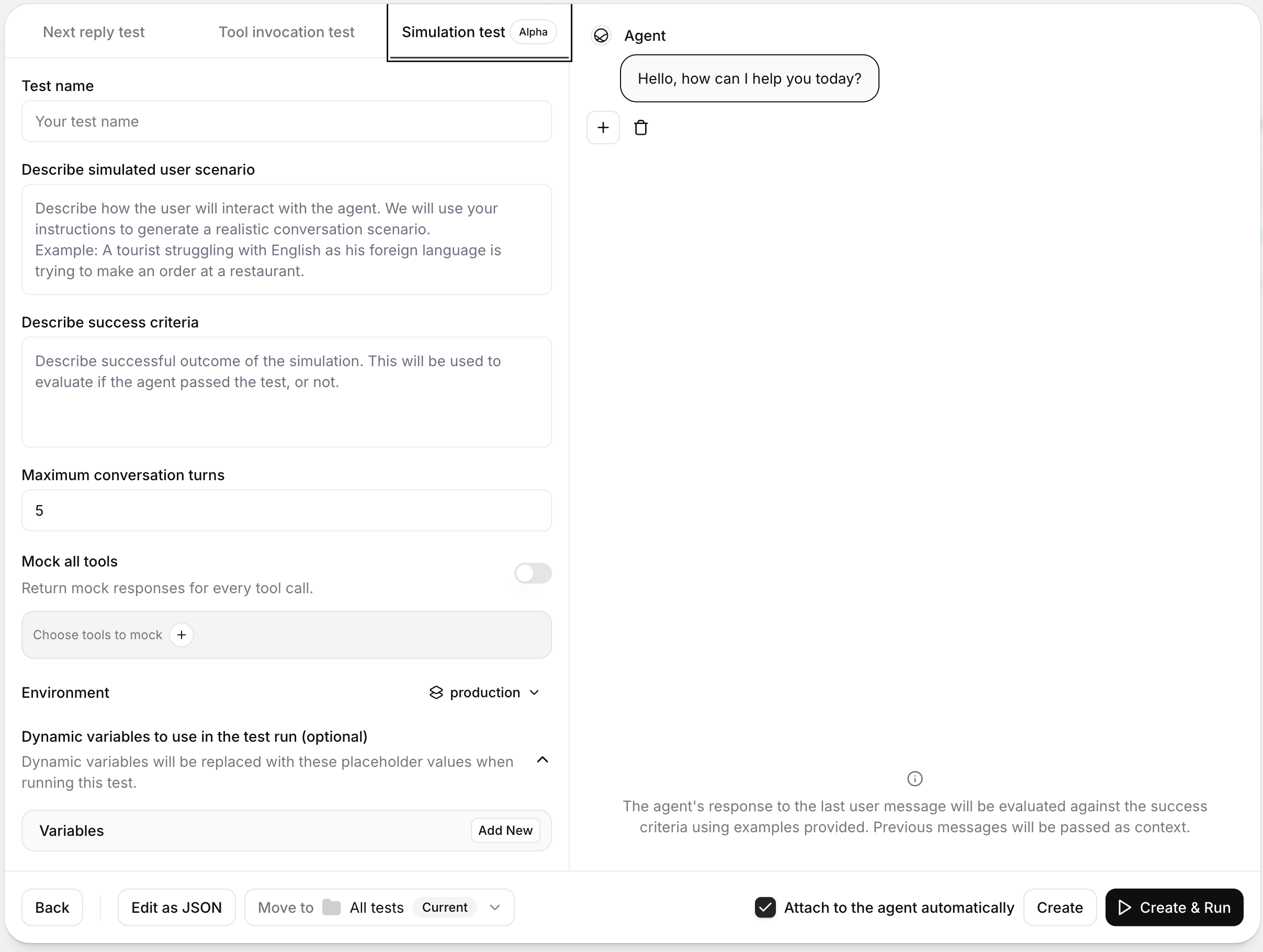 Describe the user's context, intent, and behavior in natural language. The simulator uses this
scenario to drive the conversation.
**Example scenario:**
> "A tourist who is not fluent in English is trying to place an order at a restaurant."
Define the outcome that should count as a pass. This prompt is used to evaluate whether the
full conversation succeeded.
**Example success condition:**
> "The agent confirmed the order details, handled clarifying questions, and completed the order without misunderstandings."
Choose how long the simulation can run before stopping. Use a lower value for focused checks
and a higher value for complex workflows.
* Minimum: `1`
* Maximum: `50`
* Default: `5`
Execute the test and inspect the generated conversation transcript. Review the pass/fail result
against your success condition, then iterate on your prompt, tools, or agent configuration.
### Optional Configuration
You can refine simulation behavior in the test configuration panel:
* **Environment**: Select which environment to test against when your agent has multiple environments configured. If only one environment is available, this selector is hidden.
* **Chat history**: Start from a partial conversation instead of a blank state. This is useful for testing in-progress conversations and recovery behavior.
* **Dynamic variables**: Inject test-specific values into your agent variables (for example, user names or order IDs) without changing the base agent configuration.
### Tool Mocking
Simulation tests support tool mocking so your agent can receive controlled responses during a run instead of calling live systems.
#### Mocking strategy
* **Mock none**: No tools are mocked.
* **Mock all tools**: Every mockable tool returns a mock response.
* **Mock selected tools**: Only tools you explicitly choose are mocked.
System tools and workflow tools are never mocked.
#### Fallback behavior
If a mocked tool is called and no matching mock response is found, choose one of these behaviors:
* **Call real tool**: Executes the real tool call.
* **Finish with error**: Returns an error response from the tool instead of calling the real tool.
The fallback setting appears only when at least one tool is mocked.
## Development Workflow
The framework supports an iterative development cycle that accelerates agent refinement:
Define the desired behavior by creating tests for new features or identified issues.
Run tests instantly without saving changes. Watch them fail, then adjust your agent's prompts or
configuration.
Continue tweaking and re-running tests until all pass. The framework provides immediate feedback
without requiring deployment.
Once tests pass, save your changes knowing the agent behaves as intended.
## Running Tests
Navigate to the Tests tab in your agent's interface. From there, you can run individual tests or execute your entire test suite at once using the "Run All Tests" button.
Describe the user's context, intent, and behavior in natural language. The simulator uses this
scenario to drive the conversation.
**Example scenario:**
> "A tourist who is not fluent in English is trying to place an order at a restaurant."
Define the outcome that should count as a pass. This prompt is used to evaluate whether the
full conversation succeeded.
**Example success condition:**
> "The agent confirmed the order details, handled clarifying questions, and completed the order without misunderstandings."
Choose how long the simulation can run before stopping. Use a lower value for focused checks
and a higher value for complex workflows.
* Minimum: `1`
* Maximum: `50`
* Default: `5`
Execute the test and inspect the generated conversation transcript. Review the pass/fail result
against your success condition, then iterate on your prompt, tools, or agent configuration.
### Optional Configuration
You can refine simulation behavior in the test configuration panel:
* **Environment**: Select which environment to test against when your agent has multiple environments configured. If only one environment is available, this selector is hidden.
* **Chat history**: Start from a partial conversation instead of a blank state. This is useful for testing in-progress conversations and recovery behavior.
* **Dynamic variables**: Inject test-specific values into your agent variables (for example, user names or order IDs) without changing the base agent configuration.
### Tool Mocking
Simulation tests support tool mocking so your agent can receive controlled responses during a run instead of calling live systems.
#### Mocking strategy
* **Mock none**: No tools are mocked.
* **Mock all tools**: Every mockable tool returns a mock response.
* **Mock selected tools**: Only tools you explicitly choose are mocked.
System tools and workflow tools are never mocked.
#### Fallback behavior
If a mocked tool is called and no matching mock response is found, choose one of these behaviors:
* **Call real tool**: Executes the real tool call.
* **Finish with error**: Returns an error response from the tool instead of calling the real tool.
The fallback setting appears only when at least one tool is mocked.
## Development Workflow
The framework supports an iterative development cycle that accelerates agent refinement:
Define the desired behavior by creating tests for new features or identified issues.
Run tests instantly without saving changes. Watch them fail, then adjust your agent's prompts or
configuration.
Continue tweaking and re-running tests until all pass. The framework provides immediate feedback
without requiring deployment.
Once tests pass, save your changes knowing the agent behaves as intended.
## Running Tests
Navigate to the Tests tab in your agent's interface. From there, you can run individual tests or execute your entire test suite at once using the "Run All Tests" button.
 Integrate testing into your development pipeline:
```bash
elevenlabs agents test agent_7101k5zvyjhmfg983brhmhkd98n6
```
This enables:
* Automated testing on every code change
* Prevention of regressions before deployment
* Consistent agent behavior across environments
```python
from elevenlabs import ElevenLabs
elevenlabs = ElevenLabs()
invocation = elevenlabs.conversational_ai.agents.run_tests(
agent_id="agent_7101k5zvyjhmfg983brhmhkd98n6",
tests=[{"test_id": ""}],
)
print(invocation)
```
```typescript
import { ElevenLabsClient } from "@elevenlabs/elevenlabs-js";
const elevenlabs = new ElevenLabsClient();
const invocation = await elevenlabs.conversationalAi.agents.runTests("agent_7101k5zvyjhmfg983brhmhkd98n6", {
tests: [{ testId: "" }],
});
console.log(invocation);
```
## Probabilistic Testing
Agent outputs can vary slightly between runs, just as people may answer the same question differently on different occasions. A single pass tells you the agent *can* get it right; it doesn't tell you how often it *will*. Probabilistic testing answers that question by running the same test multiple times in one click and reporting a pass rate instead of a binary result. This lets you focus on iterating on your agent and simulating the failure distributions you'd see in production, instead of scanning through tons of test run transcripts.
### Running a test multiple times
Integrate testing into your development pipeline:
```bash
elevenlabs agents test agent_7101k5zvyjhmfg983brhmhkd98n6
```
This enables:
* Automated testing on every code change
* Prevention of regressions before deployment
* Consistent agent behavior across environments
```python
from elevenlabs import ElevenLabs
elevenlabs = ElevenLabs()
invocation = elevenlabs.conversational_ai.agents.run_tests(
agent_id="agent_7101k5zvyjhmfg983brhmhkd98n6",
tests=[{"test_id": ""}],
)
print(invocation)
```
```typescript
import { ElevenLabsClient } from "@elevenlabs/elevenlabs-js";
const elevenlabs = new ElevenLabsClient();
const invocation = await elevenlabs.conversationalAi.agents.runTests("agent_7101k5zvyjhmfg983brhmhkd98n6", {
tests: [{ testId: "" }],
});
console.log(invocation);
```
## Probabilistic Testing
Agent outputs can vary slightly between runs, just as people may answer the same question differently on different occasions. A single pass tells you the agent *can* get it right; it doesn't tell you how often it *will*. Probabilistic testing answers that question by running the same test multiple times in one click and reporting a pass rate instead of a binary result. This lets you focus on iterating on your agent and simulating the failure distributions you'd see in production, instead of scanning through tons of test run transcripts.
### Running a test multiple times
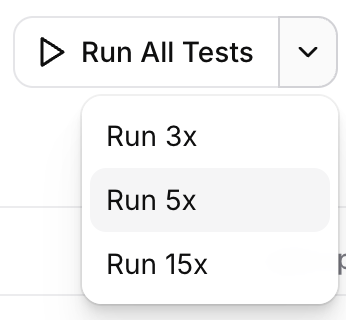 When triggering a test from the dashboard, use the split-run control on the run button to choose how many times to execute it (for example 3×, 5×, or 15×). Each run is independent: the agent receives the same scenario, dynamic variables, and chat history, but its response is generated fresh every time.
Multi-run works for individual tests, folders, and running the entire test suite attached to an agent. It's compatible with all three test types — Scenario, Tool Call, and Simulation — and is typically most useful for Simulation tests, where the larger surface area of a multi-turn conversation makes response variation more likely.
### Pass rates and result bucketing
When triggering a test from the dashboard, use the split-run control on the run button to choose how many times to execute it (for example 3×, 5×, or 15×). Each run is independent: the agent receives the same scenario, dynamic variables, and chat history, but its response is generated fresh every time.
Multi-run works for individual tests, folders, and running the entire test suite attached to an agent. It's compatible with all three test types — Scenario, Tool Call, and Simulation — and is typically most useful for Simulation tests, where the larger surface area of a multi-turn conversation makes response variation more likely.
### Pass rates and result bucketing
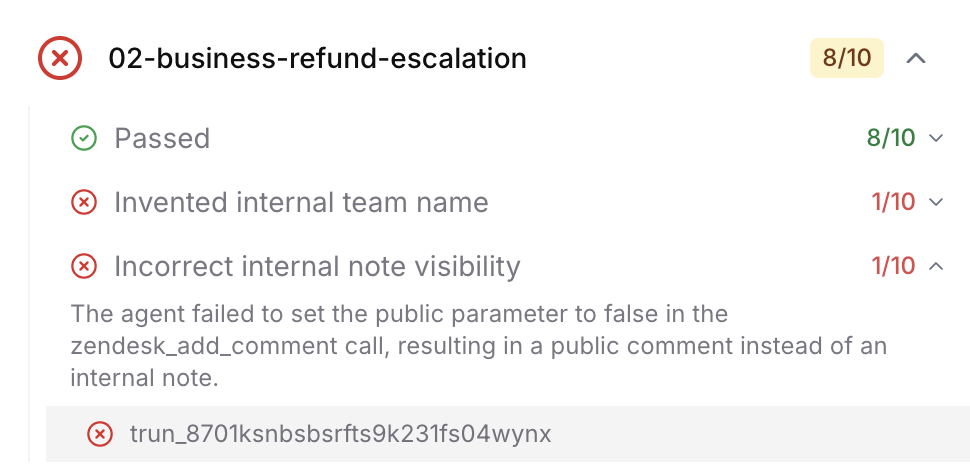 After a multi-run finishes, results are summarized as a pass rate (for example, **4/5 passed**) with a colored badge:
* **Green** — 100% passed
* **Amber** — at least 80% passed
* **Red** — below 80%
Individual runs are then grouped by failure reason so you can see *how* the agent fails, not just *that* it fails. Instead of scrolling through five separate transcripts to spot what differed, you see clusters like *"Correctly routed to billing (4 runs)"* and *"Hallucinated a support number (1 run)"*, each expandable to the underlying transcripts and evaluation rationale.
### When to use it
* **Before shipping a change** — Re-run attached tests probabilistically to confirm reliability hasn't dropped (for example, from 95% to 60%).
* **Diagnosing flaky behavior** — A single failure could be noise; a 1-in-5 failure with a clearly named failure bucket is a reproducible issue to fix.
* **Tuning prompts and tools** — Iterate on configuration and compare pass rates side by side, rather than relying on one-off runs.
### Running probabilistically via the API or SDK
Pass `repeat_count` (between `2` and `20`) on the run-tests request to execute each test that many times. Setting `repeat_count` automatically enables failure bucketing on the response, so the returned invocation includes the per-bucket grouping and pass rate you'd see in the dashboard.
```python
from elevenlabs import ElevenLabs
elevenlabs = ElevenLabs()
invocation = elevenlabs.conversational_ai.agents.run_tests(
agent_id="",
tests=[{"test_id": ""}],
repeat_count=5,
)
```
```typescript
import { ElevenLabsClient } from "@elevenlabs/elevenlabs-js";
const elevenlabs = new ElevenLabsClient();
const invocation = await elevenlabs.conversationalAi.agents.runTests(
"",
{
tests: [{ testId: "" }],
repeatCount: 5,
},
);
```
## Batch Testing and CI/CD Integration
Execute all tests at once to ensure comprehensive coverage:
1. Select multiple tests from your test library
2. Run as a batch to identify any regressions
3. Review consolidated results showing pass/fail status for each test
## Best Practices
Test that your agent maintains its defined personality, tone, and behavioral boundaries across
diverse conversation scenarios and emotional contexts.
Create scenarios that test the agent's ability to maintain context, follow conditional logic,
and handle state transitions across extended conversations.
Evaluate how your agent responds to attempts to override its instructions or extract sensitive
system information through adversarial inputs.
Test how effectively your agent clarifies vague requests, handles conflicting information, and
navigates situations where user intent is unclear.
## Next Steps
* [View CLI Documentation](/docs/eleven-agents/operate/cli) for automated testing setup
* [Explore Tool Configuration](/docs/eleven-agents/customization/tools) to understand available tools
* [Read the Prompting Guide](/docs/eleven-agents/best-practices/prompting-guide) for writing testable prompts
After a multi-run finishes, results are summarized as a pass rate (for example, **4/5 passed**) with a colored badge:
* **Green** — 100% passed
* **Amber** — at least 80% passed
* **Red** — below 80%
Individual runs are then grouped by failure reason so you can see *how* the agent fails, not just *that* it fails. Instead of scrolling through five separate transcripts to spot what differed, you see clusters like *"Correctly routed to billing (4 runs)"* and *"Hallucinated a support number (1 run)"*, each expandable to the underlying transcripts and evaluation rationale.
### When to use it
* **Before shipping a change** — Re-run attached tests probabilistically to confirm reliability hasn't dropped (for example, from 95% to 60%).
* **Diagnosing flaky behavior** — A single failure could be noise; a 1-in-5 failure with a clearly named failure bucket is a reproducible issue to fix.
* **Tuning prompts and tools** — Iterate on configuration and compare pass rates side by side, rather than relying on one-off runs.
### Running probabilistically via the API or SDK
Pass `repeat_count` (between `2` and `20`) on the run-tests request to execute each test that many times. Setting `repeat_count` automatically enables failure bucketing on the response, so the returned invocation includes the per-bucket grouping and pass rate you'd see in the dashboard.
```python
from elevenlabs import ElevenLabs
elevenlabs = ElevenLabs()
invocation = elevenlabs.conversational_ai.agents.run_tests(
agent_id="",
tests=[{"test_id": ""}],
repeat_count=5,
)
```
```typescript
import { ElevenLabsClient } from "@elevenlabs/elevenlabs-js";
const elevenlabs = new ElevenLabsClient();
const invocation = await elevenlabs.conversationalAi.agents.runTests(
"",
{
tests: [{ testId: "" }],
repeatCount: 5,
},
);
```
## Batch Testing and CI/CD Integration
Execute all tests at once to ensure comprehensive coverage:
1. Select multiple tests from your test library
2. Run as a batch to identify any regressions
3. Review consolidated results showing pass/fail status for each test
## Best Practices
Test that your agent maintains its defined personality, tone, and behavioral boundaries across
diverse conversation scenarios and emotional contexts.
Create scenarios that test the agent's ability to maintain context, follow conditional logic,
and handle state transitions across extended conversations.
Evaluate how your agent responds to attempts to override its instructions or extract sensitive
system information through adversarial inputs.
Test how effectively your agent clarifies vague requests, handles conflicting information, and
navigates situations where user intent is unclear.
## Next Steps
* [View CLI Documentation](/docs/eleven-agents/operate/cli) for automated testing setup
* [Explore Tool Configuration](/docs/eleven-agents/customization/tools) to understand available tools
* [Read the Prompting Guide](/docs/eleven-agents/best-practices/prompting-guide) for writing testable prompts